


CRM for Real Estate: Run Your Brokerage on GoHighLevel
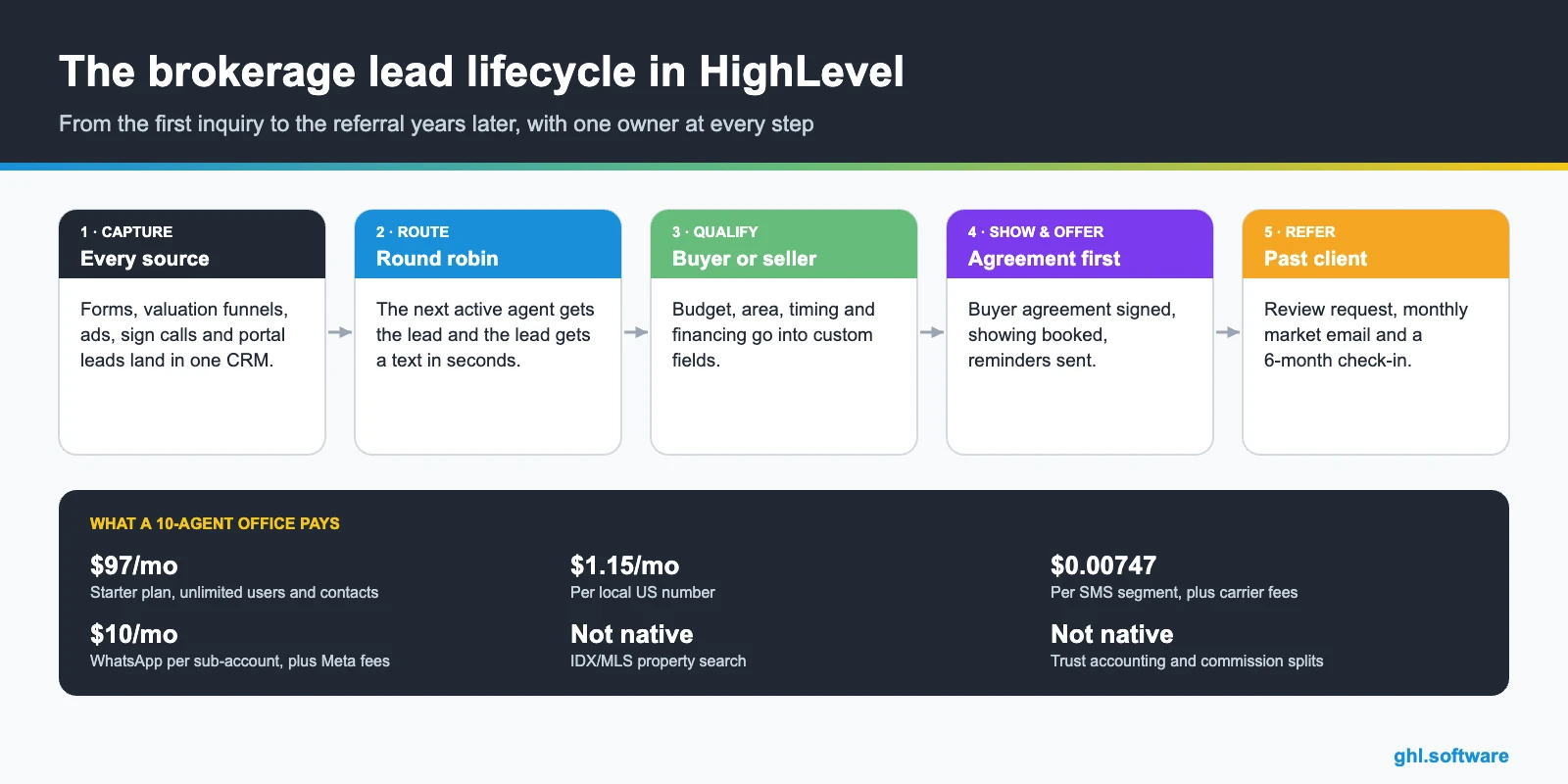
A CRM for real estate brokerages has to do more than store contacts. It routes every new lead to an agent within minutes. It also tracks buyers and listings in separate pipelines and shows the broker who is following up. GoHighLevel does this with round-robin workflows, custom pipelines, a Property object, texting, WhatsApp and Voice AI. You pay a flat monthly price with unlimited users. However, it has no native IDX/MLS search, so listings need a third-party app.
It is Saturday, 8:12 p.m., and a couple has just asked for a home valuation on your website. On Monday morning, three agents in the office each assume someone else called them back. Nobody did, and by Tuesday the couple has signed with the brokerage that texted first. A CRM for real estate teams exists to stop exactly that. It gives every lead one place to land, one owner and a reply while the interest is still warm.
This guide is for brokers, team leads and office managers who run 5 to 50 agents. It also serves the agencies that build their systems. If you work alone, our CRM guide for realtors fits better. Here, instead, we focus on brokerage problems: lead routing, accountability, agent turnover, recruiting and broker-level reporting.
You will see the exact pipelines, three automations and the setup order. Then we cover what HighLevel really costs and its honest limits, including the missing IDX. Because this is an independent affiliate guide, we also point out where another tool does the job better.
Leer en español: CRM para inmobiliarias · Ler em português: CRM para imobiliárias · Part of GoHighLevel by industry
What a real estate brokerage needs from a CRM
A solo agent mostly needs reminders. A brokerage, however, needs rules: who gets which lead, how fast they answer and what happens when they don’t. It also needs to own the contact when an agent leaves. So the system has to be shared, permissioned and measurable. Here is how HighLevel covers each job as a CRM for real estate offices.
Brokerage problems and how HighLevel solves them
Most offices don’t lose deals because of bad agents. Instead, they lose them in the gaps between agents. The table maps the usual gaps to the feature that closes each one when HighLevel is your CRM for real estate.
| Problem | What HighLevel does | Feature |
|---|---|---|
| Leads wait hours for a first reply | Sends an instant text and assigns an agent in seconds | Workflows + round robin |
| Missed calls from yard signs | Texts the caller back and logs the lead | Missed call text back |
| Chats live on agents’ personal phones | Keeps SMS, WhatsApp, email and DMs in one brokerage inbox | Conversations |
| Contacts leave with the agent | The brokerage owns the account; you deactivate the user and reassign contacts | Users and permissions |
| Listings tracked in spreadsheets | Stores each property as a record linked to buyers and sellers | Custom objects |
| No-shows at showings | Sends reminders 24 h and 2 h before, with address and agent | Calendars |
| Past clients forgotten after closing | Runs review requests, market emails and check-ins | Reviews + email marketing |
| Broker can’t see who follows up | Shows opportunities, calls and appointments per agent | Reporting |
The CRM for real estate pipeline: buyers, listings and recruits
In a CRM for real estate brokerages, you run at least two pipelines, because buyers and sellers move through different steps. In HighLevel each pipeline is a board of stages, and every lead becomes an opportunity with an owner, a value and a source. Moreover, a third pipeline for agent recruiting keeps hiring out of your personal inbox.
In the US, the buyer board needs one stage that most templates miss. Since 17 August 2024, agents must sign a written agreement with a buyer before touring a home (NAR practice changes). Therefore “Buyer agreement signed” sits before “Showing scheduled”, and a workflow checks for it before the showing.

| Buyer stage | What moves the deal here |
|---|---|
| New lead | A form, portal email, ad lead, call or chat creates the opportunity |
| Contacted | The assigned agent calls or replies and moves the card, which stops the 5-minute timer |
| Qualified | Budget, area, timeline and financing are confirmed in custom fields |
| Buyer agreement signed | The agreement is sent and signed through Documents & Contracts |
| Showing scheduled | The buyer books on the agent’s Showing calendar |
| Offer / under contract | The agent logs the offer and updates the stage when it is accepted |
| Closed | The opportunity is marked Won, and review and nurture workflows start |
The listing board follows a similar path: valuation request, listing appointment, listing agreement signed, active, under contract and closed. Meanwhile, the recruiting board can use prospect agent, first conversation, office visit, offer and onboarding. For onboarding, a short internal course in Courses can hold your scripts, systems training and checklists.
Properties as a custom object
Listings don’t fit neatly into contacts, so HighLevel lets you add custom objects. Its official real estate case study builds a “Property” object and associates it with clients and vendors. For example, one listing can link to its seller, three interested buyers and the inspector. HighLevel also describes buyer-property and seller-property relationships on its real estate page. Still, this is a record, not a listing feed: prices and statuses change only when a person or an integration updates them.
Three automations every brokerage should run
These three workflows turn a CRM for real estate into a system that works at night and on weekends. They cover the first reply, the showing and the years after closing. Build them once, then copy them into every office.
Speed to lead with round robin and reassignment
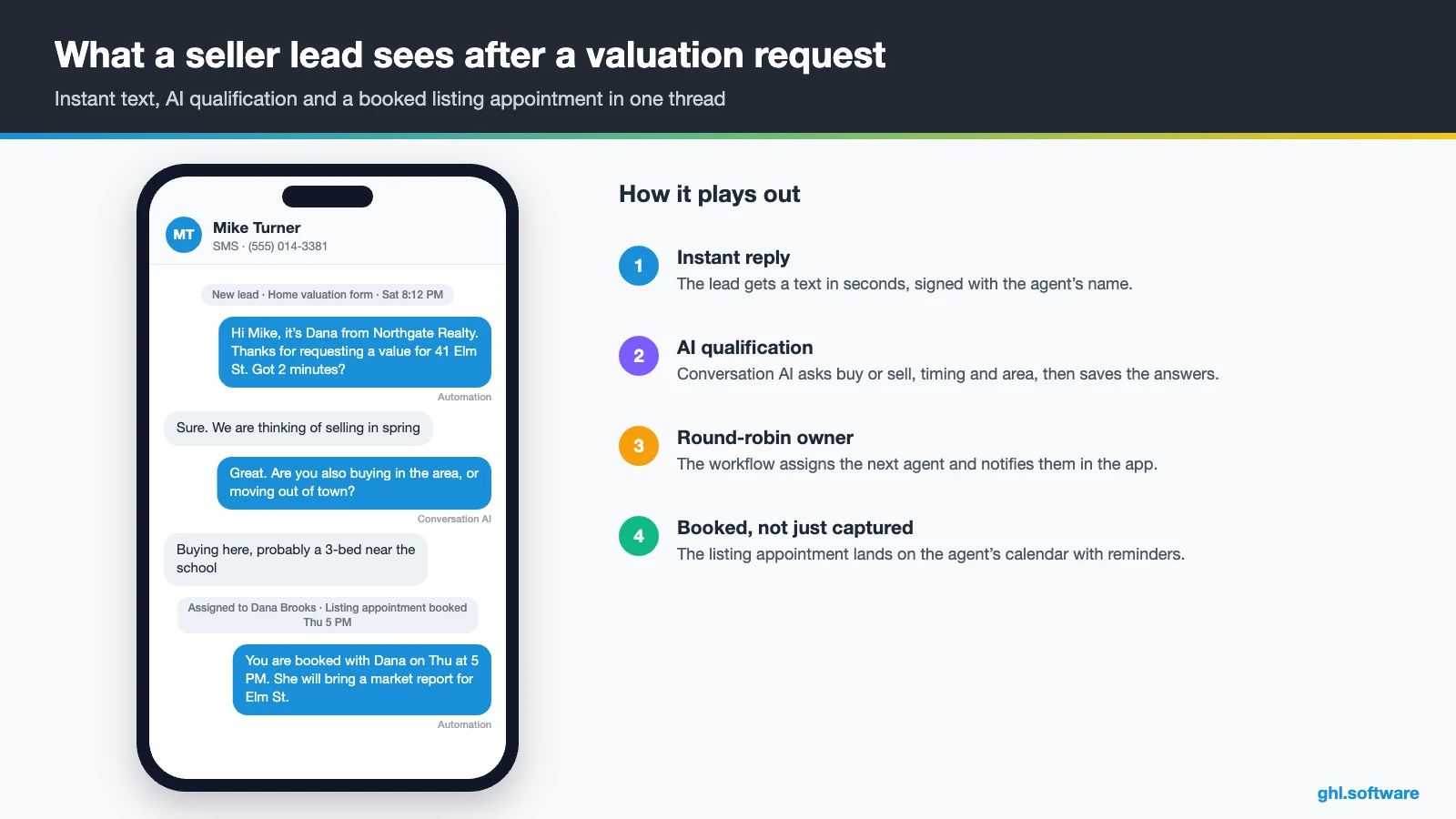
The trigger is any new lead: a form submitted on your site, a Facebook lead form, or a portal lead that arrives by webhook. Then the workflow creates the opportunity in “New lead” and assigns the contact to the next agent in the rotation. It also texts the lead in that agent’s name, and the agent gets a push notification.
After five minutes, an if/else checks whether the card is still in “New lead”. If it is, the workflow reassigns the lead to the next agent and alerts the broker. As a result, no lead waits for an agent who is at a showing or on vacation. The broker also sees exactly where the rotation broke.

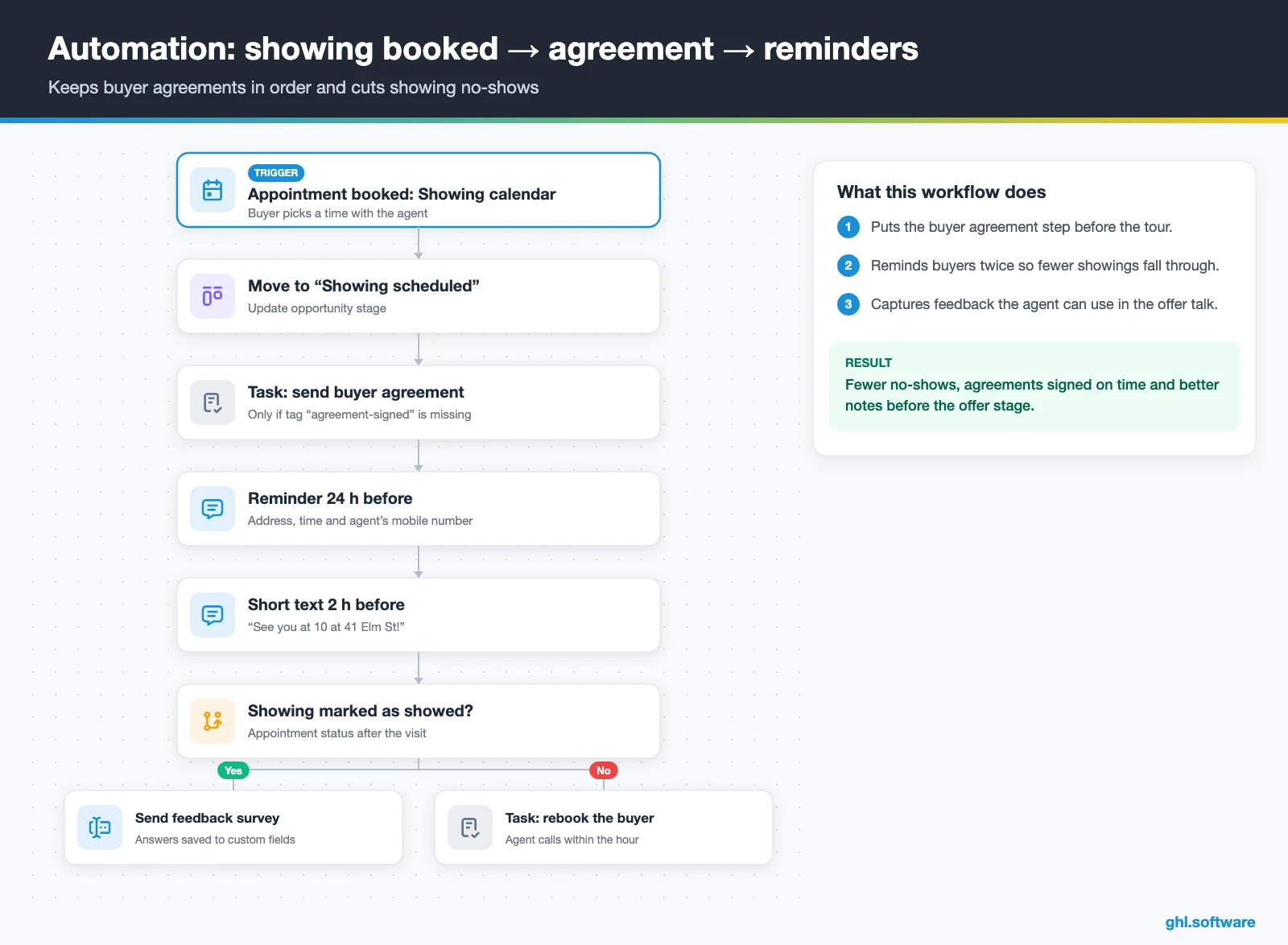
Showing booked, agreement checked, reminders sent
This workflow starts when a buyer books on the Showing calendar. It moves the opportunity to “Showing scheduled”. If the contact has no “agreement-signed” tag, it creates a task for the agent to send the buyer agreement from your contract templates. Then it sends a reminder with the address 24 hours before and a short text 2 hours before.
After the showing, a quick survey asks how the home felt. Because the answers land in custom fields, the agent walks into the offer conversation with notes instead of guesses.
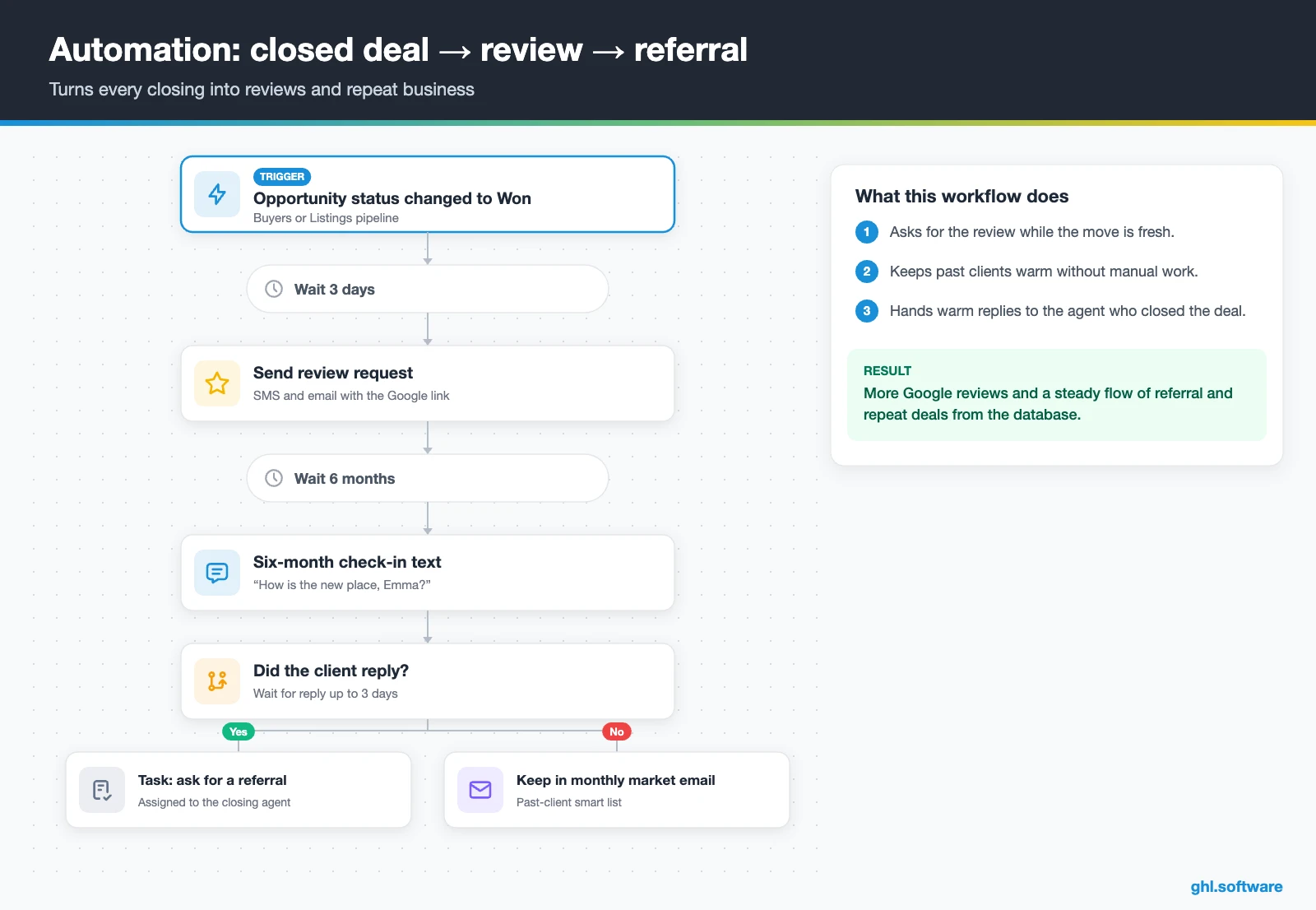
Closed deal, review request and long-term nurture
When the opportunity status changes to Won, the workflow waits three days and sends a review request by SMS and email. It also tags the contact as a past client, which adds them to a monthly market email. Six months later, a personal check-in text asks how the new home is going.
If the client replies, the agent gets a task to ask for a referral. Otherwise, the contact simply stays in the monthly nurture. In short, your database keeps producing reviews and repeat business long after the commission check clears.
Start with the snapshot and the pipeline from this guide, then add the automations one by one. The extended trial comes with our bootcamp link.
Start the 30-day trialAffiliate link. I may earn a commission at no extra cost to you.
Texting, WhatsApp and AI assistants for real estate teams
Any CRM for real estate teams has to handle fast, short messages. In the US that usually means SMS from a local number, while international buyers often prefer WhatsApp. HighLevel puts both in one inbox per contact, together with email, Facebook and Instagram DMs, web chat. That way the broker can open any conversation, and a new agent sees the full history when a lead is reassigned.
AI covers the after-hours gap. Conversation AI can answer common questions, ask qualifying questions and book a call, while Voice AI answers the number on a sign rider. Still, keep a human in the loop for pricing advice and anything legal. AI is billed per use or as a monthly add-on, as our AI Employee pricing guide explains.
What HighLevel’s official Real Estate Broker snapshot includes
HighLevel publishes a free Real Estate Broker playbook with a matching snapshot. It is a generic template with the industry name swapped in, so treat it as a starter kit, not a finished CRM for real estate brokerages. Out of the box you get:
- A “Real Estate Broker” website with Home and Link in Bio pages, plus a chat widget.
- A “Real Estate Broker Offer” funnel: an opt-in step, then an appointment booking page.
- The “Marketing Form – Claim Offer” form and a “Marketing Pipeline”.
- The “New Lead Nurture (Fast 5)” and “Long Term Nurture” workflows, with email, SMS and a voicemail drop.
- Calendars, custom values, snippets, a proposal template and one ad in Ad Manager.
- Setup steps for missed call text back, review requests, Stripe and the mobile app.
What you still build yourself is most of the brokerage logic. That means buyer, listing and recruiting pipelines, round-robin routing and the Property object. It also means a Showing calendar per agent, the buyer agreement step and portal lead intake. Also, this snapshot has no Voice AI prompt and no IDX. Rename the sample ad and rewrite every message before you publish, because the template copy is generic. If you manage several offices, save your finished build as your own snapshot and load it into each sub-account.
How to set up GoHighLevel for a brokerage
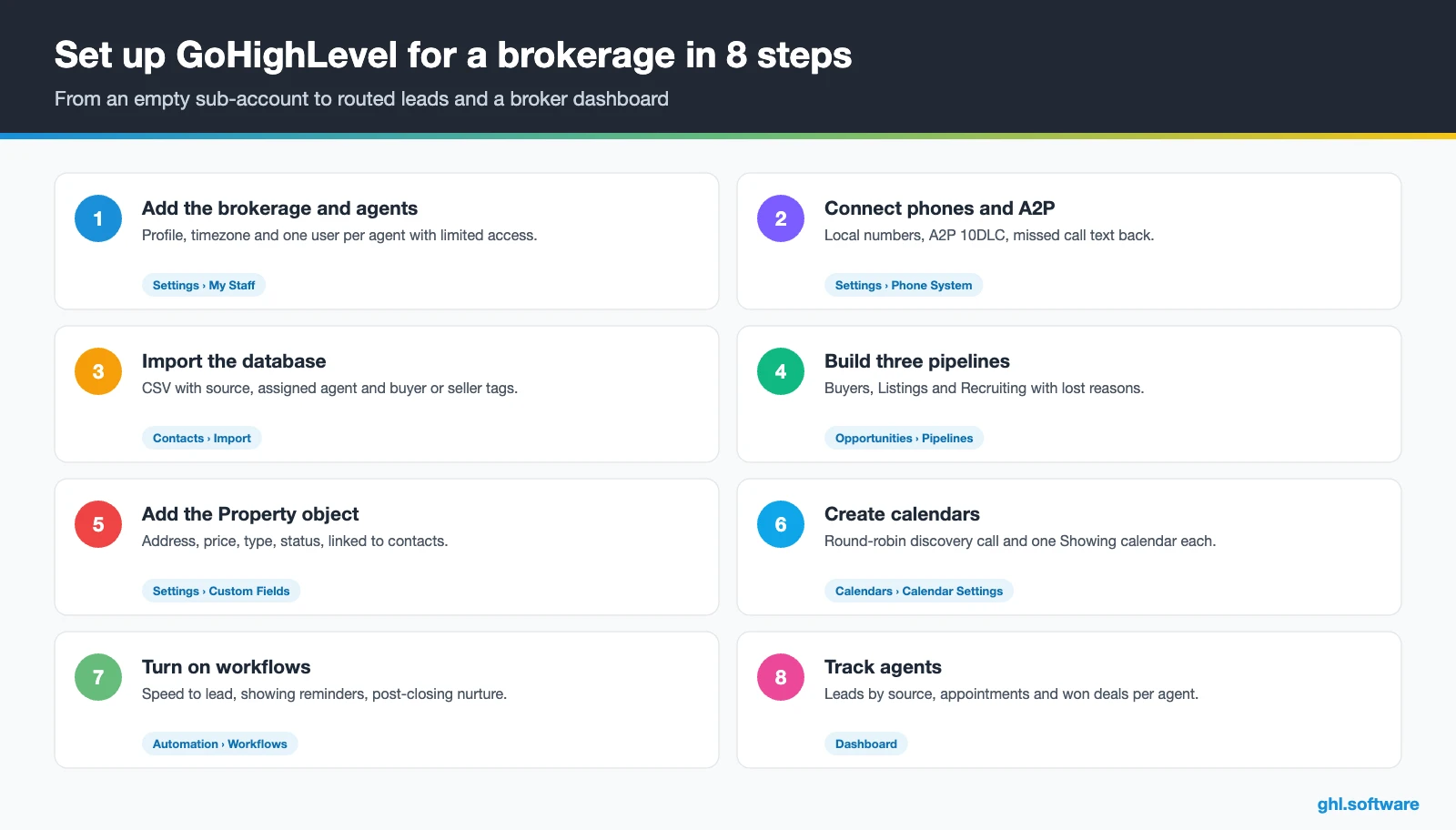
Follow this order when you set up your CRM for real estate, so routing and reporting work from the first lead. A small office can finish it in a few focused days.
- Create the sub-account and users. Add the brokerage profile, timezone and one user per agent. Limit agents to their assigned contacts, and keep admin rights for the broker and office manager.
- Connect phones and messaging. Buy local numbers, register A2P 10DLC for US texting, connect WhatsApp and turn on missed call text back.
- Import your database. Upload a CSV from your old CRM or spreadsheets. Map source, assigned agent and buyer or seller tags so reports work from day one.
- Build the pipelines. Create Buyers, Listings and Recruiting pipelines with the stages above, plus clear lost reasons such as “bought with another agent”.
- Add the Property object. Create a Property custom object with address, price, type, status and listing link, then associate it with buyers, sellers and vendors.
- Set up calendars. Add a round-robin discovery-call calendar, one Showing calendar per agent and a listing appointment calendar, each with reminders.
- Connect lead sources. Publish a home-valuation funnel and an open-house sign-in with forms, connect Facebook lead ads, and bring portal leads in by webhook or a connector.
- Turn on workflows, reviews and reporting. Activate the three automations, connect Google Business Profile for reviews, and build a broker dashboard by agent.
Want to see the order inside a real account? In this video, Software Scope covers the key features to set up first when you use GoHighLevel for real estate.
Video: How To Use GoHighLevel For Real Estate In 2026 (Key Features To Set Up) · Software Scope
What a CRM for real estate offices costs on HighLevel
HighLevel charges a flat plan price instead of a fee per agent, and every plan includes unlimited users and contacts. So a 15-agent office pays the same base price as a 3-agent team. Usage, however, is billed on top: phone numbers, texts, calls, emails, WhatsApp and AI.
For example, take a 10-agent office on Starter ($97) with 10 local numbers ($11.50) and 6,000 SMS segments (about $45 plus carrier fees). Add 3,000 outbound minutes (about $50), 30,000 emails (about $20) and the $97 AI plan. That office lands near $320 a month, plus A2P campaign and carrier fees. Most small brokerages end up between $200 and $450 a month. If you run several offices, Unlimited at $297 makes more sense. The full breakdown is in our pricing guide.
GoHighLevel plans compared
| Starter | Unlimited | Agency Pro | |
|---|---|---|---|
| Price | $97/month | $297/month | $497/month |
| Annual | $970/year | $2,970/year | $4,970/year |
| Sub-accounts | 3 | Unlimited | Unlimited |
| Contacts and users | Unlimited | Unlimited | Unlimited |
| All core features | Yes | Yes | Yes |
| White label web app | Yes | Yes | Yes |
| API access | Basic | Basic | Advanced, agency-level keys |
| Rebill phone and email | No | At cost | With markup |
| Rebill AI usage | No | No | Yes |
| SaaS Mode and automated sub-accounts | No | No | Yes |
| User and agent reporting | No | No | Yes |
| Support | 24/7 | 24/7 | 24/7 |
Usage costs on top of the plan
| Item | Official price | When you pay it |
|---|---|---|
| Local phone number (US/Canada) | $1.15/month | Each number for SMS and calls |
| SMS (US/Canada) | $0.00747 per segment + carrier fees | Every text sent or received |
| Calls (US) | $0.0166/min outbound, $0.01165/min inbound | Calls through LC Phone |
| A2P 10DLC registration | $22.50 one-time (low volume) + monthly campaign fee | Before texting US numbers |
| Email (LC Email) | $0.675 per 1,000 emails | Campaigns and workflow emails |
| $10/month per sub-account + Meta fees | If you use WhatsApp inside HighLevel | |
| AI | Pay-per-use, or $50 or $97/month per sub-account | Voice AI, Conversation AI and other AI tools |
| Premium workflow steps | $0.01 per run after 100 free | Webhooks, Google Sheets, Slack, app actions |
Honest limits and alternatives
HighLevel is a strong sales and follow-up layer, but it is not a complete real estate platform. So judge it as a CRM for real estate sales, not as an MLS tool. Before you move the office, check these gaps.
- No native IDX/MLS. There is no built-in property search fed by your MLS. The IDX request on HighLevel’s ideas board has been open since May 2020. Third-party marketplace apps and IDX providers fill the gap, and you still need your own MLS/IDX agreement.
- No transaction management or trust accounting. There are no compliance checklists, escrow ledgers or commission splits, so keep your transaction or back-office tool.
- No verified native portal feeds. Portal leads usually arrive by email or a partner connector, so you route them in through a webhook or an automation tool. Test each source before you rely on it.
- Setup takes work. Real estate tools ship with real estate defaults, while HighLevel gives you building blocks. Plan a few days, or hire an agency that has done it before.
How HighLevel compares with real estate platforms
Here is how HighLevel compares with the CRM for real estate options that US brokerages often shortlist. Features change often, so confirm details on each vendor’s site before you decide.
| GoHighLevel | Follow Up Boss | BoldTrail (kvCORE) | Lofty | |
|---|---|---|---|---|
| Built only for real estate | No | Yes | Yes | Yes |
| Native IDX website | No | No | Yes | Yes |
| Texting and email from the CRM | Yes | Yes | Yes | Yes |
| Funnels, WhatsApp and Voice AI in one tool | Yes | No | No | No |
| White label for agencies | Yes | No | No | No |
| Best fit | Offices that want one flat-priced system for leads, messaging and marketing | Teams that want a focused lead-follow-up CRM | Brokerages that want IDX sites and back office in one suite | Teams that want IDX sites with built-in lead tools |
If your office already depends on BoldTrail or Lofty for IDX, keep it. HighLevel can still sit next to it for ads, funnels, WhatsApp and AI follow-up. Instead of replacing everything at once, start with lead response and nurture, then decide after a quarter of real numbers.
Texting rules for brokerages: TCPA, A2P 10DLC and CAN-SPAM
The angle most guides miss: recruiting and agent turnover
Brokerages grow by adding agents, and they lose data when agents leave. Few guides about a CRM for real estate cover either side. In HighLevel, recruiting is simply another pipeline. A “Join our team” funnel captures licensed agents, a nurture sequence shares your training and culture, and a calendar books office visits. After they sign, the onboarding course and a welcome workflow handle the first 30 days.
Turnover is the other half. Because conversations happen on brokerage numbers and in a shared inbox, a departing agent leaves the history behind. Then the broker reassigns open opportunities in bulk, and you remove the inactive user from the rotation. As a result, the database stays an asset of the brokerage. You can compare setups like this one in our industry guides, or browse every module in the features hub.
Open a free account, load the pipeline and turn on the first automation today. The bootcamp walks you through the setup live.
Start the 30-day trialAffiliate link. I may earn a commission at no extra cost to you.
Frequently asked questions
Does GoHighLevel have IDX or MLS integration?
No, not natively. HighLevel has no built-in MLS feed or property search, and the IDX request on its ideas board has been open since 2020. You can embed an IDX provider’s search on a HighLevel site or use a third-party marketplace app, and you still need your own MLS/IDX agreement. Many brokerages keep their IDX website and send its leads into HighLevel by webhook for follow-up.
Can GoHighLevel distribute leads among agents with round robin?
Yes. A workflow’s “Assign to user” action rotates new contacts across the agents you select, and round-robin calendars spread appointments the same way. You can add a timer: if the agent has not moved the opportunity out of “New lead” within five minutes, the workflow reassigns it and alerts the broker. That gives you speed to lead and accountability without manual dispatching.
How much does a CRM for real estate cost for a 20-agent office?
On HighLevel the plan price does not grow with agents: Starter is $97 a month and Unlimited $297, both with unlimited users. Usage adds the rest, such as numbers at $1.15 each, SMS segments, call minutes, email and optional AI. A 20-agent office that texts and calls actively will often land between $300 and $600 a month in total, depending on volume.
What CRM do most real estate brokerages use?
There is no reliable public market-share figure, so be wary of any “number one” claim. US brokerages often shortlist Follow Up Boss, BoldTrail (kvCORE), Lofty, Wise Agent and IXACT Contact. Real estate-only tools win when you need IDX websites and transaction features. HighLevel wins when you want one flat-priced system for ads, funnels, texting, WhatsApp, AI and reviews across many agents.
Do real estate teams need A2P 10DLC to text leads?
Yes, if you text US contacts from local 10-digit numbers. Carriers require A2P 10DLC registration, and HighLevel guides you through it in the Trust Center. Toll-free numbers need their own verification instead. Registration has a one-time fee plus a monthly campaign fee. Until it is approved, use the live chat widget and email so leads still get a reply.
Can I import my contacts from Follow Up Boss or another CRM?
Yes. Export your contacts from the old system as a CSV file, then use Contacts › Import in HighLevel. Map the columns to standard and custom fields, including source, assigned agent, tags and important dates such as closing day. Import open deals as opportunities in the right pipeline stage. Test with a small file first, because clean tags make routing and reports work.
Is there a free CRM for real estate in HighLevel?
HighLevel has no free plan. Its own trial runs 14 days and needs a card, while the extended 30-day trial comes through our bootcamp link. After that, Starter costs $97 a month with unlimited users. Free CRMs exist, but they usually limit users, automation or messaging, which matters once several agents share the same leads.
More industry guides
Sources: HighLevel Real Estate Broker playbook · HighLevel help: Custom Objects real estate case study · HighLevel ideas board: IDX integration · HighLevel help: Missed Call Text Back · HighLevel help: WhatsApp pricing and billing · HighLevel: CRM for real estate · NAR: August 17 practice changes · FCC: Telemarketing and robocalls · FTC: CAN-SPAM Act compliance guide

