

GoHighLevel events and webinars: tickets, RSVP, check-in and webinar funnels
Leer en español: Eventos y webinars en GoHighLevel · Ler em português: Eventos e webinars no GoHighLevel · Part of all GoHighLevel features
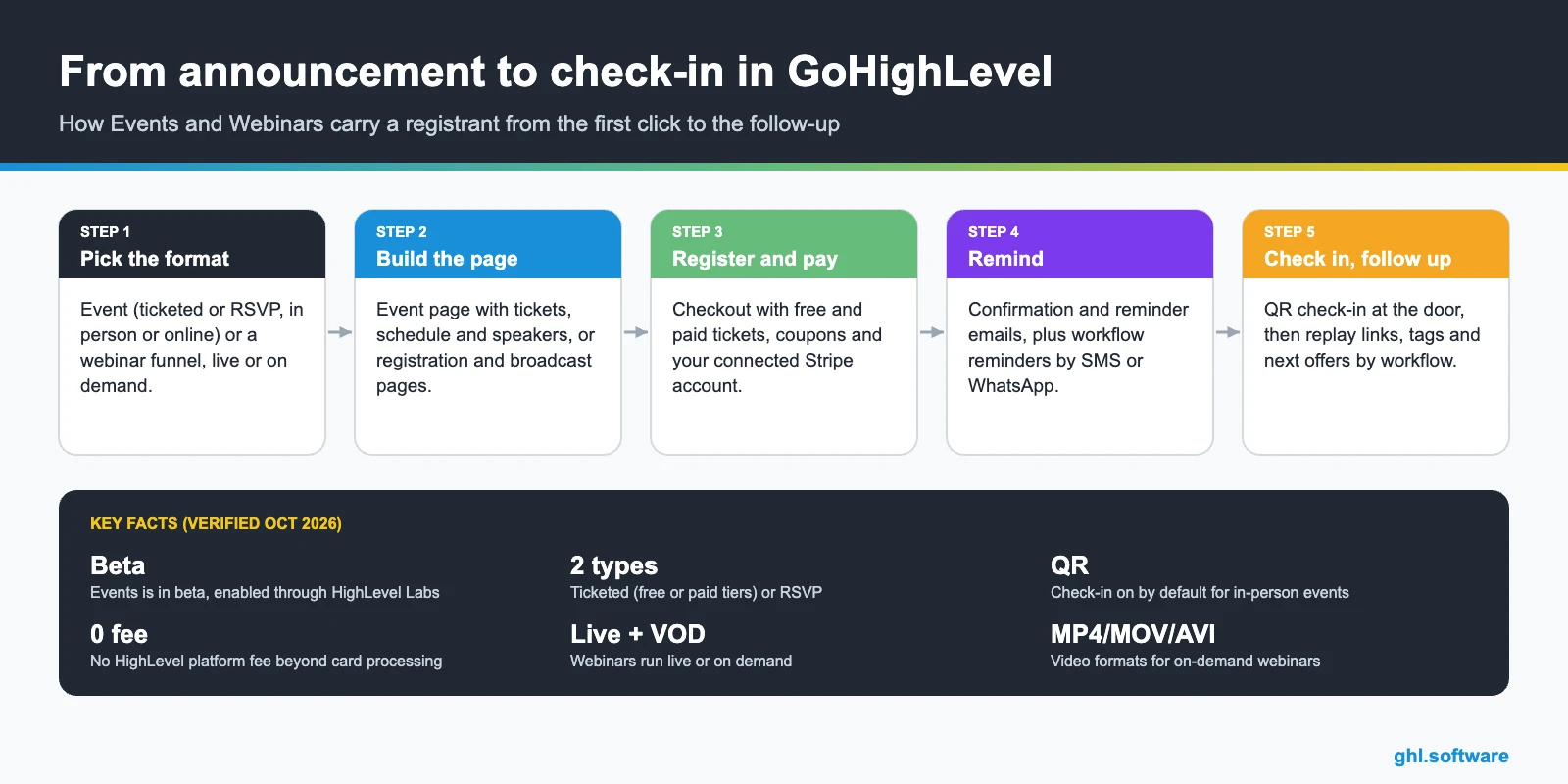
GoHighLevel events (Memberships > Events, currently in beta through Labs) let you sell tickets or collect RSVPs for in-person and online events, with an event page, coupons, schedules, speakers and QR check-in. Webinars (Sites > Webinars) are funnels with registration, confirmation and broadcast pages, live through Zoom or YouTube Live, or on demand from an uploaded video.
Verified in the HighLevel help center and changelog on October 24, 2026.
Picture Marcus, a business coach who runs a monthly half-day workshop in a hotel meeting room. Until now the workshop needed four tools: a ticketing site for the seats, a spreadsheet for the guest list, an email tool for reminders and a printed list at the door. With GoHighLevel events, the ticket page, the checkout, the reminder emails and the QR check-in sit in the same account as his CRM, so every attendee lands as a contact he can follow up with the next morning.
This guide covers both sides of that story. Events is the newer tool for ticketed and RSVP events, and it is still in beta. Webinars is the funnel builder for live and on-demand online sessions. Below you will find what each one does, how to set them up, what they cost, and the limits worth knowing before you announce a date.
What GoHighLevel events include
Events sits under Memberships > Events in a sub-account. HighLevel announced in its changelog that the beta is now available in Labs for all agencies: you enable it in Agency Settings > Labs > Sub-Account > Events, for every sub-account or only for selected ones.
How to create an event, step by step
- Choose the event type. Ticketed or RSVP. Choose carefully: HighLevel does not let you switch between them after the event is created.
- Add the details. Name (up to 100 characters), cover image (1920×1080 recommended, max 5 MB), a 160-character summary and the description.
- Set date, time and place. Start and end, timezone and display format, then a physical address or the online session with its meeting link.
- Add tickets and settings. Create ticket tiers and coupons, set the registration deadline and the capacity (0 means unlimited), and review check-in rules.
- Test, then publish. With Live mode off the event runs in test mode and no real payments are processed. Turn it on and click Publish event.
The event is saved as a draft until you publish it. After publishing, the three-dot menu lets you share the link, duplicate the event for next month, unpublish it (registrations are kept), archive it or delete it.
Running the day: registrations, check-in and notifications
The Registrations tab shows who signed up, tickets issued, revenue and refunds, with search and filters. Staff can add attendees by hand, which helps with sponsors, speakers or people who pay at the door. The Check-in tab scans QR codes in real time, and only registrants with an allowed payment status, such as Succeeded, can be checked in. The changelog also mentions check-in through the HighLevel mobile app and a dashboard with live check-in activity and staff performance.
Attendees get a registration confirmation and a reminder email. Organizers get an alert for each new registration and a daily summary at 9:00 AM in the event timezone. For anything beyond that, the changelog lists workflow triggers on registration and check-in, with branches based on event, ticket and check-in data, so you can send an SMS the morning of the event or a thank-you with the next offer once someone checks in. See how GoHighLevel automations work.
GoHighLevel webinars: live and on-demand funnels
Webinars live in Sites > Webinars > New Webinar Funnel. A webinar funnel generates three pages from templates: registration, confirmation and broadcast. Registration runs on a form from Sites > Forms, so each sign-up becomes a CRM contact and can start a workflow.
| Live webinar | On-demand webinar | |
|---|---|---|
| What you set | Name, timezone, date and time | Name and a video or link |
| Where the video comes from | Stream link: Zoom, YouTube Live, WebinarJam or custom | Upload or media library (MP4, MOV, AVI) |
| Best for | Launches, live training, Q&A, coaching | Evergreen lead generation, automated sales funnels |
| Reminders | Workflows, typically 24 h, 1 h and 10 min before | Workflows after registration |
| Reuse | Clone and change the date and time | Clone and reuse the template |
Be clear about one thing: HighLevel is not the streaming platform for live webinars. You still need Zoom, YouTube Live or a similar tool for the room itself. What HighLevel replaces is everything around the room: the pages, the form, the reminders, the replay email and the follow-up sequence. The help center also documents recurring webinar settings, webinar video analytics and a WebinarKit integration if you need more. Read the websites and funnels guide.
What it costs
| Item | Price | Notes |
|---|---|---|
| Starter plan | $97/month | Agency plan with up to 3 sub-accounts |
| Unlimited plan | $297/month | Unlimited sub-accounts |
| Agency Pro | $497/month | Adds SaaS Mode and rebilling |
| Event tickets | No HighLevel platform fee | Your payment provider’s card processing applies |
| Reminder emails by workflow | $0.675 per 1,000 emails | LC Email usage |
| SMS reminders | $0.00747 per segment | US/Canada, plus carrier fees |
| WhatsApp reminders | $10/month per sub-account | Plus Meta’s per-message fees |
The help articles do not tie Events or Webinars to a specific plan, and Events depends on the agency enabling it in Labs, so check your account before you sell the first ticket. Compare plans on the GoHighLevel pricing guide. Ticket money goes through your own Stripe account; see GoHighLevel payments for the providers and fees.
Limits and what it does not do
An honest list before you announce a date:
- Events is beta. It is enabled through Labs and features may change.
- You cannot switch an event between Ticketed and RSVP after creating it.
- Refunds are manual from the Registrations tab, attendees cannot request them in the platform, and canceling or unpublishing does not refund anyone automatically.
- Coupons are percentage-only and only work for Events, not for other HighLevel products.
- There is no self-serve ticket transfer. The organizer edits the attendee or cancels and re-adds the registration.
- Live webinars need an external streaming tool. The webinar help article does not describe a built-in chat, so plan on the chat in Zoom or YouTube.
Who it fits, and how it compares with standalone tools
Coaches and consultants
Workshops and masterminds with paid tickets, then a follow-up offer to everyone who checked in.
Educators and course creators
An on-demand webinar as the entry point to a course. See courses and communities.
Local businesses
Open days, tastings and classes with RSVP, reminders and QR check-in at the door.
Agencies
Build the event or webinar funnel once and roll it out to clients with snapshots.
A dedicated ticketing platform or webinar tool has more mileage: seating charts, a marketplace audience, interactive webinar rooms. The GoHighLevel version wins when the event is one step in a longer process. The registrant is already a contact, the reminder emails come from your domain (see email marketing), the ticket revenue sits next to your other sales and the follow-up starts on its own. If you need a one-off event with thousands of seats, a specialist tool may fit better. If the event feeds your pipeline, keeping it inside HighLevel removes the copy-paste between tools. For booking one-to-one or class sessions instead of events, use the GoHighLevel calendar.
With the bootcamp link you get a 30-day trial instead of 14, plus live onboarding classes to set up funnels, payments and the workflows around your event.
Start the 30-day trialAffiliate link. I may earn a commission at no extra cost to you.
Frequently asked questions
Does GoHighLevel have an events feature?
Yes. GoHighLevel Events lives under Memberships > Events and lets you create ticketed or RSVP events, in person or online, with a public event page, ticket tiers, coupons, schedules, speakers, registrations and QR check-in. It is in beta: agencies turn it on for sub-accounts in Agency Settings > Labs.
Can I sell tickets with GoHighLevel Events?
Yes. Ticketed events support several ticket types on one event, free and paid, each with its own price, quantity and sale period. Payments go through your connected provider, such as Stripe. HighLevel says it charges no platform fee beyond standard card processing.
Can GoHighLevel host a live webinar?
Not as the streaming platform. A live webinar funnel in Sites > Webinars handles registration, confirmation and the broadcast page, and you add the stream link from Zoom, YouTube Live, WebinarJam or a custom URL. On-demand webinars are different: you upload the recording (MP4, MOV or AVI) and HighLevel plays it after registration.
How do refunds work for GoHighLevel events?
Refunds are manual. The organizer starts them from the Registrations tab, attendees cannot request a refund through the platform, and canceling or unpublishing an event does not refund anyone automatically. Refund timing follows your payment processor.
What is the difference between Events, event calendars and community events?
Events is the ticketing and RSVP tool with its own event page and check-in. Event calendars are a calendar type for bookings without an assigned host. Community events are sessions hosted inside a HighLevel Community. HighLevel treats them as three separate features.
Can I switch an event from RSVP to ticketed later?
No. HighLevel’s help article says you cannot switch between Ticketed and RSVP after creating the event, so decide before you build it. If you might charge later, start with a ticketed event and a free ticket tier.
Related: Calendars · Courses and communities · Payments · Websites and funnels · Email marketing · Automations
Sources: How to create and manage Events in HighLevel (updated September 18, 2026) · Webinars in HighLevel (May 11, 2026) · Events beta is now available in Labs for everyone (changelog) · gohighlevel.com/pricing.

