

GoHighLevel CRM: pipelines, contacts and lead scoring in one place
Leer en español: CRM de GoHighLevel · Ler em português: CRM do GoHighLevel · Part of all GoHighLevel features
The GoHighLevel CRM is the contact database and visual sales pipeline included in every HighLevel plan (from $97/month). Contacts and users are unlimited, every call, SMS and email is logged on the contact, and workflows can create and move deals for you.
Prices checked on gohighlevel.com/pricing on October 23, 2026.
Most small businesses don’t lose deals because their offer is bad. They lose them in the gaps: a lead that came in through Facebook on a Friday night, a quote that nobody followed up on, a client who replied by SMS to a number nobody checks. The CRM in GoHighLevel exists to close those gaps. Every person gets one record, every sale gets one card on a board, and the follow-up runs on automations instead of on memory.
This guide walks through what the CRM includes, how to set up your first pipeline, how lead scoring works and where it falls short compared with dedicated CRMs like HubSpot.
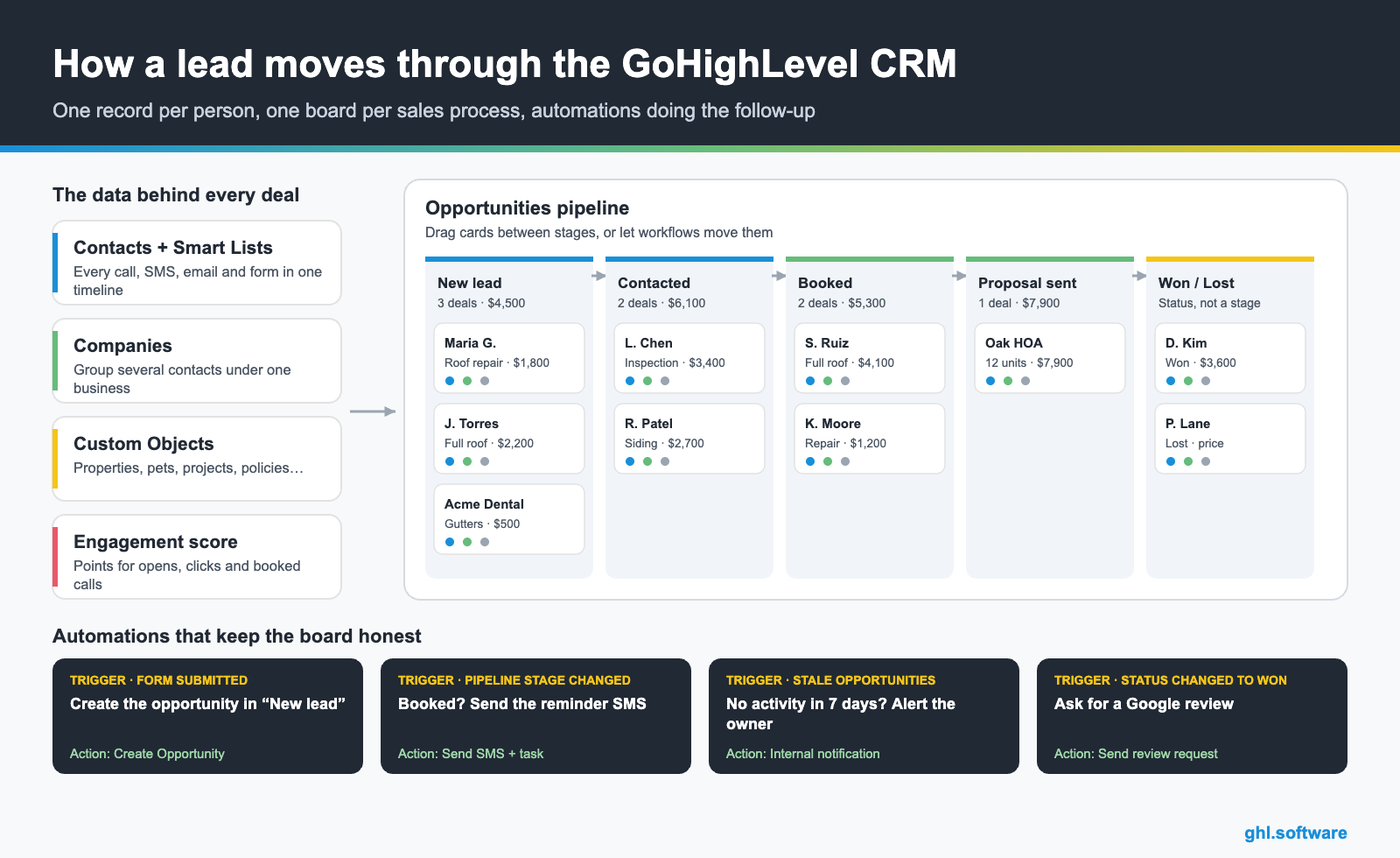
What the GoHighLevel CRM includes
The pipeline board, card by card
A pipeline is your sales process drawn as columns. A home services company might use New lead → Contacted → Inspection booked → Quote sent → Under contract; a coach might use Applied → Discovery call → Offer → Enrolled. Opportunities move left to right, either when you drag them or when an automation moves them.
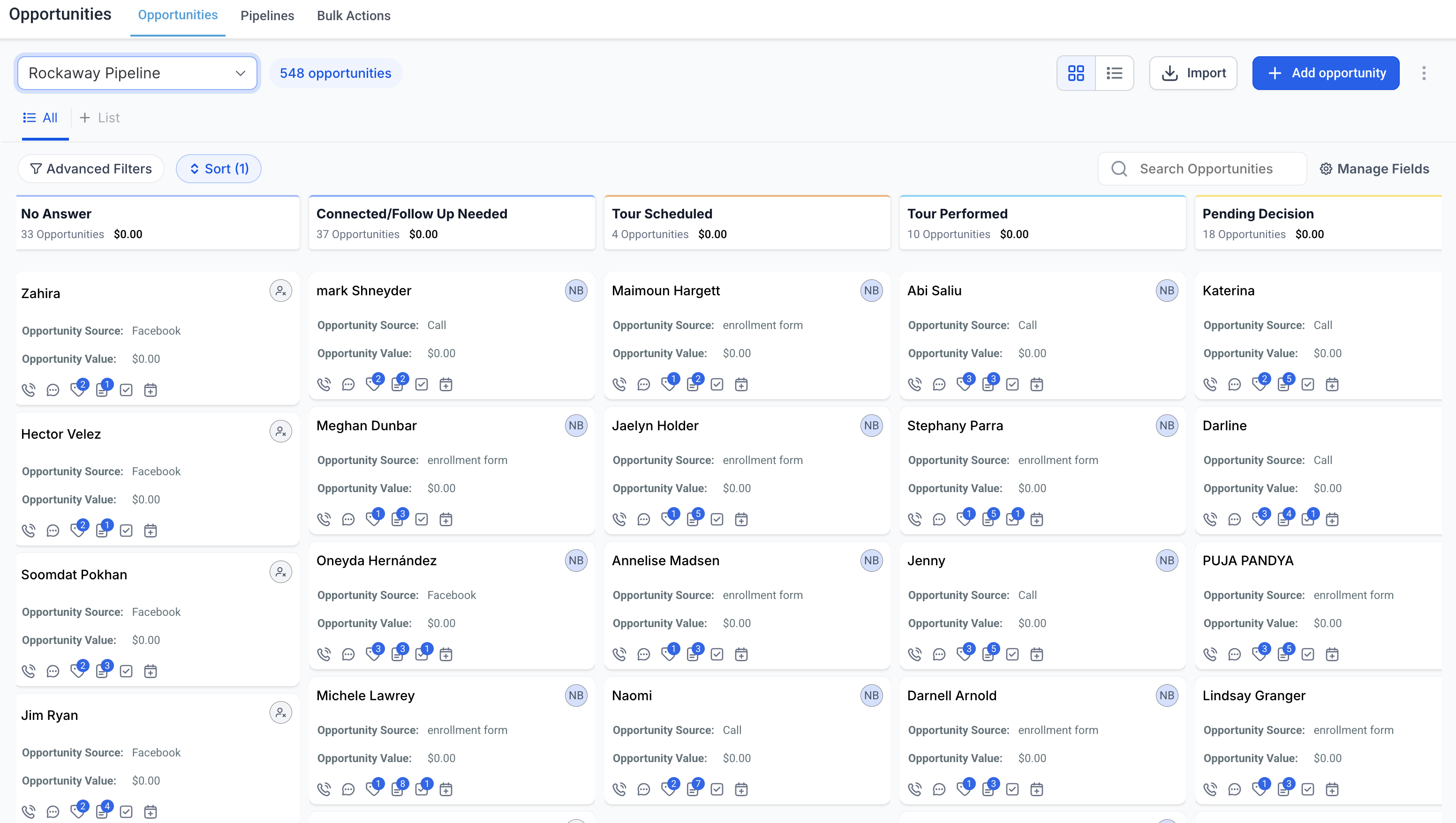
One detail that confuses people at first: won and lost are statuses, not stages. A deal can be marked as won from any column, which keeps your reports clean and lets you see at which stage you lose the most deals.
| Status | What it means | Typical automation |
|---|---|---|
| Open | The deal is active and somewhere in the pipeline | Reminders, follow-up sequences |
| Won | The client bought or signed | Onboarding email, review request, invoice |
| Lost | The client said no (you can record the lost reason) | Long-term nurture, win-back offer in 90 days |
| Abandoned | The lead went silent | Re-engagement sequence or archive |
Set up your first pipeline in about 20 minutes
- Map your real process first. Write down the 4 to 6 steps a client goes through before paying you. Fewer stages means fewer decisions for your team.
- Create the pipeline. Go to Opportunities → Pipelines → Create new pipeline, name it and add the stages in order.
- Add or import your deals. Create opportunities by hand, or import contacts from a CSV and let a workflow create the opportunities in the first stage.
- Connect your lead sources. Build a workflow with the trigger “Form submitted” (or “Survey submitted”, “Call status”, “Inbound webhook”) and the action “Create opportunity” so new leads land on the board automatically.
- Automate the stage changes. Use the “Pipeline stage changed” and “Opportunity status changed” triggers to send reminders, create tasks or request a review when a deal is won.
- Catch the deals that go quiet. The “Stale opportunities” trigger alerts the owner when a card has had no activity for the number of days you choose.
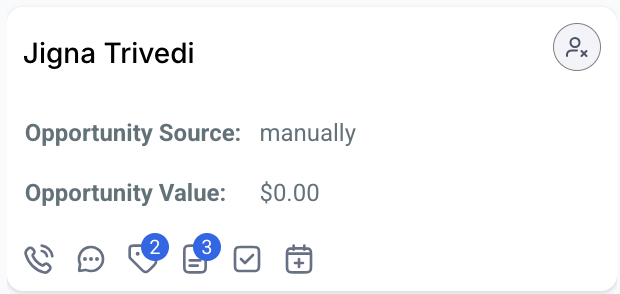
Every action, from the deal card
The opportunity card is where the CRM saves the most time. From the card you can call the lead, open the conversation, add tags, write a note, create a task or check the next appointment, without opening five tabs.
Lead scoring: who to call first
When you have 200 open leads, the question is not “who is interested?” but “who do I call today?”. GoHighLevel’s engagement score answers it with points. You define the rules in Settings → Manage scoring: an email open might add 1 point, a click 3, a confirmed appointment 10, and an unsubscribe subtracts points.
Use the score to trigger actions
A workflow can start when a contact reaches a threshold (for example 10 points) to notify a salesperson, move the deal to “Hot” or send a personal offer. Workflows can also add or subtract points, for example when someone replies to an SMS.
GoHighLevel CRM vs HubSpot
HubSpot is the CRM most people compare against, so here is the honest version.
| GoHighLevel | HubSpot | |
|---|---|---|
| Free plan | No | Free CRM for up to 2 users |
| Pricing model | Flat monthly price, unlimited users and contacts | Per seat on paid plans; marketing contacts also count |
| Pipelines and deal stages | Included | Included |
| Calling, SMS and WhatsApp built in | Included | Limited, mostly through add-ons or integrations |
| Funnels, websites and booking calendars | Included | Landing pages and meetings, website tools on separate hubs |
| White label for agencies | Included | No |
| Depth of sales reporting and forecasting | Basic to solid | Stronger on higher tiers |
HubSpot details from hubspot.com/pricing (October 2026). Check their site for current seat prices, as promotions change often.
Who it fits, and who it does not
A good fit
Agencies managing clients, local service businesses, coaches, clinics and real estate teams that want the CRM, the follow-up and the marketing in one login. See our CRM for realtors guide for a full example.
Probably not the best fit
Large B2B sales teams that live in forecasting, territory management and CPQ, or companies that only need a free contact list for two people.
Custom Objects, Smart Lists and the unified Conversations inbox
Contacts and opportunities cover most businesses. When they don’t, three CRM tools fill the gap.
An insurance agent, for example, can keep each policy as its own record linked to the household contact, build a Smart List of policies renewing next month, and answer the client’s WhatsApp question from the same screen.
Sources: Custom Objects In All Plans + Higher Limit (updated Jun 15, 2026) · SmartLists for Custom Objects · Getting Started with the Conversations Tab (updated Jul 27, 2026)
The bootcamp link gives you a 30-day trial (instead of the standard 14) plus live onboarding sessions to set up your first pipeline.
Start the 30-day trialAffiliate link. I may earn a commission at no extra cost to you.
Frequently asked questions
Is the GoHighLevel CRM included in every plan?
Yes. Contacts, Smart Lists, opportunities and pipelines are part of the core platform on Starter ($97/month), Unlimited ($297/month) and Agency Pro ($497/month). Contacts and users are unlimited on all three; what changes between plans is mostly the number of sub-accounts and the agency features.
How many pipelines can I create?
You can create several pipelines per sub-account, one for each sales process (for example new customers, renewals and partnerships), each with its own stages. Every opportunity lives in one pipeline and one stage at a time.
Does GoHighLevel have lead scoring?
Yes. The contact engagement score adds points for actions such as email opens, link clicks and confirmed appointments and subtracts them for unsubscribes or spam reports. You set the rules in Settings, and workflows can start when a contact reaches a threshold or adjust the score themselves.
Can I import my contacts from another CRM?
Yes. You can import contacts from a CSV file and map the columns to standard or custom fields. Once they are in, a workflow can create the matching opportunities in the right pipeline and stage.
GoHighLevel CRM or HubSpot: which one should I pick?
HubSpot is free for up to two users and charges per seat on paid plans. GoHighLevel has no free plan, but it includes unlimited users plus calling, SMS, funnels and automations in the same price. If you need a CRM for a large in-house sales team with deep reporting, HubSpot is strong; if you want CRM plus marketing for yourself or for clients, GoHighLevel usually costs less overall.
Keep exploring: websites and funnels · Voice AI · workflows and automations · GoHighLevel pricing · Contracts and e-signature · Payments and invoicing · Calendars and booking · Mobile app · Reporting and attribution
Sources: HighLevel pricing · Automating opportunities · Getting started with Custom Objects · Contact engagement score · HubSpot CRM pricing. Reviewed October 23, 2026.

