

GoHighLevel calendar: booking types, sync, reminders and payments
Leer en español: Calendario de GoHighLevel · Ler em português: Agenda do GoHighLevel · Part of all GoHighLevel features
The GoHighLevel calendar is the online booking system included in every HighLevel plan from $97/month. It offers personal, round robin, class, collective, event and service calendars, syncs with Google, Outlook and iCloud, sends reminders by email, SMS and WhatsApp, takes payments at booking and creates Zoom or Google Meet links. SMS and WhatsApp are billed by use.
Checked against HighLevel’s help center on October 24, 2026.
Picture Carla, who runs a two-room physiotherapy studio. Her week used to start with a notebook, a Google Calendar on her phone and a pile of WhatsApp messages asking “do you have anything Thursday?”. Every booking meant three back-and-forth messages, and every no-show meant an empty hour she could not resell. When she moved her studio onto the GoHighLevel calendar, the booking link replaced the back-and-forth: clients pick a service, a therapist and a room, pay a deposit and get a WhatsApp reminder the day before.
That is what this guide is about. Not a list of buttons, but how the calendar actually behaves once real clients start booking: which calendar type to choose, how sync with Google or Outlook works, what reminders cost, how payments and no-shows are handled, and where the limits are. If you landed here looking for how to create an online booking system, this is the up-to-date version of that guide.
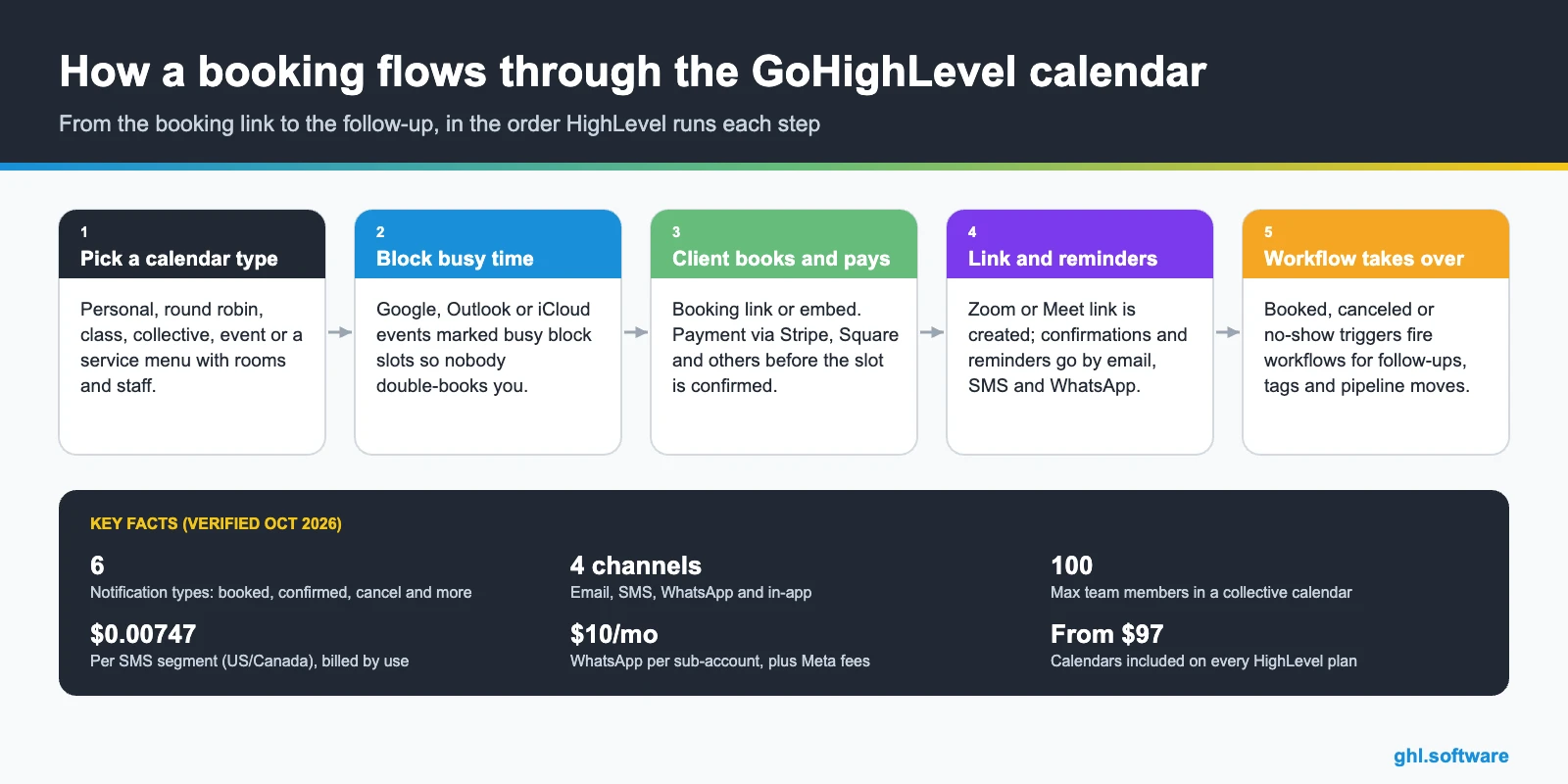
What the GoHighLevel calendar includes
Calendars live inside each sub-account and share the same contact records, conversations and workflows as the rest of HighLevel. That is the real difference with a standalone scheduler: a booking is not just an event, it is a contact, a conversation and, if you want, an opportunity in your pipeline.
Which calendar type to use
Most setup mistakes come from choosing the wrong type. This is how HighLevel defines each one in its help center:
| Calendar type | Who hosts | Best for | Key detail |
|---|---|---|---|
| Personal | One user | Consultations, discovery calls | Zoom or Meet link per booking |
| Round robin | A team, one member per booking | Sales and support teams | Optimize for availability (priority) or for equal distribution |
| Class booking | One host, many attendees | Fitness, yoga, workshops, webinars | “Seats per class” capacity; one seat per booking |
| Collective | Several members in the same meeting | AE + SDR calls, interviews, support escalations | Up to 100 members; a primary owner leads |
| Event | No host assigned | Conferences, expos, seminars | Shared by link or embed code |
| Services | Staff assigned per service | Salons, clinics, spas, studios | Add-ons, rooms, equipment, several services in one booking |
Round robin deserves a closer look. With Optimize for Availability, members get High, Medium or Low priority and the system fills the best available slot. With Optimize for Equal Distribution, HighLevel balances bookings across the month and blocks any member who is three or more meetings ahead. If a client books a specific member, the distribution logic is skipped.
How to set up online booking, step by step
- Connect your existing calendar. In your profile, link Google, Outlook/Office 365 or iCloud as a conflict calendar so busy events block availability.
- Create the calendar. Choose the type, set duration, availability hours, date overrides and buffer rules. For multi-service businesses, turn on Services in the sub-account.
- Add the meeting location. Connect Zoom or Google Meet for automatic links, or set a physical address. HighLevel alerts staff when a booking has no link or location.
- Turn on notifications. Pick which notifications go by email, SMS or WhatsApp, edit the templates with custom values and send a test.
- Share it and automate. Copy the booking link or embed code, then build workflows on the booked, canceled and no-show triggers.
If you are coming from Calendly, HighLevel’s migration guide recommends rebuilding custom questions as form custom fields and setting up payments in Payments > Integrations before enabling them on each calendar. See how forms work.
Reminders, confirmations and no-shows
Reminders are where a calendar pays for itself. HighLevel splits notifications into six types, and each one can go to the contact, the guest, the assigned user or extra addresses and numbers:
WhatsApp reminders need a verified WhatsApp Business Account and approved templates. Read the WhatsApp guide. For no-shows, the most useful piece is the workflow trigger: when you mark an appointment as no-show, a workflow can send a rebooking link the same afternoon, tag the contact and move the deal back a stage, instead of the lead quietly going cold.
Payments and service bookings
Taking money at booking is the cheapest way to cut no-shows. Round robin calendars have an Accept Payments toggle with multiple currencies. Collective calendars confirm the booking only after payment. The Services menu goes further: payments through Stripe, Square, Razorpay, Authorize.net or NMI, cards on file, processing fees, taxes and gift cards.
Services also handle the logic that generic schedulers struggle with: a haircut plus a color add-on, a processing time where the stylist can take another client, a massage that needs a specific room, or a senior therapist who charges more than a junior one. Customers can book several services in one go on a branded booking page. See GoHighLevel payments.
What it costs and plan availability
| Item | Price | Notes |
|---|---|---|
| Starter plan | $97/month | Calendars included, up to 3 sub-accounts |
| Unlimited plan | $297/month | Calendars included, unlimited sub-accounts |
| Agency Pro | $497/month | Calendars included, plus SaaS Mode |
| SMS reminders | $0.00747 per segment | US/Canada, plus carrier fees |
| WhatsApp reminders | $10/month per sub-account | Plus Meta’s per-message fees |
| Email reminders | Billed by use | See the email pricing guide |
| Zoom | Free Zoom account works | One Zoom account per user |
The calendar itself has no extra fee. What you pay for is the messaging around it. Compare plans on the GoHighLevel pricing guide, or go straight to Starter or Unlimited. SMS details are on the phone and SMS page.
Limits and what it does not do
Honest list, so you are not surprised after launch:
- Class booking calendars take one seat per booking. A client cannot book three seats at once, and Add Guests is not supported there.
- Only events marked busy in Google, Outlook or iCloud block your availability. “Free” events do not.
- Showed and no-show statuses stay inside HighLevel; they are not pushed to your external calendar.
- One video platform per calendar or profile, and one Zoom account per user. I only verified Zoom and Google Meet, not Microsoft Teams.
- Group bookings, reporting, the Opportunities integration and AI booking through Conversation AI and Voice AI are listed as upcoming in the Services article, not live.
- WhatsApp reminders only work with a verified business account and approved templates.
Who it fits, and how it compares with a standalone scheduler
Clinics, salons and spas
Services with rooms, staff pricing and deposits replace a separate booking app.
Sales teams
Round robin spreads demos fairly; collective calendars put the closer and the SDR on the same call.
Studios and trainers
Class booking with seat limits for classes, workshops and webinars.
Agencies
Build the calendar once, add reminders and no-show workflows, and copy it to each client with snapshots.
A dedicated scheduler can be quicker to set up and simpler to explain to a team that only needs a booking link. The GoHighLevel calendar wins when the booking is the start of a process: the lead lands in the CRM, the reminders go by WhatsApp, the payment is recorded and the follow-up runs on its own. If you only need a link, you probably do not need HighLevel. If you are paying for a scheduler, a reminder tool and a CRM separately, this is where they merge.
Rentals: booking properties, vehicles and equipment (public beta)
Appointments are about time with a person. Rentals are about time with a thing. HighLevel’s Rentals tool, inside Calendars, lets you list properties, vehicles, equipment or any other bookable asset, with quantities and variants, and take bookings by the hour, day, week or month from a public booking page.
Be aware of its status. HighLevel’s own guide asks for feedback “before general release,” so treat Rentals as a public beta: fine for a party-rental business or a small vacation property testing direct bookings, but test the whole flow, deposit and invoice included, before moving all your bookings over. The guide lists no limits on listings or bookings.
Source: Rentals – Overview & How to Get Started (updated Aug 5, 2026)
With the bootcamp link you get a 30-day trial instead of 14, plus live onboarding classes to set up calendars, reminders and workflows.
Start the 30-day trialAffiliate link. I may earn a commission at no extra cost to you.
Frequently asked questions
Does GoHighLevel have a calendar and booking system?
Yes. Booking calendars are a core feature on every HighLevel plan, from Starter at $97/month. You can create personal, round robin, class booking, collective, event and service calendars, share them with a link or embed them on your site, and connect them to workflows.
Does the GoHighLevel calendar sync with Google Calendar and Outlook?
Yes. You can link Google, Outlook/Office 365 and iCloud calendars. Only events marked busy block your availability. Sync is one-way by default; with two-way sync, external events can create contacts and trigger workflows, and Write Back Appointments pushes bookings, cancellations and reschedules to your external calendar.
Can GoHighLevel send appointment reminders by WhatsApp?
Yes. Calendar notifications go out by email, SMS, WhatsApp and in-app. WhatsApp needs a verified WhatsApp Business Account and approved templates, and it costs $10 per month per sub-account plus Meta’s message fees. SMS is billed per segment ($0.00747 in the US and Canada).
Can clients pay when they book?
Yes. Round robin and collective calendars have an Accept Payments option, and in a collective calendar the booking is confirmed only after payment. The Services booking menu accepts Stripe, Square, Razorpay, Authorize.net and NMI, with cards on file, taxes, processing fees and gift cards.
How does GoHighLevel handle no-shows?
You mark the appointment as no-show and HighLevel can send the cancellation/no-show notification. The no-show status is also a workflow trigger, so you can send a rebooking message, apply a tag or move the opportunity automatically. Note that showed and no-show statuses are not pushed to Google or Outlook.
Does it create Zoom or Google Meet links automatically?
Yes. HighLevel creates Zoom links for personal, round robin, service and collective calendars, and Google Meet is supported too. Each user connects one Zoom account (a free Zoom account works), and only one video platform can be active per calendar or profile.
Related: Courses and communities · Payments · Automations · WhatsApp · Forms · Pricing
Sources: Calendar notifications (updated October 14, 2026) · Services (service menu bookings) (October 1, 2026) · Round robin calendars (March 16, 2026) · Round robin distribution logic (April 14, 2026) · Class booking calendars (August 11, 2026) · Collective calendars (September 30, 2025) · Event calendars (March 16, 2026) · Linked and conflict calendars (July 8, 2026) · Zoom integration (February 10, 2026) · Migrating from Calendly (December 23, 2025) · Calendars help folder · gohighlevel.com/pricing.

