

GoHighLevel contracts: proposals, estimates, e-signature and payment at signing
Leer en español: Contratos en GoHighLevel · Ler em português: Contratos no GoHighLevel · Part of all GoHighLevel features
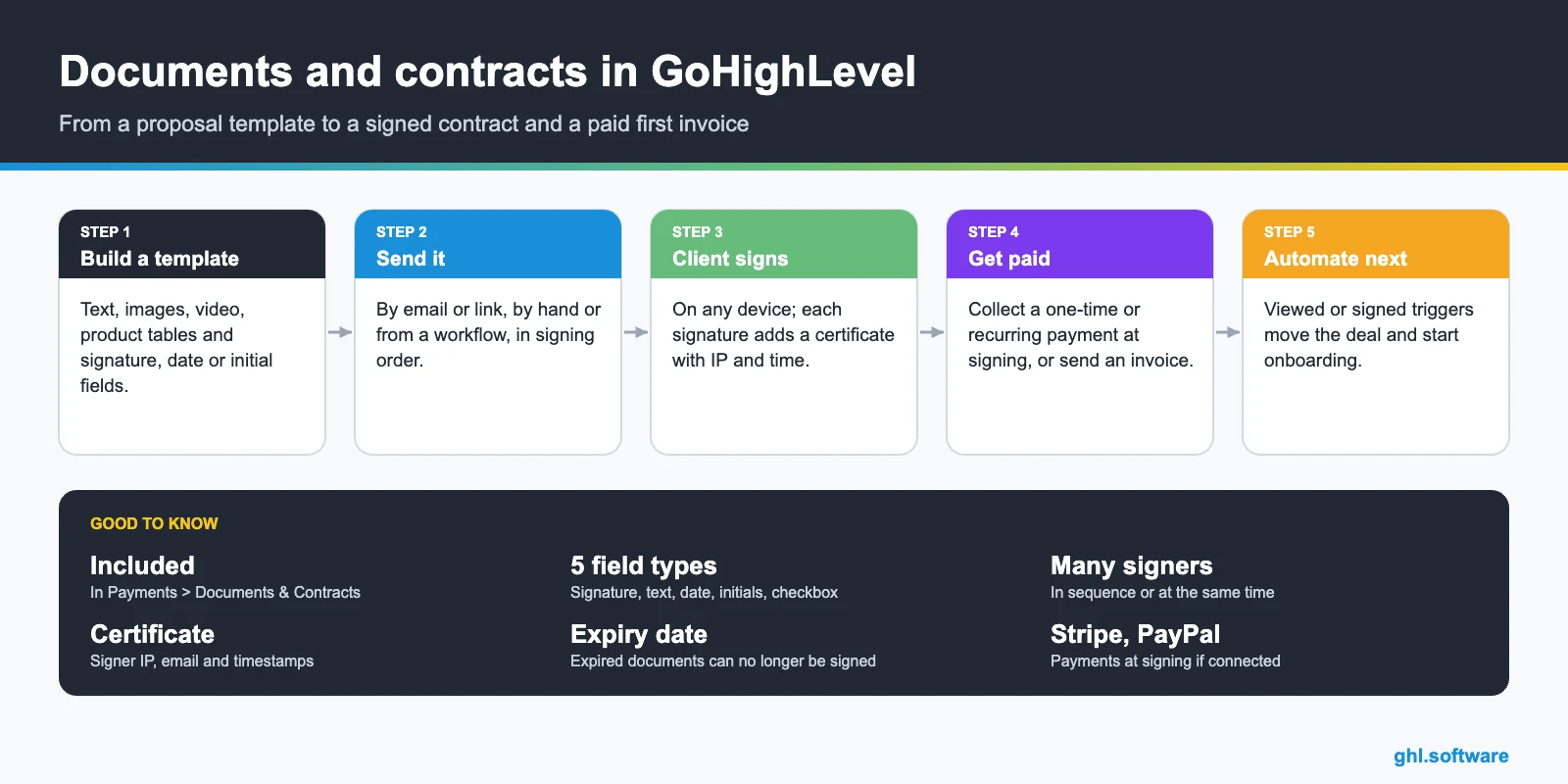
GoHighLevel contracts live in Payments > Documents & Contracts. You build proposals, estimates and contracts from templates with text, images, video, product tables and signature fields, send them by email or link (or from a workflow), collect signatures from several people in order, and charge a one-time or recurring payment at signing. Every signature adds a certificate with IP, email and timestamps.
Based on HighLevel’s Documents & Contracts articles, updated August 11–12, 2026.
A web designer closes a deal on a Tuesday call. Then the real work starts: a proposal in Google Docs, a PDF export, a signing tool, a separate invoice, three emails to remind the client and a spreadsheet to remember who paid. The deal was won in thirty minutes; the paperwork takes a week. That gap is exactly what GoHighLevel contracts are meant to close.
With documents and contracts inside the same account as your CRM, the proposal pulls the client’s data, the signature moves the deal forward and the first payment is collected on the spot. This guide covers what you can build, how signing and payments work, how to automate it and where its limits are.
What GoHighLevel documents and contracts include
Proposals, estimates and contracts: which one to use
| Proposal or contract | Estimate | |
|---|---|---|
| Where | Payments > Documents & Contracts | Payments > Invoices & Estimates > Estimates |
| Content | Free-form pages, media, product tables, terms | Business and customer details, products, expiry |
| Client action | Signs fields and can pay at signing | Accepts or rejects online, with notes |
| After approval | Payment collected or invoices sent automatically | You create the invoice from the accepted estimate |
| Best for | Agency retainers, services with terms, onboarding agreements | Quick quotes for trades and local services |
Estimate stages are Draft, Sent, Accepted, Declined and Invoiced, and the dashboard shows the value of estimates in your pipeline.
How to create and send a contract in GoHighLevel
- Open Documents & Contracts. Payments > Documents & Contracts > + New: blank, uploaded PDF or template.
- Build the document. Add your terms, a product list with prices, and the fields each party must complete.
- Add recipients. Set the signing order (sequential or simultaneous) and assign fields to each signer.
- Add payment (optional). One-time or recurring, collected at signing, with your connected processor.
- Set an expiry date. After it passes the document moves to Expired and cannot be signed.
- Send it. Pick an email template, adjust subject and body, set a redirect URL after signing and attach files, or share the link.
- Save it as a template. Turn the finished document into a template for the next client.
Statuses and the signing trail
| Status | What it means |
|---|---|
| Draft | Created but not sent |
| Waiting for others | At least one required signer has not finished; resend to remind them |
| Completed | All required signers finished; the client gets the signed PDF |
| Expired | The expiry date passed; it can no longer be signed |
| Declined | The recipient declined the document |
| Archived | Moved out of the active list |
Automate contracts with workflows
The Send Documents & Contracts workflow action sends a template the moment something happens in the CRM, for example a tag is added or an opportunity moves to “won”. You choose the template, the internal sender, whether to send directly or create a draft, and the channel: email, SMS or both. How workflows work.
- Deal won → contract sent. Opportunity stage changes to won; the contract goes out by email and SMS.
- Viewed but not signed → reminder. Document triggers on viewed or signed let you follow up only with people who opened it.
- Signed → onboarding. Create tasks, send the welcome email and book the kickoff call.
- Signed → invoice series. Recurring payment starts or invoices are sent automatically.
SMS delivery still requires an email on the contact; without one the document stays in Drafts. Documents sent directly are locked; only drafts can be edited after sending.
Limits to know before you switch
Use cases that pay off quickly
GoHighLevel contracts vs a separate e-signature tool
Where it wins
The contract, the client record, the pipeline, the payment and the follow-up live in one place, with no per-document fees listed and no extra subscription.
Where dedicated tools win
Conditional sections, complex approval chains or industry-specific compliance features. If you need those, keep your e-signature tool and connect it.
Best fit
Agencies, consultants, coaches and local services that send the same few agreements every week.
The bootcamp link gives you 30 days instead of 14, enough to build your proposal template, connect Stripe and get your first signature.
Start the 30-day trialAffiliate link. I may earn a commission at no extra cost to you.
Frequently asked questions
Does GoHighLevel have e-signature?
Yes. Documents & Contracts, under Payments, lets you send proposals, estimates and contracts with signature, initials, date, text and checkbox fields. Each signature generates a certificate with the signer’s details, IP address, email and timestamps, added to the signed PDF.
Is Documents & Contracts included in every plan?
It is part of the core platform in the Payments area. HighLevel’s help articles do not list a per-document fee; payment processing fees from your provider still apply when you collect money on a document.
Can several people sign the same contract?
Yes. Add multiple recipients, choose sequential or simultaneous signing and assign each one their own fields. The document stays in “Waiting for others” until every required signer finishes.
Can clients pay when they sign?
Yes. Add a one-time or recurring payment to the document and collect it at signing, or send invoices automatically, using a connected processor such as Stripe or PayPal.
Can I send contracts automatically?
Yes. The “Send Documents & Contracts” workflow action sends a template by email, SMS or both, directly or as a draft, for example when a deal moves to “won”. The contact needs an email address on file.
Does it support conditional logic?
No. HighLevel notes that documents do not support conditional logic and are static once created. Editing a template does not change documents already sent.
Related: payments and invoicing · CRM and pipelines · automations · GoHighLevel pricing
Sources: How to use Documents & Contracts (updated August 11, 2026) · Send document templates in a workflow (updated August 12, 2026) · Proposals and estimates (changelog) · Create and send estimates · Getting started with coupons.

