
GoHighLevel Social Planner: schedule, publish and measure 9 social networks
Leer en español: Social Planner de GoHighLevel · Ler em português: Social Planner do GoHighLevel · Part of all GoHighLevel features
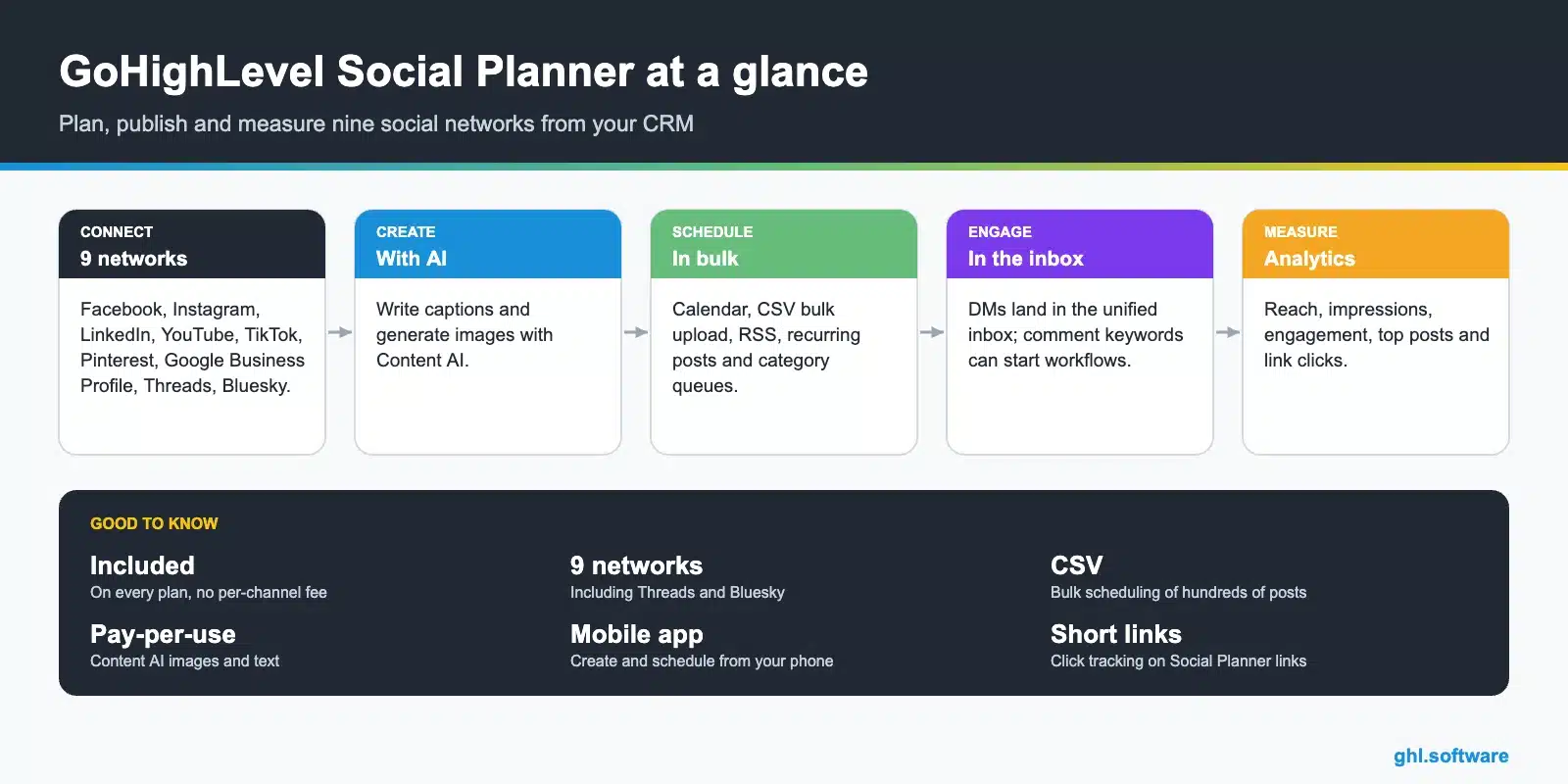
The GoHighLevel Social Planner is a social media scheduler included in every plan. It connects nine networks (Facebook, Instagram, LinkedIn, YouTube, TikTok, Pinterest, Google Business Profile, Threads and Bluesky), supports bulk CSV uploads, RSS, recurring posts and AI-generated content, and reports reach, engagement and link clicks, so you may not need Hootsuite, Buffer or Later.
Based on HighLevel’s Social Planner articles, updated between February 2 and November 6, 2026.
Most small businesses post in bursts: ten posts in January, nothing in February, panic in March. Not because they lack ideas, but because posting lives in five different apps on one person’s phone.
The GoHighLevel Social Planner moves it to one calendar next to your CRM. You plan a month in an afternoon, bulk-upload it, let AI help with captions and images, and Facebook and Instagram messages land in the same inbox as your leads. This page covers networks, scheduling options, AI, analytics and how agencies sell it as a service.
Supported social networks
| Network | Post | Analytics |
|---|---|---|
| Facebook pages | Yes | Including post-level statistics |
| Yes | Including post-level statistics and demographics (100+ followers) | |
| Yes | Pages (post-level), not personal profiles | |
| TikTok | Yes | Business profiles; data can take 1 to 2 days |
| YouTube | Yes | Account-level metrics |
| Yes | Impressions and top pins | |
| Google Business Profile | Yes | Impressions and reach |
| Threads | Yes | One-day delay on most metrics |
| Bluesky | Yes | One-day delay on most metrics |
Scheduling options
AI content
Content AI writes captions and generates images inside the Social Planner. It costs $0.063 per image and $0.0945 per 1,000 words on pay-per-use, and is unlimited on the AI Employee Growth and Unlimited plans. AI Employee pricing.
From comments to customers
This is where a standalone scheduler usually needs extra integrations. Facebook and Instagram DMs arrive in the unified inbox, and workflows can react to comments on your posts: reply with a DM when someone comments a keyword, tag the contact and start a follow-up. Automations.
New in November 2026: YouTube comments land in the same place. You can view and reply to comments on videos published through Social Planner without opening YouTube Studio, and HighLevel syncs them every 6 hours (HighLevel Support).
Analytics
Social media management as an agency service
Monthly content packages
Plan, design and schedule 12 to 20 posts a month per client from their sub-account.
Reviews to content
Turn every new five-star review into a social post automatically.
Comment-to-DM funnels
Keyword comments trigger a DM with a lead magnet and a booking link.
The bootcamp link gives you 30 days, enough to connect your networks, bulk-upload a month of posts and see the analytics.
Start the 30-day trialAffiliate link. I may earn a commission at no extra cost to you.
Social Listening in the HighLevel Social Planner: trend ideas on one screen
Running out of post ideas is the quiet problem behind many empty content calendars. So the new Social Listening (Beta) tab in the Social Planner deserves a look. We opened it in a live HighLevel account in October 2026, and it shows a “social trends” dashboard.
What the trends dashboard shows
The dashboard refreshes daily, and a date picker lets you look back at earlier days. It also pulls signals from several sources at once:
- Google Trends searches, with “new” badges on fresh terms.
- Pinterest keywords, with pin counts and percentage change.
- Wikipedia page views, also with percentage change.
- YouTube popular keywords, popular channels and trending videos.
Turning trends into posts
Picture a gym owner who plans a week of posts every Monday. She checks which fitness terms climb on Google Trends and Pinterest. Then she scans trending YouTube videos for formats her audience already watches.
After that, she drafts posts in the Planner, so ideas and scheduling live in the same place. As a result, her calendar follows real demand instead of guesses.
Labs also lists two related betas that HighLevel is rolling out on an opt-in basis, so dates can change. One gives clients a password-protected invite link to connect their own social accounts. The other adds Social Planner triggers to workflows, and that rollout is still in progress.
Frequently asked questions
What is the GoHighLevel Social Planner?
The social media scheduler built into HighLevel. It connects Facebook, Instagram, LinkedIn, YouTube, TikTok, Pinterest, Google Business Profile, Threads and Bluesky, lets you create, schedule and bulk-upload posts and shows analytics, all inside the same account as your CRM.
Is the Social Planner free?
It is included in every HighLevel plan at no extra cost per channel or per post. Only AI generation with Content AI is billed by use, unless you have an AI Employee plan.
Can I schedule posts in bulk?
Yes. You can upload posts with an advanced CSV, schedule from an RSS feed, create recurring posts and use category queues.
Does the Social Planner have analytics?
Yes. It shows posts, likes, comments, followers, impressions, reach, engagement and top posts by network, plus link clicks for Social Planner short links. Post-level statistics are available for Facebook, Instagram, TikTok and LinkedIn pages.
Can I post from my phone?
Yes. The HighLevel mobile app includes the Social Planner, so you can create and schedule posts on the go.
Can agencies manage social media for clients?
Yes. Each client sub-account connects its own profiles, and the agency plans and schedules content in each one. It is one of the easiest services to bundle with a monthly retainer.
Related: reputation management · AI features · automations · GoHighLevel pricing · Ad Manager · Reporting and attribution
Sources: Social Planner statistics (updated February 2, 2026) · AI product pricing.