

GoHighLevel payments: invoices, text-to-pay, payment links, subscriptions and POS
Leer en español: Pagos en GoHighLevel · Ler em português: Pagamentos no GoHighLevel · Part of all GoHighLevel features
GoHighLevel payments connect your own processor (Stripe, PayPal, Square, Authorize.net, NMI, Razorpay or Mercado Pago) to one Payments area where you sell products through invoices and recurring invoices, estimates, text-to-pay links, payment links, order forms, forms, stores, calendars, courses and an in-person point of sale with Tap to Pay. Coupons, installments, tipping and late fees are built in.
Based on HighLevel’s payments help articles, updated between February and September 2026.
A personal trainer has three ways of getting paid: cash after the session, a bank transfer “when the client remembers” and a Stripe link he copies from another tab. At the end of the month he spends a Sunday matching payments to names. Nothing is broken, but nothing is connected either. GoHighLevel payments fix that by putting every charge on the client record.
Invoices, subscriptions, links sent by text, checkout pages and taps on a phone all land on the same contact, and a payment can trigger the next step automatically: a receipt, course access, a welcome sequence. This guide covers providers, every way to charge, recurring billing, coupons, in-person payments and what HighLevel does not do.
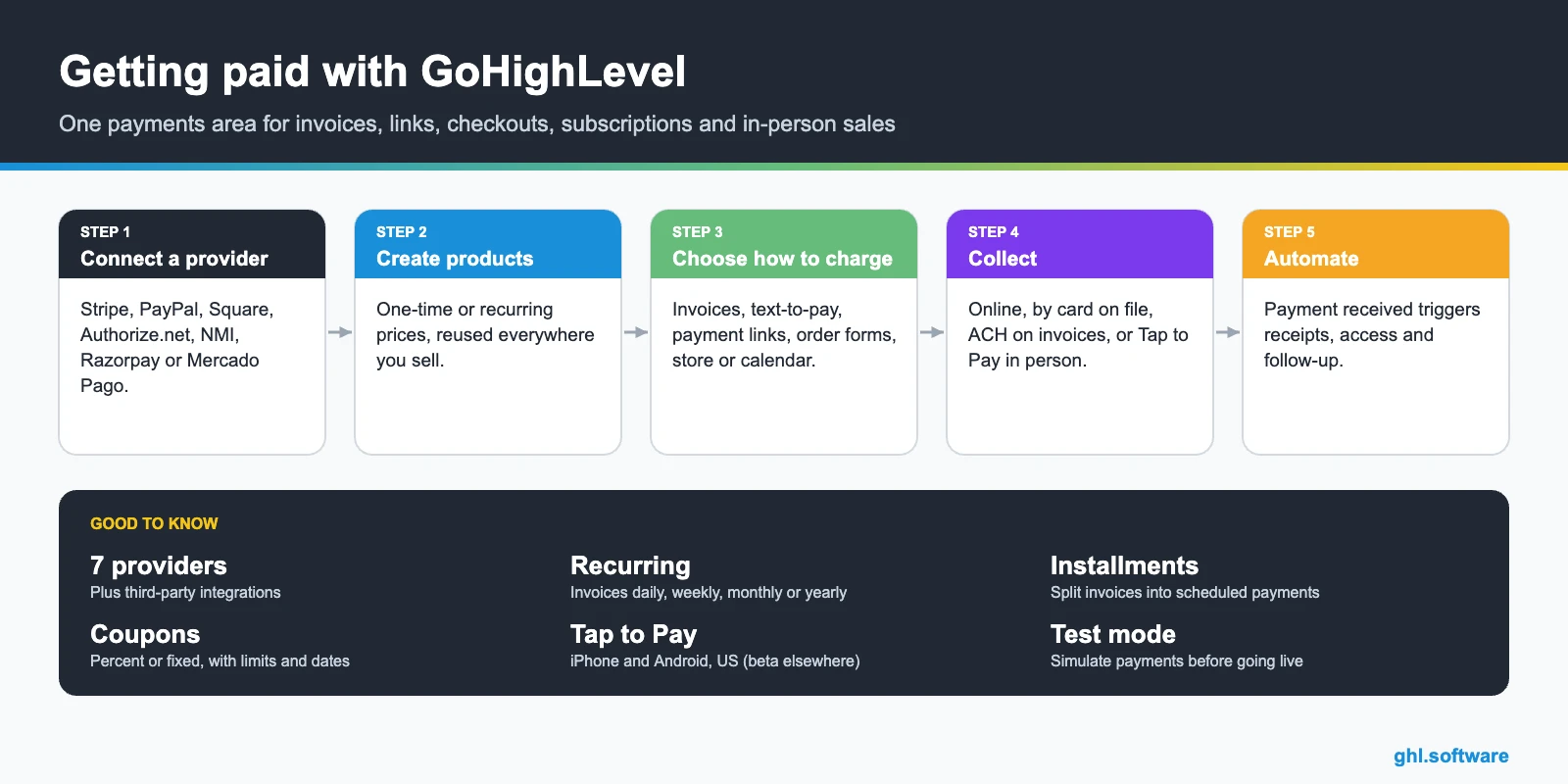
Every way to charge with GoHighLevel payments
Supported payment providers and methods
| Provider | Methods | Notes |
|---|---|---|
| Stripe | Cards, Apple Pay, Google Pay, Affirm, Klarna, Afterpay, ACH Direct Debit, iDEAL, Bancontact, SEPA, Amazon Pay, Revolut Pay, Link, card readers | Widest coverage; ACH only on invoices; readers only for POS |
| PayPal | PayPal checkout | Some coupon setups with subscriptions are not supported |
| Square | Cards, card reader | Reader for POS |
| Authorize.net | Cards | |
| NMI | Cards | |
| Razorpay | Listed in the provider matrix | |
| Mercado Pago | Local currency payments | Mexico, Colombia, Argentina, Chile, Uruguay, Peru and Brazil |
| Third-party integrations | Depends on the integration |
Some methods only support one-time payments, not subscriptions. Apple Pay and Google Pay buttons appear only on supported devices and when enabled with your provider. Each sub-account connects one Stripe account.
Invoices and recurring billing
- Create the invoice. Payments > Invoices & Estimates > + New, one-time or recurring.
- Add products. From the catalog or created on the fly; edit price and quantity per line.
- Set the terms. Payment schedule in installments, discounts, tax, late fees, processing fees and tipping.
- Schedule recurrence. Daily, weekly, monthly, yearly or custom; end on a date or after a number of invoices; send in advance.
- Send. By email and text, email only or text only, in test or live mode.
Without an online provider you can still issue one-time invoices and record the payment manually. Active recurring invoices lock frequency, price and taxes; end the series and create a new one to change them.
Text-to-pay and payment links
| Text-to-pay | Payment link | |
|---|---|---|
| How it is sent | SMS from the contact’s conversation | Copy and share by email, social or your website |
| Products | One product with discount, tax and due date | Several one-time products plus recurring options |
| Extras | Custom payment page | Quantities, coupons, address collection, custom URL |
| Requirements | HighLevel Payments (Stripe), phone number, a product | A connected provider and products |
In person: point of sale and Tap to Pay
The HighLevel mobile app includes a point of sale. With Tap to Pay, the customer taps a contactless card or wallet on your phone: iPhone XS or later on iOS 16+, or Android 8+ with NFC. It works with Stripe for US locations and is in beta in other countries. Stripe readers (M2, BBPOS WisePad 3) and Square readers also work for POS.
Coupons and discounts
Automations after the payment
- Payment received → receipt and access. Send the receipt, grant course or community access and tag the buyer.
- Failed or overdue → reminder. Follow up by email, SMS or WhatsApp before the late fee applies.
- Contract signed → invoice series. Start recurring invoices when the agreement is signed.
- New customer → onboarding. Create the opportunity, tasks and a kickoff booking. Automations.
Use cases
What to check before you switch
Your country and currency
Payment methods depend on your provider account, country, currency, checkout type and test or live mode. Confirm Stripe supports your country before setting up.
Accounting
HighLevel collects and records payments; it is not accounting software. Keep your bookkeeping tool for taxes and reports.
Agencies
On Agency Pro, SaaS Mode uses the same payments setup to charge your own clients. Agency Pro.
Gift cards and Tap to Pay with Square
Two smaller payment tools tend to surprise people. The first is gift cards. You create a gift card product in Payments → Gift Cards, and HighLevel gives you a checkout link, an embed code and a QR code for it. You can also sell it through checkouts you already run: forms, funnels, stores, payment links, websites, invoices and calendars that support products. The buyer chooses whether the card is for themselves or someone else, and whether it should arrive now or on a scheduled date. The recipient gets it by email.
A typical use: a spa sells gift cards from its booking calendar in December, then takes the in-person payment for the treatment with an iPhone at the front desk, with no card reader on the counter.
Source: How to Sell Gift Cards (updated Jan 5, 2026) · Tap to Pay on Square for POS and Mobile Payments (updated Sep 1, 2026)
The bootcamp link gives you 30 days instead of 14, enough to connect Stripe in test mode, build your products and send your first invoice.
Start the 30-day trialAffiliate link. I may earn a commission at no extra cost to you.
Frequently asked questions
What payment providers does GoHighLevel support?
Stripe, PayPal, Square, Authorize.net, NMI and Razorpay are listed in HighLevel’s provider matrix, plus third-party integrations, and Mercado Pago is available for several Latin American countries. Stripe offers the widest set of methods, including Apple Pay, Google Pay, Klarna, Affirm, Afterpay and ACH on invoices.
Does GoHighLevel charge a transaction fee?
The HighLevel help articles used for this guide do not list a platform transaction fee on payments. Your payment processor charges its own fees, and on invoices you can pass processing fees to the customer if you enable it in payment settings.
Can GoHighLevel send recurring invoices?
Yes. Recurring invoices can run daily, weekly, monthly, yearly or on a custom schedule, end on a date or after a number of occurrences, and be sent a few days before the due date.
What is text-to-pay in GoHighLevel?
A payment request you send by SMS from a contact’s conversation. It creates a checkout link for a product, with optional discount, tax and due date. It requires HighLevel Payments (Stripe), an active phone number and at least one product.
Can I take payments in person?
Yes. The mobile app’s point of sale supports Tap to Pay on iPhone and Android with Stripe in the US (beta in other countries), and Stripe or Square card readers work for POS.
Can I use coupons on invoices?
No. Coupons work on order forms, stores, websites, payment links, calendars, services and events, but not on estimates and invoices.
Related: contracts and estimates · online store · CRM · GoHighLevel pricing
Sources: Supported payment providers and methods (updated February 17, 2026) · Invoices (updated September 19, 2026) · Recurring invoices (updated February 10, 2026) · Text-To-Pay links · Payment links with multiple products (changelog) · Getting started with coupons (updated September 18, 2026) · Tap to Pay · Mercado Pago payments (changelog) · Connect Stripe (updated August 18, 2026).

