

GoHighLevel ecommerce: how the online store works (2026 guide)
Leer en español: tienda online con GoHighLevel · Ler em português: loja virtual no GoHighLevel · Part of all GoHighLevel features
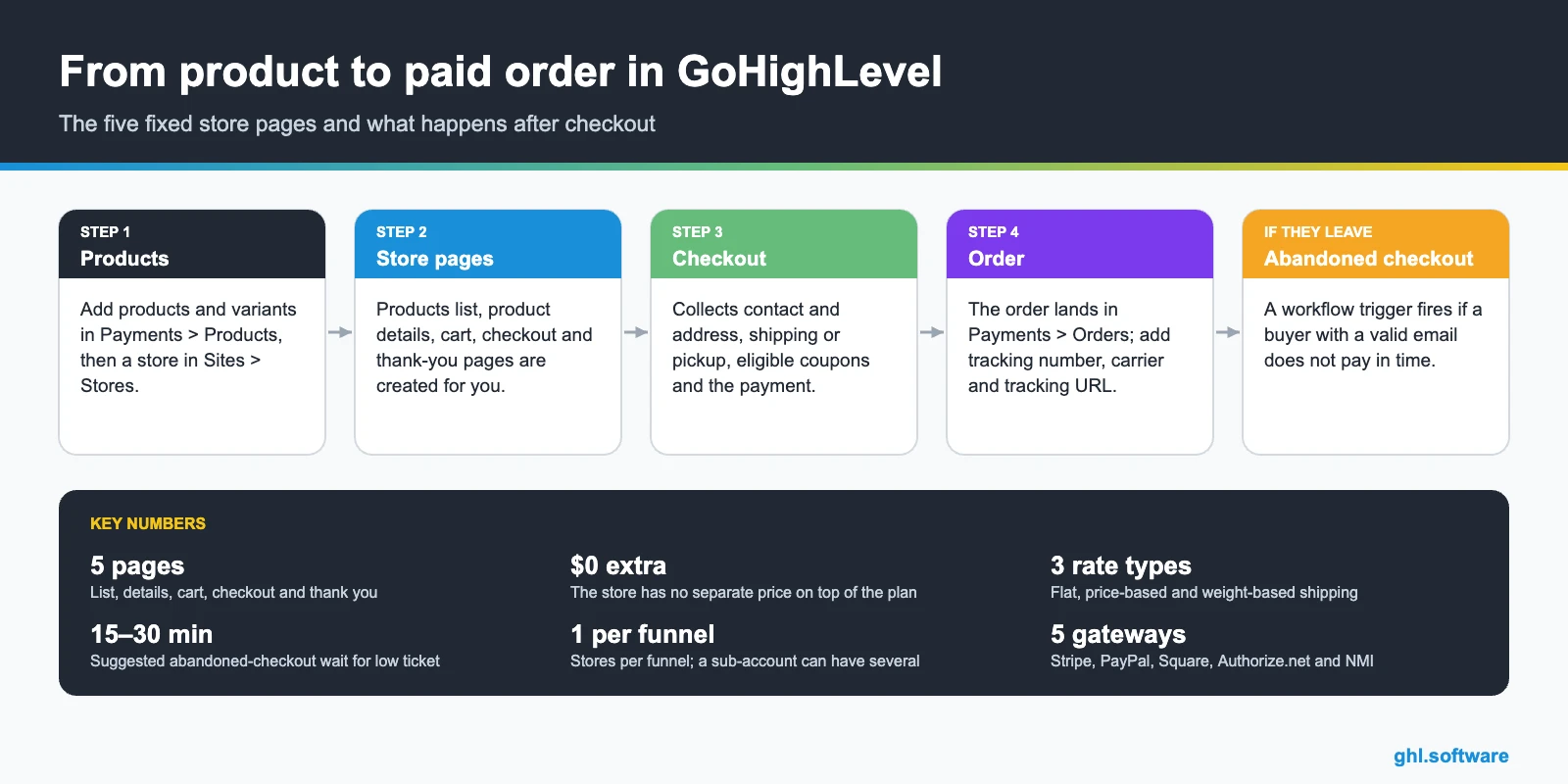
GoHighLevel ecommerce is a native online store built into the Website Builder and funnels: products with variants, cart, checkout, coupons, shipping zones, automatic taxes, order fulfillment, one-click upsells and an abandoned checkout trigger for workflows. It has no separate price on top of your plan, and it can also sync an existing Shopify or WooCommerce store.
Reviewed on 23/10/2026 with HighLevel’s help center.
Marta sells hand-poured candles. For three years her business ran on a patchwork: a store on one platform, an email tool on another, a texting app for order updates and a spreadsheet for wholesale buyers. Every Monday she exported customers from one place and imported them into the next. When she looked at GoHighLevel ecommerce, the question wasn’t “is it better than my store?” but “can the store, the follow-up and the customer record finally live in the same place?”
That is the honest way to judge it. HighLevel’s store is not trying to be the biggest ecommerce platform on the market. It is a store that sits inside your CRM, so every order is already a contact, every abandoned checkout can start a workflow and every buyer can get a review request or a reorder reminder without another tool. This guide covers what it includes, how to set it up, what it costs and where it falls short.
What’s included in GoHighLevel ecommerce
How to set up the store, step by step
- Create the store. Go to Sites > Stores. HighLevel offers a guided “Complete Setup” that you can run with Ask AI.
- Add products. In Payments > Products, create each product with its price, images and variants.
- Connect payments. Connect your payment provider by hand in the Payments settings. Nothing sells until this is done.
- Set shipping and taxes. Create shipping zones in Payments > Settings > Shipping & Delivery, including a default fallback zone, then turn on automatic taxes if you need them.
- Design and publish. Customize the five pages with store elements, connect your domain and place a test order before you announce it.
Prefer a sales funnel? You can add a store to a funnel in Sites > Funnels. It creates five store steps in a fixed order, one store per funnel, and deleting one step deletes all five. Checkout lists shipping options from lowest to highest price.
Selling more: upsells, order bumps and abandoned checkout
A cadence that works for many small stores: an SMS one hour after the cart is abandoned, an email at six hours and a last email at 24 hours. If you also run Shopify, turn off Shopify’s own recovery email so buyers don’t get two, and keep past customers out of live sequences when you import them. Build the follow-up in GoHighLevel automations.
Shopify, WooCommerce and shipping integrations
| Integration | What it does | Watch out for |
|---|---|---|
| Shopify | Imports and syncs products, collections, contacts, orders and transactions. Order Received and Payment Received triggers. | Taxes are not mapped; refunds don’t reduce order count. Shopify Basic only exposes products and collections. |
| Shopify migration | Moves your catalog into the HighLevel store. | Store pages, checkout, payment, shipping, workflows and abandoned checkout must be rebuilt. |
| WooCommerce | Imports and syncs contacts, orders, transactions, products and categories. | One-way sync (WooCommerce to HighLevel), one WooCommerce account per agency. |
| Shipping and print-on-demand | Shippo, ShipStation, Printful and Printify are listed as related integrations. | Check each provider’s own fees. |
What the store costs
| Item | Cost | Notes |
|---|---|---|
| Online store | Included | No separate price on HighLevel’s ecommerce page |
| HighLevel plan | From $97/month | Starter $97, Unlimited $297, Agency Pro $497; annual billing equals 10 months |
| Card processing | Your provider’s fees | Stripe, PayPal, Square, etc. charge their own rates |
| Email follow-ups | $0.675 per 1,000 emails | LC Email usage |
| WhatsApp follow-ups | $10/month per sub-account | Plus Meta’s message pricing |
See the full breakdown on the GoHighLevel pricing page.
Limits and what it does not do
Who the HighLevel store is for
Small product brands
A catalog of tens or hundreds of products, where follow-up and repeat buyers matter more than a huge app store.
Coaches and service businesses
Sell a kit, a ticket or a physical bundle next to your services, with upsells in the same funnel.
Agencies
Build stores for local clients and keep orders, CRM and automations in one sub-account per client.
GoHighLevel store vs a standalone ecommerce platform
| HighLevel store | Standalone platform | |
|---|---|---|
| Orders become CRM contacts | Yes | No |
| Workflows, SMS, email and WhatsApp in the same tool | Yes | No |
| Large app and theme marketplace | No | Yes |
| Advanced catalog and multi-warehouse tools | No | Yes |
| Funnels with order bumps and one-click upsells | Yes | No |
Many businesses keep their existing store and sync it with HighLevel instead, which is exactly what the Shopify integration is for. If your store already works, syncing is the low-risk first step.
The bootcamp link gives you a 30-day trial and live setup sessions, so you can build the store and place a test order before paying.
Start the 30-day trialAffiliate link. I may earn a commission at no extra cost to you.
Frequently asked questions
Does GoHighLevel have ecommerce?
Yes. HighLevel includes a native online store inside the Website Builder and in funnels. You add products with variants, and HighLevel creates a products list, product details, cart, checkout and thank-you page. Orders, fulfillment, shipping zones, automatic taxes and coupons are handled in the Payments area.
How much does the GoHighLevel online store cost?
HighLevel’s ecommerce page lists no separate price for the store, so it comes with your plan, starting at $97 per month for Starter. You pay processing fees to your payment provider, and per-use costs if you send email, SMS or WhatsApp follow-ups.
Which payment gateways work with the HighLevel store?
You connect the payment provider yourself. For one-click upsells HighLevel lists Stripe, PayPal, Square, Authorize.net, NMI and approved marketplace providers. The ecommerce page also mentions buy-now-pay-later options such as Affirm, Klarna and AfterPay.
Can I connect my Shopify store to GoHighLevel?
Yes. The Shopify integration imports products, collections, contacts, orders and transactions and keeps them in sync, with Order Received and Payment Received triggers. Shopify Basic only exposes products and collections; contacts, orders and transactions need Grow, Advanced or Plus.
Does GoHighLevel recover abandoned carts?
Yes. The Abandoned Checkout trigger fires when a buyer has items in the cart, enters a valid email and does not pay within the time you set. HighLevel suggests 15 to 30 minutes for low-ticket stores. From there a workflow sends your SMS, email or WhatsApp follow-up.
Can I sell upsells after checkout?
Yes, in V2 funnels with native forms. A one-click upsell reuses the buyer’s payment token, so they don’t re-enter their card. You can add one upsell product per step and chain several steps. Order bumps are set in the Sell Products element.
Related: GoHighLevel payments · websites and funnels · automations · email marketing · WhatsApp · pricing
Sources: Setting up an E-commerce Store, Add E-commerce Stores to Funnels, Order Upsell in Forms, Abandoned Checkout trigger, Shipping and Delivery Rates, International automatic taxes, Shopify integration, Migrate Shopify stores to HighLevel, WooCommerce integration, HighLevel ecommerce. Reviewed on 23/10/2026.

