

GoHighLevel courses and communities: memberships, portal and app
Leer en español: Cursos en GoHighLevel · Ler em português: Cursos no GoHighLevel · Part of all GoHighLevel features
GoHighLevel courses and communities are included in every HighLevel plan from $97/month. You can build courses with drip content, assessments and completion certificates, sell them as one-time or recurring offers, run public, private or paid community groups with live sessions and gamification, and give students one client portal login. A branded mobile app is an optional add-on at $49/month per location.
Checked against HighLevel’s help center on October 24, 2026.
Picture Marcus, a business coach with a few hundred past clients and a course sitting on three different tools: videos on one platform, the group chat on another, payments on a third, and a spreadsheet to keep track of who should have access. Every refund meant removing someone by hand in two places. Moving his program into GoHighLevel courses put the lessons, the paid community, the payments and the follow-up emails behind one login, and the spreadsheet disappeared.
This guide covers what you can actually build: the course builder, offers and subscriptions, drip content, assessments, certificates, communities with live sessions and gamification, the client portal and the branded app. It also covers the limits, because a course platform is hard to leave once your students are inside it. If you came here looking for how to create an online course, this is the updated version of that guide.
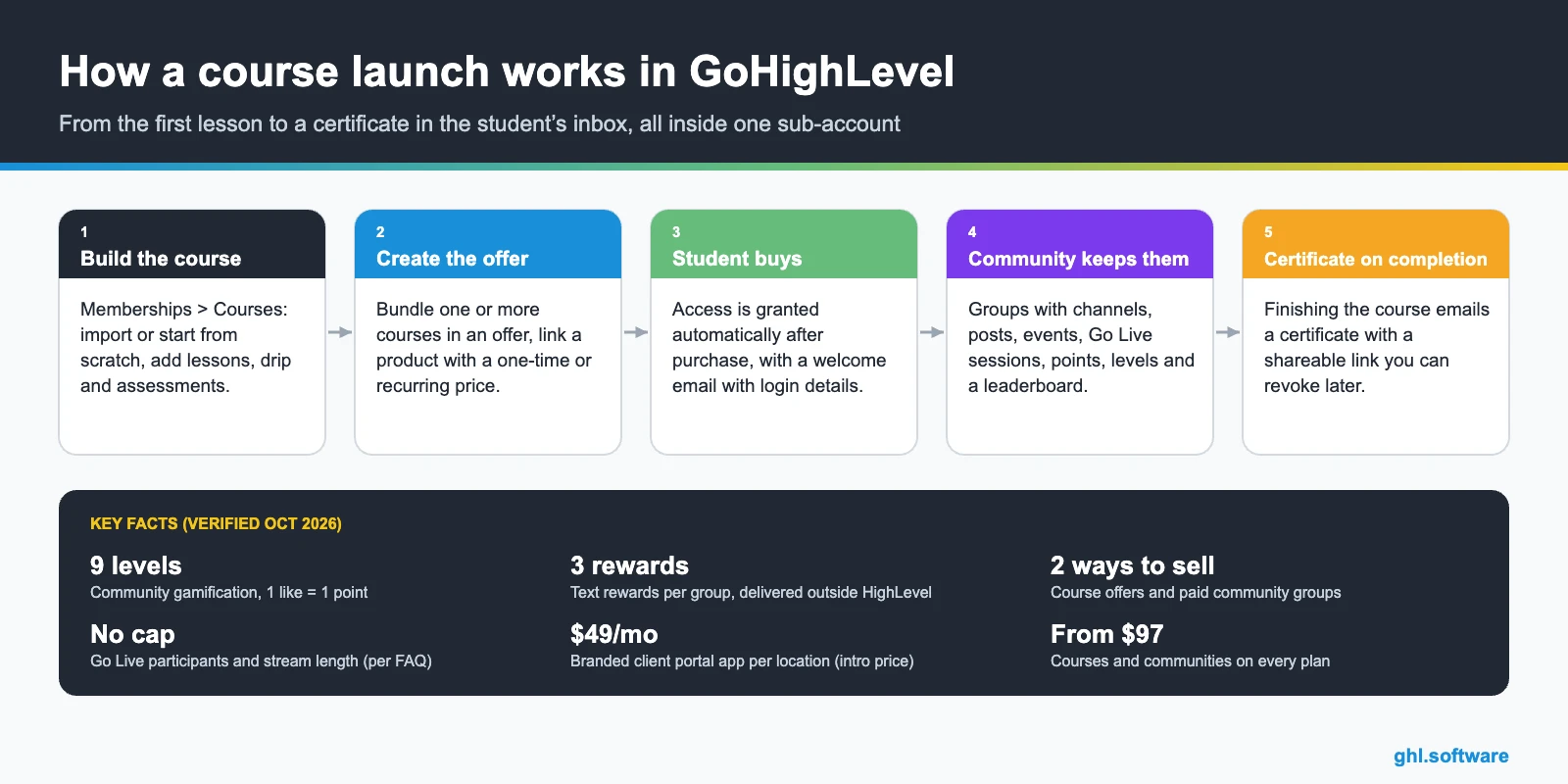
What GoHighLevel courses include
How to launch a course, step by step
- Create the course. Go to Memberships > Courses > Products > Create New. Import an existing course or start from scratch.
- Add lessons, drip and assessments. Organize lessons in categories, set drip schedules where it helps and add an assessment with a passing grade.
- Build the offer and product. Create and publish an offer, then in Payments > Products create a product, turn on Membership Offer and select it. Draft offers do not appear.
- Attach a certificate. In the course’s Certificates tab, attach a template. New learners get it automatically when they finish.
- Open the community. Create a group in Communities, attach the course in its Learning section and invite or sell access.
Once the product is linked to a published offer, access is granted automatically after purchase, and the “Send Welcome Email” option sends login details. Sell it from a funnel page: how funnels work.
Communities: groups, live sessions and gamification
Courses teach; communities keep people paying. Each group can be public, private (you approve members) or paid, and content is organized in channels with posts, featured posts and events. Go Live has two modes: a Meeting Room for interactive calls with chat, reactions, hand raise and screen share, or Stream Software mode, where you broadcast from OBS, Zoom or StreamYard with a stream key. HighLevel’s FAQ says there is no cap on participants or stream length, recording is optional and replays attach to the post. It runs in the browser and in the HighLevel mobile app.
Gamification is simple: one like on a post, comment or reply equals one point for its author. Points unlock nine levels per group, which you can rename but not restructure:
| Level | 1 | 2 | 3 | 4 | 5 | 6 | 7 | 8 | 9 |
|---|---|---|---|---|---|---|---|---|---|
| Points needed | 0 | 5 | 20 | 65 | 155 | 515 | 2,015 | 8,015 | 33,015 |
Badges are awarded automatically, a leaderboard ranks members and you can list up to three text rewards (for example, a free call at level 5). Rewards are not linked to levels, so you deliver them yourself, and points do not reset. Levels are per group: a member who joins another group starts at level 1.
Selling access: offers, subscriptions and paid groups
| Way to sell | Pricing | Payments | Access |
|---|---|---|---|
| Course offer | Free, one-time or recurring; several prices per product; fixed number of payments optional | HighLevel Payments products | Automatic after purchase |
| Paid public group | One-time (lifetime) or monthly/annual subscription with trial days | GHL Payments or Stripe | Immediate after paying |
| Paid private group | Same options | GHL Payments or Stripe | Admin approves the member |
Taxes come from your Payments settings, and paid groups have a Test Mode. When a subscription is canceled, the member is removed from the group automatically and both sides get an email. Refunds go through Payments > Transactions or Stripe. More on GoHighLevel payments. If you pay partners for referrals, the client portal shows their commissions and payouts: see the affiliate manager.
Client portal and branded mobile app
The client portal is what your students and clients see after a single login: courses in the Learning tab, community groups and upcoming events, plus invoices and estimates, signed contracts, shared files, appointments and affiliate payouts in the sidebar. Clients get an email invitation to set a password, and login also works with a time-limited email code.
The branded client portal app takes that portal to a mobile app with your name and icon. HighLevel’s changelog lists custom app name and icon, brand colors, logos, login screen and store listing, plus push notifications, at an introductory price of $49 per month per location. HighLevel builds the app within weeks, with no setup fee, and agencies can resell it to their clients. Want to sell the whole platform under your brand? See white label and SaaS Mode.
What it costs and plan availability
| Starter $97/mo | Unlimited $297/mo | Agency Pro $497/mo | |
|---|---|---|---|
| Courses and memberships | Yes | Yes | Yes |
| Communities (incl. paid groups) | Yes | Yes | Yes |
| Certificates and assessments | Yes | Yes | Yes |
| HighLevel mobile app | Yes | Yes | Yes |
| Sub-accounts | 3 | Unlimited | Unlimited |
| Branded client portal app | $49/mo add-on | $49/mo add-on | $49/mo add-on |
On top of the plan you pay payment processing fees and any email or SMS you send to students. Agencies can save a full course setup (certificates, offers, products) in a snapshot and reuse it. Compare plans on the pricing guide.
Limits and what it does not do
- Only one course-completion certificate can be attached to a course at a time.
- Community rewards are text only and you deliver them outside HighLevel; levels cannot be restructured, only renamed.
- Imports from Kajabi bring lessons, but quizzes and assignments have to be rebuilt by hand.
- The branded app price is labeled introductory in the changelog, so check it before quoting it to clients.
- I could not verify published limits on number of courses, students or video storage, so I left them out instead of guessing.
- The help center does not describe unlocking courses by community level; do not plan a launch around it without testing.
Who it fits, and how it compares with Kajabi, Teachable or Skool
Coaches and consultants
A paid program, a community and calls in one place, with the CRM following each student.
Membership businesses
Monthly paid groups with live sessions and levels that reward participation.
Trainers and academies
Assessments and certificates for programs that need proof of completion.
Agencies
Client onboarding courses, resellable branded apps and snapshots for each niche.
Dedicated course platforms usually have a more polished student experience and more course-specific features, and community-first tools are simpler to start. GoHighLevel courses make sense when the course is part of a bigger funnel: the lead comes from an ad, gets nurtured by email, books a call on the calendar, buys, joins the community and is tracked in the CRM. If you only need to host videos, a simpler tool will do. If you are stitching four tools together, this is where they merge.
With the bootcamp link you get a 30-day trial instead of 14, plus live onboarding classes to set up offers, communities and automations.
Start the 30-day trialAffiliate link. I may earn a commission at no extra cost to you.
Frequently asked questions
Can you host online courses in GoHighLevel?
Yes. Courses and communities are core features on every HighLevel plan, from Starter at $97/month. You build courses under Memberships, add lessons, drip schedules and assessments, and sell them as free, one-time or recurring offers, with access granted automatically after purchase.
Does GoHighLevel have a community like Skool?
Yes. Communities have public, private and paid groups, channels, posts, events and Go Live sessions, plus gamification with points, nine levels, badges and a leaderboard. One like on a post or comment equals one point for its author, and you can attach courses to a group’s Learning section.
Can I charge a monthly fee for my community?
Yes. Paid groups accept GHL Payments or Stripe, with a one-time price for lifetime access or a monthly or annual subscription with optional trial days. When a subscription is canceled, the member is removed from the group automatically.
Does GoHighLevel issue course certificates?
Yes. You attach a certificate template to a course product, and every new learner who completes the course gets it by email with a link to download and share it. Only one completion certificate can be attached per course, and you can revoke a learner’s access later.
Is there a mobile app for students?
Members can use communities in the HighLevel mobile app, and Go Live sessions work there too. There is also a branded client portal app with your own name, icon and colors, offered at an introductory $49 per month per location, built by HighLevel with no setup fee.
Can I move my courses from Kajabi?
HighLevel has a Kajabi importer that brings lessons, including nested categories and subcategories. Quizzes and assignments do not transfer automatically and have to be recreated, and drip schedules should be checked after import.
Related: Calendars · Payments · Contracts · Affiliate manager · White label · Pricing
Sources: Products and membership course offers (updated December 29, 2025) · Course drip settings (May 9, 2026) · Certificates on course completion (November 16, 2023) · Gamification in Communities (March 20, 2026) · Paid Groups (June 5, 2026) · Go Live in Communities (August 28, 2026) · Client Portal (October 17, 2023) · All-in-one client portal (HighLevel blog) (September 21, 2026) · Branded client portal mobile app (changelog) · gohighlevel.com/pricing.

