

GoHighLevel Ad Manager: run Meta, Google and LinkedIn ads from your CRM
Leer en español: Ad Manager de GoHighLevel · Ler em português: Ad Manager do GoHighLevel · Part of all GoHighLevel features
GoHighLevel Ad Manager lets you create, manage and measure ads for Meta (Facebook and Instagram), Google Search and LinkedIn from inside HighLevel, with lead forms mapped to CRM contact fields, real-time reporting, reusable templates and AskAI. Its HighLevel base cost is $0 for agencies; each sub-account pays its own ad spend.
Reviewed on 23/10/2026 with HighLevel’s help center.
Dan owns a roofing company. On a normal Tuesday he had four tabs open: Meta Ads Manager to check yesterday’s leads, Google Ads to see why spend jumped, a spreadsheet where his office manager pasted lead form answers, and the CRM where those leads were supposed to get a call. By the time a lead moved from tab two to tab four, it was often a day old. GoHighLevel Ad Manager is HighLevel’s answer to that gap: the campaign and the contact record live in the same place.
It is not a replacement for every corner of the native ad platforms, and this guide says so plainly. But for local businesses and the agencies that run their ads, being able to launch a lead campaign, map the form to CRM fields and watch spend and conversions without switching tools changes the daily routine. Here is what it includes, what it costs and where its limits are.
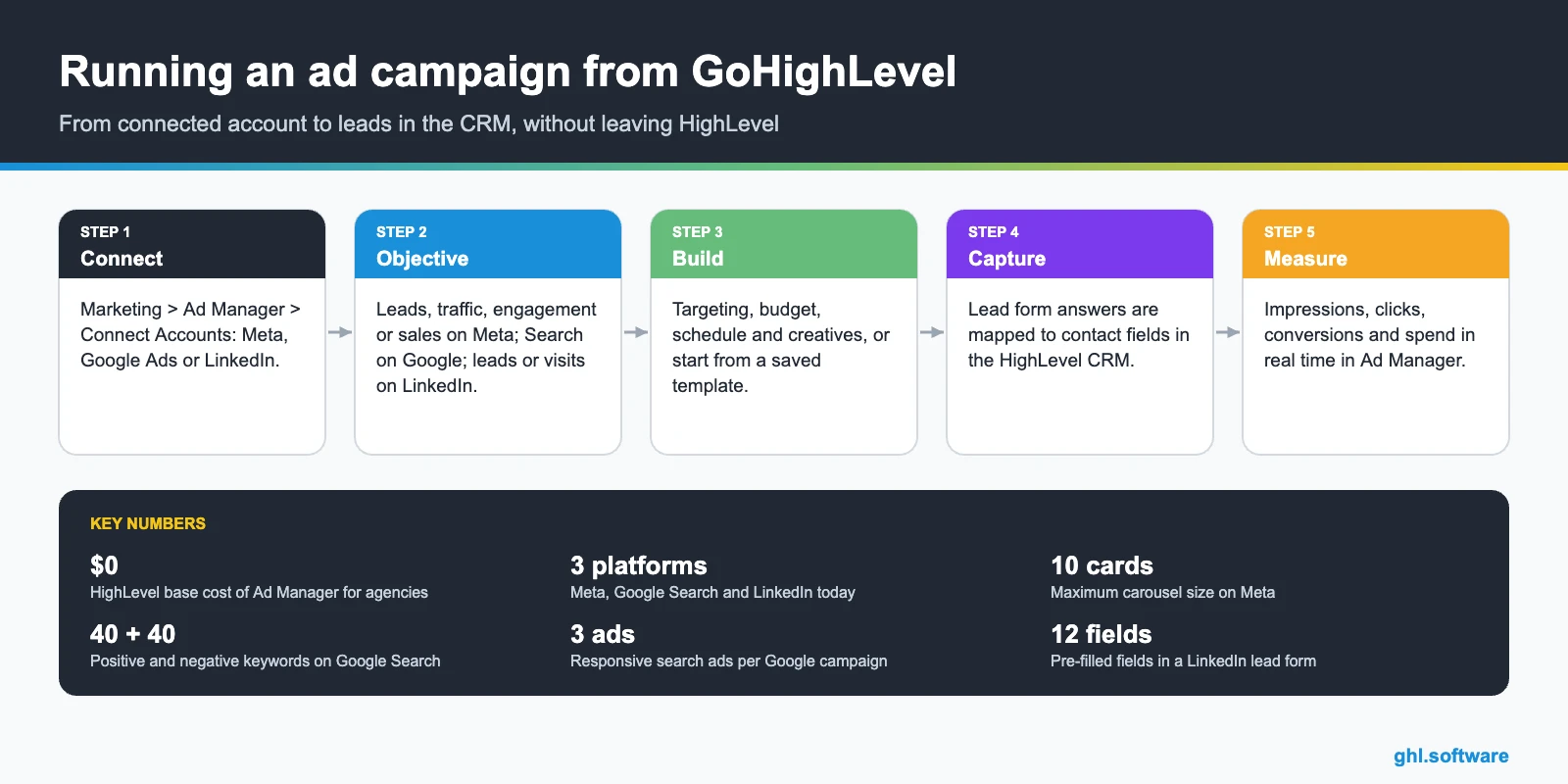
What GoHighLevel Ad Manager includes
| Platform | Objectives | Formats | Status |
|---|---|---|---|
| Meta (Facebook and Instagram) | Lead generation, website traffic, engagement, sales | Single image, video, carousel (up to 10), lead forms, conversation forms | Available |
| Google Ads | Search campaigns | Responsive search ads | Available |
| Lead generation, website visits | Single image, video, carousel, lead forms | Available | |
| Google Demand Gen | No | No | Coming soon |
| TikTok | No | No | In progress on the roadmap, no date |
On top of creation, Ad Manager handles day-to-day management from HighLevel, real-time reporting, reusable campaign templates, optimization insights, AskAI for Ad Manager and public APIs.
How to connect your ad accounts
- Open Ad Manager. In the sub-account go to Marketing > Ad Manager.
- Connect accounts. Click Connect Accounts and sign in to Meta, Google Ads or LinkedIn.
- Check Meta assets. For Meta you need a Business Portfolio, an ads account and a Facebook Page your profile can access.
- Prepare your CRM. Create the custom fields you’ll need before building lead forms, so answers have somewhere to land.
- Launch a test campaign. Start small, confirm a test lead reaches the contact record, then scale.
Creating campaigns on Meta, Google and LinkedIn
A realistic first week looks like this. On Monday you connect the Meta account and build one lead generation campaign with a single offer, such as a free roof inspection. The form asks only what your team needs to call back: name, phone, ZIP code and one qualifying question. On Tuesday you check that the first test lead arrived with every answer in the right field. By Friday you compare cost per lead with what you were paying before, and only then decide whether to add a Google Search campaign for people already searching for the service.
That order matters. Lead forms bring volume fast, while search campaigns catch people with clear intent. Running both from the same place lets you see, contact by contact, which channel brought the customers who actually booked.
Lead forms, reporting and AskAI
Once the lead is a contact, the rest of HighLevel takes over: a workflow can text the lead in minutes, assign it in the CRM pipeline or hand it to an AI agent.
What Ad Manager costs
| Item | Cost | Notes |
|---|---|---|
| Ad Manager (HighLevel base cost) | $0 | Free for agencies |
| Reselling to clients | You set the price | Agency Reselling, Sub-Account Reselling or SaaS Configurator Features tab |
| Ad spend | Paid by each sub-account | Directly to Meta, Google or LinkedIn |
| HighLevel plan | From $97/month | Starter $97, Unlimited $297, Agency Pro $497 |
For agencies in SaaS mode, Ad Manager can be one more feature in the package you sell. See Agency Pro for how reselling works.
Limits and what it does not do yet
Who Ad Manager is for, and how it compares
Local businesses
Run a lead campaign and call the lead from the same tool, minutes after the form is sent.
Agencies
Manage client campaigns per sub-account and resell Ad Manager at your own price.
| HighLevel Ad Manager | Native ad managers | |
|---|---|---|
| Leads mapped to CRM contacts | Yes | No |
| Workflows and follow-up in the same tool | Yes | No |
| Meta, Google Search and LinkedIn in one place | Yes | No |
| Every format and bidding option | No | Yes |
| TikTok and all Google campaign types | No | Yes |
The practical rule: if most of your budget goes to lead generation on Facebook and Instagram, or to simple search campaigns, Ad Manager can be your daily cockpit. If you depend on Performance Max, YouTube or TikTok, keep the native tools and use HighLevel for the follow-up.
The bootcamp link gives you a 30-day trial and live setup sessions, so you can connect your ad accounts and run a test lead campaign before paying.
Start the 30-day trialAffiliate link. I may earn a commission at no extra cost to you.
Frequently asked questions
What is GoHighLevel Ad Manager?
It is HighLevel’s built-in tool to create, manage and report on ad campaigns for Meta (Facebook and Instagram), Google Search and LinkedIn from inside a sub-account. Leads from lead forms are mapped to contact fields in the CRM, so follow-up can start right away.
How much does GoHighLevel Ad Manager cost?
HighLevel’s base cost for Ad Manager is $0 for agencies. Agencies can resell it to clients and set their own price, and each sub-account pays its own ad spend directly to Meta, Google or LinkedIn.
Which ad platforms does Ad Manager support?
Today: Meta (lead generation, traffic, engagement and sales), Google Ads Search campaigns and LinkedIn (lead generation and website visits). Google Demand Gen is listed as coming soon and TikTok ads are on the roadmap as “in progress”, with no date.
Do Facebook lead form leads go into the CRM?
Yes. When you build a Facebook lead form in Ad Manager, you map each form field to a HighLevel contact field, including custom fields you create first. Mapped answers appear on the contact, and you can review mappings in Settings > Integrations.
What do I need to connect Meta ads?
A Meta Business Portfolio, a Meta ads account and a Facebook Page, plus a Facebook profile with access to those assets. You connect them in Marketing > Ad Manager > Connect Accounts.
Can Ad Manager replace Meta Ads Manager or Google Ads?
For everyday campaigns, often yes. For advanced setups, not completely: Google support is Search-only today, and HighLevel’s documentation does not list every format and bidding option that the native platforms offer. Many agencies use both.
Related: GoHighLevel CRM · forms · automations · reporting · AI · white label and SaaS
Sources: Overview of Ad Manager, Facebook Lead Form in Ad Manager, LinkedIn ad campaign in Ad Manager, Ad Manager: Google Search ads (changelog), TikTok ads integration (roadmap). Reviewed on 23/10/2026.

