

GoHighLevel snapshots: what they copy, how to create, share and update them
Leer en español: Snapshots de GoHighLevel · Ler em português: Snapshots do GoHighLevel · Part of all GoHighLevel features · Industry templates: snapshots directory
A GoHighLevel snapshot is a reusable copy of a sub-account’s setup: funnels, websites, workflows, pipelines, calendars, custom fields, templates, dashboards and AI agents. You create it in Agency View > Account Snapshots, share it with a link, load it into new or existing sub-accounts and push updates later. Contacts, conversations, appointments and third-party connections are never copied.
Based on HighLevel’s Snapshots overview, updated October 9, 2026.
The first client of a new agency takes two weeks: the funnel, the pipeline, the reminders, the review requests, the AI receptionist. The tenth client should take thirty minutes. The difference is a snapshot.
Snapshots are the reason agencies can grow on HighLevel without hiring an operations team. This guide explains exactly what a snapshot copies and what it leaves behind, how to create, share and load one, how updates work and how to turn a good snapshot into a product.
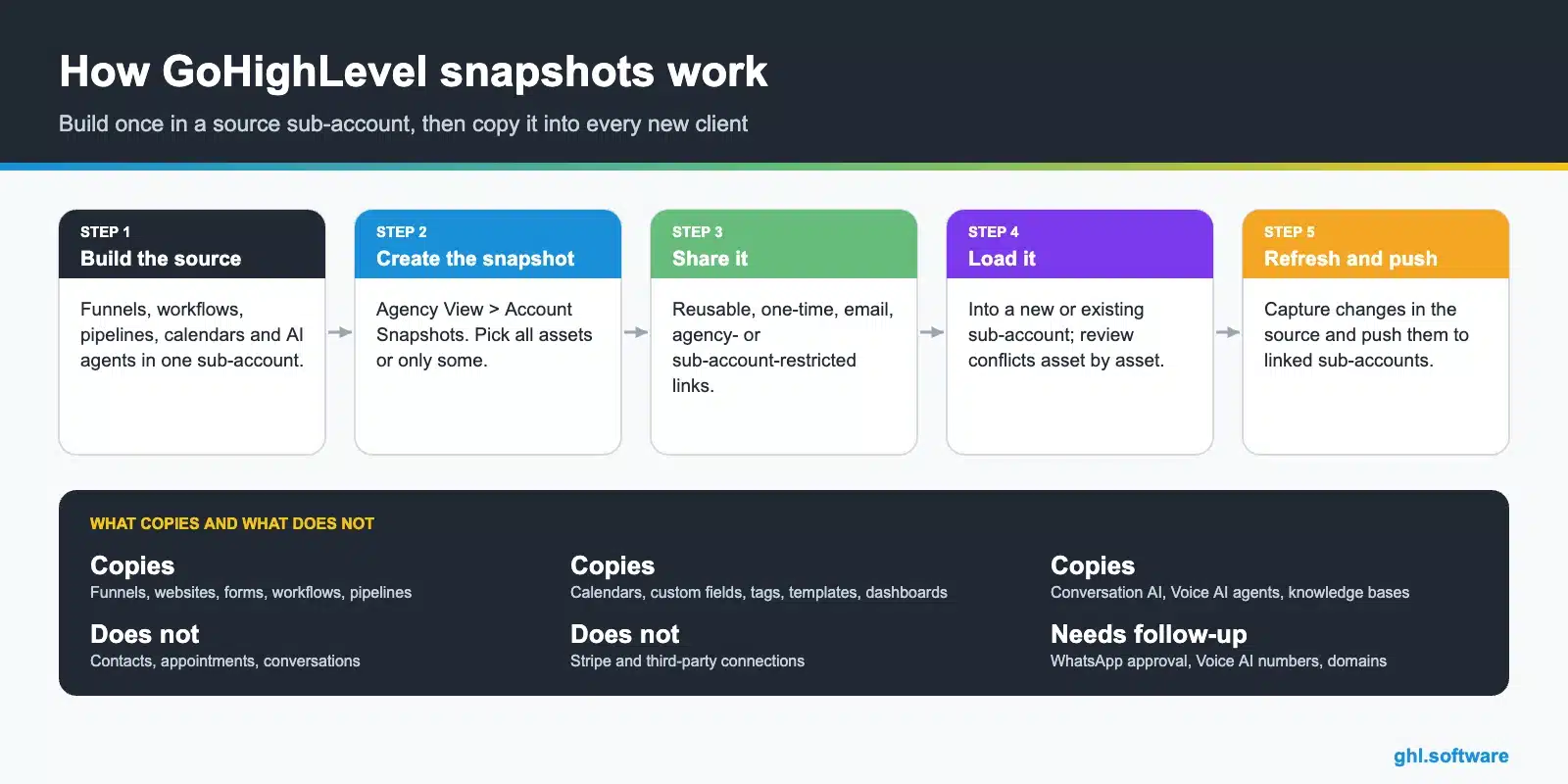
What a snapshot copies
| Area | Assets included |
|---|---|
| Funnels and marketing | Funnels, websites, blogs, forms, surveys, quizzes, campaigns, email builder templates, text and email templates, social planner, WordPress sites |
| Automation and AI | Workflows and triggers, Conversation AI, Voice AI agents, Agent Studio, brand voice, knowledge bases |
| CRM | Pipelines, custom fields, custom objects, custom values, tags, smart lists, trigger links |
| Calendars | Calendars, calendar groups, services, add-ons, categories and resources |
| Reporting | Dashboards, custom reports and custom metrics |
| Memberships and documents | Membership offers and products, certificates, webinars, documents and contracts |
| Ads and reputation | Google, LinkedIn and Meta ad campaigns, review settings, WhatsApp templates, brand colors and design kit |
What a snapshot does not copy
Assets protected by another creator’s protected snapshot settings cannot be copied either.
How to create, share and load a snapshot
- Build in a source sub-account. Use a dedicated template sub-account, not a live client, so the snapshot stays clean.
- Create the snapshot. Agency View > Account Snapshots > Create New Snapshot. Name it, choose the source and pick all assets or only some categories.
- Share it. Generate a reusable link, a one-time link, an email invite or a link restricted to one agency or sub-account.
- Load it. Create a new sub-account from the snapshot, or load it into an existing one and decide asset by asset whether to override or skip conflicts.
- Finish the setup. Reconnect Stripe and integrations, assign phone numbers, connect domains and WhatsApp.
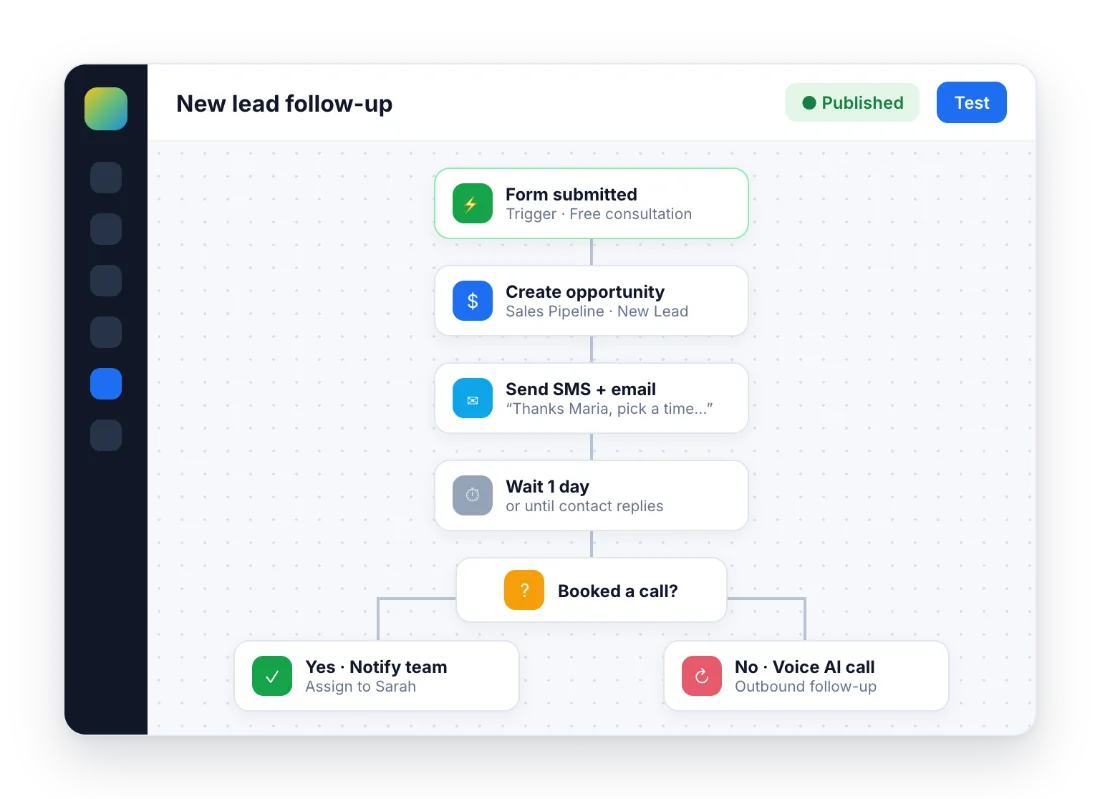
Updating snapshots: refresh and push
Snapshots do not update by themselves. When you improve the source, for example a better reminder sequence, you refresh the snapshot to capture the new and changed assets, then push the updates you select to the sub-accounts linked to it. Push carefully: test in one client before sending a change to all of them.
Snapshots on each plan
| Plan | How snapshots help |
|---|---|
| Starter ($97) | Build in a sandbox sub-account and copy to your live business or a second brand |
| Unlimited ($297) | Onboard every new client in minutes with unlimited sub-accounts |
| Agency Pro ($497) | Attach a snapshot to each SaaS plan so new subscribers get it automatically |
Turning a snapshot into a product
Sell it to other agencies
A proven niche snapshot (roofing, med spa, real estate) can be sold with a share link or listed through HighLevel’s Marketplace link type.
Use it as your SaaS product
On Agency Pro, the snapshot is what a client gets the moment they pay for your software.
Protect your work
Protected snapshot settings stop buyers from copying your assets into their own snapshots.
Ready-made snapshots by industry
Not ready to build your own? The GoHighLevel snapshots directory covers more than 50 industries, from accounting firms and dental clinics to med spas, gyms and law firms, so you can see what a snapshot for your niche should include before you build or buy one.
The bootcamp link gives you 30 days instead of 14, plus a ready-made snapshot and funnel as bonuses to learn from.
Start the 30-day trialAffiliate link. I may earn a commission at no extra cost to you.
Frequently asked questions
What is a GoHighLevel snapshot?
A reusable template that copies the setup of one sub-account (funnels, websites, workflows, pipelines, calendars, custom fields, templates, AI agents and more) into new or existing sub-accounts. It does not copy contacts, conversations or appointments.
How do I create a snapshot in GoHighLevel?
Go to Agency View > Account Snapshots, click Create New Snapshot, name it, choose the source sub-account, select all assets or specific ones and click Create.
Do snapshots update automatically?
No. When you change the source sub-account, you refresh the snapshot to capture the changes and then push the updates you choose to the sub-accounts that use it.
Can I share or sell a snapshot?
Yes. You can share it with reusable, one-time, email, agency-restricted or sub-account-restricted links, and there is a Marketplace link type. Many agencies sell niche snapshots or include them in a SaaS plan on Agency Pro.
Will loading a snapshot delete my contacts?
No. Loading adds assets and does not delete contacts or client data. If an asset already exists, you choose to override or skip it.
Where can I find GoHighLevel snapshots for my industry?
Our GoHighLevel snapshots directory covers more than 50 industries, from accounting firms and dental clinics to med spas, gyms and law firms. HighLevel’s Marketplace and other agencies also sell ready-made niche snapshots.
Related: snapshots directory · white label and SaaS · automations · Agency Pro · Courses, communities and client portal · Online store
Source: Snapshots overview (updated October 9, 2026).

