

GoHighLevel AI: the AI Employee, AI agents and every AI tool explained
Leer en español: Inteligencia artificial en GoHighLevel · Ler em português: Inteligência artificial do GoHighLevel · Part of all GoHighLevel features
GoHighLevel AI is a set of tools that work inside your CRM: Voice AI answers calls, Conversation AI replies on SMS, WhatsApp, web chat and social DMs, Reviews AI answers reviews, Content AI writes posts and emails, and Ask AI works as an assistant inside the platform. HighLevel sells them together as the AI Employee: pay per use, or $50 or $97 per month per sub-account.
Prices from HighLevel’s AI product pricing article, updated October 20, 2026.
Most people meet HighLevel’s AI through one tool, usually the AI receptionist, and only later find out there are almost ten of them, each billed a little differently. That is where the confusion starts: what is free, what costs per minute, what the $97 plan really covers and which tool to switch on first.
This guide maps every AI tool in HighLevel, what it does for a real business, what it costs and where it still needs a person behind it.
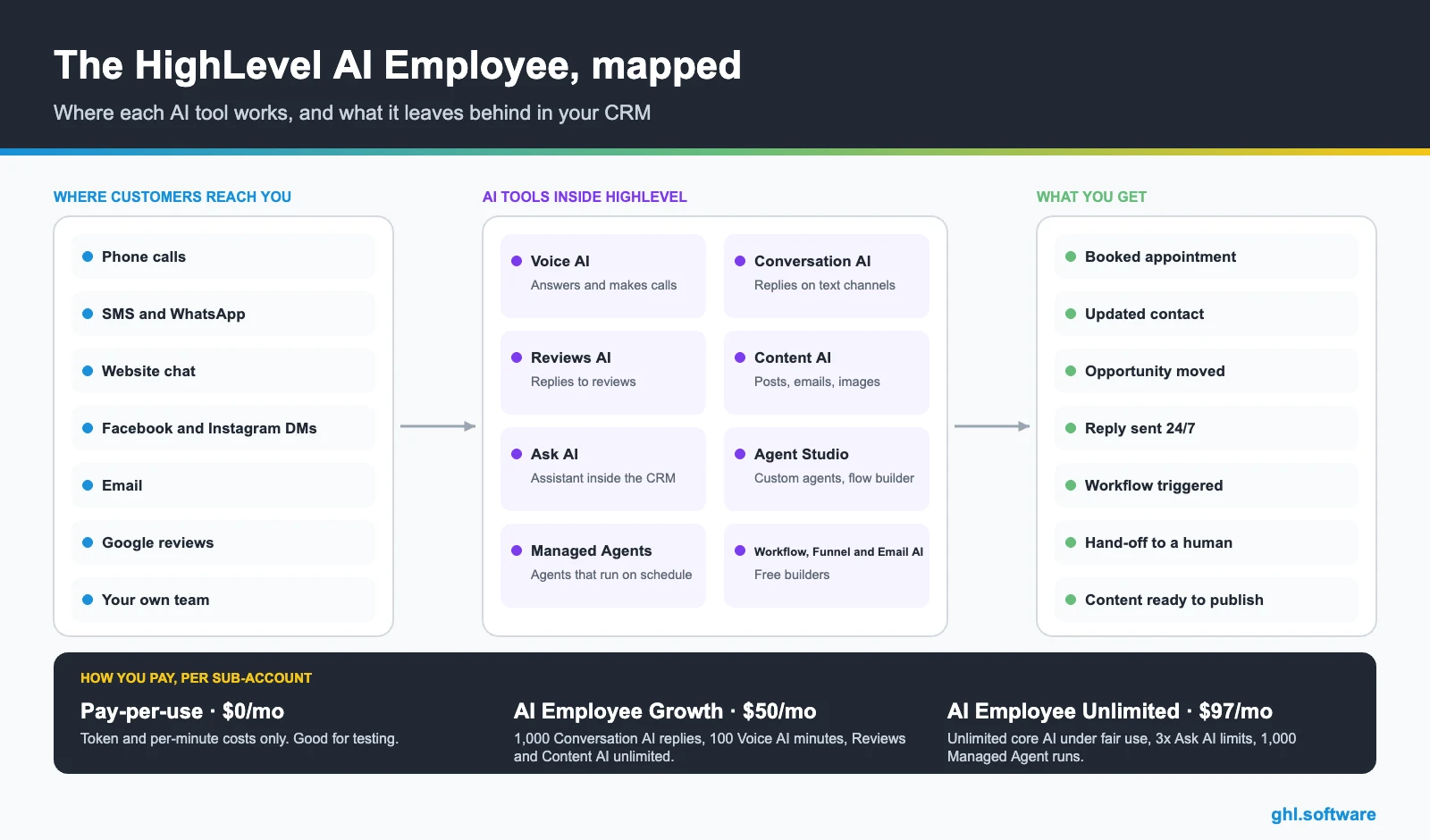
Every AI tool in HighLevel and what it does
Which AI tool to switch on first
Start where your business leaks the most leads. Turning everything on at once is the fastest way to get bad answers you will not have time to review.
You miss calls
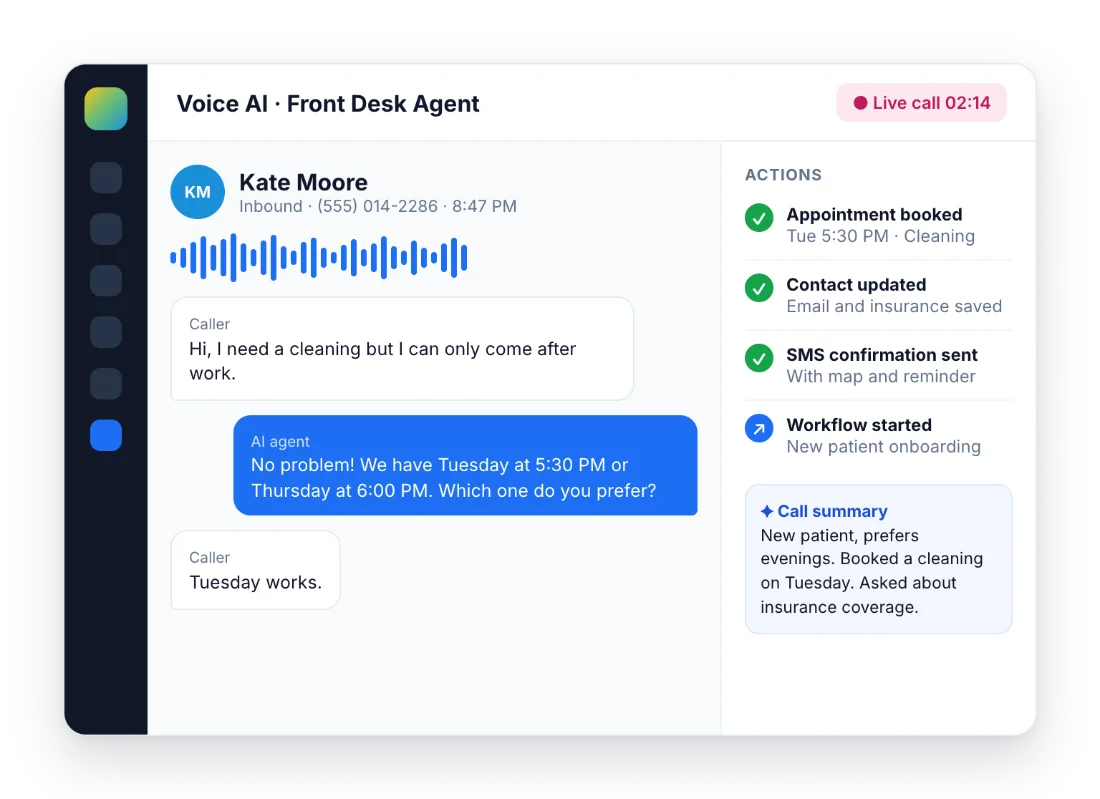
Start with Voice AI. Every unanswered call is usually a customer who calls the next company on Google.
Leads write and wait hours for a reply
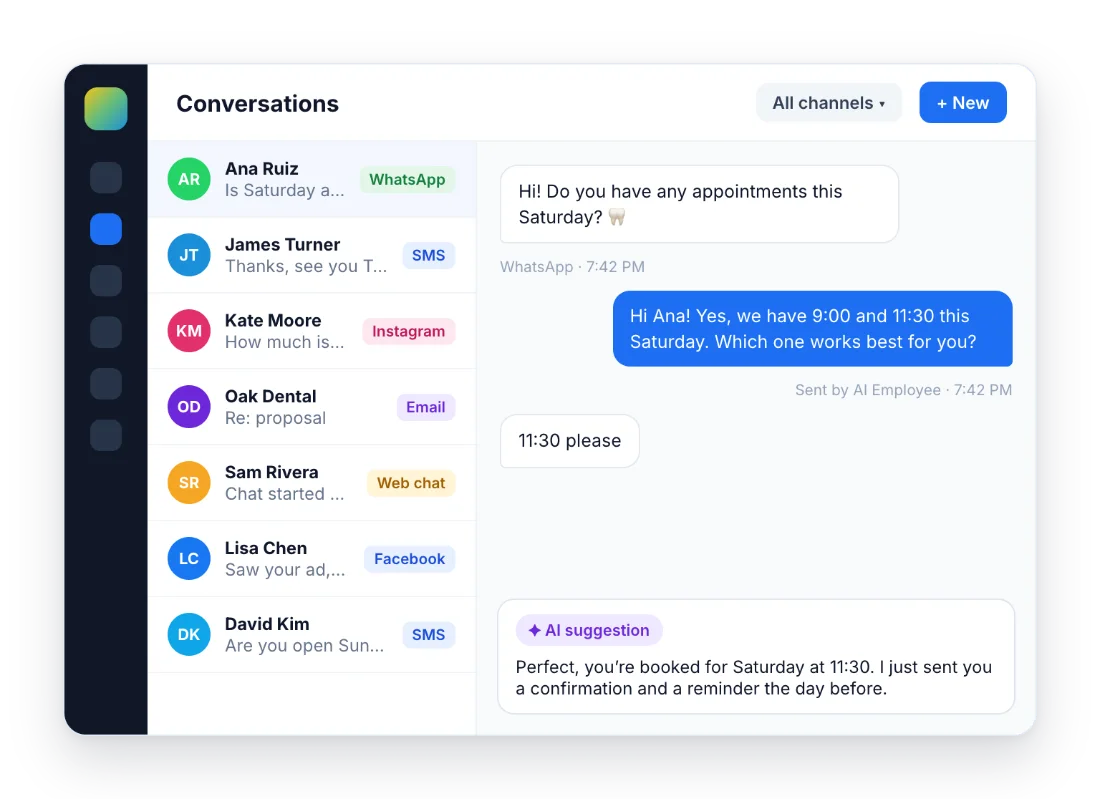
Start with Conversation AI on the channel where most messages arrive, usually WhatsApp or web chat.
Reviews pile up without answers
Start with Reviews AI in drip mode. It answers gradually so it does not look automated.
You are the bottleneck for content
Start with Content AI inside the Social Planner and email builder.
What the AI Employee costs
AI is billed per sub-account. You can stay on pay-per-use or add one of the two AI Employee plans on top of your HighLevel plan.
| Pay-per-use | AI Employee Growth | AI Employee Unlimited | |
|---|---|---|---|
| Monthly price | $0 | $50 | $97 |
| Conversation AI | Token cost | 1,000 agent replies/month | Unlimited (fair use) |
| Voice AI | $0.045/min voice engine + text-to-speech + LLM | 100 minutes/month | Unlimited (fair use) |
| Reviews AI | $0.01 per AI reply sent | Unlimited | Unlimited |
| Content AI | $0.063/image, $0.0945 per 1,000 words | Unlimited | Unlimited |
| Ask AI | Token cost | Included (5-hour window limit) | 3x the Growth limit |
| Managed Agents | Token cost | 100 runs/month | 1,000 runs/month |
| Agent Studio | Pay-per-use | Pay-per-use | Pay-per-use |
Free on every plan: Funnel AI (up to 1,000 prompts a day per sub-account), the Workflow AI builder, Email AI and the Knowledge Base. Premium workflow AI actions cost $0.01 per execution. Phone minutes for Voice AI are billed separately by the phone system. Growth overages are charged at pay-per-use rates.
For a single location the decision is simple: if Voice AI handles more than about 100 minutes a month or Conversation AI more than 1,000 replies, Unlimited usually costs less than Growth plus overages. See how the AI plans fit with the base plans in the GoHighLevel pricing guide.
Set up the AI Employee in one afternoon
- Fill the Knowledge Base. Add your website, services, prices, hours and the ten questions customers ask most. Every AI tool answers from here.
- Switch on Conversation AI in suggestive mode. The AI drafts the reply and a person approves it. Move to auto-pilot only when the drafts stop needing edits.
- Add Voice AI for calls. Create the agent, connect your calendar and decide when it answers: always, after hours or when nobody picks up.
- Turn on Reviews AI. Start with suggestions, then drip mode. Check that the tone matches how you talk to customers.
- Set a spending limit. Choose whether the AI stops at the limit or keeps running. Agencies review usage per sub-account in the AI Suite.
- Review conversations every week. Read a sample of chats and call logs during the first month and update the Knowledge Base with what was missing.
Where AI still needs a person
Sensitive conversations
Complaints, refunds, emergencies and anything legal or medical should go to a human. Write those hand-off rules before going live.
Consent and disclosure
Tell people they are talking to an AI assistant, and only contact people who agreed to hear from you. Outbound AI calls and SMS have specific consent rules in the US and many other countries.
Costs that grow quietly
Pay-per-use is cheap per message but adds up across many sub-accounts. Set spending limits from day one, especially for agencies.
The bootcamp link gives you 30 days instead of 14 and live onboarding sessions where you can set up your first AI agent with help.
Start the 30-day trialAffiliate link. I may earn a commission at no extra cost to you. AI and phone usage may be charged during the trial.
Frequently asked questions
What is the GoHighLevel AI Employee?
It is the name HighLevel uses for its suite of AI tools: Voice AI for calls, Conversation AI for text channels, Reviews AI, Content AI and Ask AI, plus builders for your own agents such as Agent Studio and Managed Agents. You pay per use or add an AI Employee plan per sub-account: Growth at $50/month or Unlimited at $97/month.
Is AI included in the GoHighLevel base plans?
Partly. Funnel AI, the Workflow AI builder, Email AI and the Knowledge Base are free on every plan. Voice AI, Conversation AI, Reviews AI, Content AI and Ask AI are pay-per-use unless you add an AI Employee plan on top of Starter, Unlimited or Agency Pro.
What does AI Employee Unlimited include for $97/month?
Unlimited use of Conversation AI, Voice AI, Reviews AI and Content AI under fair use, three times the Growth limits for Ask AI and AI Studio, and 1,000 Managed Agent runs per month. Agent Studio is always billed per use, and phone minutes are billed separately.
Can I cap how much the AI spends?
Yes. Spending limits let you either block the AI when it reaches the limit or keep it running and pay the overage at pay-per-use rates. Usage is reviewed by agency admins in the AI Suite, with a breakdown per sub-account.
Can an agency resell the AI Employee to clients?
Yes, on Agency Pro ($497/month). Only that plan can rebill AI Employee usage to clients, and you can add your own markup. On Starter and Unlimited the AI usage is billed to the agency.
Does the AI work in Spanish and other languages?
Yes. Conversation AI and Voice AI answer in the language of your instructions and knowledge base. Write both in the language your customers use and test real conversations before switching to auto-pilot.
Keep exploring: Voice AI · CRM and pipelines · integrations and API · what is conversational AI · GoHighLevel pricing · Calendars and booking · Reporting and attribution
Sources: AI product pricing (updated October 20, 2026) · Overview of Voice AI Agents. Reviewed October 23, 2026.

