

GoHighLevel automation: workflows, triggers, actions and Workflow AI
Leer en español: Automatizaciones en GoHighLevel · Ler em português: Automação no GoHighLevel · Part of all GoHighLevel features
GoHighLevel automation runs on workflows: a trigger (a form, a call, a booking, a payment, a tag) starts a sequence of actions such as SMS, email, WhatsApp, tasks or pipeline moves, with waits, if/else branches and goals in between. Workflows are included in every plan; premium steps cost $0.01 per run after 100 free runs per sub-account.
Pricing from HighLevel’s workflow premium features article, updated September 28, 2026.
Every business we set up in HighLevel starts with the same three or four workflows: answer a new lead in under a minute, text back a missed call, remind people of their appointment and ask for a review when the job is done. None of them is clever. Together they usually recover more sales in the first month than any new ad campaign.
This page shows how a workflow works, the five to build first, the full list of triggers and actions, what Workflow AI does and what premium steps cost.
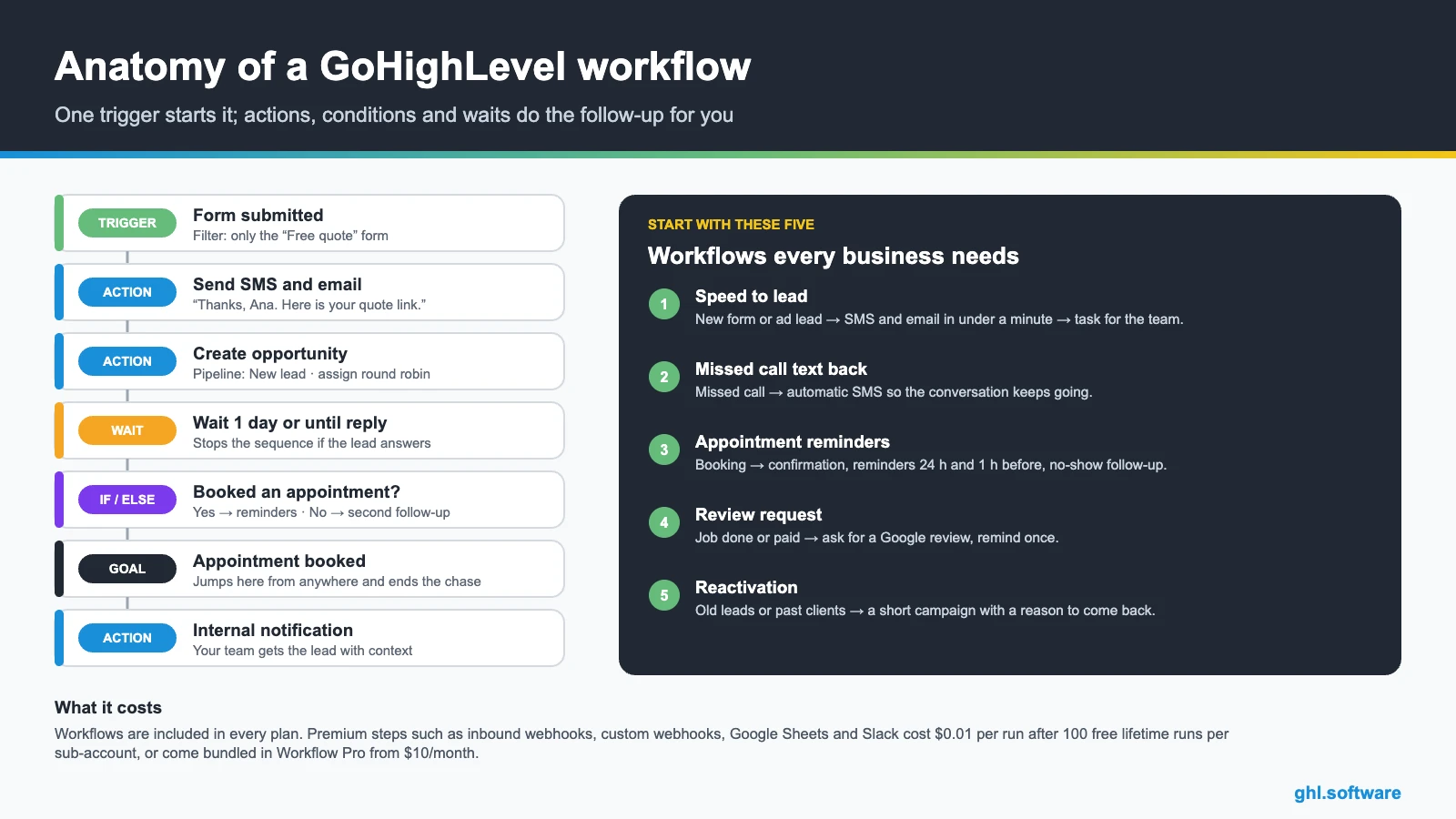
How a workflow works
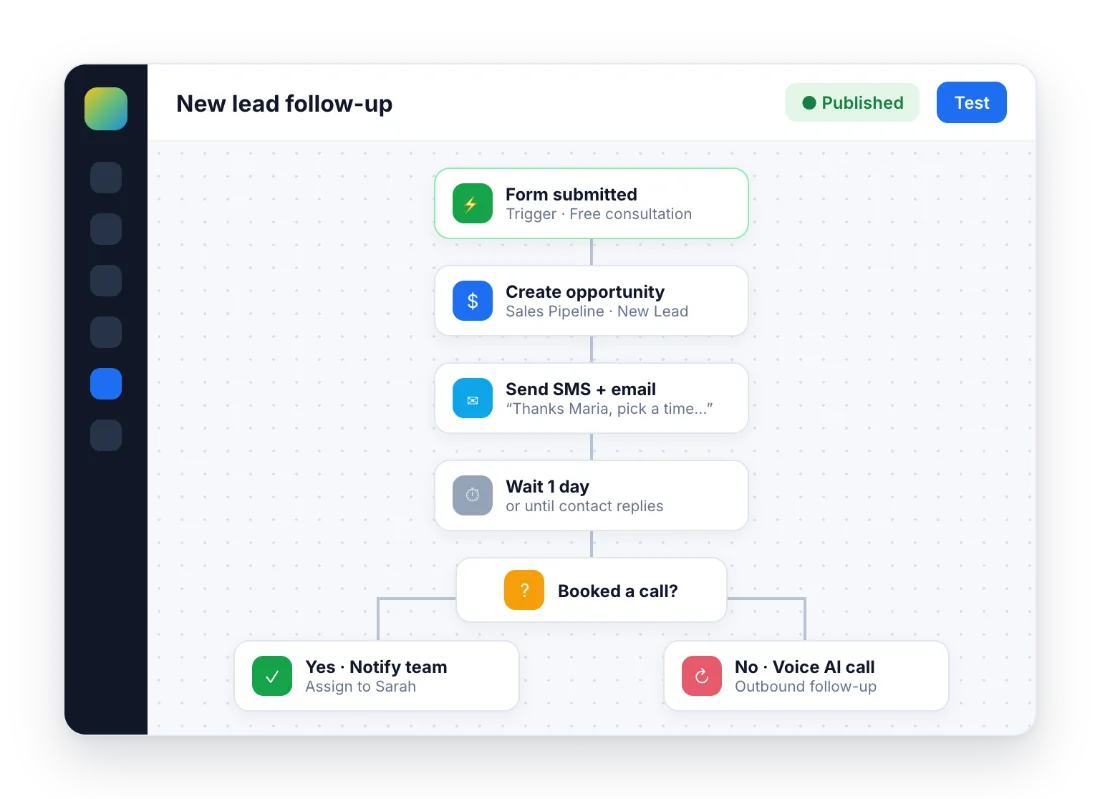
Five workflows to build first
- Speed to lead. Trigger: form submitted or Facebook lead form. Actions: SMS and email within a minute, create the opportunity, assign the lead and notify the team.
- Missed call text back. Trigger: call status, missed. Action: an automatic SMS so the caller does not move on to the next company. Guide: missed call text back.
- Appointment confirmation and reminders. Trigger: customer booked appointment. Actions: confirmation, reminders 24 hours and 1 hour before, and a follow-up if they do not show. Guide: how to send appointment reminders.
- Review request. Trigger: appointment completed or payment received. Actions: review request by SMS or email, one reminder, then stop. Guide: automate review requests.
- Reactivation. Trigger: a tag added to old leads or past clients. Actions: a short sequence with a real reason to come back, ending with a booking link.
Every workflow trigger, by category
| Category | Triggers |
|---|---|
| Contact | Contact created, contact changed, contact tag, birthday reminder, custom date reminder, contact DND, note added, task added, task reminder, task completed, contact engagement score |
| Messages and events | Customer replied, form submitted, survey submitted, quiz submitted, trigger link clicked, email events, call status, inbound webhook, video tracking, funnel or website page view, messaging error |
| Ads and social | Facebook lead form, TikTok form, LinkedIn lead form, Facebook and Instagram comments on a post, new review received |
| Appointments | Customer booked appointment, appointment status |
| Pipeline | Opportunity created, opportunity changed, opportunity status changed, pipeline stage changed, stale opportunities |
| Payments and documents | Payment received, invoice, order form submission, order submitted, subscription, refund, estimates, documents and contracts |
| Courses and communities | New signup, product or offer access granted or removed, lesson started or completed, product completed, user login, community group access, leaderboard level changed |
| Ecommerce and affiliates | Shopify abandoned checkout, order placed, order fulfilled; affiliate created, affiliate enrolled in campaign, new affiliate sale |
| Phone | Start IVR, call status, missed call (through call status) |
Every workflow action, by category
| Category | Actions |
|---|---|
| Communication | Send email, SMS, WhatsApp, Messenger and Instagram DM, voicemail drop, call, review request, internal notification, Slack, reply in comments, live chat message, manual call or SMS task |
| Contacts | Create or update contact, find contact, update field, add or remove tag, assign to user (round robin), DND, add note, add task, copy contact, engagement score, followers |
| Pipeline | Create or update opportunity, find opportunity, remove opportunity, owners and followers |
| Appointments | Book appointment, update appointment status, appointment note, one-time booking link |
| Payments and documents | Send invoice, send estimate, send documents and contracts, Stripe one-time charge |
| Logic | If/else, wait, goal event, split test, go to, add to or remove from workflow, drip, update custom value |
| Data tools | Date/time formatter, number formatter, text formatter, math operation, array functions |
| Ads and integrations | Google Analytics and Google Ads events, Facebook custom audiences and Conversions API, webhook, custom webhook, Google Sheets, custom code |
| AI | Conversation AI bot, AI appointment booking, Workflow AI actions such as decision maker, intent detection, summarize and translate |
Messenger and Instagram DMs only deliver if the contact wrote to your page in the last 24 hours, except replies to comments. WhatsApp needs a connected WhatsApp number.
Workflow AI and the AI actions
Workflow AI lets you describe the automation in plain language, for example “text new leads within a minute and email them if they do not reply in two days”, and HighLevel drafts the trigger and steps for you to review. The builder is free on every plan.
Inside a workflow you can also add AI steps that decide or transform: decision maker, intent detection, summarize text and translate. Those cost $0.01 per run. For conversations and calls, workflows hand off to Conversation AI and Voice AI; see GoHighLevel AI.
What automation costs
| Price | What it covers | |
|---|---|---|
| Standard workflows | Included in every plan | Triggers and actions such as SMS, email, tags, tasks, pipeline, appointments |
| Premium triggers and actions | $0.01 per run after 100 free lifetime runs per sub-account | Inbound and custom webhooks, Google Sheets, Slack, Marketplace and LC app actions |
| Workflow Pro Starter | $10/month | 10,000 premium runs, then $0.008 each |
| Workflow Pro Growth | $25/month | 30,000 premium runs, then $0.006 each |
| Workflow Pro Scale | $50/month | 65,000 premium runs, then $0.004 each |
| Workflow AI actions | $0.01 per run | Decision maker, intent detection, summarize, translate |
Messages themselves are billed as usage: SMS, calls and email through LC Phone and LC Email. Agencies can rebill premium workflow usage to each sub-account with a markup. See the pricing guide for plans and usage rates.
Mistakes that cost leads
The same lead in three workflows
Two workflows on “contact created” mean two welcome messages. Use goal events, “remove from workflow” and clear entry filters.
Messages at 3 a.m.
Set allowed sending hours in the workflow settings and use waits that respect the contact’s time zone.
Consent and opt-outs
Honor STOP replies and DND, include unsubscribe links and register A2P 10DLC before texting US numbers.
Publishing without testing
Run a test contact through every branch and read the workflow history before switching from draft to published.
The bootcamp link gives you 30 days instead of 14 and live onboarding sessions where you can build these five workflows with help.
Start the 30-day trialAffiliate link. I may earn a commission at no extra cost to you. Messaging usage may be charged during the trial.
Frequently asked questions
What can you automate in GoHighLevel?
Almost any repeatable task with a clear starting point: follow-up after a form or ad lead, missed call text back, appointment confirmations and reminders, review requests, onboarding, payment and invoice reminders, course access, lead assignment and internal alerts. Workflows can send email, SMS, WhatsApp and social DMs, update the CRM and call other apps through webhooks.
Are workflows included in every GoHighLevel plan?
Yes. Workflows are included from the Starter plan. Premium steps, such as inbound and custom webhooks, Google Sheets, Slack and Marketplace app actions, cost $0.01 per run after 100 free lifetime runs per sub-account, or you can buy Workflow Pro from $10/month.
What is the difference between workflows and campaigns?
Campaigns were HighLevel’s older, linear automation tool. Workflows replaced them: they add triggers, conditions, goals, waits, branching and far more actions, and everything new is built there.
Does GoHighLevel have workflow templates?
Yes. The builder includes ready-made recipes for common jobs such as appointment reminders and lead nurturing, and snapshots let you import complete sets of workflows, funnels and pipelines built by other agencies or by you.
What is Workflow AI?
You describe the automation in plain language and HighLevel drafts the trigger and the steps for you to review. The builder is free; AI actions inside a workflow, such as intent detection or summarizing, cost $0.01 per run.
How do I stop a lead from getting messages after they reply or book?
Use a wait step set to “until reply”, a goal event for the outcome you want (for example, appointment booked) or the stop-on-response setting. When the goal is met, the contact jumps out of the chase.
Keep exploring: CRM and pipelines · GoHighLevel AI · integrations and API · snapshots · GoHighLevel pricing · Contracts and e-signature · Payments and invoicing · Calendars and booking
Sources: Workflow premium features (updated September 28, 2026) · Workflow Pro pricing tiers · AI product pricing (updated October 20, 2026). Trigger and action lists based on the HighLevel workflow builder. Reviewed October 23, 2026.

