

GoHighLevel AI Studio: what it is, pricing and how to build with it
Leer en español: AI Studio en español · Ler em português: AI Studio em português · Part of all GoHighLevel features
GoHighLevel AI Studio is a conversational builder inside each sub-account. You describe a website, landing page, survey, booking flow or branded form, and it builds it. Then you refine it, connect its forms and calendars to the CRM and publish it on your domain. Usage is included in the AI Employee plans ($50 or $97 per month per location) or billed at token cost.
Based on HighLevel’s AI Studio help articles, AI Product Pricing and the changelog, checked on October 24, 2026.
Dana runs a two-person agency in Phoenix. On a Tuesday, a yoga studio asks for a page before Saturday’s open house: a short quiz that suggests a class, a booking calendar and a free-class form. Before, that meant a template and a long afternoon of dragging sections. This time Dana opens GoHighLevel AI Studio, types two sentences, uploads a photo of the studio and makes a coffee while the first draft builds.
The draft is not the end of the job, though. The form still has to reach the CRM, the calendar must be the real one, and the page needs the client’s domain. So this guide covers the whole path, including where the tool stops.
What GoHighLevel AI Studio is
HighLevel describes AI Studio as an AI-powered, conversational builder for websites, landing pages and interactive front-end experiences, such as multi-step surveys, booking flows and branded forms. You find it in the left navigation of the sub-account. When you write what you want in plain language, it generates the layout, copy and visuals, and then you keep refining with follow-up prompts.
Recent additions
The changelog moves fast. In October 2026 alone, for example, HighLevel added site analytics, Live Chat and Email Chat widgets, checkout upgrades for AI Studio Payments and Git Sync with GitHub.
Is AI Studio free? Pricing in 2026
It depends on when the source was written. When HighLevel announced it on April 2, 2026, the blog said AI Studio was available inside HighLevel Labs and “still in the free trial mode”. Then, on September 22, 2026, the changelog announced it was live from Labs for all locations. Since then, the AI Product Pricing article treats it as a usage-based product:
| Option | Monthly price | AI Studio usage |
|---|---|---|
| AI Employee Growth | $50 per enabled location | Usage included |
| AI Employee Unlimited | $97 per enabled location | 3x the Growth usage |
| Pay-per-use | No monthly fee | Billed at token cost |
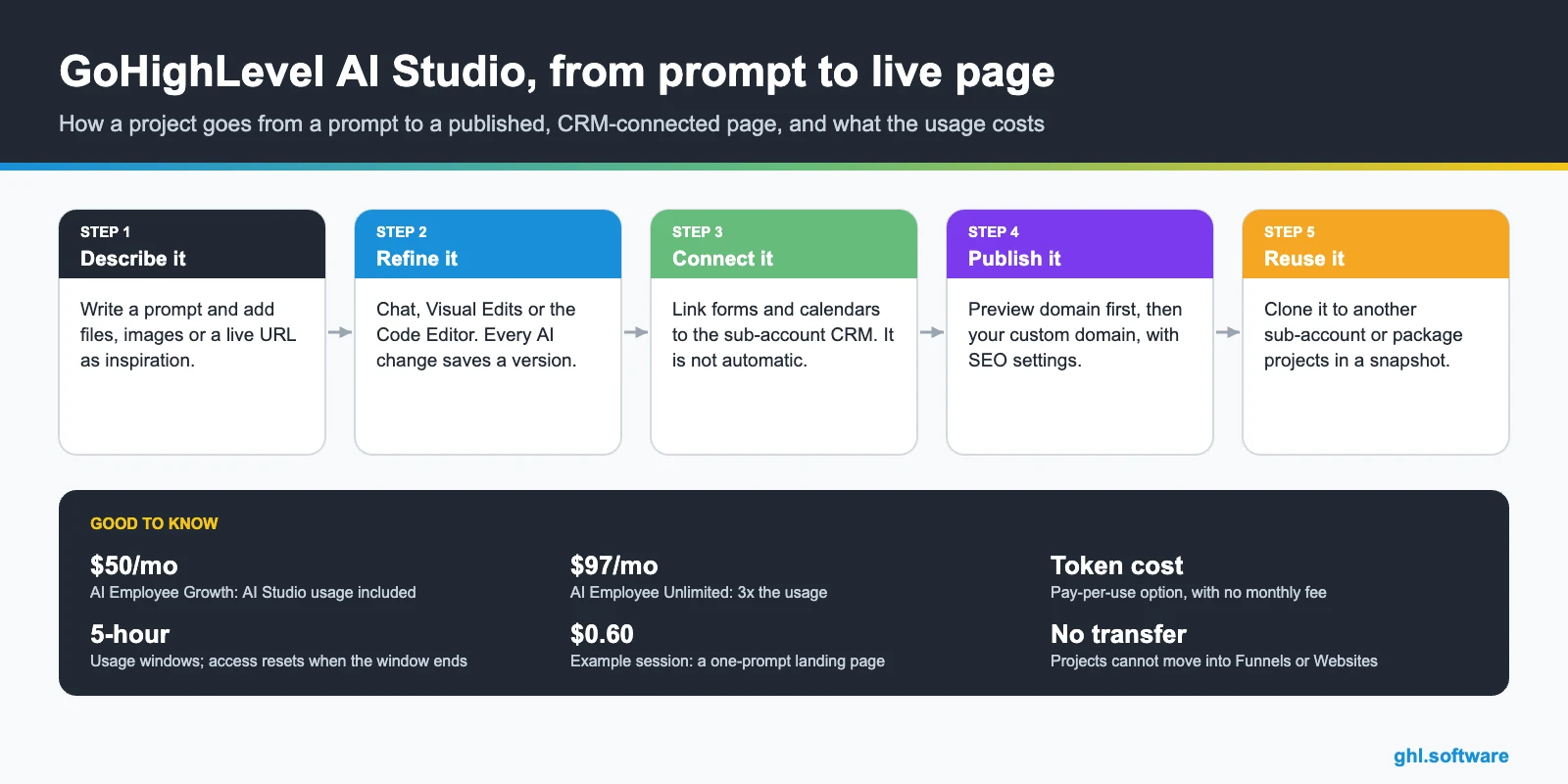
Also, usage is measured in 5-hour windows, each with its own limit per plan. If you hit it, access comes back when the window ends. More in AI Employee pricing.
What one GoHighLevel AI Studio project costs
Cost depends on the work in each session, because reasoning steps, pages, generated images, reference analysis, connections, refinements and publishing all count. For example, the AI Studio pricing article lists these sessions, each started with one message:
| Project | Tools used | Session cost |
|---|---|---|
| Yoga lead-capture landing page | 14 | $0.60 |
| Image-forward fashion landing page | 29 | $1.30 |
| 7-page travel website with CMS | 40 | $1.10 |
In other words, AI-generated images are often the biggest cost driver. Pay-per-use users also get a notice for every $50 spent. Finally, agencies that want to rebill AI Employee usage need the $497 plan, Agency Pro.
How to build a page with GoHighLevel AI Studio, step by step
- Get access. Since September 2026, AI Studio is off by default for sub-account users, so an admin grants access from the Home banner.
- Write the first prompt. Describe the business, the audience and the goal, and attach a logo, photos or a live URL if you want a reference.
- Answer or skip the questions. Pick palette, typography, layout and goal, or choose “Skip all” if you are in a hurry. Alternatively, start from a template.
- Refine it. Ask for changes in plain language, then use Visual Edits for quick tweaks and the Code Editor for precise ones.
- Preview every device. Check desktop, tablet and mobile. Because each AI change creates a version, you can always revert.
- Connect and publish. Connect forms and calendars (next section), then click Publish, set the name, description and social image, and go live on the preview domain.
If something breaks, ask AI Studio to fix it instead of debugging it yourself: HighLevel says it can inspect the project, test it and verify the fix.
Connecting GoHighLevel AI Studio forms and calendars to the CRM
This is the step most first projects miss, because forms and calendars are not connected automatically. At first, a form is only a front-end layout. To connect it, ask AI Studio to “Connect forms to my CRM”, or click Connect when it suggests it in the chat. After that, submissions flow into HighLevel, and you never had to create the form in the form builder first.
Calendars work the same way. When you ask for a booking page, AI Studio shows a card with the calendars that already exist in the sub-account, so you pick one. Bookings then follow its availability, while its confirmations, reminders and automations keep running. See calendars.
Where submissions land
Then, from that trigger, a workflow can send an email or SMS, add tags, create an opportunity or assign the contact; see automations and forms.
Publishing, custom domains, SEO, cloning and snapshots
Publishing happens inside AI Studio, so the project never moves. First you publish to a preview domain, and then you connect a custom domain from the project or from Settings > Domains & URL Redirects. You can add apex and www together, so one redirects to the other. If the domain is managed in HighLevel, the DNS records can be added for you.
When several URLs point to one project, the others 301-redirect to the primary one. Also, edits made after publishing stay in draft until you publish again.
Cloning, snapshots and Git
Limits: what GoHighLevel AI Studio does not do
Still, the first point matters most when you promise a client something: once a page is built in AI Studio, it stays there.
AI Studio vs Agent Studio
The names are close, but AI Studio builds what the visitor sees, while Agent Studio builds the AI agents that act behind the scenes.
| AI Studio | Agent Studio | |
|---|---|---|
| What it builds | Websites, landing pages, surveys, booking flows, forms | AI agents made of connected nodes on a canvas |
| Where it is | Left navigation of the sub-account | AI Agents > Agent Studio |
| Pricing | Usage included in AI Employee plans, or token cost | Token cost, not included in any plan |
In practice they work well together: the page captures the lead, and then a workflow or an agent follows up.
AI Studio, the classic funnel builder or Lovable?
Choose AI Studio when…
You want a custom, interactive page fast, such as a quiz or a booking flow, with its leads in the CRM from day one.
Choose the classic builder when…
Your client will edit with drag and drop, or the page must live in an existing funnel. Also, its Funnel & Website AI is free, with 1,000 prompts per day per location. Websites and funnels.
Choose a tool like Lovable when…
You are building a full web app with its own backend, while the CRM is secondary. See Lovable alternatives.
The bootcamp link gives you 30 days instead of 14. Write one prompt, connect the form to your CRM and publish, so you can judge the result yourself.
Start the 30-day trialAffiliate link. I may earn a commission at no extra cost to you.
Frequently asked questions
Is GoHighLevel AI Studio free?
In April 2026, HighLevel’s blog said it was in a free trial inside Labs. The current pricing article, however, lists it as usage-based: included in AI Employee Growth ($50/month), 3x in Unlimited ($97/month), or at token cost.
How is AI Studio different from Agent Studio?
AI Studio builds pages and interactive experiences, while Agent Studio builds AI agents on a node canvas, billed at token cost.
Can I move a project into the Funnels or Websites builder?
No. Projects stay in AI Studio, so you publish them from there. If your team needs the drag-and-drop editor, start in the classic builder.
Can I use my own domain?
Yes. You publish to a preview domain first, then connect your custom domain, with apex and www together if you like.
Where do form submissions go?
To the connected sub-account instead of the project. They show up in Contacts and under External Forms, and they can also start the AI Studio Form Submitted trigger.
Can AI Studio projects go into a snapshot?
Yes. Since June 2026, agencies can include AI Studio projects in account snapshots, so one project can become a template for many clients.
Related pages and sources
Related: websites and funnels · GoHighLevel AI · forms · calendars · AI Employee pricing · Lovable alternatives
Sources (help center): AI Studio in HighLevel: Build Faster With AI (October 16, 2026) · Connect Forms and Calendars in AI Studio (October 9, 2026) · AI Product Pricing (October 20, 2026) · AI Studio – Pricing (September 22, 2026) · Agent Studio overview (July 8, 2026).
Blog and changelog: HighLevel AI Studio: From idea to fully built in minutes (April 2, 2026) · AI Studio Live for All (September 22, 2026) · AI Studio Form Submitted Workflow Trigger (July 28, 2026) · AI Studio Snapshot Support is Live (June 11, 2026) · AI Studio – Analytics & Submissions (October 8, 2026) · AI Studio: Git Sync with GitHub (October 15, 2026) · AI Studio Chat Widgets (October 14, 2026) · Checkout upgrades for AI Studio Payments (October 15, 2026) · AI Studio – Code Editor (April 9, 2026).

