


CRM for Construction: From Lead to Signed Job in GoHighLevel
A CRM for construction companies should turn a missed call into a booked site visit and an estimate into a signed contract. It should also turn a finished job into a review. GoHighLevel does this with missed call text back, round-robin calendars, native Estimates and contracts with e-signature and deposits. Then a separate production pipeline tracks the job. However, it is not project management software. Still, keep Buildertrend, JobTread or your ERP for schedules, job costing and purchase orders.
Mike is on a roof in July when his phone buzzes. A homeowner wants a quote for a kitchen remodel, but Mike can’t answer, so the call goes to voicemail. By the time he climbs down, she has booked a site visit with the contractor who texted her back in two minutes. A CRM for construction businesses exists for exactly that gap: the space between doing the work and selling the next job.
This guide is for general contractors, remodelers, roofers and specialty trades, and for the agencies that market them. If you build and sell homes or units, our CRM for real estate guide covers that sales funnel. Here, instead, the focus is jobs: lead, site visit, estimate, contract and deposit, production and review.
Then you will see the pipelines, three automations, the setup order and what HighLevel really costs. Then we cover the honest limits, because this is an independent affiliate guide and not HighLevel’s own site.
Leer en español: CRM para constructoras · Ler em português: CRM para construtoras · Part of GoHighLevel by industry
What contractors need from a construction CRM
Most contractors don’t lose jobs on price. Instead, they lose them on speed and follow-up. Think of the late callback, the estimate nobody chased and the deposit that waited a week. So the CRM has to work while you are on site. Here is how HighLevel covers each step as a CRM for construction crews and remodelers.
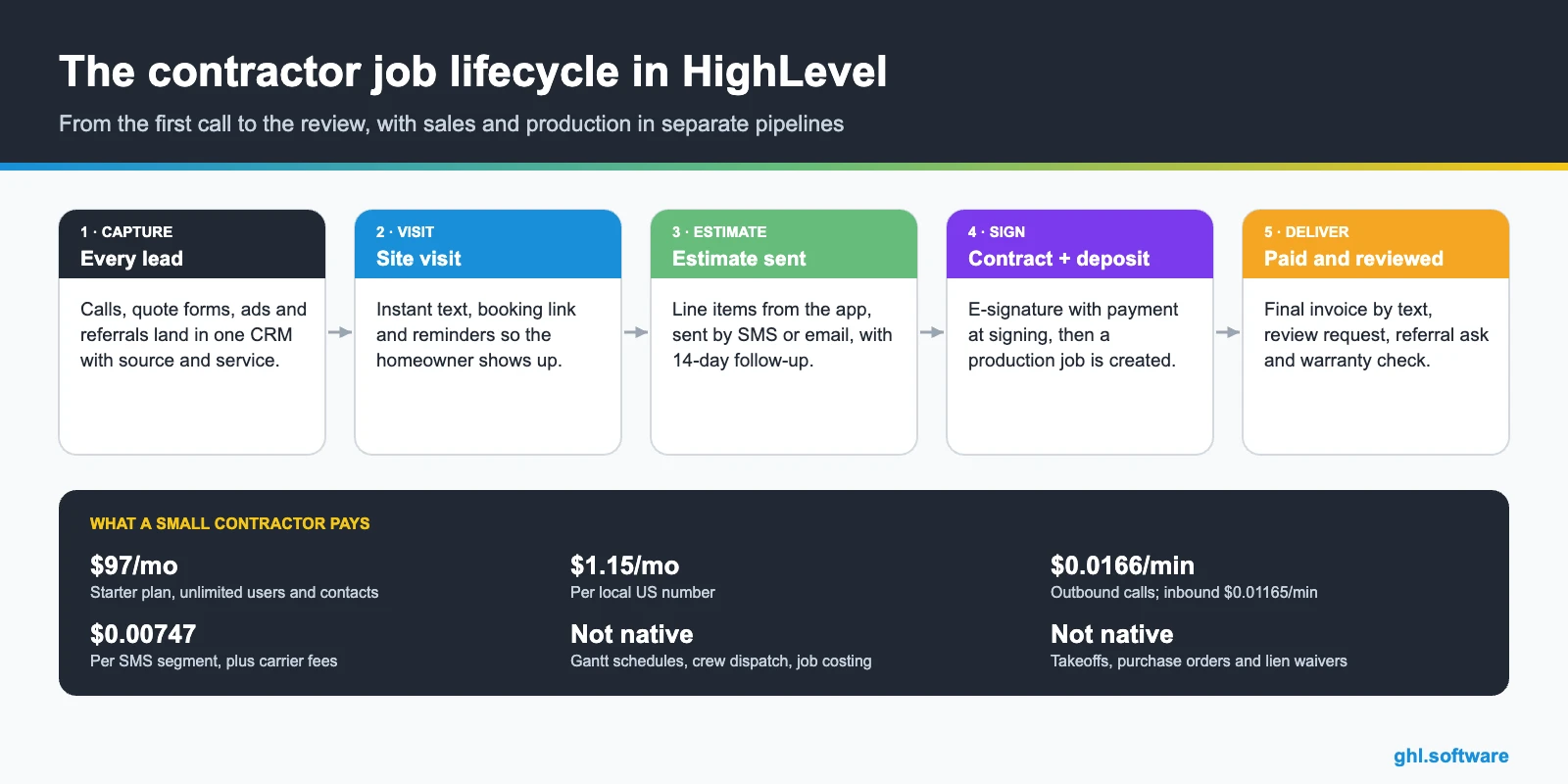
Contractor problems and how HighLevel solves them
The table maps the usual leaks in a contractor’s sales process to the CRM for construction feature that plugs each one. In fact, most of these leaks happen between the first call and the signed contract.
| Problem | What HighLevel does | Feature |
|---|---|---|
| Calls missed on the job site | Texts the caller back and offers a booking link | Missed call text back |
| Leads wait until evening for a reply | Sends an instant text and assigns an estimator | Workflows + round robin |
| Homeowners skip site visits | Confirms and reminds 24 h and 2 h before | Calendars |
| Estimates go cold | Runs a 14-day follow-up with texts, email and call tasks | Workflows |
| Paper contracts and chasing deposits | Sends the contract for e-signature with payment at signing | Documents & Contracts |
| Change orders agreed by text only | Sends a signed change order with its own payment | Documents & Contracts |
| Sales forgets to hand off to production | Creates a production opportunity and a task when the contract is signed | Pipelines + workflows |
| Few online reviews | Asks for a Google review after the final invoice is paid | Reputation management |
The CRM for construction pipeline: sales and production
The biggest setup mistake is putting everything in one board. After all, sales and production move at different speeds and have different owners. Therefore a CRM for construction work should run two pipelines: one for winning the job and one for delivering it. HighLevel lets you create both, and stage-change triggers move information between them.

| Sales stage | What moves the job here |
|---|---|
| New lead | A form, call, chat or ad lead creates the opportunity |
| Contacted | The estimator replies or calls back and moves the card |
| Site visit booked | The client books on the estimate calendar |
| Estimate sent | The estimate goes out by email or SMS from HighLevel |
| Negotiation | The client asks questions, changes scope or compares options |
| Signed + deposit | The contract is e-signed and the deposit is paid; the opportunity is Won |
| Lost | Marked with a reason such as price, timing or chose another contractor |
The production pipeline then follows the job: scheduled, in progress, change order, final walkthrough, final invoice paid and review requested. Meanwhile, the project details live in custom fields such as address, project type, budget, timeline and decision maker. That way, the crew lead sees what sales promised without a phone call.
Estimates, contracts and change orders in HighLevel
HighLevel’s Estimates use line items from your product list and go out by email or SMS. The client then accepts or declines online. Then their status moves from draft to sent, accepted, declined or invoiced, and an accepted estimate converts to an invoice. You can also build them from mobile templates while you stand in the client’s kitchen.
However, accepting an estimate is a button, not a signature. So send the binding agreement through Documents & Contracts, which supports e-signature with an audit certificate. It also handles several signers in order, expiry dates and payment at signing. Also, a change-order template works the same way: the client signs the new scope and pays the difference in one step.
Three automations every contractor should run
These workflows turn your CRM for construction sales into a system that works while you are on site. They cover the first reply, the estimate follow-up and the end of the job.
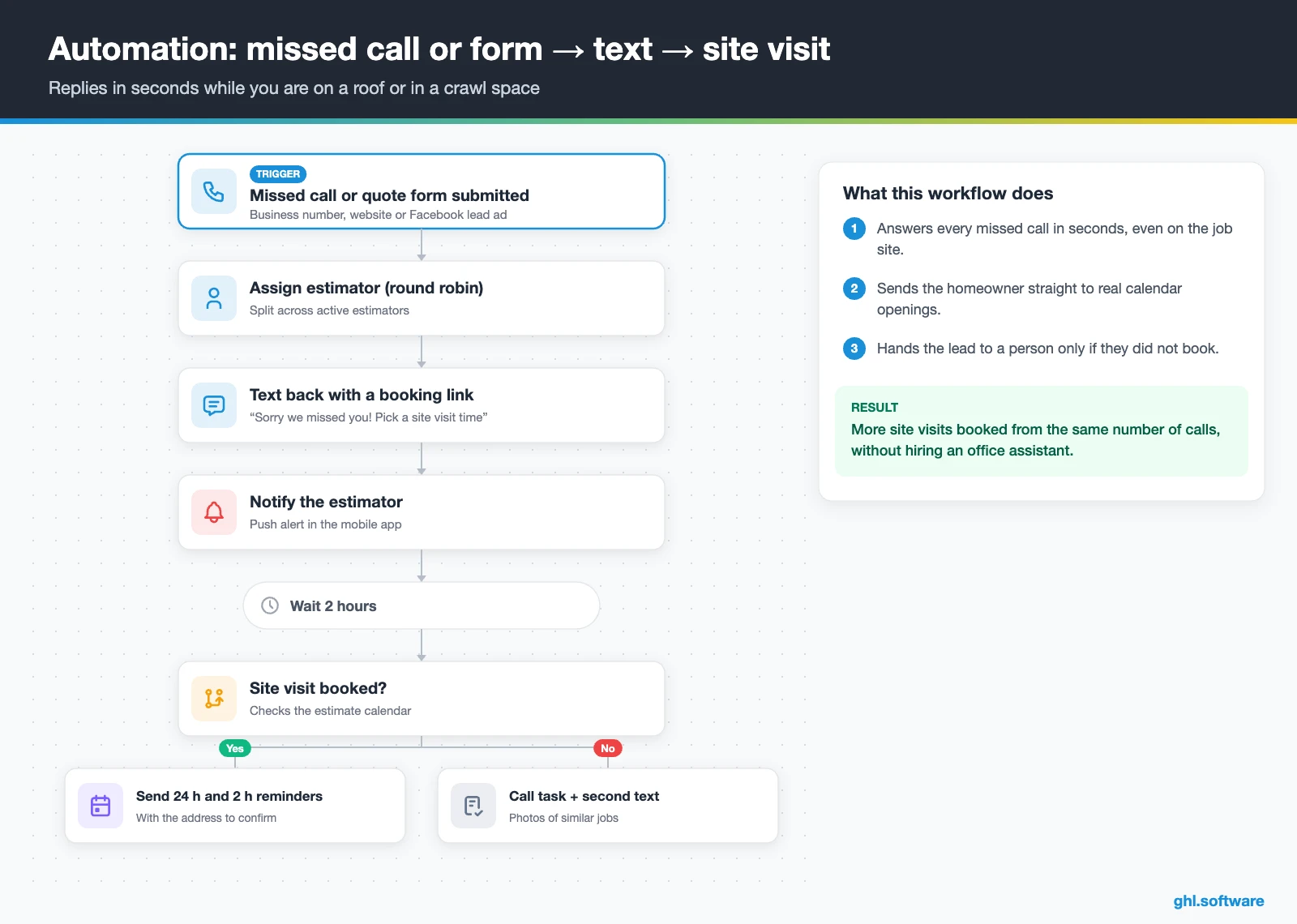
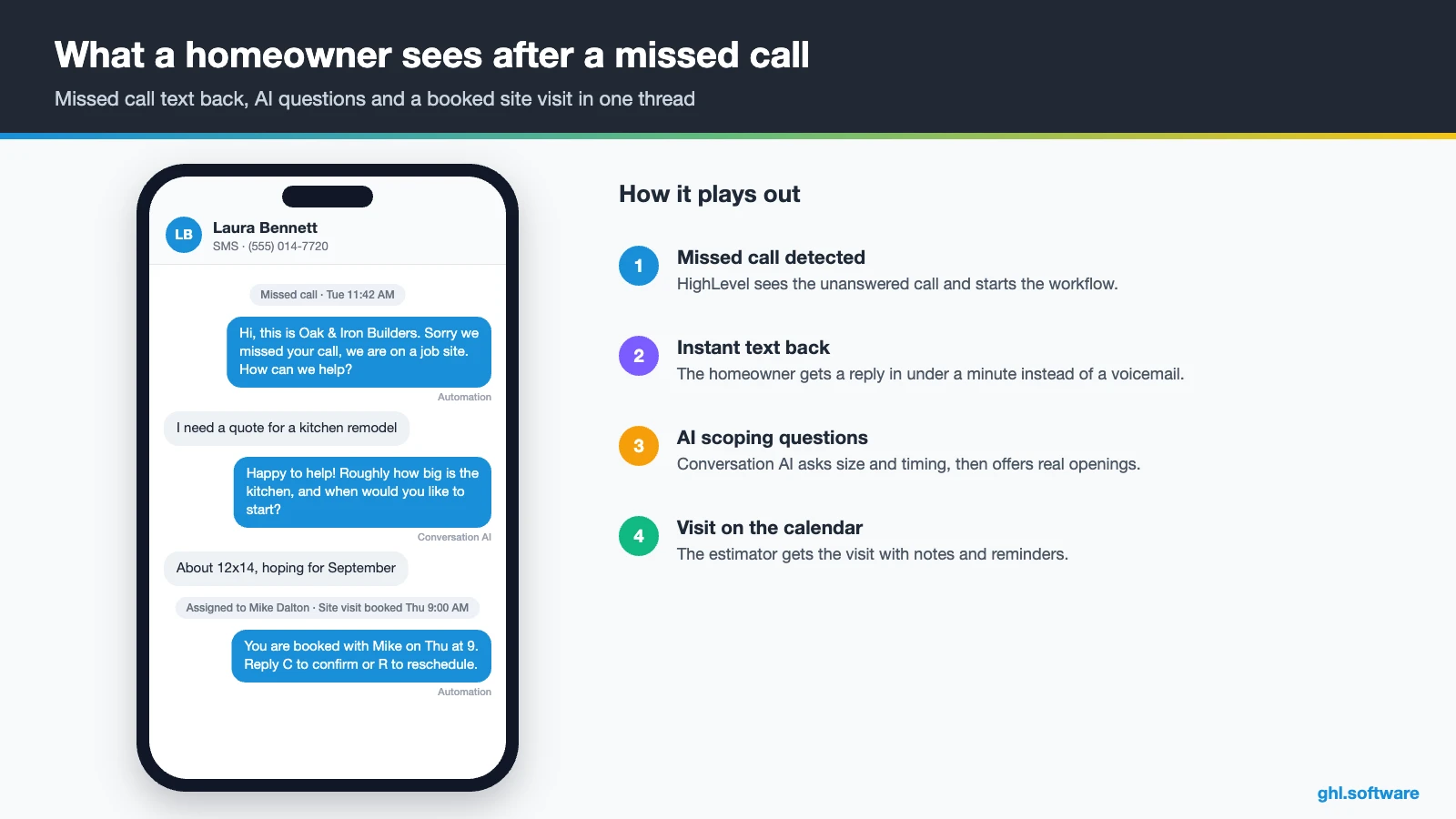
Missed call or form → instant text → site visit
The trigger is a missed call or a quote form. Then the workflow assigns the lead to the next estimator and texts the homeowner a booking link. It also pings the estimator in the mobile app. After two hours, an if/else checks whether a site visit is on the calendar.
If it is, the homeowner gets reminders 24 hours and 2 hours before, with the address to confirm. Otherwise, the estimator gets a call task and the lead gets a second text with photos of similar jobs. As a result, you reply in minutes even when your hands are full.
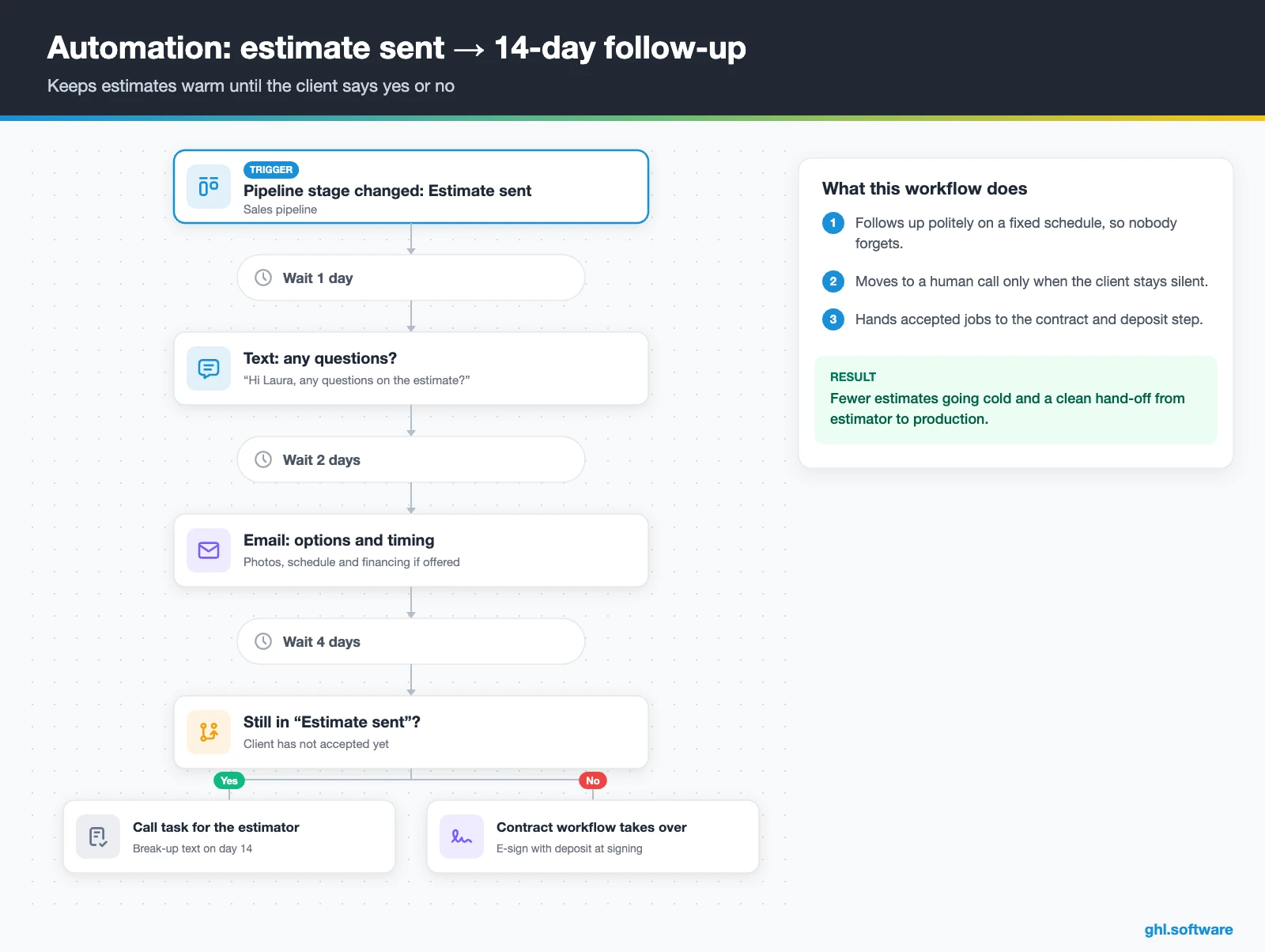
Estimate follow-up that closes the job
This workflow starts when the opportunity moves to “Estimate sent”. One day later it texts “Any questions on the estimate?” Two days later, an email explains options, timing and any financing you offer. After a week, an if/else checks whether the card is still in “Estimate sent”. If so, it creates a call task. Finally, a short, polite break-up text on day 14 closes the loop.
When the client accepts, you move the card. Then a second workflow sends the contract with the deposit due at signing. Once it is signed, the workflow marks the sale as Won and creates the job in the production pipeline. In short, nothing falls between the estimator and the project manager.
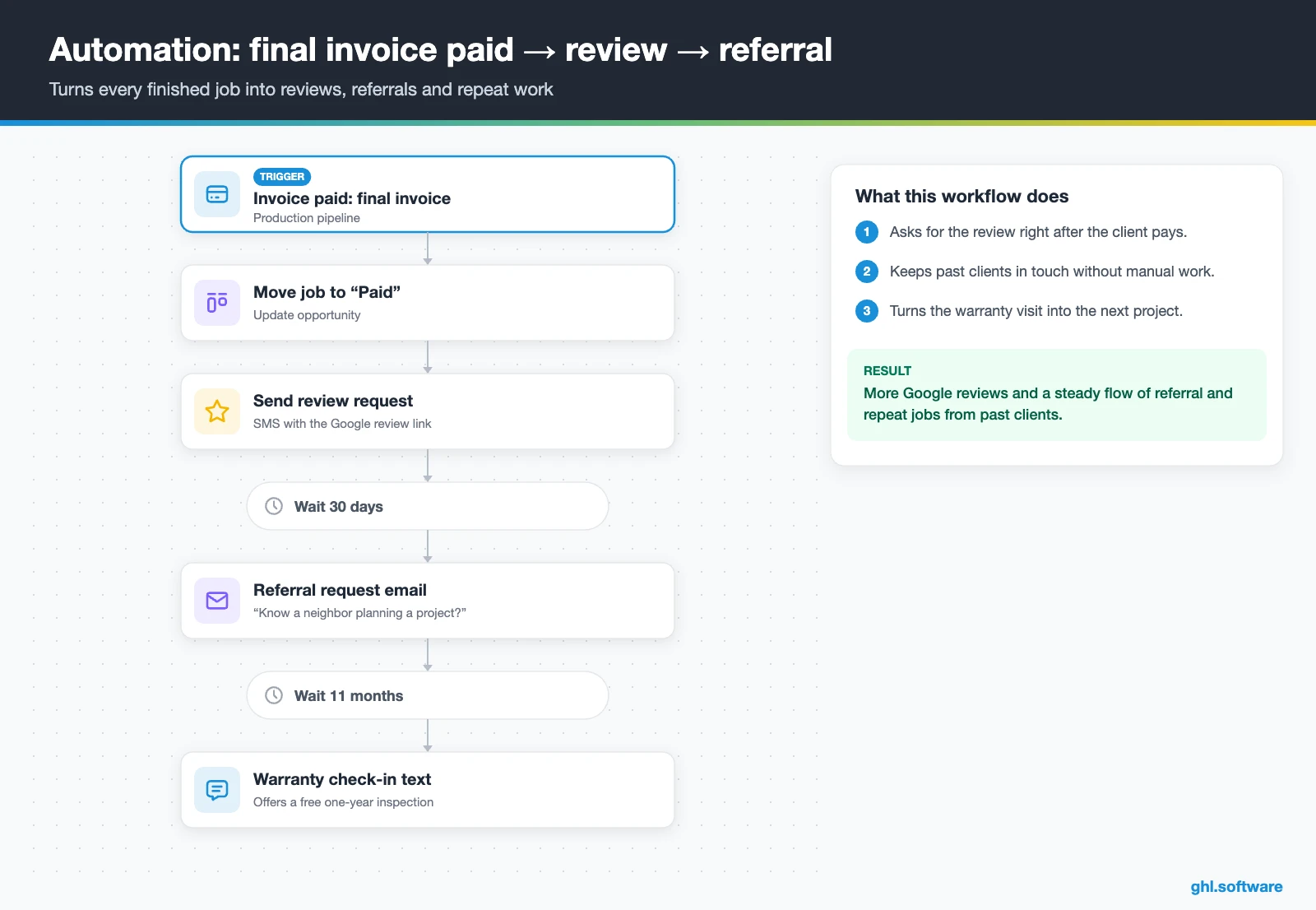
Final payment → review → referral → warranty check-in
The trigger is the final invoice being paid. The workflow moves the job to “Paid” and sends a review request with your Google link. Thirty days later, an email asks for referrals, and eleven months later a text offers a warranty or maintenance check.
Because the request follows the payment, you ask when the client is happiest and the paperwork is done. Moreover, the warranty check often turns into the next project, such as a deck after the kitchen.
Start with the snapshot and the pipeline from this guide, then add the automations one by one. The extended trial comes with our bootcamp link.
Start the 30-day trialAffiliate link. I may earn a commission at no extra cost to you.
Texting, calls and an AI receptionist for contractors
Any CRM for construction leads has to handle texts, calls and Facebook messages, often from the same homeowner in one week. HighLevel keeps SMS, email, Facebook and Instagram DMs, WhatsApp, web chat in one conversation per contact. So the office manager can answer while you work, and both of you see the same history.
AI covers the hours nobody can answer. Conversation AI can reply to chats and texts, ask about scope and timeline, and offer visit times. Meanwhile, Voice AI does the same by phone. Still, keep pricing and scope decisions with a person. The AI Employee pricing guide explains the per-use and monthly options.
What HighLevel’s official Construction Company snapshot includes
HighLevel publishes a free Construction Company playbook with a matching snapshot. However, it is a generic template with the industry name swapped in. Still, it is a useful starter kit for a CRM for construction work, and its proposal template fits the trade well. Out of the box you get:
- A “Construction Company” website with Home and Link in Bio pages, plus a chat widget.
- A “Construction Company Offer” funnel: an opt-in step, then an appointment booking page.
- The “Marketing Form – Claim Offer” form and a “Marketing Pipeline”.
- The “New Lead Nurture (Fast 5)” and “Long Term Nurture” workflows, with email, SMS and a voicemail drop.
- Service calendars, custom values, snippets, a “Construction Company” proposal template and one ad.
- Setup steps for missed call text back, review requests, Stripe, invoices and the mobile app.
What you still build is the contractor logic. That means separate sales and production pipelines, the estimate follow-up and the hand-off workflow. It also means contract and change-order templates and project custom fields. Also, this snapshot has no Voice AI prompt. Rewrite every message for your trade and service area before you publish, because the template copy is generic. Then save your finished build as your own snapshot.
How to set up GoHighLevel for a construction business
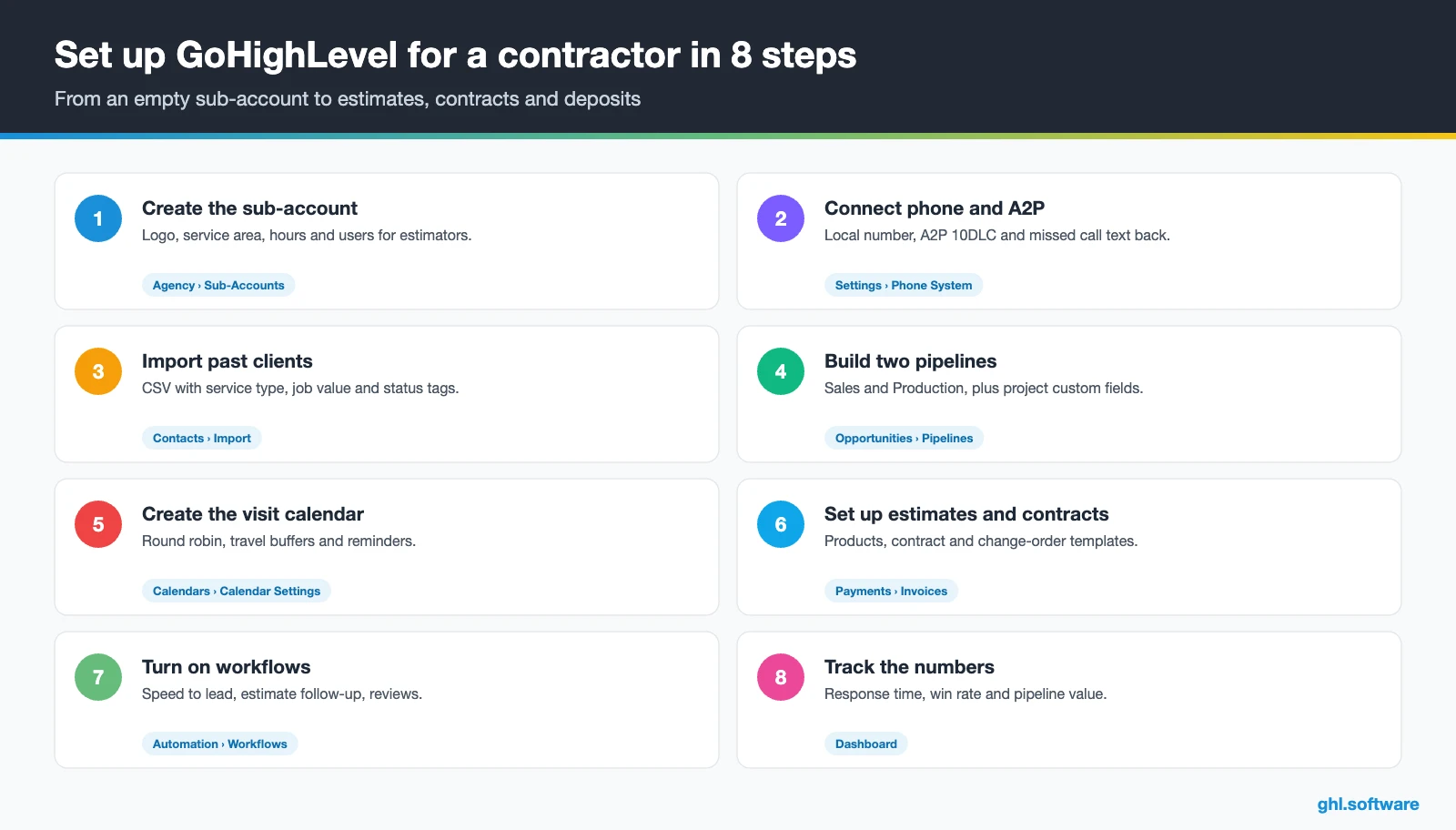
Follow this order when you set up your CRM for construction, so the first lead already flows from call to estimate. Still, a small contractor can finish it in a few focused days.
- Create the sub-account. Add your logo, service area, business hours and one user per estimator or office manager.
- Connect phone and A2P. Buy a local number, register A2P 10DLC, turn on missed call text back and decide on call recording under your state’s consent rules.
- Import past clients and open estimates. Upload a CSV with tags for service type, job value and status, so reactivation and follow-up start on day one.
- Build two pipelines. Sales and Production with the stages above, plus custom fields for address, project type, budget, timeline and decision maker.
- Set up the estimate calendar. A site-visit calendar with round robin across estimators, travel buffers and 24 h and 2 h reminders.
- Connect payments and documents. Connect Stripe, add products for estimate line items, and create contract and change-order templates in Documents & Contracts.
- Publish lead capture. A quote-request form with photo upload on a landing page per service, using forms.
- Turn on workflows, reviews and reporting. Activate the three automations, connect Google Business Profile and build a dashboard for response time, win rate and pipeline value.
Want to see a contractor build step by step? In this tutorial, Web Whizz walks through Go High Level for contractors.
Video: Go High Level for Contractors - Tutorial (2026) · Web Whizz
What a CRM for construction costs on HighLevel
HighLevel charges a flat plan price with unlimited users and contacts, so adding estimators doesn’t raise the bill. Usage, however, is billed on top: phone numbers, texts, calls, emails and AI.
For example, a remodeler on Starter ($97) with two local numbers ($2.30) and 2,000 SMS segments (about $15) pays about $114. Add 1,500 outbound minutes (about $25), 10,000 emails (about $7) and the $50 AI plan. The total is then about $196 a month. Besides, carrier fees, A2P campaign fees and card processing come on top. As a result, most small contractors land between $150 and $300 a month. Our pricing guide has the full breakdown.
GoHighLevel plans compared
| Starter | Unlimited | Agency Pro | |
|---|---|---|---|
| Price | $97/month | $297/month | $497/month |
| Annual | $970/year | $2,970/year | $4,970/year |
| Sub-accounts | 3 | Unlimited | Unlimited |
| Contacts and users | Unlimited | Unlimited | Unlimited |
| All core features | Yes | Yes | Yes |
| White label web app | Yes | Yes | Yes |
| API access | Basic | Basic | Advanced, agency-level keys |
| Rebill phone and email | No | At cost | With markup |
| Rebill AI usage | No | No | Yes |
| SaaS Mode and automated sub-accounts | No | No | Yes |
| User and agent reporting | No | No | Yes |
| Support | 24/7 | 24/7 | 24/7 |
Usage costs on top of the plan
| Item | Official price | When you pay it |
|---|---|---|
| Local phone number (US/Canada) | $1.15/month | Each number for SMS and calls |
| SMS (US/Canada) | $0.00747 per segment + carrier fees | Every text sent or received |
| Calls (US) | $0.0166/min outbound, $0.01165/min inbound | Calls through LC Phone |
| A2P 10DLC registration | $22.50 one-time (low volume) + monthly campaign fee | Before texting US numbers |
| Email (LC Email) | $0.675 per 1,000 emails | Campaigns and workflow emails |
| $10/month per sub-account + Meta fees | If you use WhatsApp inside HighLevel | |
| AI | Pay-per-use, or $50 or $97/month per sub-account | Voice AI, Conversation AI and other AI tools |
| Premium workflow steps | $0.01 per run after 100 free | Webhooks, Google Sheets, Slack, app actions |
Honest limits: what to keep in Buildertrend, JobTread or your ERP
As a CRM for construction sales, HighLevel is the front end, not the job site office. So be clear about what it does not do before you move:
- No project management. For example, there are no Gantt schedules, crew dispatch, daily logs or selections portal.
- No job costing or takeoffs. Budgets, purchase orders, lien waivers and cost codes stay in your construction or accounting software.
- Estimates are simple. They handle line items and online acceptance, not assemblies or takeoffs, and acceptance is not a signature.
- No verified lead-network integrations. We did not verify native connections to Angi, HomeAdvisor or Houzz, so test any connector or email parser first.
The cleanest stack is simple: HighLevel wins the job, and your project tool delivers it. Here is how HighLevel compares with each CRM for construction that contractors often shortlist. Features change often, so confirm details on each vendor’s site.
| GoHighLevel | Buildertrend | JobNimbus | Jobber | |
|---|---|---|---|---|
| Built for contractors | No | Yes | Yes | Yes |
| Estimates or quotes | Yes | Yes | Yes | Yes |
| Production management | Pipeline and tasks only | Full construction project management | Job boards and production tracking | Scheduling and dispatch |
| Funnels, social, ads, WhatsApp and Voice AI in one tool | Yes | Check plan | Check plan | Check plan |
| White label for agencies | Yes | No | No | No |
| Best fit | Lead response, follow-up and marketing | Builders and remodelers who need project management | Roofers and exterior trades | Service-style trades with many small jobs |
Compliance notes for contractors: texting, in-home sales and lead paint
The angle most guides miss: build the cooling-off window into your workflow
For example, remodelers who sell at the kitchen table often order materials the same evening. Then the client cancels within the three-day window, and the deposit dispute begins. Few guides about a CRM for construction mention this, although it touches every in-home sale.
In HighLevel, the fix is a small branch in the contract workflow. Meanwhile, your in-home contract template already includes the cancellation notice and forms. When it is signed, the workflow tags the job and waits until the three-business-day window has passed. Only then does it create the “order materials” and “schedule crew” tasks. Meanwhile, the client gets a friendly welcome text instead of silence. As a result, you respect the rule and still start fast. Compare this setup with other trades in our industry guides or browse every module in the features hub.
Open a free account, load the pipeline and turn on the first automation today. The bootcamp walks you through the setup live.
Start the 30-day trialAffiliate link. I may earn a commission at no extra cost to you.
Frequently asked questions
What is the best CRM for construction companies?
It depends on where you lose money. If schedules, job costing and client selections are the problem, a construction platform such as Buildertrend or JobTread is the core. If you lose jobs to slow replies and forgotten estimates, HighLevel fixes that with missed call text back, estimate follow-up, contracts and reviews for a flat price. Many contractors run HighLevel for sales and keep a project tool for delivery.
Can GoHighLevel send estimates and contracts?
Yes. HighLevel has native Estimates with line items that you send by email or SMS, and the client accepts or declines online. Accepted estimates convert to invoices. Acceptance is a button, not a signature, so use Documents & Contracts for the binding agreement. Also, it supports e-signature with an audit certificate, several signers and payment at signing.
Can I collect deposits on site with HighLevel?
Yes. You can send a payment link or text-to-pay invoice from the mobile app, or take the deposit when the client signs the contract. HighLevel also supports Tap to Pay on Square in the mobile app, which its help center lists for iPhone. Card processing fees from Stripe or Square apply on top of HighLevel’s plan.
How much does a CRM for construction cost?
On HighLevel the plan price stays flat as you add estimators: Starter is $97 a month and Unlimited $297, both with unlimited users. Usage adds the rest, such as numbers at $1.15 a month, SMS segments, call minutes, email and optional AI. A small contractor typically pays between $150 and $300 a month in total.
Do I need both a CRM and project management software?
Most growing contractors do. A CRM handles leads, follow-up, estimates, contracts and reviews, while project management software handles schedules, crews, budgets and daily logs. HighLevel covers the first job well and the second only with pipelines and tasks. So connect the two through the API or an automation tool, or hand off at the signed contract.
Is there a free CRM for contractors?
Free CRMs exist, but they usually limit automation, texting or users, which is exactly what speeds up a contractor’s sales. HighLevel has no free plan. Its own trial runs 14 days and needs a card, while the extended 30-day trial comes through our bootcamp link. After that, Starter costs $97 a month.
How fast should a contractor respond to a new lead?
As fast as you can, ideally within minutes, because the homeowner is often calling several contractors at once. You don’t need to stop working to do it. Missed call text back and an instant-reply workflow answer in seconds with a booking link, and a call task follows if the lead does not book.
More industry guides
Sources: HighLevel Construction Company playbook · HighLevel help: Estimates · HighLevel changelog: Estimates now live · HighLevel help: Estimate templates in the mobile app · HighLevel help: Documents & Contracts · HighLevel help: Tap to Pay on Square · HighLevel help: Missed Call Text Back · FTC: Cooling-Off Rule · EPA: Lead Renovation, Repair and Painting Program

