

CRM for Retail: Turn Walk-ins Into Repeat Customers
A CRM for retail turns anonymous shoppers into contacts you can reach again. GoHighLevel does it with counter sign-ups, welcome and birthday texts, win-back, reviews and a one-way Shopify sync with abandoned-checkout reminders. It is not a POS, so it sits next to the system that rings up sales and tracks inventory.
It is Saturday afternoon at Linen & Lane, a small clothing and gift shop. Emma Clarke rings up forty sales in four hours. Almost every buyer leaves without a trace: no name, no phone number, no idea whether they will come back. The POS knows what was sold, but not who to thank next week. That gap is exactly what a CRM for retail closes.
Most pages about this topic list enterprise platforms or compare per-seat CRMs built for sales teams. However, a neighborhood store does not need a sales team tool. It needs to capture shoppers at the counter and send the right text at the right time. It also needs reviews and recovered online carts, without another full-time job.
This guide is a practical CRM for retail playbook for physical stores that may also sell online. It shows how GoHighLevel (HighLevel) handles the customer side and which automations to switch on first. Then it covers what it costs and, just as important, what it does not do.
Leer en español: CRM para tiendas · Ler em português: CRM para varejo · Part of GoHighLevel by industry
What a CRM for retail does, and what your POS already does
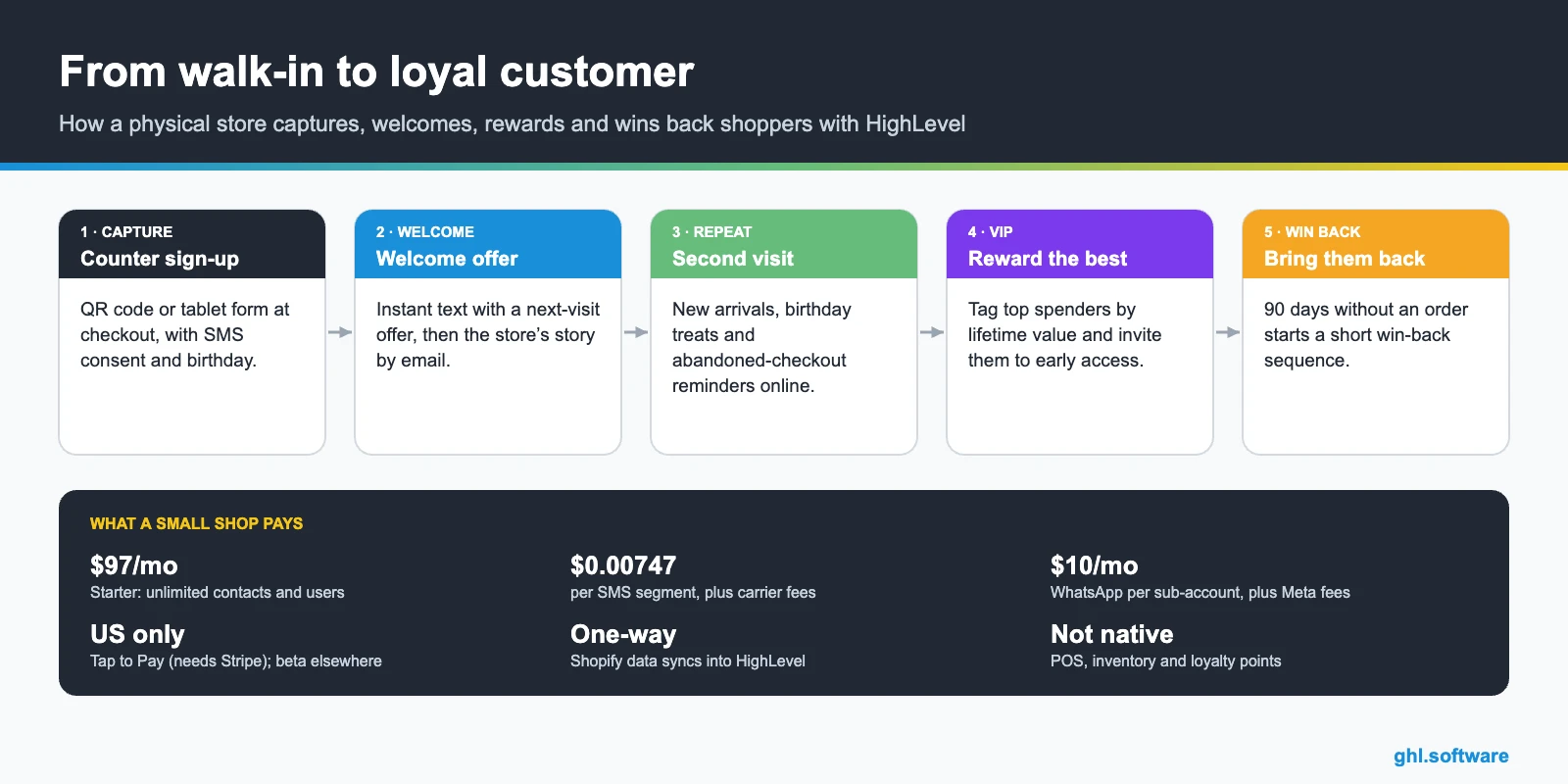
Your POS handles the transaction: checkout, receipts, inventory and staff. A CRM for retail handles the relationship around it. In other words, it remembers who bought, invites them back and asks them to recommend you. HighLevel covers eight retail jobs inside one account.
Common retail problems and how HighLevel solves them
| Problem | What HighLevel does | Feature |
|---|---|---|
| Anonymous walk-in buyers | QR or tablet sign-up at the counter creates a contact with consent | Forms + CRM |
| Low repeat rate | Welcome series and a second-visit offer after the first purchase | Workflows |
| Generic mass promos | Segments by tag, store, spend or last order date | Smart lists + SMS/email |
| Abandoned online carts | Abandoned checkout trigger for the HighLevel store or Shopify | Workflows + store |
| Customers who drift away | Win-back sequence 90 days after the last order | Custom date reminder |
| Few Google reviews | Review request a few hours after each purchase | Reputation management |
| Holding items by phone | Text-to-pay link so the shopper pays before pickup | Payments |
The customer lifecycle pipeline in a CRM for retail
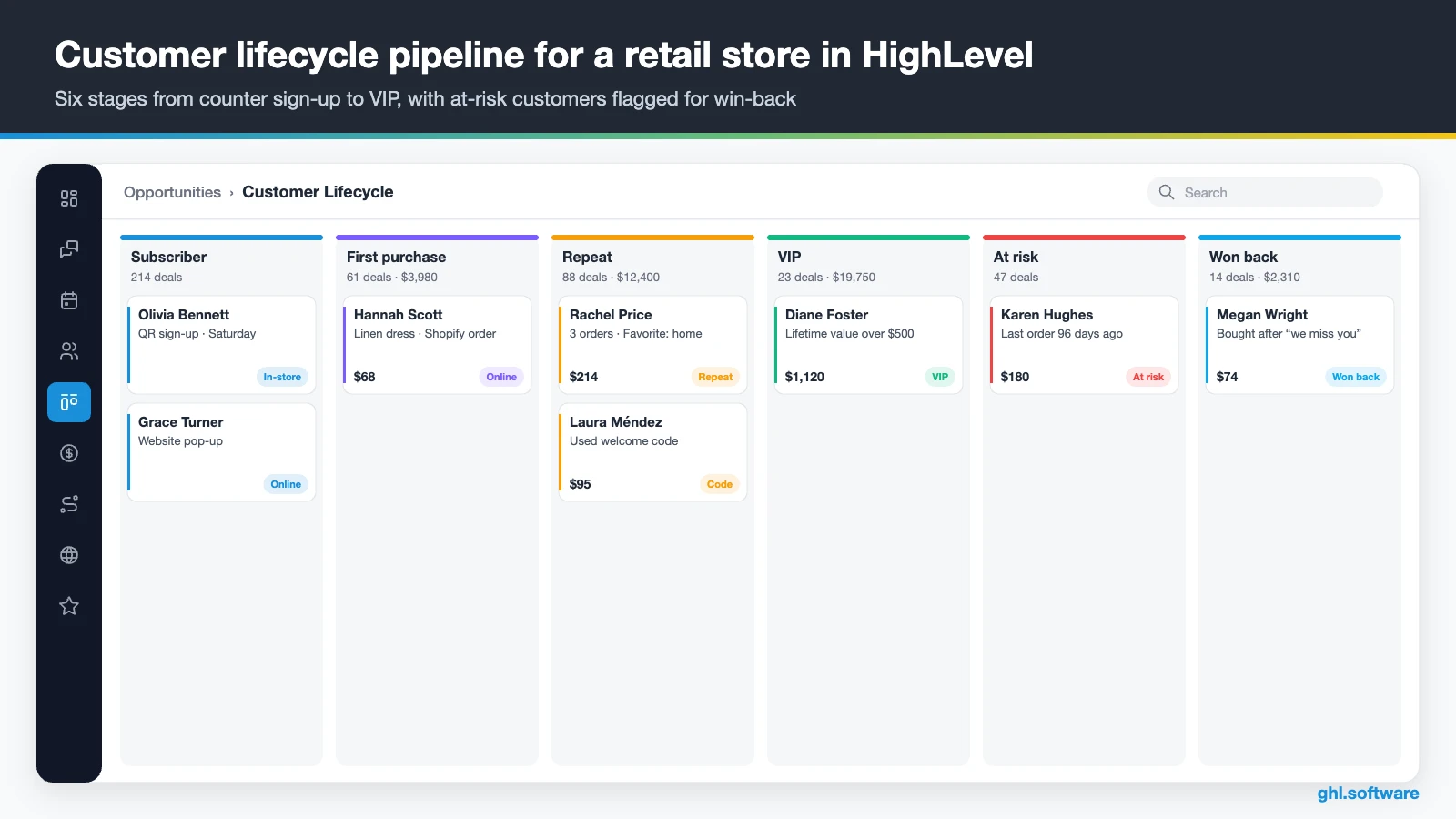
Retail does not sell through deals that close once. Instead, it runs on a lifecycle that repeats. So the pipeline in this CRM for retail tracks where each customer sits, from new subscriber to VIP. It also flags the ones who are drifting away. Workflows move the cards, while the owner sees at a glance how many people are in each stage.
| Stage | What moves a customer here |
|---|---|
| Subscriber | Counter sign-up form, website pop-up or online account |
| First purchase | A Shopify order, a HighLevel store order or a “purchased” tag added at the POS |
| Repeat | Order count reaches 2 (Shopify field) or a second purchase tag |
| VIP | Lifetime value passes your threshold, for example $500 |
| At risk | No order for 90 days, using the last order date field |
| Won back | A purchase after the win-back sequence |
If your POS is not Shopify, keep it simple at first. For example, export customers weekly as a CSV with the last order date and total spent. Alternatively, staff can add a “purchased” tag from the mobile app. Later, an integration or webhook can automate that step.
Three automations every CRM for retail should run
Start with the moments that bring shoppers back: the first visit, the abandoned cart and the silence after a purchase. These three workflows cover all of them.
Counter QR sign-up → welcome offer
Put a small sign by the register: “Scan to join and get 10% off your next visit.” The QR code opens a short form with name, mobile number, birthday and an unchecked SMS consent box. Once it is submitted, HighLevel tags the contact as in-store and records the location. Then it sends a welcome text with the offer code.
Two days later, an email tells the store’s story and shows best sellers. Then, after two weeks, the workflow checks whether the code was used. If not, a friendly reminder goes out before the offer ends. As a result, a shopper who would have left anonymous becomes a contact who said yes to hearing from you.

Abandoned checkout → recovered order
HighLevel’s Abandoned Checkout trigger works with its own online store and with connected Shopify stores. You set how many minutes to wait before a checkout counts as abandoned. You can also filter by cart value, country or product. The shopper must have entered an email address, otherwise the trigger cannot fire.
A good sequence is an email after an hour and a text a day later for shoppers who opted in. Save the one-time offer for larger carts. Meanwhile, a goal ends the workflow as soon as the order comes in. The workflow’s Analytics tab then shows sends, clicks and saved revenue, while recovered orders appear under Payments.

Ninety days without an order → win-back
This one uses the last order date. A custom date reminder fires 90 days after that date, so it only reaches people who have not bought since. The contact gets an at-risk tag and a short “we miss you” text with new arrivals.
If nothing happens after five days, an email follows with a time-limited offer. When the customer buys again, they get the won-back tag. Otherwise they are tagged lapsed and receive fewer messages, which keeps your list healthy and your sending costs down.

Start with the snapshot and the pipeline from this guide, then add the automations one by one. The extended trial comes with our bootcamp link.
Start the 30-day trialAffiliate link. I may earn a commission at no extra cost to you.
Texting, WhatsApp and the shared inbox for stores
In a CRM for retail aimed at US shops, SMS is the channel that gets read, so most automations end in a text. Every reply lands in HighLevel’s Conversations inbox, next to email, Facebook and Instagram DMs, website chat. Staff can answer from the counter on the mobile app, for example to confirm a size.
WhatsApp makes sense if you serve tourists, expats or customers from Latin America. It costs $10 a month per sub-account plus Meta’s fees, and marketing messages use approved templates. Besides that, the social planner can post new arrivals to Instagram and Facebook on the same day as the text.
Reviews deserve their own workflow, because they bring foot traffic from Google Maps. A few hours after a purchase, HighLevel sends a review request by text or email with your Google link. Then Reviews AI can suggest or post replies, so every review gets an answer while the owner stays on the floor.

What the official HighLevel retail snapshots include
HighLevel has no generic “retail” snapshot. The closest official templates are the Clothing Boutique/Tailor playbook and the Jewelry Shop playbook. Both follow the same generic structure as the other industry snapshots:
- A website named after the shop type, with Home (services and FAQ) and Link in Bio pages
- An “Offer” funnel: an opt-in step, then an appointment booking page
- The “Marketing Form – Claim Offer” form and a “Marketing Pipeline”
- Nurture workflows such as “New Lead Nurture (Fast 5)” with email, SMS and a voicemail drop, plus “Long Term Nurture”
- Service calendars for fittings or consultations, custom values, a chat widget and a proposal template
- One ad template in Ad Manager; the boutique version also lists social post templates
However, neither snapshot includes retail or e-commerce assets: no product catalog, no cart, no counter sign-up and no win-back. The flow is built to book appointments, which suits alterations, bridal fittings or jewelry consultations. So use the snapshot for the website and booking. Then add the lifecycle pipeline and the three workflows from this guide to turn it into a real CRM for retail.
How to set up GoHighLevel for a retail store
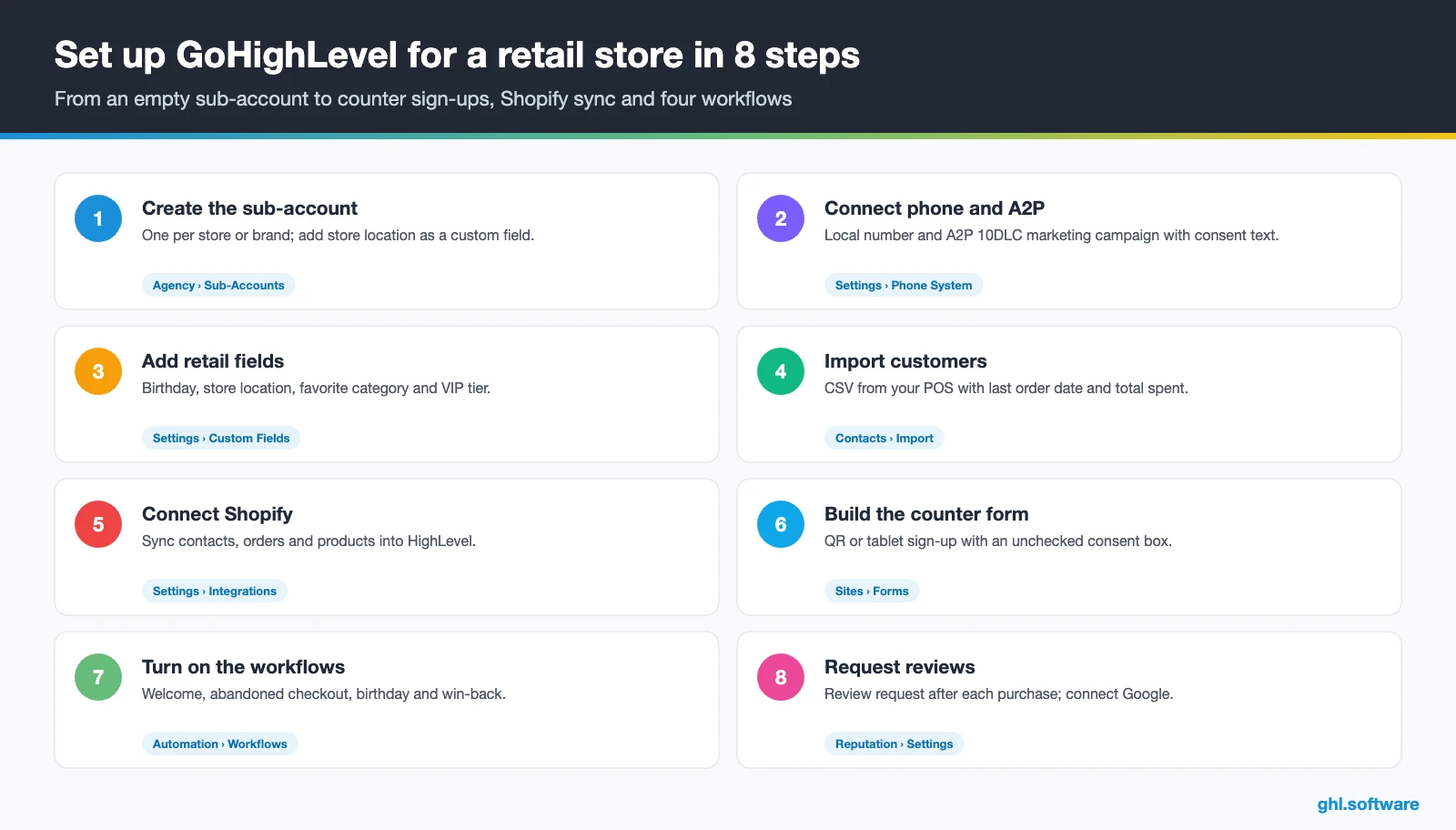
- Create the sub-account. One per store or brand. With several locations, add “Store location” as a custom field instead of separate accounts.
- Connect phone and A2P. Buy a local number and register A2P 10DLC with a marketing campaign, using the same consent text as your counter form.
- Add retail fields. Birthday, store location, favorite category and VIP tier, so you can segment campaigns later.
- Import customers. Upload a CSV from your POS with last order date and total spent, and tag everyone by source.
- Connect your online store. Connect Shopify to sync contacts, orders and products, or build products in the HighLevel store.
- Build the counter form. A short QR or tablet form with an unchecked consent box. Print the QR for the register and fitting rooms.
- Turn on the workflows. Welcome offer, abandoned checkout, birthday and win-back. Then add the post-purchase review request.
- Track what matters. A dashboard with sign-ups per week, repeat customers, recovered checkouts and new reviews.
What a CRM for retail costs with HighLevel
The plan is the easy part. Starter costs $97 a month, or $970 a year, with unlimited contacts and users. So every sales associate can have a login. Because all core features come with every plan, you do not pay extra for the store, workflows or reviews. Unlimited ($297) and Agency Pro ($497) are aimed at agencies and multi-brand groups.
GoHighLevel plans compared
| Starter | Unlimited | Agency Pro | |
|---|---|---|---|
| Price | $97/month | $297/month | $497/month |
| Annual | $970/year | $2,970/year | $4,970/year |
| Sub-accounts | 3 | Unlimited | Unlimited |
| Contacts and users | Unlimited | Unlimited | Unlimited |
| All core features | Yes | Yes | Yes |
| White label web app | Yes | Yes | Yes |
| API access | Basic | Basic | Advanced, agency-level keys |
| Rebill phone and email | No | At cost | With markup |
| Rebill AI usage | No | No | Yes |
| SaaS Mode and automated sub-accounts | No | No | Yes |
| User and agent reporting | No | No | Yes |
| Support | 24/7 | 24/7 | 24/7 |
Usage is where a store’s bill grows, because retail sends a lot of texts. For example, a shop with 1,500 opted-in subscribers and two SMS campaigns a month uses about 3,000 segments. That is roughly $22 plus carrier fees. Add 20,000 emails at $0.675 per 1,000, a $1.15 local number and the A2P campaign fee.
Usage costs on top of the plan
| Item | Official price | When you pay it |
|---|---|---|
| Local phone number (US/Canada) | $1.15/month | Each number for SMS and calls |
| SMS (US/Canada) | $0.00747 per segment + carrier fees | Every text sent or received |
| Calls (US) | $0.0166/min outbound, $0.01165/min inbound | Calls through LC Phone |
| A2P 10DLC registration | $22.50 one-time (low volume) + monthly campaign fee | Before texting US numbers |
| Email (LC Email) | $0.675 per 1,000 emails | Campaigns and workflow emails |
| $10/month per sub-account + Meta fees | If you use WhatsApp inside HighLevel | |
| AI | Pay-per-use, or $50 or $97/month per sub-account | Voice AI, Conversation AI and other AI tools |
| Premium workflow steps | $0.01 per run after 100 free | Webhooks, Google Sheets, Slack, app actions |
In short, a CRM for retail on HighLevel usually costs a small store around $140 to $180 a month on Starter, before any AI plan. Card payments also carry Stripe’s own processing fees. The GoHighLevel pricing guide explains every line in detail.
Honest limits: what HighLevel does not do for retail
As a CRM for retail, HighLevel is the marketing and follow-up layer, not the store system. It does not replace your POS, so keep that for checkout, barcode scanning, receipts, cash drawers and inventory. It also has no native points-based loyalty program. Instead, you build loyalty with tags, custom fields and workflows, or connect a loyalty app. Finally, we could not verify a native order sync with Square or Lightspeed. So plan on CSV imports or webhooks and the API.
Shopify: a one-way sync with an abandoned-checkout trigger
The Shopify integration brings data into HighLevel. Customers become contacts, with fields for lifetime value, order count, first and last order date and last order value. Orders, transactions, products and collections sync too. However, the contact fields cannot be switched on or off one by one, and refunds do not lower the order count. Also, Shopify’s email and SMS consent fields are still marked as coming soon, so collect consent in HighLevel.
If you want to see the connection before you set it up, the video below is titled “GoHighLevel for Shopify”.
Video: GoHighLevel for Shopify · DiscoverMyBusiness
Payments at the counter
Tap to Pay in the HighLevel mobile app lets a customer tap a card, Apple Pay or Google Pay on your phone. Tips are optional. It requires a connected Stripe account and an NFC Android phone or an iPhone XS or later. Moreover, it is available for US locations only. Elsewhere, it works only through the beta program. Text-to-pay links, on the other hand, work anywhere Stripe does.
| GoHighLevel | Your POS (Square, Shopify POS, Lightspeed) | Klaviyo | HubSpot | |
|---|---|---|---|---|
| Main job | Capture, messaging, reviews, follow-up and an online store | Checkout, inventory, receipts and staff | Email and SMS marketing for online stores | Sales and marketing CRM |
| Inventory and receipts | No | Yes | No | No |
| Shared SMS and WhatsApp inbox | Yes | Varies by POS | SMS campaigns | Varies by plan |
| Pricing model | Flat per account from $97/mo, unlimited users | Varies; card processing fees | By number of contacts | Free CRM; paid tiers per seat |
| Best when | You want walk-ins, texts, reviews and carts in one place | Always: it rings up the sale | Your store is mostly online and on Shopify | You run a B2B or wholesale sales team |
Loyalty without points: VIP tiers and birthdays
Many small stores want loyalty in their CRM for retail, but not another app. HighLevel does not keep a points balance, yet it can still run a simple, effective program. For example, a workflow tags customers as VIP when their Shopify lifetime value passes $500. Then it invites them to early access and sends a private preview the day before a sale.
Birthdays work the same way. The Birthday reminder trigger sends a treat a few days before, such as a free gift with any purchase that week. Staff then redeem it at the register. Paper punch cards can move here too. For instance, staff add a visit tag from the mobile app, and a workflow sends the reward at the fifth visit. Keep in mind that Shopify’s lifetime value counts only purchases from the connected store. Explore every industry guide or all features for more ideas.
Open a free account, load the pipeline and turn on the first automation today. The bootcamp walks you through the setup live.
Start the 30-day trialAffiliate link. I may earn a commission at no extra cost to you.
Frequently asked questions
What is the best CRM for retail stores?
It depends on where you sell. Online-first brands on Shopify often pick an email and SMS tool built for e-commerce. Physical stores that want counter sign-ups, texting, reviews, birthdays and win-back in one place, at a flat price, are a good fit for GoHighLevel. Whatever you choose, keep your POS for checkout and inventory, and make sure the CRM can import or sync your customers.
How is CRM used in retail?
Retailers use a CRM to turn buyers into contacts and then bring them back. Typical uses are capturing shoppers at the counter, sending welcome and birthday offers, announcing new arrivals, recovering abandoned online carts, asking for Google reviews and reactivating customers who have not bought in months. The CRM also segments people by spend, store or last purchase, so promotions feel relevant instead of generic.
Can a retail CRM integrate with my POS or Shopify?
GoHighLevel integrates with Shopify: customers, orders, transactions, products and collections sync into HighLevel, with fields such as lifetime value and last order date. The sync runs one way, from Shopify into HighLevel. We could not verify a native order sync with Square or Lightspeed, so those stores usually rely on CSV imports, connectors or webhooks to update purchases.
Does GoHighLevel have a loyalty program?
Not a native points-based one. HighLevel does not track a points balance or rewards wallet. You can still run loyalty with tags, custom fields and workflows: VIP tiers by lifetime value, birthday treats, visit counts added by staff and early-access invitations. If you need true points and redemption at the register, keep a loyalty app connected to your POS and use HighLevel for the messaging.
How do I collect customer phone numbers in-store legally?
Ask for consent explicitly. In the US, use a QR or tablet form with an unchecked box that says what you will text and how often, and include HELP and STOP instructions. Keep a record of the opt-in, which HighLevel stores on the contact. Never add numbers from receipts to marketing lists without consent, and register A2P 10DLC before you start sending.
How much does a CRM for retail cost?
Per-seat CRMs charge per user, while HighLevel charges per account: $97 a month on Starter with unlimited users. Texting is the main extra cost for a store. A shop sending two SMS campaigns a month to 1,500 subscribers, plus email, usually pays around $140 to $180 a month in total on Starter. Card payments add Stripe’s processing fees.
What is the difference between a CRM and clienteling?
Clienteling is a selling style: an associate knows a customer’s preferences and reaches out personally, for example when a favorite brand arrives. A CRM is the system that makes that possible at scale, with profiles, notes, segments and messaging. In HighLevel, associates can see a customer’s history in the mobile app and text them directly, so small stores get basic clienteling without a separate tool.
More industry guides
Sources: HighLevel plans and pricing block · Clothing Boutique/Tailor playbook (HighLevel) · Jewelry Shop playbook (HighLevel) · How to integrate Shopify with HighLevel · Abandoned checkout trigger for e-commerce stores · Tap to Pay (HighLevel Help) · How to send review requests (HighLevel Help) · A2P 10DLC registration (HighLevel Help) · HubSpot: Best CRM for retail · FCC: Telemarketing and robocalls

