

CRM for Small Business: The All-in-One GoHighLevel Option
The best CRM for small business is the one your team actually opens every day. GoHighLevel takes the all-in-one route: CRM, texting, WhatsApp, booking, website, reviews and payments for a flat $97 a month, with unlimited users. If two people only need a contact list and a deal board, a free or per-user CRM may be enough.
It is 7:15 on a Tuesday evening. Sam Ortega, who runs a four-person painting company, finally sits down with his phone. There is a Facebook lead from Sunday, two voicemails, an estimate request buried in Gmail and a customer on Instagram asking whether the deposit went through. Each one lives in a different app, so by Thursday one of those people has hired someone else. A good CRM for small business exists to stop exactly that leak.
Most pages that rank for this topic compare sales CRMs priced per user: HubSpot, Zoho, Pipedrive, monday and similar tools. They are good products. However, a local business does not just need a contact list. It also needs to answer calls and texts fast, book appointments, send quotes, collect payments and ask for reviews. As a result, many owners end up paying for five or six subscriptions that never talk to each other.
This guide takes the other route and shows how GoHighLevel (HighLevel) works as an all-in-one CRM for small business teams. Along the way, you will also see the pipeline, three automations, setup and real costs. Just as important, you will also see when a simpler tool is the better choice.
Leer en español: CRM para pymes · Ler em português: CRM para pequenas empresas · Part of GoHighLevel by industry
What a CRM for small business needs to do in 2026
A spreadsheet can store names. A CRM for small business earns its place when it moves people forward without you having to remember every follow-up. In practice, that comes down to eight jobs, and HighLevel covers each one inside the same account.
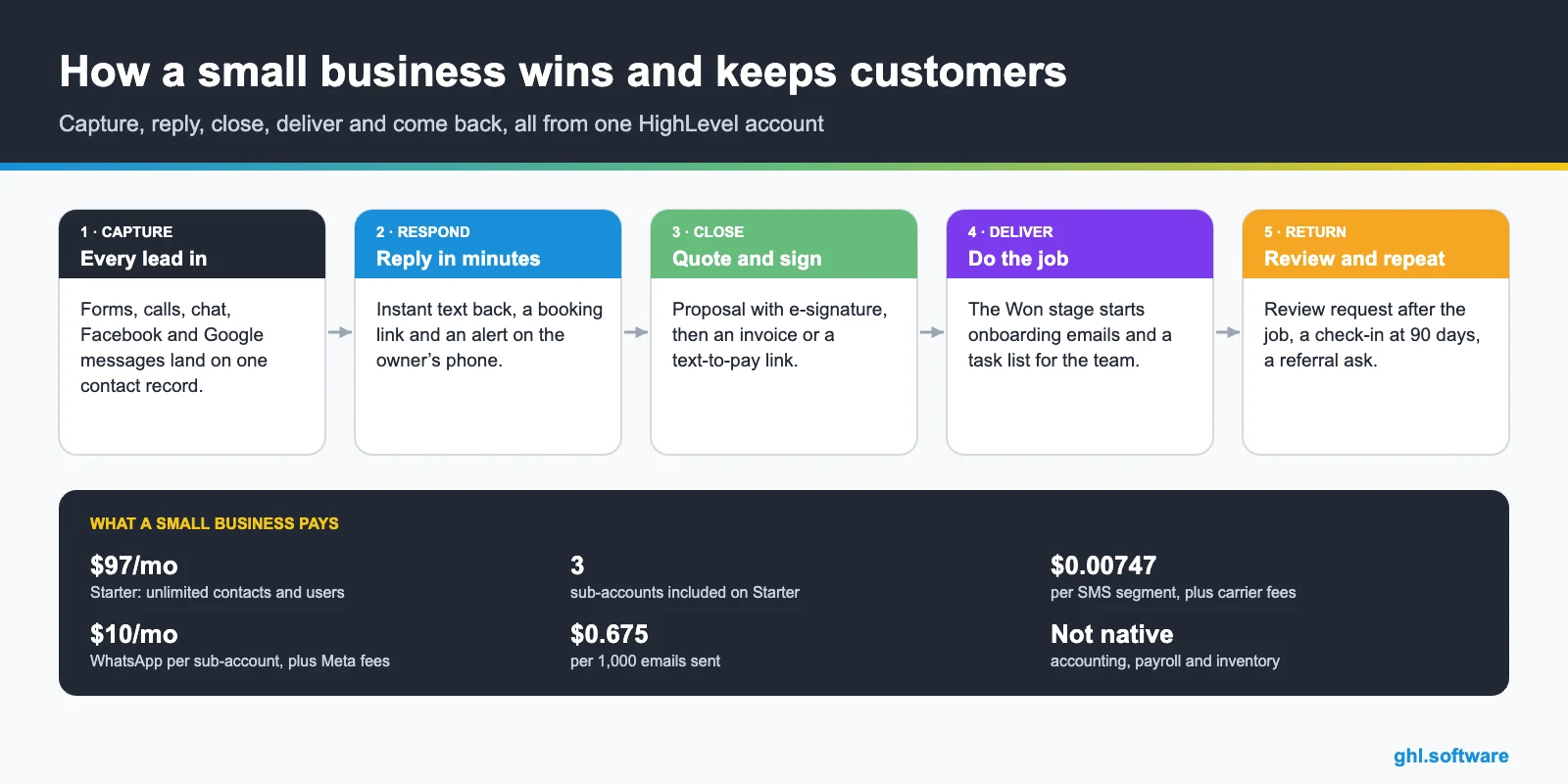
Per-user CRM or all-in-one platform: the real difference
Every CRM for small business falls into one of two camps. The first is the sales CRM: HubSpot, Zoho CRM, Bigin, Pipedrive, Freshsales or monday CRM. Usually you pay per user, while the product focuses on contacts, deals and tasks. Forbes Advisor’s 2026 roundup, for example, lists starting prices from about $9 to $71 per user per month. That model is fair when two salespeople live in the pipeline all day.
The second camp is the all-in-one platform. Instead of charging per seat, HighLevel charges per account. Starter is $97 a month with unlimited contacts and unlimited users, and every core feature comes with every plan. So the office manager, a part-time assistant and a seasonal crew lead can all log in without raising the bill. However, the trade-off is a bigger product to learn, which the limits section covers honestly.
Add up the stack HighLevel replaces
Before you pick a CRM for small business, list what you pay for today. Use this table as a worksheet: write your current monthly bill next to each line, then compare the total with one flat subscription plus usage.
| Job | Separate tool people often pay for | Usually priced | In HighLevel |
|---|---|---|---|
| Contacts and pipeline | HubSpot, Zoho, Pipedrive, Bigin | Per user, per month | CRM and pipelines |
| Email newsletters | Mailchimp or similar | By list size | Email marketing (pay per send) |
| Online booking | Calendly or similar | Per user | Calendars with reminders |
| Website and landing pages | Wix, Squarespace, ClickFunnels | By plan tier | Websites and funnels |
| Business texting | A separate SMS app | Plan plus messages | Phone system and SMS (usage) |
| Review requests | A reputation tool | Per location | Reputation management |
| Quotes and e-signature | A document-signing tool | Per user or per document | Proposals and contracts |
| Glue between apps | Zapier or similar | By number of tasks | Workflows (built in) |
Here is some illustrative math. A five-person team on a sales CRM at $20 per user already spends $100 a month before email, booking, texting or reviews. Add three of the tools above and the total often passes HighLevel’s Starter plan, while the data still sits in separate apps. However, if your stack is just a free CRM and a free calendar, the math points the other way.
Common small business problems and how HighLevel solves them
| Problem | What HighLevel does | Feature |
|---|---|---|
| Leads scattered across apps | Pulls forms, calls, texts, email, WhatsApp and DMs into one inbox and one contact record | Conversations + CRM |
| Slow follow-up | Texts every new lead within a minute and alerts the owner on their phone | Workflows + mobile app |
| Missed calls | Sends an automatic text back with a booking link | Missed call text back |
| No-shows | Confirmations and reminders by SMS and email before each appointment | Calendars |
| Quotes that go cold | Reminds the client to sign, then sends the payment link | Proposals + text-to-pay |
| Few online reviews | Asks every happy customer for a Google review at the right moment | Reputation management |
| Old customers nobody contacts | Smart lists and reactivation campaigns by text or email | Workflows + email marketing |
A simple sales pipeline in your CRM for small business
A pipeline is simply the list of steps a lead goes through before it turns into revenue. Keep it short. In fact, six stages work for most service businesses, from a plumber to a consultant. Also, each move should follow a real event, not someone remembering to drag a card. In HighLevel, workflows move the opportunity for you, while the owner still sees the value in every column.

| Stage | What moves a lead here |
|---|---|
| New lead | A form, funnel, Facebook lead ad, missed call or new chat creates the opportunity |
| Contacted | The lead replies, books or takes a call, and the workflow moves the card |
| Estimate or consult booked | A booking on the estimate or consultation calendar |
| Proposal sent | The owner sends the proposal or estimate from Payments |
| Won | The proposal is signed and the deposit or invoice is paid |
| Review & repeat | The job is done, the review request goes out and a 90-day check-in is scheduled |
Lost deals matter too. Mark them Lost with a reason, such as price, timing or no response, and read the reasons monthly. After a quarter, you will know whether you have a pricing problem or a follow-up problem.
Three automations every CRM for small business should run
You do not need fifty workflows. Start with these three, because they cover the costliest moments: the first five minutes, the quote and the months after the job.
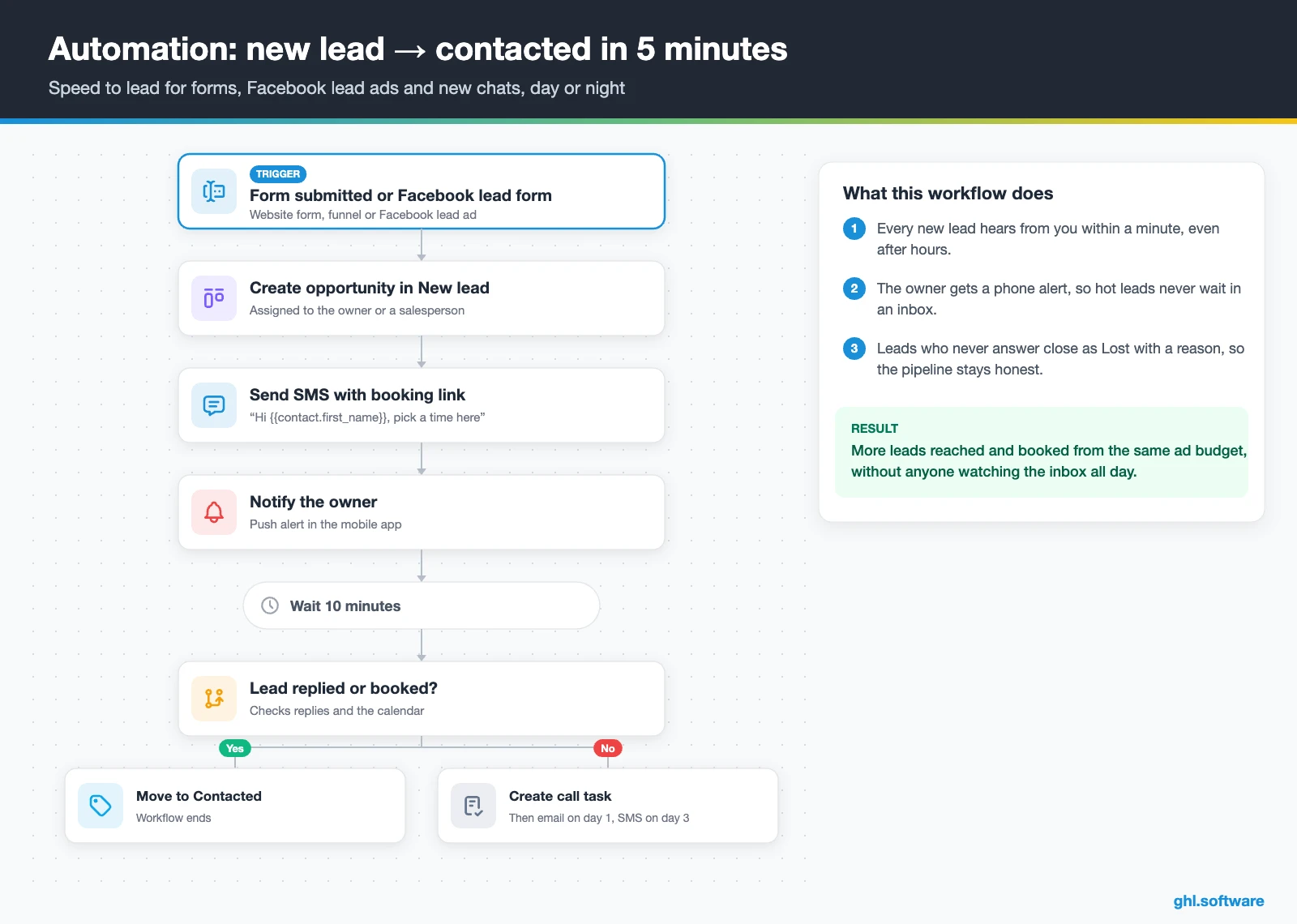
Speed to lead: every new lead contacted in five minutes
The trigger is a form submission, a Facebook lead form or a new inbound conversation. The workflow then creates an opportunity in New lead, assigns an owner and sends a friendly text with the booking link. At the same time, the owner gets a push notification in the mobile app.
After ten minutes, an if/else step checks whether the lead replied or booked. If not, HighLevel creates a call task, sends an email the next day and a last text on day three. Leads who never answer close as Lost with the reason “no response”. That way, the pipeline stays honest and nobody chases ghosts.
Quote to cash: proposal, signature and payment
This one starts when an opportunity moves to Proposal sent. HighLevel sends the proposal with e-signature, waits two days and reminds the client by text if it is still unsigned. Once it is signed, the workflow then sends an invoice or a text-to-pay link for the deposit.
If the invoice is still unpaid after three days, the owner gets an alert and the client gets a second reminder. When it is paid, the deal moves to Won and the contact is tagged as a customer, which starts the onboarding emails. In short, the money side runs on rails while you do the work.

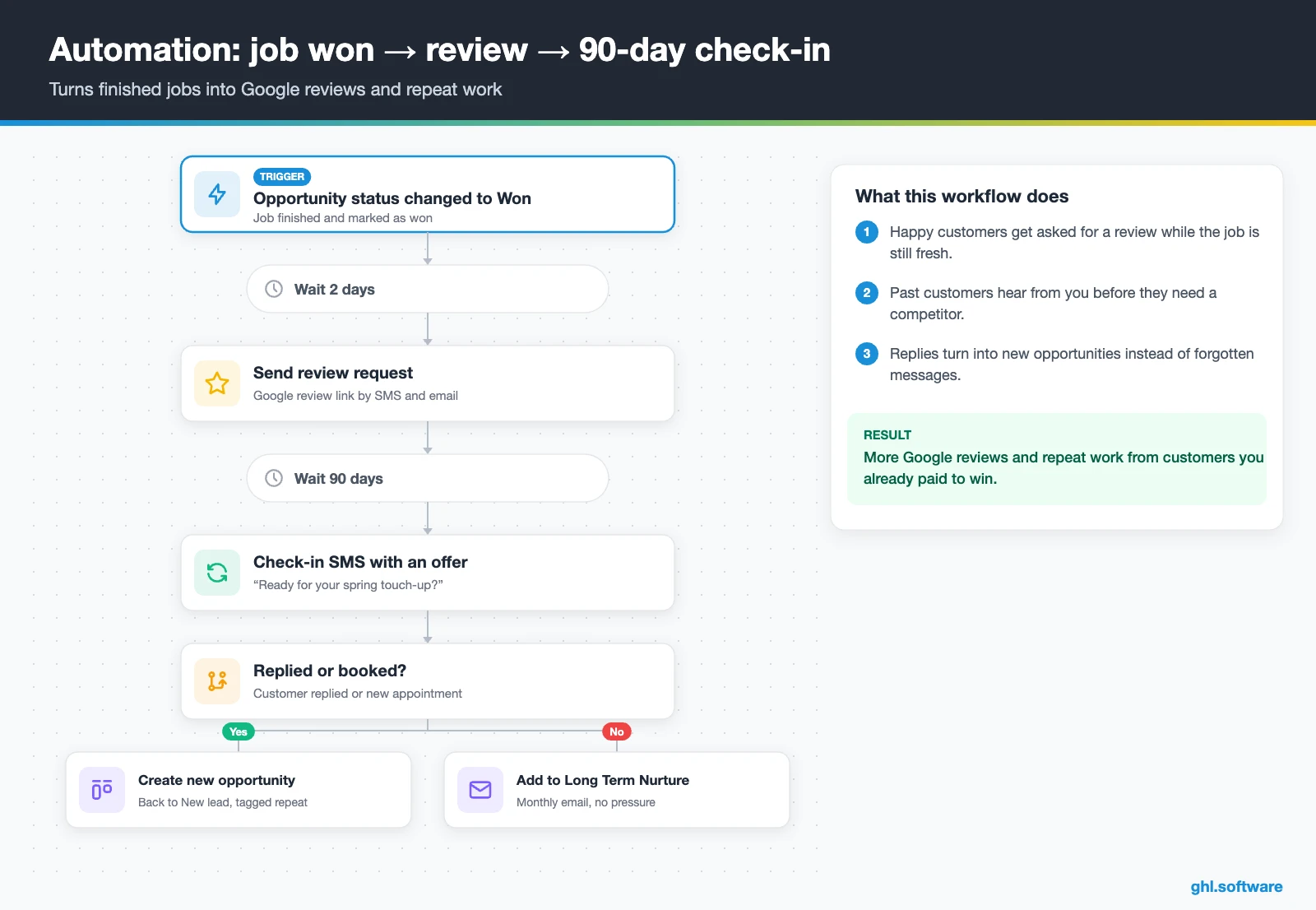
After the job: review request and 90-day reactivation
The third workflow fires when an opportunity is marked Won and the job is finished. Two days later it sends a review request by SMS and email, with a reminder if nobody clicks. Then the contact waits quietly for ninety days.
Then, on day ninety, the customer gets a short check-in or a seasonal offer. If they reply or book, a new opportunity opens in the pipeline. Otherwise, they move to a low-pressure monthly email. As a result, past customers who already trust you hear from you before a competitor’s ad reaches them.
Start with the snapshot and the pipeline from this guide, then add the automations one by one. The extended trial comes with our bootcamp link.
Start the 30-day trialAffiliate link. I may earn a commission at no extra cost to you.
Texting, WhatsApp and AI in one shared inbox
In a CRM for small business, the inbox often matters more than the pipeline. HighLevel’s Conversations tab gathers SMS, email, WhatsApp, Facebook and Instagram DMs, website chat in one list. As a result, anyone on the team can pick up a thread, see the full history and reply from the desktop or the mobile app.
In the US and Canada, texting is usually the fastest channel, so missed call text back and two-way SMS do the heavy lifting. Meanwhile, customers from Latin America or Europe often prefer WhatsApp, which costs $10 a month per sub-account plus Meta’s fees. Since 1 October 2026, service messages above the first 1,000 per number each month are billable too.
If nobody can answer after hours, Conversation AI can reply to chats and book appointments, while Voice AI can pick up calls. Both are billed per use or through a monthly AI plan, and the AI Employee pricing guide explains the options. Still, start with the human workflows first and add AI once you know which questions repeat.

What HighLevel’s official small business snapshot includes
HighLevel does not publish a snapshot called “small business”. The closest official template is the Business Coaching playbook, which shares the generic structure of the other industry snapshots. Even so, it gives you a working starting point in minutes:
- A website with Home (services and FAQ sections) and Link in Bio pages
- A “Business Coaching Offer” funnel: an opt-in step, then an appointment booking page
- The “Marketing Form – Claim Offer” form and a “Marketing Pipeline”
- “New Lead Nurture (Fast 5)” with email, SMS and a voicemail drop, plus “Long Term Nurture”
- A general calendar, an event calendar for consultations and service calendars
- Custom values, a chat widget, email and social post templates, and a Voice AI prompt
However, the playbook does not list pipeline stages, form fields, workflow triggers or message copy. So you still define your own stages, rename the funnel and write messages in your own voice. Then add the quote-to-cash and review workflows from this guide. So treat the snapshot as scaffolding, not a finished system. This overview of snapshots explains how loading one works.
How to set up GoHighLevel for a small business
- Create the sub-account. Add the business name, address, time zone and logo. Load the Business Coaching snapshot for its funnel and nurture workflows, or start blank.
- Invite the team. Add every user with the right role. Because users are unlimited, include part-timers and the bookkeeper so nobody shares a login.
- Connect phone and email. Buy a local number, register A2P 10DLC, turn on missed call text back and set up a dedicated sending domain for email.
- Import your contacts. Upload a CSV from your spreadsheet or old CRM, tagged as customer or lead with the original source.
- Build the pipeline. Create the six stages above, add lost reasons and fill in the deal value. Keep it short at first.
- Create the booking calendar. A “Free estimate” or “Consultation” calendar with buffers and reminders, embedded on your site or funnel.
- Connect payments and documents. Connect Stripe, add your products and build one proposal template and one contract template.
- Turn on the three workflows. Speed to lead, quote to cash, and review plus reactivation. Then add a dashboard with leads by source and won revenue.

If you prefer to watch first, the video below promises a full overview for beginners. That way, you get a map of the account before you follow the steps.
Video: GoHighLevel Tutorial For Beginners 2026 | FULL OVERVIEW · Vince Opra
What a small business really pays for HighLevel
The subscription itself is simple. Starter costs $97 a month, or $970 a year, and includes three sub-accounts, unlimited contacts and unlimited users. Meanwhile, Unlimited ($297) and Agency Pro ($497) suit agencies that run many accounts or resell the software. Because all core features come with every plan, you never upgrade just to get texting or booking.
GoHighLevel plans compared
| Starter | Unlimited | Agency Pro | |
|---|---|---|---|
| Price | $97/month | $297/month | $497/month |
| Annual | $970/year | $2,970/year | $4,970/year |
| Sub-accounts | 3 | Unlimited | Unlimited |
| Contacts and users | Unlimited | Unlimited | Unlimited |
| All core features | Yes | Yes | Yes |
| White label web app | Yes | Yes | Yes |
| API access | Basic | Basic | Advanced, agency-level keys |
| Rebill phone and email | No | At cost | With markup |
| Rebill AI usage | No | No | Yes |
| SaaS Mode and automated sub-accounts | No | No | Yes |
| User and agent reporting | No | No | Yes |
| Support | 24/7 | 24/7 | 24/7 |
Usage is billed on top, as the table shows. Besides that, A2P 10DLC registration costs $22.50 once for low-volume brands, plus a monthly campaign fee.
Usage costs on top of the plan
| Item | Official price | When you pay it |
|---|---|---|
| Local phone number (US/Canada) | $1.15/month | Each number for SMS and calls |
| SMS (US/Canada) | $0.00747 per segment + carrier fees | Every text sent or received |
| Calls (US) | $0.0166/min outbound, $0.01165/min inbound | Calls through LC Phone |
| A2P 10DLC registration | $22.50 one-time (low volume) + monthly campaign fee | Before texting US numbers |
| Email (LC Email) | $0.675 per 1,000 emails | Campaigns and workflow emails |
| $10/month per sub-account + Meta fees | If you use WhatsApp inside HighLevel | |
| AI | Pay-per-use, or $50 or $97/month per sub-account | Voice AI, Conversation AI and other AI tools |
| Premium workflow steps | $0.01 per run after 100 free | Webhooks, Google Sheets, Slack, app actions |
So what does a CRM for small business like this cost in a normal month? For example, take a five-person service business that sends about 1,000 texts, 10,000 emails and a few hundred minutes of calls. It usually lands around $115 to $150 a month on Starter, before any AI plan. If you add Conversation AI or Voice AI, budget $50 or $97 a month, or pay per use. The full breakdown, including annual billing, is in the GoHighLevel pricing guide.
When a simple CRM is enough, and other honest limits
HighLevel is not the right answer for every small business. It was built for agencies, with sub-accounts and snapshots, so the learning curve is steeper than Bigin or Pipedrive. For a two-person B2B sales team that only needs contacts, deals and email sync, the best CRM for small business is probably a focused sales CRM. Likewise, if your budget is zero, HubSpot’s free CRM offers unlimited users and up to one million contacts, which is plenty for a start.
What HighLevel does not do
There are also jobs HighLevel simply does not do. It has no accounting, payroll or inventory, so keep QuickBooks, Xero or your field-service tool and connect them through integrations, the API or webhooks where needed. Also, phone and email usage is billed separately, and the many menus take a few hours to learn.
| GoHighLevel | HubSpot | Zoho CRM / Bigin | Pipedrive | |
|---|---|---|---|---|
| Pricing model | Flat per account from $97/mo, unlimited users | Free CRM; paid tiers per seat | Per user | Per user |
| Main strength | CRM plus texting, booking, sites, reviews and payments | Broad free CRM that grows into paid hubs | Customizable CRM suite; Bigin for very small teams | Visual sales pipeline for deal-focused teams |
| Best when | You want one tool for leads, follow-up and getting paid | You want to start free and add hubs later | You already use other Zoho apps | Your team sells B2B and lives in the deal board |
| Watch out for | Steeper learning curve; usage billed separately | Seat costs rise as users and hubs grow | Many options to configure | Focused on sales, less on marketing and reviews |
Why small business CRMs get abandoned, and a 30-day rollout that sticks
Most attempts to roll out a CRM for small business teams fail for a boring reason. People keep working in their old apps, so the CRM goes stale within weeks. An all-in-one platform has a quiet advantage here. Because texts, calls, bookings and payments happen inside HighLevel, the record fills itself in.
- Week 1: connect the phone number, inbox and booking calendar, then answer every message from Conversations.
- Week 2: import contacts, build the pipeline and turn on speed to lead.
- Week 3: add the proposal template, payments and the quote-to-cash workflow.
- Week 4: switch on review requests, build a simple dashboard and cancel the tools you no longer use.
One more detail most comparisons miss: Starter includes three sub-accounts. So an owner with a second brand or a side business can run it in its own clean account on the same $97 plan. That way, each customer list stays separate. Browse the other industry guides or all HighLevel features to plan your next step.
Open a free account, load the pipeline and turn on the first automation today. The bootcamp walks you through the setup live.
Start the 30-day trialAffiliate link. I may earn a commission at no extra cost to you.
Frequently asked questions
Should a small business use a CRM?
Yes, as soon as leads come from more than one place or more than one person answers them. A CRM keeps every conversation, quote and payment on one record, so nothing depends on someone’s memory. Many owners start when they notice lost leads or forgotten follow-ups. Even a one-person business benefits if it gets calls, texts and form leads every week, because automated replies and reminders save hours.
What is the best CRM for small business beginners?
For pure simplicity, a focused sales CRM such as HubSpot’s free CRM, Bigin or Pipedrive is the easiest to learn. However, if you also need texting, booking, a website, reviews and payments, an all-in-one platform like GoHighLevel saves you from stitching tools together. Beginners do best when they start with one pipeline and one automation, then add more once the team uses the system daily.
Is there a free CRM for small business?
Yes. HubSpot offers a free CRM with unlimited users and up to one million contacts, and several other vendors have free tiers with limits. GoHighLevel has no free plan, but it offers a trial; our bootcamp link extends it to 30 days. Free CRMs are a good start for contact management, though texting, booking and automation usually require paid tiers or extra tools.
How much does a CRM cost per month?
Sales CRMs usually charge per user. Forbes Advisor’s 2026 list shows starting prices from about $9 to $71 per user per month. GoHighLevel charges per account instead: $97 a month on Starter with unlimited users, plus usage for texts, calls and email. For a five-person service business, a realistic HighLevel total is often around $115 to $150 a month before AI.
Is GoHighLevel good for small businesses or only for agencies?
It works for both. HighLevel was designed for agencies, which is why it has sub-accounts and snapshots, but a single business can use one sub-account as its complete CRM and marketing system. The Starter plan includes three sub-accounts, unlimited contacts and unlimited users. The main drawback for a small business is the learning curve, so start with a snapshot and a few core workflows.
GoHighLevel vs HubSpot: which is better for a small business?
HubSpot is easier to start with and has a generous free CRM, but paid tiers are priced per seat and grow with each hub. GoHighLevel costs more on day one, yet one flat $97 plan includes texting, booking, websites, reviews, payments and unlimited users. Choose HubSpot if you mainly need a sales CRM; choose HighLevel if you want follow-up, messaging and payments in one place.
Can I build my own CRM for free, for example with ChatGPT?
You can build a basic contact tracker in a spreadsheet, Notion or with code that an AI assistant helps you write. The hard part is everything around it: texting, call tracking, booking, reminders, payments, consent records and reliable automations. Building and maintaining those yourself takes far more time than it saves for most small businesses, so a ready-made CRM is usually cheaper in practice.
More industry guides
Sources: HighLevel plans and pricing block · HighLevel Business Coaching playbook · Missed call text back (HighLevel Help) · WhatsApp pricing and billing (HighLevel Help) · Text-to-pay (HighLevel Help) · A2P 10DLC registration (HighLevel Help) · Forbes Advisor: Best CRM for small business 2026 · HubSpot CRM for small business · FCC: Telemarketing and robocalls · FTC: CAN-SPAM Act compliance guide

