

CRM for Accountants: Tax Season, Onboarding and Fees in HighLevel
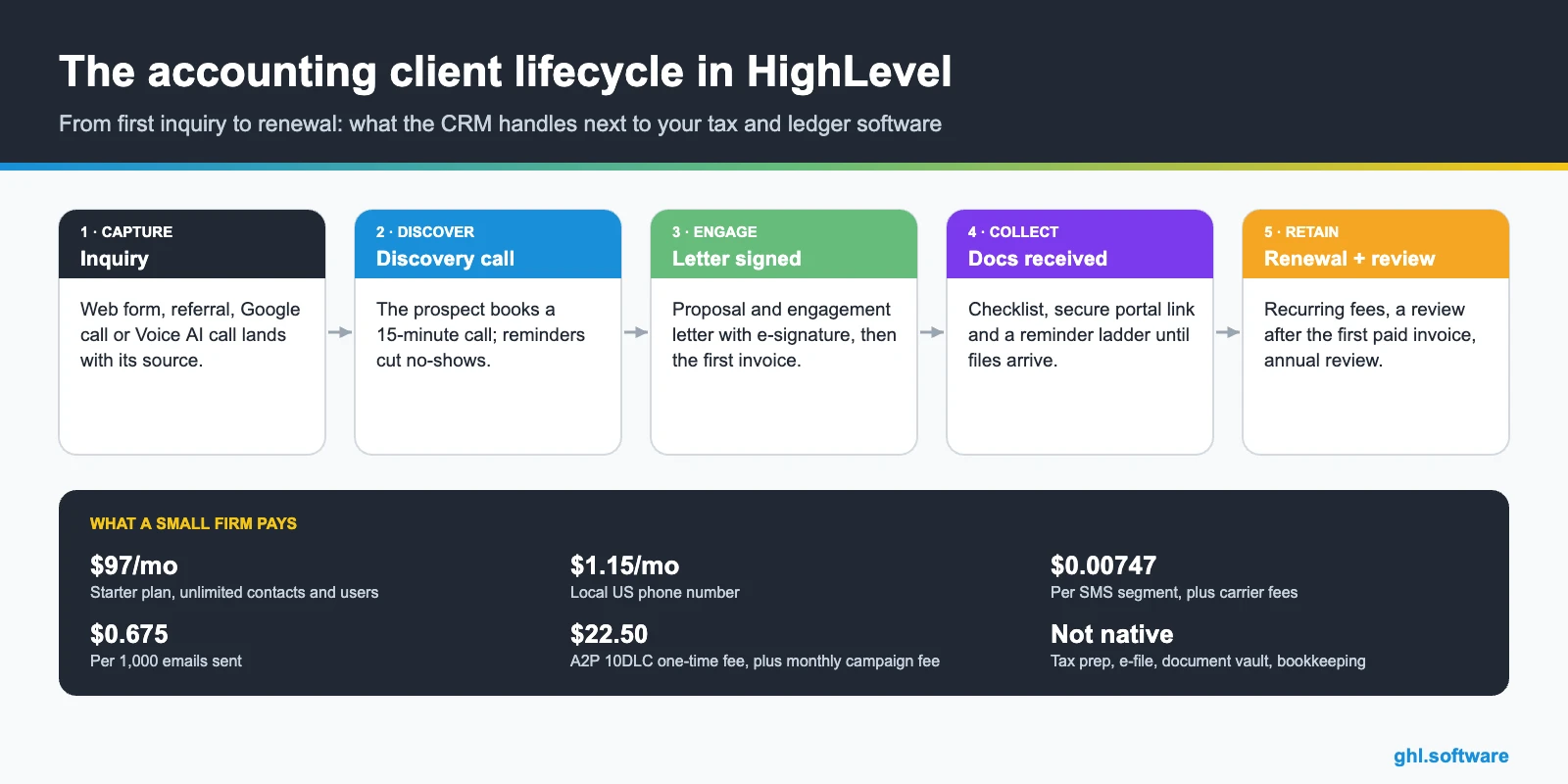
A CRM for accountants tracks every prospect from first call to signed engagement letter. Then it automates onboarding, document requests, recurring invoices and reviews. GoHighLevel does that next to your tax, ledger and practice software. It handles messages, e-signatures, billing and follow-up, while returns, workpapers and secure files stay where they are.
It is the first week of March. Dana Brooks runs a four-person tax and bookkeeping firm. Still, her inbox holds 37 unread messages that all say some version of “Did you get my W-2?”. Meanwhile, a dozen returns sit waiting for a missing 1099. A CRM for accountants, however, turns that chaos into a list. It shows who was asked, who still owes documents and who needs a call today.
In fact, most firms already pay for good software. QuickBooks or Xero hold the books, and TaxDome, Karbon or Canopy run the work. However, none of them was built to answer a Google lead at 8 p.m. or to send an engagement letter the minute a proposal is accepted. Nor do they text a late payer a one-tap payment link.
So this guide shows how HighLevel covers that layer in a small firm. You will see the client pipeline, three automations with real triggers, the official snapshot, an 8-step setup and real monthly costs. After that come honest limits, a comparison with practice management tools and the compliance rules that matter. It is part of our GoHighLevel by industry series.
Leer en español: CRM para contadores · Ler em português: CRM para contabilidade · Part of GoHighLevel by industry
What an accounting firm needs from a CRM
Think of the CRM as the front office of the firm. It owns the relationship before the engagement and between deadlines, while your practice management and ledger tools own the work itself. In a typical small firm, a CRM for accountants comes down to nine jobs.
Common accounting firm problems and how HighLevel solves them
Before you build anything, list the leaks. For example, most small firms recognize at least four of the problems below. A good CRM for accountants should fix each one with a specific feature.
| Problem | What HighLevel does | Feature |
|---|---|---|
| Chasing documents every tax season | Runs a reminder ladder that stops when documents arrive | Workflows + tags |
| Engagement letters signed weeks late | Sends the letter automatically and nudges until it is signed | Documents & Contracts |
| Late-paying monthly clients | Sends recurring invoices and text-to-pay reminders | Invoices + text-to-pay |
| Referrals answered days later | Instant SMS and email, plus a task for the partner | Forms + workflows |
| Missed calls in peak season | Texts the caller back within a minute with a booking link | Missed call text back |
| Few online reviews | Asks for a review after the first fully paid invoice | QuickBooks + Reputation |
| No view of the sales pipeline | Shows proposals, signed fees and renewals on one board | Pipelines + reporting |
The client pipeline in your CRM for accountants
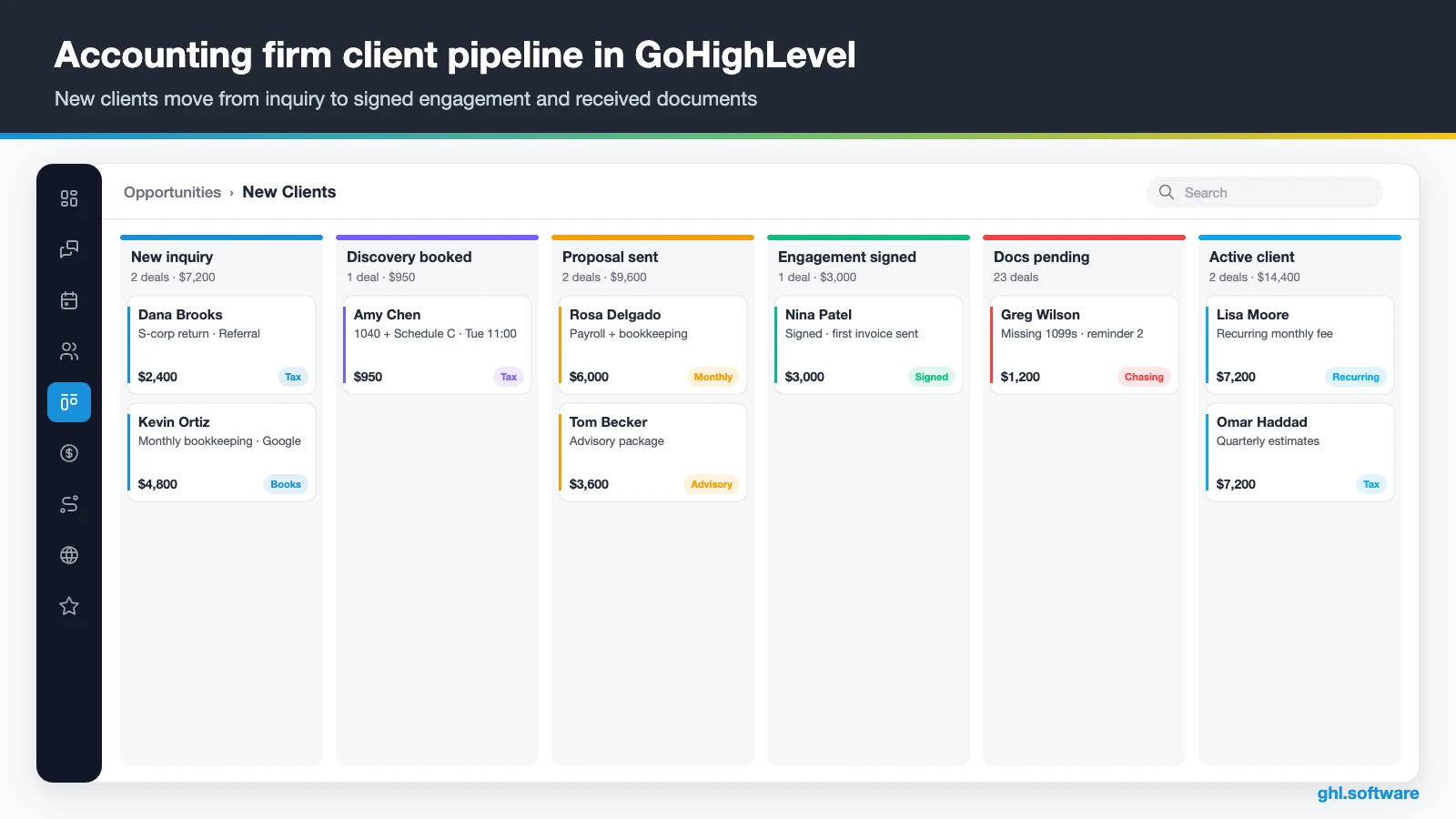
A pipeline is a board of stages. Moreover, each card is a client opportunity with its annual fee, and each move can trigger the next message or task. In addition, the board shows how much revenue sits in Proposal sent. That turns a vague feeling into a clear number for the Monday meeting.
So keep two pipelines. The first, New Clients, runs from inquiry to active client. The second, Renewals & Annual Review, holds existing clients before each engagement renews. That way, onboarding and retention never compete for the same view.
| Stage | What moves a client here |
|---|---|
| New inquiry | Web form, referral, Google call or Voice AI call |
| Discovery booked | Prospect books the intro call on your calendar |
| Proposal sent | Partner sends the fee proposal from a template |
| Proposal accepted | Client accepts; this stage starts the engagement letter workflow |
| Engagement signed | Letter signed; first invoice or recurring billing starts |
| Docs pending | Onboarding checklist sent; document chaser running |
| Active client | Documents received and work in progress in your practice tool |
Three automations every accounting firm should run
You can build dozens of workflows. Still, three of them do most of the work in a CRM for accountants at a small firm. Each one below uses triggers and actions that exist in the HighLevel workflow builder.
1. Proposal accepted → signed engagement letter
The trigger is Pipeline stage changed to Proposal accepted. Right away, the workflow uses the Send Documents & Contracts action to deliver your engagement letter template with e-signature. If the template includes a product list, the client can even pay the first fee at signing.
Then the workflow waits two days and texts the signing link. After three more days, the partner then gets a task to call. Unsigned letters also appear in the Waiting for Others tab, so nothing hides in an inbox. Finally, moving the card to Engagement signed starts onboarding and billing.

2. The tax-season document chaser
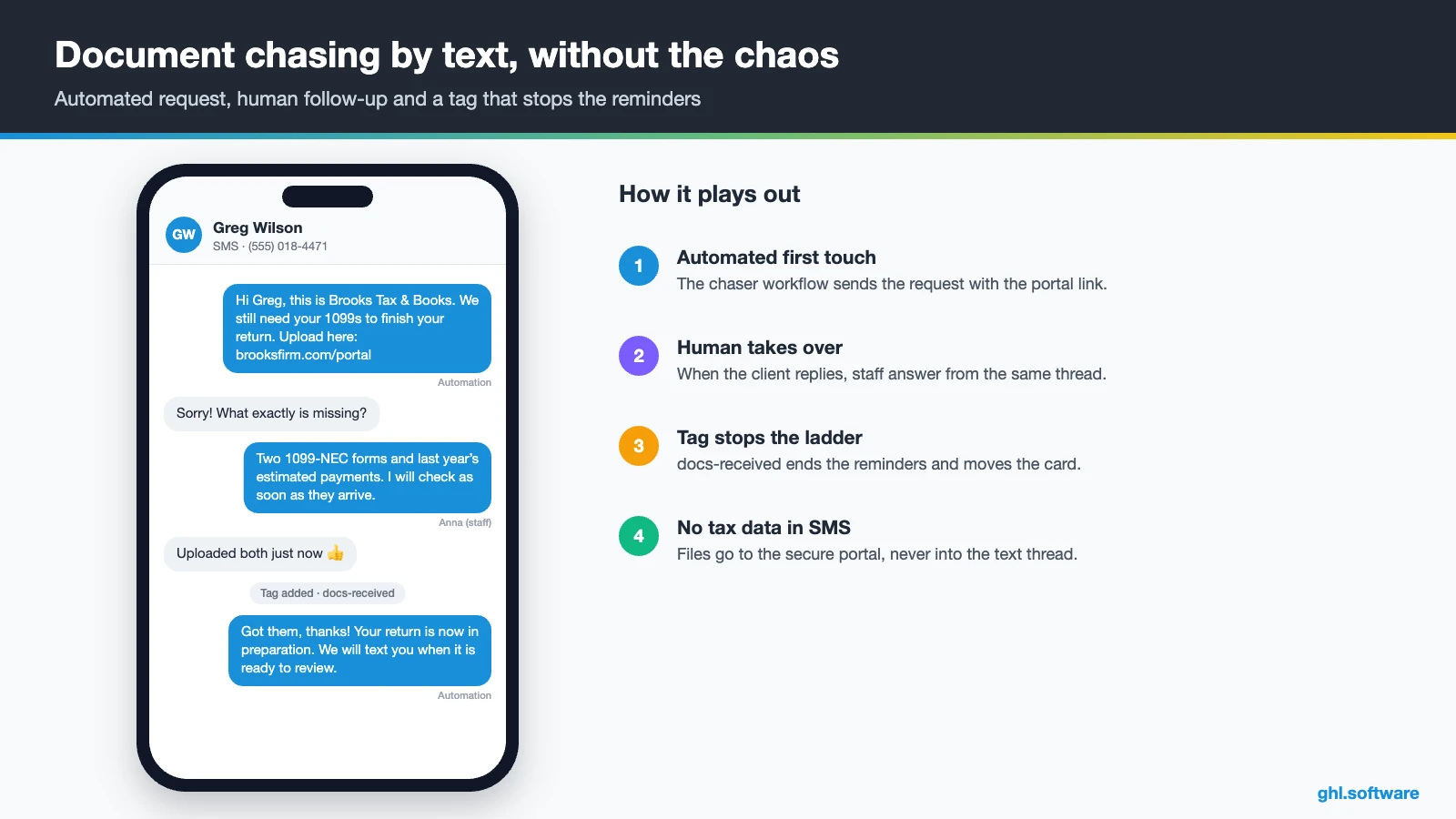
This one starts with Tag added: docs-requested-2026, or with the stage Docs pending. On day zero, the client gets an email and a text with the checklist and a link to your secure portal. Three days later, an SMS names what is still missing.
Before each reminder, an if/else step checks for the tag docs-received, which staff add when the files arrive. If the tag is there, the reminders stop and the card moves to In preparation. Otherwise, after a week the workflow creates a call task. As a result, your team only calls the clients who really need it.

3. Overdue fees, payment and a review request
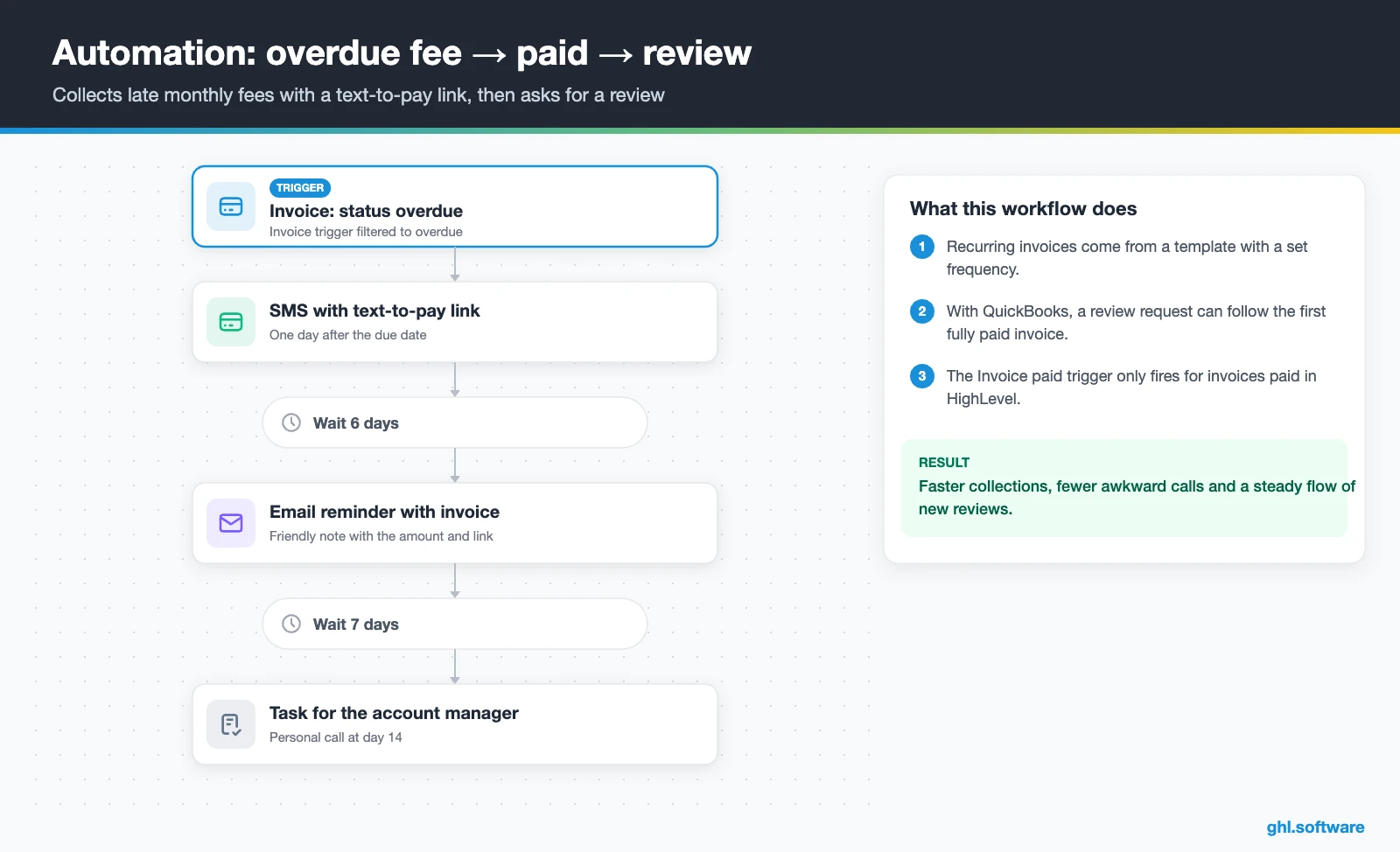
In fact, monthly bookkeeping fees work best as recurring invoices built from a template with a set frequency. When an invoice goes overdue, the Invoice trigger starts a ladder. A text-to-pay link goes out after one day, then an email a week later and finally a task for the account manager at day 14.
After the client pays, ask for a review. If you connect QuickBooks Online, the integration can send a review request automatically. It fires when a contact’s first invoice is paid in full (HighLevel help). Note that the Invoice paid workflow trigger only fires for invoices paid in HighLevel, not in QuickBooks.
If you are new to the builder, the walkthrough below covers the triggers, waits and if/else branches these three automations use. Watch the parts on conditions and actions.
Video: GoHighLevel Workflow Complete Tutorial and Walkthrough · Nuno Tavares | Automated Marketer
Start with the snapshot and the pipeline from this guide, then add the automations one by one. The extended trial comes with our bootcamp link.
Start the 30-day trialAffiliate link. I may earn a commission at no extra cost to you.
Texting, email and AI answering for accounting firms
Clients ignore portal notifications. Still, they read texts. So a CRM for accountants has to live where clients answer. The HighLevel inbox puts SMS, email, web chat, Facebook, Instagram and WhatsApp in one thread per client. So anyone on the team sees the full history.
In fact, missed call text back is the quickest win in March and April. You enable it under Settings › Phone System, and it needs an A2P-verified number for SMS. Likewise, a Voice AI agent can answer overflow calls, book discovery calls during the conversation and transfer to a human. Also, it only works on LC Phone or Twilio numbers.
Also, keep one rule: texts carry reminders and links, never tax data. Moreover, Conversation AI can handle routine questions about deadlines, office hours or uploads. Anything specific to a return goes to staff.
What HighLevel’s official Accounting Firm snapshot includes
HighLevel publishes a free Accounting Firm playbook with a matching snapshot. A snapshot loads a website, funnels, forms, workflows and calendars into a sub-account in one step. However, this one is a generic template with the industry name swapped in, so treat it as a starting point. Out of the box you get:
- A website called Accounting Firm, with a home page (services and FAQ sections) and a link-in-bio page
- An Accounting Firm Offer funnel: an opt-in step, then an appointment booking page
- The Marketing Form – Claim Offer and a Marketing Pipeline (the guide defines no stages)
- Two named nurture workflows, New Lead Nurture (Fast 5) – Claim Offer and Long Term Nurture, plus four unnamed ones
- Service calendars tagged Accounting Firm Services, a general calendar and an event calendar for consultations
- Custom values, a chat widget, snippets, one ad template and Voice AI prompts for calls, booking and FAQs
- Setup steps for missed call text back, review requests and Review Reply AI
What you still build yourself: the pipeline stages, letter and proposal templates and the document chaser. Besides, recurring billing, renewals and all the message copy are on you. Also, use the generic Voice AI activation steps, because the accounting guide repeats the link-in-bio steps by mistake. In other words, the snapshot gives you the shell, and you add the firm’s logic.
How to set up GoHighLevel as a CRM for accountants
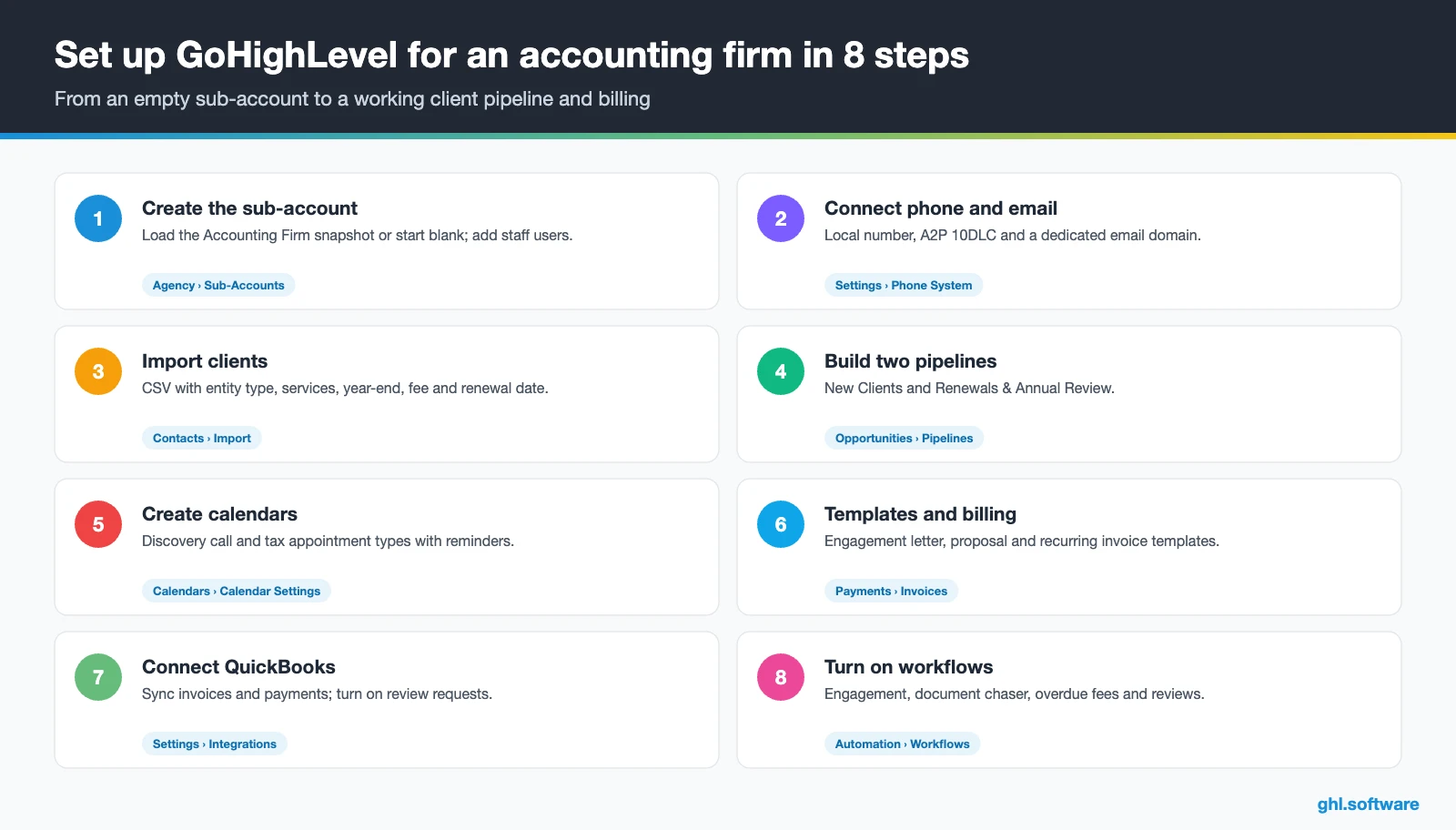
- Create the sub-account. Add the firm under Agency › Sub-Accounts and load the Accounting Firm snapshot or start blank. Then add partners and staff with the right permissions.
- Connect phone and email. Buy a local number, register A2P 10DLC, enable missed call text back and set up a dedicated email domain. See phone and SMS.
- Import clients. Map custom fields for entity type, services, fiscal year-end, fee and renewal date, then tag clients by service line.
- Build both pipelines. Create New Clients and Renewals & Annual Review, with the stages from the table above.
- Create calendars. Set up a discovery call and tax appointment types, with confirmations and reminders.
- Templates and billing. Build engagement letter and proposal templates, connect Stripe and create recurring invoice templates.
- Connect QuickBooks. Under Settings › Integrations, connect QuickBooks Online, decide whether to import past invoices and turn on review requests.
- Turn on workflows and reporting. Activate the three automations and track proposal-to-signed rate and overdue invoices in reporting. Then install the mobile app.
What a CRM for accountants costs with HighLevel
HighLevel charges a flat plan plus usage. Most small firms start on Starter at $97 a month, which already includes every core feature, unlimited contacts and unlimited users. On top of that, you pay for what you send. A local number is $1.15 a month, SMS is $0.00747 per segment plus carrier fees, and email is $0.675 per 1,000.
For example, picture a firm that sends 4,000 text segments and 10,000 emails in a busy month. It lands around $140 to $170, plus the one-time $22.50 A2P brand fee and a monthly campaign fee. Moreover, adding an AI plan ($50 or $97 per sub-account) pushes it toward $250. Our pricing guide and the AI Employee pricing page break it down.
GoHighLevel plans compared
| Starter | Unlimited | Agency Pro | |
|---|---|---|---|
| Price | $97/month | $297/month | $497/month |
| Annual | $970/year | $2,970/year | $4,970/year |
| Sub-accounts | 3 | Unlimited | Unlimited |
| Contacts and users | Unlimited | Unlimited | Unlimited |
| All core features | Yes | Yes | Yes |
| White label web app | Yes | Yes | Yes |
| API access | Basic | Basic | Advanced, agency-level keys |
| Rebill phone and email | No | At cost | With markup |
| Rebill AI usage | No | No | Yes |
| SaaS Mode and automated sub-accounts | No | No | Yes |
| User and agent reporting | No | No | Yes |
| Support | 24/7 | 24/7 | 24/7 |
Usage costs on top of the plan
| Item | Official price | When you pay it |
|---|---|---|
| Local phone number (US/Canada) | $1.15/month | Each number for SMS and calls |
| SMS (US/Canada) | $0.00747 per segment + carrier fees | Every text sent or received |
| Calls (US) | $0.0166/min outbound, $0.01165/min inbound | Calls through LC Phone |
| A2P 10DLC registration | $22.50 one-time (low volume) + monthly campaign fee | Before texting US numbers |
| Email (LC Email) | $0.675 per 1,000 emails | Campaigns and workflow emails |
| $10/month per sub-account + Meta fees | If you use WhatsApp inside HighLevel | |
| AI | Pay-per-use, or $50 or $97/month per sub-account | Voice AI, Conversation AI and other AI tools |
| Premium workflow steps | $0.01 per run after 100 free | Webhooks, Google Sheets, Slack, app actions |
Limits and alternatives: TaxDome, Karbon and Canopy
A CRM for accountants is not practice management or tax software, and HighLevel is no exception. In short, it has no tax preparation, workpapers, e-file, bank feeds or bookkeeping. It is also not a secure document vault, so keep tax documents, IDs and returns in a dedicated client portal. Therefore, the best stack pairs HighLevel for growth and communication with the tools that do the work.
The QuickBooks sync also has limits. Draft invoices do not sync, and only new invoices sync unless you turn on Import Invoices during setup. Meanwhile, a Xero integration article exists in the help center, but we have not tested it.
| GoHighLevel | TaxDome | Karbon | Canopy | |
|---|---|---|---|---|
| What it is | Growth CRM: inbox, booking, billing, marketing | All-in-one practice management | Practice management and team collaboration | Cloud CRM and practice tool for accountants |
| Client portal and document management | – (not a secure vault) | Yes | Check with vendor | ✓ (client portal) |
| E-signatures | Yes | Yes | Check with vendor | Yes |
| Workflow automation | Yes | Yes | Yes | ✓ (larger plans) |
| SMS, missed call text back, Voice AI | Yes | Not its focus | Not its focus | Not its focus |
| Funnels, ads and review requests | Yes | Not its focus | Not its focus | Not its focus |
In short, if you need a client portal and work management, start with a practice tool. However, if your gap is lead follow-up, texting, e-signed letters, collections and reviews, a CRM for accountants like HighLevel covers it. It also runs fine next to TaxDome or Karbon. The practice tool details come from Expert Market’s review.
Compliance: Safeguards Rule, IRS Pub 4557 and §7216
Meanwhile, marketing has its own rule. Under IRC §7216, lists built from tax return information may not be used to solicit non-tax return preparation services. Misuse can also bring criminal and civil penalties (IRS §7216 center). Therefore, get the client’s consent before an advisory or insurance upsell campaign uses return data. In addition, US texting needs A2P 10DLC registration and documented consent.
The overlooked angle: consent-aware advisory campaigns
Every firm wants to turn compliance clients into advisory clients. Yet many guides on CRM for accountants suggest an upsell campaign to the whole client list. That can collide with §7216 when the list comes from return data.
Instead, HighLevel lets you build it the safe way. First, add a consent checkbox and a short explanation to the onboarding form. Next, store the answer in a custom field. Then build a smart list of clients who said yes, and only that list enters the advisory nurture. Because the consent lives on the contact record, anyone can see why a client received the campaign. As a result, growth and compliance stop pulling in opposite directions.
Open a free account, load the pipeline and turn on the first automation today. The bootcamp walks you through the setup live.
Start the 30-day trialAffiliate link. I may earn a commission at no extra cost to you.
Frequently asked questions
What CRM software is best for accounting firms?
It depends on your gap. If you need a client portal, document management and work tracking, a practice management tool like TaxDome, Karbon or Canopy fits first. If your gap is lead follow-up, texting, engagement letters, recurring billing and reviews, an all-in-one CRM like HighLevel covers it. Many small firms run HighLevel next to their practice tool and QuickBooks.
What is a CRM for accounting?
A CRM for accounting is software that manages the client relationship around the work: inquiries, discovery calls, proposals, engagement letters, onboarding, document requests, invoices, renewals and reviews. Also, it stores every conversation in one place and automates follow-up. It does not prepare returns or keep the books; that stays in your tax and ledger software.
Does GoHighLevel integrate with QuickBooks?
Yes. The QuickBooks Online integration records HighLevel payments as sales receipts, syncs sent invoices and imports existing QuickBooks contacts. It can also send a review request when a contact’s first invoice is paid in full. Draft invoices do not sync, and past invoices only sync if you turn on Import Invoices during setup. A Xero integration article also exists.
Can a CRM automate document requests during tax season?
Yes. In HighLevel, a tag such as docs-requested starts a workflow that sends a checklist with your portal link, then reminders by SMS and email. Before each reminder, an if/else step checks whether staff added the docs-received tag. If so, the reminders stop. If not, the workflow creates a call task. Keep the files themselves in a secure portal.
Is a CRM secure enough for financial client data?
Use it for contact details and communication, not for sensitive tax data. The FTC Safeguards Rule requires tax preparers to keep a written security plan, and HighLevel is not a secure document vault. Therefore, never collect Social Security numbers or bank details in CRM forms. Instead, link clients to a dedicated portal and keep returns and IDs there.
Can I market other services to my tax clients?
Only with care. Under IRC §7216, lists built from tax return information may not be used to solicit non-tax return preparation services without the client’s consent, and misuse can bring penalties. Collect consent on your onboarding form, store it in a custom field, and send advisory or upsell campaigns only to clients who agreed.
How much does a CRM for accountants cost?
With HighLevel, the Starter plan costs $97 a month with unlimited contacts and users. However, usage comes on top: a local number is $1.15 a month, SMS $0.00747 per segment plus carrier fees, and email $0.675 per 1,000. A small firm typically pays about $140 to $170 a month in a busy season, or around $250 with an AI plan.
More industry guides
Sources: HighLevel Accounting Firm playbook · Setting up the QuickBooks integration · Automatic review request when invoice paid in QuickBooks · Documents & Contracts templates in workflows · Text-to-pay links · A2P 10DLC brand and campaign registration · IRS Publication 4557 · IRS Section 7216 information center · Expert Market: best CRM for accountants

