


CRM for Law Firms: Client Intake in GoHighLevel, Step by Step
A CRM for law firms runs everything before a matter opens: answering calls and forms, qualifying the lead, triggering the conflict check, booking the consultation and getting the engagement letter signed and paid. GoHighLevel handles that intake layer well. However, it does no case management or trust (IOLTA) accounting, so it works next to Clio or MyCase.
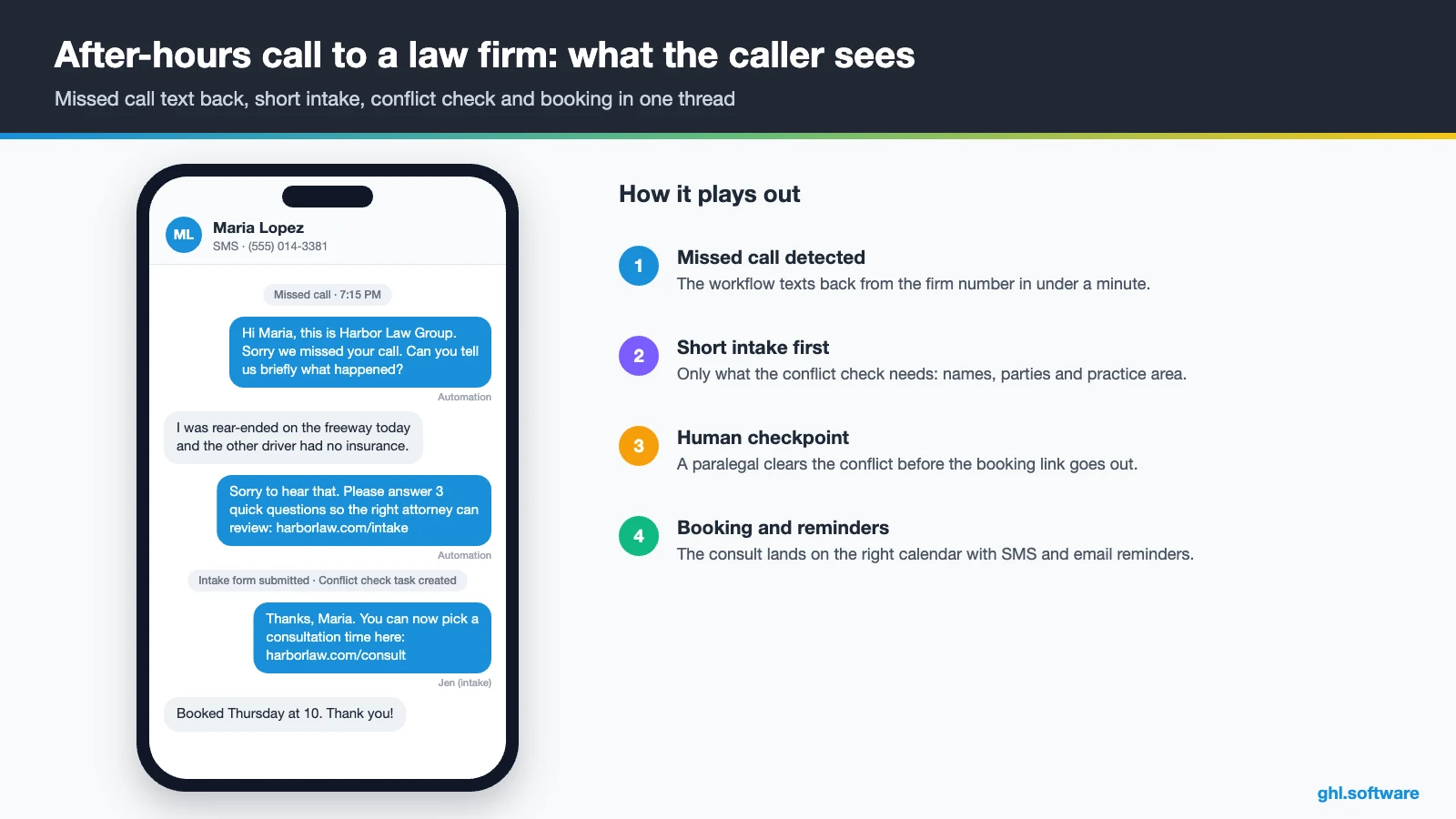
It is 7:15 on a Tuesday evening. Two hours ago, Maria Lopez was rear-ended on the freeway. Now she is calling the three injury firms she found on Google, and your line goes to voicemail. Meanwhile, the second firm texts her back within a minute with three short questions. By 8 p.m., she has a consultation booked for Thursday. Nobody at your office did anything wrong; the office was simply closed. A CRM for law firms exists for exactly that gap between the first call and the signed engagement letter.
Most practice-management software starts working once the person is already a client. Before that point, intake often lives in a shared inbox, a spreadsheet and the receptionist’s memory. As a result, leads go cold, consultations don’t show, and fee agreements sit unsigned for a week.
This guide shows how GoHighLevel (HighLevel) covers that front end for a small or mid-size firm. You will see the intake pipeline, three automations, texting and Voice AI, the official snapshot, setup, costs and limits. Because this is an independent guide, it also shows where Clio, MyCase or a legal intake tool fits better. For other professions, browse the industry guides.
Leer en español: CRM para abogados · Ler em português: CRM para advogados · Part of GoHighLevel by industry
What a law firm needs from a CRM, and what HighLevel does
Intake at a law firm is not a generic sales funnel. Before anyone books a consultation, you need the practice area, the jurisdiction and the key dates. You must also clear conflicts. After the consultation, the engagement letter has to be signed and the first payment received. Therefore, a CRM for law firms has to connect forms, tasks, calendars, documents and payments, not just store contacts.
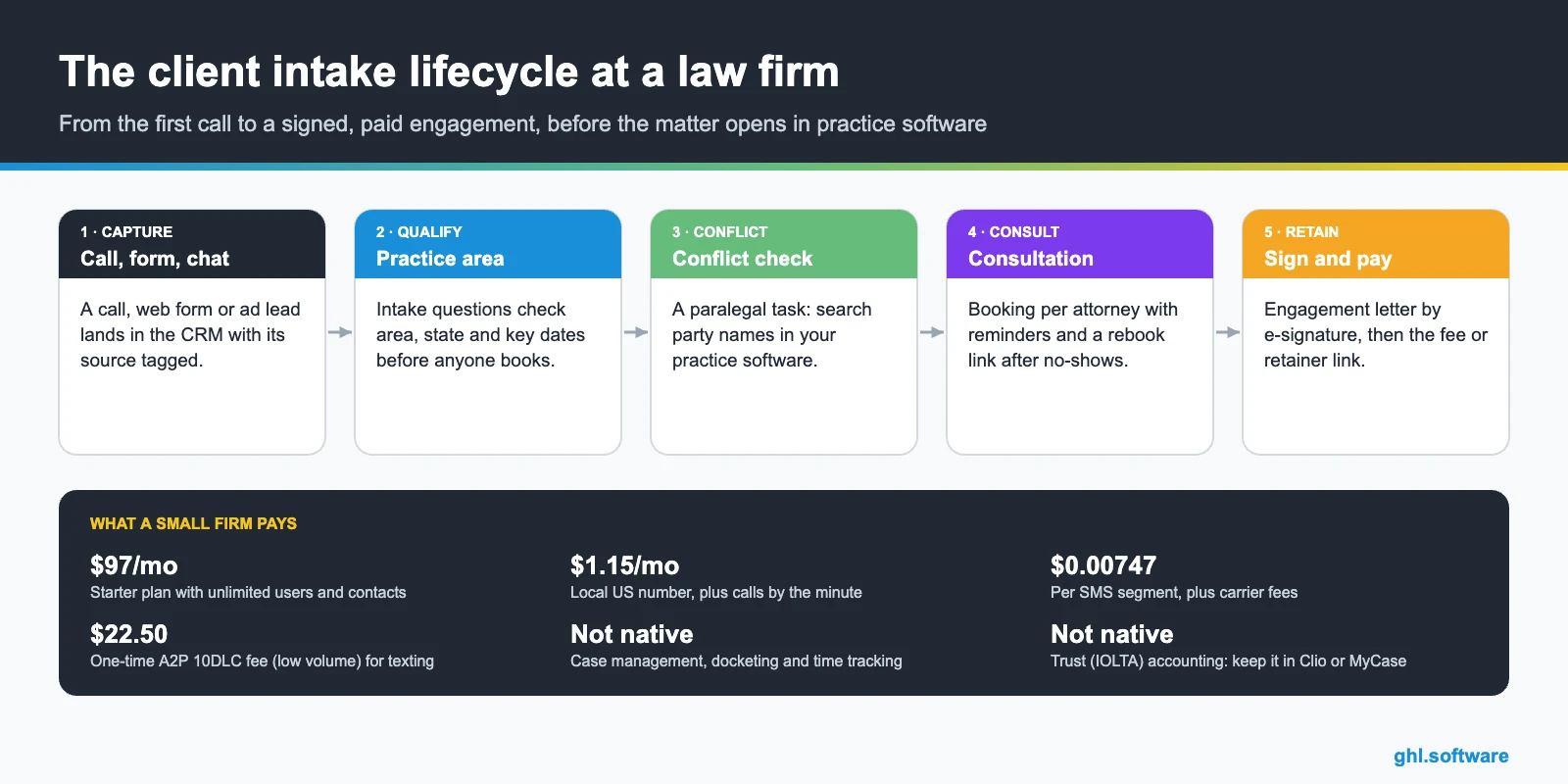
Intake problems at law firms and how HighLevel solves them
Most firms lose prospects in the same few places, and a CRM for law firms should close each gap. The table below maps each one to what HighLevel actually does and the feature behind it.
| Pain | What HighLevel does | Feature |
|---|---|---|
| Calls missed after hours or during court | Texts back in under a minute with a short intake link; Voice AI can take the call instead | Missed call text back, Voice AI |
| Consultations with people you cannot help | Asks practice area, state and key dates before the booking link appears | Forms, custom fields, if/else |
| Conflicts found after the consult | Creates a conflict-check task and holds the card until a paralegal clears it | Workflows, tasks, pipeline |
| Consultation no-shows | Sends SMS and email reminders, then a rebook link after a no-show | Calendars, workflows |
| Fee agreements unsigned for days | Sends the engagement letter automatically and reminds the client until it is signed | Documents & Contracts |
| Chasing the consultation fee | Sends a text-to-pay link or an invoice right after the consult | Payments, invoices |
| “What is happening with my case?” calls | Sends short milestone texts when staff move the client to a new stage | Workflows, inbox |
| Few online reviews | Asks every client for a review when a matter closes, where state rules allow, and routes unhappy replies to a partner | Reputation management |
The intake pipeline in a CRM for law firms
A good intake pipeline mirrors how your firm actually decides to take a matter. Each stage needs a clear trigger, so a card never moves because someone “had a feeling”. In HighLevel, stages live under Opportunities. Workflows then move cards when a form arrives, an appointment changes or a document is signed. Meanwhile, the stages that need judgment, such as the conflict check, stay manual on purpose.
Also keep two exits outside the main flow. “Not retained” holds prospects who decide not to hire you, while “Referred out” holds matters outside your practice areas. That way, your reports show the real retain rate instead of a board full of dead cards.

| Stage | What moves the lead here |
|---|---|
| New lead | A call, web form, chat, ad lead or referral creates the contact and the opportunity |
| Qualified | Intake answers fit a practice area and a jurisdiction you serve |
| Conflict check | The paralegal task is open while party names are searched in your practice software |
| Consult booked | The prospect books through the attorney or team calendar |
| Consult held | The appointment is marked “showed” and the attorney logs the outcome |
| Engagement sent | The attorney accepts the matter and the fee agreement goes out |
| Retained | Signed and paid; the matter is opened in Clio, MyCase or your practice software |
To see the idea on screen, watch the walkthrough below. “GoHighLevel for Law Firms: Client Intake Made Simple” covers client intake in HighLevel. Watch how the form answers feed the contact record and what follow-up comes after.
Video: GoHighLevel for Law Firms: Client Intake Made Simple · Easy Access Tech
Three intake automations every firm should run
A CRM for law firms doesn’t need fifty workflows. Instead, these three cover the moments where most prospects drop out: the first response, the signature and the missed consultation.
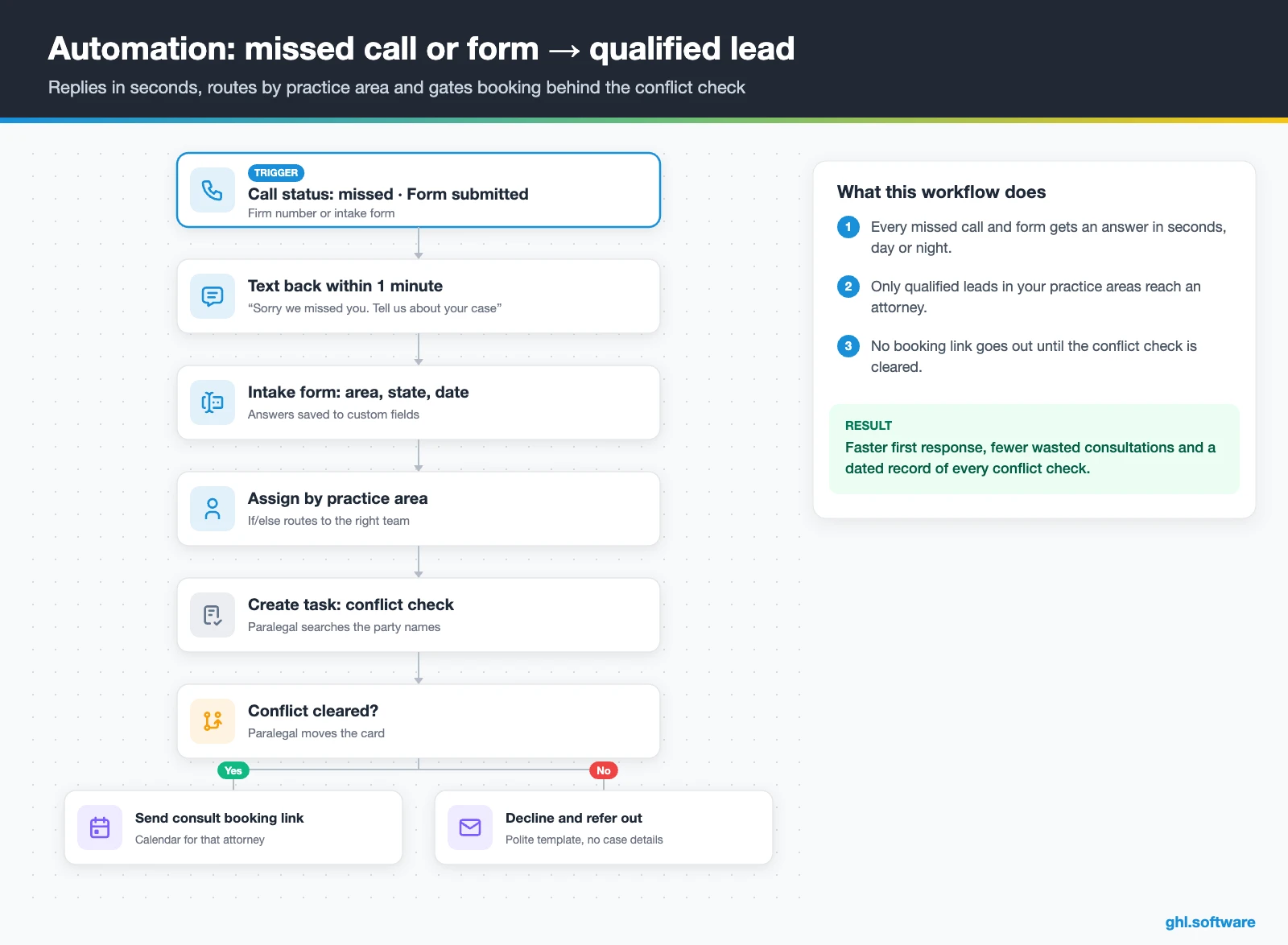
Missed call or web form → qualified, conflict-checked lead
The trigger is either a missed call or a submitted intake form. HighLevel texts the caller back within a minute with a short intake link. Then it saves the answers to custom fields and creates the opportunity in “New lead”. Next, an if/else branch reads the practice area, assigns the right attorney and sends an alert in the mobile app.
After that comes the step most templates skip. The workflow creates a conflict-check task for the paralegal, using the opposing party’s name from the form. Only when the paralegal moves the card to “Conflict cleared” does the prospect receive the booking link. If the matter is outside your practice areas, a polite referral message goes out instead. The card then moves to “Referred out”.
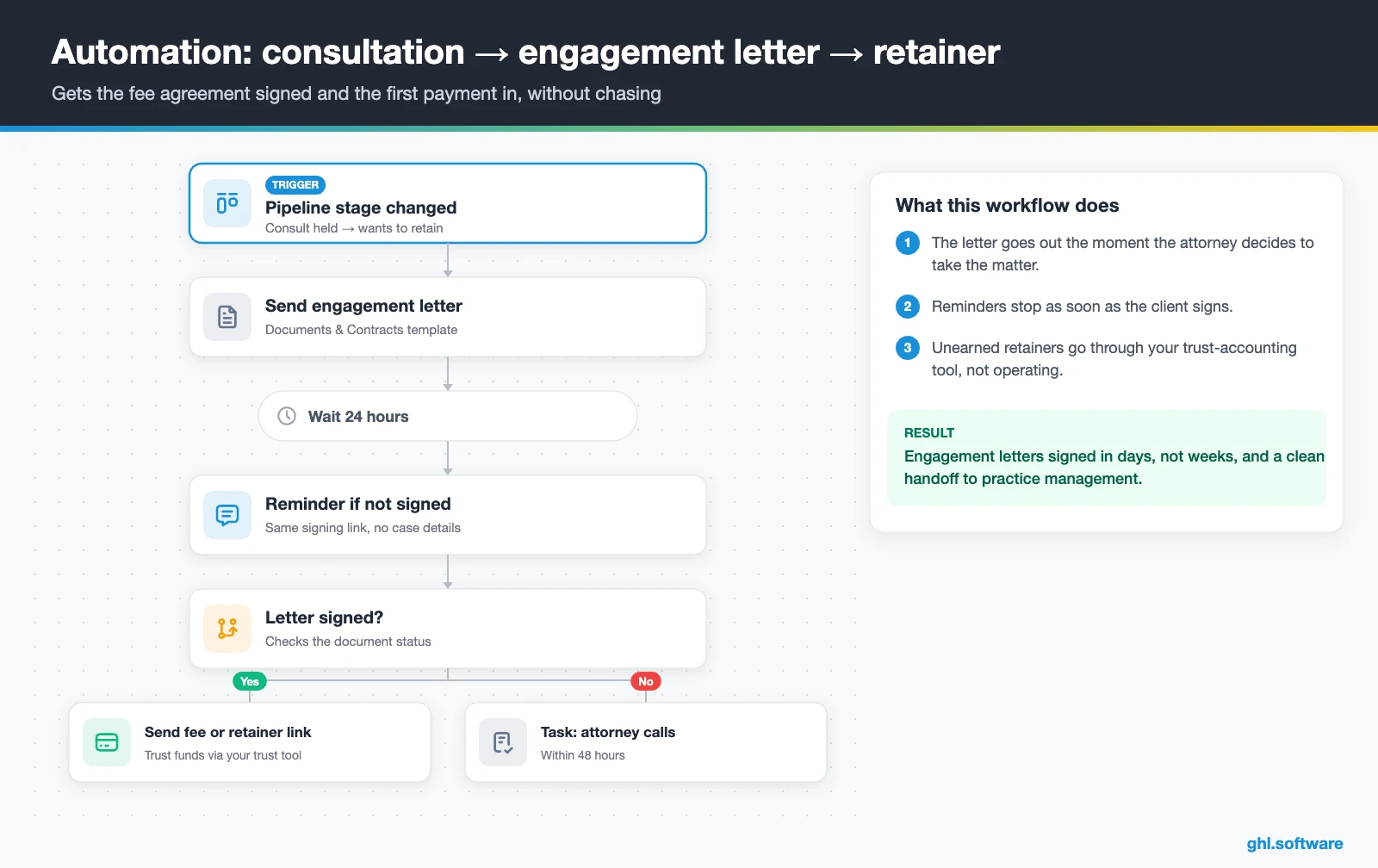
Consultation held → engagement letter → retainer paid
Say the attorney moves the card to “Consult held, wants to retain”. The workflow then sends the engagement letter from a Documents & Contracts template. HighLevel documents support signature fields, several signers and an audit certificate with timestamps. After 24 hours without a signature, the client gets a friendly SMS with the same link. After 48 hours, the attorney gets a task to call.
Once the letter is signed, the client receives the payment link. For a consultation fee or an earned flat fee, that can be a HighLevel invoice or text-to-pay. For money that must go into trust, however, send the link from your trust-accounting tool instead. Finally, the card moves to “Retained” and a welcome email lists the documents you need. A webhook can also pass the new client to your practice software.
Consultation no-show → rebooked
The trigger is the appointment status changing to “no-show”. Ten minutes later, the prospect receives a short text with a link to rebook with the same attorney. If nothing happens, an email follows the next day, and after three days the intake team gets a call task. After two weeks of silence, the card moves to “Not retained” and a light, ethics-reviewed nurture takes over. As a result, you recover part of the consultations you already paid to generate.

Start with the snapshot and the pipeline from this guide, then add the automations one by one. The extended trial comes with our bootcamp link.
Start the 30-day trialAffiliate link. I may earn a commission at no extra cost to you.
Texting, web chat and Voice AI for law firm intake
In the US, many prospects would rather get a text than a voicemail. So SMS from your firm number becomes the backbone of any CRM for law firms. Before you text anyone, register A2P 10DLC (brand and campaign) and keep proof of opt-in. Marketing texts also need TCPA-grade consent. After that, every SMS, email, web chat and social message lands in one Conversations thread, on desktop or mobile.
AI helps, but within limits. Conversation AI can answer first questions such as hours, locations and practice areas, collect intake details and offer consultation times. Voice AI can answer after-hours calls, ask the intake questions and book the consult. However, it needs a HighLevel (LC Phone) or Twilio number. Still, neither tool should give legal advice. Both should hand off to a person once a caller describes facts that need judgment.
For the voice side, the next video fits well. Its title says it all: “GoHighLevel for Law Firms, Lawyers | Legal Voice AI Agent & CRM Automation”. Watch it with your bar’s rules in mind, and then decide which answers your agent may give.
Video: GoHighLevel for Law Firms, Lawyers | Legal Voice AI Agent & CRM Automation · Neyox AI - Automated Lead Response System
What the official HighLevel law firm snapshots include
HighLevel publishes two legal playbooks: the Personal Injury Attorney playbook and the Family Lawyer playbook. Both follow the generic template HighLevel uses for every industry, with the names changed. Out of the box, you get:
- A website (“Personal Injury Attorney” or “Family Lawyer”) with a Home page, services and FAQ sections, plus a Link in Bio page.
- An offer funnel (“Personal Injury Attorney Offer” or “Family Law Offer”) that goes from an opt-in to a booking page.
- The “Marketing Form – Claim Offer”, a “Marketing Pipeline” and service calendars for consultations.
- The “New Lead Nurture (Fast 5)” workflow (email, SMS and a voicemail drop) and a “Long Term Nurture” workflow.
- Custom values, a chat widget, snippets and missed call text back as a quick win; the family law version adds a Voice AI prompt.
- A proposal template named “Personal Injury Attorney” in Documents & Contracts.
Still, the snapshot is a marketing starter, not a finished CRM for law firms. The guides list no pipeline stages, no intake fields and no conflict-check step. Therefore, you still build the intake pipeline, practice-area fields, conflict task, engagement letter and no-show flow. Also, rewrite the “claim offer” wording, because a law firm offers a consultation, not a promotion. Every message should pass your state’s advertising rules.
How to set up GoHighLevel as a CRM for law firms
- Create the sub-account. Load the Personal Injury or Family Lawyer snapshot, or start blank. Then add each attorney and paralegal under My Staff with the right permissions.
- Connect phone and A2P. Buy a local number, register A2P 10DLC with clear opt-in language and turn on missed call text back in the phone system.
- Create intake fields. Add custom fields for practice area, state, incident date, opposing party, referral source and conflict status.
- Build the intake pipeline. Use the seven stages above, plus “Not retained” and “Referred out”, under Opportunities.
- Set up consult calendars. Create one calendar per practice area or attorney, with round robin, buffers and reminders.
- Write the engagement letter. Turn your fee agreement into a Documents & Contracts template with signature and date fields.
- Turn on the workflows. Build the three automations above and test them with a staff phone number first.
- Track intake numbers. Set up a dashboard for leads by source, show rate, retain rate and days to signature.

What a law firm really pays for HighLevel
For a single firm, HighLevel usually starts on Starter at $97 a month, with unlimited users and contacts. Unlimited at $297 makes sense for agencies or groups with several offices, because it removes the sub-account cap. On top of the plan, you pay for usage. A local number costs about $1.15 a month, and SMS costs $0.00747 per segment plus carrier fees. You also pay for calls by the minute. Texting requires the one-time A2P fee and a monthly campaign fee as well.
For example, picture a five-attorney firm with 1,500 SMS segments, 2,000 call minutes and 15,000 emails a month. Its usage would add roughly $50–70. With an AI plan at $50 or $97, the total typically lands between about $150 and $270 a month. For the full breakdown, read the GoHighLevel pricing guide and the AI Employee pricing page.
GoHighLevel plans compared
| Starter | Unlimited | Agency Pro | |
|---|---|---|---|
| Price | $97/month | $297/month | $497/month |
| Annual | $970/year | $2,970/year | $4,970/year |
| Sub-accounts | 3 | Unlimited | Unlimited |
| Contacts and users | Unlimited | Unlimited | Unlimited |
| All core features | Yes | Yes | Yes |
| White label web app | Yes | Yes | Yes |
| API access | Basic | Basic | Advanced, agency-level keys |
| Rebill phone and email | No | At cost | With markup |
| Rebill AI usage | No | No | Yes |
| SaaS Mode and automated sub-accounts | No | No | Yes |
| User and agent reporting | No | No | Yes |
| Support | 24/7 | 24/7 | 24/7 |
Usage costs on top of the plan
| Item | Official price | When you pay it |
|---|---|---|
| Local phone number (US/Canada) | $1.15/month | Each number for SMS and calls |
| SMS (US/Canada) | $0.00747 per segment + carrier fees | Every text sent or received |
| Calls (US) | $0.0166/min outbound, $0.01165/min inbound | Calls through LC Phone |
| A2P 10DLC registration | $22.50 one-time (low volume) + monthly campaign fee | Before texting US numbers |
| Email (LC Email) | $0.675 per 1,000 emails | Campaigns and workflow emails |
| $10/month per sub-account + Meta fees | If you use WhatsApp inside HighLevel | |
| AI | Pay-per-use, or $50 or $97/month per sub-account | Voice AI, Conversation AI and other AI tools |
| Premium workflow steps | $0.01 per run after 100 free | Webhooks, Google Sheets, Slack, app actions |
Honest limits: no case management, no trust accounting
HighLevel is an intake and marketing platform. It is not built for matter management. Court deadlines, docketing, time entries and matter billing belong in practice-management software such as Clio or MyCase. Likewise, HighLevel keeps no trust (IOLTA) ledger. Its payments run through the processor and account you connect. Therefore, never route unearned retainers into an operating account; ABA Model Rule 1.15 and your state’s version govern client funds.
How the handoff to practice software works
The clean setup is a handoff. HighLevel owns everything up to “Retained”. Then a webhook, the API or a staff member opens the matter in your practice software. HighLevel also appears in Clio’s App Directory. However, the listing does not say what data syncs, so test it before you rely on it. In short, let HighLevel run the front door and keep the case file where it already lives.
| Tool | What it is | Where it fits |
|---|---|---|
| GoHighLevel | Marketing, intake and follow-up platform with forms, calendars, SMS, e-signature and payments | Before retention: lead capture, qualification, consults and engagement letters |
| Clio (Manage and Grow) | Legal practice management (Manage) plus a legal intake CRM (Grow) | Firms that want intake and matters from one legal vendor |
| MyCase | Legal practice-management software | Matters, calendars, billing and client communication after retention |
| Lawmatics | CRM and intake automation built for law firms | Firms that want a CRM made only for lawyers |
Choosing between HighLevel and a legal CRM
So which CRM for law firms should you pick? A legal CRM such as Clio Grow or Lawmatics may be simpler if you only want legal intake templates. On the other hand, HighLevel wins when you want websites, ads, texting, AI and intake under one bill. It also fits agencies that run marketing for several firms.
The step most guides skip: the conflict check gate
Most guides to a CRM for law firms jump straight from lead to consultation. In practice, the conflict check is where intake breaks, because it depends on a person searching another system. If the booking link goes out first, an attorney may hear confidential facts from someone the firm cannot represent. Moreover, ABA Model Rule 1.18 gives prospective clients protections of their own, so what you learn before the check matters.
Therefore, design intake in two layers. Before the check, collect only what the conflict search needs: the prospect’s name, the other parties and the practice area. After the paralegal clears it, send the booking link and a longer questionnaire. That way, your CRM for law firms enforces the conflict policy instead of relying on memory. Every cleared check also leaves a dated task on the contact record.
Open a free account, load the pipeline and turn on the first automation today. The bootcamp walks you through the setup live.
Start the 30-day trialAffiliate link. I may earn a commission at no extra cost to you.
Frequently asked questions
Is GoHighLevel good for law firms?
Yes, for intake and marketing. GoHighLevel answers calls and forms, qualifies leads, books consultations, sends engagement letters for e-signature and collects fees, all with automations. It also includes websites, ads, reviews and AI. However, it is not practice-management software, so it does no docketing, time tracking or trust accounting. Most firms that use it keep Clio, MyCase or a similar tool for matters and use HighLevel as the front door.
Is Clio a CRM, and can HighLevel replace it?
Clio offers both: Clio Manage is practice management, and Clio Grow is its legal intake CRM. HighLevel can replace the intake and marketing side that Clio Grow covers, and it adds funnels, texting, AI and ads. It cannot replace Clio Manage, because matters, deadlines, billing and trust funds stay there. HighLevel is listed in Clio’s App Directory, but test what syncs before you depend on it.
Can HighLevel handle trust accounting or IOLTA retainers?
No. HighLevel has invoices, text-to-pay and payment links, but it keeps no trust ledger and cannot reconcile an IOLTA account. Payments go to whatever processor and account you connect. Use it for consultation fees or fees your state lets you deposit into operating, and send trust deposits through your practice-management or trust-accounting tool. When in doubt, check Rule 1.15 in your state and ask your bar’s ethics line.
Can my law firm text leads and clients?
Yes, with consent and registration. In the US, register A2P 10DLC (brand and campaign) before sending, keep a record of how each person opted in, and honor STOP and HELP. Marketing texts need TCPA-grade consent. Reply to people who contacted you, keep case details out of SMS, and use texts for scheduling, reminders and short status notes. Your state’s solicitation rules still apply to any outreach.
Can an AI receptionist answer calls for a law firm?
Yes. HighLevel’s Voice AI can answer calls on LC Phone or Twilio numbers, ask your intake questions, book the consultation and create the contact and opportunity. Conversation AI does the same over web chat and text. Keep the script to logistics and data collection, never legal advice, and set a handoff to a person for urgent or complex calls. Review recordings and transcripts regularly to make sure the agent follows your policies.
How does a legal CRM improve the client intake process?
It removes the gaps between steps. A legal CRM replies to every inquiry in seconds, asks the qualifying questions, routes the lead to the right attorney, creates the conflict-check task, books the consultation, reminds the prospect and sends the engagement letter. Each move is tracked, so you can see where prospects drop out. In HighLevel, those steps run as workflows on a single intake pipeline, with reporting on show rate and retain rate.
How much does a CRM for a small law firm cost?
With HighLevel, a small firm usually pays the $97 Starter plan plus usage: about $1.15 a month per local number, SMS and calls by volume, email at $0.675 per 1,000 and an optional AI plan at $50 or $97. A typical total is roughly $150 to $270 a month for unlimited users. See the pricing guide for current details and annual pricing.
More industry guides
Sources: HighLevel playbook: Personal Injury Attorney · HighLevel playbook: Family Lawyer · HighLevel help: How to use Documents & Contracts · HighLevel help: Missed call text back · HighLevel help: AI Voice Agents overview · HighLevel help: A2P 10DLC brand and campaign registration · Clio App Directory: HighLevel · Clio: Legal CRM software

