

CRM for Restaurants: Turn First-Time Guests into Regulars
A CRM for restaurants keeps a guest list you own and uses it to fill tables. It texts back missed calls, sends reminders, asks every guest for a Google review and runs birthday and win-back campaigns. HighLevel works as the marketing layer next to your POS. However, it is not a POS, and it has no native integration with Toast, Square or Clover.
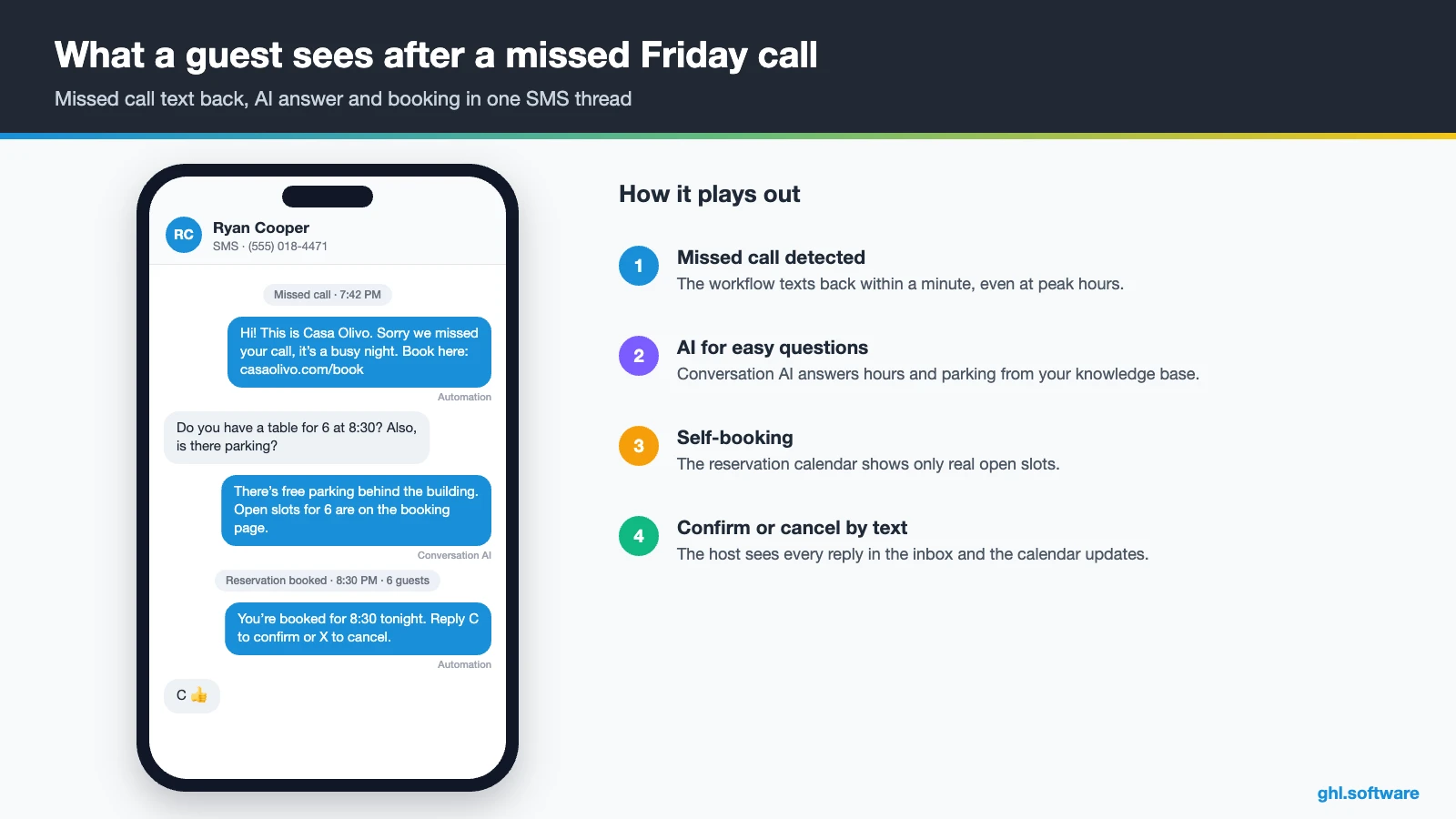
Friday, 7:42 p.m., at Casa Olivo, Mateo Larsen’s trattoria in Spokane. The host stand phone rings for the fourth time, but nobody can answer it. The host is seating a twelve-top, while the bar is three deep. So the caller, who wanted a table for six at 8:30, hangs up. Ten minutes later, that party is ordering drinks across town. A CRM for restaurants exists for that moment. It texts each missed caller the booking link within a minute, so the call becomes a reservation.
The same gap also shows up after the meal. For example, your POS knows a card number and a check total. However, it rarely knows that Shane Vance comes in every other Thursday and has a birthday next week. When he stops coming, nobody notices. Meanwhile, delivery apps keep the customer relationship for themselves.
So this guide shows how to run guest marketing in HighLevel (GoHighLevel). You will see three automations, a catering pipeline, the official snapshots, setup, real costs and honest limits. Finally, for other businesses, see the industries hub.
Leer en español: CRM para restaurantes · Ler em português: CRM para restaurantes · Part of GoHighLevel by industry
30 days instead of the usual 14, plus a free live setup class with a HighLevel coach.
Start free + bootcampAffiliate link.
What a CRM for restaurants does (and what it doesn’t)
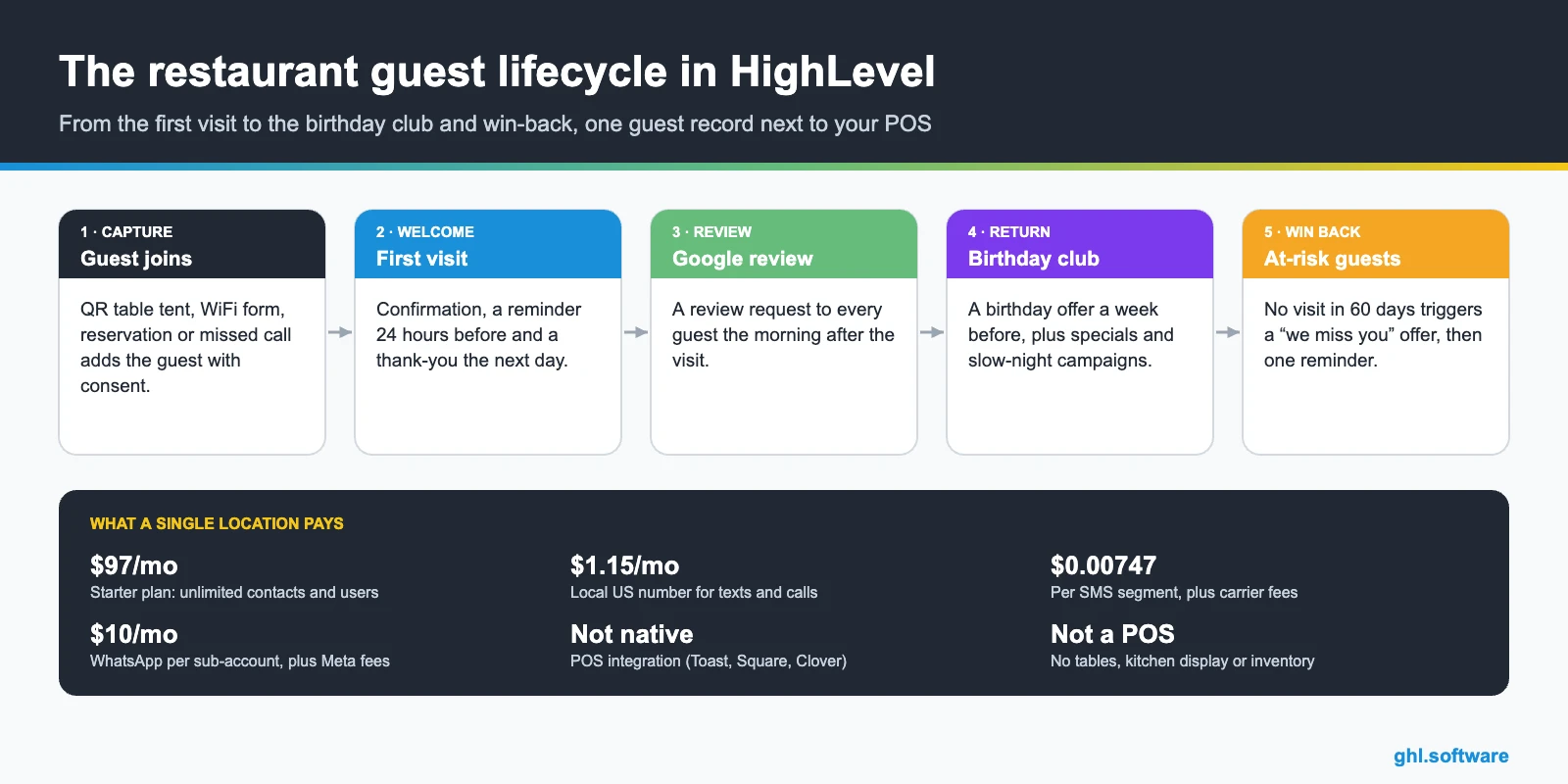
Your POS runs the service: orders, modifiers, tables, the kitchen display, payments and tips. In contrast, a CRM for restaurants runs the relationship: who the guest is, how to reach them and what brings them back. HighLevel lives on the second side. So think of it as the guest database, inbox and campaign engine next to your POS, not inside it.
Restaurant problems and how HighLevel solves them
Most restaurants lose guests in the same places. Here is where a CRM for restaurants helps, and which HighLevel feature does the work.
| Problem | What HighLevel does | Feature |
|---|---|---|
| Calls missed at rush hour | Text back within a minute with menu and booking link | Missed call text back |
| Reservation no-shows | Confirmation plus a reminder 24 hours before, with reply to cancel | Calendars + Workflows |
| Few or old Google reviews | Review request to every guest the next morning | Reputation |
| No guest list of your own | QR, WiFi and reservation forms that save contacts with consent | Forms + CRM |
| Regulars quietly stop coming | Win-back offer when the last visit is 60 days old | Workflows |
| Slow Tuesday nights | Targeted text or email offer to nearby, consented guests | Campaigns |
| Catering leads lost in email | Pipeline with quote, deposit and follow-up for each order | Opportunities + Payments |
| Same questions all day | AI replies about hours, parking and menu in the inbox | Conversation AI |
A catering and private-event pipeline in your CRM for restaurants
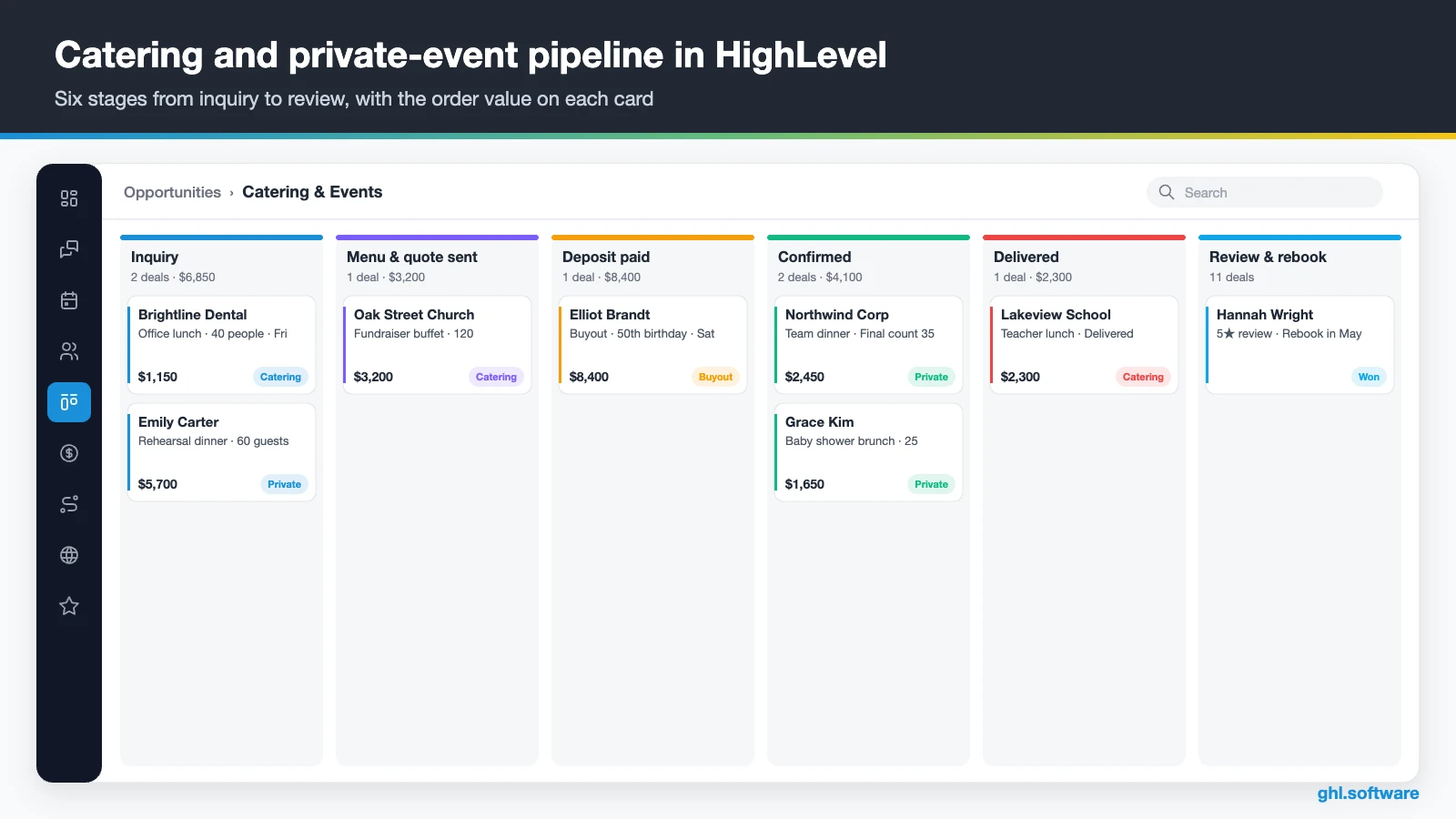
Walk-in guests don’t need a sales pipeline. Catering orders, buyouts and private dining do, because each one has a date, a headcount, a quote and a deposit. A pipeline shows every open event and its value, so nothing waits in an inbox until it is too late.
Most moves happen on their own. For example, the inquiry form creates the card, and the paid deposit moves it to Deposit paid. After the event date, it moves to Delivered. Then the review request goes out like it does for any guest.
| Stage | What moves the card here |
|---|---|
| Inquiry | Catering or private-event form, call or message |
| Menu & quote sent | You send the proposal with menu and per-guest price |
| Deposit paid | The client pays the deposit link or invoice |
| Confirmed | Final headcount and menu locked, kitchen notified |
| Delivered | The event date passes or you mark it done |
| Review & rebook | Review request sent; reminder before next year’s date |
Regular dine-in guests fit better in smart lists than in a pipeline. For example, keep lists for New, Repeat (two or more visits), VIP, At risk (no visit in 60 days) and Lost. Those lists then feed your campaigns.
Three automations every restaurant should run
Every CRM for restaurants should run these three workflows. In short, they cover the unanswered phone, the missing review and the regular who drifts away. Build them in Automation › Workflows, then test each one with your own phone first.
Missed call → reservation booked
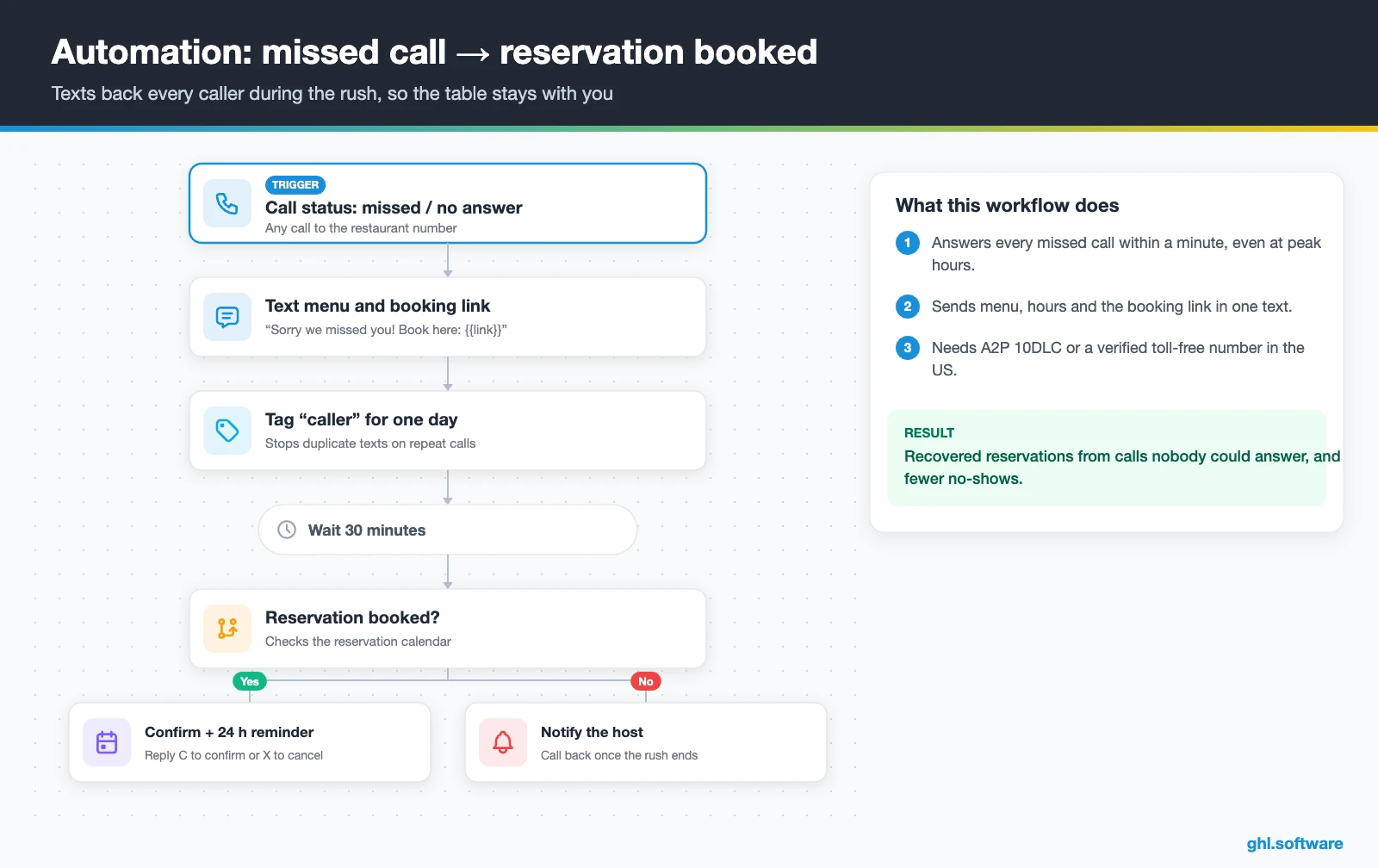
The trigger is a missed or unanswered call to the restaurant number. Then, within a minute, the guest gets a text with your menu, hours and reservation link. The workflow also tags the caller for a day. HighLevel’s help article recommends a wait or filter, so repeat calls don’t trigger duplicate texts.
Then, after 30 minutes, it checks the reservation calendar. If the guest booked, they get a confirmation and later a reminder 24 hours before. If not, the host gets a notification to call back once the rush ends. Note that missed call text back needs A2P 10DLC or a verified toll-free number in the US.
Visit → Google review request
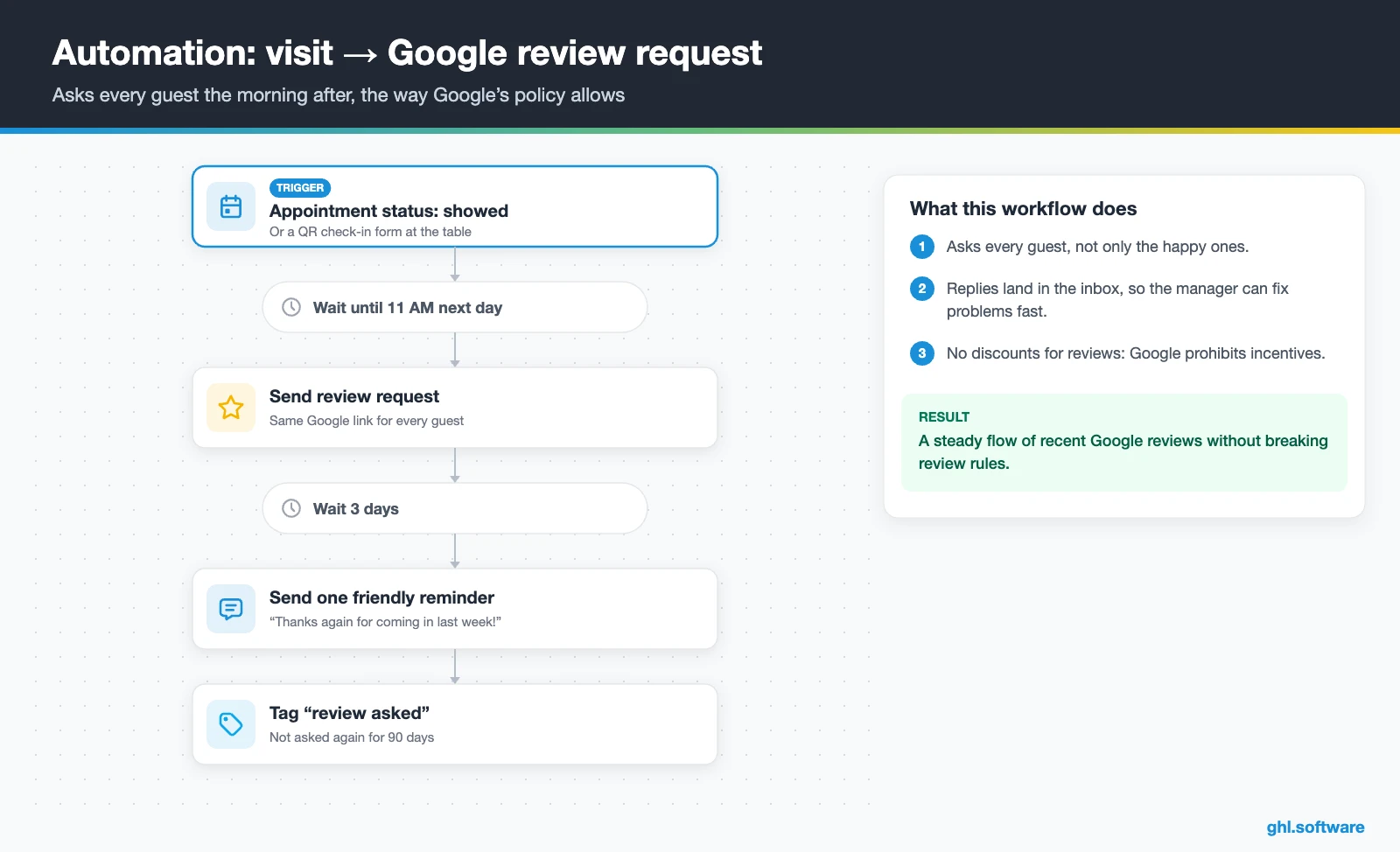
The trigger is a reservation marked as showed, or a QR check-in form submitted at the table. The workflow waits until 11 a.m. the next day and sends a short review request with your Google link. Three days later it sends one friendly reminder, then tags the guest so they aren’t asked again for 90 days.
Notice what the workflow does not do: it doesn’t send only happy guests to Google. In fact, Google’s Maps policy forbids merchants from discouraging negative reviews, selectively soliciting positive ones or offering discounts for reviews. Instead, ask everyone and invite them to reply if something went wrong. As a result, the manager can fix it.
Birthday club and win-back
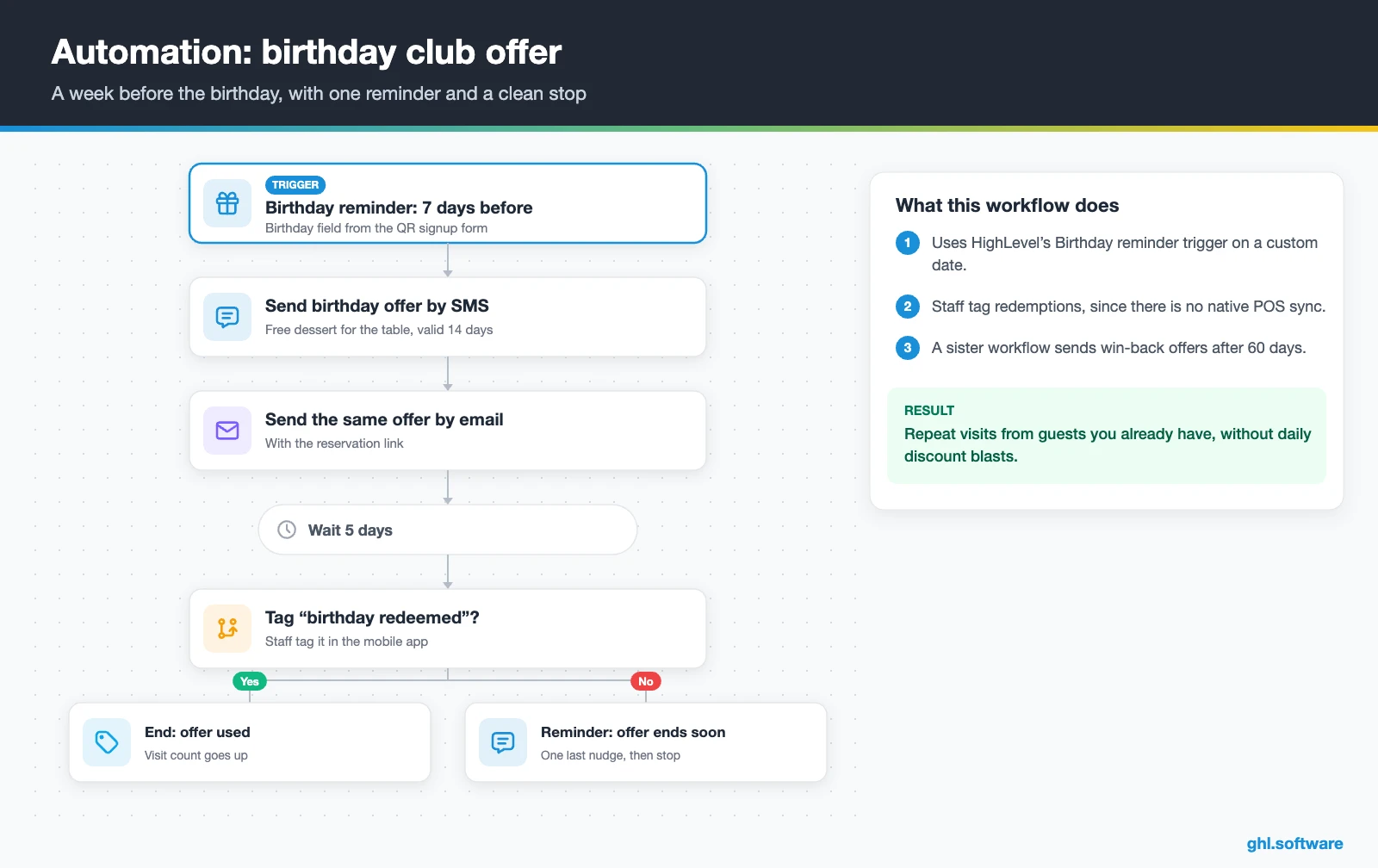
The trigger is HighLevel’s Birthday reminder, set to seven days before the birthday field from your signup form. Then the guest gets a text and an email with a birthday offer and the booking link. After five days, the workflow checks for a “birthday redeemed” tag that staff add in the mobile app. If the tag is missing, one reminder goes out, and then the workflow stops.
A sister workflow handles win-back. When the last-visit date is 60 days old, it sends a “we miss you” offer. Then it waits a week and tries once more. After that, the guest moves to the Lost list and stays out of campaigns for 90 days. So you bring regulars back without daily discount blasts.
Start with the snapshot and the pipeline from this guide, then add the automations one by one. The extended trial comes with our bootcamp link.
Start the 30-day trialAffiliate link. I may earn a commission at no extra cost to you.
Texting, WhatsApp and AI answers for restaurants
Guests reach you on many channels: phone, texts, Instagram and Facebook DMs, web chat and, for many tourists, WhatsApp. HighLevel, however, puts them all in one Conversations inbox. So the manager sees the whole thread and the guest’s last visit before replying.
Conversation AI can take the repetitive questions: hours, parking, dress code, large-party policy and where to find the menu. Write a short knowledge base, but keep allergen answers pointing to your published menu and staff. Voice AI can also answer calls, which helps on nights when the phone never stops. However, keep a person on special requests and complaints.
Catering, pop-ups and Tap to Pay in the mobile app
For catering deliveries, farmers markets or a food truck, the HighLevel mobile app includes a simple POS checkout. You key in an amount or pick products from your catalog, then take the card with Tap to Pay. With Stripe, Tap to Pay works on Android 8+ phones with NFC and on iPhone XS or later with iOS 16+. However, general use is US-only, with a beta elsewhere. With Square, it is iPhone-only, and HighLevel adds no fees.
Still, this is a checkout, not a restaurant POS: it has no tables, modifiers, kitchen display, tip pooling or inventory.
What HighLevel’s restaurant snapshots include
HighLevel publishes two official restaurant playbooks, the Bistro playbook and the Steakhouse playbook. However, both follow the generic template HighLevel uses for many local businesses, with the name swapped in. Out of the box you get:
- A website (“Bistro” or “Steakhouse”) with a Home page, services and FAQ sections, and a Link in Bio page.
- An offer funnel (“Bistro Offer” or “Steakhouse Offer”): an opt-in step, then a booking page.
- The “Marketing Form – Claim Offer” form and a “Marketing Pipeline”.
- The “New Lead Nurture (Fast 5) – Claim Offer” and “Long Term Nurture” workflows, with email and SMS.
- Service calendars, custom values, a chat widget and snippets. The Bistro version adds a proposal template, while the Steakhouse version adds a Voice AI prompt.
- Missed call text back as a quick win.
But what they lack is anything specific to restaurants. There are no reservation reminders, no review workflow tuned to visits, no birthday club, no win-back and no catering pipeline. Instead, diners “book” through appointment-style service calendars. So use a snapshot as the shell of your CRM for restaurants. Then build the three automations above, or import an agency snapshot made for restaurants.
How to set up HighLevel for a restaurant
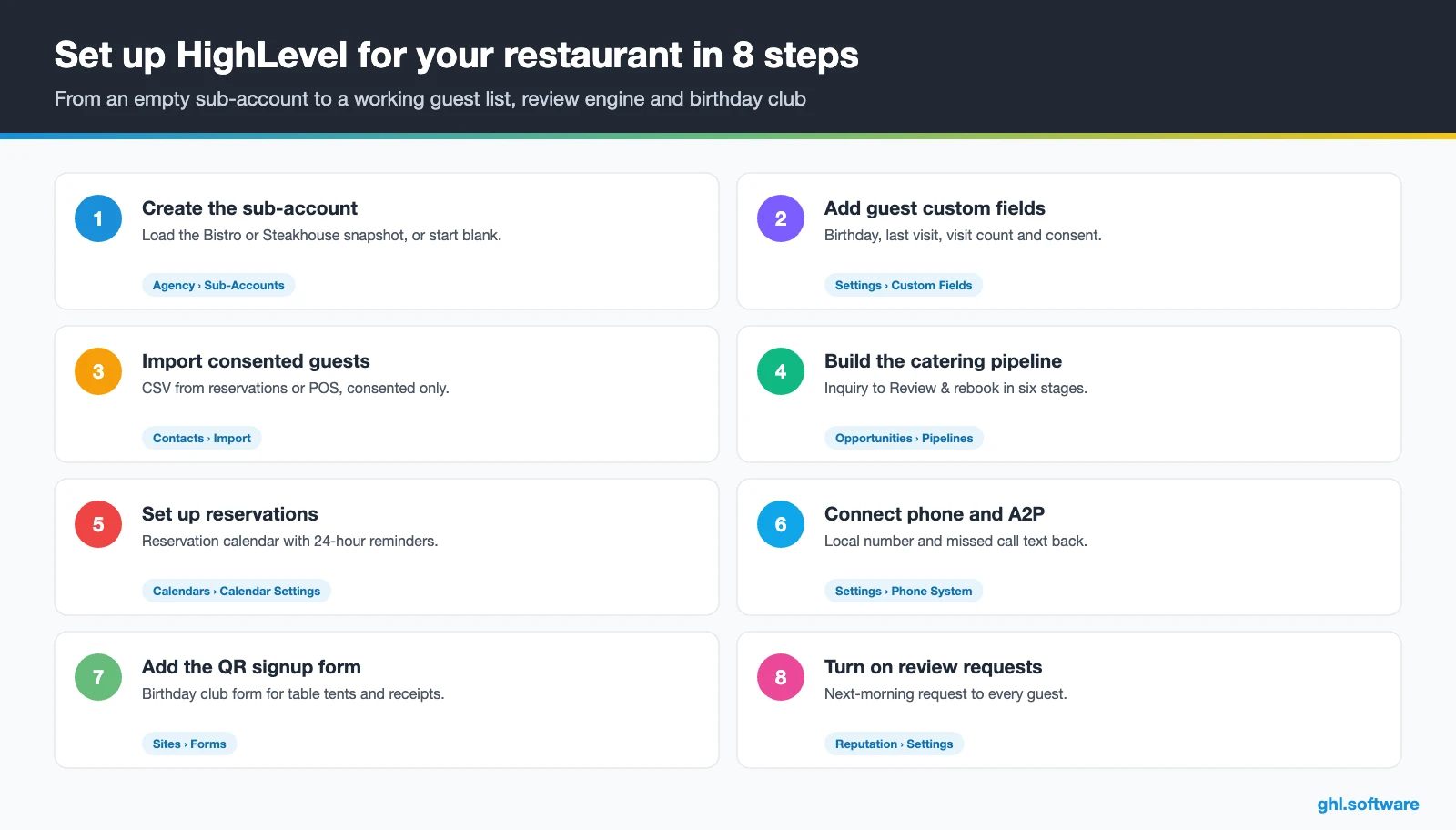
These eight steps turn an empty account into a working CRM for restaurants. Create one sub-account per location if your locations market separately.
- Create the sub-account. Load the Bistro or Steakhouse snapshot, or start blank. Then complete Settings › Business Profile and connect your Google Business Profile.
- Add guest custom fields. Birthday, last visit date, visit count, dietary notes, preferred location and marketing consent.
- Import consented guests. Upload reservation or POS customer exports as CSV, but only contacts who agreed to marketing.
- Build the catering pipeline. Six stages from Inquiry to Review & rebook, plus smart lists for the guest lifecycle.
- Set up reservations. A reservation calendar with reminders, or keep your reservation platform and connect it through webhooks where it allows.
- Connect phone and messaging. Local number with A2P 10DLC, missed call text back, WhatsApp, Instagram, Facebook and web chat.
- Add guest capture. For example, a QR table-tent form, WiFi splash form and a catering inquiry form on your website.
- Turn on workflows and reporting. The three automations, review requests and a dashboard for reviews, bookings and redemptions.
What a CRM for restaurants costs in HighLevel
HighLevel charges a flat subscription instead of per-user or per-contact fees. A single restaurant usually starts on Starter at $97 a month. It also includes unlimited contacts and users and every core feature. Restaurant groups and agencies look at Unlimited ($297) or Agency Pro ($497), and annual billing costs $970, $2,970 or $4,970.
Usage is where restaurants differ, because campaigns go to big lists. For example, a local number costs $1.15 a month. A2P 10DLC has a $22.50 one-time fee plus a monthly campaign fee, and each SMS segment costs $0.00747 plus carrier fees. So 3,000 texts a month add roughly $22 before carrier fees. In addition, email costs $0.675 per 1,000, and WhatsApp adds $10 a month plus Meta’s fees.
In short, a single location running weekly campaigns typically lands around $130 to $250 a month. An AI plan adds $50 or $97. These are illustrative ranges, so check the full pricing guide and the AI Employee pricing.
GoHighLevel plans compared
| Starter | Unlimited | Agency Pro | |
|---|---|---|---|
| Price | $97/month | $297/month | $497/month |
| Annual | $970/year | $2,970/year | $4,970/year |
| Sub-accounts | 3 | Unlimited | Unlimited |
| Contacts and users | Unlimited | Unlimited | Unlimited |
| All core features | Yes | Yes | Yes |
| White label web app | Yes | Yes | Yes |
| API access | Basic | Basic | Advanced, agency-level keys |
| Rebill phone and email | No | At cost | With markup |
| Rebill AI usage | No | No | Yes |
| SaaS Mode and automated sub-accounts | No | No | Yes |
| User and agent reporting | No | No | Yes |
| Support | 24/7 | 24/7 | 24/7 |
Usage costs on top of the plan
| Item | Official price | When you pay it |
|---|---|---|
| Local phone number (US/Canada) | $1.15/month | Each number for SMS and calls |
| SMS (US/Canada) | $0.00747 per segment + carrier fees | Every text sent or received |
| Calls (US) | $0.0166/min outbound, $0.01165/min inbound | Calls through LC Phone |
| A2P 10DLC registration | $22.50 one-time (low volume) + monthly campaign fee | Before texting US numbers |
| Email (LC Email) | $0.675 per 1,000 emails | Campaigns and workflow emails |
| $10/month per sub-account + Meta fees | If you use WhatsApp inside HighLevel | |
| AI | Pay-per-use, or $50 or $97/month per sub-account | Voice AI, Conversation AI and other AI tools |
| Premium workflow steps | $0.01 per run after 100 free | Webhooks, Google Sheets, Slack, app actions |
Honest limits and alternatives
HighLevel is a strong CRM for restaurants, but a restaurant needs more than marketing. Know what it does not do before you switch anything off.
- It is not a POS: no tables, modifiers, kitchen display, tip pooling or inventory.
- It has no native POS integration, so visit and spend data needs webhooks, Zapier or a third-party connector.
- Its calendars book time slots, not tables. There is no floor plan, waitlist by table or table-turn management.
- It has no verified integration with delivery apps such as DoorDash or Uber Eats.
HighLevel vs SevenRooms, OpenTable and your POS
Hospitality platforms like SevenRooms and OpenTable build guest profiles inside the reservation system, which HighLevel can’t match. In return, HighLevel adds funnels, missed call text back, WhatsApp, the ad manager and catering deposits at a flat price. The table uses vendor pages from October 2026 (SevenRooms, OpenTable), so confirm details on a demo.
| HighLevel | SevenRooms | OpenTable | Your POS (Toast, Square, Clover) | |
|---|---|---|---|---|
| Main focus | CRM, marketing and payments | Reservations, guest CRM and marketing | Reservations with built-in guest CRM | Orders, payments and kitchen |
| Guest profiles | ✓ (fields you define) | Yes | Yes | Varies by POS |
| Table reservations | Time-slot calendars | Yes | Yes | Varies by POS |
| POS data sync | Not native | Not listed on its page | Connects to the POS | Built in |
| Email campaigns | Yes | Yes | Yes | Varies by POS and plan |
| SMS and WhatsApp inbox | Yes | SMS campaigns | Not listed | Varies by POS |
| Websites, funnels and ads | Yes | Not listed | Not listed | Varies by POS |
| Catering quotes and deposits | Yes | Reservation deposits | Not listed | Varies by POS |
The part most guides skip: plan around the missing POS link
Most articles about HighLevel for restaurants assume your sales data flows in by itself. But it doesn’t. On HighLevel’s ideas board, the “HighLevel & Toast integration” request has 129 votes. It was posted in May 2024, but no official reply is shown. Requests for Clover, the Toast API and other restaurant POS systems (Epos Now, Lightspeed, Square for Restaurants, Zonal) are merged into it.
So design your CRM for restaurants to work without that link. For example, use the QR check-in form as the visit signal, and let staff tag redemptions in the mobile app. If your POS can send webhooks or connects to Zapier, use HighLevel’s Inbound webhook trigger to update the last-visit date. Otherwise, import a consented customer export every week. As a result, birthdays, reviews and win-back still run on real visits.
Open a free account, load the pipeline and turn on the first automation today. The bootcamp walks you through the setup live.
Start the 30-day trialAffiliate link. I may earn a commission at no extra cost to you.
Frequently asked questions
What is a restaurant CRM?
A restaurant CRM is a guest database with tools to act on it. It stores who each guest is, how to reach them, their birthday, visits and preferences, and it sends the right message at the right time: reservation reminders, review requests, birthday offers and win-back campaigns. It also sits next to your POS, which handles orders and payments, and turns one-time guests into regulars.
What is the best CRM for restaurants?
It depends on where your guests book. If most reservations run through SevenRooms or OpenTable, their built-in guest CRM is hard to beat for table data. If you need missed call text back, WhatsApp, reviews, catering deposits, websites and ads in one place at a flat price, HighLevel is a strong choice. Therefore, many restaurants keep their POS and reservation tool and add HighLevel for marketing.
Does GoHighLevel integrate with Toast, Square or Clover?
Not natively for restaurant POS data. The Toast integration request on HighLevel’s ideas board has 129 votes and no official reply shown, and requests for Clover and other restaurant POS systems are merged into it. You can connect through webhooks, Zapier or third-party connectors when your POS supports them. However, Square is supported for Tap to Pay payments in the mobile app, which is a different thing.
How do restaurants collect customer data?
The easiest sources are reservations, a QR code on table tents or receipts that opens a birthday-club form, guest WiFi with a signup page, online orders on your own site, and catering inquiries. Ask only for what you will use, usually name, mobile, email and birthday, and include a clear consent checkbox for texts and emails. However, delivery-app customers usually stay with the app.
How do I get more Google reviews for my restaurant?
Ask every guest, at the right time, with one tap. In HighLevel, a workflow sends a short text with your Google review link the morning after the visit, then one reminder three days later. Don’t offer discounts for reviews and don’t send only happy guests to Google, because Google’s policy forbids both. Also reply to reviews, and HighLevel’s review AI can suggest responses.
Can I send SMS promotions to my restaurant guests legally?
Yes, with consent. In the US, promotional texts sent with automated tools need prior express written consent under the TCPA, so collect it on your signup forms with clear wording. You also need A2P 10DLC registration for your number, an easy way to opt out (reply STOP) and reasonable sending hours. Finally, keep consent records in the contact profile.
How much does a CRM for restaurants cost?
With HighLevel, the plan starts at $97 a month for unlimited contacts and users, and you pay usage on top: about $0.00747 per SMS segment plus carrier fees, $0.675 per 1,000 emails and $10 a month for WhatsApp plus Meta fees. For example, a single location running weekly campaigns typically spends around $130 to $250 a month in total, depending on list size.
More industry guides
Sources: HighLevel Bistro playbook · HighLevel Steakhouse playbook · HighLevel ideas: HighLevel & Toast integration · HighLevel Help: Missed Call Text Back · HighLevel Help: Tap to Pay · HighLevel Help: Tap to Pay on Square · Google Maps user-generated content policy · FCC: Telemarketing and robocalls (TCPA) · FTC: CAN-SPAM Act compliance guide · SevenRooms: benefits of a restaurant CRM

