

CRM for Event Planners: Book Clients and Sell Tickets
A CRM for event planners moves each couple or company from inquiry to signed contract and paid retainer. Then it keeps the details straight until event day. HighLevel does that with forms, a booking calendar, a pipeline, proposals, e-signature, payment links and automated follow-up. It can also sell tickets or RSVPs with QR check-in, but it does not replace floor-plan, seating or BEO tools.
It is Sunday night. Megan has just sent the same message to four planners: “Do you have June 13 open? About 120 guests.” In fact, the first planner who replies with a clear next step usually gets the call. The others get silence. A CRM for event planners exists for that moment. It answers in seconds and books the discovery call, even while you are running someone else’s wedding.
After the call, the work gets heavier. You send a proposal, then a contract, then a retainer invoice, then payment reminders spaced around the event date. Meanwhile, vendors, timelines and guest counts keep changing. Most planners juggle all of this across email, a spreadsheet, a calendar app and three group chats, so something slips.
This guide shows how to run the whole flow in HighLevel (GoHighLevel). Then you will see the pipeline, three automations, the official snapshot, an 8-step setup, real costs and honest limits. It also covers the second job many planners have, which is selling tickets or RSVPs for their own events. For other businesses, see the industries hub.
Leer en español: Software para eventos · Ler em português: Sistema para eventos · Part of GoHighLevel by industry
What event planners need from a CRM
An event business sells dates, not products. After all, each inquiry is tied to one day, one venue and one budget. So the system has to capture those details at the first touch and reuse them after. Here is what a CRM for event planners should handle, and where HighLevel covers it.

Event planning headaches and how HighLevel fixes them
A CRM for event planners should solve these problems first, because each one costs you bookings.
| Problem | What HighLevel does | Feature |
|---|---|---|
| Inquiries go cold while you are on site | Instant text or email reply with a call-booking link | Workflows + Calendars |
| Missed calls during events | Missed call text back sends an SMS within seconds | Phone system |
| Proposals take days to send | Templates with line items, taxes and discounts, ready in minutes | Proposals & Estimates |
| Clients sign late | Contract with e-signature plus automatic reminders | Documents & Contracts |
| Chasing deposits and balances | Payment links and reminders timed to the event date | Payments + Workflows |
| Details scattered across apps | Custom fields, notes, tasks and files on one contact | CRM |
| Few reviews after great events | Review request two days after the event, with a Google link | Reputation |
| Selling seats for your own events | Ticket tiers, capacity, coupons and QR check-in | Events |
The client pipeline in a CRM for event planners
A pipeline turns your process into columns you can see. Each card is one event, while its value is the contract total. So the board also shows booked revenue by stage. Keep it to seven stages, because more stages mean more cards nobody moves.
Most moves happen on their own. For example, a booked call moves the card to Discovery call, and a paid retainer moves it to Booked. You still drag cards by hand when a client says yes on the phone, and that is fine.
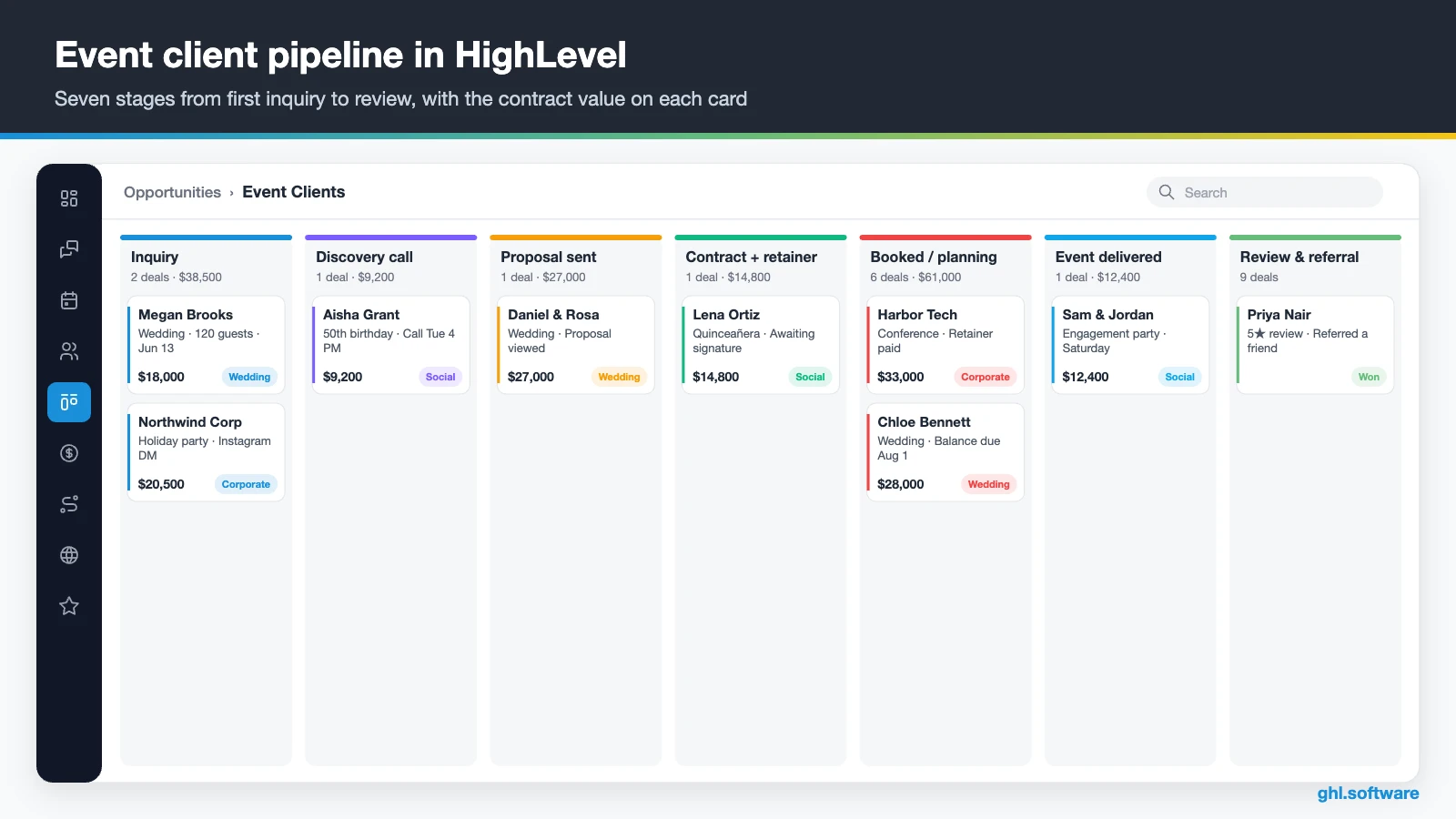
| Stage | What moves the card here |
|---|---|
| Inquiry | Inquiry form, DM, missed call or WhatsApp message |
| Discovery call | The client books on your calendar link |
| Proposal sent | You send the proposal from Documents & Contracts |
| Contract + retainer | The client accepts; contract and payment link go out |
| Booked / planning | Retainer paid; date tagged and team notified |
| Event delivered | The event date passes or you mark it done |
| Review & referral | Review request sent; the card closes as won |
Leads that never reply go to Lost with a reason, such as “no reply”, “budget” or “date taken”. After a season, those reasons tell you whether to change your prices, your response time or your marketing.
Selling tickets and RSVPs with HighLevel Events
Many planners also host their own events: a bridal open house, a styled-shoot workshop or a corporate networking night. This is where HighLevel goes beyond a typical CRM for event planners. Instead of sending guests to a separate ticketing site, you can build the event inside HighLevel under Memberships › Events. When you create it, you choose ticketed or RSVP, and in person or online.
Ticketed events can mix free and paid tiers, each with its own price, quantity and sale period. You also set a total capacity and a registration deadline, and you can add percentage coupons. Also, the public page shows the schedule, speakers, location and FAQ. Guests get confirmation and reminder emails, while you get registration alerts and a daily summary. At the door, staff scan each guest’s QR code from a phone in the Check-in tab.
Ticket payments run through your connected processor, such as Stripe. According to the HighLevel help article on Events, HighLevel adds no platform fee on top of standard card processing. Still, the feature has limits worth knowing before you launch:
- You can’t switch an event between Ticketed and RSVP after creating it.
- Refunds are manual. The organizer issues them from the Registrations tab, and canceling an event doesn’t refund anyone automatically.
- Attendees can’t transfer tickets themselves, so you edit or re-add them.
- Coupons are percentage-only, and the help article doesn’t mention waitlists.
- There is no marketplace, so buyers find your event only through your site, ads, list and social posts.
Three automations that book more events
Every CRM for event planners should run these three workflows. That is because they cover the moments where planners lose the most money: the first reply, the deposit and the review. Build them in Automation › Workflows, then test each one with your own phone number.
Inquiry → discovery call within the hour
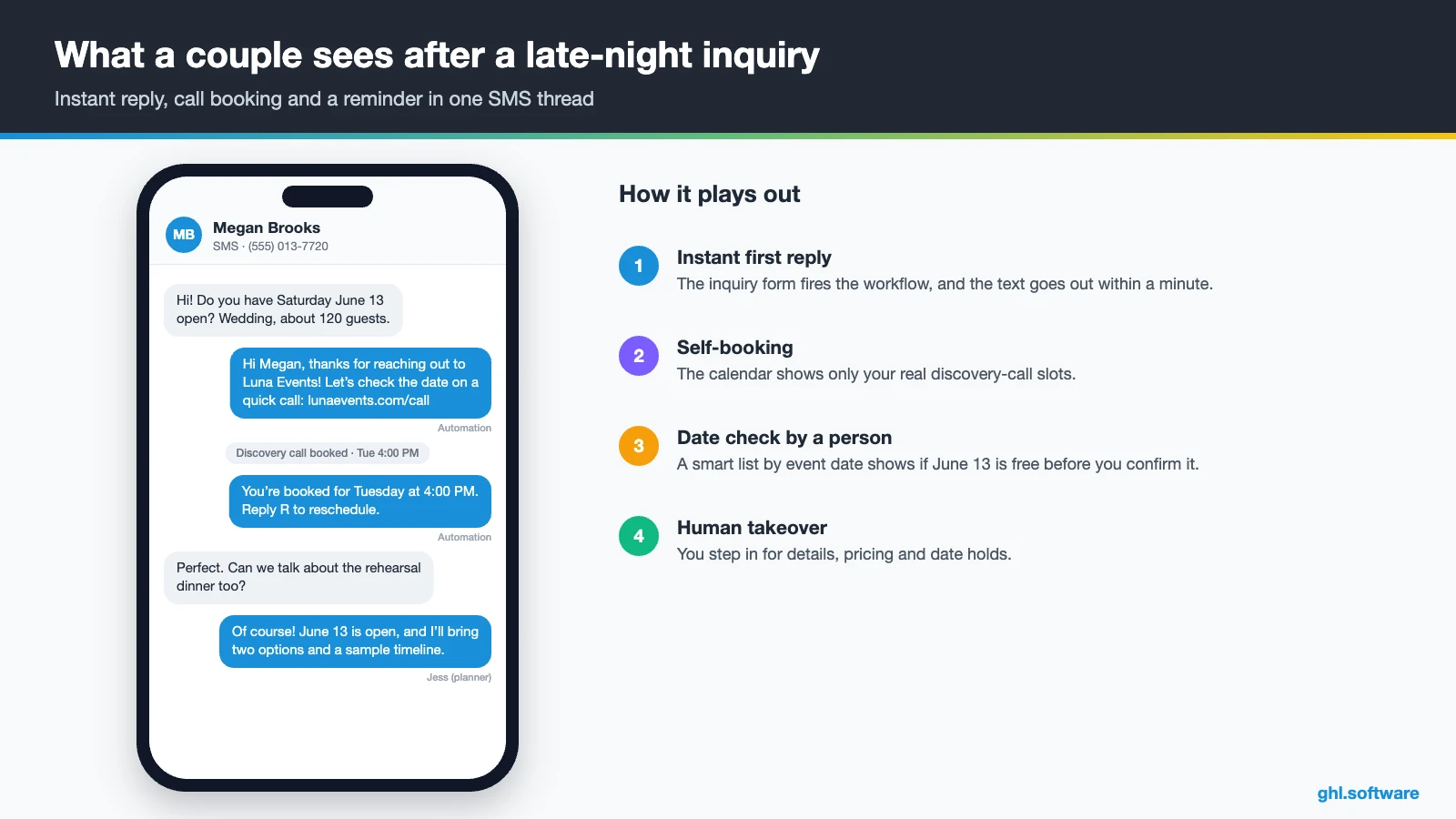
The trigger is the inquiry form being submitted, or a DM you tag “inquiry”. The workflow creates an opportunity in Inquiry with the event date, guest count and budget. Then it texts the lead a link to book a 20-minute discovery call. After two hours it checks for a booking. If there is none, it creates a call task so a person follows up the same day.
If the lead stays quiet, the workflow sends a portfolio email the next day. Three days later, a short text asks whether the date is still open. After that, the card moves to Lost with the reason “no reply”. Speed matters here because couples and companies often ask several planners at once.

Proposal accepted → contract → retainer
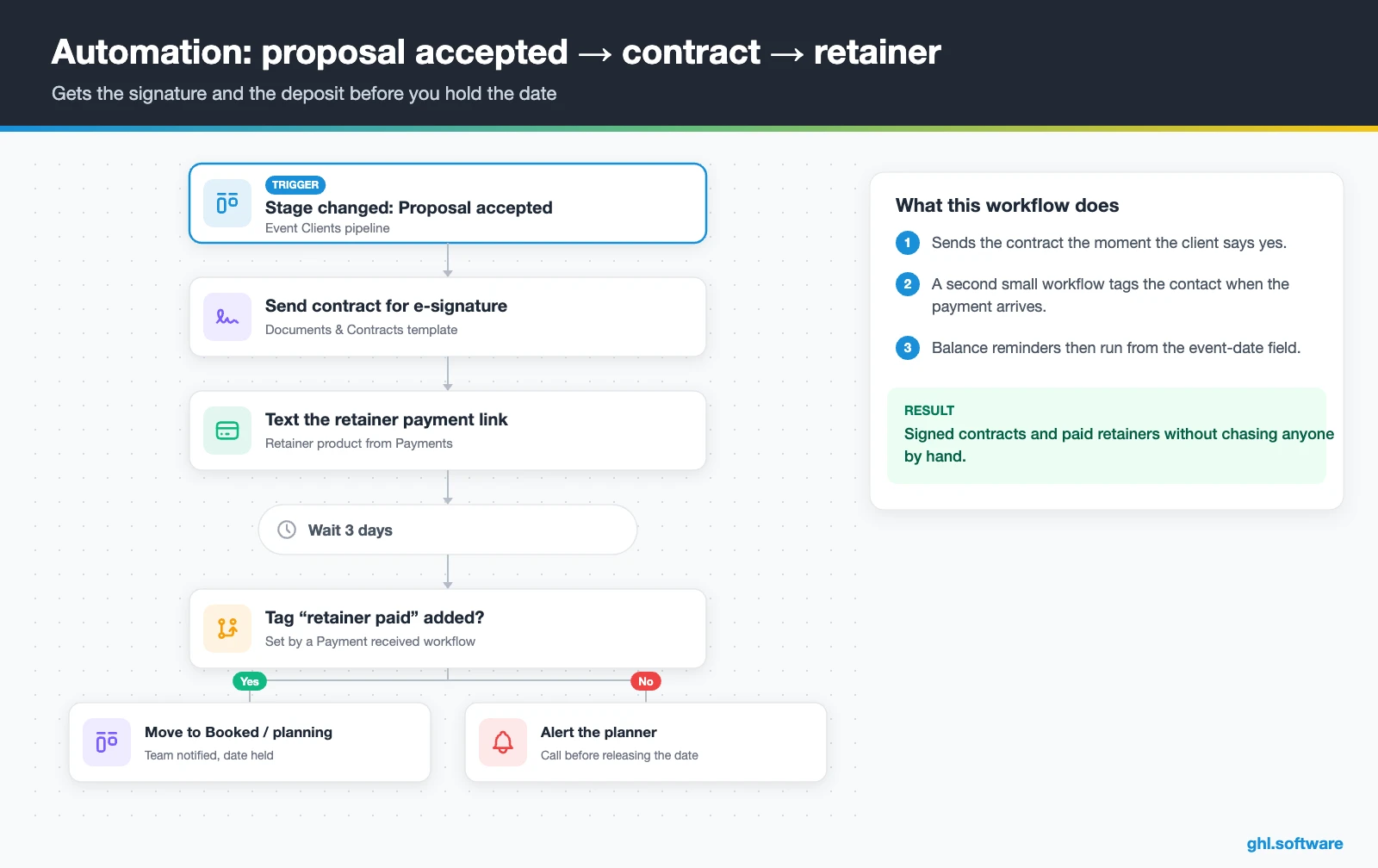
When you move a card to Proposal accepted, the second workflow sends the contract from Documents & Contracts for e-signature. Then it texts a payment link for the retainer. A small separate workflow on the Payment received trigger adds a “retainer paid” tag. Meanwhile, the main workflow waits three days. If the tag is still missing, it alerts you before you hold the date any longer.
Later, a date-based workflow reads the event-date field. It reminds the client about the balance, for example 60 and 14 days before the event. That way nobody has to remember which couple owes what in which month.
New to contract templates? This short HighLevel video shows that you can send legally binding e-signatures directly from the platform.
Video: Did You Know You Can Send Legally Binding E Signatures Directly in HighLevel? · HighLevel
Event delivered → review, referral and rebook
The day after the event, move the card to Event delivered, or let a date trigger do it. Then the third workflow sends a thank-you text with the gallery link. Two days later it sends a review request with your Google link. After that, a referral email reaches friends who are planning something. Finally, it waits eleven months and sends an anniversary note or a “planning next year’s gala?” message.
This is where many planners leave money on the table. Happy clients rarely write a review unless someone asks at the right moment, and corporate events often repeat every year.

Start with the snapshot and the pipeline from this guide, then add the automations one by one. The extended trial comes with our bootcamp link.
Start the 30-day trialAffiliate link. I may earn a commission at no extra cost to you.
WhatsApp, Instagram DMs and texts in one inbox
Inquiries arrive everywhere: Instagram DMs from a Reel, Facebook messages, website chat, texts and, for international or Latino clients, WhatsApp. So a CRM for event planners that ignores DMs misses a lot of them. HighLevel’s Conversations puts them in one inbox, and each thread sits on the client record. So you see the proposal status and the event date while you reply.
In the US, connect a local number with texting and calls. Then register A2P 10DLC and turn on missed call text back. On busy weekends, Conversation AI can answer common questions and offer the booking link. In addition, Voice AI can pick up calls. However, keep the handoff clear: prices and date holds should come from you.
On site, the mobile app lets you reply between toasts. You can also send a payment link without opening a laptop.
What HighLevel’s Event Planner snapshot includes
HighLevel publishes an official Event Planner playbook for its “Event Planner Snapshot”. It is a useful start, although it follows the same generic template HighLevel uses for many local businesses. Out of the box you get:
- A website called “Event Planner” with a Home page (services and FAQ sections) and a Link in Bio page.
- An “Event Planner Offer” funnel: an opt-in step, then an appointment booking page.
- The “Marketing Form – Claim Offer” form and a “Marketing Pipeline”.
- Two named workflows, “New Lead Nurture (Fast 5) – Claim Offer” and “Long Term Nurture”, with email, SMS and a voicemail drop.
- Consultation and service calendars, custom values, a chat widget, snippets and a Voice AI prompt for calls and booking.
- Missed call text back as a quick win.
What it lacks is the part that makes an event business different. For example, there is no inquiry form with event date or guest count. There are also no stages for retainers, no contract workflows and no event-date reminders. So treat it as the marketing shell of your CRM for event planners. Then build the client pipeline and the three automations yourself, or import an agency snapshot that has them.
How to set up HighLevel for an event planning business
These eight steps turn an empty account into a working CRM for event planners.
- Create the sub-account. Load the Event Planner snapshot or start blank. Then complete Settings › Business Profile and add your team under My Staff.
- Add event custom fields. Event date, event type, venue, guest count, budget and package, so forms, cards and workflows share the same data.
- Import past clients. Upload a CSV with tags by event type (wedding, corporate, social) and a past-client tag for later campaigns.
- Build the pipeline. Seven stages from Inquiry to Review & referral. Add a second pipeline for corporate events if that sales cycle differs.
- Create calendars. Discovery call with buffers, venue walkthrough and planning meetings, each with SMS and email reminders.
- Connect your channels. Phone number with A2P 10DLC, missed call text back, Instagram, Facebook, Google Business Profile and WhatsApp.
- Set up payments and documents. Connect Stripe, create retainer and balance products, then build proposal and contract templates.
- Publish workflows and events. Turn on the three automations, review requests and a reporting dashboard. Then create ticketed or RSVP events if you host them.

What a CRM for event planners costs in HighLevel
HighLevel charges a flat subscription rather than a per-user or per-contact fee. A solo planner or small team usually starts on Starter at $97 a month. Also, it includes unlimited contacts, unlimited users and every core feature. Agencies that build systems for many planners look at Unlimited ($297) or Agency Pro ($497). Annual billing costs $970, $2,970 or $4,970.
On top of the plan, you pay for usage. For example, one local number, a few hundred texts and some email might add $15 to $40 a month. WhatsApp adds $10 plus Meta’s message fees. An AI plan costs $50 or $97 per month, or you can pay per use. Meanwhile, ticket sales only carry your processor’s card fees.
In short, a small planning business typically lands around $110 to $200 a month. These are illustrative ranges, so check the full pricing guide and the AI Employee pricing before you budget.
GoHighLevel plans compared
| Starter | Unlimited | Agency Pro | |
|---|---|---|---|
| Price | $97/month | $297/month | $497/month |
| Annual | $970/year | $2,970/year | $4,970/year |
| Sub-accounts | 3 | Unlimited | Unlimited |
| Contacts and users | Unlimited | Unlimited | Unlimited |
| All core features | Yes | Yes | Yes |
| White label web app | Yes | Yes | Yes |
| API access | Basic | Basic | Advanced, agency-level keys |
| Rebill phone and email | No | At cost | With markup |
| Rebill AI usage | No | No | Yes |
| SaaS Mode and automated sub-accounts | No | No | Yes |
| User and agent reporting | No | No | Yes |
| Support | 24/7 | 24/7 | 24/7 |
Usage costs on top of the plan
| Item | Official price | When you pay it |
|---|---|---|
| Local phone number (US/Canada) | $1.15/month | Each number for SMS and calls |
| SMS (US/Canada) | $0.00747 per segment + carrier fees | Every text sent or received |
| Calls (US) | $0.0166/min outbound, $0.01165/min inbound | Calls through LC Phone |
| A2P 10DLC registration | $22.50 one-time (low volume) + monthly campaign fee | Before texting US numbers |
| Email (LC Email) | $0.675 per 1,000 emails | Campaigns and workflow emails |
| $10/month per sub-account + Meta fees | If you use WhatsApp inside HighLevel | |
| AI | Pay-per-use, or $50 or $97/month per sub-account | Voice AI, Conversation AI and other AI tools |
| Premium workflow steps | $0.01 per run after 100 free | Webhooks, Google Sheets, Slack, app actions |
Honest limits and alternatives
No CRM for event planners does everything. HighLevel is a sales, marketing and payments platform. It is not a full event-production tool, so know what it leaves out.
- No floor plans, seating charts or banquet event orders (BEOs). As a result, venues often keep a tool like Planning Pod or Tripleseat for that.
- No vendor marketplace or vendor portal. Instead, you coordinate vendors with tasks, notes and messages.
- No ready-made client portal for timelines. You can share documents, but a planning portal takes custom work.
- No ticketing marketplace that brings you new buyers, unlike Eventbrite.
In return, you get marketing that planner-focused tools don’t list: funnels, SMS and WhatsApp, a social planner, the ad manager, reviews and ticketed events in the same account. The table below uses each vendor’s own site in October 2026 (HoneyBook, Planning Pod, Eventbrite), so confirm details on a demo.
| HighLevel | HoneyBook | Planning Pod | Eventbrite | |
|---|---|---|---|---|
| Main focus | CRM, marketing and payments | Client flow for small service businesses | Venue and event management | Ticketing and event discovery |
| Proposals and e-sign contracts | Yes | Yes | Yes | No |
| Invoices and payment reminders | Yes | Yes | Yes | No |
| Client portal | Custom work | Yes | Yes | No |
| Floor plans and BEOs | No | No | Yes | No |
| SMS and WhatsApp inbox | Yes | Not listed | Not listed | Not listed |
| Websites, funnels and ads | Yes | Not listed | Not listed | Event pages and on-platform ads |
| Ticket sales and QR check-in | Yes | Not listed | Not listed | Yes |
The angle most guides miss: build around the event date
Most CRMs are built around a close date: once the deal is won, the sales work is over. In events, the opposite is true. The signature starts months of planning, payments and messages that all hang on one day. So the most useful field in your account is the event date, and almost every automation should key off it.
For example, a date-based workflow can send the balance reminder 60 days out. It can send the guest-count form 21 days out and a vendor task 7 days out. Then it sends the thank-you the day after and the anniversary message 11 months later. Also, a smart list filtered by event date shows whether a Saturday is already taken. As a result, your CRM for event planners stops being a lead list and becomes your production calendar.
Open a free account, load the pipeline and turn on the first automation today. The bootcamp walks you through the setup live.
Start the 30-day trialAffiliate link. I may earn a commission at no extra cost to you.
Frequently asked questions
What is the best CRM for event planners?
It depends on what you sell. If you mainly need proposals, contracts and invoices, HoneyBook or Dubsado are popular. Venues that need floor plans and BEOs often pick Planning Pod or Tripleseat. HighLevel fits planners who also want to generate demand: it adds SMS, WhatsApp, funnels, ads, reviews and ticketed events to the client pipeline at a flat monthly price, with unlimited users and contacts.
What is CRM in event management?
In event management, a CRM is the system that holds every client and lead, the details of each event (date, venue, guests, budget) and every message and payment. It also shows where each deal stands in your pipeline and automates the follow-up. For planners, that means fewer lost inquiries, faster signatures and deposits, and a record you can use for reviews, referrals and repeat corporate events.
Can GoHighLevel sell event tickets?
Yes. Under Memberships › Events you can create ticketed or RSVP events, in person or online, with free and paid tiers, a capacity limit, a registration deadline and percentage coupons. Payments run through your connected processor, such as Stripe, and HighLevel says it adds no extra platform fee. Refunds are manual, attendees can’t transfer tickets themselves, and there is no marketplace that brings you buyers.
Does HighLevel have QR code check-in for events?
Yes. QR check-in is enabled by default for in-person events in HighLevel Events. Then staff open the Check-in tab and scan each attendee’s QR code from a mobile device. You decide which payment statuses can enter, for example only registrations marked as succeeded. The Registrations tab then shows who registered, tickets issued, revenue and refunds, so you can compare check-ins with sales after the event.
Is HighLevel a good HoneyBook or Dubsado alternative?
For many planners, yes, with trade-offs. HighLevel covers proposals, e-signed contracts, invoices, payment links, scheduling and workflows like HoneyBook or Dubsado. It also adds texting, WhatsApp, websites, ads, reviews and ticketing. On the other hand, HoneyBook offers a ready client portal and migrates your files for free, while HighLevel needs more setup. Choose HighLevel if marketing and lead follow-up are your bottleneck.
How should an event planner structure a payment schedule?
Many planners take a non-refundable retainer at signing, then one or two installments, and the balance a couple of weeks before the event. The exact split is a business decision, so state it in your contract. In HighLevel, send the retainer link when the contract goes out, then let a date-based workflow remind the client before each due date and alert you when a payment is late.
What should an event planner’s inquiry form ask?
Keep it short enough to finish on a phone: name, email, mobile number, event type, event date (or “flexible”), city or venue, guest count, budget range and how they found you. Add a consent checkbox for texts. Save each answer to a custom field, because your pipeline cards, date checks and automations will reuse those fields for the rest of the booking.
More industry guides
Sources: HighLevel Event Planner playbook · HighLevel Help: How to create and manage Events · HighLevel changelog: Proposals & Estimates · HighLevel Help: Text-to-Pay · HighLevel Help: Missed Call Text Back · HighLevel Help: WhatsApp pricing and billing · FCC: Telemarketing and robocalls (TCPA) · FTC: CAN-SPAM Act compliance guide · HoneyBook: software for event planners · Eventbrite: organizer overview

