

CRM for Nonprofits: Donor Journeys and Automation in HighLevel
A CRM for nonprofits should thank every donor fast, turn one-time givers into monthly supporters and bring lapsed donors back. HighLevel does this well for small organizations, with donation forms, recurring gifts and automated follow-up. However, it is not a donor database: it has no soft credits, no year-end statements and no refunds in form payments.
Felix Drake will not give to your food pantry again, and nobody on your team knows why. Rewind to Giving Tuesday, 9:47 p.m. Felix, a nurse in Pittsburgh, gives $40 to the pantry where he volunteered last spring. Then nothing happens. The thank-you letter goes out three weeks later, after the coordinator finally merges a spreadsheet. By then, Felix has given to two other causes that thanked him the same night. A good CRM for nonprofits would have done the same, by name, saying what his $40 does.
That gap between the gift and the thank-you is where small organizations lose donors. In fact, most of the work after a gift repeats itself: a receipt, a welcome, an impact story, a monthly ask. So automation does it well.
This guide shows how to build that donor journey in HighLevel, from the donation form to the lapsed-donor email. It also explains honestly when an all-in-one is enough and when you need a donor CRM. It is part of our GoHighLevel industry guides.
Leer en español: CRM para ONG · Ler em português: CRM para ONGs · Part of GoHighLevel by industry
30 days instead of the usual 14, plus a free live setup class with a HighLevel coach.
Start free + bootcampAffiliate link.
What a nonprofit needs from a CRM
Small organizations rarely lack donors; they lack time. The development director is also the event planner, the newsletter writer and often the volunteer coordinator. So a CRM for nonprofits has to carry the routine follow-up, while people focus on relationships. In HighLevel, that looks like the building blocks below.
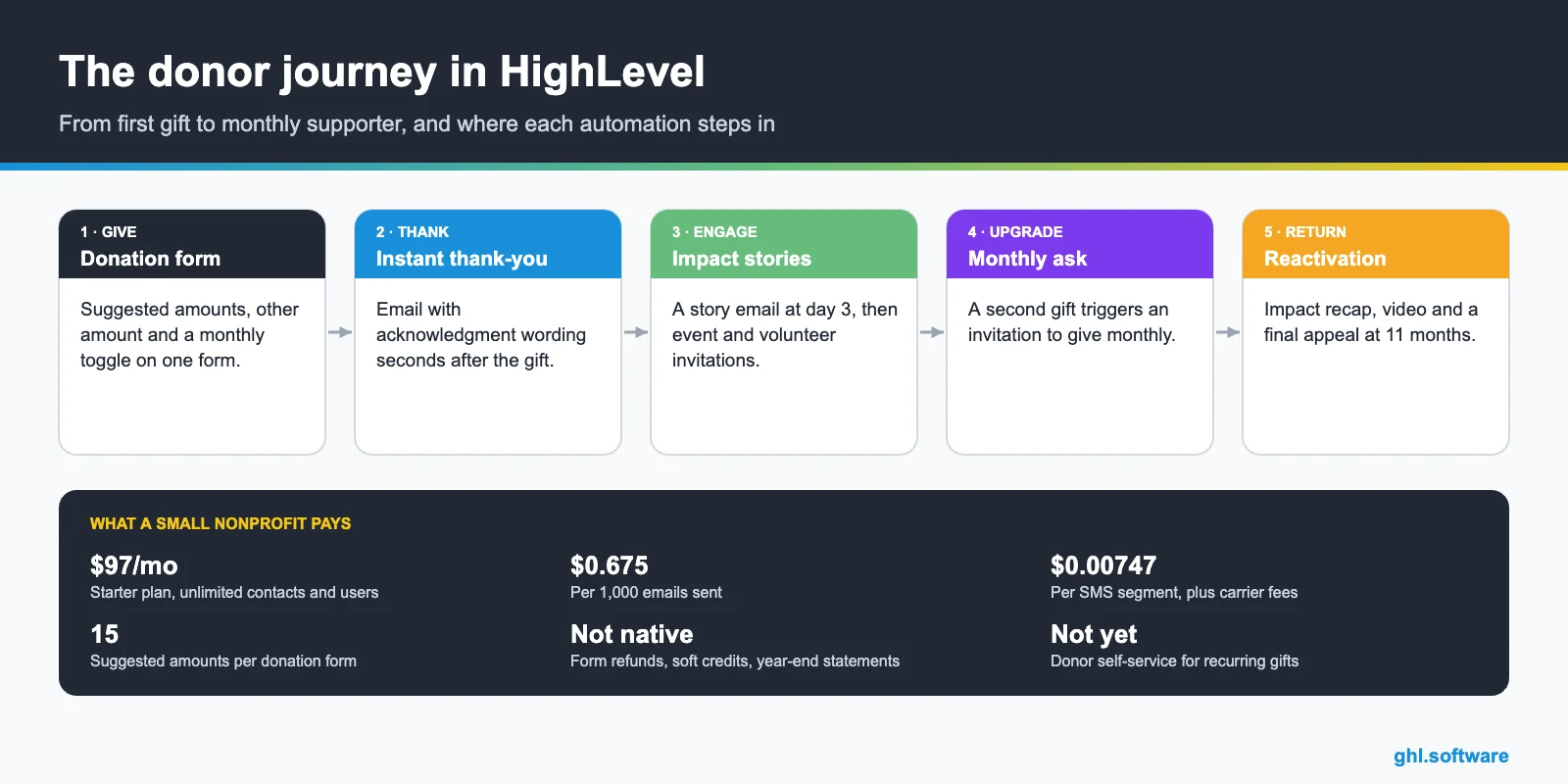
Common nonprofit problems and how HighLevel solves them
Start with the leaks that a CRM for nonprofits should close. Each one below maps to one feature, so you can fix them in order instead of all at once.
| Nonprofit problem | What HighLevel does | Feature |
|---|---|---|
| Thank-yous go out weeks late | Sends a personal thank-you seconds after each gift | Workflows + email |
| Donor data spread across spreadsheets | Keeps gifts, events and volunteer status on one contact | CRM + custom fields |
| One-time donors never give again | Invites second-time donors to give monthly | Workflows + tags |
| Lapsed donors nobody contacts | Starts a reactivation sequence 11 months after the last gift | Workflows + date fields |
| Event RSVPs in a separate tool | Registers guests, sends reminders and follows up after | Calendars + forms |
| Volunteers never asked to give | Sends active volunteers a gentle giving invitation | Pipelines + workflows |
| Board can’t see results | Shows gifts by campaign, new vs repeat donors and monthly donors | Reporting dashboard |
All-in-one or donor CRM? When HighLevel is enough
This is the honest question behind any CRM for nonprofits, and most guides skip it. In short, HighLevel is an all-in-one marketing CRM: forms, payments, email, SMS, WhatsApp, pages and automation in one place. A donor CRM such as Bloomerang, DonorPerfect, Neon CRM or Salesforce Nonprofit Cloud is built around the gift record instead. Many organizations still run Salesforce’s older Nonprofit Success Pack (NPSP), too. Both approaches are valid, but they fit different organizations.
HighLevel alone is usually enough when you are small, raise most money online and need fast follow-up more than gift accounting. For example, a local animal rescue with a few hundred donors and one part-time staffer fits well. However, you need a donor CRM, alone or next to HighLevel, once you track soft credits, households, pledges or major-gift moves. The same is true if your board or auditor expects consolidated year-end giving statements.
| Your situation | Best fit |
|---|---|
| Small org, mostly online gifts, no gift accountant | HighLevel alone |
| Growing org with events, volunteers and a major-gift program | Donor CRM + HighLevel for marketing |
| Large org with complex data, grants and an admin team | Salesforce Nonprofit Cloud or another donor CRM |
| Monthly program where donors manage their own gift | A tool with a donor portal (HighLevel has none yet) |
A donor lifecycle pipeline in your CRM for nonprofits
Pipelines in HighLevel were designed for sales, but they map well to a donor journey. Each card is a supporter, while each stage says what that person needs from you next. Most moves happen on their own, because workflows update the card after a gift, a second gift or a long silence. As a result, you see how many first-time donors became monthly supporters this quarter.
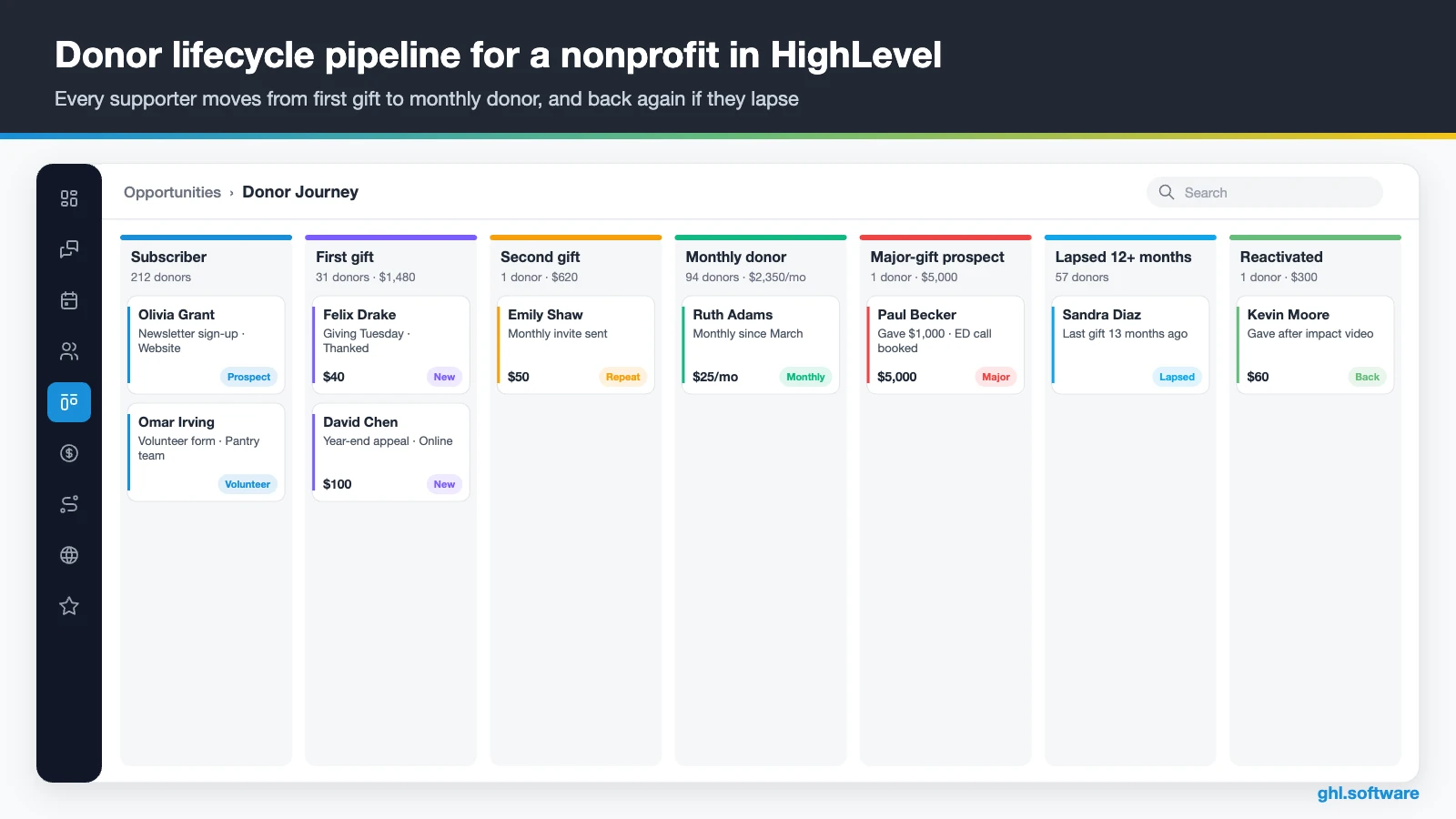
| Stage | What moves the supporter here |
|---|---|
| Subscriber / prospect | Newsletter sign-up, event RSVP or volunteer form |
| First gift | Donation form submitted with payment; thank-you sent |
| Second gift | A new one-time gift arrives; tag repeat added |
| Monthly donor | A recurring gift starts on the monthly form |
| Major-gift prospect | A single gift at or above your threshold, for example $250 |
| Lapsed (12+ months) | No gift 12 months after the last one |
| Reactivated | A lapsed donor gives again |
Besides donors, run sponsors and grants in a second pipeline, for example Identified, Contacted, Meeting, Proposal, Committed and Reporting. Then give volunteers a third one: Applied, Onboarded and Active.
Three donor automations that do the stewardship for you
These three workflows cover the donor journey in a CRM for nonprofits, from the first gift to a lapsed supporter. Build them in this order, because each one feeds the next.
1. Instant thank-you and acknowledgment
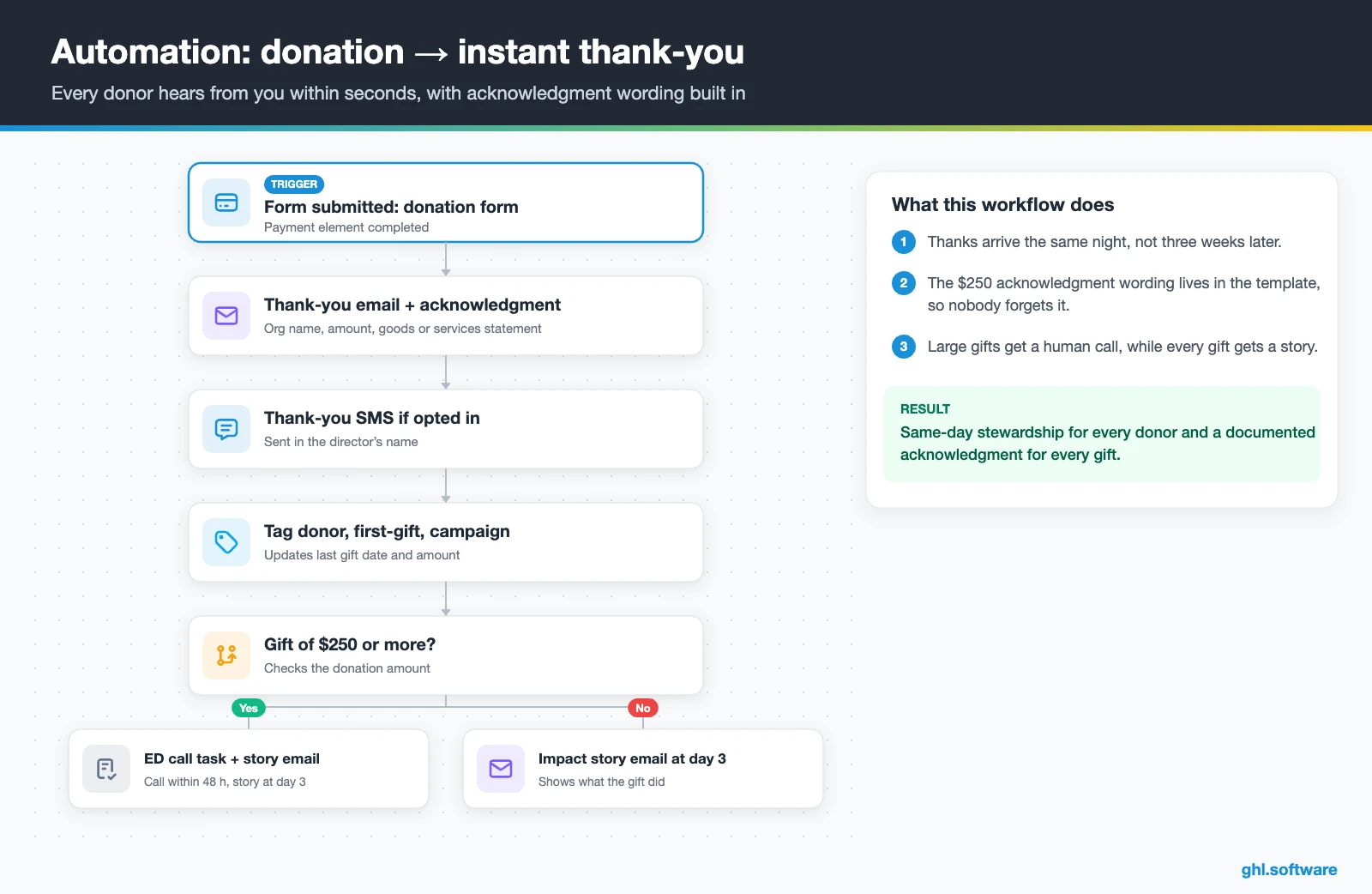
The workflow starts when a donor submits the donation form with payment. Right away, the donor gets a thank-you email with your acknowledgment wording: the organization’s name, the amount and whether you provided any goods or services. If the donor opted in, a short text follows in the director’s name. Then the workflow adds tags such as donor, first-gift and the campaign, and updates the last gift date and amount.
Gifts at or above your threshold, for example $250, also create a task for the executive director to call within 48 hours. Three days later, an impact story email shows what the gift did. That way, every donor hears from you the same day, and every acknowledgment is documented.
2. Monthly-donor upgrade
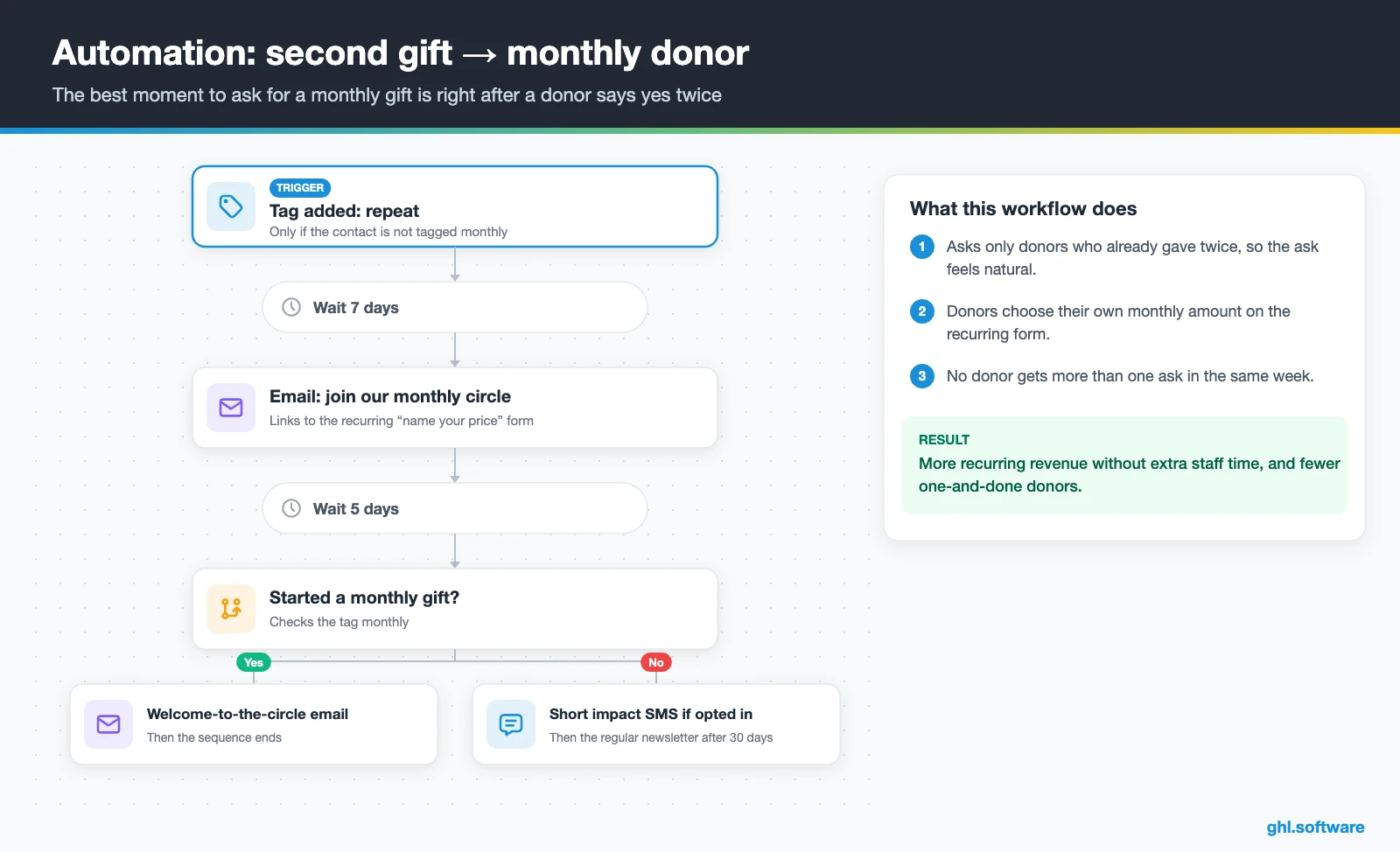
A second gift is the best moment to ask for a monthly one, because the donor has already said yes twice. So the trigger is the tag repeat, with a condition that the contact is not already tagged monthly. Seven days later, an email invites the donor to join your monthly circle and links to the recurring form. Also, HighLevel supports recurring “name your price” gifts in forms, so donors pick their own monthly amount.
Five days later, donors who have not started a monthly gift get a short impact text, if they opted in. If the donor does start one, a welcome-to-the-circle email goes out and the sequence ends. Otherwise, the donor moves to the regular newsletter after 30 days. In short, nobody gets asked twice in one week.
3. Lapsed-donor reactivation
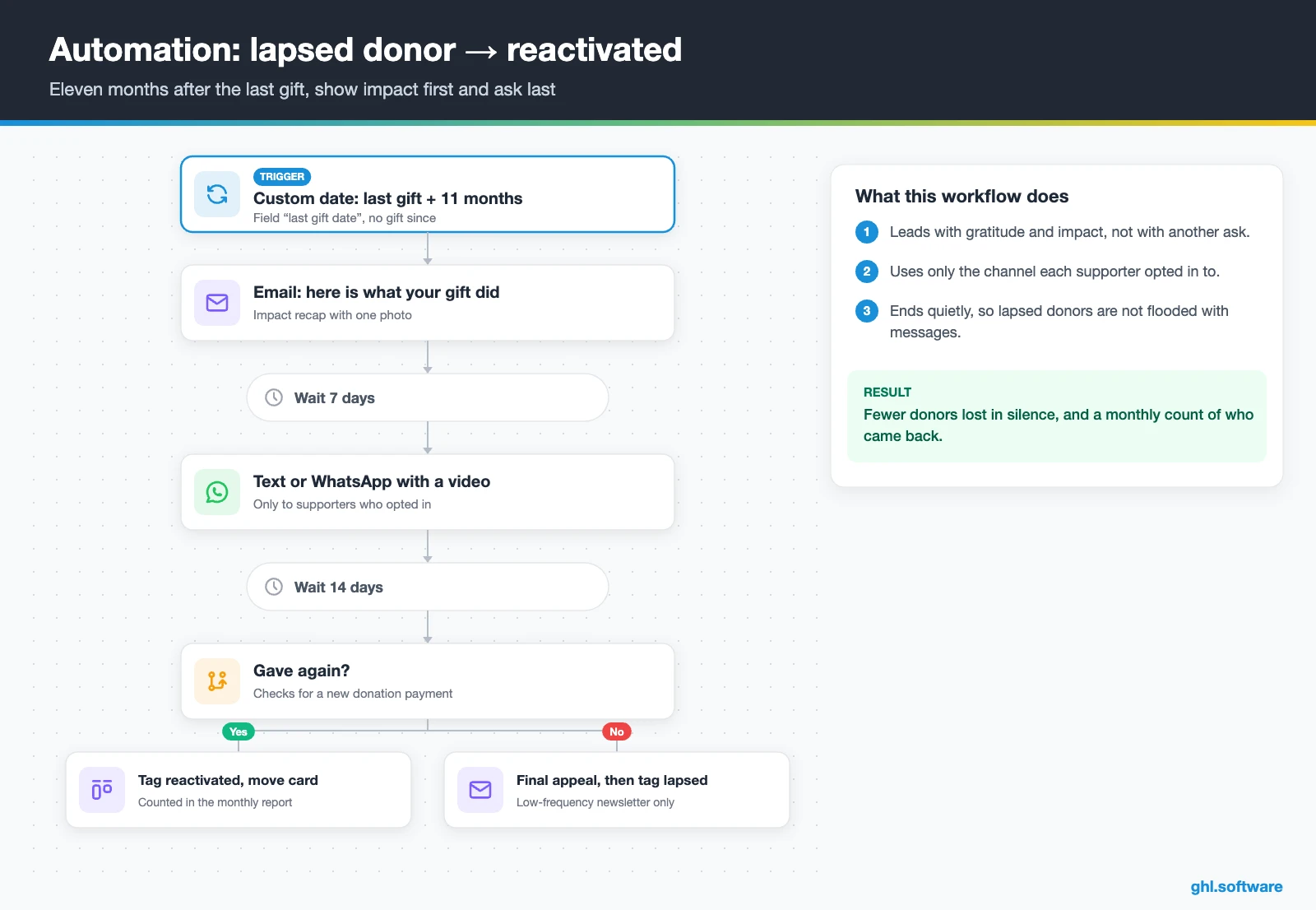
The trigger is a date: 11 months after the last gift date, with no gift since. Instead of an appeal, the first email answers a simple question: “Here is what your gift did.” Then, seven days later, a text or WhatsApp message shares a short video. Finally, two weeks after that, donors who still have not given get a last appeal tied to your current campaign.
If the donor gives, the tag reactivated goes on and the card moves to Reactivated. Otherwise, the tag lapsed goes on, and the contact receives only a low-frequency newsletter. Meanwhile, a monthly report counts how many lapsed donors came back, so the board sees the effect.
Start with the snapshot and the pipeline from this guide, then add the automations one by one. The extended trial comes with our bootcamp link.
Start the 30-day trialAffiliate link. I may earn a commission at no extra cost to you.
Email, SMS and WhatsApp for donors, volunteers and events
Donors read email, but volunteers often answer texts faster. That is why a CRM for nonprofits needs every channel in one inbox. HighLevel, for example, puts email, SMS, WhatsApp, Facebook and Instagram messages and web chat in one thread per supporter. So the volunteer coordinator and the development lead see the same history. Also, the mobile app lets staff reply from an event floor.
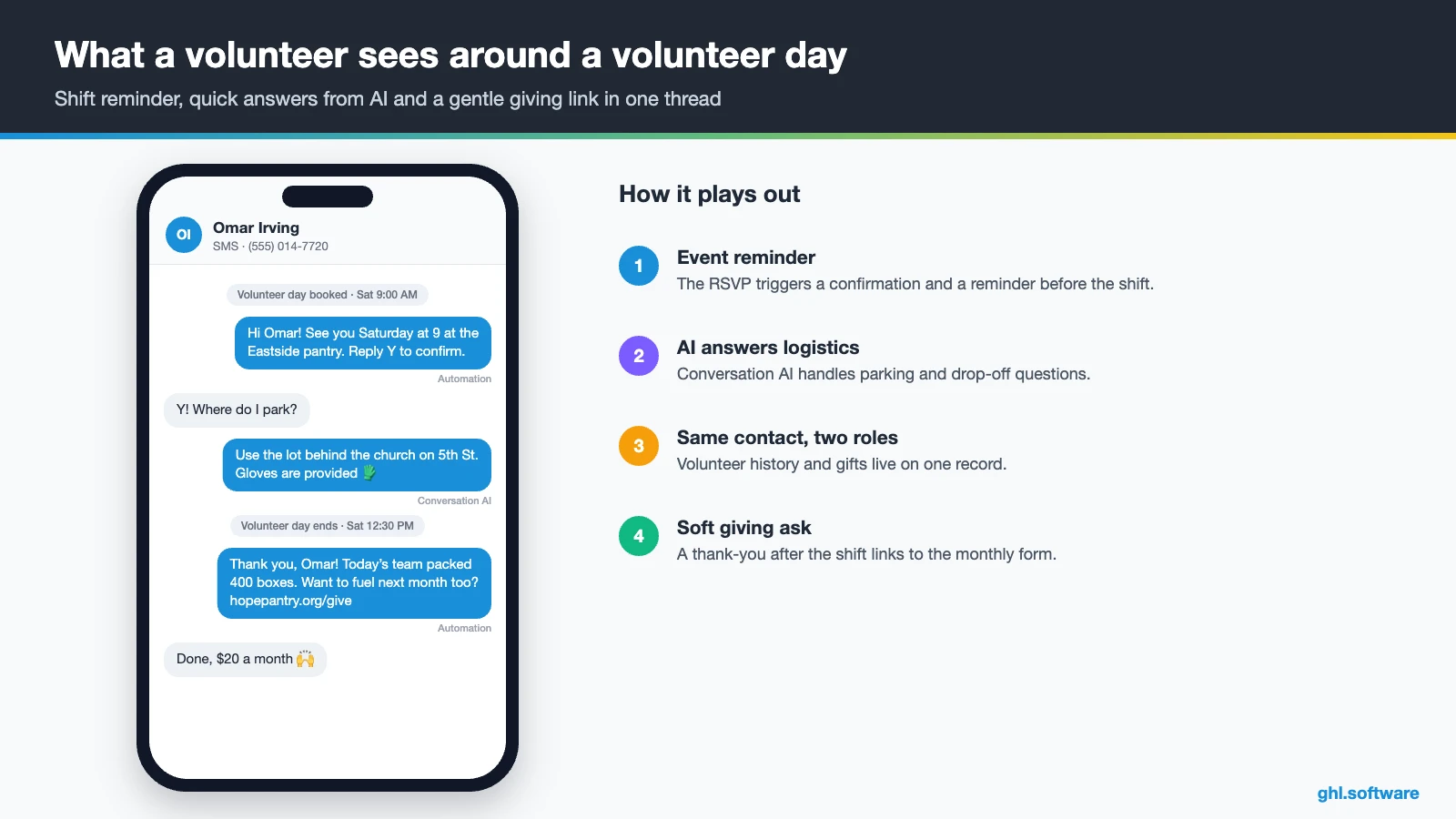
Events follow the same pattern. For example, an RSVP form registers the guest, reminders go out before the gala, and a note the next morning thanks guests and links to the donation page. Volunteers work the same way: an application form, a short onboarding sequence and group texts before each shift. Meanwhile, Conversation AI can answer repeat questions about parking or drop-off hours, while a person handles sensitive conversations.
Is there an official HighLevel snapshot for nonprofits?
No. HighLevel’s playbook library has industry snapshots, but we found none for nonprofits. Instead, the closest approach is to borrow the shared template those snapshots use. For example, the Event Planner snapshot playbook includes a website, an offer funnel and the “Marketing Form – Claim Offer”. It also ships a “Marketing Pipeline”, the “New Lead Nurture (Fast 5)” and “Long Term Nurture” workflows, an event calendar, a chat widget and missed call text back. Then you can map each piece to nonprofit work.
- Website → your mission, programs and a donate page.
- Offer funnel → a campaign page, such as a year-end appeal.
- Claim Offer form → your donation form with the payment element.
- Fast 5 nurture → the donor thank-you and welcome series.
- Long Term Nurture → the monthly impact newsletter.
- Event calendar → galas, tours and volunteer days.
You still build the donor pipeline, the three workflows, the acknowledgment wording and every message. Once it works, save it as your own snapshot. That way, a second chapter or a partner organization starts from a working copy.
How to set up HighLevel for a nonprofit in 8 steps
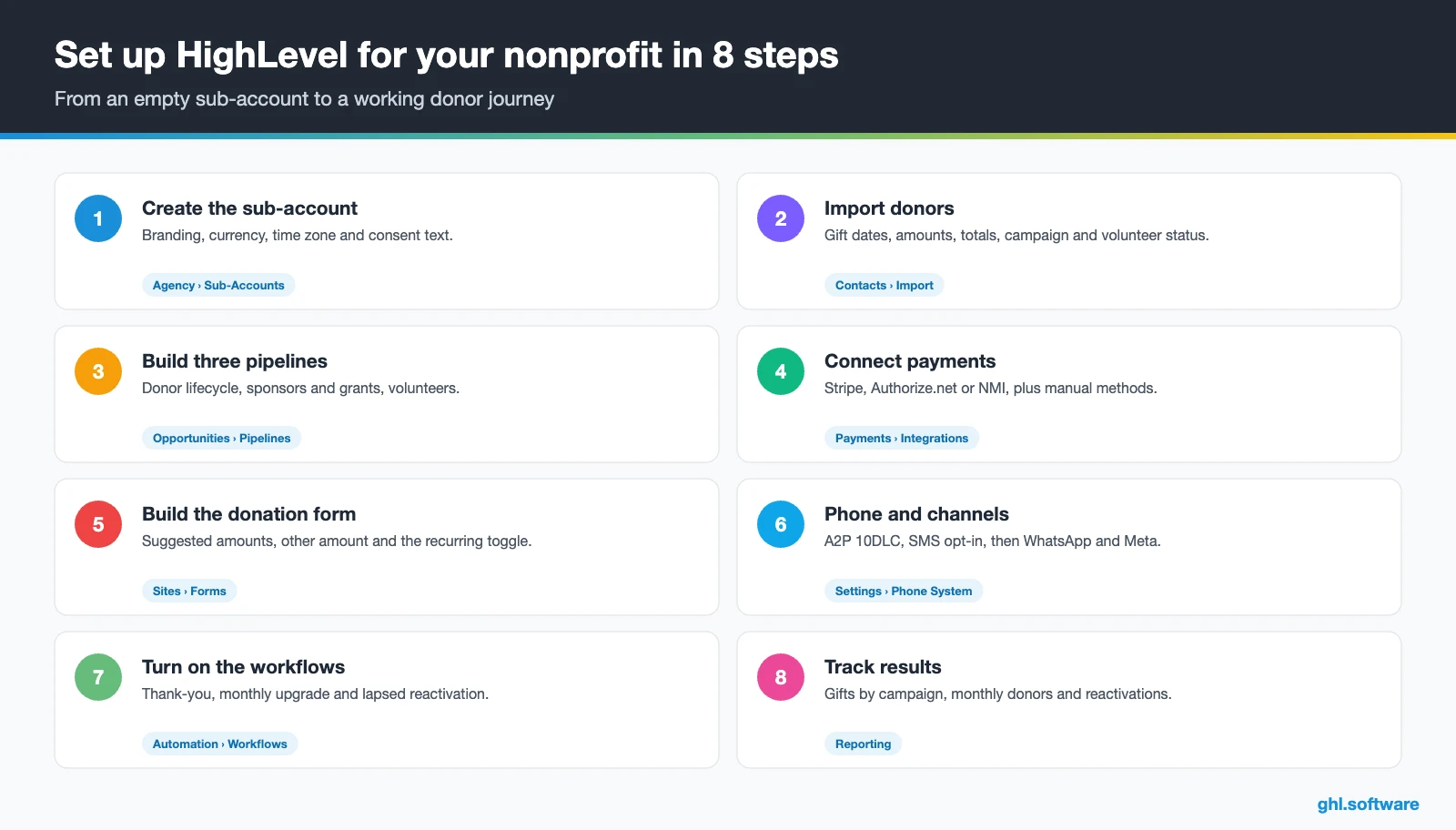
These steps turn HighLevel into a working CRM for nonprofits, from your data to the board report.
- Create the sub-account. Add your organization’s branding, currency and time zone, plus a privacy policy and consent text for email and SMS.
- Import your donors. Bring in spreadsheets or platform exports with first and last gift date, last amount, total given, recurring status, campaign and volunteer status.
- Build three pipelines. Create Donor lifecycle, Sponsors and grants, and Volunteers in Opportunities › Pipelines.
- Connect payments. Connect Stripe, Authorize.net or NMI, and add bank transfer or checks as manual methods if you accept them. See Payments.
- Build the donation form. Add the payment element with suggested amounts, “other amount” and the recurring toggle. Embed it on your site and campaign pages.
- Register phone and channels. Register A2P 10DLC for US texting, keep SMS opt-in on every form, then connect WhatsApp, Facebook and Instagram.
- Turn on the workflows. Publish the thank-you, monthly upgrade and reactivation flows, plus a year-end appeal campaign.
- Build the dashboard. Track gifts by campaign and source, new vs repeat donors, monthly donors and reactivations in Reporting.
What a CRM for nonprofits costs with HighLevel
HighLevel charges a flat plan plus usage, not a fee per donor or per gift. Most small organizations start on Starter at $97 a month, with unlimited contacts, users and all core features. Usage then comes on top. For example, email costs $0.675 per 1,000, and texts cost $0.00747 per segment plus carrier fees. A US number is $1.15 a month, and A2P registration is $22.50 one-time plus a monthly campaign fee.
So an organization emailing 10,000 donors a month and sending a few hundred texts usually pays about $110–$130 a month before AI. Card processing fees go to your payment provider, not to HighLevel. Also, we could not verify a nonprofit discount on HighLevel’s site, so budget for the standard price. See our pricing guide and the AI Employee pricing for details.
GoHighLevel plans compared
| Starter | Unlimited | Agency Pro | |
|---|---|---|---|
| Price | $97/month | $297/month | $497/month |
| Annual | $970/year | $2,970/year | $4,970/year |
| Sub-accounts | 3 | Unlimited | Unlimited |
| Contacts and users | Unlimited | Unlimited | Unlimited |
| All core features | Yes | Yes | Yes |
| White label web app | Yes | Yes | Yes |
| API access | Basic | Basic | Advanced, agency-level keys |
| Rebill phone and email | No | At cost | With markup |
| Rebill AI usage | No | No | Yes |
| SaaS Mode and automated sub-accounts | No | No | Yes |
| User and agent reporting | No | No | Yes |
| Support | 24/7 | 24/7 | 24/7 |
Usage costs on top of the plan
| Item | Official price | When you pay it |
|---|---|---|
| Local phone number (US/Canada) | $1.15/month | Each number for SMS and calls |
| SMS (US/Canada) | $0.00747 per segment + carrier fees | Every text sent or received |
| Calls (US) | $0.0166/min outbound, $0.01165/min inbound | Calls through LC Phone |
| A2P 10DLC registration | $22.50 one-time (low volume) + monthly campaign fee | Before texting US numbers |
| Email (LC Email) | $0.675 per 1,000 emails | Campaigns and workflow emails |
| $10/month per sub-account + Meta fees | If you use WhatsApp inside HighLevel | |
| AI | Pay-per-use, or $50 or $97/month per sub-account | Voice AI, Conversation AI and other AI tools |
| Premium workflow steps | $0.01 per run after 100 free | Webhooks, Google Sheets, Slack, app actions |
Honest limits of HighLevel as a CRM for nonprofits
HighLevel handles donations, marketing and follow-up. It is not a donor management system, so check these gaps before you migrate.
- No refunds in form payments. HighLevel’s payment element guide says refunds are not supported there, so you refund in your payment provider.
- No donor self-service. Donors cannot change or cancel a recurring gift on their own yet, so staff do it for them.
- Recurring gifts in forms only. The recurring “name your price” option works in forms, not in surveys (HighLevel ideas board).
- No soft credits, households or pledges. Tribute and family giving need custom-field workarounds.
- No consolidated year-end statements. You can email each acknowledgment, but there is no annual giving summary per donor.
- No grant management, wealth screening or fund accounting. Keep those in a donor CRM or your accounting system.
How the main donor CRMs compare
Here is how the main donor CRMs compare. The competitor cells come from Neon One’s 2026 comparison, which is vendor-authored, and from Salesforce’s nonprofit page. “Check vendor” means the source did not state it.
| HighLevel | Bloomerang | DonorPerfect | Neon CRM | Salesforce NPC | |
|---|---|---|---|---|---|
| Built around | Marketing, donations, automation | Donor profiles, engagement meter | Donor database, recurring giving | Donor database, memberships, events | Fundraising, programs, volunteers |
| Donor portal | No | Check vendor | ✓ (Core tier) | Check vendor | Check vendor |
| Wealth screening | No | Yes | Check vendor | Not built in | Check vendor |
| Volunteer management | Forms + pipeline, no shifts | Add-on | Check vendor | Module | Yes |
| SMS, WhatsApp, pages and workflows in one tool | Yes | Check vendor | Check vendor | Check vendor | Check vendor |
| Published starting price | $97/mo + usage | $125/mo (CRM) | Custom quote | From $99/mo | 10 free licenses, then from $60/user/mo |
Running a donor CRM and HighLevel together
Many organizations end up with both: a donor CRM as the record of gifts, and HighLevel for pages, messages and automation. In that case, decide which system owns the gift record, and sync the other through the API and webhooks.
Volunteers are your next donors: the loop nobody automates
Here is the angle most guides on CRM for nonprofits miss. Volunteers already give their time, so they are often your warmest future donors. However, most organizations keep volunteer lists in a separate sheet, so nobody ever asks. In HighLevel, the volunteer and the donor are the same contact, which makes a gentle loop possible.
For example, after a volunteer’s third logged shift, which your coordinator records in a number field, a workflow sends a thank-you with a photo from the day. A month later, a story email explains what the program costs to run, with a soft link to the monthly form. Meanwhile, donors who never volunteered get an invitation to the next volunteer day. As a result, each group meets the other side of your mission.
Open a free account, load the pipeline and turn on the first automation today. The bootcamp walks you through the setup live.
Start the 30-day trialAffiliate link. I may earn a commission at no extra cost to you.
Frequently asked questions
What is the best CRM for small nonprofits?
It depends on where your time goes. If you mostly need fast thank-yous, donation forms, email and text follow-up and campaign pages, an all-in-one like HighLevel covers it at a flat price. If you track soft credits, households, pledges, grants or major-gift moves, a donor CRM such as Bloomerang, DonorPerfect or Neon CRM fits better. Many growing organizations use a donor CRM for records and HighLevel for marketing.
Is there a free CRM for nonprofits?
Some options are free to start. Salesforce gives eligible nonprofits 10 free Nonprofit Cloud or Sales and Service Cloud licenses through its Power of Us program, although setup still costs time or money. Tip-based donation tools may charge donors or take a platform fee instead. HighLevel has no free plan and we could not verify a nonprofit discount, but its standard trial lets you test the donor journey first.
Can HighLevel take recurring donations?
Yes. The payment element in HighLevel forms supports weekly, monthly or yearly recurring payments, up to 15 suggested amounts and an “other amount” option. Recurring “name your price” gifts work in forms, but not in surveys. It also connects to gateways such as Stripe, Authorize.net and NMI. However, donors cannot change or cancel their recurring gift on their own, and refunds happen in your payment provider.
How do I automate donor thank-you letters?
Build a workflow triggered by your donation form submission. It sends a thank-you email right away with your organization’s name, the amount and a goods-or-services statement, then adds tags and updates the last gift date. Add a short text for donors who opted in, a call task for gifts above your threshold, and an impact story email three days later. Altogether, that covers same-day stewardship.
Can HighLevel issue year-end tax receipts?
Not as a consolidated statement. HighLevel can email an acknowledgment for every gift as it happens, with the wording the IRS expects for gifts of $250 or more. However, it does not generate an annual giving summary per donor. If you need year-end statements, export your gift data or use a donor CRM that produces them, and keep HighLevel for the follow-up.
How is a nonprofit CRM different from a donor database?
A donor database records gifts: amounts, dates, funds, soft credits and statements. A CRM for nonprofits also manages the relationship around those gifts, with emails, texts, events, volunteers and automated follow-up. Dedicated donor CRMs combine both with a focus on gift records. In contrast, HighLevel focuses on the relationship and marketing side, with donation forms built in, but without deep gift accounting.
How much does HighLevel cost for a nonprofit?
The Starter plan costs $97 a month with unlimited contacts and users. Usage also comes on top: $0.675 per 1,000 emails, $0.00747 per text segment plus carrier fees, and $1.15 a month for a US number. A small organization usually pays about $110 to $130 a month before AI. Card processing fees go to your payment provider, and we found no verified nonprofit discount.
More industry guides
Sources: HighLevel: Payment element in forms (donations) · HighLevel ideas: recurring name-your-price donations · HighLevel: Documents and contracts · HighLevel: A2P 10DLC and SMS registration · HighLevel Event Planner snapshot playbook · IRS: Charitable contributions, written acknowledgments · Salesforce: Nonprofit Cloud and Power of Us · Neon One: Best CRM for nonprofits (vendor comparison, 2026)

