


CRM for Healthcare: How GoHighLevel Fills a Practice Schedule
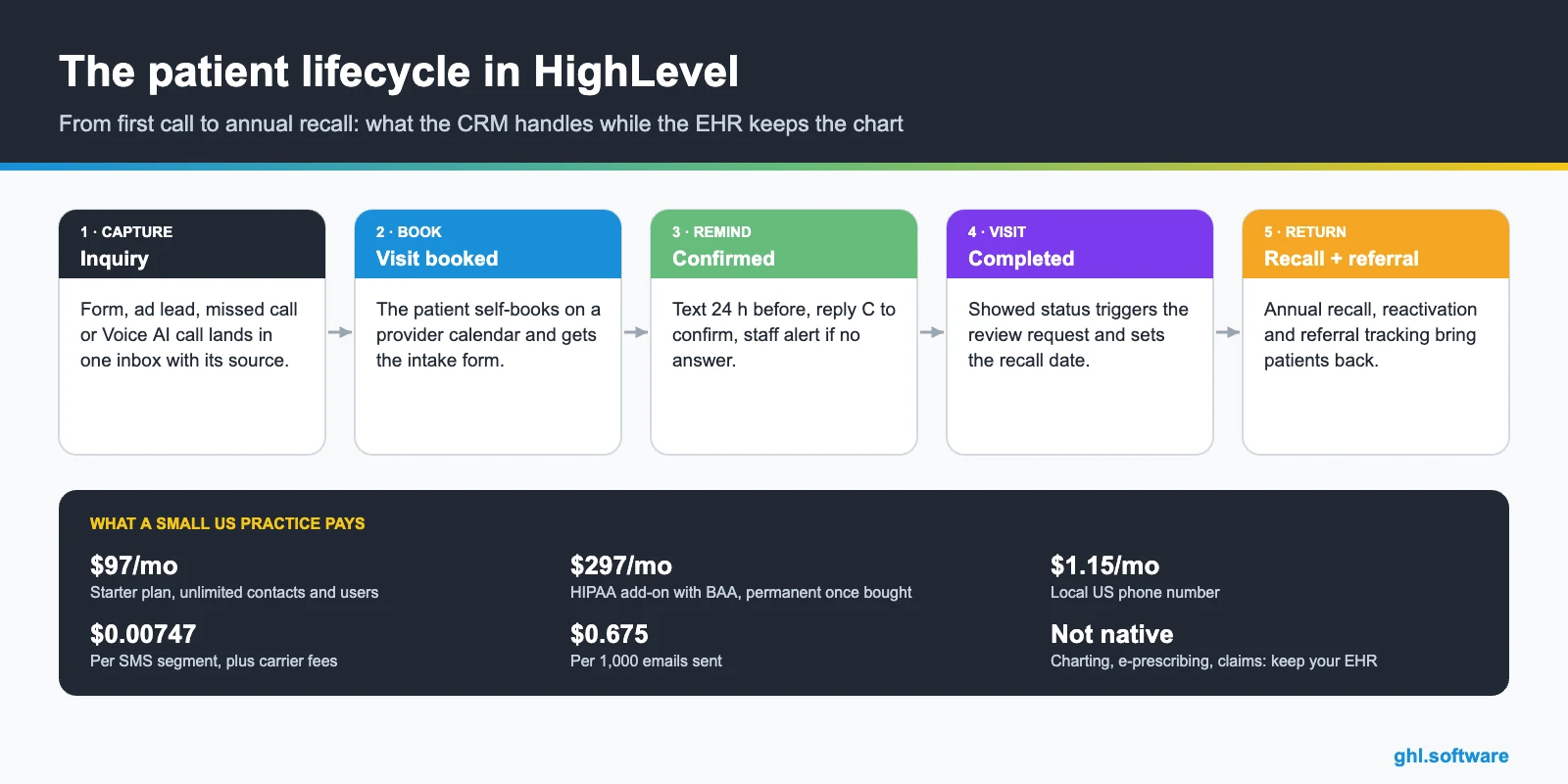
A CRM for healthcare captures every patient inquiry, books the visit online, sends intake forms and reminders, and brings patients back for recalls and reviews. GoHighLevel does that job on top of your EHR (athenahealth, eClinicalWorks and similar). Charting, prescribing and claims stay in the EHR, and US practices that store patient data need HighLevel’s $297/month HIPAA add-on.
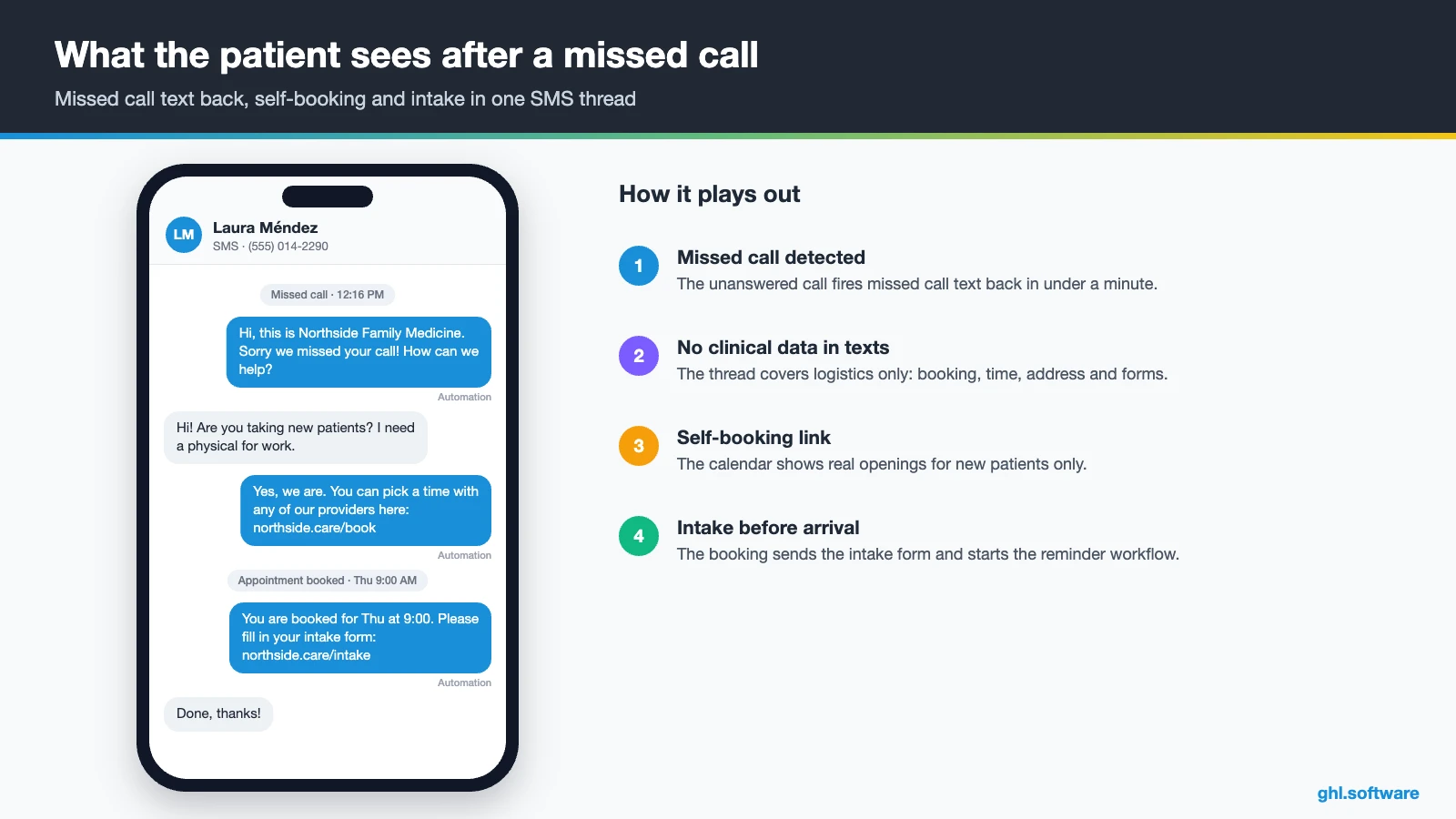
It is 12:15 on a Monday. Both front desk lines are busy when Laura Méndez calls a family practice about a new-patient physical. Nobody picks up, so she taps the next clinic on Google Maps and books there before lunch is over. A CRM for healthcare exists for that exact moment. It texts Laura back within a minute, sends her the online booking link and tells your team who is coming in.
Most practices already pay for good software. However, an EHR such as athenahealth or eClinicalWorks was built around the visit: the chart, the orders, the claim. It was not built to answer a Facebook lead at 9 p.m., chase an unsigned intake form or remind a patient that her annual physical is due. Nor does it ask every patient for a Google review. That gap is where HighLevel fits.
So this guide walks through the whole setup for a small clinic or multi-provider practice. You will see the patient pipeline, three automations with real triggers, Voice AI reception and the official snapshot. After that come an 8-step setup, monthly costs, honest limits and what the HIPAA add-on really covers. It is part of our GoHighLevel by industry series.
Leer en español: CRM para clínicas · Ler em português: CRM para clínicas · Part of GoHighLevel by industry
What a medical practice needs from a CRM (and what your EHR does not do)
Think of the CRM as the patient-acquisition and follow-up layer. The EHR remains the record of care. Meanwhile, the CRM owns the conversation before the first visit and between visits. In a typical outpatient practice, that generally comes down to nine jobs.
Common clinic problems and how HighLevel solves them
Before you build anything, list the leaks. For example, most small practices recognize at least four of the problems below. Therefore, a useful CRM for healthcare should fix each one with a specific feature, not a vague promise.
| Problem | What HighLevel does | Feature |
|---|---|---|
| Calls missed while the front desk is busy | Texts the caller within a minute with a booking link | Missed call text back |
| Web and ad leads answered the next day | Sends an instant text and email, alerts staff and creates a call task | Forms + workflows |
| No-shows and late cancellations | Sends confirmations and reminders, then a rebook link after a no-show | Calendars + workflows |
| Paper intake at the window | Sends the intake form with the booking confirmation | Forms + e-signature |
| Annual physicals and follow-ups slipping | Finds patients due for recall and runs a short sequence | Smart lists + workflows |
| Few recent Google reviews | Requests a review a few hours after the visit | Reputation + Reviews AI |
| Phones ringing after hours | Lets an AI agent answer, book and hand off | Voice AI |
The patient pipeline in a CRM for healthcare
A pipeline is a board of stages. Each card is a patient opportunity, and each move can trigger the next message or task. In a CRM for healthcare, the board also shows where new patients get stuck, which makes the weekly huddle much shorter.
Keep two pipelines. The first, New Patients, runs from first contact to the first completed visit. Then the second, Recall & Reactivation, holds existing patients who are due or overdue. That way, a lapsed patient never clutters the new-patient view, and each board answers one question.

| Stage | What moves a patient here |
|---|---|
| New inquiry | Web form, ad lead, chat, missed call or Voice AI call |
| Contacted | First reply sent or call logged by the front desk |
| Visit booked | Patient books on a provider calendar (automatic) |
| Intake complete | Intake and consent form submitted |
| Confirmed | Patient replies C to the 24-hour reminder |
| Visit completed | Appointment status changes to showed |
| Recall due (second board) | Recall date reached, for example 12 months after the last physical |
Three automations every outpatient practice should run
You can build dozens of workflows. Still, three of them do most of the work in a CRM for healthcare at a small clinic. Also, each one below uses triggers and actions that exist in the HighLevel workflow builder.
1. Missed call → booked visit
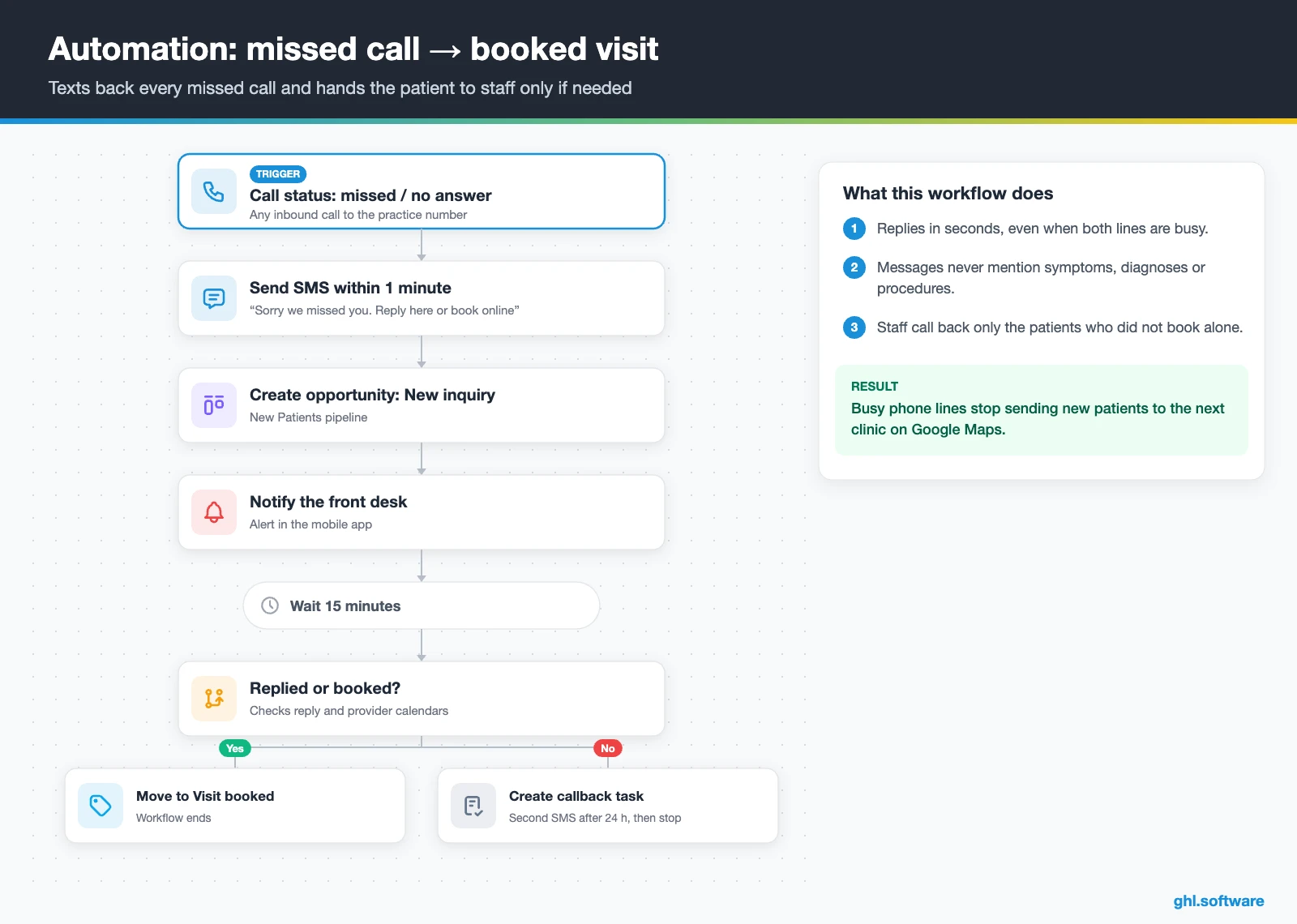
Here, the trigger is Call status on an inbound call that ends as missed or unanswered. Within a minute, the caller gets a text: sorry we missed you, reply here or book online. At the same time, HighLevel creates the opportunity in New inquiry and notifies the front desk in the mobile app.
Then the workflow waits 15 minutes. If the caller has neither replied nor booked, it creates a callback task for the front desk. After 24 hours with no booking, one last text goes out and the workflow ends. As a result, a busy phone line no longer sends patients to the clinic down the street. Keep the texts free of any clinical detail.
2. Confirmations, intake and no-show recovery
This one starts with Customer booked appointment on any provider calendar. First, the patient gets a confirmation with the address and the intake form link. Then, 24 hours before the visit, a text asks them to reply C to confirm. If no C arrives, the front desk gets an alert four hours before, while a final reminder goes out two hours before.
Meanwhile, a second workflow watches Appointment status. When staff mark a no-show, the patient receives a friendly reschedule link 30 minutes later. After two days without a new booking, the contact joins the reactivation list instead of disappearing.

3. Post-visit review request and annual recall
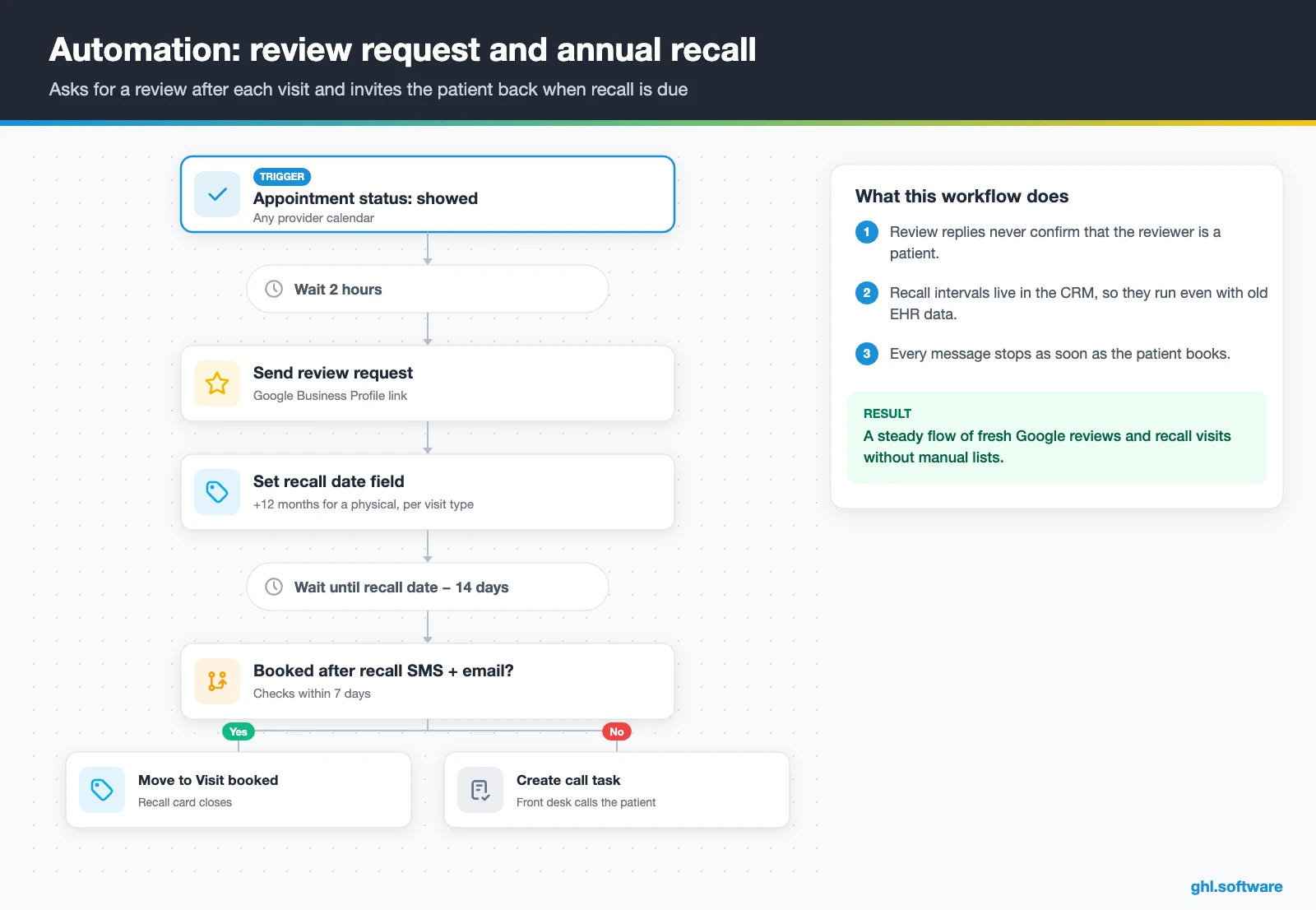
The trigger is Appointment status changed to showed. Two hours later, the patient gets a review request, plus one reminder after two days if they did not click. Send it to every patient, not only the ones you expect to be happy. If a reply sounds unhappy, the practice manager gets an alert. Moreover, the same workflow writes a recall date into a custom field: 12 months for a physical, or whatever interval your providers set for each visit type.
Fourteen days before that date, a text and an email invite the patient to book. If nothing happens within a week, the front desk gets a call task. Because the recall interval lives in the CRM, the program keeps running even when the EHR export is a month old.
Start with the snapshot and the pipeline from this guide, then add the automations one by one. The extended trial comes with our bootcamp link.
Start the 30-day trialAffiliate link. I may earn a commission at no extra cost to you.
Texting, WhatsApp and Voice AI reception for clinics
Patients rarely want to call back. Instead, they reply to a text, so a CRM for healthcare has to live where patients answer. The HighLevel inbox puts SMS, email, web chat, Facebook and Instagram messages and WhatsApp in one thread per patient. So anyone at the front desk sees the full history before replying.
Missed call text back is the quickest win. You enable it in the phone settings, and it needs an A2P-registered number for SMS (HighLevel help). In addition, a Voice AI agent can answer overflow and after-hours calls. According to HighLevel, it books appointments during the call, triggers workflows, transfers to a human and can even place outbound reminder calls (Voice AI overview).
Two cautions apply. Voice AI only works on LC Phone or Twilio numbers. Moreover, the agent should handle logistics only: hours, insurance accepted, directions and booking. It must never triage symptoms or give medical advice, so script a clear handoff for anything clinical. Likewise, Conversation AI can answer routine chat questions and then pass the thread to staff.
What HighLevel’s Family Practice Physician snapshot includes
HighLevel publishes a free Family Practice Physician playbook with a matching snapshot. A snapshot is a template that loads a website, funnels, forms, workflows and calendars into a sub-account in one step. However, this one is a generic template with the industry name swapped in, so treat it as a starting point. Out of the box you get:
- A website called Family Practice Physician, with a home page (services and FAQ sections) and a link-in-bio page
- A Family Practice Physician Offer funnel: an opt-in step, then an appointment booking page
- The Marketing Form – Claim Offer and a Marketing Pipeline (the guide defines no stages)
- Two named nurture workflows, New Lead Nurture (Fast 5) – Claim Offer and Long Term Nurture, plus four unnamed ones
- Service calendars tagged Family Practice Physician Services, a general calendar and an event calendar for consultations
- Custom values, a chat widget, snippets, a proposal template and one ad in Ad Manager
- Setup steps for missed call text back, review requests and Review Reply AI
There is no Voice AI prompt in this variant, and the guide says nothing about HIPAA, intake or reminders. So you still build the patient pipeline stages, provider calendars, intake and consent forms, reminders, recalls and every message yourself. In other words, the snapshot gives you the shell of a CRM for healthcare, and this guide adds the clinical-practice logic. The official walkthrough below gives HighLevel’s own overview for medical practices; watch it for the big picture before you customize.
Video: Industry Guide - Medical Practices · HighLevel
How to set up GoHighLevel as a CRM for healthcare
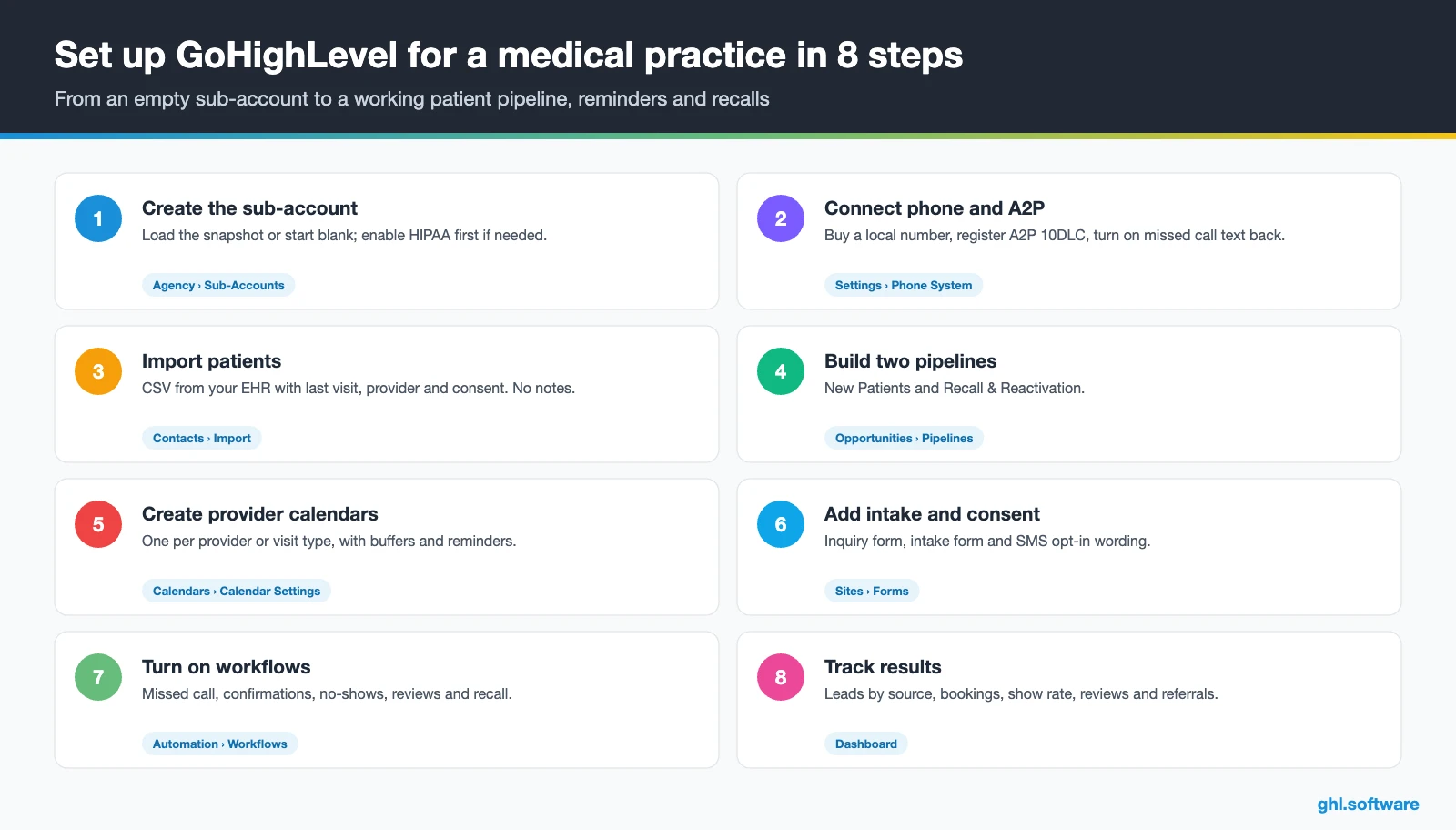
- Create the sub-account. Add the practice under Agency › Sub-Accounts and load the snapshot or start blank. If you will store patient health information in the US, buy the HIPAA add-on, sign the BAA and enable HIPAA on the sub-account before you import anyone.
- Connect phone and A2P. Buy a local number, register your A2P 10DLC brand and campaign, then enable missed call text back. See phone and SMS.
- Import patients. Export from your EHR: name, phone, email, last visit, provider and consent flags. Never import clinical notes or diagnoses.
- Build both pipelines. Create New Patients and Recall & Reactivation, with the stages from the table above.
- Create provider calendars. One calendar per provider or visit type, with buffers, round robin for shared slots, confirmations and reminders.
- Add intake and consent. Publish an inquiry form and an intake form with explicit SMS opt-in, plus consents with e-signature through contracts.
- Turn on the workflows. Activate the three automations above, test them with a staff phone and connect Google Business Profile for reviews.
- Track and train. Build a reporting dashboard for leads by source, bookings, show rate and reviews, and install the mobile app for staff.
What a CRM for healthcare costs with HighLevel
In short, HighLevel prices a CRM for healthcare as a flat plan plus usage. A single practice usually starts on Starter at $97 a month, which already includes every core feature, unlimited contacts and unlimited users. On top of that, you pay for what you send. A local number is $1.15 a month, SMS is $0.00747 per segment plus carrier fees, and email is $0.675 per 1,000.
The HIPAA add-on changes the math for US practices. It costs $297 a month at the agency level, so an illustrative clinic with 3,000 text segments, 5,000 emails and some inbound calls lands around $430 to $480 a month. Then adding an AI plan ($50 or $97 per sub-account) pushes it toward $550. Our pricing guide and the AI Employee pricing page break it down.
To judge it, use your own numbers. For example, a practice that books 400 visits a month with an 8% no-show rate loses 32 slots. At $120 per visit, that is $3,840 a month. If confirmations and quick rebooking recover even eight of those slots, they cover the plan, the add-on and the usage.
GoHighLevel plans compared
| Starter | Unlimited | Agency Pro | |
|---|---|---|---|
| Price | $97/month | $297/month | $497/month |
| Annual | $970/year | $2,970/year | $4,970/year |
| Sub-accounts | 3 | Unlimited | Unlimited |
| Contacts and users | Unlimited | Unlimited | Unlimited |
| All core features | Yes | Yes | Yes |
| White label web app | Yes | Yes | Yes |
| API access | Basic | Basic | Advanced, agency-level keys |
| Rebill phone and email | No | At cost | With markup |
| Rebill AI usage | No | No | Yes |
| SaaS Mode and automated sub-accounts | No | No | Yes |
| User and agent reporting | No | No | Yes |
| Support | 24/7 | 24/7 | 24/7 |
Usage costs on top of the plan
| Item | Official price | When you pay it |
|---|---|---|
| Local phone number (US/Canada) | $1.15/month | Each number for SMS and calls |
| SMS (US/Canada) | $0.00747 per segment + carrier fees | Every text sent or received |
| Calls (US) | $0.0166/min outbound, $0.01165/min inbound | Calls through LC Phone |
| A2P 10DLC registration | $22.50 one-time (low volume) + monthly campaign fee | Before texting US numbers |
| Email (LC Email) | $0.675 per 1,000 emails | Campaigns and workflow emails |
| $10/month per sub-account + Meta fees | If you use WhatsApp inside HighLevel | |
| AI | Pay-per-use, or $50 or $97/month per sub-account | Voice AI, Conversation AI and other AI tools |
| Premium workflow steps | $0.01 per run after 100 free | Webhooks, Google Sheets, Slack, app actions |
Limits, EHR integration and alternatives
A CRM for healthcare is not an EHR or a practice management system, and HighLevel is no exception. In fact, it has no charting, no e-prescribing, no lab orders, no insurance eligibility checks and no claims. Therefore, keep athenahealth, eClinicalWorks or your current EHR as the system of record, and let HighLevel own marketing and communication.
There is also no native EHR sync. Third parties build bridges through the API and webhooks, and a monthly CSV of last visit dates is often enough to run recalls. If you use SimplePractice, the video below presents a third-party two-way patient sync; watch it to see which records move in each direction.
Video: SimplePractice + GoHighLevel Integration (REAL 2-Way Patient Sync) · Siavash Abbasalipour
| GoHighLevel | Weave | NexHealth | Tebra | |
|---|---|---|---|---|
| What it is | All-in-one CRM, marketing and automation | Patient communication platform | Patient booking and engagement platform | Practice platform: EHR, billing, PatientPop marketing |
| EHR and charting | No | No | No | Yes |
| Two-way texting and reminders | Yes | Yes | Yes | Yes |
| Funnels, ads and custom pipelines | Yes | No | No | Marketing through PatientPop |
| Pricing model | Public flat plans plus usage | Quote-based | Quote-based | Quote-based |
In short, a CRM for healthcare complements the EHR rather than replacing it. If your EHR already sends reminders and that is all you need, Weave or NexHealth may be simpler. However, if you want speed-to-lead, funnels, ads, reviews, Voice AI and recalls in one place, HighLevel adds what the EHR lacks. The tool list comes from SchedulingKit’s medical CRM roundup.
HIPAA on HighLevel: add-on, BAA and open issues
Two open points deserve attention. First, a request titled “Exposed media uploads” on HighLevel’s HIPAA ideas board reports that media files have no authentication even with HIPAA enabled. Moreover, in October 2026 it showed 89 votes and the status Under review. So do not store lab results, referrals or other clinical documents in the media library. Second, the HIPAA article does not mention WhatsApp, Voice AI or media uploads, so confirm those with HighLevel before you use them with patient data.
Messaging rules matter for any CRM for healthcare too. According to HHS, marketing generally needs the patient’s written authorization, while treatment communications such as refill reminders are not marketing (HHS marketing guidance). In addition, US texting needs A2P 10DLC registration, and telemarketing calls need prior express written consent under the TCPA (FCC). Keep reminders minimal: name, date, time and a link. Finally, never confirm in a review reply that someone is your patient.
The patient source most clinics never track: referrals
Here is the angle most guides about a CRM for healthcare skip. Many new patients arrive because another physician, a specialist or a current patient sent them. Yet that source usually sits in a free-text box in the EHR, so nobody knows which referrers matter or when one goes quiet.
So in HighLevel, add a Referral source field to every form and to the booking calendar. Then store each referring physician as a contact, or as a custom object if your agency uses them. A simple workflow counts referred patients per referrer and creates a monthly task when a referrer has sent nobody for 90 days. Meanwhile, the clinical letter still goes from your EHR, because HighLevel only reminds the team and tracks the numbers.
Patient referrals work the same way. After a showed visit, a short message can invite the patient to share your booking link with family. However, check with your compliance advisor whether that message counts as marketing under HIPAA. As a result, you will finally see which relationships fill your schedule, and you can thank them before they drift.
Open a free account, load the pipeline and turn on the first automation today. The bootcamp walks you through the setup live.
Start the 30-day trialAffiliate link. I may earn a commission at no extra cost to you.
Frequently asked questions
Is GoHighLevel HIPAA compliant for medical practices?
Not by default. HighLevel sells HIPAA compliance as an add-on for agencies at $297 a month, with a signed Business Associate Agreement. However, the agency enables it per sub-account, and it cannot be disabled, cancelled or refunded once purchased. It covers contacts, notes, messages, call recordings, forms, calendars and invoices. Even with it, keep clinical documents in your EHR, because an open ideas-board report says media uploads lack authentication.
What is the difference between a healthcare CRM and an EHR?
An EHR such as athenahealth or eClinicalWorks is the record of care: charting, orders, prescriptions and claims. A healthcare CRM manages the relationship around it: capturing inquiries, answering missed calls, online booking, intake forms, reminders, recalls, reviews and referral tracking. Most practices run both, with the EHR as the system of record and the CRM for acquisition and follow-up.
Can a CRM integrate with my EHR?
HighLevel has no native EHR sync. Third-party developers build bridges through HighLevel’s API and webhooks, for example a two-way SimplePractice sync shown on YouTube, but test any connector before you trust it with patient data. Many small clinics simply export last visit dates and provider names as a CSV each month and import them into custom fields. That is enough to run recall and reactivation workflows.
How does a CRM reduce no-shows?
It combines confirmations, reminders and fast rebooking. Send a confirmation right after booking, a text 24 hours before asking the patient to reply C, and a final reminder two hours before. Unconfirmed visits trigger a staff alert, so the team can call or fill the slot. When a no-show happens, an automatic reschedule link goes out within 30 minutes, which recovers part of the lost visits.
Can I text appointment reminders to patients legally?
Generally yes, with care. In the US you need A2P 10DLC registration for texting, documented consent and an easy opt-out. HHS treats treatment communications such as refill reminders differently from marketing, which usually needs written authorization. Keep reminders minimal, with name, date, time and a link, and never include a diagnosis or procedure. If you store patient information in HighLevel, enable the HIPAA add-on first.
Can an AI receptionist book patient appointments?
Yes. HighLevel’s Voice AI agents answer inbound calls, check calendar availability, book appointments during the call, trigger workflows and transfer to a human when needed. They only work on LC Phone or Twilio numbers. For a clinic, start with overflow and after-hours calls, keep the script to logistics and booking, and route anything about symptoms straight to staff or emergency instructions.
How much does a healthcare CRM cost?
With HighLevel, a single practice starts at $97 a month on Starter, plus usage: $1.15 for a local number, $0.00747 per SMS segment plus carrier fees and $0.675 per 1,000 emails. US practices storing patient data add the $297 HIPAA add-on. An illustrative small clinic therefore lands around $430 to $550 a month, depending on volume and whether it adds an AI plan.
More industry guides
Sources: HighLevel Family Practice Physician playbook · HIPAA compliance with HighLevel · HighLevel ideas board: HIPAA compliance · AI Voice Agents overview · Missed call text back setup · A2P 10DLC brand and campaign registration · HHS: marketing under the HIPAA Privacy Rule · FCC: telemarketing and robocalls · SchedulingKit: best CRM for medical practices · HighLevel pricing

