

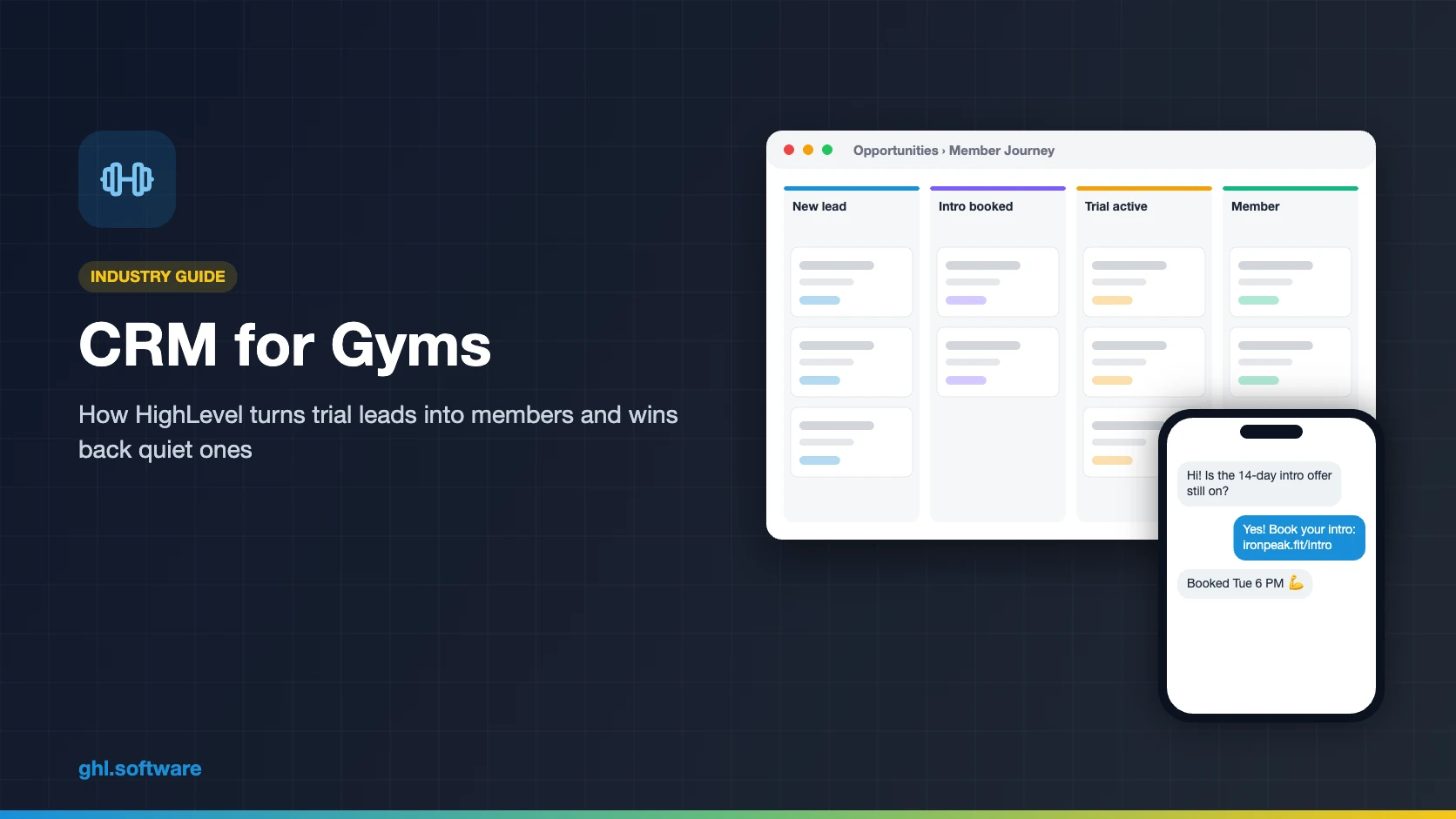
CRM for Gyms: Turn Trials into Members with HighLevel
A CRM for gyms runs the sales and retention side of the business. It answers trial leads in minutes, books intro sessions, nudges trial members to join and flags members who stop showing up. HighLevel does this with pipelines, workflows, texting and calendars. However, it has no door access or check-in, so most gyms keep Mindbody, PushPress or Gymdesk next to it.
It is 7:15 on a Monday night, and Coach Danny is running a full bootcamp class. Meanwhile, a Facebook lead comes in: Megan wants to try the 14-day intro offer. Nobody sees it until Wednesday, and by then she has joined the gym near her office. A good CRM for gyms closes that gap. For example, it texts Megan back within a minute, sends her the intro booking link and alerts the front desk.
The second leak is slower. A new member comes three times a week in January, then twice, then not at all. Still, nobody calls her until she cancels in March. So retention needs a system too. In short, the trial and the first 30 days deserve as much attention as the ad.
This guide shows how to build both in HighLevel: the member pipeline, three automations, intro and class booking, memberships, reviews and referrals. It also explains honestly where your gym management software still does the job. It is part of our GoHighLevel industry guides.
Leer en español: Software para gimnasios · Ler em português: CRM para academias · Part of GoHighLevel by industry
What a gym needs from a CRM (and what HighLevel is not)
Gym management software is built for the floor: check-ins, door access, class rosters, billing and the member app. A CRM for gyms is built for everything around that. In fact, it handles the ad lead, the intro session, the trial, the onboarding texts and the win-back. So think of HighLevel as the sales and retention layer next to Mindbody, PushPress or Gymdesk.

Common gym problems and how HighLevel solves them
Before you build anything, list the leaks. A CRM for gyms maps each one to a feature, so you can fix them one at a time.
| Gym problem | What HighLevel does | Feature |
|---|---|---|
| Ad leads go cold before anyone calls | Texts and emails each lead within a minute and alerts staff | Workflows + SMS |
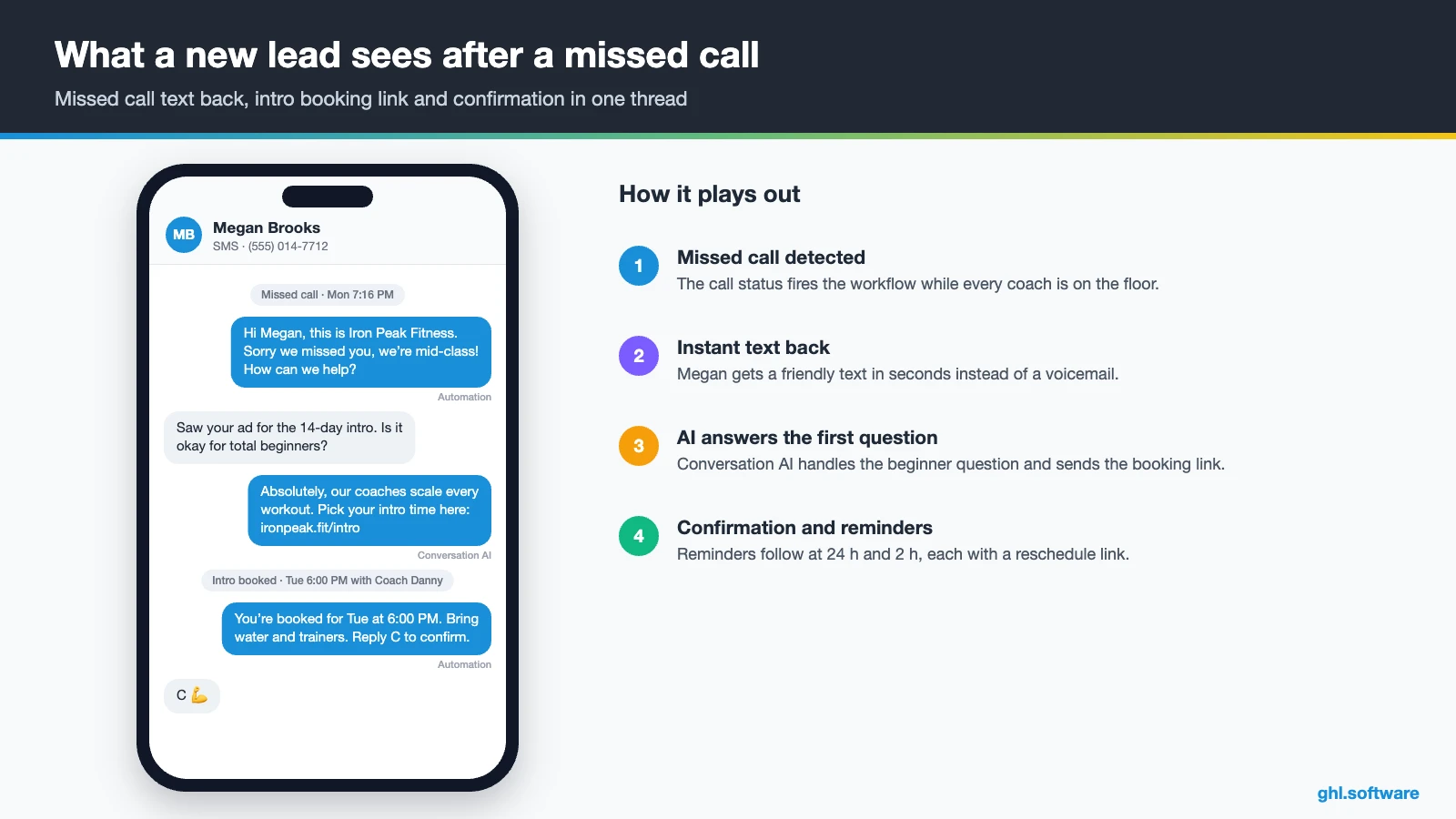
| Calls missed during classes | Texts the caller back with the intro booking link | Missed call text back |
| Intro no-shows | Confirms, reminds 24 h and 2 h before and offers a reschedule link | Calendars + workflows |
| Trials that never convert | Runs a 14-day sequence with a coach call and a membership offer | Pipeline + workflows |
| New members fade in month one | Sends a 30-day onboarding plan with check-ins | Workflows + tags |
| Members quietly stop coming | Flags no visits in 14 days, from your attendance data, and starts a win-back | Inbound webhook + workflows |
| Failed membership payments | Sends a card update link and a staff task once billing data reaches HighLevel | Payments or webhook + workflows |
| Few Google reviews and referrals | Asks every member at day 30 and routes complaints to a manager | Reputation management |
Gym CRM vs gym management software: do you need both?
Often yes, and the split is simple. Your gym software owns the member record that the door, the roster and the billing depend on. HighLevel, in turn, owns the conversation: leads, trials, texts, reviews and win-backs. The two talk through webhooks and the API, or a connector such as Zapier.
There are two honest setups. In the first, a small studio without door hardware runs everything in HighLevel: class calendars, recurring payments and the CRM. In the second, however, a gym with access control keeps Mindbody, PushPress or Gymdesk for check-in and billing. Meanwhile, HighLevel runs the sales funnel and the retention messages. Either way, decide which system holds the true membership status before you set up your CRM for gyms.
A member pipeline in your CRM for gyms
A gym doesn’t sell one deal; it sells a habit. So the pipeline follows the person from the first click to regular member, and it keeps watching after the sale. Workflows move the card when a lead books, shows up, pays or goes quiet. As a result, the owner sees the trial-to-member rate every week instead of guessing.

| Stage | What moves the person here |
|---|---|
| New lead | Claim Offer form, Facebook lead ad, missed call or DM |
| Intro booked | Booked on the intro calendar from the text link |
| Trial active | Intro marked Showed, so the trial pass starts |
| Offer presented | Coach call done or offer link sent around day 10–12 |
| Member | Membership payment received, or membership confirmed in your gym software |
| At-risk | No visit in 14 days, or a failed payment flagged by your billing |
| Lost / dormant | Trial ended without joining, or membership cancelled; long-term nurture |
Intro sessions, class booking and memberships in HighLevel
For intro sessions, a simple calendar with a 20- or 30-minute slot works well. For group classes, HighLevel has a Class Booking calendar where you set seats per class and recurring days and times. You can also charge through a connected Stripe account, which suits drop-ins and intro packs (HighLevel class calendar guide). Still, know the limits before you move a busy timetable into your CRM for gyms.
- One host per class calendar. So, with several coaches, you create one calendar per instructor.
- One seat per booking. A member can’t book a spot for a friend, because “Add Guests” isn’t supported on this calendar type.
- No waitlist documented. The class calendar guide doesn’t mention one, so a full class simply closes.
- No check-in or door access. Meanwhile, attendance and turnstiles stay in your gym software.
Memberships run on recurring products and recurring invoices, and you can send a text-to-pay link when the trial ends (recurring products guide). Online programs fit in courses and communities. However, if you run 40 classes a week with waitlists, keep your scheduling platform.
Three automations every CRM for gyms should run
1. Trial lead → intro booked in minutes
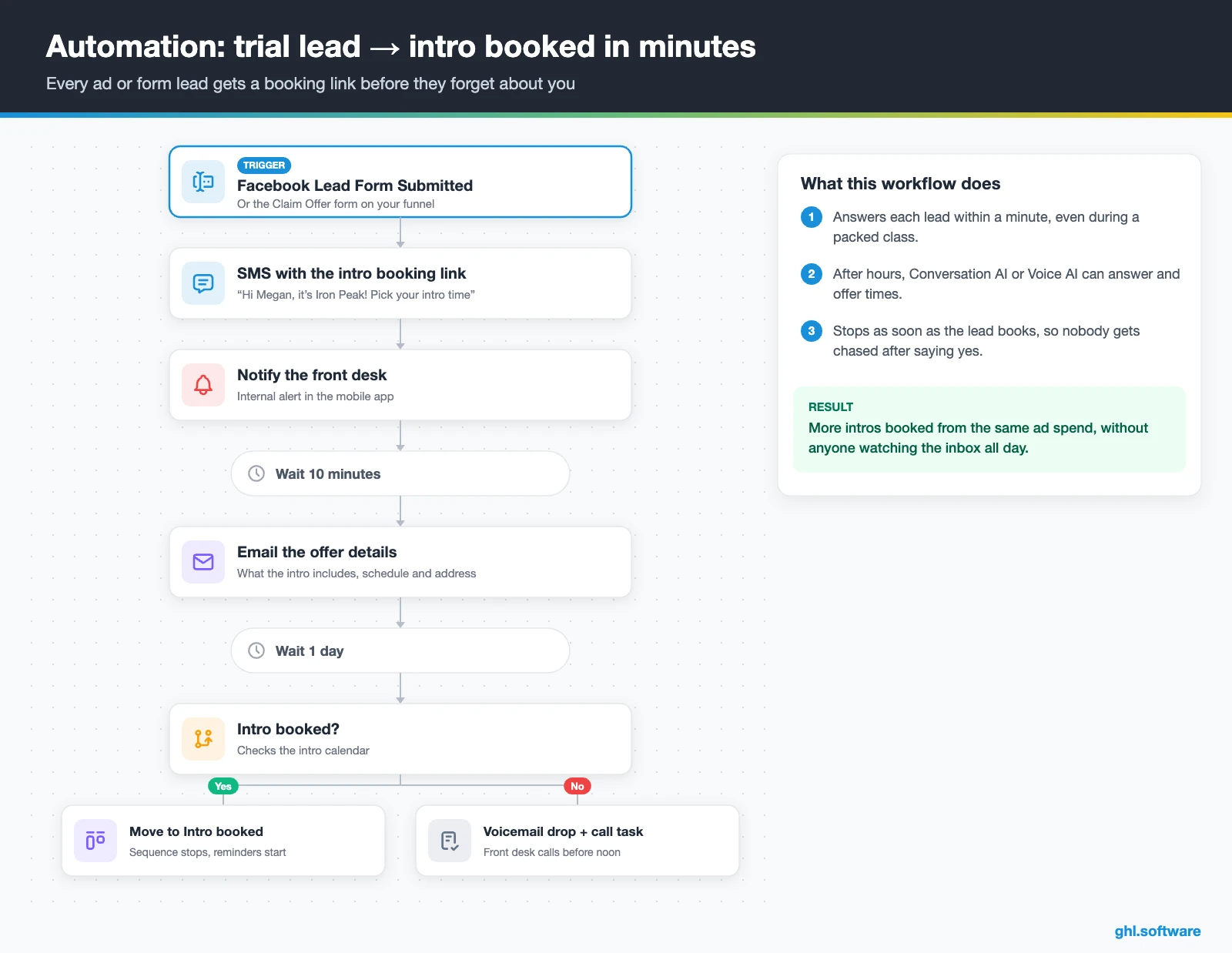
This workflow pays for your CRM for gyms. The trigger is the Claim Offer form, or Facebook Lead Form Submitted if you run lead ads. Right away, HighLevel creates the opportunity in New lead and sends a text with the intro booking link. Meanwhile, the front desk gets an internal notification. After hours, Conversation AI or Voice AI can answer questions and offer times.
If the lead hasn’t booked after 10 minutes, an email and a second text follow. Then, after a day, the workflow drops a voicemail and creates a call task. As soon as the lead books, the card moves to Intro booked and the sequence stops. So nobody gets five messages after they already said yes.
2. Trial → member, then the first 30 days
The trigger is Appointment Status changed to Showed on the intro calendar. Then a welcome text and a “what to bring” email go out at once. After two days, a check-in text asks how the first class felt. Around day 8, the coach gets a task to call before day 10. Then, at day 12, the person receives the offer with a text-to-pay link and a clear deadline.
When payment arrives, the card moves to Member and the tag member starts a 30-day onboarding plan. For example, it can send a day-1 welcome from the coach, a day-7 nudge to book the third class, a day-14 goal check and a day-30 review and referral ask. If the trial ends without a payment, instead, the contact moves to Lost and joins the Long Term Nurture workflow.

3. Attendance drop-off and failed-payment win-back
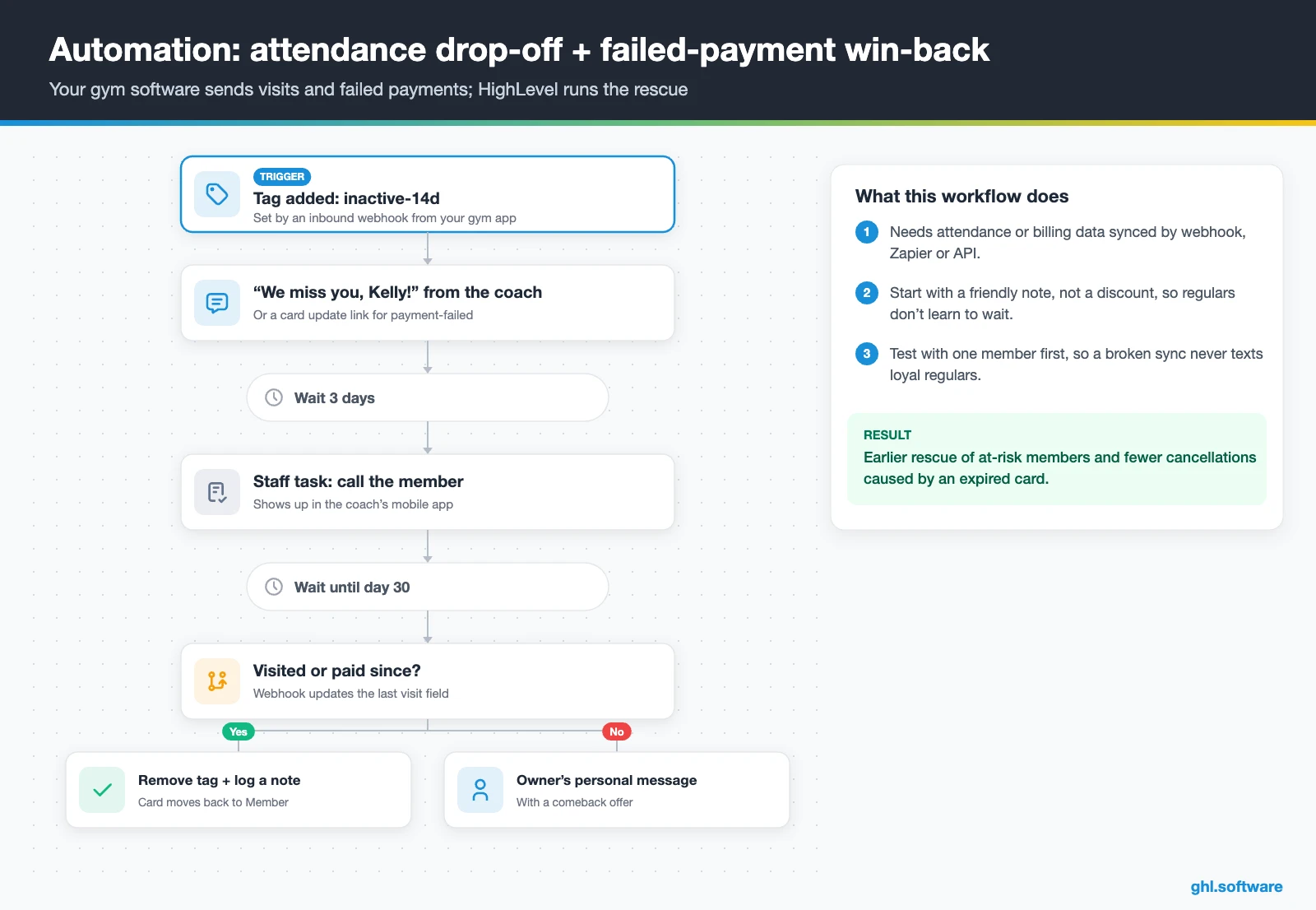
This one needs data from your gym software, because HighLevel doesn’t see the door. Send visits or failed payments in through an Inbound Webhook or Zapier, then add a tag such as inactive-14d or payment-failed. The tag starts the workflow, so the same logic works with any platform.
For inactivity, the member gets a friendly “we miss you” text from the coach, not a discount. If there is no visit after three days, a staff task asks someone to call. Still quiet at day 30? Then the owner sends a personal message with a comeback offer. For a failed payment, the first text carries a card update link instead.
In the video below, Stephen Bohol builds a gym membership automation system in HighLevel. Watch it for the trigger structure, because it is a third-party build.
Video: I Built A Gym Membership Automation System Using GoHighLevel | Easy · Stephen Bohol
Start with the snapshot and the pipeline from this guide, then add the automations one by one. The extended trial comes with our bootcamp link.
Start the 30-day trialAffiliate link. I may earn a commission at no extra cost to you.
Texting, WhatsApp and an AI front desk for gyms
Most leads reply by text, not by email. So in a CRM for gyms, the inbox matters as much as the funnel. HighLevel puts SMS, email, Facebook and Instagram DMs, web chat and WhatsApp in one thread per contact. Coaches reply from the mobile app between sessions.
In the US, register A2P 10DLC before you text, because HighLevel requires it for local numbers (A2P guide). Missed call text back also needs a registered or toll-free verified number (setup guide). Then add Conversation AI for the questions that repeat all day: price, parking and “is it beginner friendly?”. Still, keep a person in the loop for cancellations and injuries.
Reviews and referrals without the awkward ask
The best moment to ask for a review is the week a member notices progress, not day one. So send the request to every member around day 30, at the end of onboarding, not only to the ones who seem happy. If someone replies with a complaint, route it to the manager first; then Reviews AI can draft replies to public reviews. Finally, after a good review, a second text offers a free guest week with a tracked link to the Claim Offer funnel. As a result, the friend enters the same pipeline tagged referral.
What HighLevel’s official Gym snapshot includes
HighLevel publishes a free Gym snapshot playbook, and its Gym playbook page describes the bundle. It is a solid starting kit, but it is a generic marketing template with the gym name swapped in. In short, it gets a gym online fast, while the retention logic of your CRM for gyms is up to you. It includes:
- A “Gym” website with a Home page (services and FAQ) and a Link in Bio page.
- A “Gym Offer” funnel: an opt-in step, then an appointment booking page.
- The “Marketing Form – Claim Offer” and a “Marketing Pipeline” whose stages you define.
- Two named workflows: “New Lead Nurture (Fast 5) – Claim Offer”, with email, SMS and a voicemail drop, and “Long Term Nurture”.
- Calendars tagged “Gym Classes/Sessions”, a simple calendar and an event calendar for consultations.
- Custom values such as “Promotion Name”, a chat widget, missed call text back, one ad template and a Voice AI prompt.
You still build the member pipeline stages, one class calendar per coach, the trial-to-member sequence and the 30-day onboarding. Attendance and payment win-backs, review timing and every message are also yours, since the guide ships no copy. Load the kit through snapshots when you create the sub-account.
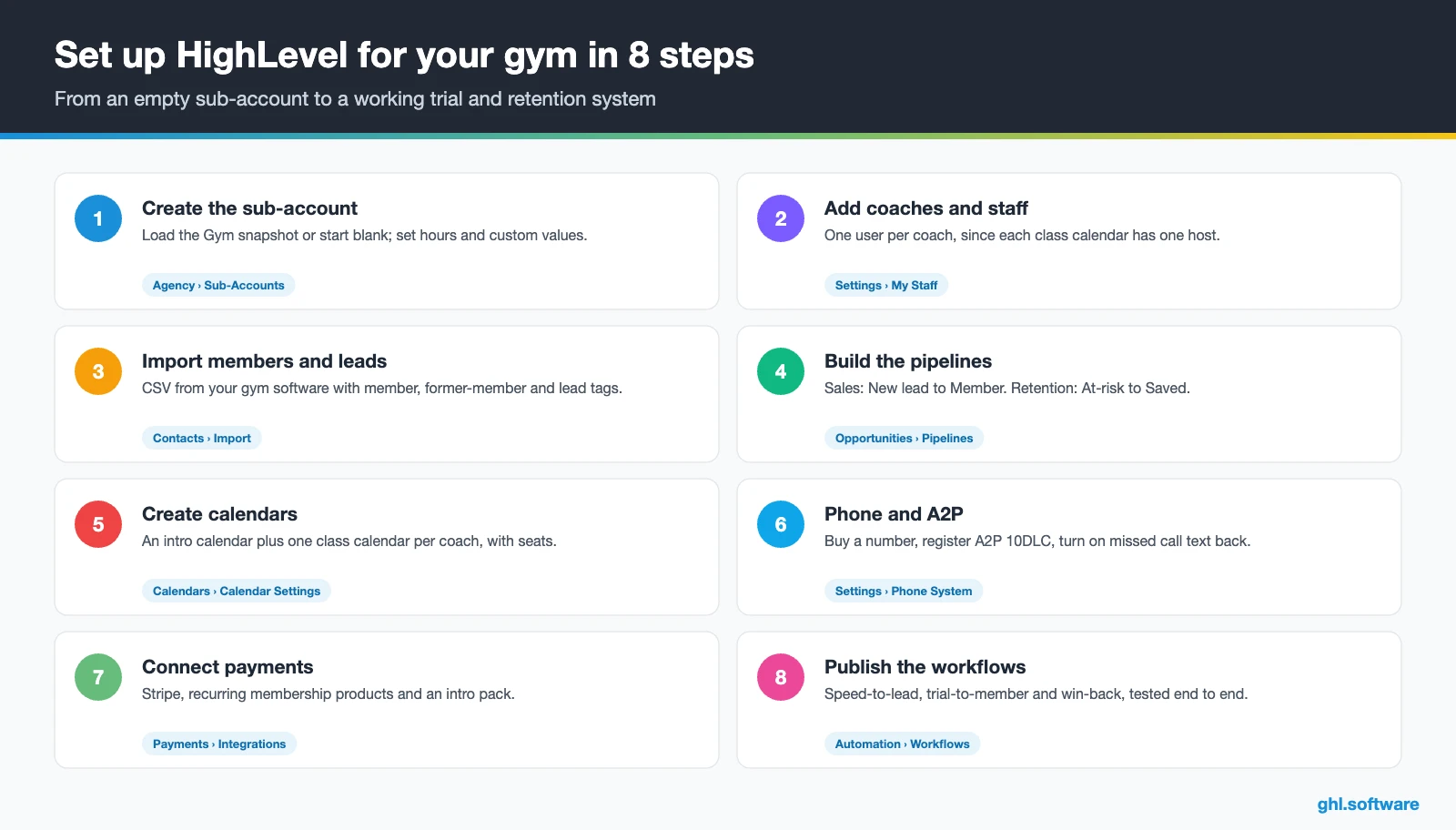
How to set up HighLevel as a CRM for gyms in 8 steps
- Create the sub-account. Load the Gym snapshot or start blank, then set hours, time zone and the “Promotion Name” custom value.
- Add coaches and staff. In Settings › My Staff, add each coach with working hours, because every class calendar has one host.
- Import members and leads. Import a CSV from your gym software with tags such as member, former-member and lead, plus a consent field.
- Build the pipelines. Create the sales pipeline (New lead to Member) and a retention pipeline (At-risk to Saved or Cancelled).
- Create calendars. Add an intro calendar, then one class calendar per coach with seats, recurring times and Stripe payment if needed.
- Connect phone and social. Buy or port a number, register A2P 10DLC, turn on missed call text back, and connect Facebook, Instagram and Google.
- Connect payments and offers. Connect Stripe, create recurring memberships and an intro pack, then publish the offer funnel.
- Publish workflows and reporting. Test the three automations end to end, then track show rate and trial-to-member rate in Reporting.
What a CRM for gyms costs with HighLevel
HighLevel charges a flat plan plus usage. A single-location gym usually starts on Starter at $97 a month, with unlimited contacts, unlimited users and all core features. Usage comes on top: $1.15 a month for a local US number and $0.00747 per SMS segment plus carrier fees. Besides, A2P registration costs $22.50 one-time plus a monthly campaign fee, and email runs $0.675 per 1,000.
So a gym sending about 2,000 text segments a month typically pays $115–$160 before AI. As a result, an AI plan at $50 or $97 a month moves that to roughly $165–$260. These numbers are illustrative, because your volume decides the rest. Also budget for your gym software, since HighLevel sits next to it. For details, see our GoHighLevel pricing guide and the AI Employee pricing breakdown.
GoHighLevel plans compared
| Starter | Unlimited | Agency Pro | |
|---|---|---|---|
| Price | $97/month | $297/month | $497/month |
| Annual | $970/year | $2,970/year | $4,970/year |
| Sub-accounts | 3 | Unlimited | Unlimited |
| Contacts and users | Unlimited | Unlimited | Unlimited |
| All core features | Yes | Yes | Yes |
| White label web app | Yes | Yes | Yes |
| API access | Basic | Basic | Advanced, agency-level keys |
| Rebill phone and email | No | At cost | With markup |
| Rebill AI usage | No | No | Yes |
| SaaS Mode and automated sub-accounts | No | No | Yes |
| User and agent reporting | No | No | Yes |
| Support | 24/7 | 24/7 | 24/7 |
Usage costs on top of the plan
| Item | Official price | When you pay it |
|---|---|---|
| Local phone number (US/Canada) | $1.15/month | Each number for SMS and calls |
| SMS (US/Canada) | $0.00747 per segment + carrier fees | Every text sent or received |
| Calls (US) | $0.0166/min outbound, $0.01165/min inbound | Calls through LC Phone |
| A2P 10DLC registration | $22.50 one-time (low volume) + monthly campaign fee | Before texting US numbers |
| Email (LC Email) | $0.675 per 1,000 emails | Campaigns and workflow emails |
| $10/month per sub-account + Meta fees | If you use WhatsApp inside HighLevel | |
| AI | Pay-per-use, or $50 or $97/month per sub-account | Voice AI, Conversation AI and other AI tools |
| Premium workflow steps | $0.01 per run after 100 free | Webhooks, Google Sheets, Slack, app actions |
Honest limits and alternatives
HighLevel is a CRM for gyms, not a full gym management system. So check these gaps before you cancel anything.
- No door access or check-in hardware. Turnstiles, QR doors and kiosks stay in your gym platform.
- Class calendar limits. One host per calendar, one seat per booking and no documented waitlist.
- No workout programming. HighLevel’s app is built for running the business, not for logging workouts.
- No attendance data on its own. Attendance-based win-backs need visits synced in by webhook, Zapier or API.
- HIPAA is off by default. It is an add-on at $297 a month with a BAA, and it can’t be removed once enabled (HighLevel help).
HighLevel next to gym software
Here is a neutral view of HighLevel next to common gym tools. The competitor cells come from Gymdesk’s CRM comparison and PushPress’s gym CRM guide, both written by vendors. “Check vendor” means the pages didn’t say.
| HighLevel | Mindbody | PushPress | Gymdesk | |
|---|---|---|---|---|
| Built for | Sales, follow-up and marketing | Studio booking with a marketplace | Class-based gyms | Gym management |
| Lead pipeline and campaigns | ✓ on every plan | In upper tiers | In the Grow add-on | ✓ on every plan |
| Class booking | ✓ (one host per calendar) | Yes | Check vendor | Yes |
| Door access / check-in | No | Check vendor | Check vendor | ✓ (facility access) |
| Branded member app | No | Check vendor | Yes | ✓ (mobile app) |
| SMS | ✓ (usage-based) | Check vendor | ✓ (Grow) | Paid add-on |
| Yes | Check vendor | Check vendor | Check vendor | |
| Payments | Stripe, PayPal or Square | Processing fees apply | Stripe only | Yes |
Feed attendance into HighLevel: the link most gym guides skip
Here is the angle most guides on CRM for gyms miss. A win-back is only as good as its data, and HighLevel can’t see who walked through the door. So the real work is a small bridge. Your gym software sends a visit event, and HighLevel updates a “last visit” date field on the contact.
However, once that field exists, everything else gets simple. A smart list shows members with no visit in 14 days, and a workflow tags them inactive-14d. For example, if your platform supports webhooks, point them at an Inbound Webhook trigger; otherwise, a Zapier step does the same. Test it with one member first, because a broken sync would text loyal regulars that you miss them.
Open a free account, load the pipeline and turn on the first automation today. The bootcamp walks you through the setup live.
Start the 30-day trialAffiliate link. I may earn a commission at no extra cost to you.
Frequently asked questions
What is the best CRM for gyms?
It depends on the job. If you need door access, class rosters, a member app and billing in one place, a gym platform such as Mindbody, PushPress or Gymdesk fits. If your gap is lead follow-up, trial conversion, WhatsApp and texting, reviews and win-backs, HighLevel is a strong CRM for gyms. Many gyms run both: the gym platform for operations and HighLevel for sales and retention.
What’s the difference between gym management software and a gym CRM?
Gym management software runs operations: check-ins, door access, class schedules, billing and the member app. A gym CRM runs relationships: it captures leads, follows up, books intros, converts trials and brings quiet members back. Some gym platforms include basic CRM tools, often in higher tiers or add-ons. HighLevel is the opposite, however, with a deep CRM and marketing stack plus lighter booking and billing.
Can I replace Mindbody or PushPress with HighLevel?
A small studio without door hardware often can, using class calendars, recurring payments and the CRM. However, HighLevel has no check-in, access control, workout programming or branded member app, and its class calendars allow one host each with no documented waitlist. If you depend on those, keep your gym platform and connect it to HighLevel by webhook or Zapier. Run both side by side for a month first.
How fast should a gym follow up with a new lead?
Within minutes, ideally while the person still has your ad open. Speed-to-lead comes up again and again in gym software guides, because a lead who waits a day has often found another gym. In HighLevel, a workflow can text the booking link within a minute of the form, alert the front desk and switch to Conversation AI or Voice AI after hours.
How do I convert free-trial members into paying members?
Treat the trial as a process, not a hope. Book the intro, then send a welcome text, a check-in after the first class and a coach call before day 10. Around day 12, send a clear membership offer with a text-to-pay link and a deadline. If the trial ends without payment, move the person to long-term nurture instead of dropping them.
Can HighLevel handle class bookings and memberships?
Yes, with limits. The Class Booking calendar sets seats per class, recurring times and paid booking through Stripe. Each calendar has one host, attendees book one seat at a time, and the guide mentions no waitlist. Memberships run on recurring products and invoices, and text-to-pay links work well after a trial. Check-in and door access are not included.
How much does a gym CRM cost per month?
With HighLevel, the Starter plan costs $97 a month with unlimited contacts and users. Usage comes on top: about $1.15 a month for a US number, $0.00747 per SMS segment plus carrier fees, and a one-time $22.50 A2P registration plus a monthly campaign fee. A small gym usually pays about $115 to $160 a month before AI, plus its gym software.
More industry guides
Sources: HighLevel Gym snapshot playbook · HighLevel Gym playbook page · HighLevel: How to create a class booking calendar · HighLevel: Recurring products · HighLevel: Missed call text back setup · HighLevel: A2P 10DLC brand and campaign registration · HighLevel: HIPAA compliance with HighLevel · FTC: Negative Option Rule · Gymdesk: Gym CRM software comparison · PushPress: Best gym CRM software

