

CRM for Barbershops: Keep Every Chair Full with HighLevel
A CRM for barbershops keeps chairs full between visits. It books online by barber, confirms and reminds, rebooks every client on a 2–4 week rhythm, asks for reviews and bills monthly cut memberships. HighLevel does all of that. However, it is not a barbershop POS, so tips, commissions and product stock stay in Booksy, Squire or your register.
It is Saturday at 11:40, and Marcus has a skin fade halfway done with three more clients waiting. Meanwhile, his phone buzzes twice in his apron: a missed call and an Instagram DM asking for a 2 p.m. slot. By the time he finishes the line-up, the caller has booked at the shop across the street. A good CRM for barbershops catches that moment. It texts the caller back with a booking link, answers the DM and keeps every conversation in one place.
The bigger leak is quieter, though. A regular who came every three weeks skips one cycle, then two. Nobody notices until he is gone. Barbershops live on repeat visits, so rebooking matters more than any ad. In short, the shop that remembers wins.
This guide shows how to build that engine in HighLevel: booking per barber, a no-show shield, a rebooking timer, cut memberships, reviews and slow-day fill. It also says honestly when Booksy or Squire should stay. It is part of our GoHighLevel industry guides.
Leer en español: Software para barberías · Ler em português: Sistema para barbearia · Part of GoHighLevel by industry
What a CRM for barbershops does that a booking app doesn’t
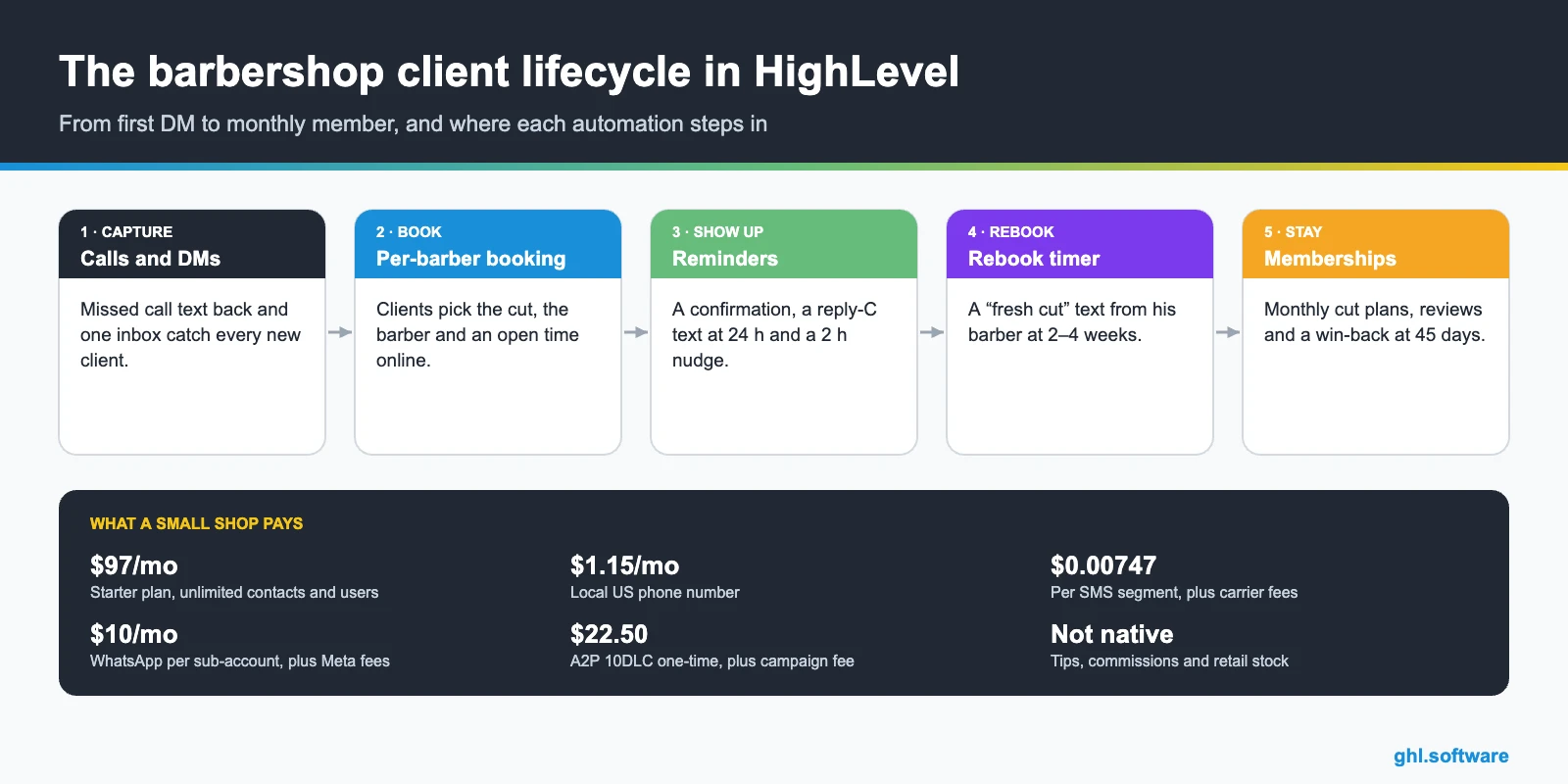
Booking apps are great at the appointment: a time, a barber, a payment. A CRM for barbershops works the gap between appointments instead. It knows who is due this week, who missed twice and who has not been back in six weeks. HighLevel covers that layer with these pieces.
Common barbershop problems and how HighLevel solves them
List the leaks first. Each one maps to a feature of your CRM for barbershops, so you can fix them in order of cost.
| Barbershop problem | What HighLevel does | Feature |
|---|---|---|
| Calls missed mid-cut | Texts the caller back with the booking link | Missed call text back |
| No-shows and late cancels | Confirms, reminds at 24 h and 2 h, and offers a reschedule link | Workflows + calendars |
| The same clients no-show again | Tags repeat no-shows and asks them for a deposit next time | Tags + paid calendars |
| Regulars drift away | Starts a rebooking timer after every visit | Workflows + tags |
| Empty chairs on weekdays | Texts clients who are due about the open slots | Bulk SMS or WhatsApp |
| Few Google reviews | Sends a review request after each cut | Reputation management |
| Uneven monthly income | Bills monthly cut memberships automatically | Recurring products + Stripe |
Booking app or CRM? Two honest setups for a barbershop
There are two ways to run this. In the first, HighLevel is your booking system too, with calendars per barber, deposits, reminders and payments. That, in fact, suits a solo barber or a small shop that doesn’t depend on a marketplace. In the second, however, you keep Booksy or Squire for booking, checkout, tips and payouts. Meanwhile, HighLevel runs the follow-up, the inbox, reviews and memberships.
The second setup needs a plan for data, because we found no native Booksy or Squire connector. For example, export clients from your booking app every week and import them with the last visit date. Or connect through the API and webhooks if your app supports it. Otherwise, the rebooking timer can’t see who already booked. In short, one booking system is simpler, while two need discipline.
A client lifecycle pipeline in your CRM for barbershops
A barbershop doesn’t close big deals; it sells the next cut. So the pipeline follows the client, not a quote. First, new clients enter from calls, DMs and the booking page. Then workflows move each card when a visit, a booking or a long silence happens. As a result, you can see how many first-timers became regulars this month.
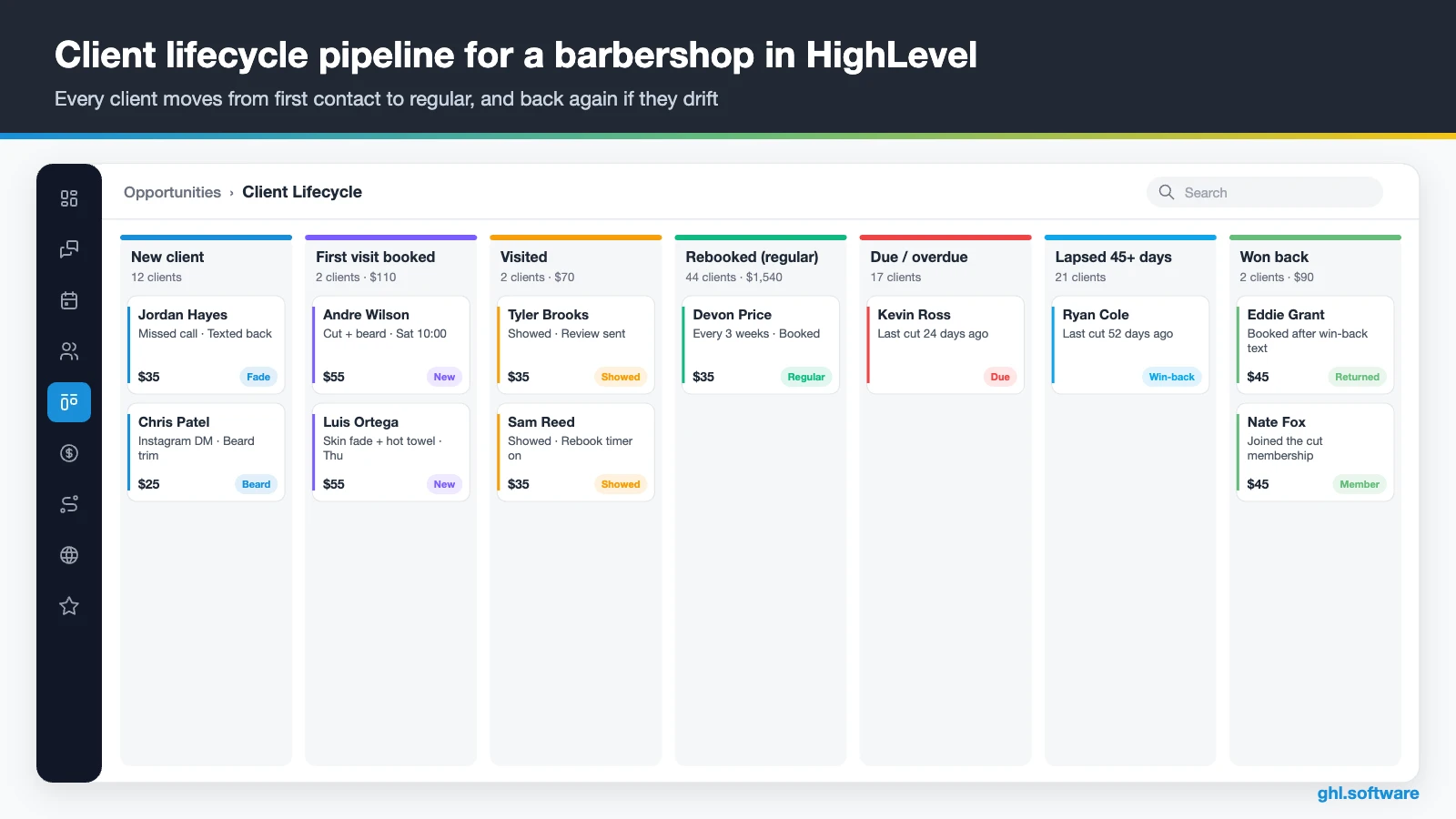
| Stage | What moves the client here |
|---|---|
| New client | Missed call, DM, web chat or the Claim Offer form |
| First visit booked | A booking on any barber calendar |
| Visited | Appointment status set to Showed |
| Rebooked (regular) | A new booking before the rebook timer runs out |
| Due / overdue | The timer passes with no booking |
| Lapsed 45+ days | No visit or booking 45 days after the last cut |
| Won back | A lapsed client books again |
Add a small second pipeline for memberships: Interested, First month, Active member and Cancelled. That way, recurring revenue and churn sit on one board.
Three automations that keep every chair full
These three workflows do most of the work. Build them in order, because each one feeds the next.
1. No-show shield: confirmation, reminders and the deposit rule
The trigger is Customer Booked Appointment on any barber calendar. Right away, the client gets a text with the time, the barber, the address and your cancellation policy. Then, 24 hours before, a text asks him to reply C to confirm or R to reschedule. If he confirms, a short nudge follows two hours before. Otherwise, the barber gets a task to text him.
Also, a separate workflow watches for the No Show appointment status. It adds a tag and sends a friendly rebook link. After a second no-show, you send that client the link to a deposit-required calendar. HighLevel’s Hair & Nail Salon industry playbook lists paid appointment calendars and text-to-pay for exactly this.

2. The rebooking engine: every client back in 2–4 weeks
This is the workflow that pays the rent. The trigger is Appointment Status changed to Showed. After two hours, the client gets a thank-you with a review link. Then the workflow waits, for example 18 days for a fade, or a custom cadence stored on the contact. If he has not booked, a “time for a fresh cut” text arrives from his barber with the booking link.
Seven days later, a second text suggests two open times. Still nothing by day 45? The workflow then adds the tag lapsed and starts a small win-back offer. A booking at any point ends the sequence, so regulars never get nagged.

3. Missed calls and slow-day fill
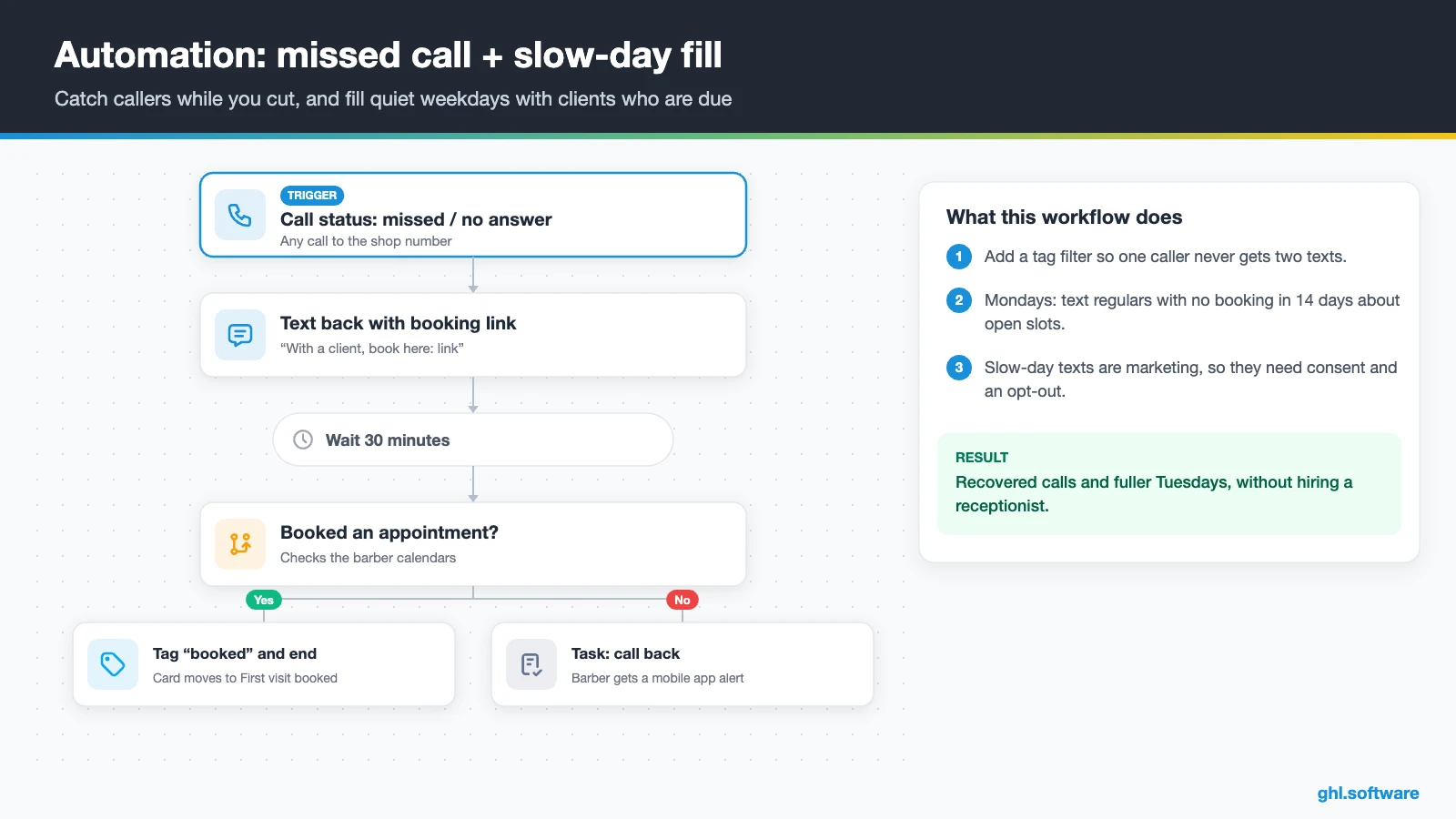
Missed call text back runs on its own once your number is registered. It fires on every missed call (see HighLevel’s setup guide), so add a wait or a tag filter to avoid two texts to one caller. If nobody books within 30 minutes, the barber gets a task to call back.
For slow days, build a weekly workflow or a bulk campaign. For example, every Monday, filter regulars with no booking in 14 days and send a text or WhatsApp listing two open slots on Tuesday. Keep these messages short and respect opt-outs. Replies land in the shared inbox, and each booking moves the card back to Rebooked.
Start with the snapshot and the pipeline from this guide, then add the automations one by one. The extended trial comes with our bootcamp link.
Start the 30-day trialAffiliate link. I may earn a commission at no extra cost to you.
Monthly cut memberships: steady income between visits
In a CRM for barbershops, memberships turn regulars into recurring revenue. In HighLevel, you create a recurring product, connect Stripe and sell it through an order form, a payment link or the online store, as HighLevel’s recurring products guide explains. Then a workflow tags each new member, moves the card to Active member and sends the booking link.
Keep the rules simple, for example two cuts a month and priority booking. However, we could not verify that HighLevel counts visits against a plan for you. So track used cuts in a custom field or tag, and check it when the member books. Also, watch failed payments in Stripe, and text the member a payment link before the next visit.
Texting, WhatsApp and Instagram DMs for barbers
Most barbershop clients text or DM; in fact, few fill in forms. So in a CRM for barbershops, the inbox matters as much as the calendar. HighLevel’s Barber Shop Playbook page lists one conversation stream for SMS, Facebook, Instagram, WhatsApp and email. So barbers reply from the mobile app between clients, while saved snippets keep prices and policies consistent.
In the US, register A2P 10DLC first, because HighLevel won’t text from an unregistered number. Then add Conversation AI for “are you open?” and “how much is a fade?” questions. WhatsApp costs $10 a month per sub-account plus Meta’s fees, per HighLevel’s pricing guide. Also, from 1 October 2026, service messages above 1,000 per number each month are billable. Still, keep a person on complaints.

What HighLevel’s official Barber Shop snapshot includes
HighLevel offers a free Barber Shop kit in two places. The Barber Shop Playbook bundle includes a done-for-you snapshot, a website template, an offer funnel, pre-built workflows, forms and calendars, social posts, Facebook ads and a setup course. Moreover, it states a total value of $997 and comes with the free trial. Meanwhile, the Barber Shop setup guide lists the assets by name.
- A “Barber Shop” website with a Home page (services and FAQ) and a Link in Bio page.
- A “Barber Shop Offer” funnel: an opt-in step, then a booking page, with email and SMS nurture.
- The “Marketing Form – Claim Offer” and a “Marketing Pipeline” whose stages you define.
- Six workflows, two named: “New Lead Nurture (Fast 5) – Claim Offer”, with a voicemail drop, and “Long Term Nurture”.
- A simple calendar, an “Event” calendar and service calendars tagged “Barber Shop Services”.
- A “Barber Shop” proposal template, custom values, a chat widget, missed call text back and one ad.
It is a generic marketing template, though. You still build the lifecycle pipeline, your real services and barbers, the reminders, rebooking timers, memberships and every message. Load it through snapshots, then rename what you keep. For a third-party tour, watch Jasper Aiken install and configure a barbershop snapshot in the video below.
Video: GoHighLevel Barbershop Snapshot - Full Setup Guide · Jasper Aiken
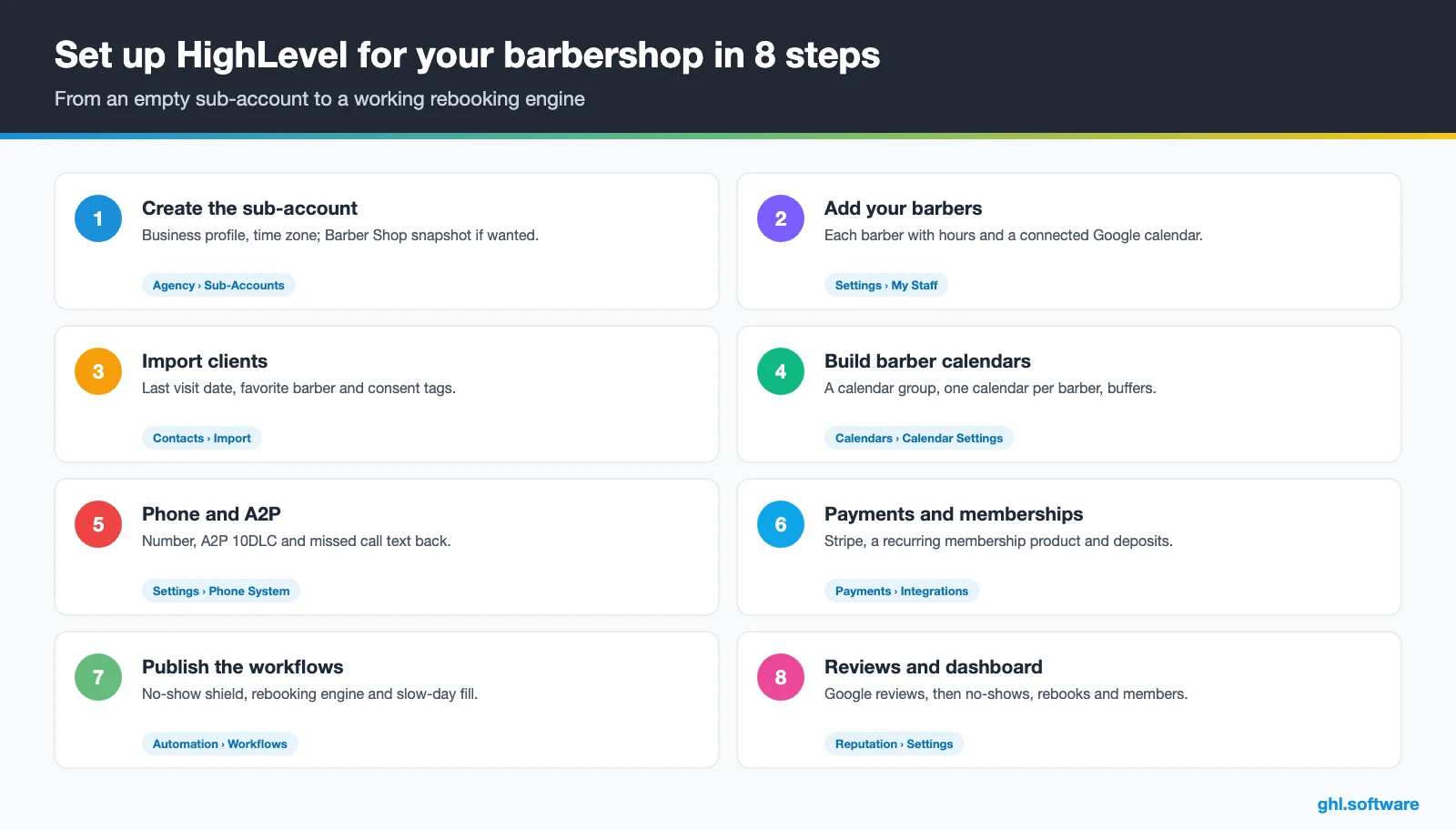
How to set up HighLevel for a barbershop in 8 steps
HighLevel’s Hair Salon snapshot guide covers the calendar side well. It tells you to assign staff to the service calendars, connect each person’s calendar and set conflict calendars to prevent double-booking. So these steps turn that into a working CRM for barbershops.
- Create the sub-account. Add the business profile and time zone, then load the Barber Shop snapshot if you want its site and funnel.
- Add your barbers. In Settings › My Staff, add each barber with working hours, and have each one connect a Google calendar.
- Import your clients. Export from Booksy, Squire or a spreadsheet, then import with last visit date, favorite barber and consent tags.
- Build the calendars. Create a calendar group with one service calendar per barber, with durations, buffers and a deposit-required calendar. See Calendars.
- Connect phone and messaging. Buy or port a number, register A2P 10DLC, turn on missed call text back, then connect Instagram, Facebook and WhatsApp.
- Set up payments and memberships. Connect Stripe, create the membership as a recurring product and set up text-to-pay for deposits.
- Publish the workflows. Turn on the no-show shield, the rebooking engine and slow-day fill. Test everything as a fake client first.
- Track the numbers. Connect Google Business Profile for reviews, then track bookings per barber, no-show rate, rebook rate and members in Reporting.
Prefer to follow along on screen? In “How to Use GoHighLevel For Barbers – Step by Step,” Software Scope walks through a barber setup.
Video: How to Use GoHighLevel For Barbers - Step by Step · Software Scope
What a CRM for barbershops costs with HighLevel
HighLevel charges a flat plan plus usage. A single shop usually starts on Starter at $97 a month, with unlimited contacts, users and all core features. Usage comes on top. A local US number costs $1.15 a month, and texts cost $0.00747 per segment plus carrier fees. Besides, A2P registration is $22.50 one-time plus a monthly campaign fee.
Barbershops text a lot, because reminders and rebook nudges go out every day. So a four-chair shop sending about 2,500 segments a month typically pays $120–$160 before AI, plus Stripe fees on memberships. As a result, an AI plan at $50 or $97 a month raises that to roughly $170–$260. These numbers are illustrative. For details, see our GoHighLevel pricing guide and the AI Employee pricing page.
GoHighLevel plans compared
| Starter | Unlimited | Agency Pro | |
|---|---|---|---|
| Price | $97/month | $297/month | $497/month |
| Annual | $970/year | $2,970/year | $4,970/year |
| Sub-accounts | 3 | Unlimited | Unlimited |
| Contacts and users | Unlimited | Unlimited | Unlimited |
| All core features | Yes | Yes | Yes |
| White label web app | Yes | Yes | Yes |
| API access | Basic | Basic | Advanced, agency-level keys |
| Rebill phone and email | No | At cost | With markup |
| Rebill AI usage | No | No | Yes |
| SaaS Mode and automated sub-accounts | No | No | Yes |
| User and agent reporting | No | No | Yes |
| Support | 24/7 | 24/7 | 24/7 |
Usage costs on top of the plan
| Item | Official price | When you pay it |
|---|---|---|
| Local phone number (US/Canada) | $1.15/month | Each number for SMS and calls |
| SMS (US/Canada) | $0.00747 per segment + carrier fees | Every text sent or received |
| Calls (US) | $0.0166/min outbound, $0.01165/min inbound | Calls through LC Phone |
| A2P 10DLC registration | $22.50 one-time (low volume) + monthly campaign fee | Before texting US numbers |
| Email (LC Email) | $0.675 per 1,000 emails | Campaigns and workflow emails |
| $10/month per sub-account + Meta fees | If you use WhatsApp inside HighLevel | |
| AI | Pay-per-use, or $50 or $97/month per sub-account | Voice AI, Conversation AI and other AI tools |
| Premium workflow steps | $0.01 per run after 100 free | Webhooks, Google Sheets, Slack, app actions |
Honest limits: what stays in your POS or booking app
As a CRM for barbershops, HighLevel is the booking, follow-up and marketing layer. It is not a barbershop POS, so check these gaps before you cancel anything.
- No tips, commissions or booth-rent payouts. We found no documented tip handling or commission split, so keep those in your POS or payroll tool.
- No retail stock. You can sell products, but there is no inventory control or cash drawer.
- No marketplace. New clients won’t discover you inside HighLevel the way they do on Booksy.
- No verified walk-in queue. We could not verify a walk-in waitlist, which Squire lists as a feature.
- Setup takes work. Still, calendars per barber, workflows and payments need a few focused sessions.
This neutral comparison uses public pages; “Check vendor” means the page did not state it.
| HighLevel | Booksy | Squire | |
|---|---|---|---|
| Online booking per barber | Yes | Yes | Yes |
| Consumer marketplace | No | Yes | Check vendor |
| In-person POS | Tap to Pay in the mobile app | ✓ (integrated payments) | Yes |
| Tips, commissions, payouts | No | Check vendor | Auto Payout (tips not stated) |
| Retail inventory | No | Yes | Yes |
| No-show protection | Deposits via paid calendars | Check vendor | Yes |
| Workflows with waits and if/else | Yes | Mass messages, promotions | Check vendor |
| Review requests | Yes | Yes | ✓ (Google Reviews Booster) |
| Recurring memberships | ✓ (Stripe) | Check vendor | Check vendor |
The cells come from Booksy’s business page and Squire’s website, checked on 25 October 2026. Many shops run both: the booking app for checkout and HighLevel for retention.
The two-strike rule: deposits without scaring off good clients
Here is the angle most guides on a CRM for barbershops miss. Charging every client a deposit can push away regulars who have never missed a cut. Instead, use tags to make the rule personal. The first no-show gets a friendly rebook link. A second one adds the tag deposit-required, and from then on that client books through a paid calendar.
That way, clients who show up keep one-tap booking, while repeat no-shows pay to hold the chair. Moreover, the tag is visible on the contact, so every barber applies the same rule. Then, after a few clean visits, remove the tag and send a thank-you text.
Open a free account, load the pipeline and turn on the first automation today. The bootcamp walks you through the setup live.
Start the 30-day trialAffiliate link. I may earn a commission at no extra cost to you.
Frequently asked questions
What is the best booking app for barbershops?
It depends on what you need. Booksy and Squire are built for barbers, with booking, payments and, on Booksy, a marketplace where clients find you. If you need rebooking timers, no-show rules, memberships, reviews and one inbox for every DM, HighLevel is a strong CRM for barbershops. Many shops run both: the booking app for checkout and HighLevel for retention.
Can HighLevel replace Booksy or Squire?
For online booking, reminders, deposits and payments, often yes, especially for a solo barber or a small shop. However, HighLevel has no consumer marketplace, retail stock, tip handling or commission payouts that we could verify. If you depend on those, keep your booking app for checkout and use HighLevel for messaging, rebooking, memberships and reviews. Run both for a month before cancelling anything.
How do I reduce no-shows at my barbershop?
Combine a clear policy with automation. Send a confirmation with your cancellation policy at booking, a “reply C to confirm” text 24 hours before and a short nudge two hours before. Add a reschedule link, so clients cancel early instead of disappearing. Then tag no-shows, and ask repeat offenders for a deposit through a paid calendar next time.
Should I charge a deposit for barber appointments?
Not always. However, a deposit for every booking can slow down regulars who never miss. A two-strike rule works better for many shops: the first no-show gets a friendly rebook link, and the second adds a deposit-required tag. In HighLevel, that client then books through a paid calendar or pays a text-to-pay link before the appointment.
How do I get clients to rebook every 2–4 weeks?
Ask at the chair, then add a safety net. In HighLevel, a workflow starts when the visit is marked Showed and waits for the client’s usual rhythm, such as 18 days for a fade. If he has not booked, a text from his barber sends the booking link. A second text follows a week later, and day 45 starts a win-back.
How do barbershop memberships work in HighLevel?
You create a recurring product, connect Stripe and sell the plan through an order form, a payment link or the online store. A workflow then tags the member and sends the booking link. HighLevel bills the subscription, but we could not verify automatic visit counting, so track used cuts in a custom field or tag and check failed payments in Stripe.
How much does barbershop software cost per month?
With HighLevel, the Starter plan costs $97 a month with unlimited contacts and users. Usage comes on top: about $1.15 a month for a US number, $0.00747 per SMS segment plus carrier fees, and A2P registration. A four-chair shop sending about 2,500 segments a month usually pays $120 to $160 before AI and Stripe fees.
More industry guides
Sources: HighLevel Barber Shop snapshot guide · HighLevel Barber Shop Playbook bundle · HighLevel: Hair Salon snapshot setup (calendars) · HighLevel: Industry playbook – Hair & Nail Salon · HighLevel: Missed call text back setup · HighLevel: Recurring products and subscriptions · HighLevel: A2P 10DLC registration · HighLevel: WhatsApp pricing and billing · Booksy: Business software page · Squire: Barbershop software

