

CRM for Dentists: How GoHighLevel Fills the Schedule
A CRM for dentists answers every new patient inquiry, books the exam, reminds the patient and brings them back for recall and reviews. GoHighLevel does that job next to your practice software (Dentrix, Open Dental). It handles calls, texts, forms, booking and follow-up, while charting, imaging and insurance claims stay in the PMS.
It is 6:40 p.m. on a Tuesday. The front desk has just locked up when Laura Méndez calls about a cracked molar. Nobody answers, so she taps the next practice on Google Maps, and that office books her for Thursday. A CRM for dentists exists for that exact moment. For example, it texts Laura back within a minute, sends her the emergency booking link and tells your team who is coming in.
Most dental offices already own good software. However, Dentrix and Open Dental were built around the chair: charts, treatment plans, ledgers and claims. They were not built to answer a Facebook lead at 9 p.m. or to nudge a patient who never scheduled her crown. Nor do they ask a happy patient for a Google review. That gap is where HighLevel fits.
So this guide walks through the whole setup for a small practice. You will see what HighLevel does and does not do, the patient pipeline and three automations with real triggers. After that come texting, AI receptionists, the Dental snapshot, an 8-step setup, monthly costs and HIPAA. It is part of our GoHighLevel by industry series.
Leer en español: Software para dentistas · Ler em português: CRM para dentistas · Part of GoHighLevel by industry
What a dental practice needs from a CRM (and what HighLevel covers)
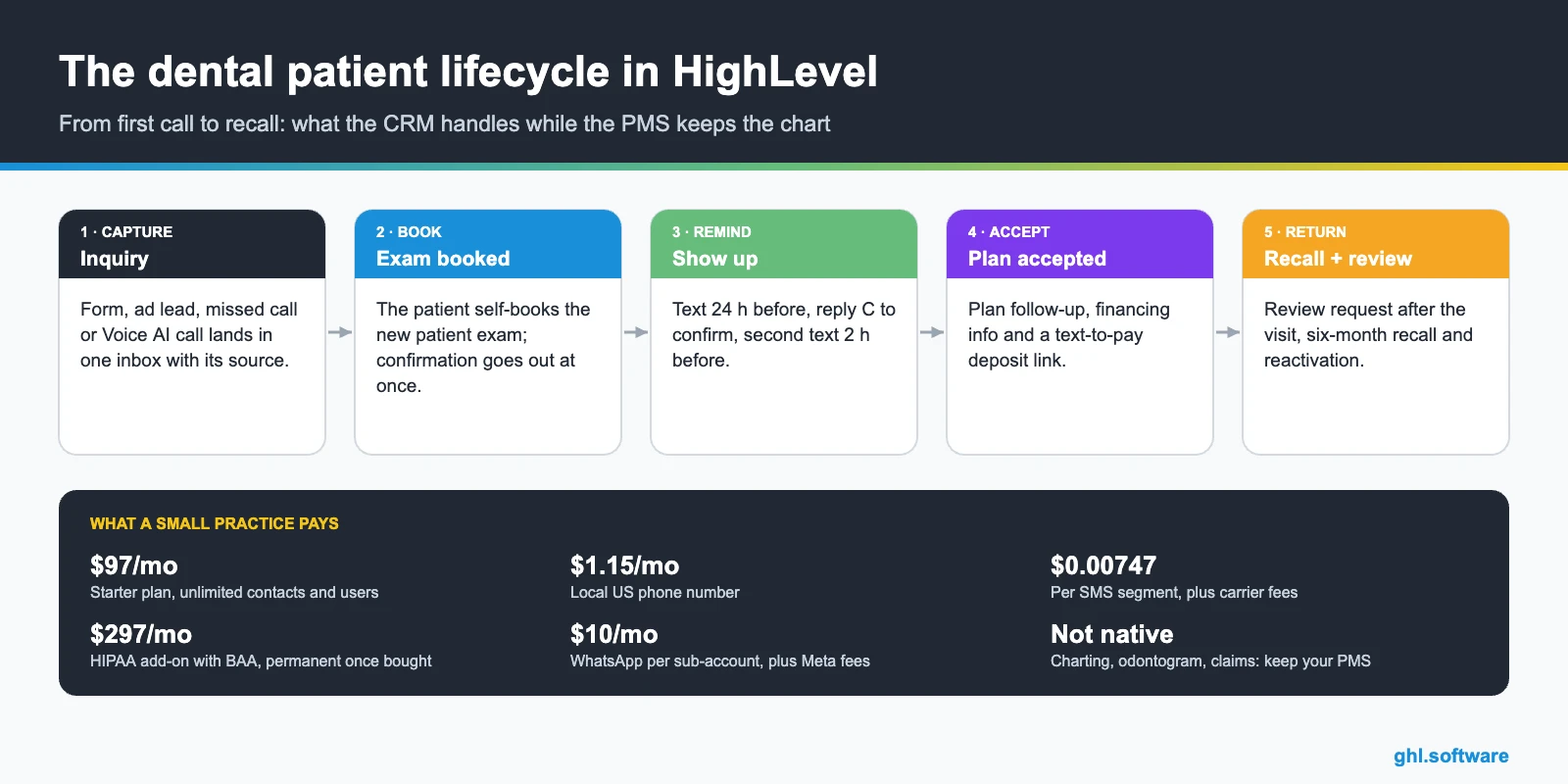
Think of the CRM as the growth layer that sits next to the practice management system (PMS). The PMS remains the record of care. Meanwhile, the CRM owns the conversation before the first visit and between visits. In a typical office, a CRM for dentists comes down to nine jobs.
Common dental office problems and how HighLevel solves them
Before you build anything, list the leaks. For example, most small practices recognize at least four of the problems below. A good CRM for dentists should fix each one with a specific feature.
| Problem | What HighLevel does | Feature |
|---|---|---|
| Calls missed at lunch or after hours | Texts the caller within a minute with a booking link | Missed call text back |
| Ad leads answered the next day | Sends an instant SMS and email, alerts the front desk and creates a call task | Forms + workflows |
| No-shows and late cancellations | Sends reminders before the visit and a rebook link after a no-show | Calendars + workflows |
| Recall patients drifting away | Finds patients with no visit in six months and runs a recall sequence | Smart lists + workflows |
| Treatment plans never scheduled | Keeps each plan as an opportunity with follow-up tasks | Pipelines + tasks |
| Few recent Google reviews | Asks for a review one to two hours after the appointment | Reputation + Reviews AI |
| Front desk buried in calls | Lets an AI agent answer, book and transfer when needed | Voice AI |
The patient pipeline in your CRM for dentists
A pipeline is a board of stages. Moreover, each card is a patient opportunity, and each move can trigger the next message or task. In addition, the board shows the production waiting at each stage, which makes the morning huddle much shorter.
Keep two pipelines. The first, New Patients, runs from first contact to accepted treatment. The second, Recall & Reactivation, then holds existing patients who are due or overdue. That way, a lapsed patient never clutters the new patient view, and each board answers one question.
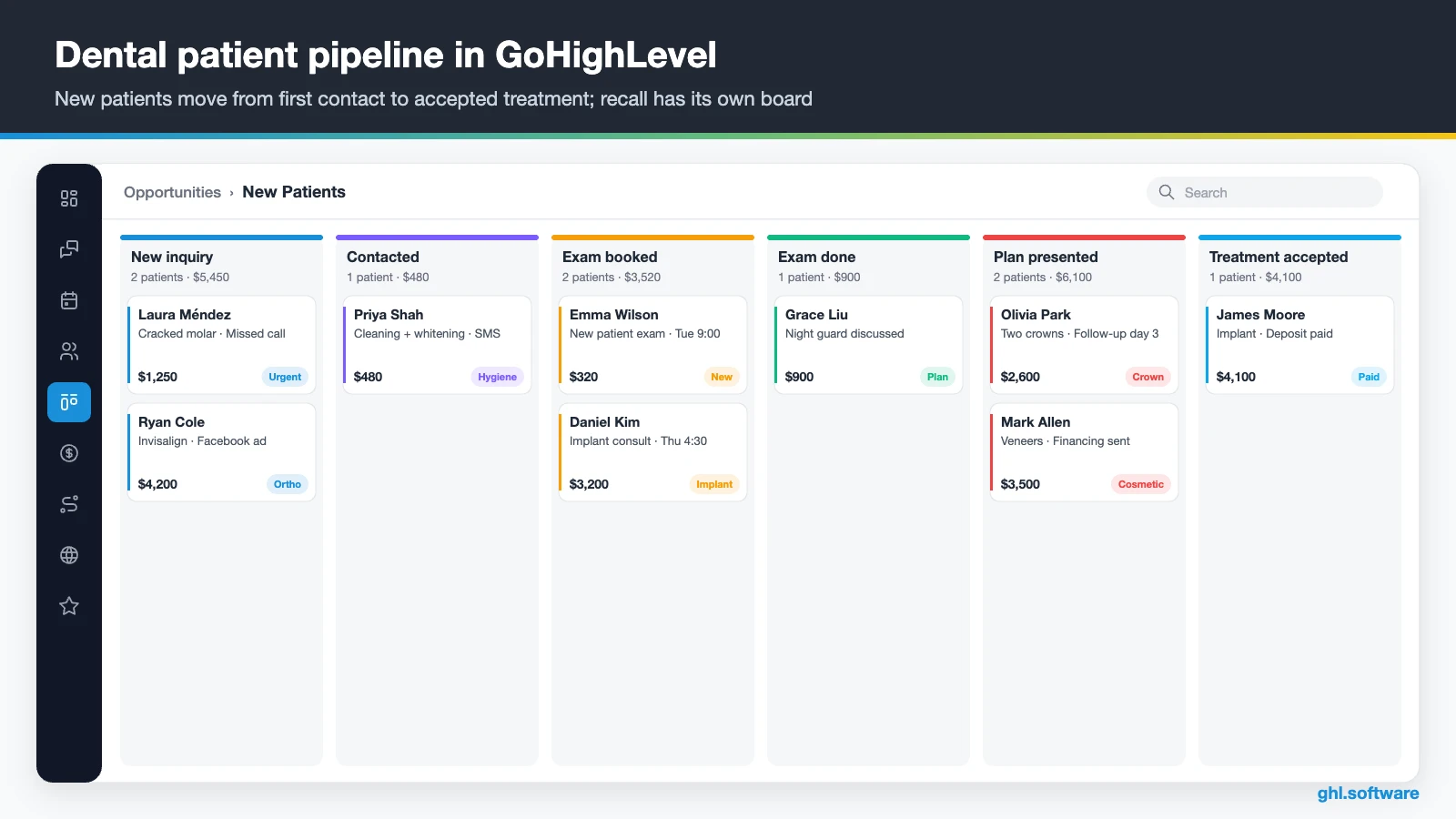
| Stage | What moves a patient here |
|---|---|
| New inquiry | Web form, ad lead, chat, missed call or Voice AI call |
| Contacted | First reply sent or call logged by the front desk |
| Exam booked | Patient books on the new patient calendar (automatic) |
| Exam done | Appointment status changes to showed |
| Plan presented | Front desk logs the treatment plan and its value |
| Treatment accepted | Plan signed or deposit paid through text-to-pay |
| Recall due (second board) | Last visit date is more than six months ago |
Three automations every dental practice should run
You can build dozens of workflows. Still, three of them do most of the work in a CRM for dentists at a small office. Each one below uses triggers and actions that exist in the HighLevel workflow builder.
1. New patient inquiry → booked exam in minutes
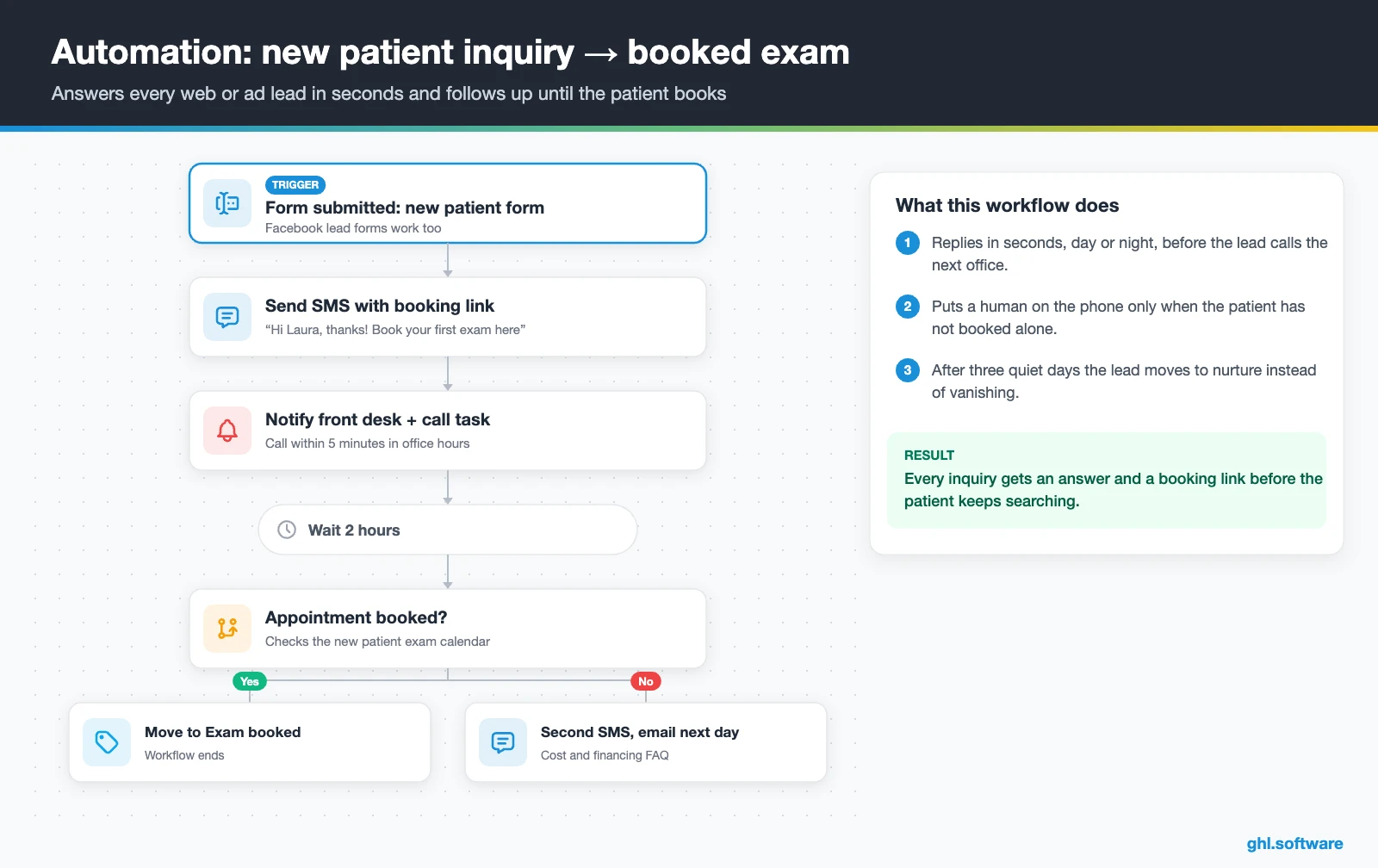
The trigger is Form submitted on your new patient form, or a Facebook lead form. Right away, HighLevel creates the opportunity in New inquiry, sends a text with the booking link and emails your address and parking notes. It also notifies the front desk and creates a task to call within five minutes.
Then the workflow waits two hours and checks whether an appointment exists. If not, a second text goes out, and one day later an email answers the usual questions about cost and financing. After three quiet days, the lead moves to a nurture list instead of disappearing. As a result, no inquiry goes cold without anyone noticing.
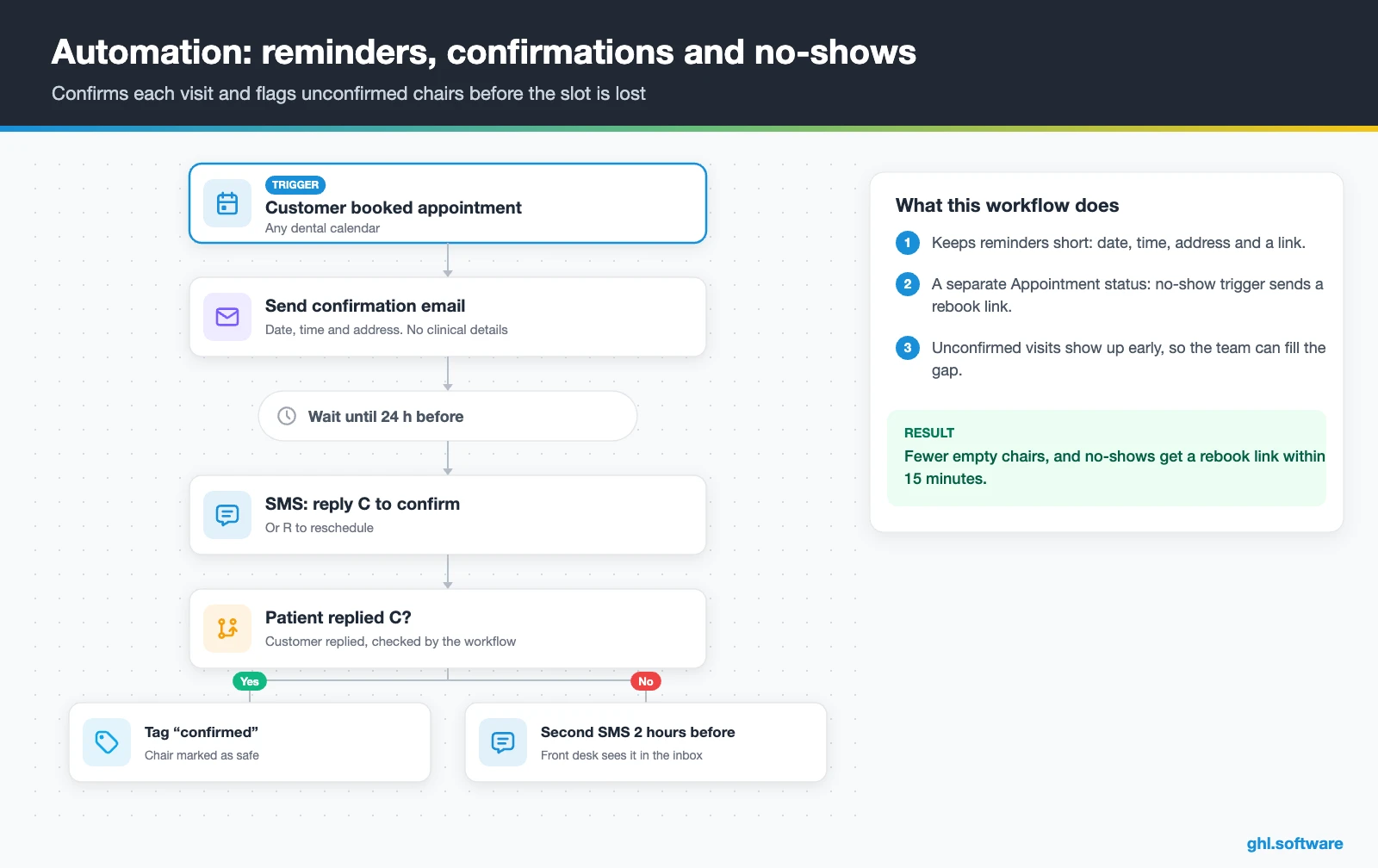
2. Reminders, confirmations and no-show recovery
This one starts with the trigger Customer booked appointment on any dental calendar. The patient gets a confirmation, then a text 24 hours before asking them to reply C to confirm. If no confirmation arrives, a second text goes out two hours before the visit.
Meanwhile, a separate workflow watches Appointment status. When the front desk marks a no-show, the patient receives a friendly rebook link 15 minutes later, and the team gets a call task. Because the messages are short and contain no clinical detail, they also stay on the safe side of patient privacy.
3. Six-month recall and patient reactivation
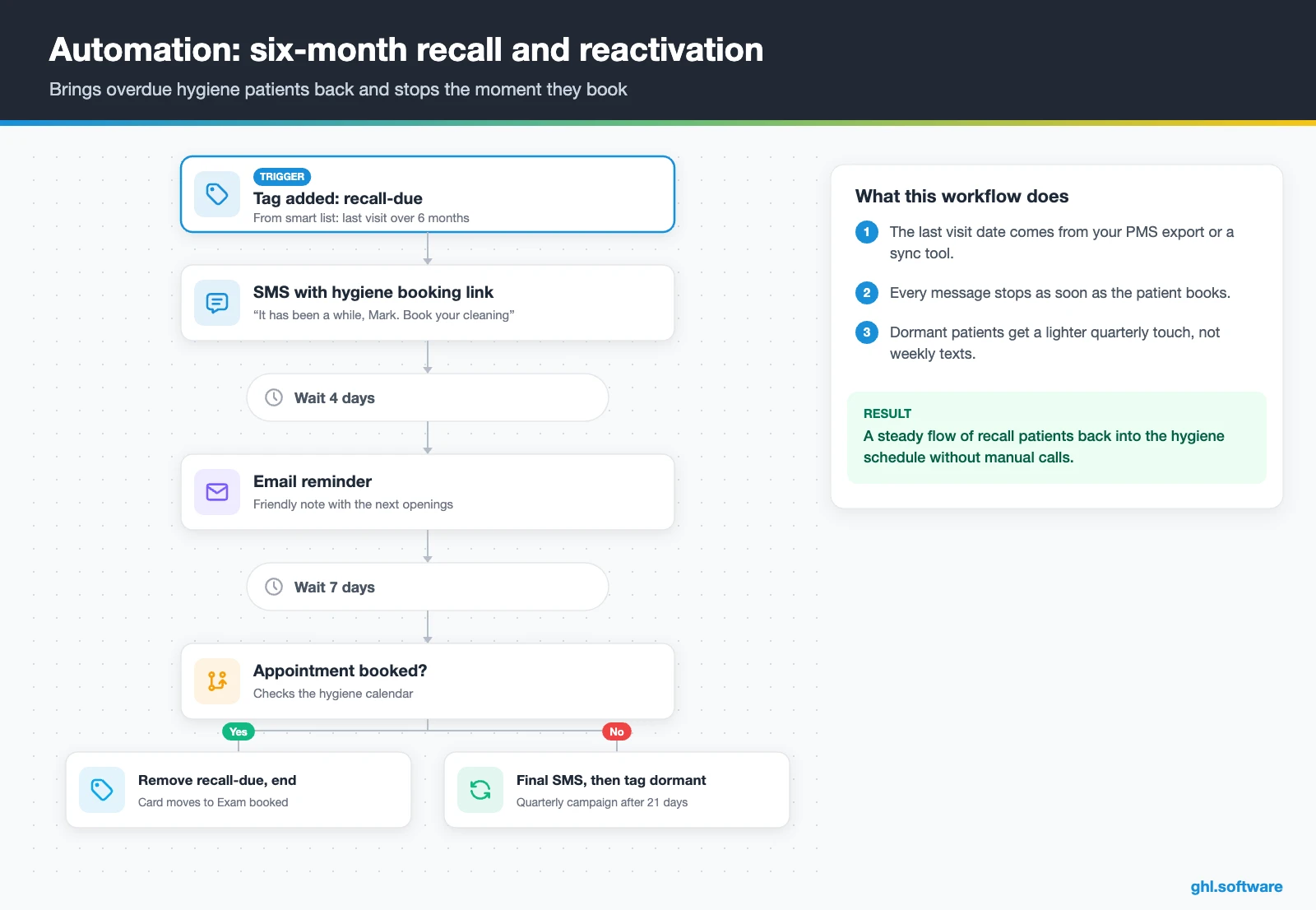
Recall data lives in your PMS, so export the last visit date into a custom field each month, or use a sync tool. Then a smart list such as “last visit more than six months ago” adds the tag recall-due, and that tag triggers the workflow.
The patient gets a text with the hygiene calendar link, then an email four days later and a final text a week after that. As soon as they book, the tag comes off and the card moves to Exam booked. Otherwise, after 21 days the contact is tagged dormant for a quarterly campaign. HighLevel’s own dental guide suggests a similar smart list based on the last appointment date.
Start with the snapshot and the pipeline from this guide, then add the automations one by one. The extended trial comes with our bootcamp link.
Start the 30-day trialAffiliate link. I may earn a commission at no extra cost to you.
Texting, WhatsApp and AI receptionists for dental offices
Patients rarely want to call back. Instead, they reply to a text, so a CRM for dentists has to live where patients answer. The HighLevel inbox puts SMS, email, web chat, Facebook and Instagram messages and WhatsApp in one thread per patient. So anyone at the front desk sees the full history before replying.
Missed call text back is the quickest win. You enable it under Settings › Phone System, and it needs an A2P-verified number for SMS (HighLevel help). There is also a separate missed call WhatsApp back for offices with WhatsApp-first patients.
Also, after hours, a Voice AI agent can answer the call and check the calendar. It books the appointment during the call and transfers to a human when needed. Note that it only works on LC Phone or Twilio numbers. Likewise, Conversation AI can answer routine chat questions about hours, parking or new patient forms, and then hand off to staff.

If you want to see booking and follow-up logic built in a real account, the demo below is a good match. Watch how the booking step connects to the follow-up workflow.
Video: GoHighLevel Dental Automation System | Booking + Follow-Up Workflow Demo · Shekinah Ross
What HighLevel’s official Dental snapshot includes
HighLevel publishes a free Dental playbook with a matching snapshot. A snapshot is a template that loads a website, funnels, forms, workflows and calendars into a sub-account in one step. However, this one is a generic template with the industry name swapped in, so treat it as a starting point. Out of the box you get:
- A website called Dental, with a home page (services and FAQ sections) and a link-in-bio page
- A Dental Offer funnel: an opt-in step, then an appointment booking page
- The Marketing Form – Claim Offer and a Marketing Pipeline (the guide defines no stages)
- Two named nurture workflows, New Lead Nurture (Fast 5) – Claim Offer and Long Term Nurture, plus four unnamed ones
- Service calendars tagged Dental Services, a general calendar and an event calendar for consultations
- Custom values, a chat widget, snippets, one ad template and a Voice AI prompt for calls, booking and FAQs
- Setup steps for missed call text back, review requests and Review Reply AI
What you still build yourself: the dental pipeline stages, hygiene and emergency calendars, recall and reactivation, treatment-plan follow-up, new patient intake and all the message copy. In other words, the snapshot gives you the shell, and you add the dental logic from this guide.
How to set up GoHighLevel as a CRM for dentists
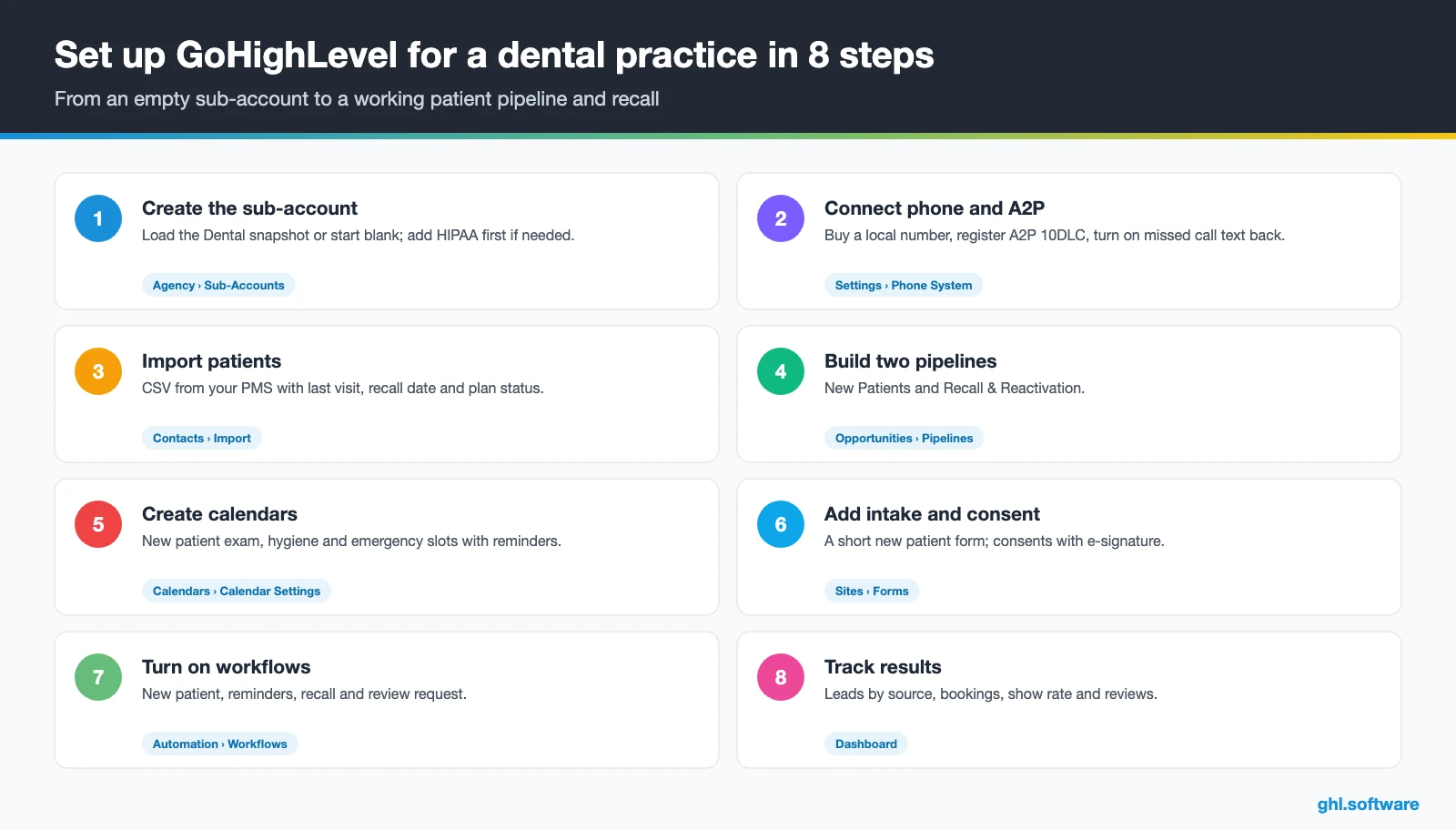
- Create the sub-account. Add the practice under Agency › Sub-Accounts and load the Dental snapshot or start blank. If you will store patient health information in the US, buy and enable the HIPAA add-on before you import anyone.
- Connect phone and A2P. Buy a local number, register your A2P 10DLC brand and campaign, then enable missed call text back. See phone and SMS.
- Import patients. Export from your PMS and map custom fields: last visit, next recall, plan status and family or guarantor. Then tag patients by service line.
- Build both pipelines. Create New Patients and Recall & Reactivation, with the stages from the table above.
- Create calendars. Set up new patient exam, hygiene and emergency calendars, with buffers, confirmations and reminders.
- Add forms and consent. Publish a short new patient form (keep clinical detail in the PMS) and consent documents with e-signature through contracts.
- Turn on the workflows. Activate the three automations above, plus a review request after each completed visit.
- Track and train. Build a reporting dashboard for leads by source, bookings, show rate and reviews, and install the mobile app for staff.
What a CRM for dentists costs with HighLevel
HighLevel prices a CRM for dentists as a flat plan plus usage. In fact, most single practices start on Starter at $97 a month, which already includes every core feature, unlimited contacts and unlimited users. On top of that, you pay for what you send. A local number is $1.15 a month, SMS is $0.00747 per segment plus carrier fees, and email is $0.675 per 1,000.
For example, an illustrative office that sends about 3,000 text segments and 5,000 emails a month lands around $130 to $160 in total, before AI. After that, adding an AI plan ($50 or $97 per sub-account) and WhatsApp ($10 plus Meta fees) pushes it toward $250. Moreover, the HIPAA add-on costs $297 a month on top, which changes the math for US practices. Our pricing guide and the AI Employee pricing page break it down.
GoHighLevel plans compared
| Starter | Unlimited | Agency Pro | |
|---|---|---|---|
| Price | $97/month | $297/month | $497/month |
| Annual | $970/year | $2,970/year | $4,970/year |
| Sub-accounts | 3 | Unlimited | Unlimited |
| Contacts and users | Unlimited | Unlimited | Unlimited |
| All core features | Yes | Yes | Yes |
| White label web app | Yes | Yes | Yes |
| API access | Basic | Basic | Advanced, agency-level keys |
| Rebill phone and email | No | At cost | With markup |
| Rebill AI usage | No | No | Yes |
| SaaS Mode and automated sub-accounts | No | No | Yes |
| User and agent reporting | No | No | Yes |
| Support | 24/7 | 24/7 | 24/7 |
Usage costs on top of the plan
| Item | Official price | When you pay it |
|---|---|---|
| Local phone number (US/Canada) | $1.15/month | Each number for SMS and calls |
| SMS (US/Canada) | $0.00747 per segment + carrier fees | Every text sent or received |
| Calls (US) | $0.0166/min outbound, $0.01165/min inbound | Calls through LC Phone |
| A2P 10DLC registration | $22.50 one-time (low volume) + monthly campaign fee | Before texting US numbers |
| Email (LC Email) | $0.675 per 1,000 emails | Campaigns and workflow emails |
| $10/month per sub-account + Meta fees | If you use WhatsApp inside HighLevel | |
| AI | Pay-per-use, or $50 or $97/month per sub-account | Voice AI, Conversation AI and other AI tools |
| Premium workflow steps | $0.01 per run after 100 free | Webhooks, Google Sheets, Slack, app actions |
Limits, PMS integration and alternatives
HighLevel is not a practice management system or an EHR. In short, it has no clinical charting, no odontogram, no imaging and no insurance eligibility checks or claims. Therefore, keep Dentrix, Open Dental or your current PMS as the system of record, and let HighLevel own marketing and communication.
There is also no native PMS sync. Third-party bridges exist, such as RecordLink and SmartSync, but we have not tested them, so ask which PMS versions they support. Otherwise, a monthly CSV export of last visit dates is enough to run recall. In the video below, RecordLink presents its integration between GoHighLevel and dental practice management systems; watch it to see which data it moves.
Video: GoHighLevel to Dental Practice Management Systems Integration Using RecordLink by DrDDS Innovations · RecordLink Dental Practice Management Integration
| GoHighLevel | Dentrix | Open Dental | |
|---|---|---|---|
| What it is | Growth CRM: inbox, booking, marketing, reviews | Practice management platform | Customizable practice management platform |
| Clinical charting and treatment plans | No | Yes | Yes |
| Insurance workflows and claims | No | Yes | Billing listed; confirm claims with vendor |
| Scheduling and reminders | Yes | Yes | Yes |
| Lead pipeline, funnels and ad tracking | Yes | Engagement tools, less flexible than a CRM | Usually through integrations |
| Best role in your stack | Acquisition and follow-up | System of record | System of record |
In short, a CRM for dentists complements the PMS rather than replacing it. If your PMS already sends reminders and that is all you need, you may not need a CRM yet. However, if you want speed-to-lead, funnels, ads, reviews and AI answering in one place, HighLevel adds what the PMS lacks. The PMS details above come from Capsule’s dental CRM overview.
HIPAA and texting rules: the reality check
Any CRM for dentists that sends reminders touches patient data, but texting and email are allowed with care. According to HHS, the Privacy Rule does not prohibit unencrypted email with patients if you apply reasonable safeguards. You also need to tell the patient about the risks (HHS FAQ). So keep reminders minimal: name, date, time and a link, never a diagnosis or a procedure. In addition, US texting needs A2P 10DLC registration, and marketing texts need documented consent under the TCPA.
The overlooked revenue: unscheduled treatment
Here is the angle most guides about a CRM for dentists skip. In fact, every practice has a list of treatment plans that were presented, explained and never booked: a crown, an implant, a night guard. That money already sits in the PMS, yet nobody owns the follow-up once the patient leaves the chair.
In HighLevel, each presented plan becomes an opportunity in Plan presented, with its value. Then a short workflow sends a check-in text after three days and an email with financing options after a week. Finally, after two weeks, the treatment coordinator gets a task. Because the board shows the total value waiting, the team sees exactly what one weekly follow-up hour is worth. Finally, when the patient says yes, a deposit link closes the loop.
Open a free account, load the pipeline and turn on the first automation today. The bootcamp walks you through the setup live.
Start the 30-day trialAffiliate link. I may earn a commission at no extra cost to you.
Frequently asked questions
Is GoHighLevel HIPAA compliant for dental practices?
Not by default. HighLevel offers HIPAA compliance as an agency-level add-on that costs $297 a month, includes a signed Business Associate Agreement and cannot be disabled once purchased. Then the agency enables it per sub-account, and it covers contacts, messages, call recordings, forms, calendars and invoices. Still, even with it, keep reminder texts minimal and leave clinical records in your PMS.
What is the difference between a dental CRM and practice management software?
Practice management software such as Dentrix or Open Dental is the record of care: charting, treatment plans, billing and insurance. A dental CRM handles the patient relationship around it: capturing inquiries, answering missed calls, online booking, reminders, recall campaigns, treatment-plan follow-up and reviews. Most practices run both, with the PMS as the system of record and the CRM for growth.
Does GoHighLevel integrate with Dentrix or Open Dental?
There is no native sync. Third-party bridges such as RecordLink and SmartSync connect HighLevel with dental practice management systems, but check which PMS versions they support and test them first. Many small offices simply export last visit dates and recall information as a CSV each month and import it into HighLevel custom fields. That is enough to run recall and reactivation workflows.
Can I automate recall reminders?
Yes. Store the last visit date in a custom field, build a smart list of patients overdue by six months, and tag them recall-due. That tag triggers a workflow with a text, an email and a final reminder, each linking to your hygiene calendar. Finally, the sequence stops the moment the patient books, and silent contacts move to a lighter quarterly campaign.
How do I reduce dental no-shows with a CRM?
Combine three things. Send a confirmation right after booking, a text 24 hours before asking the patient to reply C, and a second text two hours before if they did not confirm. Then add a no-show workflow that sends a rebook link 15 minutes after the missed slot and creates a call task. Unconfirmed visits show up early, so the team can fill gaps.
Can an AI receptionist book dental appointments?
Yes. HighLevel’s Voice AI agents answer inbound calls, check calendar availability, book appointments during the call, trigger workflows and transfer to a human when needed. They only work on LC Phone or Twilio numbers. For a dental office, start with after-hours and lunch-time calls, keep the script focused on booking and logistics, and never let the agent give clinical advice.
What CRM software is best for dental clinics?
It depends on what your PMS already covers. If you only need reminders, your practice software may be enough. If you need new patient capture, missed call text back, funnels, ads, reviews, AI answering and recall campaigns in one place, an all-in-one CRM like HighLevel fits well next to the PMS. Compare total cost, including texting usage and, in the US, HIPAA.
More industry guides
Sources: HighLevel Dental playbook · HIPAA compliance with HighLevel · Missed call text back setup · AI Voice Agents overview · Appointment booking in Voice AI · HighLevel dental reputation and reactivation guide · How to send review requests · A2P 10DLC brand and campaign registration · HHS FAQ on email with patients · Capsule: CRM for dental practice

