


CRM for Recruiting: How GoHighLevel Runs Candidates and Clients
A CRM for recruiting tracks two sides at once: the employers who give you job orders and the candidates you place. GoHighLevel handles the engagement layer: job pages, application forms, texting and AI voice screening, interview booking, nurture and employer follow-up. It is not an ATS, so resume parsing, job-board posting, timesheets and payroll stay in tools like Bullhorn or Recruit CRM.
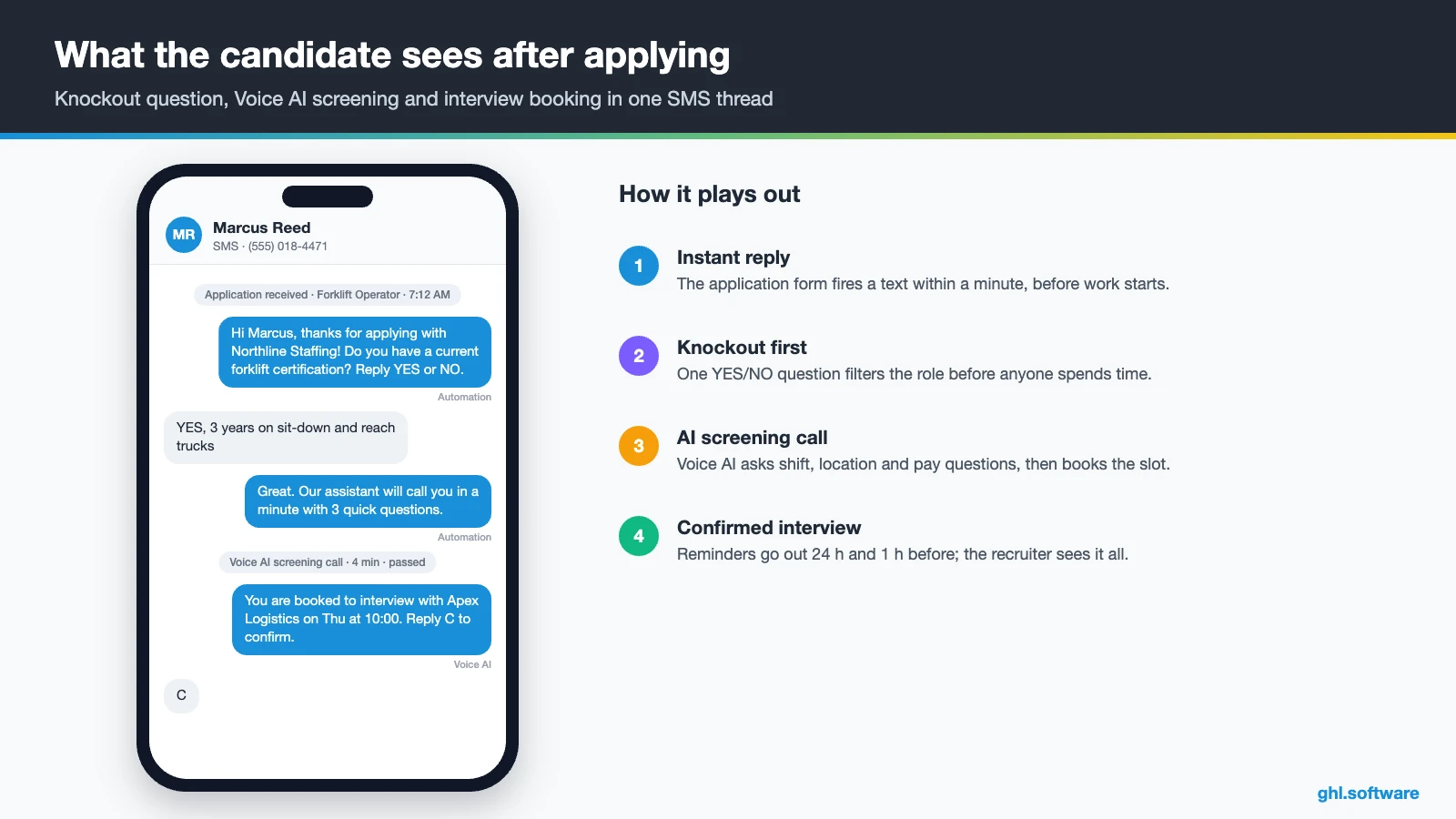
It is 7:12 a.m. Marcus Reed applies from his phone for a second-shift forklift job before he clocks in somewhere else. But your recruiter opens the application at 2 p.m., calls, and gets voicemail. By then a competing agency has texted Marcus, screened him and booked his interview. A CRM for recruiting exists for that gap. It texts him back in a minute, asks the knockout questions and then lets him pick an interview slot.
Most agencies and in-house talent teams already have an applicant tracking system. However, an ATS is built to store resumes, post jobs and log submittals. But it is rarely built to text 300 applicants, chase a hiring manager for feedback or wake up a database of past candidates. That engagement work is where HighLevel fits, whether you run a staffing agency or recruit for your own company.
This guide covers the two pipelines, three automations with real triggers, texting and Voice AI screening, and the snapshot situation. Then come an 8-step setup, costs, honest ATS limits and compliance. It is part of our GoHighLevel by industry series.
Leer en español: CRM para reclutamiento · Ler em português: CRM para recrutamento · Part of GoHighLevel by industry
What recruiters need from a CRM (and why it is not an ATS)
Think of the CRM as the conversation layer that sits next to your ATS. That way, the ATS remains the record of resumes and submittals. Meanwhile, the CRM owns speed: the first reply, the screening questions, the interview booking and every follow-up. In fact, for a small agency or a lean in-house team, that comes down to nine jobs.
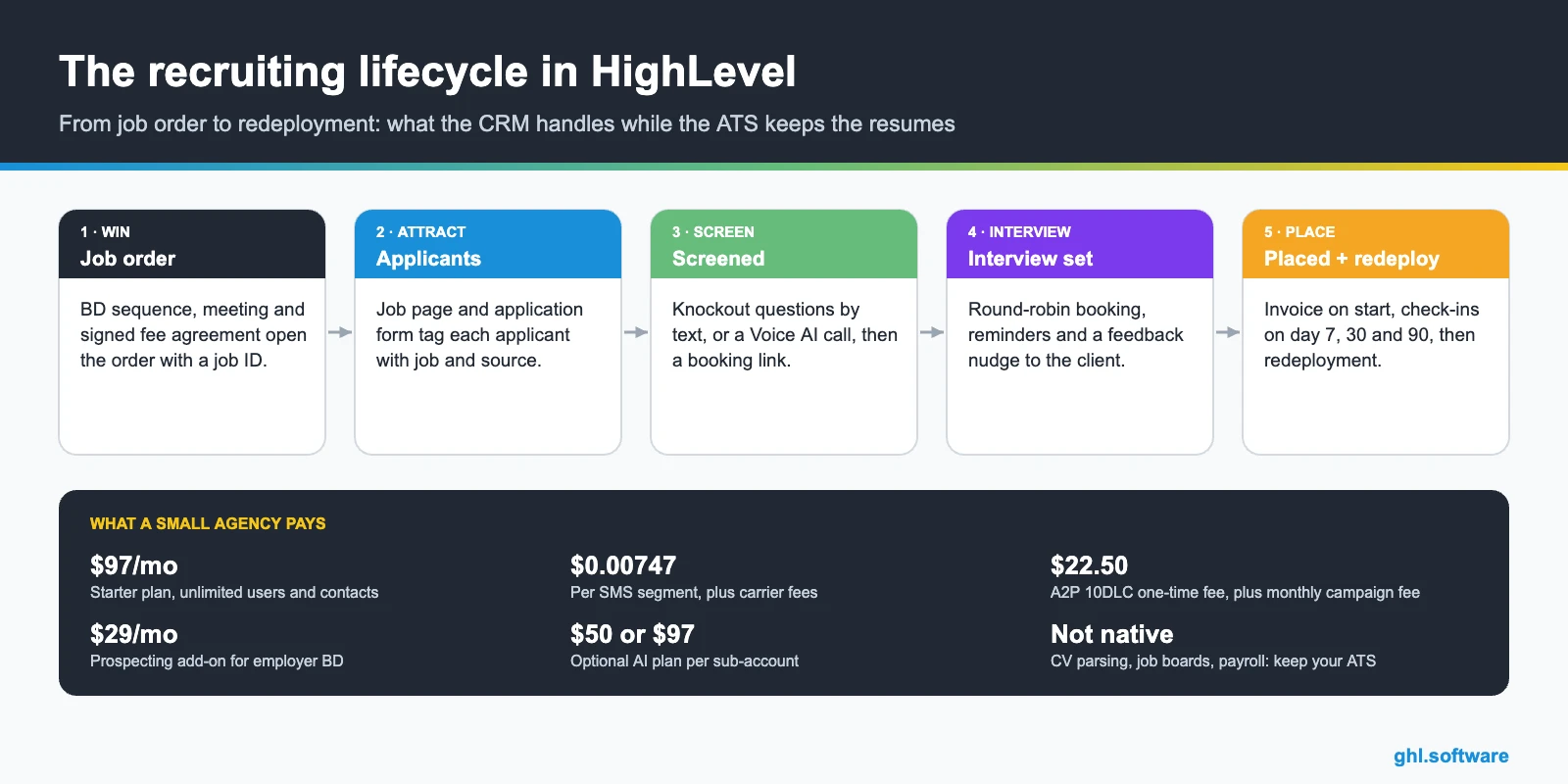
Recruiting problems and how HighLevel solves them
Before you build anything, list the leaks. For example, most small desks recognize at least four of the problems below. A good CRM for recruiting should fix each one with a specific feature, not another spreadsheet.
| Problem | What HighLevel does | Feature |
|---|---|---|
| Applicants wait hours for a reply | Texts within a minute with screening questions or a booking link | Forms + workflows |
| Candidates ghost after the first call | Sends short check-ins by text or WhatsApp and alerts the recruiter | Workflows + inbox |
| Interview back-and-forth by email | Shares a booking link with recruiter availability and reminders | Calendars + round robin |
| Phone screens eat the whole morning | Lets an AI agent ask the first questions and book the next step | Voice AI |
| Hiring managers go quiet after submittals | Sends feedback nudges and creates follow-up tasks | Client pipeline + workflows |
| Old candidate database decays | Runs reactivation messages by skill and availability | Smart lists + campaigns |
| Placements invoiced late | Sends the invoice when the candidate moves to Started | Invoices + pipeline triggers |
Two pipelines in a CRM for recruiting: clients and candidates
A recruiting business is two-sided, so your CRM for recruiting needs two boards. The client pipeline tracks employers from first outreach to an open job order. Then the candidate pipeline tracks people from application to placement and beyond. A job ID custom field connects them, so a recruiter can filter every candidate tied to one order.
Similarly, in-house teams use the same idea with different labels. Instead of clients, the first board holds hiring requests from managers: requested, approved, sourcing, filled. Meanwhile, the candidate board stays almost identical. That way, both agencies and internal talent teams can reuse the setup below.
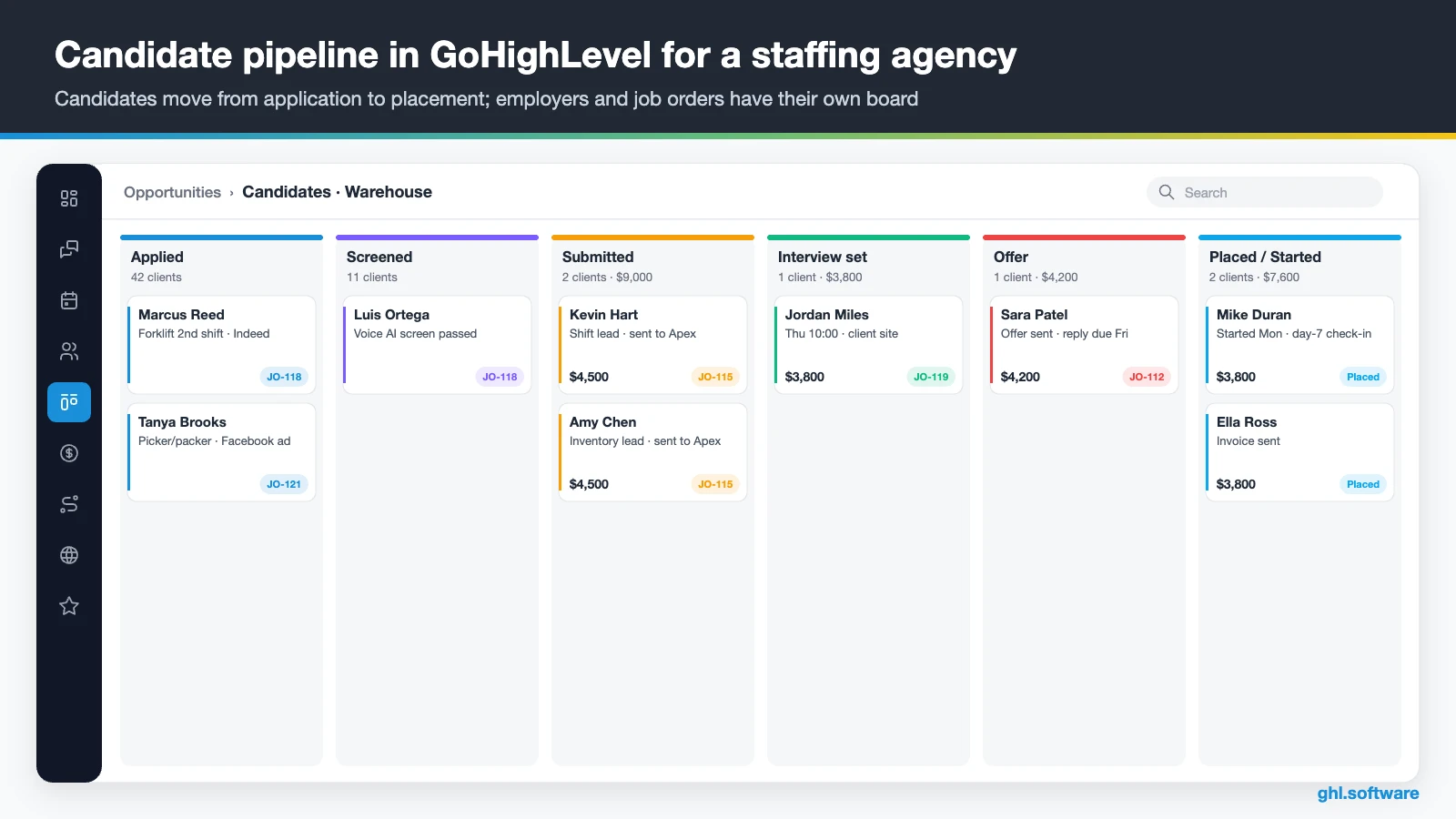
| Pipeline | Stage | What moves the card here |
|---|---|---|
| Clients | Target account | Added from prospecting, a referral or a past client list |
| Clients | Meeting booked | Hiring manager books on the BD calendar |
| Clients | Agreement signed | Fee agreement signed through e-signature |
| Clients | Job order open | Recruiter logs the role, pay range and job ID |
| Candidates | Applied | Application form submitted for a job ID |
| Candidates | Screened | Knockout questions passed or screening call completed |
| Candidates | Submitted | Recruiter sends the profile to the client |
| Candidates | Interview set | Interview booked on the client or recruiter calendar |
| Candidates | Placed / Started | Offer accepted, then the first day confirmed |
Three automations for recruiters and staffing agencies
You can build dozens of workflows. Still, three of them do most of the work in a CRM for recruiting at a small agency. Moreover, each one below uses triggers and actions that exist in the HighLevel workflow builder.
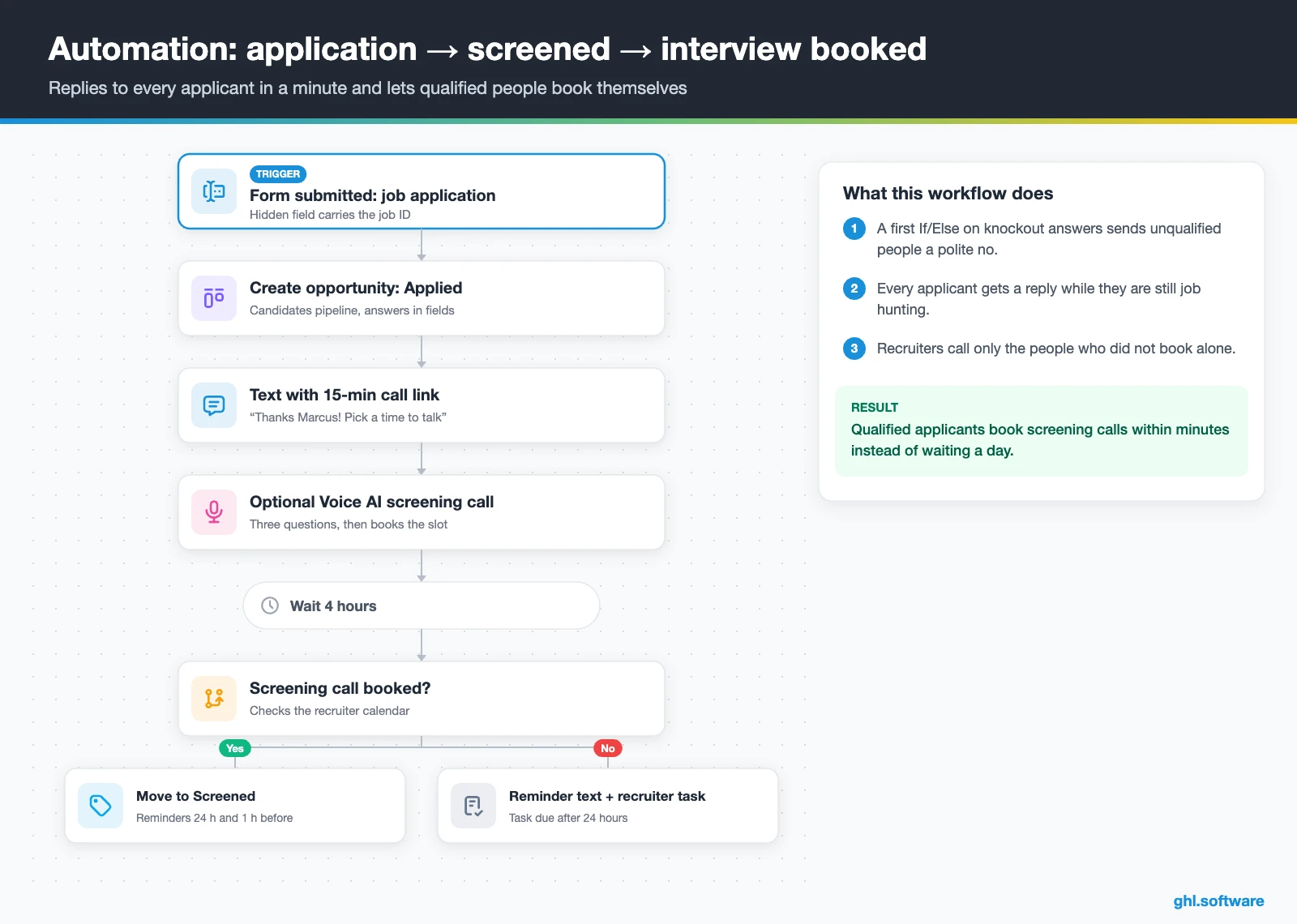
1. Application → screened → interview booked
The trigger is Form submitted on a job application form that carries the job ID as a hidden field. HighLevel then creates the opportunity in Applied and maps the answers into custom fields. Then an If/Else checks the knockout answers. Unqualified applicants get a polite no and a talent-pool tag, while qualified ones get a text with a 15-minute call link.
Optionally, a Voice AI agent calls the applicant right away to ask three screening questions and then book the slot. If four hours pass without a booking, a reminder goes out; after 24 hours, the recruiter gets a task. As a result, good applicants book themselves while they are still job hunting, and nobody waits a day for a “no”.
2. Job order follow-up with the client
This one starts when an opportunity enters Job order open on the client board. The hiring manager then receives a kickoff email with an intake form for must-haves, pay and interview availability. In addition, the recruiter gets a reminder every three business days to send a shortlist update.
When a candidate moves to Submitted, the client contact receives an email with the profile link. If there is no feedback after 48 hours, a short text nudges the hiring manager. Finally, when the candidate reaches Placed, the workflow sends the invoice and moves the job order to Filled. So placements turn into invoices without anyone chasing paper.

3. Placement check-ins and redeployment
The trigger is Pipeline stage changed to Started. Then, on day seven, the candidate gets a check-in text. On day 30, both the candidate and the client contact get a short check-in. If a reply contains words such as “quit” or “problem”, the recruiter receives an urgent task.
After that, on day 90, every placed candidate receives a review request, and the client gets a short satisfaction form. Unhappy replies go to a manager for a call. For contract roles, the workflow also fires 14 days before the end date. It asks whether the person wants a new assignment and adds them to an available-talent smart list. Because of that, contractors get redeployed instead of drifting to another agency.

Start with the snapshot and the pipeline from this guide, then add the automations one by one. The extended trial comes with our bootcamp link.
Start the 30-day trialAffiliate link. I may earn a commission at no extra cost to you.
Texting, WhatsApp and AI voice screening for candidates
Candidates answer texts far more readily than voicemail, so a CRM for recruiting has to live where they reply. In fact, the HighLevel inbox puts SMS, email, web chat, Facebook and Instagram messages and WhatsApp in one thread per person. Therefore any recruiter can pick up a conversation with the full history in view.
Voice AI adds a second front door. According to HighLevel, its agents answer inbound calls and place outbound calls, book appointments during the call, and update contacts and opportunities. They also transfer to a human when your conditions are met (Voice AI overview). It only works on LC Phone or Twilio numbers, so plan your numbers first.
Keep the AI’s job narrow: confirm availability, shift, location, certifications and pay expectations, then book. Leave judgment calls to recruiters. Likewise, Conversation AI can answer FAQ texts about pay dates or interview addresses before handing off. For example, in the video below, Neyox AI demos AI voice calling for recruitment in GoHighLevel; watch how the call hands off to booking.
Video: 🟢 Recruitment Automation | Hiring with AI Voice Calling | Voice AI Recruitment Software, GoHighLevel · Neyox AI - Automated Lead Response System
Is there an official HighLevel recruiting snapshot?
No. HighLevel’s free industry playbooks cover dozens of local businesses, from salons to law firms, but it has no recruiting or staffing guide. We also found nothing recruiting-specific on HighLevel’s own site. So you either start from a close template or build your CRM for recruiting from scratch.
Still, the closest official option is the Business Coaching playbook. It is a generic template for a service business that books consultations, and it loads a snapshot with these pieces:
- A website with home and link-in-bio pages, plus an offer funnel that ends on a booking page
- The Marketing Form – Claim Offer and a Marketing Pipeline with no predefined stages
- The New Lead Nurture (Fast 5) – Claim Offer and Long Term Nurture workflows, with email, SMS and a voicemail drop
- A general calendar, a consultation calendar, custom values, a chat widget and a Voice AI prompt for call handling and booking
That shell works for the client side: a BD landing page, a meeting calendar and a nurture sequence. However, everything on the candidate side is yours to build: both pipelines, job pages, application forms, screening logic and redeployment. Third-party recruiting snapshots also exist. For instance, in this video, Vico Khang shows how to turn GoHighLevel into an ATS with a recruiting snapshot. Check it against the limits listed further down.
Video: GoHighlevel Recruiting Snapshot | How To Turn GoHighlevel Into An ATS Application Tracking System · Vico Khang
How to set up GoHighLevel as a CRM for recruiting
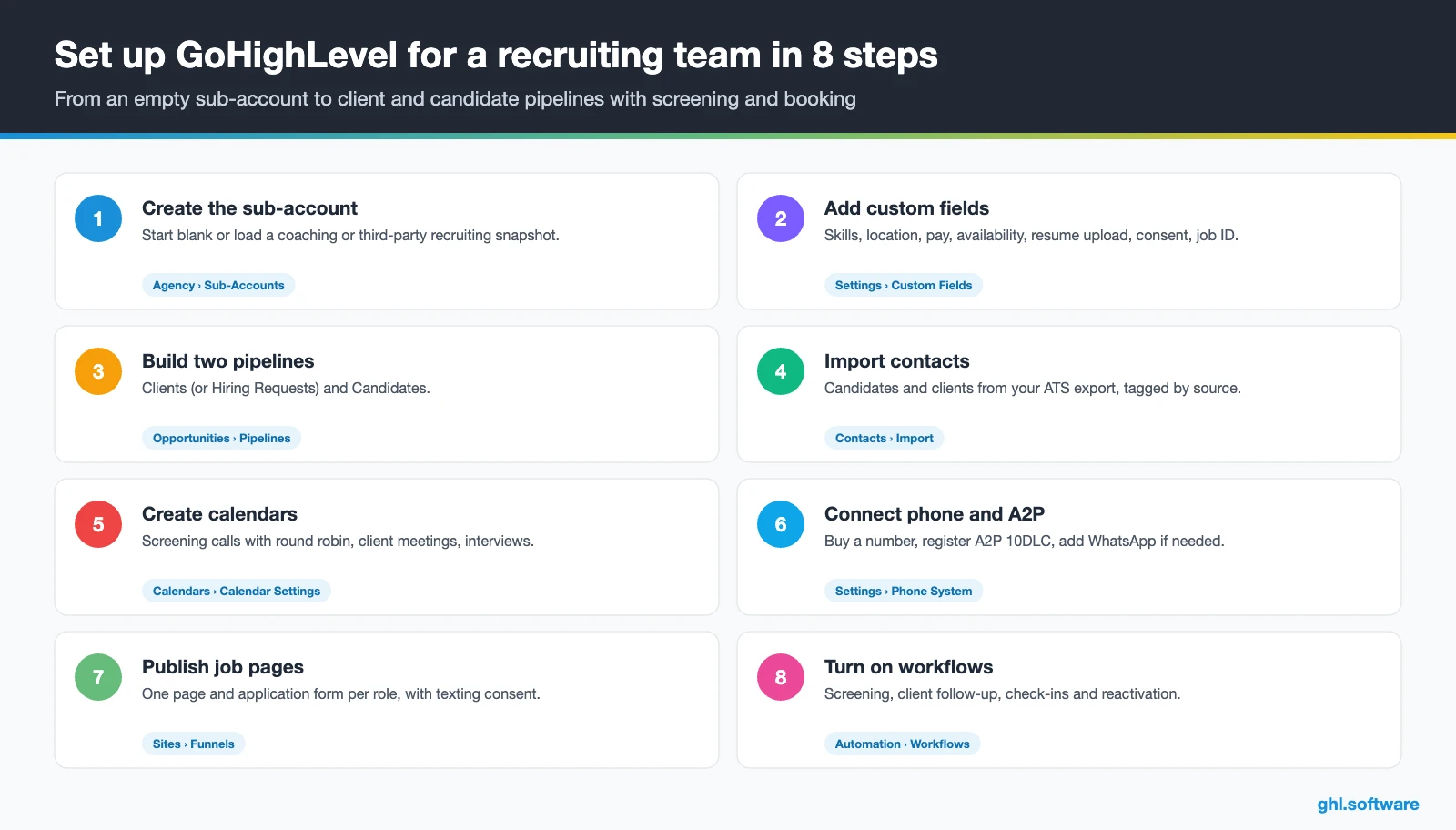
- Create the sub-account. Add the agency or talent team under Agency › Sub-Accounts. Then start blank, or load the Business Coaching snapshot or a third-party recruiting snapshot.
- Add custom fields. Role, skills, location, pay expectation, availability date, resume upload and consent on contacts; job ID, pay rate and fee on opportunities.
- Build both pipelines. Create Clients (or Hiring Requests) and Candidates with the stages from the table above.
- Import contacts. Upload candidates and clients from your ATS export with tags such as candidate, client and source. Keep resumes in the ATS if it stays your system of record.
- Create calendars. A screening-call calendar with round robin across recruiters, a client meeting calendar and interview calendars with reminders.
- Connect phone and messaging. Buy a number, register A2P 10DLC for US texting, and also add WhatsApp for candidates abroad. See phone and SMS.
- Publish job pages and forms. Clone one job landing page per role, with an application form, knockout questions and clear texting consent.
- Turn on workflows and reports. Activate the three automations, add a quarterly reactivation campaign and build reports for applicants by source, interviews and placements per recruiter.
What a CRM for recruiting costs with HighLevel
HighLevel prices a CRM for recruiting as a flat plan plus usage, not per seat. Starter costs $97 a month and already includes every core feature, unlimited contacts and unlimited users. That matters for agencies, because most ATS and recruiting CRMs charge per user. On top of the plan, you pay for what you send.
Recruiting is text-heavy. A local number is $1.15 a month, and SMS is $0.00747 per segment plus carrier fees, so 10,000 segments cost about $75 before carrier fees. Meanwhile, outbound calls run $0.0166 a minute, and email is $0.675 per 1,000. In addition, A2P 10DLC registration starts at $22.50 one time plus a monthly campaign fee.
For example, an illustrative five-recruiter desk lands around $200 to $250 a month, before AI. Adding an AI plan ($50 or $97 per sub-account) and the $29 prospecting add-on pushes it toward $350. Finally, our pricing guide and the AI Employee pricing page break it down.
GoHighLevel plans compared
| Starter | Unlimited | Agency Pro | |
|---|---|---|---|
| Price | $97/month | $297/month | $497/month |
| Annual | $970/year | $2,970/year | $4,970/year |
| Sub-accounts | 3 | Unlimited | Unlimited |
| Contacts and users | Unlimited | Unlimited | Unlimited |
| All core features | Yes | Yes | Yes |
| White label web app | Yes | Yes | Yes |
| API access | Basic | Basic | Advanced, agency-level keys |
| Rebill phone and email | No | At cost | With markup |
| Rebill AI usage | No | No | Yes |
| SaaS Mode and automated sub-accounts | No | No | Yes |
| User and agent reporting | No | No | Yes |
| Support | 24/7 | 24/7 | 24/7 |
Usage costs on top of the plan
| Item | Official price | When you pay it |
|---|---|---|
| Local phone number (US/Canada) | $1.15/month | Each number for SMS and calls |
| SMS (US/Canada) | $0.00747 per segment + carrier fees | Every text sent or received |
| Calls (US) | $0.0166/min outbound, $0.01165/min inbound | Calls through LC Phone |
| A2P 10DLC registration | $22.50 one-time (low volume) + monthly campaign fee | Before texting US numbers |
| Email (LC Email) | $0.675 per 1,000 emails | Campaigns and workflow emails |
| $10/month per sub-account + Meta fees | If you use WhatsApp inside HighLevel | |
| AI | Pay-per-use, or $50 or $97/month per sub-account | Voice AI, Conversation AI and other AI tools |
| Premium workflow steps | $0.01 per run after 100 free | Webhooks, Google Sheets, Slack, app actions |
Honest limits: what HighLevel does not do for recruiters
HighLevel works as a CRM for recruiting and an automation platform, not as an applicant tracking system. Its feature list has no recruiting back office, so treat the following as missing:
- No resume parsing: a CV upload is stored as a file, not turned into searchable skills
- No job-board multiposting to Indeed, LinkedIn or other boards
- No Boolean resume search and no duplicate merging based on CV content
- No VMS, timesheets or payroll for temporary staffing
- No EEO or compliance reporting for hiring
Therefore, most agencies keep their ATS and connect it, or move candidates over through CSV and the API and webhooks. Small desks that place hourly workers, in contrast, sometimes run HighLevel alone as an “ATS-lite”. Here is how it compares with tools recruiters actually use.
| GoHighLevel | Bullhorn | Recruit CRM | Greenhouse | |
|---|---|---|---|---|
| What it is | All-in-one CRM, marketing and automation | ATS and CRM for staffing | ATS and CRM for agencies | ATS for in-house hiring |
| Resume parsing and job posting | No | Yes | Yes | Yes |
| Client and BD pipeline | Yes | Yes | Yes | No |
| Funnels, ads and two-way texting | Yes | Check your plan | Check your plan | Check your plan |
| Best role in your stack | Engagement and speed | System of record | System of record | Hiring workflow |
In short, a CRM for recruiting from HighLevel complements an ATS rather than replacing it, unless your process is simple and high-volume. The tool list draws on folk’s recruiting CRM roundup and the vendors’ own positioning.
Compliance: texting consent, AI calls and background checks
Background checks follow different rules. If you use a consumer report, the FTC says you need a stand-alone written disclosure and the candidate’s written authorization. You also owe pre-adverse and adverse action notices before rejecting someone because of the report (FTC guidance). HighLevel can send those documents, but your process must follow the sequence.
Finally, whatever CRM for recruiting you use, keep knockout questions tied to the job, never to protected characteristics. Also check equal-opportunity rules with counsel. If you recruit candidates in the EU or Brazil, GDPR or LGPD also give them rights to access and delete their data.
With your ATS or as your ATS? A quick decision guide
Here is the question most guides about a CRM for recruiting skip: should HighLevel sit next to your ATS, or replace it? The honest answer, however, depends on volume and complexity, not on features alone.
Use HighLevel as your ATS-lite when you fill hourly or high-volume roles with short screening, few submittals per order and no payroll. For example, a warehouse or hospitality desk lives on speed: text, screen, book, show up. In that case, two pipelines, forms and Voice AI cover most of the process.
Keep your ATS and add HighLevel when you run executive search, contract staffing with timesheets, or clients who require formal submittal tracking. Then the ATS stays the record, while HighLevel owns texting, booking, nurture and BD. Either way, start with one desk and one job type, measure time to first reply and interview show rate, and expand from there.
Open a free account, load the pipeline and turn on the first automation today. The bootcamp walks you through the setup live.
Start the 30-day trialAffiliate link. I may earn a commission at no extra cost to you.
Frequently asked questions
What is the difference between an ATS and a recruiting CRM?
An applicant tracking system manages the hiring workflow for open jobs: resumes, job postings, submittals and compliance records. In contrast, a recruiting CRM manages relationships over time: fast replies, screening by text, interview booking, nurture and employer follow-up. Many agencies run both. HighLevel is a CRM and automation platform, so it covers the relationship side but has no resume parsing or job-board posting.
Can GoHighLevel replace an ATS?
For simple, high-volume hourly hiring, it can work as an ATS-lite with two pipelines, application forms, knockout questions, texting and interview calendars. For executive search, contract staffing or clients who require formal submittal tracking, it cannot. That is because it lacks resume parsing, job-board multiposting, Boolean search, timesheets and payroll. In those cases, keep Bullhorn, Recruit CRM or your current ATS and add HighLevel for engagement.
How do I manage clients and candidates in one CRM?
Use two pipelines. The client pipeline runs from target account to agreement signed and job order open. Meanwhile, the candidate pipeline runs from applied to screened, submitted, interview set and placed. A job ID custom field on both opportunities links them, so you can filter every candidate tied to one order and trigger client updates when a candidate moves.
Can I text candidates legally?
Yes, with consent and registration. In the US, texting from 10-digit numbers requires A2P 10DLC brand and campaign registration, and you should collect clear consent to texts and automated calls on the application form. Honor STOP replies right away. Also, keep messages about the role, the interview and logistics, and avoid sending marketing blasts to people who only applied for one job.
Can AI screen candidates by phone?
Yes. HighLevel’s Voice AI agents can place outbound calls, ask your screening questions, update contact fields, book the next step on a calendar and transfer to a recruiter when conditions are met. They only work on LC Phone or Twilio numbers. Keep the script to factual questions such as availability, location, certifications and pay expectations, and let a person make every hiring judgment.
How do I reactivate my candidate database?
Import past candidates with skills, location and last contact date, then build smart lists by skill and region. Send a short message such as “Are you open to new roles near Dallas?” and tag every YES reply for a recruiter task. Run it quarterly, stop messages the moment someone replies, and remove people who ask to opt out.
How much does a recruiting CRM cost with HighLevel?
HighLevel starts at $97 a month on Starter with unlimited users, which helps agencies that would otherwise pay per seat. Usage comes on top: $1.15 per local number, $0.00747 per SMS segment plus carrier fees, and email at $0.675 per 1,000. For example, an illustrative five-recruiter desk spends about $200 to $250 a month, or more with AI and prospecting add-ons.
More industry guides
Sources: HighLevel Business Coaching playbook · AI Voice Agents overview · A2P 10DLC brand and campaign registration · FCC: telemarketing and robocalls · FTC: using consumer reports, what employers need to know · Talentera: client engagement for recruitment agencies · folk: best CRM for recruitment agencies · HighLevel pricing

