

CRM for Hotels: Keep Your PMS, Add HighLevel for Guests
A CRM for hotels handles the guest relationship around the stay: inquiries, WhatsApp and web chat, pre-arrival messages, reviews, group sales and win-back offers. HighLevel does that well, but it is not a PMS. So keep Cloudbeds, Mews or your current PMS for rooms, rates and channel sync, and connect HighLevel next to it.
It is 9:15 on a Thursday night at a 24-room inn. The night auditor is checking in a late arrival when a WhatsApp message comes in: a couple wants two nights in October and asks about breakfast. Meanwhile, a wedding planner fills in the contact form for an 80-guest weekend. By Monday, the couple has booked through an OTA, and the planner has toured another venue. A CRM for hotels exists for exactly these moments, because it answers fast and keeps every lead moving.
Most independent hotels and B&Bs, however, already have the hard part covered. The PMS holds the rooms, the channel manager syncs rates to Booking.com and Expedia, and the booking engine takes direct reservations. However, none of them chases a wedding lead or brings last summer’s guests back direct. That is the gap HighLevel fills.
This guide shows the honest setup: keep your PMS, add HighLevel. So you will see the group pipeline, three automations, the PMS connection, real costs and the limits. It is part of our GoHighLevel industry guides.
Leer en español: CRM para hoteles · Ler em português: CRM para hotéis e pousadas · Part of GoHighLevel by industry
What a CRM for hotels does that your PMS doesn’t
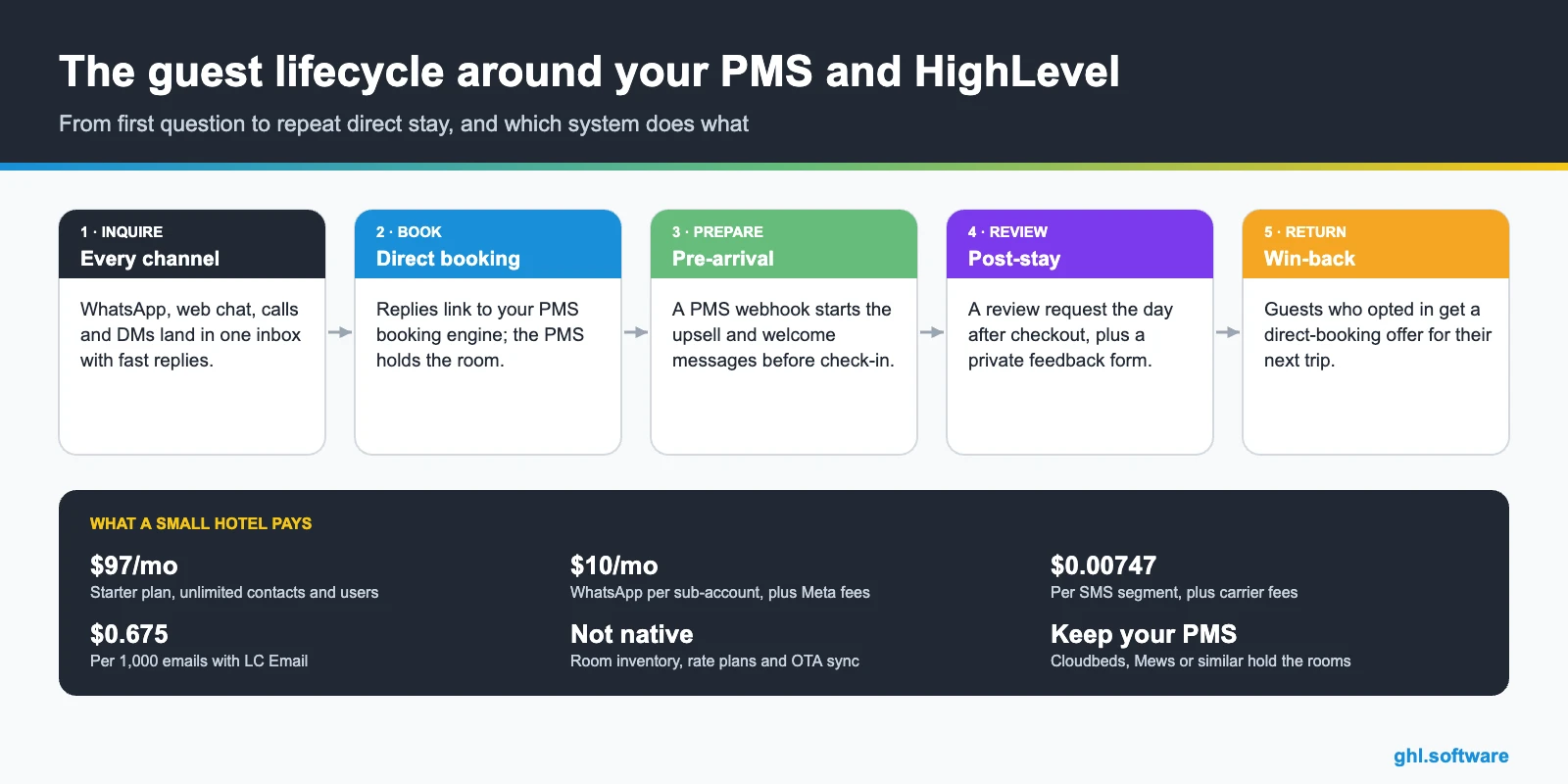
Think of the hotel stack in layers. The PMS runs operations: room inventory, rate plans, folios and the front desk. The channel manager pushes availability to the OTAs, so a room sold on one site closes on the others. Then the booking engine takes direct reservations on your website. A CRM for hotels sits on top and works the relationship before and after the booking. In short, the PMS knows the room, while the CRM knows the guest and the lead.
The HighLevel building blocks for hotels
HighLevel then covers that relationship layer with the building blocks below. None of them touches room inventory, which stays in your PMS.
Common hotel problems and how HighLevel solves them
Start with the leaks, not the software. Each problem below maps to one HighLevel feature, so you can fix them one at a time.
| Hotel problem | What HighLevel does | Feature |
|---|---|---|
| WhatsApp and DMs answered hours later | Puts every channel in one inbox and replies at once with rates and a booking link | Conversations + Conversation AI |
| Calls missed during the check-in rush | Texts the caller back in seconds | Missed call text back |
| Too many bookings through OTAs | Follows up every direct inquiry and offers a direct-booking perk | Workflows + pipelines |
| No upsells before arrival | Sends late checkout, breakfast or transfer offers with a payment link | Workflows + text-to-pay |
| Few reviews after checkout | Sends a review request the day after departure | Reputation management |
| Wedding and group leads lost in email | Tracks each inquiry from first call to deposit | Pipelines + contracts + invoices |
| Past guests never hear from you | Runs seasonal win-back campaigns to guests who opted in | Email and WhatsApp campaigns |
Keep your PMS, add HighLevel: how the two connect
This is the part most guides skip. HighLevel has no room inventory, no rate plans and no channel manager, and we found no HighLevel documentation for nightly room booking. Its calendars are built for appointments and classes with seats per time slot, as its class booking calendar guide explains. So rooms, rates and OTA sync stay in Cloudbeds, Mews or whichever PMS you already run.
Data moves between the two through an integration. For example, your PMS sends a “reservation created” or “checked out” event to HighLevel’s Inbound Webhook trigger, either directly or through Zapier or Make. Mews, for instance, publishes an Open API and a marketplace with more than 1,000 integrations, according to its website. With Cloudbeds or any other PMS, ask which reservation events it can send, then test with dummy bookings.
Be clear about what this link does. It moves guest details and stay dates, so messages go out at the right time. However, it does not sync availability, and it does not stop double bookings. That job belongs to your channel manager. Also, check what your PMS already sends, because two confirmation emails for one stay look careless.
A group and event pipeline in your CRM for hotels
Transient stays live in the PMS, so you don’t need a pipeline card for every room night. Groups are different. A wedding or a corporate block can be worth more than a month of walk-ins, yet these leads often sit in one person’s inbox. Therefore, the most valuable pipeline in a CRM for hotels is usually the one for groups and events.
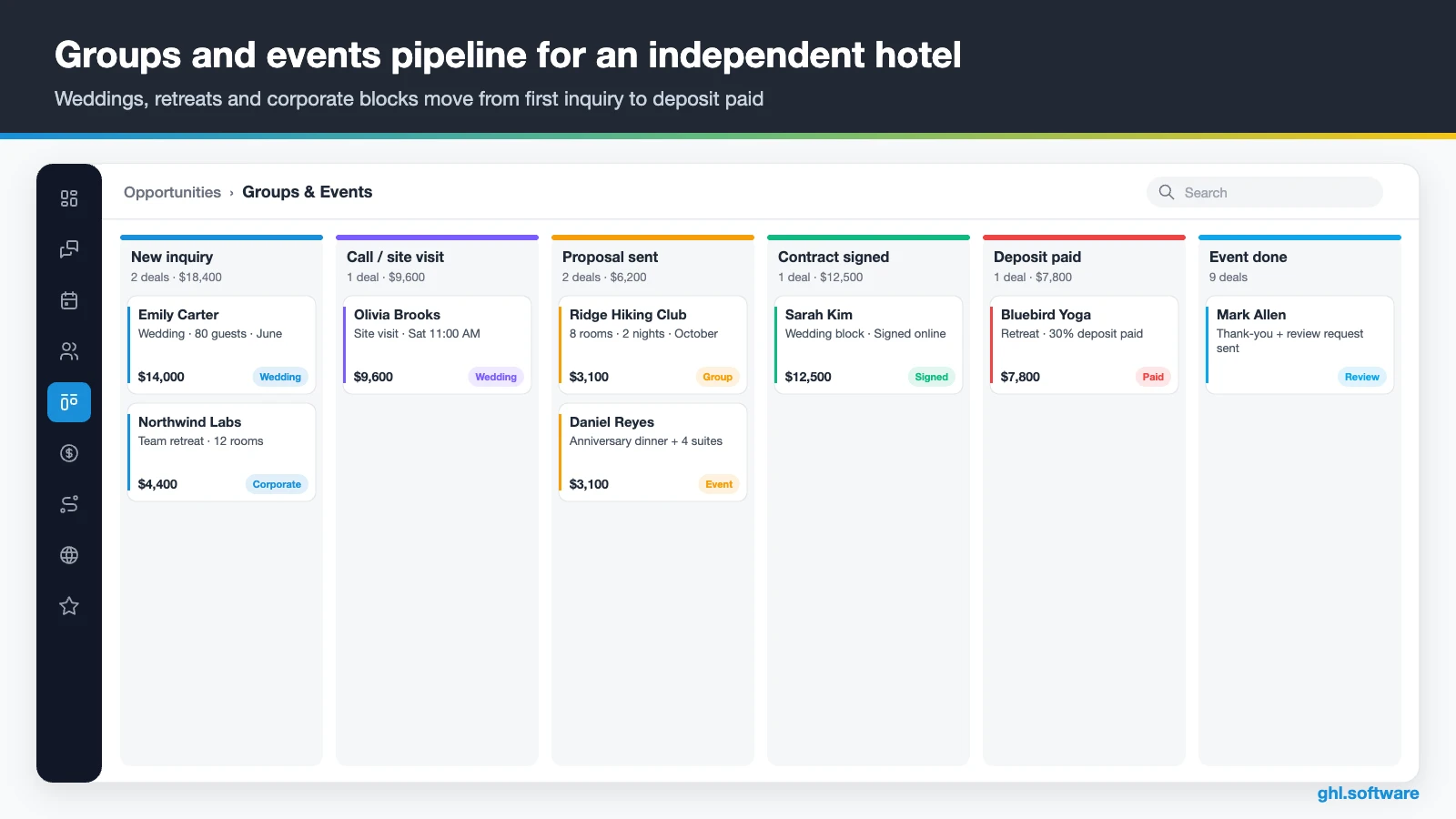
| Stage | What moves the lead here |
|---|---|
| New inquiry | Event inquiry form, WhatsApp message, call or email |
| Call / site visit | A tour or call booked on the site-visit calendar |
| Proposal sent | The sales manager sends dates, room block, menus and price |
| Contract signed | The client signs online in Documents & Contracts |
| Deposit paid | The deposit invoice is paid by card or text-to-pay link |
| Event done | The event date passes; thank-you and review request go out |
| Lost | No reply after follow-ups, or the client chose another venue |
Also, add a second, smaller pipeline for direct inquiries: New inquiry, Quoted, Booked and Lost. A card moves to Booked when staff or the PMS webhook adds a “booked” tag. That way, you can see how many WhatsApp and web chat questions turned into direct stays.
Three automations every independent hotel should run
These three workflows are the core of any CRM for hotels. Build them in order, because the first pays off on day one, while the second needs your PMS connection.
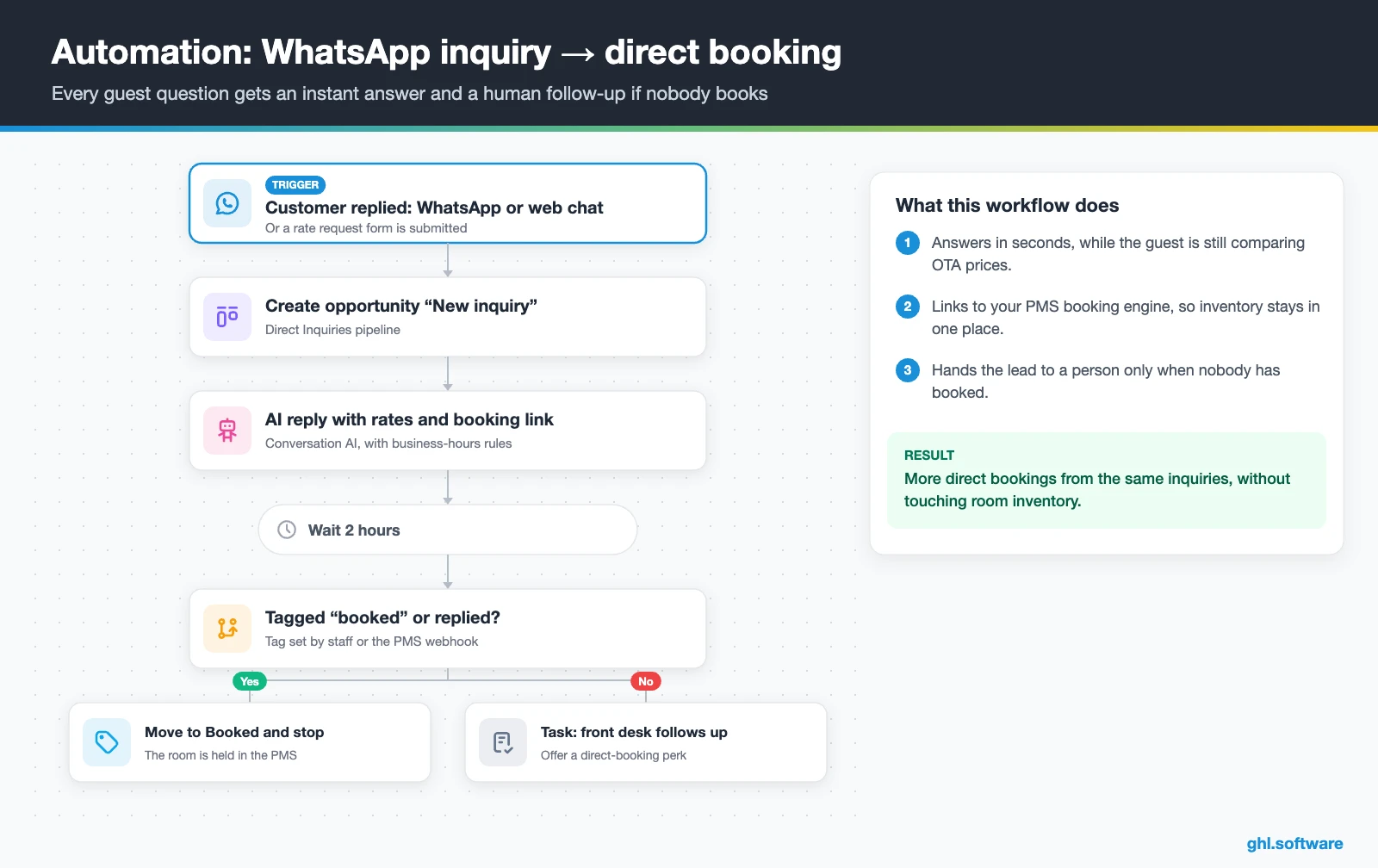
1. Guest inquiry → direct booking
Here, the trigger is Customer Replied on WhatsApp, web chat or SMS, or a rate request form. Right away, the workflow then creates an opportunity in Direct Inquiries. Then Conversation AI or a saved snippet answers with your rates and the booking engine link.
After two hours, the workflow checks for a reply or a “booked” tag. If nothing happened, the front desk gets a task to follow up with a direct-booking perk, such as free breakfast. As a result, guests who were about to book on an OTA hear from you first. The room itself is still booked in your PMS.
For follow-up ideas, watch “GoHighLevel for Hotel Reservations – Booking & CRM Automation” by Neyox AI. Focus on the inquiry automation, and remember that an appointment slot is not room inventory.
Video: GoHighLevel for Hotel Reservations – Booking & CRM Automation · Neyox AI - Automated Lead Response System
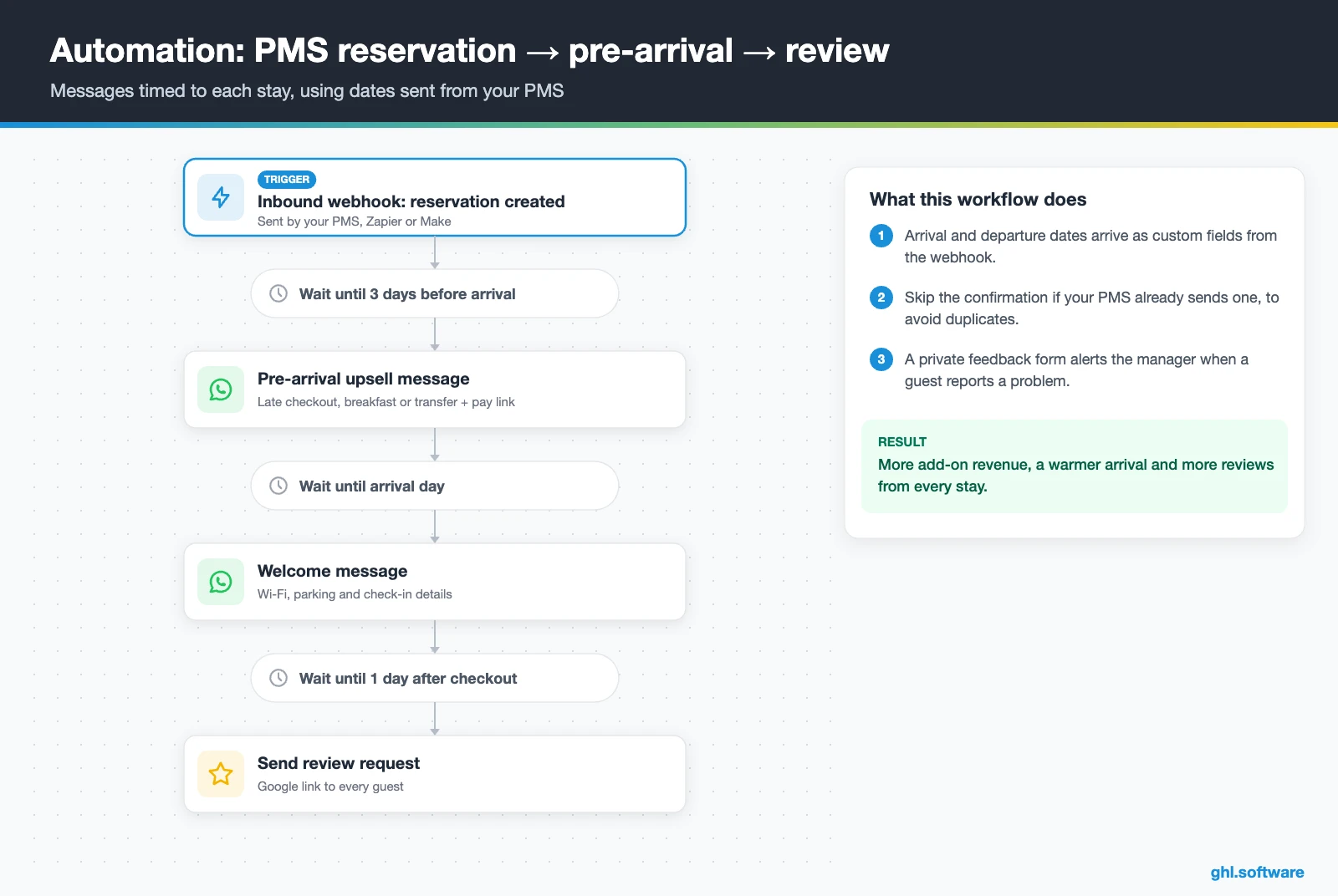
2. Pre-arrival, welcome and post-stay review
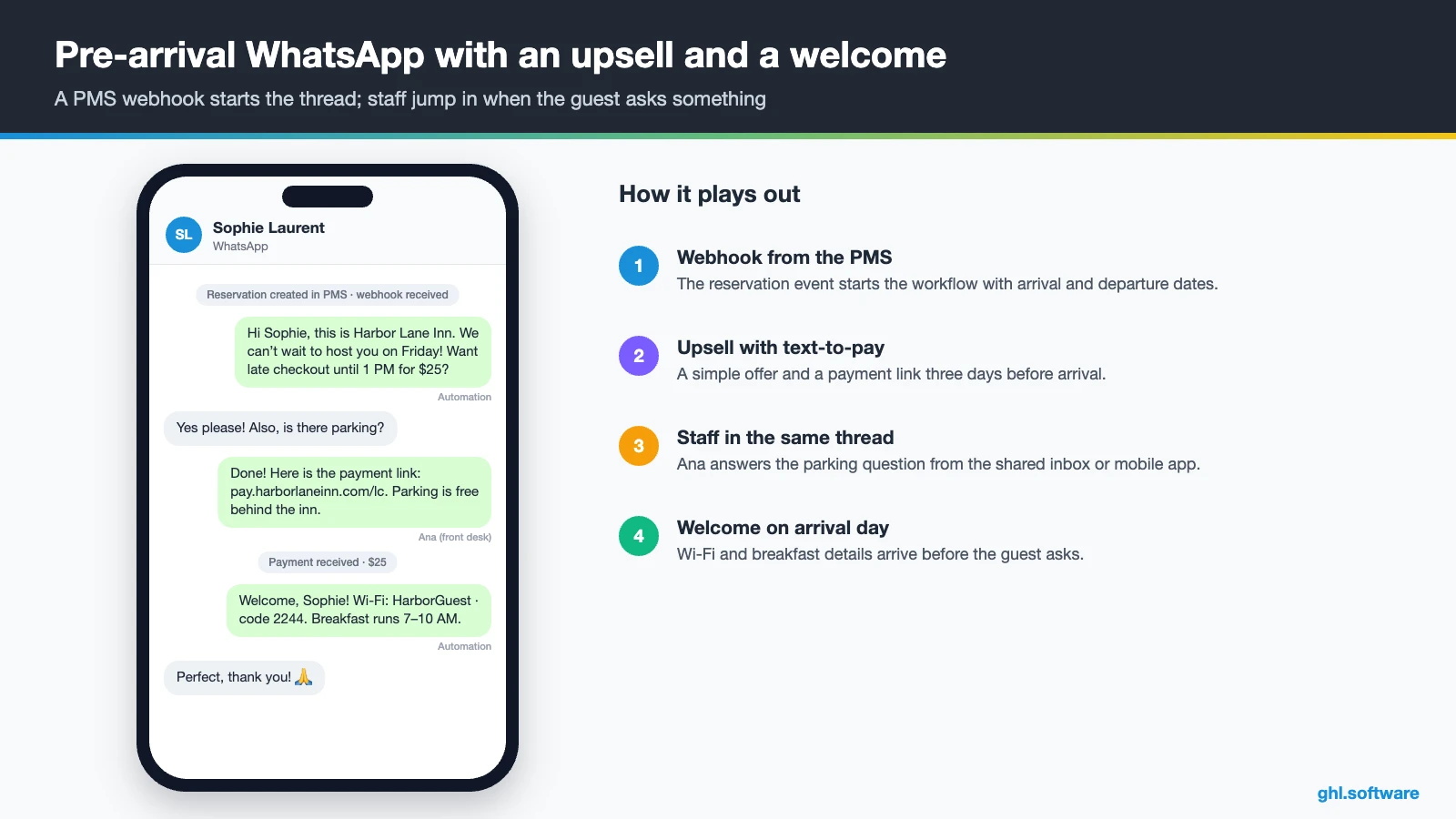
This one starts with an Inbound Webhook from your PMS when a reservation is created. First, the webhook carries the arrival and departure dates into custom fields. Three days before arrival, the guest gets a WhatsApp or SMS offer for late checkout, breakfast or an airport transfer, with a text-to-pay link. Then, on arrival day, a welcome note shares the Wi-Fi password and check-in details.
The day after checkout, the Send Review Request action shares your Google link with every guest. Meanwhile, a short private feedback form lets guests report a problem, and it alerts the manager. Skip the booking confirmation if your PMS already sends one. Otherwise, guests get two messages for the same stay.
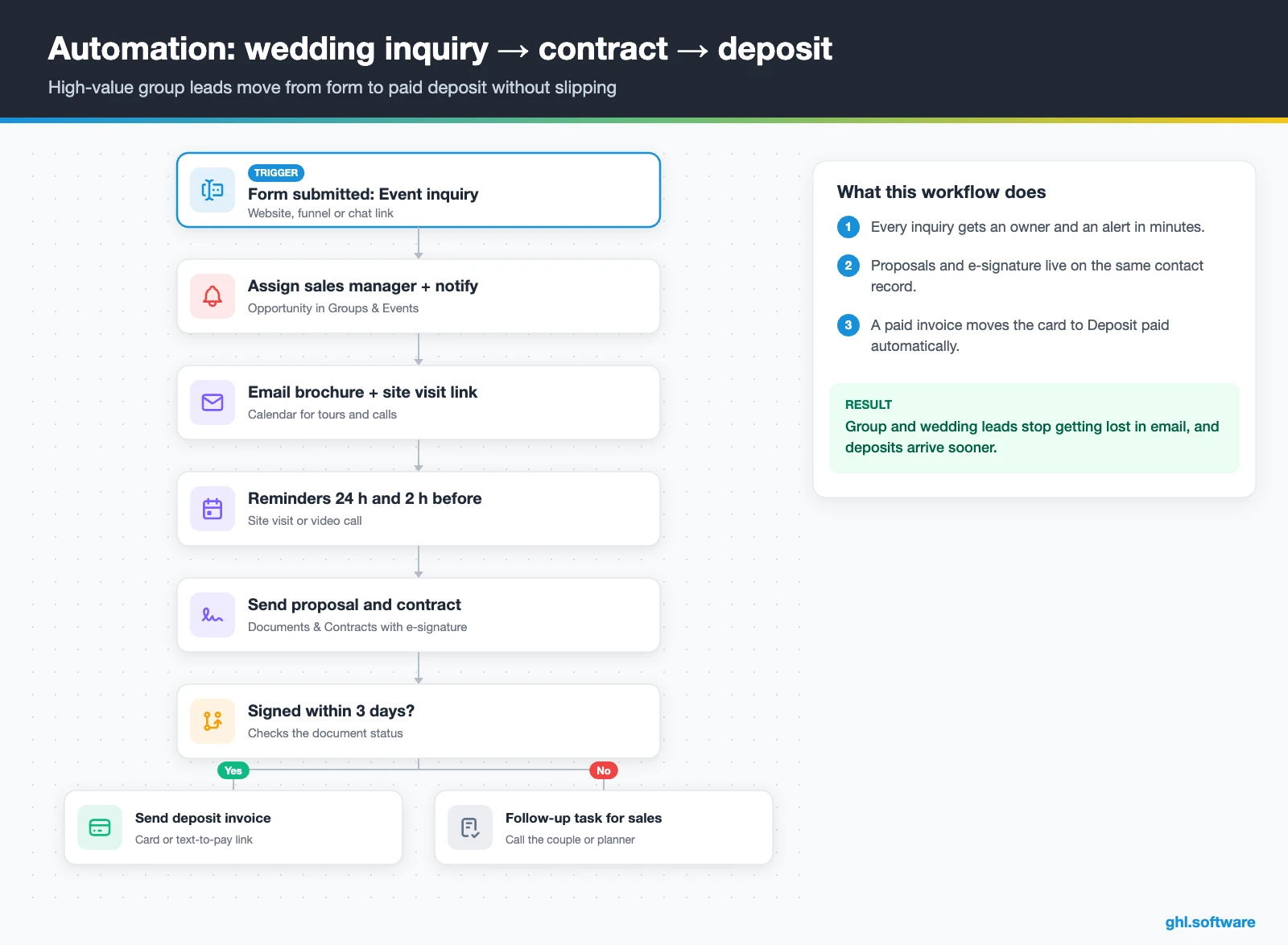
3. Wedding or group inquiry → signed contract → deposit
The trigger is Form Submitted on your event inquiry form. First, the workflow creates the opportunity, assigns the sales manager and sends an internal notification. At the same time, the planner gets an email with your brochure and a link to book a site visit or call, with reminders 24 hours and 2 hours before.
After the visit, the manager sends a proposal and contract with e-signature. If it is still unsigned after three days, a follow-up task goes to sales. Once it is signed, an invoice for the deposit goes out by email and text. Finally, a paid invoice moves the card to Deposit paid and creates the pre-event checklist tasks.
Start with the snapshot and the pipeline from this guide, then add the automations one by one. The extended trial comes with our bootcamp link.
Start the 30-day trialAffiliate link. I may earn a commission at no extra cost to you.
WhatsApp, web chat and AI replies for hotel guests
In a CRM for hotels, the inbox matters as much as the pipeline. After all, guests ask the same questions all day: parking, pets, breakfast hours, early check-in. So HighLevel’s Travel & Hospitality playbook recommends web chat, missed call text back, snippets and Conversation AI. Every message lands in one shared inbox, so the night team sees what the day team promised. Also, staff can answer from the mobile app while they walk the property.
For US numbers, register A2P 10DLC before you text guests, because HighLevel’s missed call text back and other texts need a registered number. Meanwhile, WhatsApp costs $10 a month per sub-account plus Meta’s fees. In addition, from 1 October 2026, service messages above the first 1,000 per number each month are billable. Conversations that start from a click-to-WhatsApp ad get a 72-hour free entry window, per HighLevel’s WhatsApp pricing guide.
What HighLevel’s official Hotel snapshot includes
HighLevel publishes a free Hotel snapshot playbook. Be realistic, though: it is a generic marketing template with the hotel name swapped in. It gets a property online with a lead funnel, but it has no stay workflows. Out of the box, it gives you the following.
- A “Hotel” website with a Home page (services and FAQ sections) and a Link in Bio page.
- A “Hotel Offer” funnel: an opt-in step, then an appointment booking page, with email and SMS nurture.
- The “Marketing Form – Claim Offer” and a “Marketing Pipeline” whose stages you define yourself.
- Six workflows, of which two are named: “New Lead Nurture (Fast 5) – Claim Offer”, with a voicemail drop, and “Long Term Nurture”.
- A simple calendar, an “Event” consultation calendar and service calendars tagged “Hotel Services”.
- A “Hotel” proposal template, custom values, a chat widget, missed call text back, social post templates and one ad template.
You still build the rest: the PMS webhook, the date fields, both pipelines, pre-arrival and review messages, the group workflow and every message, since the guide ships no copy. The kit has no booking engine or room inventory either. Load it through snapshots when you create the sub-account, then rename what you keep.
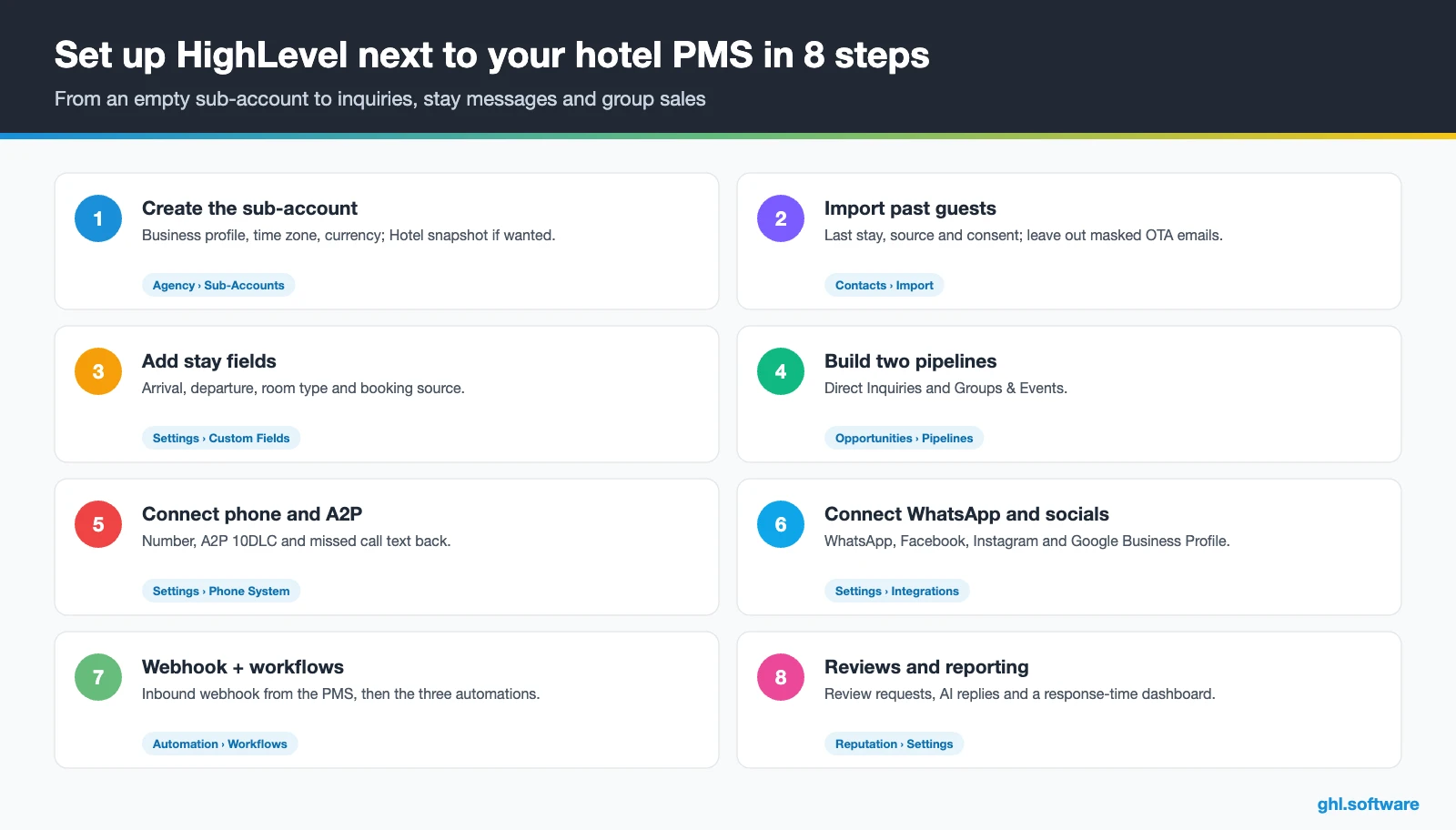
How to set up HighLevel for a hotel in 8 steps
Follow these steps to run HighLevel as a CRM for hotels, and test the PMS connection before any guest sees a message.
- Create the sub-account. Add the business profile, time zone and currency, and load the Hotel snapshot if you want its website and funnel.
- Map the PMS connection first. Decide which events reach HighLevel (reservation created, checked in, checked out) and how: a PMS webhook, its API, or Zapier or Make. See API and webhooks.
- Import past guests. Upload a CSV with last stay date, booking source and consent status. Leave masked OTA relay emails out of every marketing list.
- Add custom fields. Create arrival date, departure date, room type and booking source fields, so workflows can time messages to each stay.
- Build two pipelines. Then set up Direct Inquiries and Groups & Events with the stages above.
- Connect your channels. Buy or port a number, register A2P 10DLC and turn on missed call text back. Then connect WhatsApp, web chat, Facebook and Instagram, plus Google Business Profile for reviews.
- Create calendars for tours only. Site visits and event consultations go on calendars. Room bookings stay in the PMS booking engine.
- Publish workflows and reviews. Turn on the three automations, set up review requests, and track response time and pipeline value in Reporting.
What a CRM for hotels costs with HighLevel
HighLevel charges a flat plan plus usage. A single property usually starts on Starter at $97 a month, with unlimited contacts and users and all core features. On top of that, a local US number costs $1.15 a month, and texts cost $0.00747 per segment plus carrier fees. Also, A2P registration is $22.50 one-time plus a monthly campaign fee. WhatsApp adds $10 a month plus Meta’s fees, while LC Email costs $0.675 per 1,000 emails.
So a 20-room property sending a few thousand emails and about 1,000 text segments a month typically pays $120–$180, before AI and any Zapier or Make plan. As a result, an AI plan at $50 or $97 a month raises the total to roughly $170–$280. Also, premium workflow steps cost $0.01 per run after the first 100. These figures are illustrative. For details, read our GoHighLevel pricing guide and the AI Employee pricing breakdown.
GoHighLevel plans compared
| Starter | Unlimited | Agency Pro | |
|---|---|---|---|
| Price | $97/month | $297/month | $497/month |
| Annual | $970/year | $2,970/year | $4,970/year |
| Sub-accounts | 3 | Unlimited | Unlimited |
| Contacts and users | Unlimited | Unlimited | Unlimited |
| All core features | Yes | Yes | Yes |
| White label web app | Yes | Yes | Yes |
| API access | Basic | Basic | Advanced, agency-level keys |
| Rebill phone and email | No | At cost | With markup |
| Rebill AI usage | No | No | Yes |
| SaaS Mode and automated sub-accounts | No | No | Yes |
| User and agent reporting | No | No | Yes |
| Support | 24/7 | 24/7 | 24/7 |
Usage costs on top of the plan
| Item | Official price | When you pay it |
|---|---|---|
| Local phone number (US/Canada) | $1.15/month | Each number for SMS and calls |
| SMS (US/Canada) | $0.00747 per segment + carrier fees | Every text sent or received |
| Calls (US) | $0.0166/min outbound, $0.01165/min inbound | Calls through LC Phone |
| A2P 10DLC registration | $22.50 one-time (low volume) + monthly campaign fee | Before texting US numbers |
| Email (LC Email) | $0.675 per 1,000 emails | Campaigns and workflow emails |
| $10/month per sub-account + Meta fees | If you use WhatsApp inside HighLevel | |
| AI | Pay-per-use, or $50 or $97/month per sub-account | Voice AI, Conversation AI and other AI tools |
| Premium workflow steps | $0.01 per run after 100 free | Webhooks, Google Sheets, Slack, app actions |
What HighLevel can’t do for hotels (and what to keep)
HighLevel works as a CRM for hotels: the sales, messaging and marketing layer. It is not a hotel management system, so know these gaps before you change anything.
- No PMS. There are no folios, housekeeping, night audit or front-desk check-in screens.
- No room inventory or rate plans. Instead, calendars book appointments and class seats, not nightly rooms by type.
- No channel manager or OTA sync. Therefore, availability on Booking.com, Expedia or Airbnb stays with your channel manager.
- No room booking engine. Link to your PMS booking engine from HighLevel pages and messages instead.
- Integration work. PMS data only arrives through webhooks, an API, or Zapier and Make, which you must build and test.
How hotel software vendors compare
Many PMSs already include some guest marketing. This neutral comparison uses each vendor’s public pages; “Check vendor” means the page did not state it.
| HighLevel | Cloudbeds | Mews | Revinate | |
|---|---|---|---|---|
| PMS (front desk, folios) | No | Yes | Yes | No |
| Room inventory and rates | No | Yes | Yes | No |
| Channel manager | No | Yes | ✓ (powered by SiteMinder) | No |
| Booking engine | No | Yes | Yes | Check vendor |
| Guest email campaigns | Yes | ✓ (Guest Marketing CRM) | Check vendor | Yes |
| WhatsApp in a shared inbox | Yes | Check vendor | Check vendor | Check vendor |
| Group and event sales pipeline | Yes | Check vendor | Check vendor | Check vendor |
| Proposals with e-signature | Yes | Check vendor | Check vendor | Check vendor |
The competitor cells come from Cloudbeds’ hotel CRM page, Mews’ website and Revinate’s website, checked on 25 October 2026. In short, if your PMS already covers guest email well, use HighLevel mainly for WhatsApp, groups and win-back.
The win-back most guides miss: turning OTA guests into direct guests
Here is the angle most guides on CRM for hotels skip. Many OTA bookings arrive with masked or relay email addresses, so a list built from them is weak and often not yours to market to. Therefore, the real job is to earn a direct line during the stay. For example, offer the welcome message on WhatsApp, add an opt-in checkbox to the registration or Wi-Fi form, and ask again at checkout.
After a guest opts in, tag the season, room type and trip reason. Then, months later, a short WhatsApp or email invites them back with a perk for booking direct, such as an upgrade when available. Check your OTA contract terms before you contact guests who booked through one. As a result, each OTA stay can become the first of several direct ones, without cutting your rate.
Open a free account, load the pipeline and turn on the first automation today. The bootcamp walks you through the setup live.
Start the 30-day trialAffiliate link. I may earn a commission at no extra cost to you.
Frequently asked questions
Can HighLevel replace my hotel PMS?
No. HighLevel has no room inventory, rate plans, folios, housekeeping or channel manager, and we found no HighLevel documentation for nightly room booking. Treat it as the CRM and messaging layer next to your PMS. So keep Cloudbeds, Mews or your current system for rooms and rates. Then use HighLevel for inquiries, WhatsApp, pre-arrival messages, reviews, group sales and win-back campaigns.
Can HighLevel or Zapier prevent double bookings?
No. Double bookings are prevented by your channel manager, which updates availability across Booking.com, Expedia and your own booking engine. A Zapier or Make link between your PMS and HighLevel only moves guest details and stay dates, so messages go out on time. Keep all inventory in the PMS and send every room booking through its booking engine.
Does HighLevel connect to Cloudbeds or Mews?
We could not verify a native hotel PMS connector. Instead, you connect through webhooks, an API, or Zapier and Make. Mews publishes an Open API and a marketplace of more than 1,000 integrations. For Cloudbeds or another PMS, check which reservation events it can send. Then map them to HighLevel’s Inbound Webhook trigger and test with dummy reservations before going live.
How do I collect guest emails from OTA bookings?
Many OTA bookings arrive with masked relay addresses, so don’t build marketing lists from them. Instead, ask for a direct contact during the stay: a WhatsApp welcome message, an opt-in checkbox on the registration or Wi-Fi form, or a question at checkout. Store the consent status in HighLevel, tag the stay details and check your OTA contract terms before sending promotions.
When should a hotel send a review request?
The day after checkout works well for most properties, because the stay is still fresh and the guest is usually home. In HighLevel, a workflow triggered by the checkout event from your PMS sends the review request with your Google link. Send it to every guest, and add a short private feedback form so the manager hears about problems quickly.
How much does WhatsApp cost for a hotel in HighLevel?
HighLevel charges $10 a month per sub-account for WhatsApp, plus Meta’s per-message fees, which vary by country. From 1 October 2026, service messages above the first 1,000 per number each month are billable too. Conversations that start from a click-to-WhatsApp ad get a 72-hour free entry window. Your total depends on how many pre-arrival, welcome and campaign messages you send.
How should a hotel manage wedding and group inquiries?
Give them their own pipeline: new inquiry, call or site visit, proposal sent, contract signed, deposit paid, event done and lost. In HighLevel, an event inquiry form creates the opportunity, notifies the sales manager and sends a brochure with a site-visit booking link. Then the proposal goes out with e-signature, and an invoice collects the deposit by card or text-to-pay link.
More industry guides
Sources: HighLevel Hotel snapshot playbook · HighLevel: Industry playbook – Travel & Hospitality · HighLevel: Class booking calendar (seats and capacity) · HighLevel: WhatsApp pricing, billing and rebilling · HighLevel: Missed call text back setup · HighLevel: A2P 10DLC brand and campaign registration · Cloudbeds: Hotel CRM · Mews: Hospitality platform · Revinate: Guest data and marketing platform

