

Travel Agency CRM: Inquiries, Proposals and Deposits in HighLevel
A travel agency CRM tracks every trip from first inquiry to final payment and the next booking: fast replies, proposal follow-up, payment reminders, reviews and repeat trips. HighLevel does that well, but it is not a GDS, booking engine or back office. So keep Travefy, Tern or your host’s tools for itineraries and bookings, and run sales and follow-up in HighLevel.
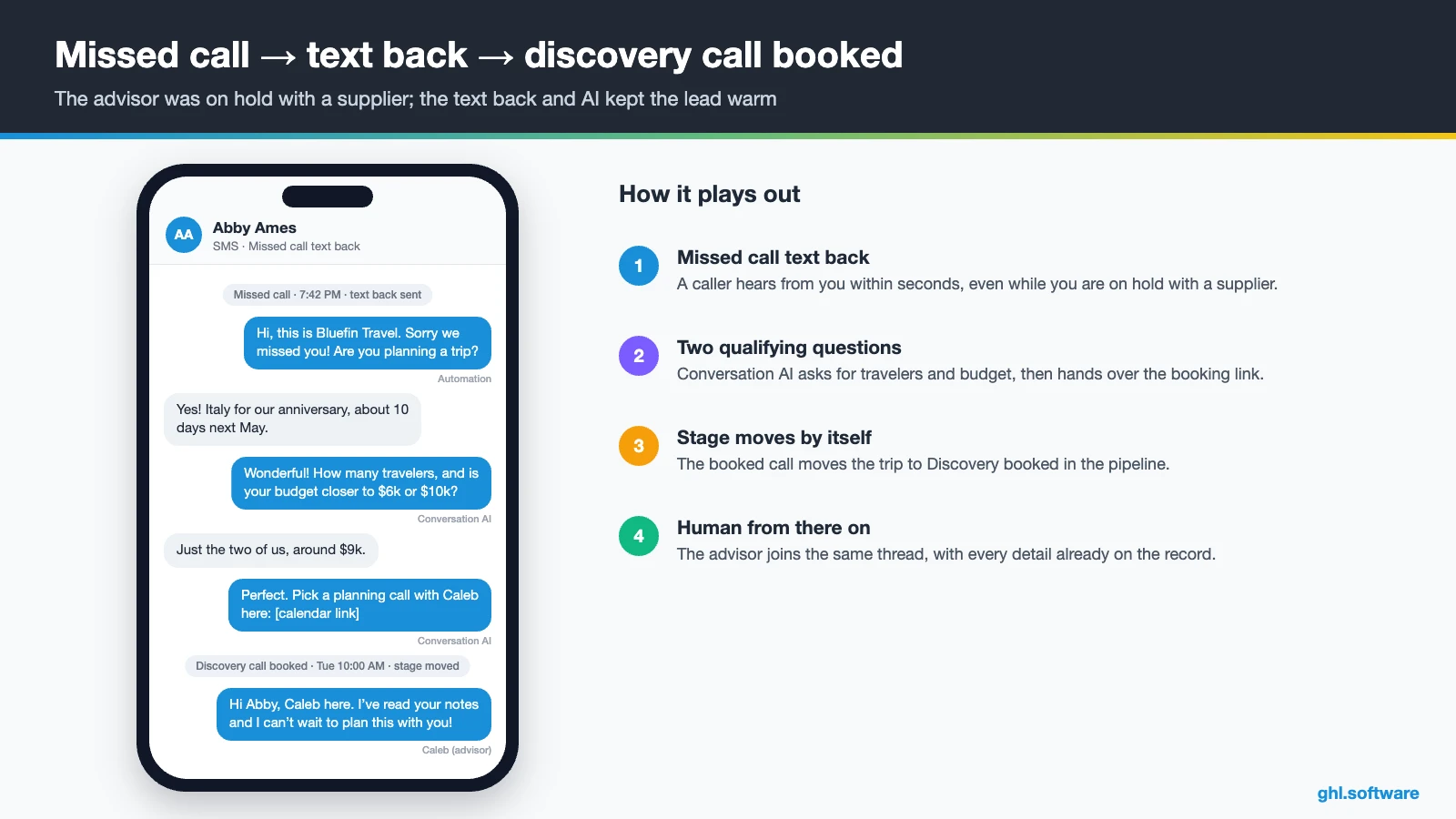
“Italy for our tenth anniversary, ten days next May, about $9,000. Can you help?” Abby Ames types that into a Columbus agency’s inquiry form at 8:50 p.m. on a Sunday. An hour earlier, her call went to voicemail. Caleb Coleman, the advisor, sees it at noon on Monday and sends a lovely proposal on Wednesday. By then, however, the couple has paid a deposit to someone who answered on Sunday night. A travel agency CRM exists for exactly that gap, because it replies in minutes and keeps every quote moving.
Most advisors already have good tools for the trip itself. The GDS and supplier portals hold fares, Travefy or Tern build the itinerary, and a host agency tracks commissions. Still, none of them chases a quiet lead, reminds a client about the final payment or asks for a review. That is the layer HighLevel covers.
So this guide covers independent advisors and small agencies. It shows the trip pipeline, three automations, payment plans, the official snapshot, costs and limits. It is part of our GoHighLevel industry guides.
Leer en español: CRM para agencias de viajes · Ler em português: Sistema para agência de viagens · Part of GoHighLevel by industry
Includes a free live setup class with a HighLevel coach.
Start free + bootcampAffiliate link.
What a travel agency needs from a CRM (and what a GDS doesn’t do)
Think of your tools in layers. The GDS, such as Sabre or Amadeus, and supplier portals handle fares and bookings. Then an itinerary builder like Travefy, Tern or Axus turns them into a polished trip document, while a back office or host agency reconciles commissions. A travel agency CRM sits on top and works the relationship: who asked, what they want, who owes what and when they travel next. In short, the GDS knows the booking, while the CRM knows the traveler.
HighLevel building blocks for travel advisors
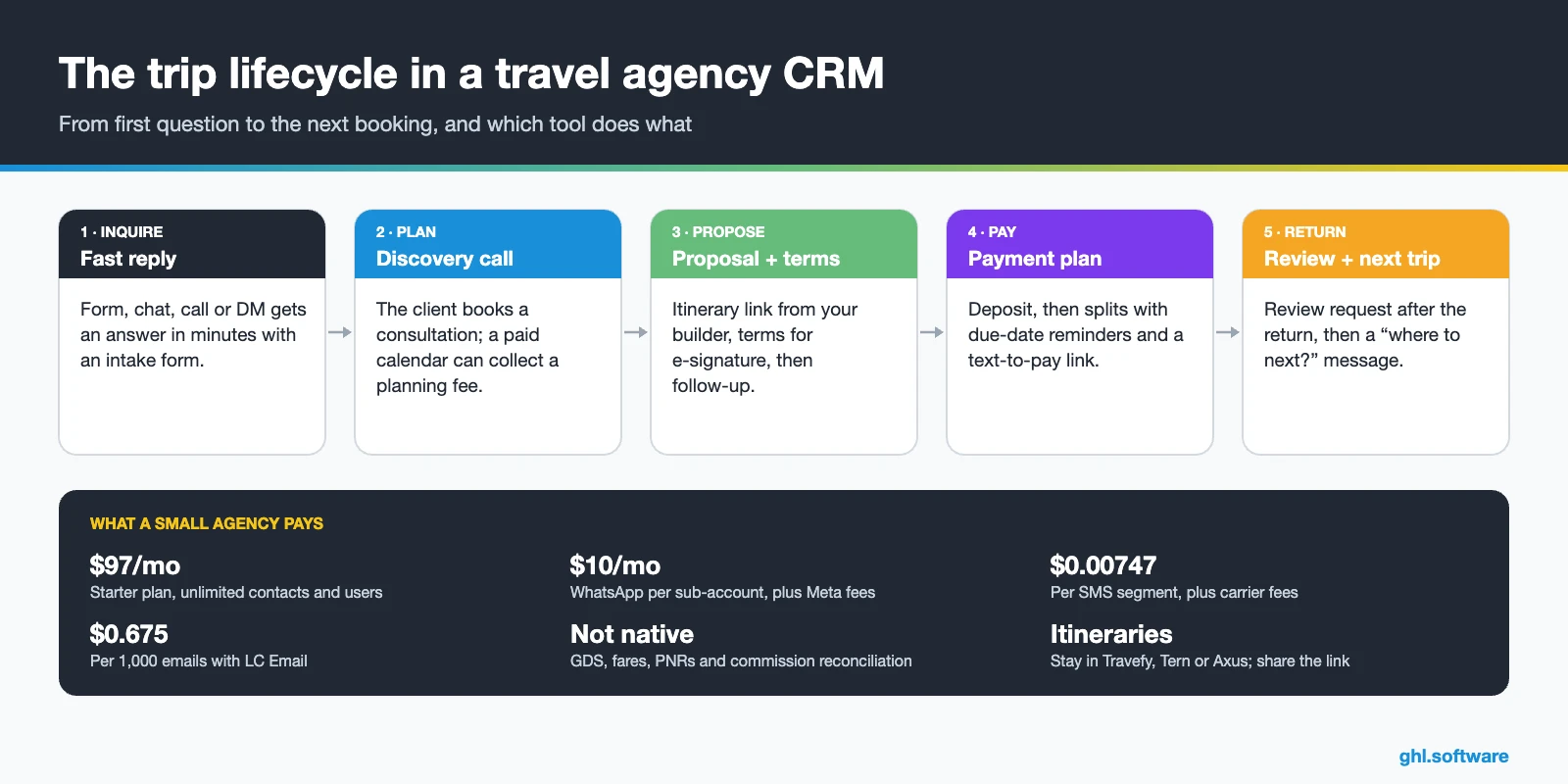
Common travel agency problems and how HighLevel solves them
Most agencies don’t lose clients on price. Instead, they lose them in the gaps between messages, and each gap below maps to one feature of your travel agency CRM.
| Agency problem | What HighLevel does | Feature |
|---|---|---|
| Inquiries answered the next day | Replies in minutes with an intake form and a call link | Workflows + Conversation AI |
| Calls missed while on hold with suppliers | Texts the caller back in seconds | Missed call text back |
| Clients ghost after the proposal | Follows up on days 2, 5, 9 and 14, then stops when the deposit arrives | Pipeline + workflows |
| Free-quote shoppers eat your evenings | Charges a planning fee when the consultation is booked | Paid appointment calendar |
| Chasing deposits and final payments | Splits the invoice and reminds the client on each due date | Invoice payment plans + text-to-pay |
| Client data spread across apps and spreadsheets | Keeps every message, file and trip on one contact record | Unified inbox + custom fields |
| No reviews or repeat trips | Asks for a review after the return and pitches the next trip months later | Reputation + email campaigns |
Keep your itinerary builder and GDS: where HighLevel fits
HighLevel has no supplier inventory, fares, PNRs or itinerary builder. So bookings stay in your GDS or host tools, and you share the Travefy or Tern itinerary link inside the proposal message. We found no native integration with Travefy, TravelJoy, Tern, ClientBase or Sabre. Instead, data can move through Zapier, Make, the Inbound Webhook trigger or the API. Still, most small agencies start simpler: the advisor updates the stage by hand, and the travel agency CRM does the rest.
The trip pipeline in your travel agency CRM
A travel pipeline follows the money as well as the conversation. Most generic CRMs stop at “won”, yet an agency’s real work starts there: the deposit, the payment schedule, documents, the trip and the next booking. Therefore, a travel agency CRM needs stages after the sale. Use one opportunity per trip, not per client, because a family that travels twice a year should show two cards.
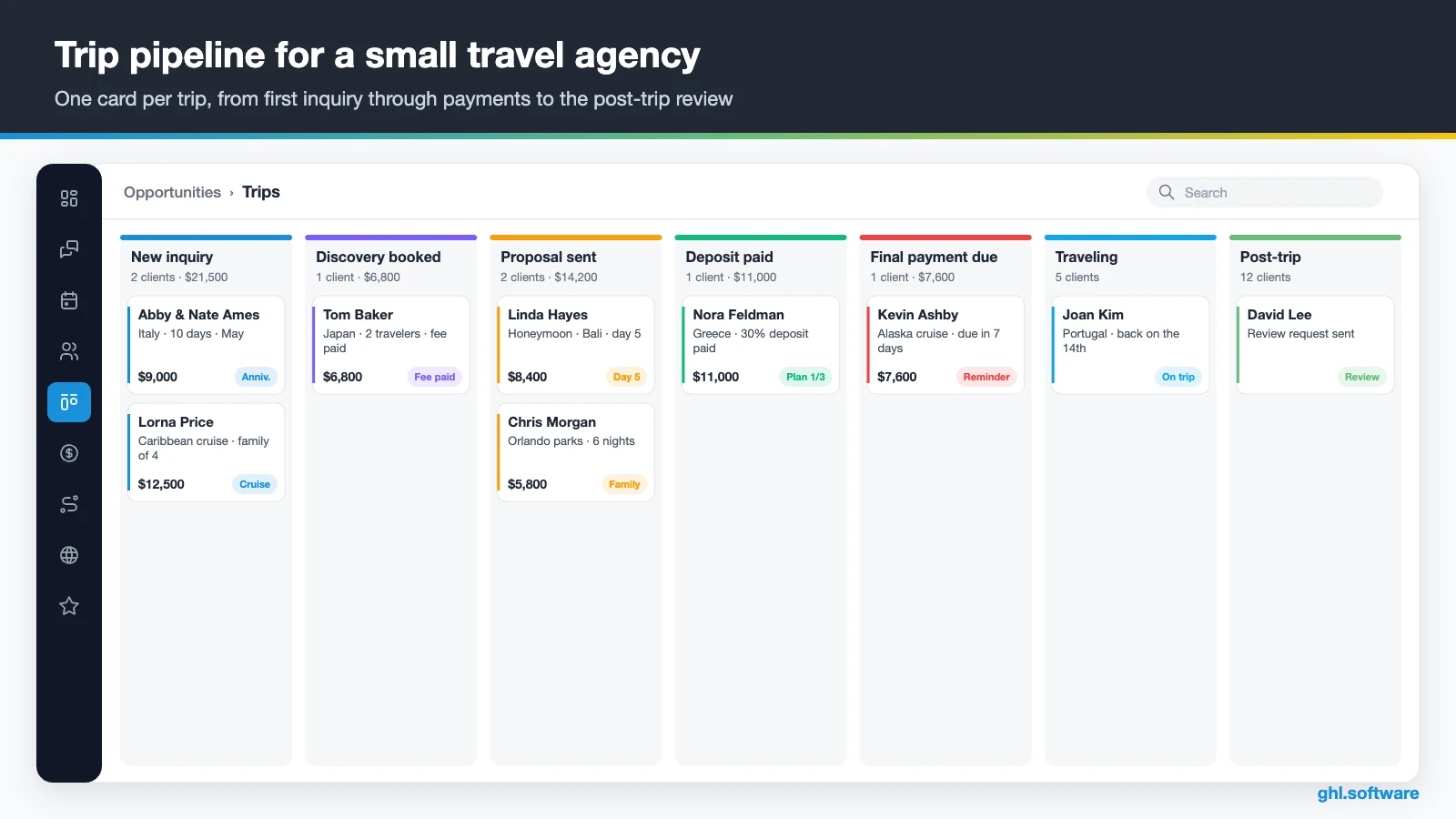
| Stage | What moves the trip here |
|---|---|
| New inquiry | Inquiry form, web chat, WhatsApp, call or DM |
| Discovery call booked | The client books the consultation calendar, paid if you charge a planning fee |
| Proposal sent | The advisor shares the itinerary link, price and terms |
| Deposit paid | The client pays the first split of the payment-plan invoice |
| Final payment due | Supplier balances are coming up and reminders run; once every split is paid, documents go out |
| Traveling | Departure date reached; the advisor watches for issues on the road |
| Post-trip | Return date passed; review request and feedback form go out |
| Lost / no response | No reply after the 14-day follow-up, or the client booked elsewhere |
Trip fields, custom objects and the forecast
Also, add custom fields for destination, dates, travelers, budget, final-payment date and return date. For clients who book several trips, a “Trips” custom object keeps each one tidy. HighLevel offers custom objects on all plans, up to 10 per sub-account, per its custom objects guide. Finally, the Forecast tab shows expected versus won revenue, which helps when commissions arrive months later.
Three automations every travel agency should run
These three workflows are the core of a travel agency CRM. The first answers new leads, the second protects proposals, and the third collects the money and brings the client back.
1. Trip inquiry → discovery call
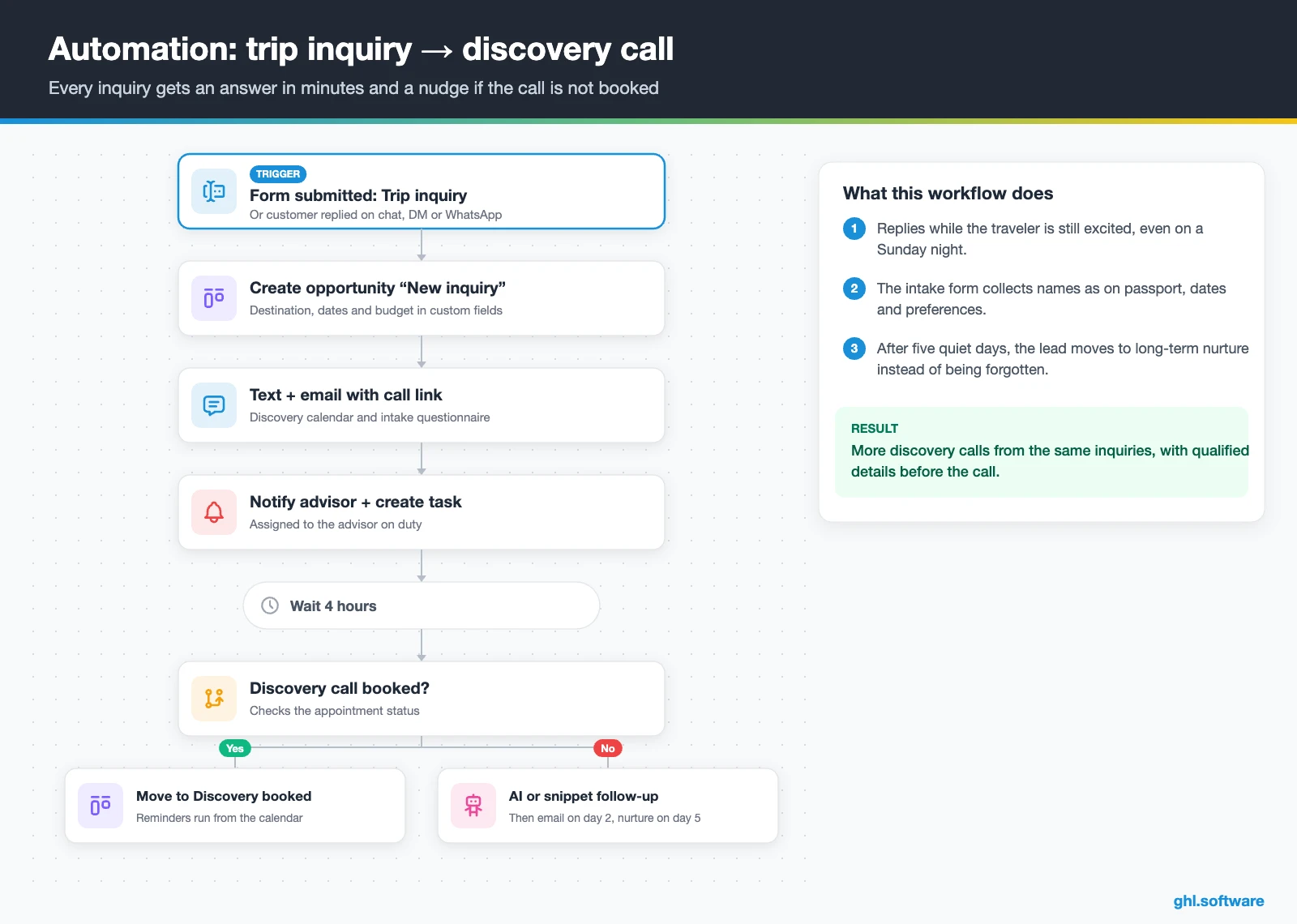
The trigger is Form Submitted on your trip inquiry form, or Customer Replied when a lead writes on chat, Instagram or WhatsApp. Right away, the workflow creates an opportunity and copies destination, dates and budget into custom fields. Then the lead gets a text and an email with the discovery-call link and a short intake form, while the advisor gets a notification and a task.
After four hours, the workflow checks the calendar. If nothing is booked, Conversation AI or a snippet asks one easy question, such as “Are your dates flexible?”. Two days later, an email explains how you plan trips, and after five quiet days the lead moves to nurture. As a result, the Sunday-night couple hears from you first.
2. Proposal follow-up until the deposit
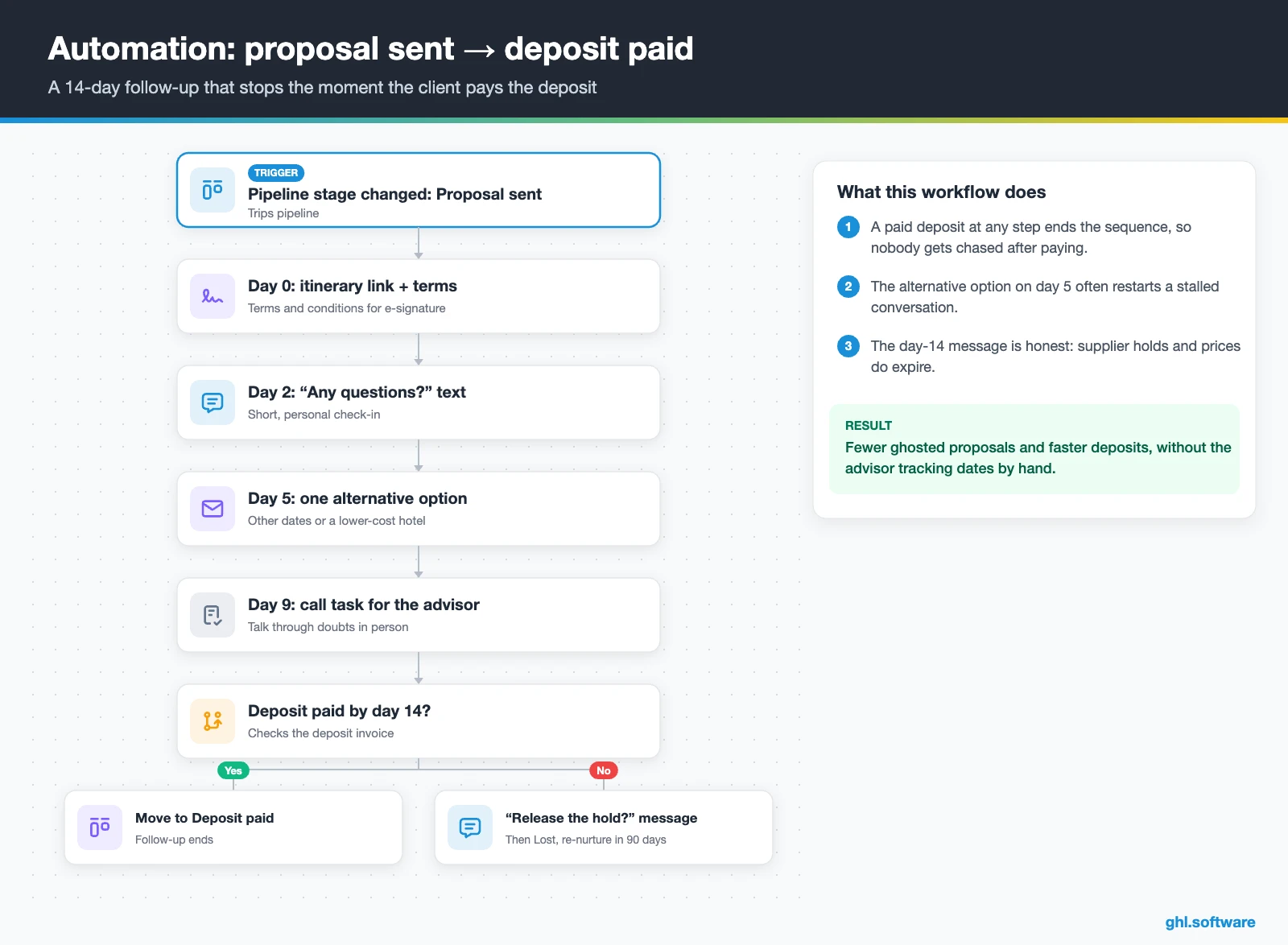
This one starts when the opportunity moves to Proposal sent, through the Pipeline Stage Changed trigger. On day 0, the client receives the itinerary link and your terms for e-signature. Then a short “any questions?” text goes out on day 2, an email with one alternative on day 5, and a call task for the advisor on day 9.
On day 14, a final message asks whether you should release the hold. Meanwhile, the workflow stops as soon as the client pays the deposit and moves the card to Deposit paid. Otherwise, the trip goes to Lost, with a re-nurture in 90 days. That way, no proposal dies quietly.
3. Payment plan, pre-departure and post-trip
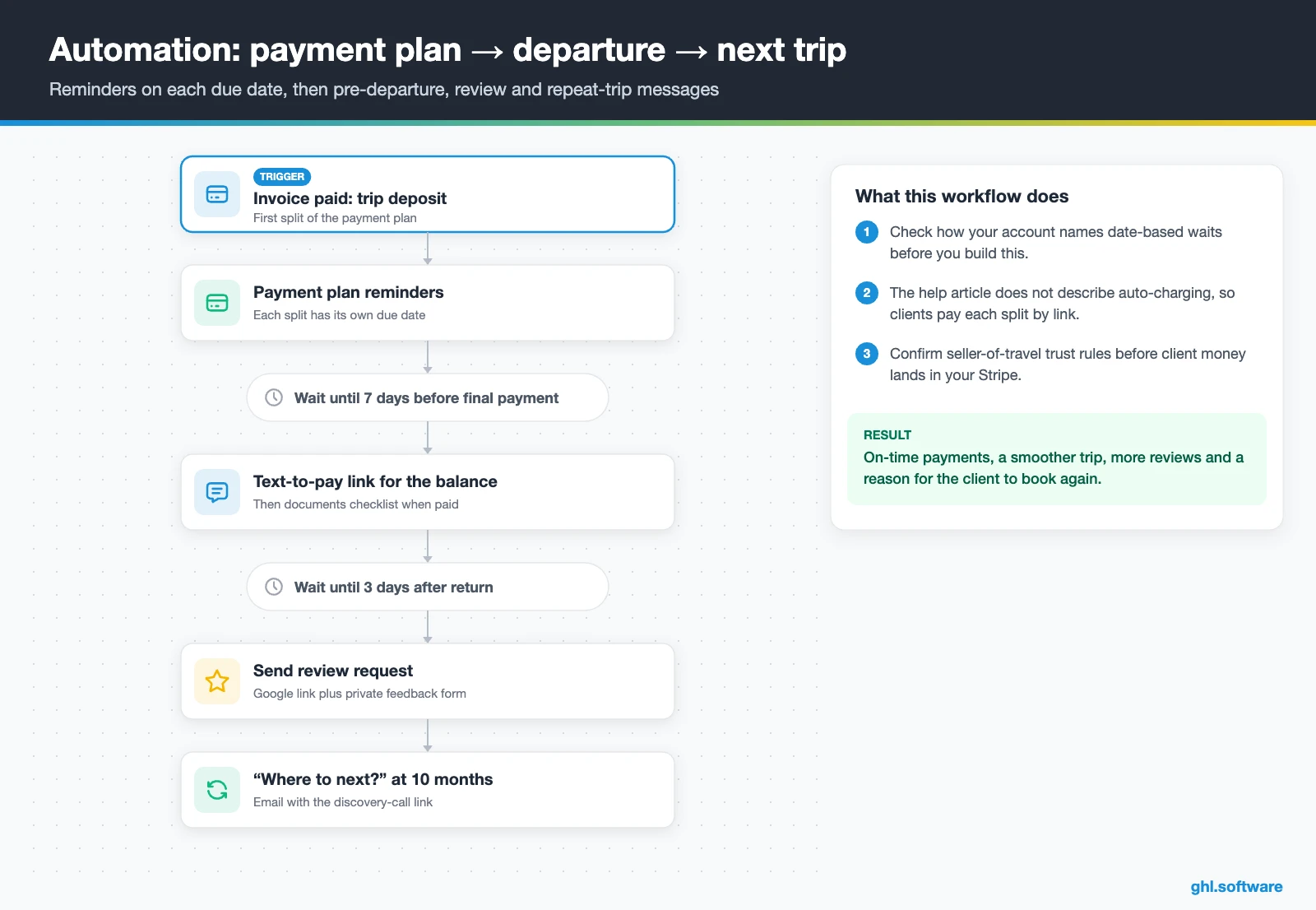
Once the client pays the deposit, the rest needs a schedule. HighLevel’s invoice payment plans split an invoice by percentage or fixed amount, each part with its own due date and status. Reminders also go out on each due date. However, the help article does not describe automatic card charging, so clients pay each split from the link.
Then a Wait step tied to the final-payment date sends a text-to-pay link seven days before the balance is due, so check how your account names date-based waits first. After the final payment, the documents checklist goes out, and packing tips follow a week before departure. Finally, three days after the return, the client gets a review request, and ten months later a “where to next?” message.
Start with the snapshot and the pipeline from this guide, then add the automations one by one. The extended trial comes with our bootcamp link.
Start the 30-day trialAffiliate link. I may earn a commission at no extra cost to you.
Texting, WhatsApp and AI replies for travel inquiries
Travel clients ask a lot before they commit: passports, visas, insurance, cruise cabins. So in a travel agency CRM, every channel should land in one shared inbox with the full history. Also, HighLevel’s Travel & Hospitality playbook recommends web chat, missed call text back, snippets and Conversation AI as an always-on assistant. Meanwhile, response-time SLAs in Conversations show which leads have waited too long.
Many international travelers prefer WhatsApp, which costs $10 a month per sub-account plus Meta’s fees, per HighLevel’s WhatsApp pricing page. Moreover, from 1 October 2026, service messages above the first 1,000 per number each month are billable. For phone calls, Voice AI agents can answer, take trip details and book the consultation. However, keep a human on visa, health and refund questions.
What HighLevel’s official Travel Agency snapshot includes
HighLevel publishes a free Travel Agency snapshot playbook, which it also promotes on its travel agency playbook page. Be realistic, though: the guide is a generic marketing template with the industry name swapped in. It mentions no trips, deposits or payment plans, but it does include the following.
- A “Travel Agency” website: a Home page with services and FAQ sections, plus Link in Bio.
- A “Travel Agency Offer” funnel: an opt-in step, then appointment booking.
- The “Marketing Form – Claim Offer” and a “Marketing Pipeline” with no preset stages.
- Six workflows; two are named: “New Lead Nurture (Fast 5) – Claim Offer” and “Long Term Nurture”.
- Calendars tagged “Travel Agency Services”, plus a simple and an “Event” consultation calendar.
- Custom values, chat widget, snippets, missed call text back, Voice AI prompts and one ad.
You still build the travel parts: the trip pipeline, date fields, proposal follow-up, payment plans, trip messages and all of the copy. Load the kit through snapshots when you create the sub-account, then shape it into a travel agency CRM.
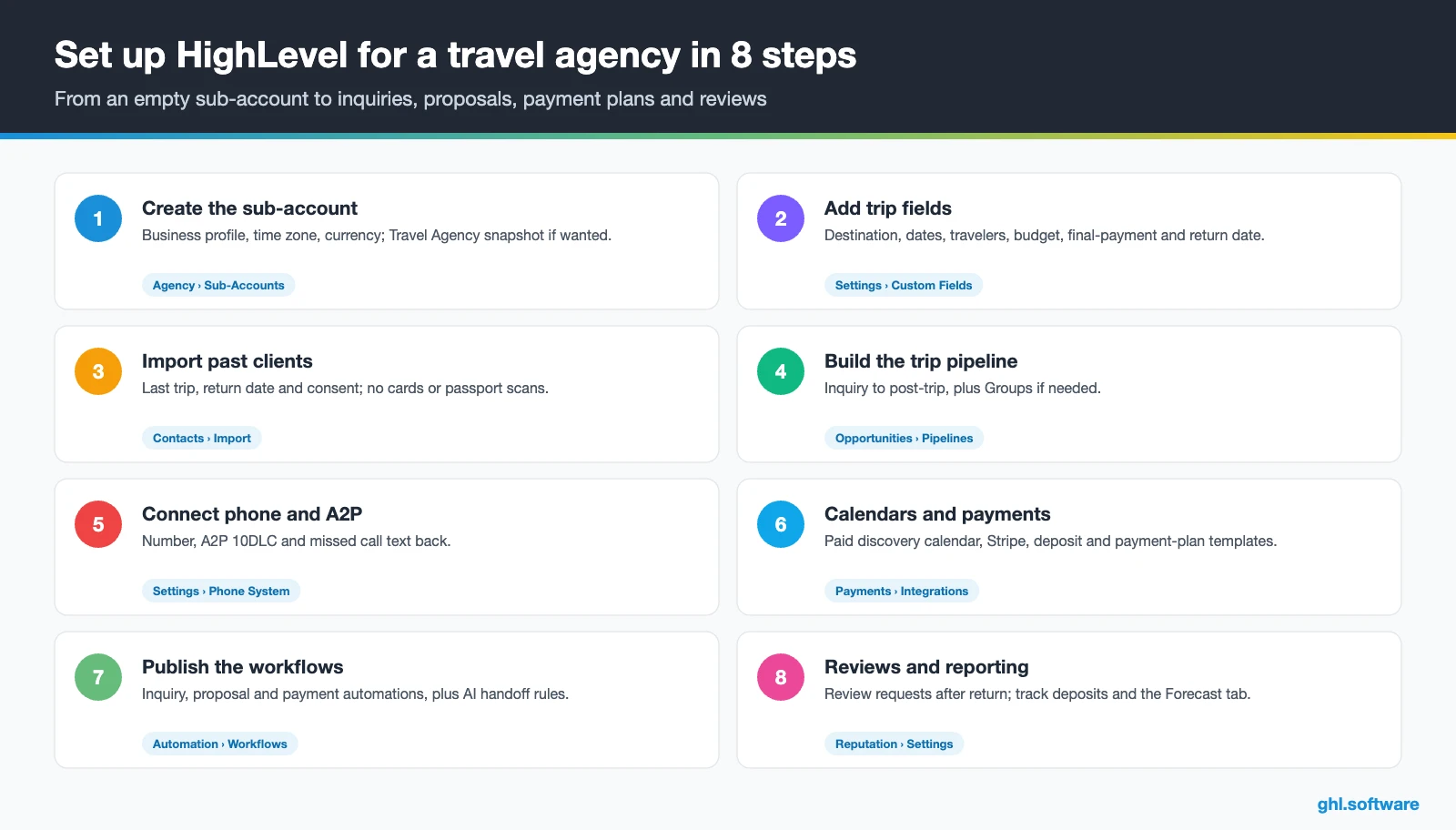
How to set up HighLevel for a travel agency in 8 steps
- Create the sub-account. Add the business profile, time zone and currency, and load the Travel Agency snapshot if you want its site.
- Add trip fields. Create destination, dates, travelers, budget, final-payment date and return date, or a “Trips” custom object.
- Import past clients. Upload past clients with last trip, return date and consent. Never upload card numbers or passport scans.
- Build the trip pipeline. Set up the stages above, and add a separate Groups pipeline if you sell group trips.
- Connect your channels. Buy or port a number, register A2P 10DLC and turn on missed call text back. Then connect WhatsApp, web chat and social inboxes.
- Set up calendars and payments. Create the discovery-call calendar, paid if you charge a planning fee. After that, connect Stripe and set up payment-plan templates.
- Publish the three workflows. Turn on the inquiry, proposal and payment automations, and add Conversation AI with clear handoff rules.
- Track and review. Turn on review requests, then watch inquiries, proposals and deposits in Reporting and the Forecast tab.
Before your travel agency CRM goes live, ask your host or accountant where client funds may land. Also, advisors can answer leads from the mobile app, while our CRM for hotels guide shows a group sales pipeline you can adapt.
What a travel agency CRM costs with HighLevel
HighLevel charges a flat plan plus usage. A solo advisor or small agency usually starts on Starter at $97 a month, with unlimited contacts and users. That matters, because per-seat CRMs cost more with each advisor, while here a third agent costs nothing extra. On top of that, a US number costs $1.15 a month, and texts cost $0.00747 per segment plus carrier fees. Also, A2P registration is $22.50 one-time plus a monthly campaign fee, while WhatsApp adds $10 a month plus Meta’s fees.
So a travel agency CRM for two or three advisors, with a few thousand emails and about 1,000 text segments a month, typically costs $120–$170 before AI. An AI plan at $50 or $97 a month brings it to roughly $170–$270. Meanwhile, a host agency that gives each advisor a sub-account may prefer Unlimited at $297, since Starter includes three. These figures are illustrative, so see our GoHighLevel pricing guide and the AI Employee pricing breakdown.
GoHighLevel plans compared
| Starter | Unlimited | Founder (formerly Agency Pro) | |
|---|---|---|---|
| Price | $97/month | $297/month | $497/month |
| Annual | $970/year | $2,970/year | $4,970/year |
| Sub-accounts | 3 | Unlimited | Unlimited |
| Contacts and users | Unlimited | Unlimited | Unlimited |
| All core features | Yes | Yes | Yes |
| White label web app | Yes | Yes | Yes |
| API access | Basic | Basic | Advanced, agency-level keys |
| Rebill phone and email | No | At cost | With markup |
| Rebill AI usage | No | No | Yes |
| SaaS Mode and automated sub-accounts | No | No | Yes |
| User and agent reporting | No | No | Yes |
| Support | 24/7 | 24/7 | 24/7 |
Usage costs on top of the plan
| Item | Official price | When you pay it |
|---|---|---|
| Local phone number (US/Canada) | $1.15/month | Each number for SMS and calls |
| SMS (US/Canada) | $0.00747 per segment + carrier fees | Every text sent or received |
| Calls (US) | $0.0166/min outbound, $0.01165/min inbound | Calls through LC Phone |
| A2P 10DLC registration | $22.50 one-time (low volume) + monthly campaign fee | Before texting US numbers |
| Email (LC Email) | $0.675 per 1,000 emails | Campaigns and workflow emails |
| $10/month per sub-account + Meta fees | If you use WhatsApp inside HighLevel | |
| AI | Pay-per-use, or $50 or $97/month per sub-account | Voice AI, Conversation AI and other AI tools |
| Premium workflow steps | $0.01 per run after 100 free | Webhooks, Google Sheets, Slack, app actions |
What HighLevel can’t do for travel agencies (and what to keep)
HighLevel works as a travel agency CRM: the sales, messaging and marketing layer. It is not a travel management system, so know these gaps first.
- No GDS or booking engine. It holds no fares, inventory or PNRs, so bookings stay in Sabre, Amadeus or supplier portals.
- No itinerary builder. Proposals carry text, prices and signatures, but day-by-day itineraries belong in Travefy, Tern or Axus.
- No commission reconciliation. Instead, your back office or host agency handles commissions and BSP/ARC reporting.
- No native travel integrations. Links run through Zapier, Make or webhooks, which you build and test.
- Payment rules come first. Seller-of-travel trust or bond rules may limit where client money goes.
How travel advisor platforms compare
Several advisor platforms already include a light CRM. This neutral table uses public pages, and “Check vendor” means we could not confirm the feature.
| HighLevel | Travefy | TravelJoy | Tern | |
|---|---|---|---|---|
| Built for travel advisors | No | Yes | Yes | Yes |
| Itinerary builder | No | Yes | Check vendor | Yes |
| Client CRM and pipeline | Yes | Yes | Yes | Yes |
| Invoices and payments | ✓ (payment plans) | Yes | Check vendor | Check vendor |
| Commission tracking | No | Yes | Check vendor | Check vendor |
| WhatsApp in a shared inbox | Yes | Check vendor | Check vendor | Check vendor |
| AI chat and voice agents | Yes | Check vendor | Check vendor | Check vendor |
The Travefy cells come from Travefy’s software guide, while TravelJoy and Tern appear as travel-specific CRMs in Nutshell’s travel CRM comparison. In short, keep the platform that builds your itineraries, and add HighLevel for replies, WhatsApp, payment reminders and marketing.
Seller-of-travel laws, texting rules and traveler data
The US has no federal travel agent license. However, California, Florida, Washington and Hawaii have seller-of-travel laws that can apply when you sell to their residents from anywhere. For example, California requires registration at $100 per location and a trust account for client funds. Florida, meanwhile, charges $300 a year and requires a $25,000 surety bond, although waivers exist. Hosted advisors may use their host’s registration under conditions, per Host Agency Reviews, and New York’s Truth in Travel Act adds disclosure rules.
The fee most travel CRMs ignore: charging for your planning time
Here is the angle most travel agency CRM guides miss. Many advisors now charge for their time, because free quotes attract shoppers who book elsewhere. In fact, a 2020 Host Agency Reviews survey, reported by TravelPulse, found that 52% of hosted advisors charged some kind of fee. That split into 26% service fees only, 10% consultation fees only and 16% both. The data is from 2020, so treat it as a direction, not as today’s market.
HighLevel makes a fee easy to run. A paid appointment calendar collects the planning fee when the client books the discovery call, so only serious travelers reach your calendar. Then a planning agreement goes out for e-signature, and you can credit the fee against the trip if you like. As a result, your evenings go to clients who have already committed.
Open a free account, load the pipeline and turn on the first automation today. The bootcamp walks you through the setup live.
Start the 30-day trialAffiliate link. I may earn a commission at no extra cost to you.
Frequently asked questions
What is a CRM for travel agents?
A CRM for travel agents keeps one record per client and one opportunity per trip, from first inquiry to final payment and the next booking. It stores preferences, travel dates and every message, then automates follow-up, payment reminders and review requests. It is different from a GDS or itinerary builder, which handle fares, bookings and trip documents. Many agencies use both: Travefy or Tern for itineraries, and a CRM like HighLevel for sales and follow-up.
Can HighLevel integrate with my booking system or itinerary builder?
We found no native HighLevel integration with Travefy, TravelJoy, Tern, ClientBase or Sabre. Instead, you connect through Zapier, Make, webhooks or the API, for example to move a trip to Deposit paid when your back office records a booking. Many small agencies skip the integration at first. So the advisor shares the itinerary link in the proposal message and updates the stage by hand, while workflows handle the reminders.
How do I stop travel leads going cold after I send a quote?
Answer fast, then follow up on a schedule. In HighLevel, moving a trip to Proposal sent starts a workflow: a check-in text on day 2, an email with one alternative on day 5, a call task on day 9 and a “should I release the hold?” message on day 14. The workflow stops when the client pays the deposit. Also, a paid planning fee filters out shoppers before you spend hours on a proposal.
How do I collect deposits and final payments for a trip?
Use an invoice with a payment plan. HighLevel splits the invoice by percentage or fixed amount, gives each split its own due date and sends reminders on those dates. A text-to-pay link also helps with the final balance. However, the help article does not describe automatic card charging. Before you collect funds, check seller-of-travel trust rules and your host agency’s policy, because some agencies must route client money through a trust account.
Is HighLevel a good fit for a small or hosted travel agency?
Yes, if you mainly need faster replies, follow-up, payment reminders and marketing. The Starter plan costs $97 a month with unlimited users, so a two- or three-person agency pays no per-seat fees. Hosted advisors should check what their host already provides, such as a CRM, booking tools or a payment setup, and connect HighLevel around it. Meanwhile, keep your itinerary builder and the host’s back office for bookings and commissions.
Do I need seller-of-travel registration?
It depends on where you and your clients are. The US has no federal license, but California, Florida, Washington and Hawaii have seller-of-travel laws that can apply when you sell to their residents. For example, Florida requires an annual registration and a surety bond, although waivers exist. Hosted advisors can sometimes operate under the host’s registration. So check each state’s current rules or ask your host, because this guide is not legal advice.
Can HighLevel track agent commissions?
Not as a commission system. HighLevel has no supplier commission reconciliation, so your back office, host agency or a tool like Travefy keeps that job. However, you can store the expected commission in the opportunity value or a custom field. Then the Forecast tab and reports show expected versus won revenue by advisor and stage, which helps you plan cash flow while you wait for supplier payments.
More industry guides
Sources: HighLevel Travel Agency snapshot playbook · HighLevel: Industry playbook – Travel & Hospitality · HighLevel: Flexible payment plans in invoices · HighLevel: Custom objects in all plans · HighLevel: WhatsApp platform pricing · HighLevel: A2P 10DLC brand and campaign registration · Host Agency Reviews: Seller of travel laws · TravelPulse: Survey on hosted advisors charging fees (2020) · FCC: Telemarketing and robocalls · Travefy: Best travel agency software