

Solar CRM: Leads, Proposals and Installs in GoHighLevel
A solar CRM has to do two jobs: win the sale and keep the customer until the system is switched on. GoHighLevel handles the first with instant texts, AI qualification, round-robin consult booking, estimates and e-signed contracts. Then an install pipeline texts the homeowner at every stage until PTO. However, it does not design systems or model production, so Aurora, OpenSolar or your design tool stays in the stack.
The cancellation email lands on Monday: Ingrid Castillo is out, eleven weeks after she signed. Rewind to the Tuesday night she filled out your solar Facebook form for her Tucson ranch house. She paid about $240 a month for power, and your text reached her before two other installers called. So she booked, signed and then heard almost nothing while her permit sat at the city. A solar CRM exists for both moments: the first reply and the long quiet after the signature.
That quiet stretch is where signed deals die. After signing, a homeowner waits through the survey, permit, install, inspection and utility approval. In fact, an NREL study found about 1 in 10 rooftop solar customers who sign a contract cancel before installation. Installers in that survey also linked permitting and interconnection delays to cancellations.
This independent guide shows how to build both halves in HighLevel, from pipelines and automations to costs and honest limits. It is for installers, EPCs, solar sales teams and their agencies.
Leer en español: Software para empresas de energía solar · Ler em português: CRM para energia solar · Part of GoHighLevel by industry
Includes a free live setup class with a HighLevel coach.
Start free + bootcampAffiliate link.
What a solar company needs from a CRM
Most solar teams already have a design tool and maybe a project spreadsheet. What leaks is everything around them: the slow first reply, the consult nobody confirmed, the proposal that sat unopened and the customer who heard nothing for six weeks. So here is how HighLevel covers each of those steps as a solar CRM.
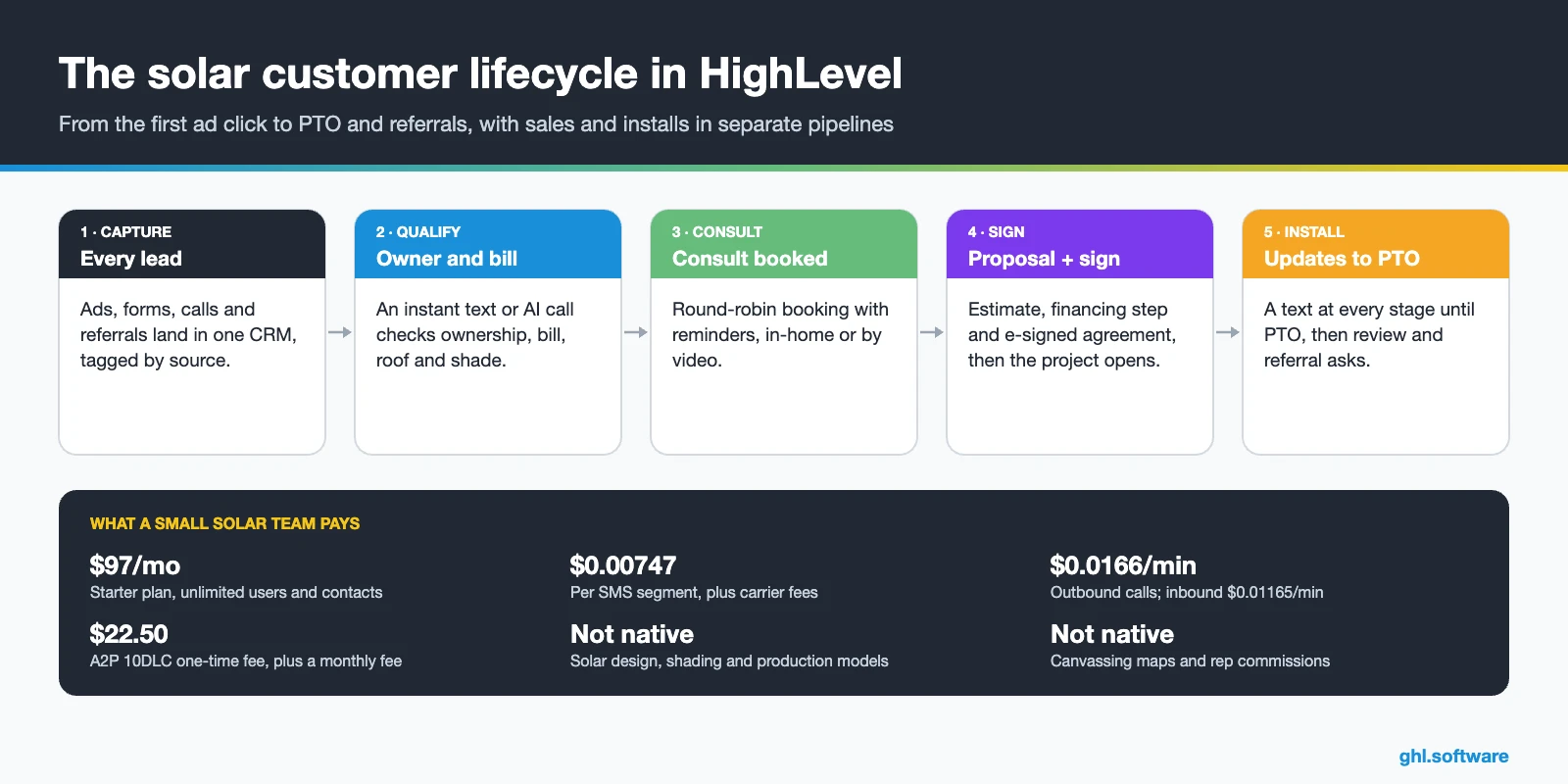
Solar sales problems and how HighLevel solves them
The table maps the usual leaks in a solar sales cycle to the solar CRM feature that plugs each one. In fact, most of them sit at the hand-offs: ad to rep, rep to proposal and sale to install.
| Problem | What HighLevel does | Feature |
|---|---|---|
| Paid leads wait hours for a reply | Sends an instant text or AI call and assigns the next rep | Workflows + Voice AI |
| Homeowners call while reps are in a consult | Texts the caller back with a booking link | Missed call text back |
| Renters and tiny bills reach the calendar | A qualification survey tags and filters them | Forms + tags |
| Consult no-shows | Confirms and reminds by SMS and email | Calendars |
| Proposals sit without a decision | Runs a 21-day follow-up with texts, email and a call task | Estimates + workflows |
| Signed customers hear nothing for weeks | Sends a status text at every install stage until PTO | Install pipeline + workflows |
| Cancellations are caught too late | Alerts a manager when a reply mentions “cancel” | Workflows + notifications |
| Few reviews after install | Asks for a review after PTO, then for a referral | Reputation management |
The solar CRM pipeline: one board for sales, one for installs
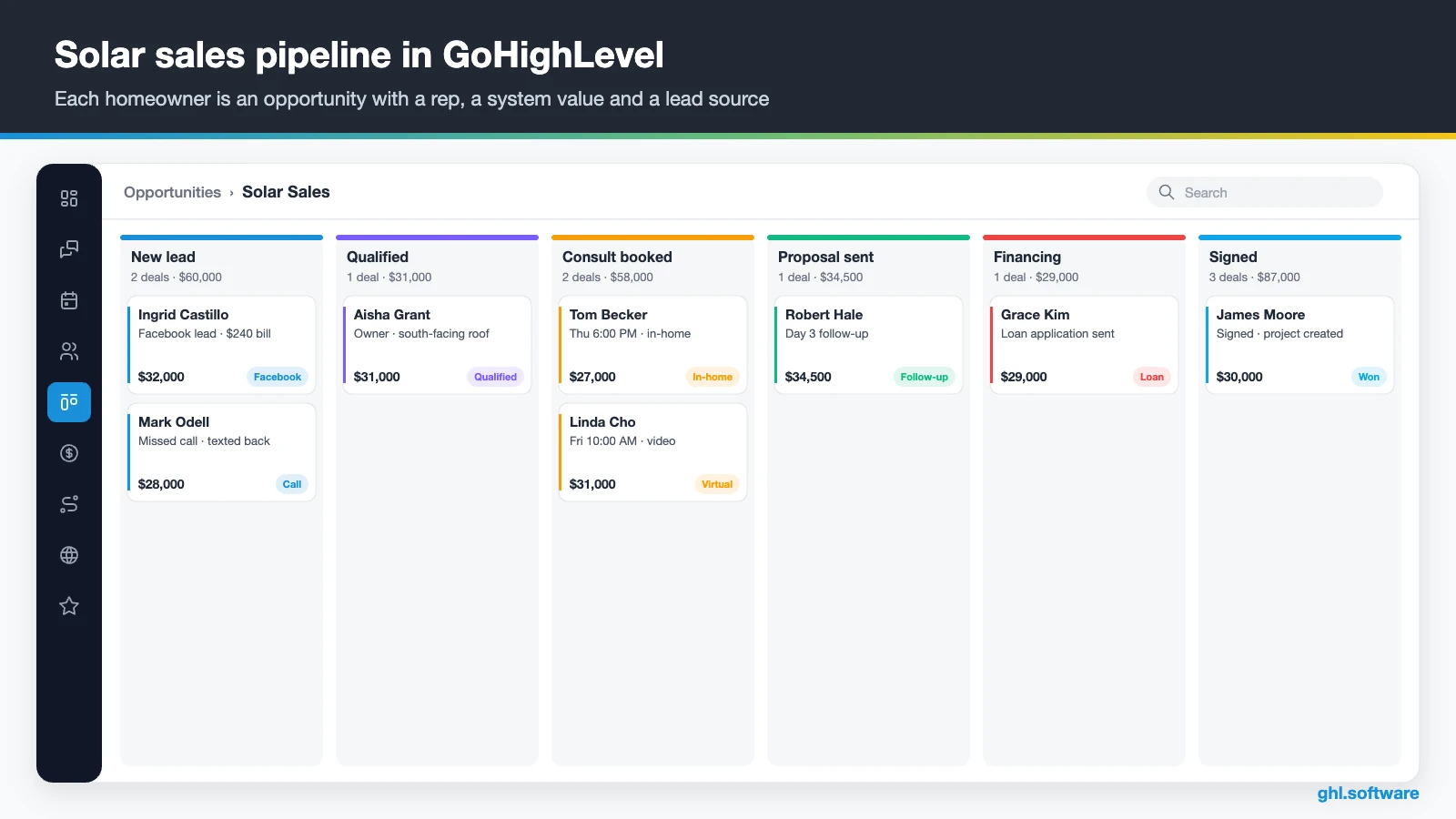
The most common setup mistake is one long board from first click to PTO. However, sales and installs move at different speeds and have different owners. A solar CRM therefore works better with two pipelines. In HighLevel, the sales pipeline ends at “Signed”, and a workflow then creates the project in the install pipeline.
| Sales stage | What moves the deal here |
|---|---|
| New lead | A form, ad, call or chat creates the opportunity |
| Contacted | The homeowner replies to the rep or the AI |
| Qualified | Survey answers pass your rules: owner, bill, roof |
| Consult booked | The homeowner books on the consult calendar |
| Proposal sent | The estimate and the design proposal go out |
| Financing | The customer applies with your lender or chooses cash |
| Signed | The agreement is e-signed, the deal is Won and the install project opens |
The install pipeline then follows the project: Signed, Site survey, Design, Permit submitted, Permit approved, Installed, Inspection and PTO. Meanwhile, system details such as kW, panel count, inverter, utility and permit number live in a custom object called “Solar Project”, linked to the contact. Custom objects are available on all plans, with up to 10 objects per location (HighLevel help).
Proposals: HighLevel Estimates next to your design tool
HighLevel’s Estimates use your products, such as system packages, batteries or EV chargers, and go out by email or SMS. The homeowner then accepts or declines online. Their status moves through Draft, Sent, Accepted, Declined and Invoiced. Also, the workflow action “Send Estimate” can send them automatically (help article).
Still, an estimate is not a solar design. Panel layout, shading and production modeling stay in Aurora, OpenSolar or your design tool. So attach the design proposal to the deal, and send the binding agreement through Documents & Contracts. In short, HighLevel carries the conversation, the deadline and the signature, while your design software carries the engineering.
Three solar automations to run first
These workflows turn HighLevel into a solar CRM that works while your reps sit in consults. They cover the first reply, the proposal and the long wait after the signature. Build them in this order, because each one depends on the stages above.
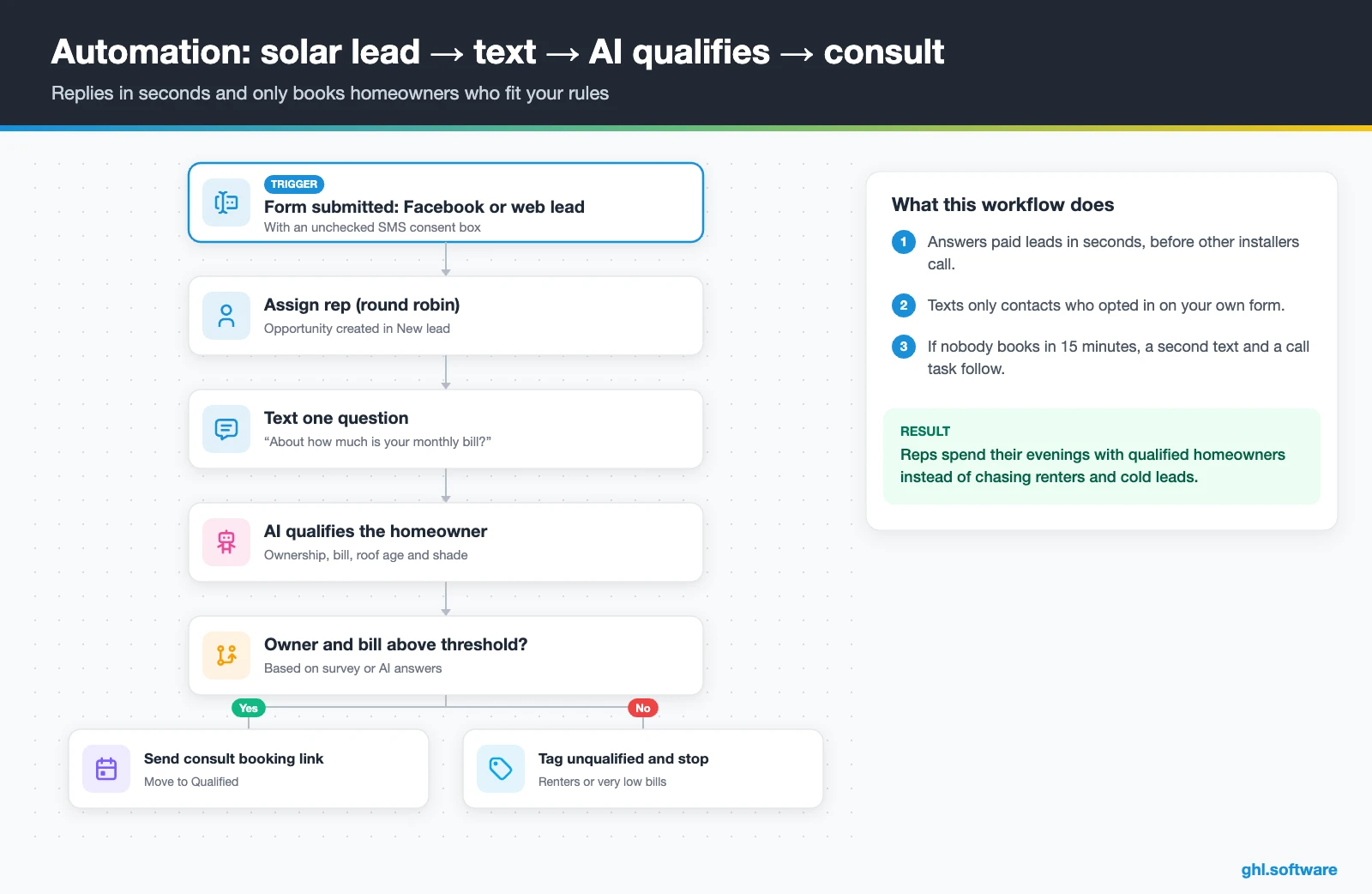
Solar lead → instant text → AI qualification → consult
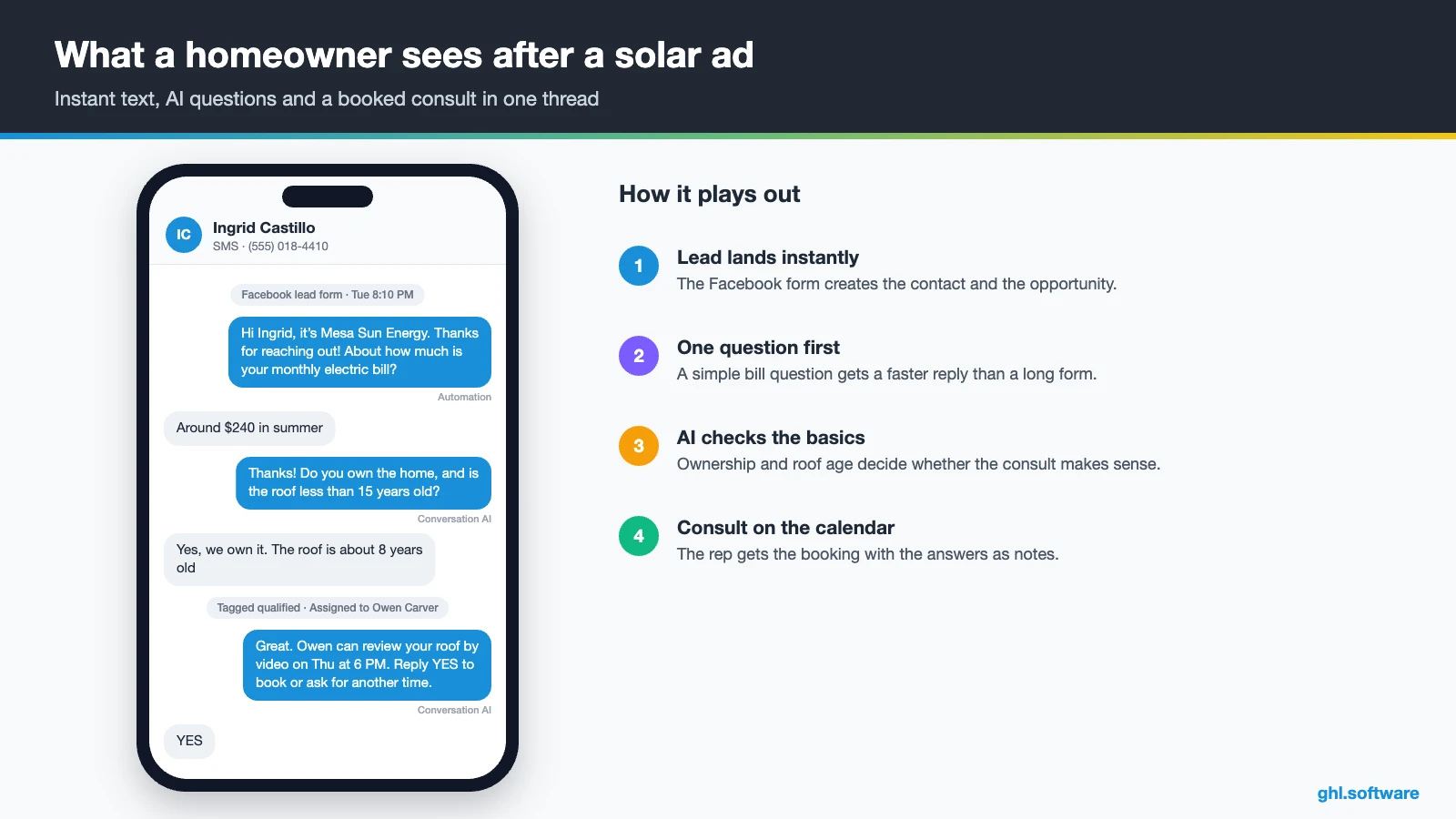
The trigger is a Facebook lead form or website form with an unchecked SMS consent box. Then the workflow creates the opportunity in “New lead”, assigns the next rep and texts a single question: roughly how much is the monthly electric bill? After that, Conversation AI or a Voice AI agent can carry the rest of the qualification.
If the homeowner owns the home and the bill clears your threshold, the workflow sends the consult link and moves the card to “Qualified”. Otherwise, it tags the contact as unqualified and stops. Also, if nobody books within 15 minutes, a second text goes out and the rep gets a call task. As a result, reps spend their evenings with homeowners who can actually buy.
Proposal sent → 21-day follow-up
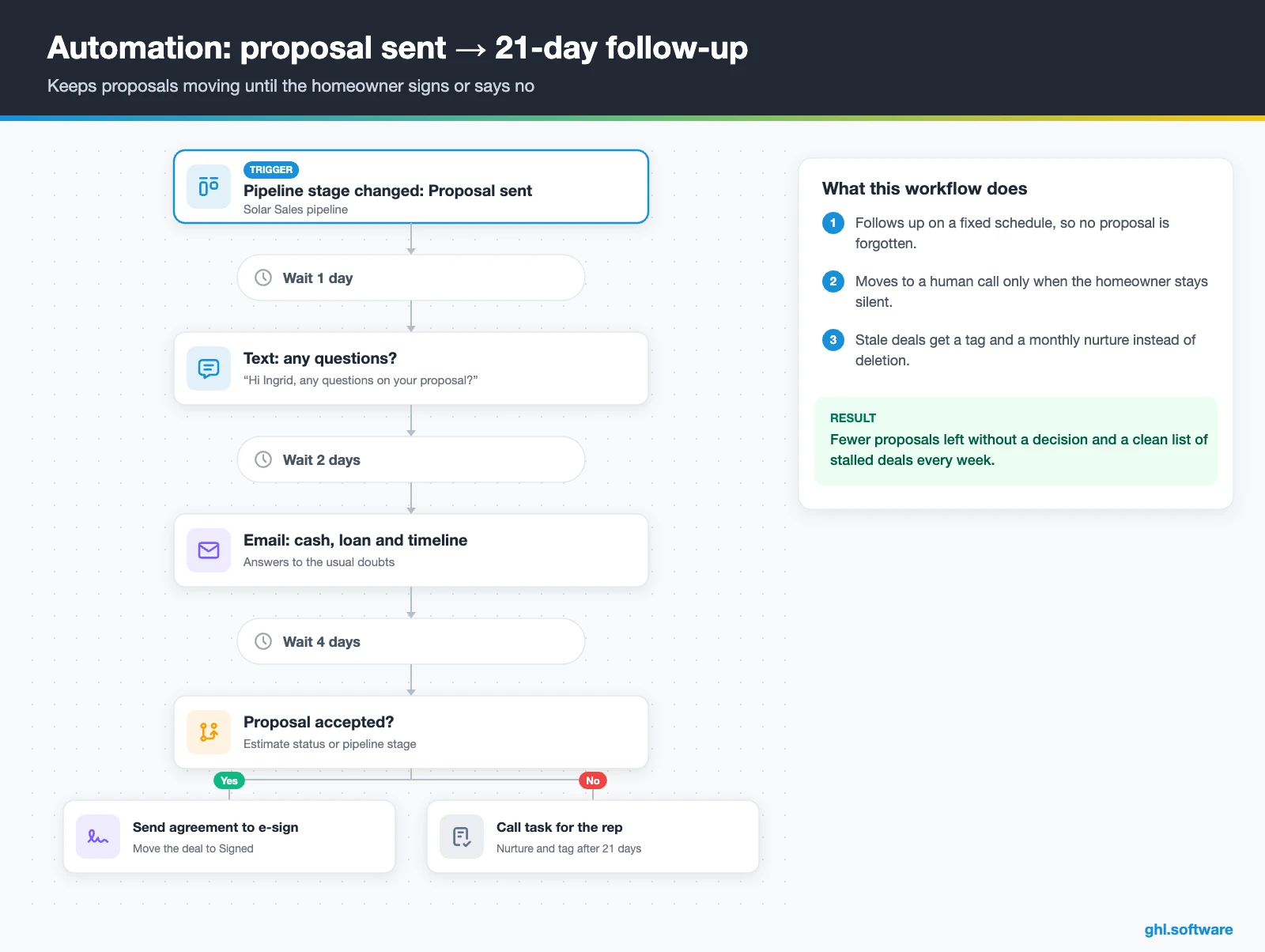
This workflow starts when the card reaches “Proposal sent”. One day later it texts “Any questions on your proposal?” Two days after that, an email answers the usual doubts: cash or financing, warranty and timeline. Then, on day seven, an if/else checks whether the proposal is still open. If it is, the rep gets a call task.
When the homeowner accepts, the workflow sends the agreement for e-signature and moves the deal to “Signed”. After 21 days without a decision, instead, it moves the contact to a monthly nurture and tags it “proposal-stale”. That way, the sales manager sees a clean list of stalled deals every Monday.
Install stage changed → status update → review
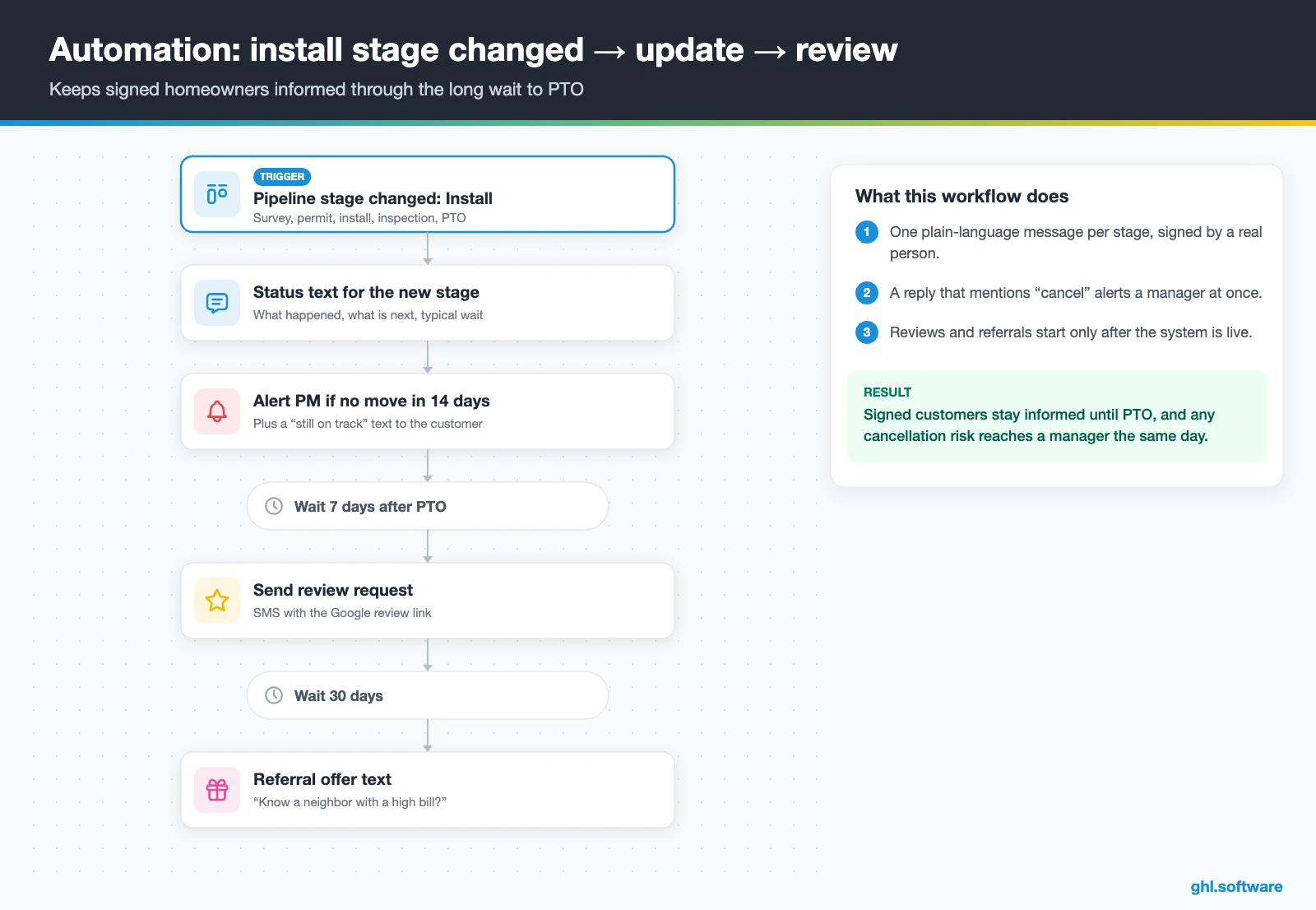
This is the automation most solar companies skip. The trigger is “Pipeline stage changed” in the install pipeline. At each stage, the homeowner gets a plain-language text with what just happened, what comes next and a typical wait. For example: “Your permit was submitted today. The city usually takes a few weeks, and we will text you when it is approved.”
Also, if a stage hasn’t moved in 14 days, the project manager gets an alert and the customer gets a “still on track” note. If a reply contains “cancel”, an urgent notification and a manager task fire at once. Finally, seven days after PTO, a review request goes out, and 30 days later a referral offer follows.
Start with the snapshot and the pipeline from this guide, then add the automations one by one. The extended trial comes with our bootcamp link.
Start the 30-day trialAffiliate link. I may earn a commission at no extra cost to you.
Texting, calls and an AI appointment setter for solar
A solar CRM has to follow leads across channels, because they reply on whatever they used first: a text, a Facebook message or a callback. HighLevel keeps SMS, email, Facebook and Instagram DMs, WhatsApp and web chat in one thread per contact. So the setter, the closer and the project manager all see the same history. Besides, conversations can carry response-time SLAs, which helps a sales manager spot leads that waited too long.
AI covers evenings and weekends. Conversation AI replies to texts and chats, while Voice AI agents handle inbound and outbound calls and can book appointments mid-call. However, HighLevel’s ready-made “Aria” industry agent is built for home services such as HVAC and plumbing, not solar. So write a custom prompt with your qualification questions, service area and hand-off rules. The AI Employee pricing guide explains the costs.
What HighLevel’s official Solar snapshot includes
HighLevel publishes a free Solar playbook with a matching “Solar Snapshot”. However, it is a generic template with the industry name swapped in. Still, it saves a day of setup. Out of the box you get:
- A “Solar” website with Home (services and FAQ sections) and Link in Bio pages, plus a chat widget.
- A “Solar Offer” funnel: an opt-in step, then an appointment booking page.
- The “Marketing Form – Claim Offer” form and a generic “Marketing Pipeline”.
- The “New Lead Nurture (Fast 5) – Claim Offer” and “Long Term Nurture” workflows, with email, SMS and a voicemail drop.
- Calendars tagged “Solar Services”, custom values, snippets, social post templates and a “Solar” proposal template.
- Setup steps for missed call text back, review requests, payments and one Ad Manager ad.
What you still build is the solar logic. There are no qualification questions, no permit or PTO stages, no financing step and no cancellation workflow. Also, this snapshot has no Voice AI prompt, and the included ad still carries another industry’s name, so rename it before launch. Rewrite all copy for your market. Then save your finished build as your own snapshot.
How to set up a solar CRM in GoHighLevel
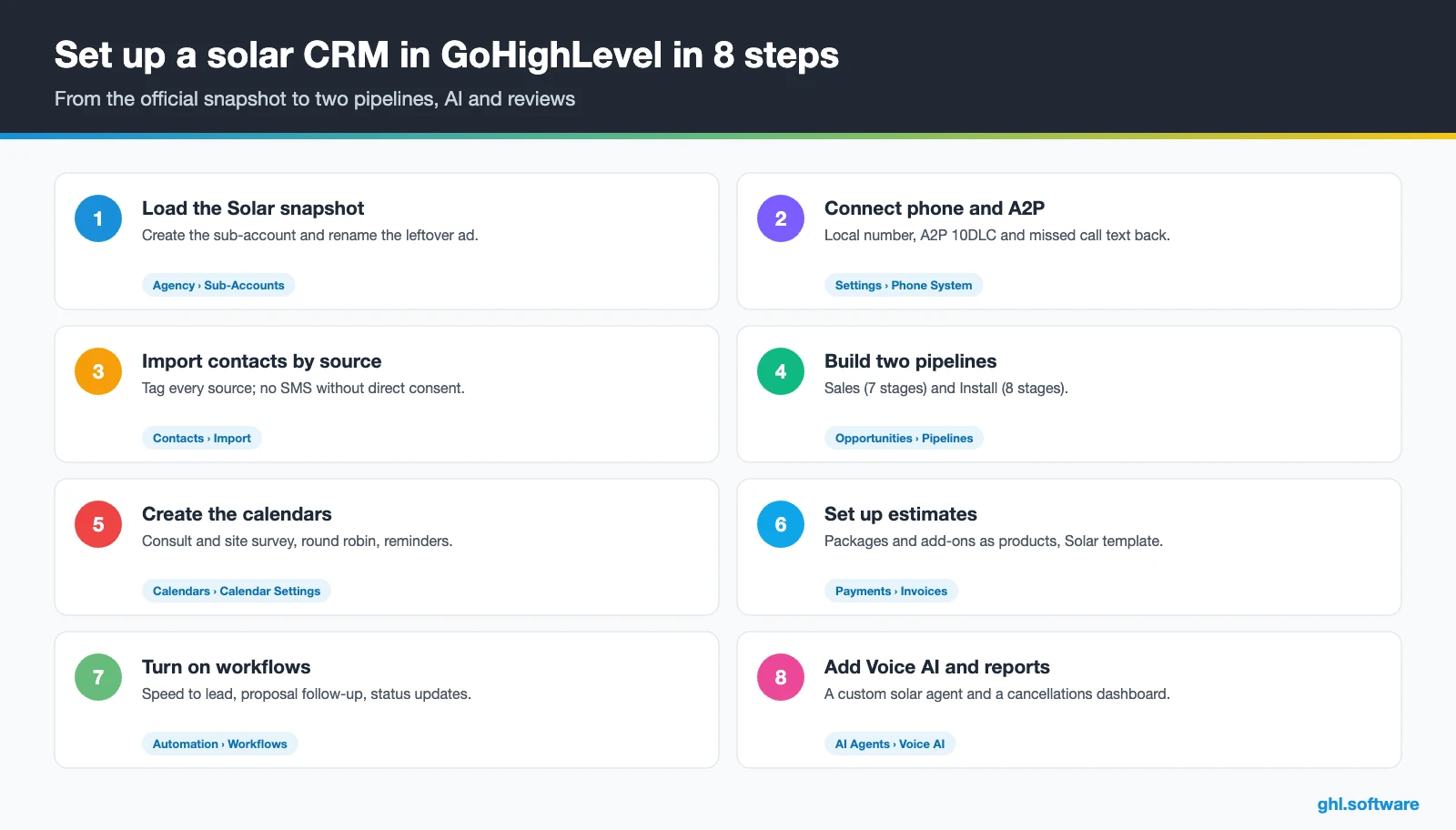
Follow this order when you set up your solar CRM, so the first paid lead already flows from form to consult. A small installer can finish it in a few focused days. However, A2P approval takes time, so start that step on day one.
- Load the Solar snapshot. Create the sub-account from the “Solar Snapshot”, add your logo, service area and users, and rename the leftover ad.
- Connect phone and A2P. Buy a local number, register A2P 10DLC with an unchecked consent box on your forms, and turn on missed call text back. See phone and SMS.
- Import contacts carefully. Tag every contact by source. Leads bought or shared from aggregators stay out of SMS until they give you direct consent.
- Build two pipelines. Replace the generic Marketing Pipeline with Sales (7 stages) and Install (8 stages), then add the “Solar Project” custom object.
- Set up calendars. A consult calendar, in-home or virtual, and a site-survey calendar with round robin, reminders and Services for crews.
- Add proposals and contracts. Add packages and add-ons as products for Estimates, and edit the “Solar” template in Documents & Contracts.
- Turn on workflows and AI. Publish the three automations and the snapshot’s nurture workflows, then add a custom Voice AI agent.
- Connect reviews and reporting. Connect Google Business Profile, set review requests and build a dashboard for leads by source, show rate, signed deals and cancellations.
What a solar CRM costs on HighLevel
HighLevel charges a flat plan price with unlimited users and contacts. So adding setters, closers or project managers doesn’t raise the bill, unlike per-seat solar CRM software. Usage, however, is billed on top: numbers, texts, calls, emails, WhatsApp and AI.
For example, a five-rep installer on Starter ($97) with two local numbers ($2.30) and 3,000 SMS segments (about $22) pays about $121. Add 2,000 outbound minutes (about $33), 10,000 emails (about $7) and the $50 AI plan, and the total is about $211 a month. Besides, carrier fees, the A2P campaign fee and card processing come on top. As a result, most small solar teams land between $180 and $350 a month. Our pricing guide has the full breakdown.
GoHighLevel plans compared
| Starter | Unlimited | Founder (formerly Agency Pro) | |
|---|---|---|---|
| Price | $97/month | $297/month | $497/month |
| Annual | $970/year | $2,970/year | $4,970/year |
| Sub-accounts | 3 | Unlimited | Unlimited |
| Contacts and users | Unlimited | Unlimited | Unlimited |
| All core features | Yes | Yes | Yes |
| White label web app | Yes | Yes | Yes |
| API access | Basic | Basic | Advanced, agency-level keys |
| Rebill phone and email | No | At cost | With markup |
| Rebill AI usage | No | No | Yes |
| SaaS Mode and automated sub-accounts | No | No | Yes |
| User and agent reporting | No | No | Yes |
| Support | 24/7 | 24/7 | 24/7 |
Usage costs on top of the plan
| Item | Official price | When you pay it |
|---|---|---|
| Local phone number (US/Canada) | $1.15/month | Each number for SMS and calls |
| SMS (US/Canada) | $0.00747 per segment + carrier fees | Every text sent or received |
| Calls (US) | $0.0166/min outbound, $0.01165/min inbound | Calls through LC Phone |
| A2P 10DLC registration | $22.50 one-time (low volume) + monthly campaign fee | Before texting US numbers |
| Email (LC Email) | $0.675 per 1,000 emails | Campaigns and workflow emails |
| $10/month per sub-account + Meta fees | If you use WhatsApp inside HighLevel | |
| AI | Pay-per-use, or $50 or $97/month per sub-account | Voice AI, Conversation AI and other AI tools |
| Premium workflow steps | $0.01 per run after 100 free | Webhooks, Google Sheets, Slack, app actions |
Honest limits: what stays in Aurora, OpenSolar or your project tool
As a solar CRM, HighLevel is the sales and communication layer, not the engineering desk. So be clear about what it does not do before you move:
- No solar design. There is no panel layout, shading analysis or production modeling. Aurora, OpenSolar and similar tools do that.
- No native financing or permit links. We found no native integrations with lenders such as Mosaic or Sungage, or with permit portals. Instead, connect them through webhooks, the API or Zapier.
- No canvassing map. Door-to-door teams keep SPOTIO or SalesRabbit for territories and knock tracking.
- No commission tracking. Rep commissions stay in a spreadsheet or payroll tool.
- Simple estimates. They handle line items and online acceptance, not kW-based pricing or production math.
The cleanest stack is simple: the design tool sizes the system, and HighLevel runs the conversation around it. Here is how it compares with each solar CRM that teams often shortlist. Features change often, so confirm details on each vendor’s site.
| GoHighLevel | Sunbase | OpenSolar | Scoop | |
|---|---|---|---|---|
| Built for solar | No | Yes | Yes | Yes |
| Solar design and proposals | Estimates only | Check plan | Yes | Check plan |
| Install and project tracking | Pipeline and tasks | Yes | Yes | Yes |
| Funnels, ads, social and Voice AI in one tool | Yes | Check plan | Check plan | Check plan |
| Pricing model | Flat plan, unlimited users | Per user | Free core, paid add-ons | Check vendor |
| Best fit | Lead response, follow-up and marketing | One solar-specific suite | Free design and proposals | Install and field operations |
Compliance for solar marketing: consent, cooling-off and the end of 25D
Door-to-door teams have one more rule. For in-home sales of $25 or more, the FTC Cooling-Off Rule gives buyers three business days to cancel (FTC). Also, the 30% residential tax credit (25D) ended for systems placed in service after 31 December 2025 (EnergySage). Therefore, no ad, template or AI prompt should promise it. State rules vary, and this is not legal advice.
The angle most guides miss: the 16 weeks after the signature
Most solar CRM guides stop at “closed won”. However, NREL found that the average time from contract to operation was about 16 weeks. During that window, the customer’s finances, a neighbor’s opinion or a long permit delay can undo a sale you already paid to win.
So treat the install pipeline as a retention tool, not just an operations board. Write one short message per stage, keep a human name on every update and give a typical wait instead of a promise. Then add the 14-day “no movement” alert. Meanwhile, the sales message has changed too. Lead with bill savings and financing options instead of a homeowner tax credit. For leases and PPAs, the separate 48E credit has its own deadlines, so let your financier explain what applies. Compare this setup with other trades in our industry guides or browse every module in the features hub.
Open a free account, load the pipeline and turn on the first automation today. The bootcamp walks you through the setup live.
Start the 30-day trialAffiliate link. I may earn a commission at no extra cost to you.
Frequently asked questions
What is a solar CRM?
A solar CRM is the system that tracks every homeowner from the first lead to a working system. It stores the lead source, qualification answers, consults, proposals and signed agreements, and it automates the follow-up. A complete setup also follows the install through survey, permit, inspection and PTO, so customers get updates. Design and production modeling usually stay in a separate tool such as Aurora or OpenSolar.
What is the best CRM for solar companies?
It depends on where you lose money. If design, proposals and install operations are the problem, a solar-specific platform such as OpenSolar, Sunbase or Scoop may be the core. If you lose deals to slow replies, no-shows and silent proposals, HighLevel fixes that with instant texts, AI booking, follow-up workflows and reviews for a flat price. Many teams run HighLevel for sales and keep a design tool next to it.
How much does a solar CRM cost?
Solar-specific CRMs often charge per user. HighLevel instead charges a flat $97, $297 or $497 a month with unlimited users, plus usage. For example, a five-rep installer on Starter with two numbers, 3,000 texts, 2,000 call minutes, 10,000 emails and the $50 AI plan pays about $211 a month before carrier and A2P fees. Most small solar teams land between $180 and $350.
Does GoHighLevel have a solar snapshot?
Yes. HighLevel’s free Solar playbook includes a “Solar Snapshot” with a website, a “Solar Offer” funnel, a claim-offer form, nurture workflows, calendars and a “Solar” proposal template. However, it is a generic template. It has no qualification questions, install or PTO stages, financing step or Voice AI prompt. So use it as a starting point and build the solar pipelines and automations yourself.
Should a solar company use a general CRM or a solar-specific platform?
Use a solar-specific platform when design, permitting and install operations are your bottleneck. Use a general sales and marketing CRM such as HighLevel when the leaks are speed to lead, consult show rates and proposal follow-up. In fact, many installers run both: the solar tool for engineering and projects, and HighLevel for ads, conversations, reminders, reviews and referrals, connected through webhooks or Zapier.
Can I text purchased or shared solar leads?
Not without direct consent. HighLevel’s messaging policy forbids texting contact lists purchased from third-party lead providers unless the contact gave you consent directly. So a shared or aged lead should receive an email or a compliant call first, and you start texting only after an opt-in on your own form or by keyword. Also, autodialed marketing calls need prior express written consent under the TCPA.
How do I reduce solar cancellations between signing and install?
Keep the customer informed during the wait. NREL found that about 1 in 10 signed rooftop customers cancel before install, and contract to operation took about 16 weeks on average. So run an install pipeline that texts the homeowner at every stage, alerts a manager when a stage stalls for 14 days and flags any reply that mentions cancelling. Then call those customers the same day.
More industry guides
Sources: HighLevel Solar playbook · NREL: project delays and cancellation rates in rooftop solar · EnergySage: end of the residential solar tax credit · HighLevel help: forbidden message categories · HighLevel help: Estimates · HighLevel help: custom objects on all plans · HighLevel help: AI Voice Agents overview · FTC: Cooling-Off Rule · FTC: 31-day Do Not Call list scrub · FCC: Telemarketing and robocalls (TCPA)