

CRM for HVAC: How HighLevel Books Calls, Tune-Ups and Renewals
A CRM for HVAC companies should answer every call, chase every replacement estimate and renew every maintenance agreement on time. GoHighLevel does this with missed call text back, an after-hours AI agent, estimate follow-up workflows and date-based tune-up reminders. However, it is not field service software, so keep Jobber, Housecall Pro or ServiceTitan for dispatch and job tickets.
By morning, the job is gone, and all you have is a missed call. Rewind to 9:40 p.m. on the hottest night of July in Richmond. Simone Reyes calls your shop while her AC blows warm air into a sweltering living room. Nobody picks up, so she taps the next contractor on Google Maps. That one texts back within a minute and books a morning slot. A CRM for HVAC businesses exists for that minute, because in an emergency the first reply often wins the job.
This guide is for HVAC owners, service managers and their agencies. It shows how GoHighLevel (HighLevel) runs the sales side of heating and cooling, from emergency calls to maintenance agreements. Moreover, it explains how HighLevel sits next to your field service software.
Then you will find the pipelines, three automations, the official snapshot, a setup order and real costs. Finally, we cover the honest limits, because this is an independent affiliate guide.
Leer en español: Software para empresas de aire acondicionado con HighLevel · Ler em português: Sistema para empresa de ar condicionado · Part of GoHighLevel by industry
Includes a free live setup class with a HighLevel coach.
Start free + bootcampAffiliate link.
What an HVAC company needs from a CRM
Field service software runs the truck: dispatch, job tickets, parts and invoices. A CRM, instead, runs the phone and the follow-up, which is where many HVAC leads quietly leak. So the real question is whether HighLevel covers the sales and retention side of a heating and cooling business.
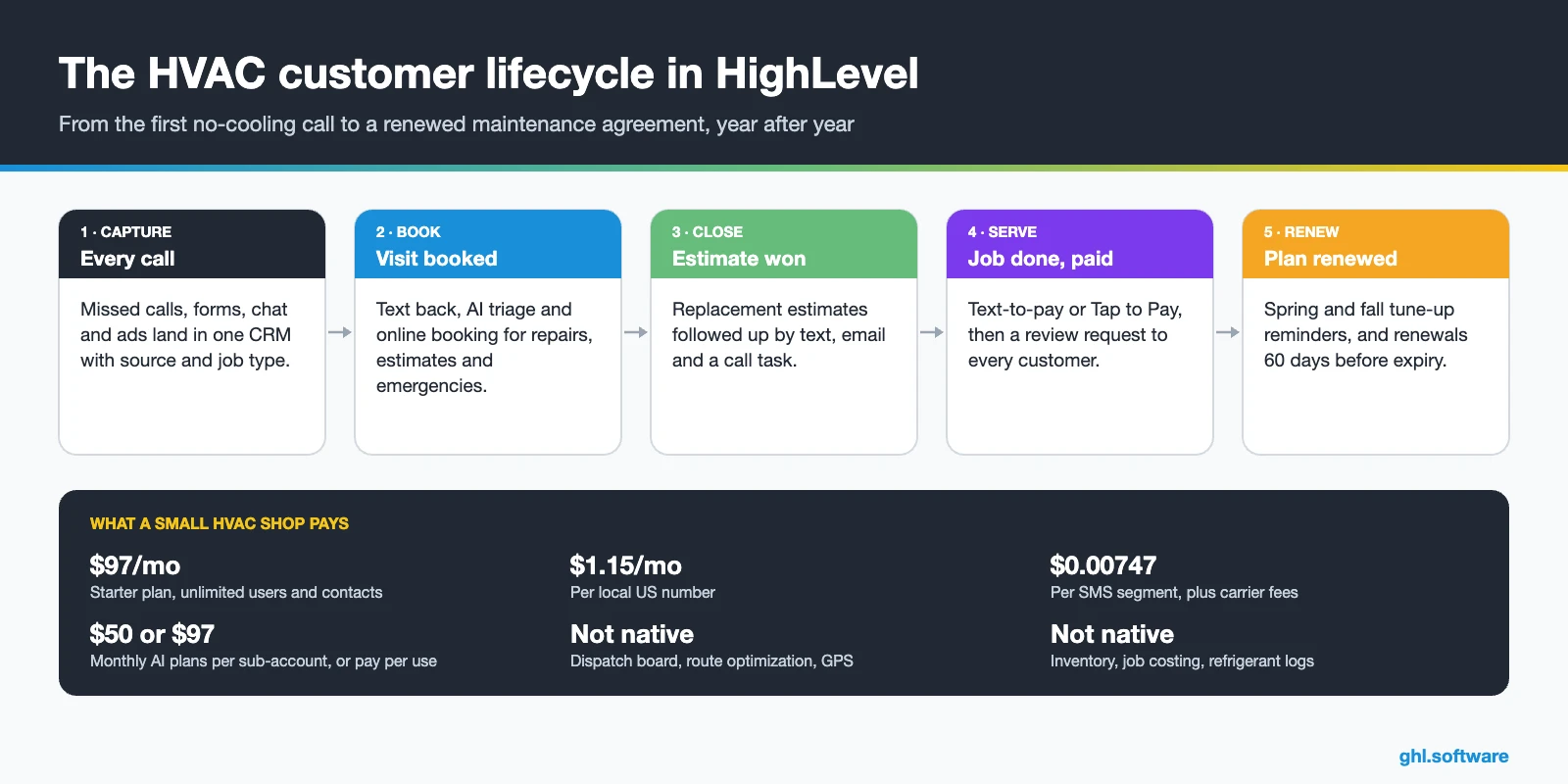
HVAC CRM vs field service software: why most shops run both
Most top results for “best HVAC CRM” list ServiceTitan, Housecall Pro, Jobber and FieldEdge. In fact, those are field service management (FSM) platforms. They shine once a job exists, because they dispatch techs, track jobs and invoice. However, they are less focused on the messy part before the job: the missed call, the estimate that sits for a week, or the agreement that expires in silence.
HighLevel, however, works the other way around. As a CRM for HVAC teams, it has marketing built in, so its strength is speed to lead, follow-up, campaigns and reviews. Therefore the cleanest setup for a growing HVAC company is “run both”: the FSM delivers the work, and HighLevel wins and keeps the customer.
What syncs with Jobber, Housecall Pro and ServiceTitan
| FSM | How it connects | What to know |
|---|---|---|
| Jobber | Official LeadConnector app from the App Marketplace, installed by the agency admin | Two-way client sync of name, email, phone, address, lead source and tags. Custom fields, notes and attachments don’t sync |
| Housecall Pro | Official LeadConnector workflow app with a Full Access API key | 9 triggers for jobs, estimates, leads and customers, checked every 5–10 minutes, plus 14 actions |
| ServiceTitan | Paid third-party Marketplace app, Zapier or API | No official HighLevel app, so map fields carefully and test before going live |
HighLevel’s Jobber guide also notes one Jobber account per sub-account. For Housecall Pro, also see the triggers and actions article.
Common HVAC problems and how HighLevel fixes them
The table maps the usual leaks in an HVAC sales process to the CRM for HVAC feature that plugs each one. In fact, most of them happen in peak season.
| Problem | What HighLevel does | Feature |
|---|---|---|
| No-heat or no-cooling calls missed at night | Texts the caller back and lets AI triage the emergency | Missed call text back + Voice AI |
| Phones overloaded in a heat wave | Answers routine questions and books repairs by chat and text | Conversation AI |
| Replacement estimates go silent | Runs a 21-day follow-up with texts, email and call tasks | Estimates + workflows |
| Maintenance agreements lapse | Starts reminders 60 days before expiry and sends a renewal payment link | Custom date reminder + text-to-pay |
| Empty schedule in shoulder months | Sends spring AC and fall furnace tune-up campaigns to Smart Lists | Smart Lists + SMS and email |
| Few recent Google reviews | Asks every customer for a review after the job | Reputation management |
| Late payments | Sends invoices and text-to-pay links from the truck | Payments + mobile app |
| Double bookings | Books by job type, technician and buffer time | Calendars (Services) |
The CRM for HVAC pipeline: sales and maintenance agreements
Emergency repairs usually close on the spot, so they don’t need much pipeline work. Replacements and agreements, however, take days or weeks, and that is where a board pays off. So set up a CRM for HVAC sales pipeline for estimates and installs, then a second one for maintenance agreements. Each card carries a value, a source and a comfort advisor. Meanwhile, HighLevel’s Forecast tab shows expected and won revenue plus deals whose close dates slipped.
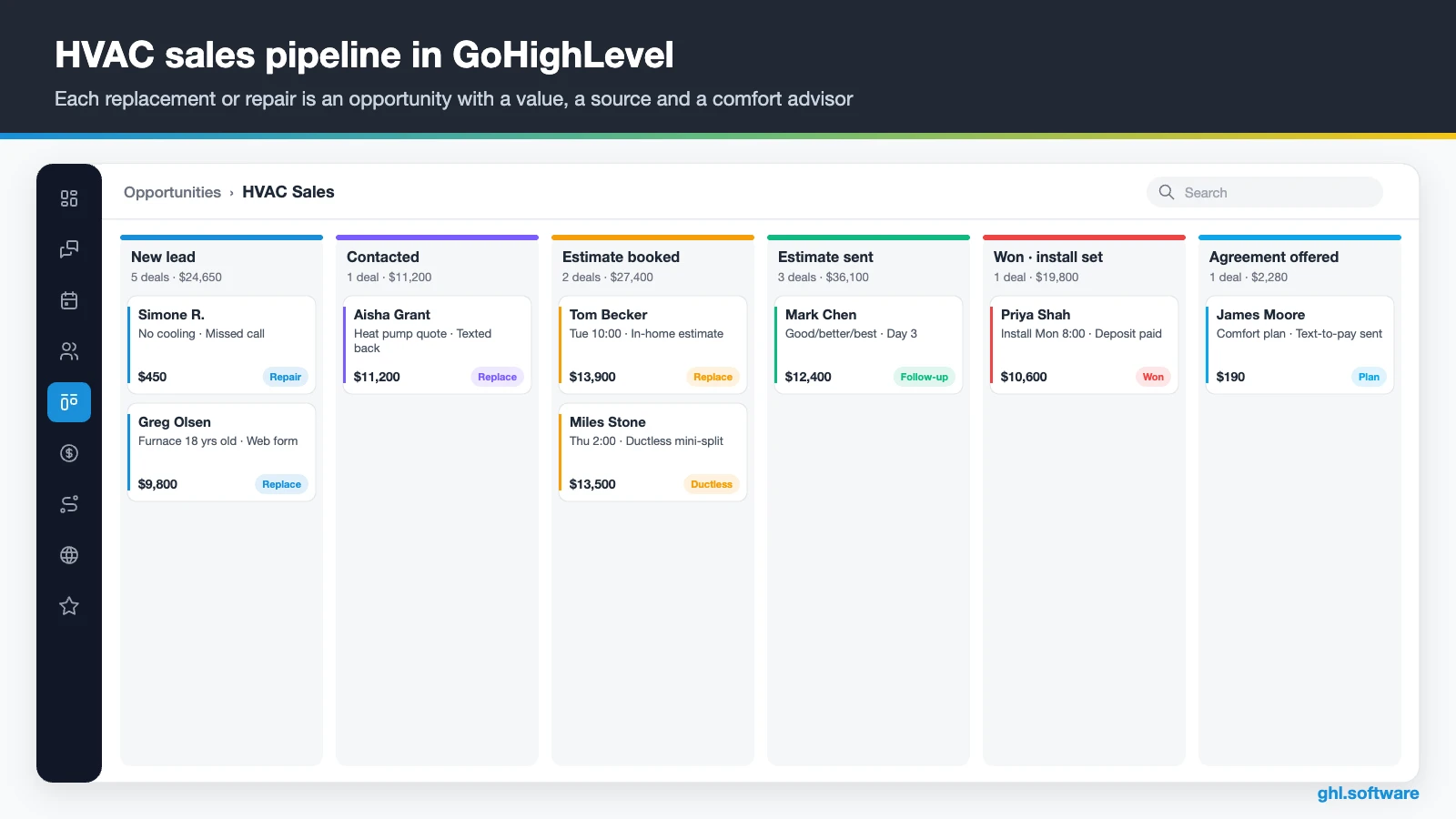
| Sales stage | What moves the opportunity here |
|---|---|
| New lead | A call, form, chat or ad lead creates the opportunity |
| Contacted | A CSR or the AI replies and qualifies the job |
| Estimate booked | The homeowner books an in-home estimate visit |
| Estimate sent | The comfort advisor sends the estimate from HighLevel or the FSM |
| Follow-up | No decision yet, so the follow-up workflow keeps running |
| Won · install scheduled | The homeowner accepts and the install date is set |
| Installed | The install is done and the final invoice is paid |
| Agreement offered | A maintenance plan is offered after the install; lost deals go to nurture |
The second pipeline: maintenance agreements
Agreements also need their own board with three simple stages: Active, Renewal due, and Renewed or Lapsed. Meanwhile, custom fields hold the equipment type, install date, last service and agreement end date. That way, a date-based workflow moves the card to “Renewal due” 60 days before expiry, and the CSR sees exactly which plans need a call this week.
Three automations every HVAC company should run
These CRM for HVAC workflows cover the moments where revenue slips: the call nobody answered, the estimate nobody chased and the plan nobody renewed. Build them once, then adjust the wording to your service area.
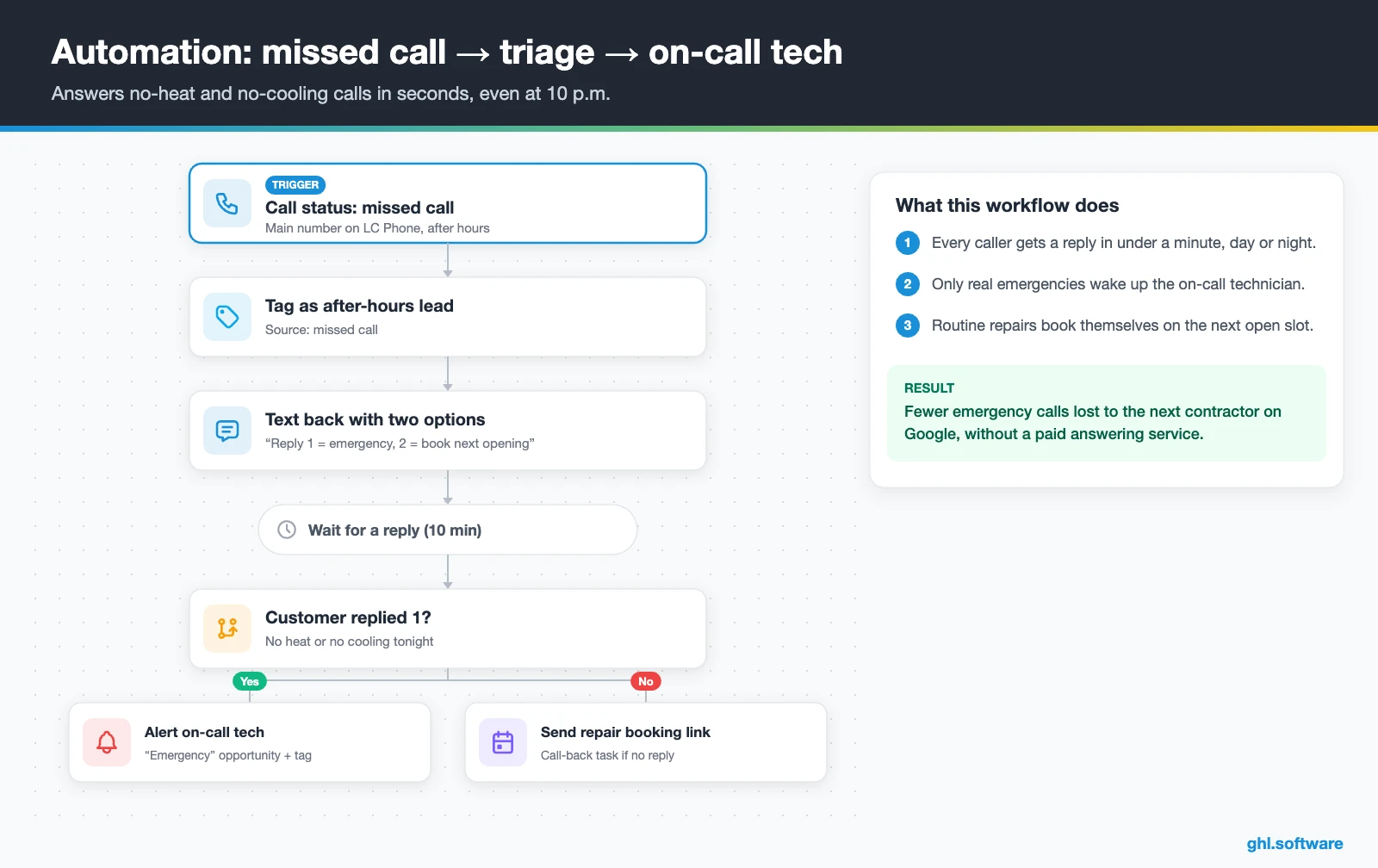
After-hours emergency: missed call → triage → on-call tech
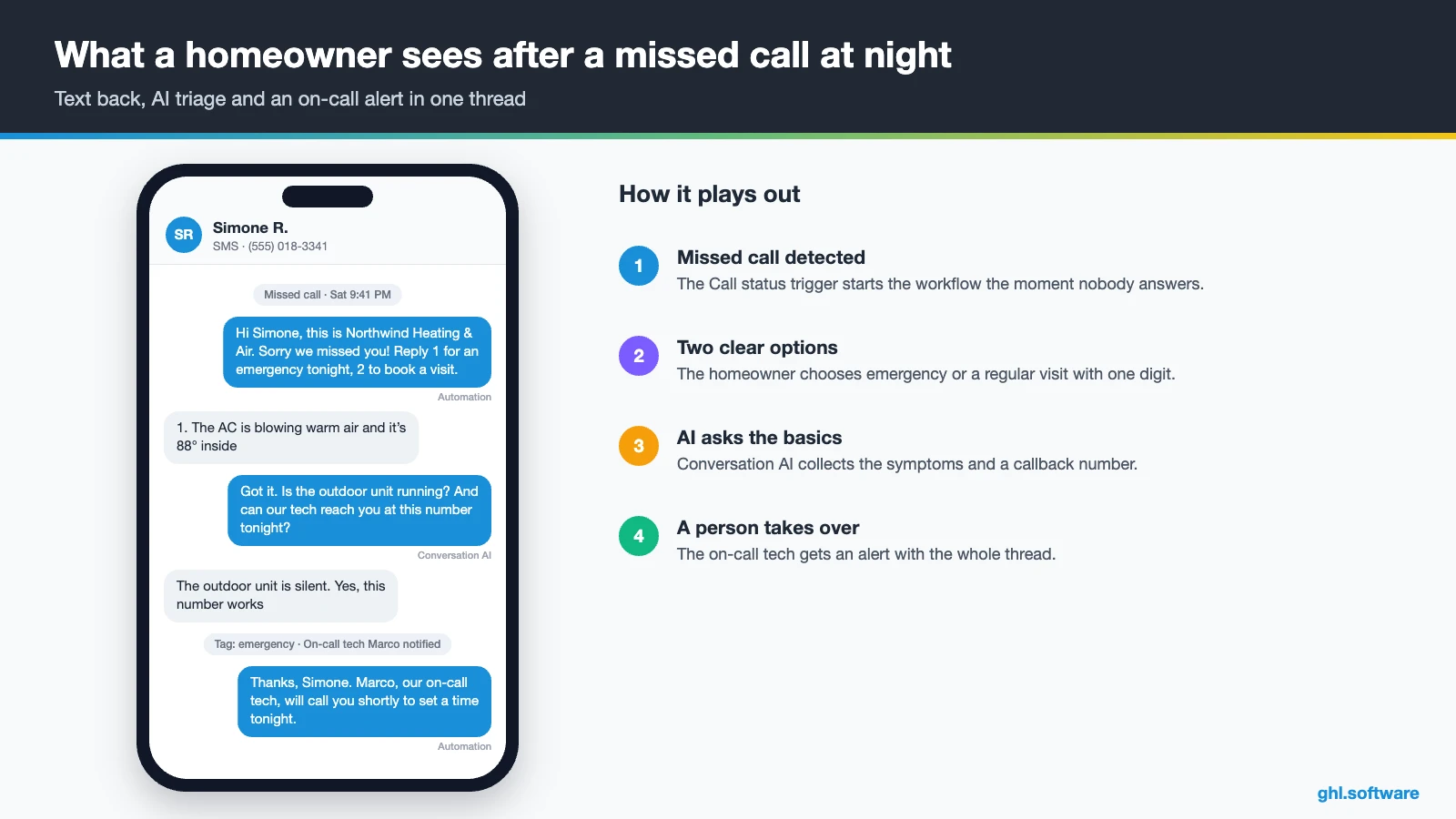
The trigger is a missed call on your HighLevel number. Then the workflow tags the lead as after-hours and texts back two options: reply 1 for an emergency tonight, or 2 to book the next opening. After that, an if/else reads the answer. A “1” alerts the on-call tech, creates an “Emergency” opportunity and adds a tag.
A “2” sends the repair calendar link instead, and a call-back task appears if the person goes quiet for ten minutes. As a result, every caller gets a reply in under a minute, while routine calls wait until morning.
Replacement estimate follow-up
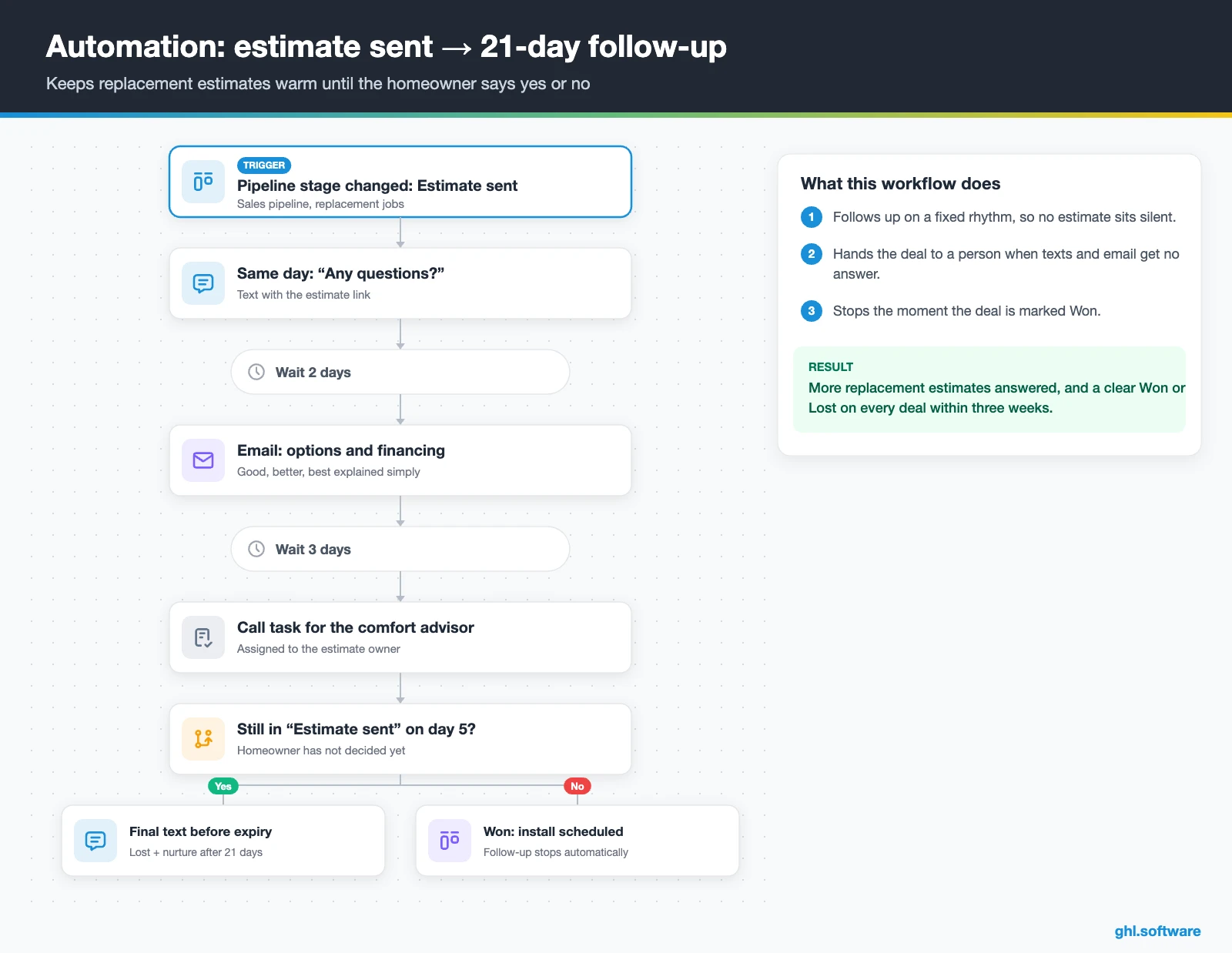
This workflow starts when an opportunity moves to “Estimate sent”. The same day, it texts the homeowner “Any questions about your estimate?” with the link. Then, after two days, an email explains the good, better and best options and any financing you offer. Three days later, the comfort advisor gets a call task.
Finally, on day five, an if/else checks the stage again. If the deal hasn’t moved, a final text mentions the estimate’s expiry date, and after 21 days of silence the deal moves to Lost and joins a nurture list. Otherwise, the workflow stops as soon as you mark it Won, so nobody gets a reminder after saying yes.
Tune-up and agreement renewal reminders
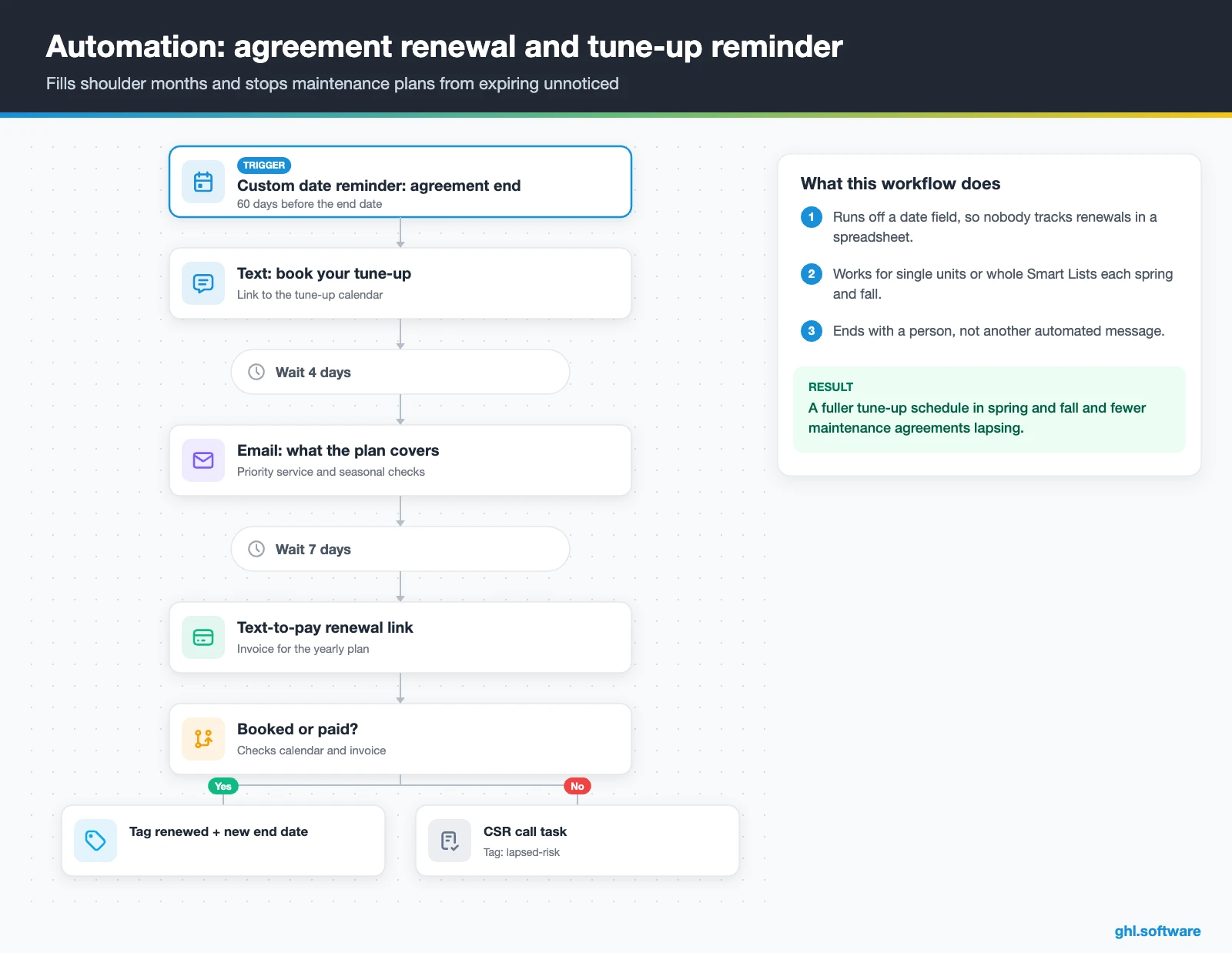
The trigger is a Custom Date Reminder on the “Agreement end date” field, 60 days ahead. Alternatively, run the same flow on 1 March for AC units and on 1 September for furnaces, using Smart Lists by equipment type. The customer first gets a text with the tune-up booking link, then an email four days later.
Then, after a week, a text-to-pay link offers the yearly renewal. If the customer books or pays, the workflow tags them as renewed and updates the end date. Otherwise, a CSR gets a call task and the contact is tagged as a lapse risk. In short, shoulder months fill up and agreements stop expiring unnoticed.
Start with the snapshot and the pipeline from this guide, then add the automations one by one. The extended trial comes with our bootcamp link.
Start the 30-day trialAffiliate link. I may earn a commission at no extra cost to you.
Texting, calls and an AI receptionist for HVAC
In practice, an HVAC customer may call on Monday, text on Tuesday and message on Facebook on Friday. So a CRM for HVAC must keep every channel together, and HighLevel keeps SMS, email, WhatsApp, Facebook and Instagram DMs and web chat in one thread per contact. Also, Conversations now support response-time SLAs, so a manager can see which leads waited too long in a busy week.
For nights and weekends, HighLevel’s AI Agents also include an Industry Agents template called Aria. It targets home services such as HVAC, plumbing and electrical, and covers lead capture, inbound booking, emergency handling and 24/7 after-hours answering. Voice AI agents can book mid-call, transfer to a human and trigger workflows, although they only run on LC Phone or Twilio numbers (HighLevel help). Meanwhile, Conversation AI handles chat and text. Finally, the AI Employee pricing guide explains the per-use and monthly options.
What HighLevel’s official HVAC snapshot includes
HighLevel publishes a free HVAC playbook with a matching “HVAC Snapshot”. However, it is a generic template with the industry name swapped in. Still, it saves a few hours when you start a CRM for HVAC work. Out of the box you get:
- An “HVAC” website with a Home page (services and FAQ sections) and a Link in Bio page, plus a chat widget.
- An “HVAC Offer” funnel: an opt-in step, then an appointment booking page.
- The “Marketing Form – Claim Offer” form and a “Marketing Pipeline”.
- The “New Lead Nurture (Fast 5) – Claim Offer” and “Long Term Nurture” workflows, with email, SMS and a voicemail drop.
- Service calendars tagged “HVAC Services”, three custom values, snippets, an “HVAC” proposal template and one ad template.
What you still build is the HVAC logic. For example, it has no tune-up reminders, seasonal campaigns, estimate follow-up, emergency handling or agreement renewals. Its guide also has no Voice AI section. Some copy also comes from other templates, so rewrite every message and rename the ad before you publish. Then save your finished build as your own snapshot for the next location.
How to set up GoHighLevel for an HVAC company
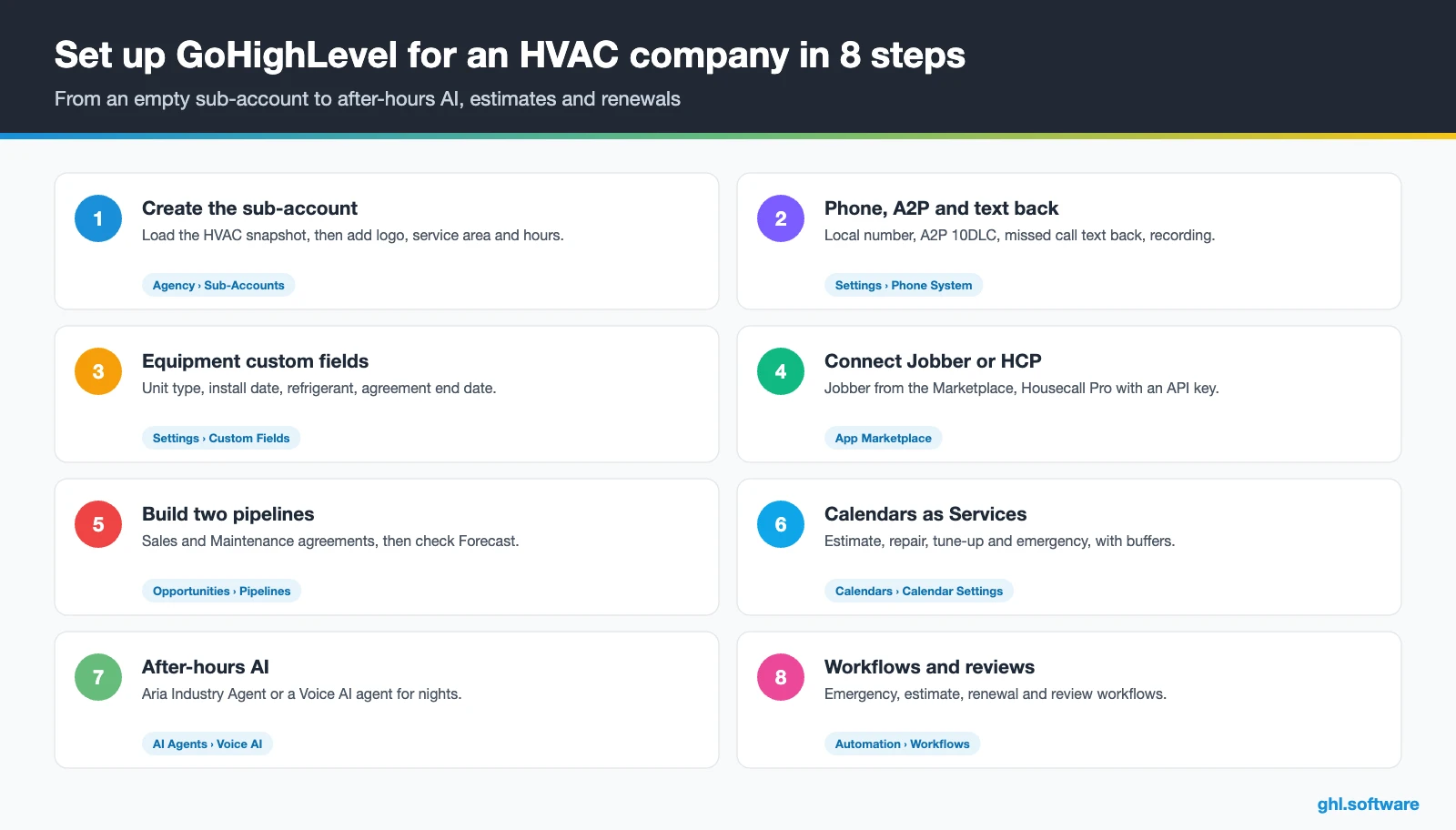
Follow this order when you set up your CRM for HVAC, so the first missed call already flows into a booked visit. Still, plan a few focused days, mainly for A2P approval and the FSM connection.
- Create the sub-account. Load the HVAC snapshot, then add your logo, service area, hours and one user per CSR, comfort advisor and on-call tech.
- Connect phone and A2P. Buy a local number and register A2P 10DLC. Then turn on missed call text back and set call recording under your state’s consent rules.
- Add equipment fields. Create custom fields for unit type, install date, refrigerant, last service and agreement end date.
- Connect your FSM or import. Install Jobber from the App Marketplace or add the Housecall Pro API key. Otherwise, import customers by CSV with those fields.
- Build two pipelines. Sales and Maintenance agreements with the stages above, then review the Forecast tab weekly.
- Set up calendars as Services. Estimate visit, repair, tune-up and emergency calendars with staff, add-ons, buffers and reminders.
- Turn on after-hours AI. Start from the Aria Industry Agent or a Voice AI agent, then add Conversation AI to web chat and SMS.
- Activate workflows, reviews and reports. Run the three automations, connect Google Business Profile and build a dashboard of leads by source, estimates won and agreements renewed.
What a CRM for HVAC costs on HighLevel
HighLevel charges a flat plan price with unlimited users and contacts, so adding CSRs or techs doesn’t raise the bill. Usage, however, is billed on top: phone numbers, texts, calls, emails and AI.
For example, a five-truck shop on Starter ($97) with two local numbers ($2.30) and 3,000 SMS segments (about $22) pays about $121. Then add 2,000 inbound minutes (about $23), 1,000 outbound minutes (about $17), 10,000 emails (about $7) and the $50 AI plan. The total is then about $218 a month. Besides, carrier fees, the A2P campaign fee and card processing come on top. As a result, most small HVAC companies land between $150 and $350 a month. Our pricing guide also has the full breakdown.
GoHighLevel plans compared
| Starter | Unlimited | Founder (formerly Agency Pro) | |
|---|---|---|---|
| Price | $97/month | $297/month | $497/month |
| Annual | $970/year | $2,970/year | $4,970/year |
| Sub-accounts | 3 | Unlimited | Unlimited |
| Contacts and users | Unlimited | Unlimited | Unlimited |
| All core features | Yes | Yes | Yes |
| White label web app | Yes | Yes | Yes |
| API access | Basic | Basic | Advanced, agency-level keys |
| Rebill phone and email | No | At cost | With markup |
| Rebill AI usage | No | No | Yes |
| SaaS Mode and automated sub-accounts | No | No | Yes |
| User and agent reporting | No | No | Yes |
| Support | 24/7 | 24/7 | 24/7 |
Usage costs on top of the plan
| Item | Official price | When you pay it |
|---|---|---|
| Local phone number (US/Canada) | $1.15/month | Each number for SMS and calls |
| SMS (US/Canada) | $0.00747 per segment + carrier fees | Every text sent or received |
| Calls (US) | $0.0166/min outbound, $0.01165/min inbound | Calls through LC Phone |
| A2P 10DLC registration | $22.50 one-time (low volume) + monthly campaign fee | Before texting US numbers |
| Email (LC Email) | $0.675 per 1,000 emails | Campaigns and workflow emails |
| $10/month per sub-account + Meta fees | If you use WhatsApp inside HighLevel | |
| AI | Pay-per-use, or $50 or $97/month per sub-account | Voice AI, Conversation AI and other AI tools |
| Premium workflow steps | $0.01 per run after 100 free | Webhooks, Google Sheets, Slack, app actions |
Honest limits: what stays in your field service software
As a CRM for HVAC sales, HighLevel is the front office, not the dispatch desk. So check these gaps before you move anything:
- No dispatch board, route optimization or GPS. The dispatching request on HighLevel’s ideas board is marked in progress, but it is not a feature yet.
- No equipment history object out of the box. Instead, use custom fields or custom objects for units, serial numbers and service dates.
- No inventory, parts tracking, time clock or job costing. Also, there are no refrigerant logs, so keep those in your FSM.
- Voice AI details vary. Its help page does not list languages or per-minute pricing, so test Aria on real calls before you trust it at night.
Here is how HighLevel, used as a CRM for HVAC, compares with the field service tools HVAC owners shortlist most. Features change often, so confirm details on each vendor’s site.
| GoHighLevel | ServiceTitan | Housecall Pro | Jobber | |
|---|---|---|---|---|
| Built for HVAC and field service | No | Yes | Yes | Yes |
| Dispatch board and job tickets | No | Yes | Yes | Yes |
| Funnels, social, ads, WhatsApp and Voice AI in one tool | Yes | Check plan | Check plan | Check plan |
| Connection to HighLevel | n/a | Paid third-party app or Zapier | Native workflow app | Native two-way client sync |
| White label for agencies | Yes | No | No | No |
| Best fit | Lead response, follow-up, reviews and renewals | Larger shops that need full operations | Small and mid-size residential shops | Small service shops with many quick jobs |
Compliance notes for HVAC marketing
The angle most HVAC guides miss: the R-410A rule change as a replacement conversation
On 21 May 2026, the EPA issued a final rule that lifts the 1 January 2026 ban on installing residential and light-commercial R-410A air conditioners and heat pumps made or imported before 2025. However, New York keeps its own deadline. Moreover, ACCA warns that demand for the limited HFC supply could push refrigerant prices up (ACCA).
Still, homeowners hear only fragments of this news and often call confused. So a CRM for HVAC can turn that confusion into a calm, honest message. Store the refrigerant type and install year in custom fields, then build a Smart List of older systems. Before their next repair, send a short email that explains repair-or-replace options in plain words, without scare tactics or price promises.
Then tag everyone who books a replacement estimate and move them into the sales pipeline. In short, you educate first and sell second. Also, compare this setup with other trades in our industry guides, or browse every module in the features hub.
Open a free account, load the pipeline and turn on the first automation today. The bootcamp walks you through the setup live.
Start the 30-day trialAffiliate link. I may earn a commission at no extra cost to you.
Frequently asked questions
What is a CRM in HVAC?
A CRM for HVAC is the system that tracks every customer and lead: calls, texts, estimates, service dates and maintenance agreements. It also makes sure nobody waits for a reply and every estimate gets a follow-up. Field service software, by contrast, dispatches technicians and runs job tickets. HighLevel is a CRM with marketing built in, so it also sends tune-up campaigns and review requests.
What software do most HVAC companies use?
Most HVAC companies run a field service platform such as ServiceTitan, Housecall Pro, Jobber or FieldEdge for dispatch, jobs and invoices, plus QuickBooks for accounting. Many also add a separate CRM or marketing tool for lead follow-up, reviews and campaigns. HighLevel, in short, fills that second role. It connects natively to Jobber and Housecall Pro, and to ServiceTitan through a paid third-party app or Zapier.
Do I need a CRM if I already use Jobber, Housecall Pro or ServiceTitan?
Not always. If your FSM already answers missed calls, follows up on estimates and renews agreements for you, you may not need more. However, many shops find those steps still happen by hand. In that case, HighLevel adds missed call text back, after-hours AI, estimate follow-up, seasonal campaigns and reviews, while the FSM keeps dispatch, jobs and invoicing.
Does GoHighLevel integrate with ServiceTitan, Housecall Pro or Jobber?
Yes, at different depths. Jobber has a native app with two-way client sync of name, email, phone, address, lead source and tags; custom fields, notes and attachments don’t sync. Housecall Pro has a native workflow app with 9 triggers and 14 actions that needs a Full Access API key. ServiceTitan connects through a paid third-party Marketplace app or Zapier, so test your field mapping carefully.
Can an AI receptionist answer after-hours HVAC emergency calls?
Yes. HighLevel’s Industry Agents include Aria, a home services template for HVAC, plumbing and electrical that covers lead capture, booking, emergency handling and 24/7 after-hours answering. Voice AI agents can also book mid-call and transfer to a human. Still, test it on real calls first, and let a person confirm emergency pricing and arrival times.
Can a CRM manage HVAC maintenance agreements?
Yes, as long as you store the right dates. So in HighLevel, add an “Agreement end date” custom field and a maintenance agreements pipeline. Then a Custom Date Reminder workflow texts the customer 60 days before expiry, books the tune-up and sends a text-to-pay renewal link. If nobody replies, a CSR gets a call task. The service itself, however, stays in your FSM.
How much does a CRM for HVAC cost?
On HighLevel the plan price stays flat as you add users: Starter is $97 a month and Unlimited $297, both with unlimited contacts. Usage adds the rest, such as numbers at $1.15 a month, SMS segments, call minutes, email and optional AI. As a result, a small HVAC company typically pays $150 to $350 a month. There is no free plan, although the trial through our link runs 30 days.
More industry guides
Sources: HighLevel HVAC playbook · HighLevel help: Jobber integration · HighLevel help: Housecall Pro triggers and actions · HighLevel help: ServiceTitan via Zapier · HighLevel help: Missed Call Text Back · HighLevel help: AI Voice Agents overview · HighLevel help: A2P 10DLC registration · HighLevel ideas: Dispatching request · ACCA: EPA lifts R-410A installation deadline · BLS: Heating, air conditioning and refrigeration mechanics