

CRM for Cleaning Business: Quotes, Recurring Cleans and Reviews
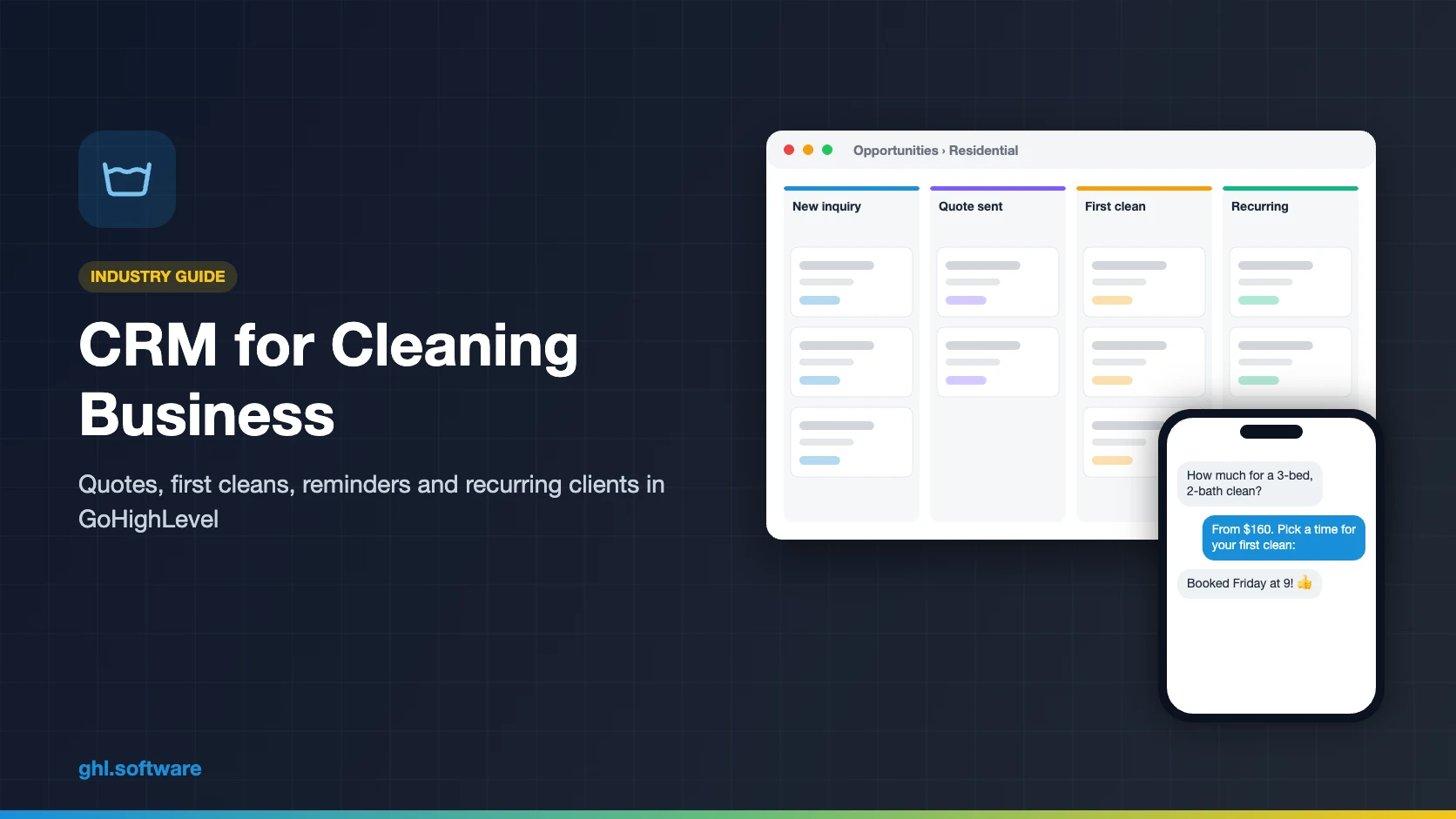
A CRM for cleaning business owners should answer every quote request in minutes, book the first clean and confirm access before each visit. It should also collect payment and turn one-time clients into recurring ones. GoHighLevel does this with quote forms, missed call text back, service calendars with add-ons, reminder workflows, text-to-pay and review requests. However, it has no route optimization, time clock or cleaner checklists, so many teams keep Jobber or ZenMaid for the day’s jobs.
Sunday, 8:40 in the evening. In Savannah, you are folding microfiber cloths for Monday when three quote requests land from your website. Monday fills up with jobs, so you answer all three on Tuesday. By then, two of those families have booked with a company that texted back a price in five minutes. The third, Erin Ellery, books one deep clean with you and never calls again. A CRM for cleaning business teams exists for both gaps: the slow first reply and the rebooking nobody offered.
This guide is for house cleaning and maid services, commercial and janitorial cleaners, and the agencies that market them. It shows how GoHighLevel (HighLevel) handles quotes, bookings, reminders, payments, reviews and win-backs. It also explains where it stops, because HighLevel is the sales layer, not a field-service app.
So you will see the pipeline, three automations, the snapshot, the setup and real costs. Then we cover the honest limits, including a recurring-appointment rule most guides miss.
Leer en español: Software para empresas de limpieza · Ler em português: Sistema para empresa de limpeza · Part of GoHighLevel by industry
Includes a free live setup class with a HighLevel coach.
Start free + bootcampAffiliate link.
What a cleaning business needs from a CRM
Most cleaning companies don’t lose clients because of the clean itself. Instead, they lose them before the first visit, through slow quotes, or right after it, because nobody offered a recurring plan. So a CRM for cleaning business growth has to cover the whole client life, not just the calendar. Here is what that looks like in HighLevel.
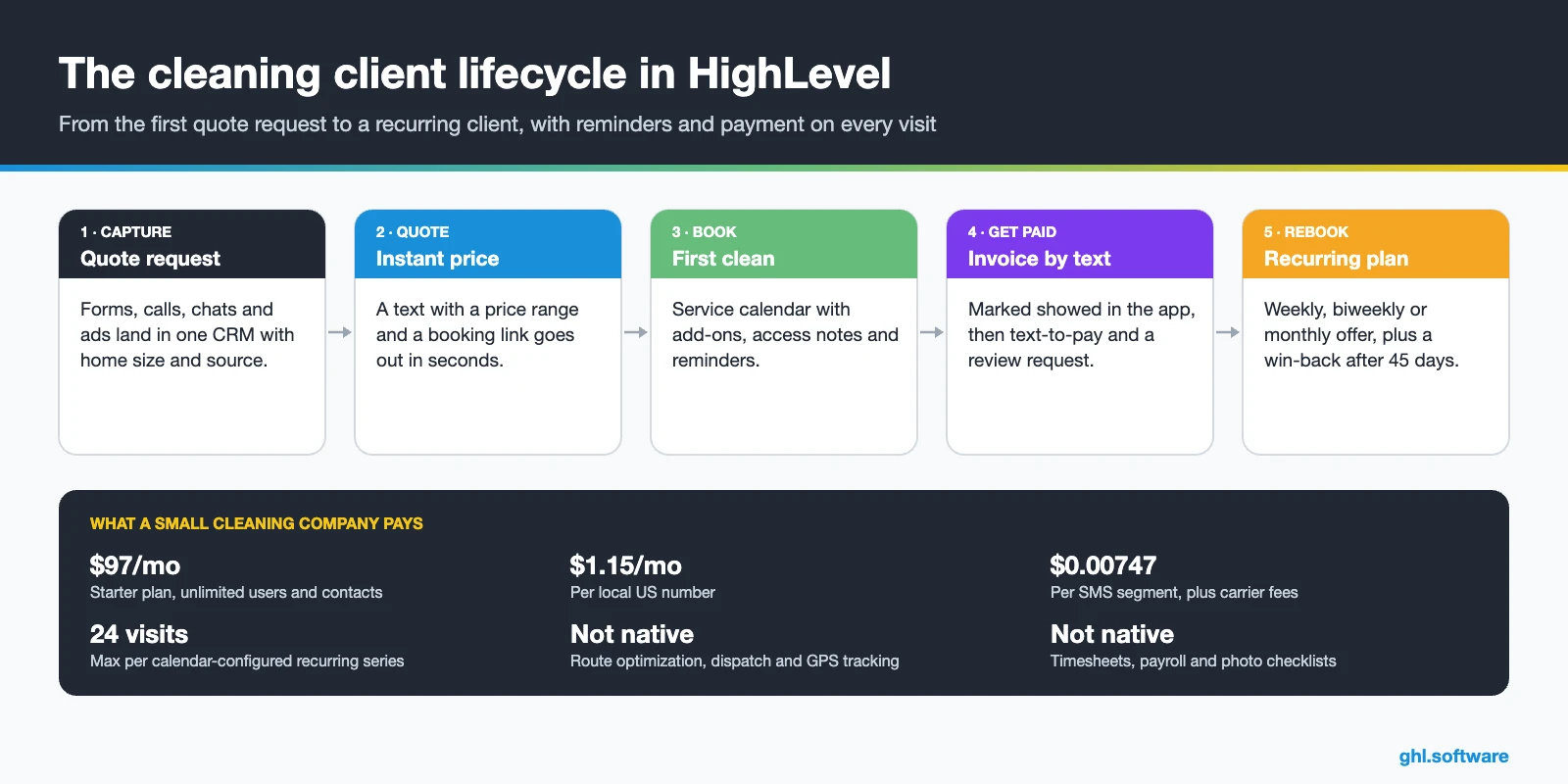
Cleaning company problems and how HighLevel solves them
The table maps the usual leaks in a cleaning company’s week to the part of a CRM for cleaning business teams that plugs each one. In fact, most of them happen before the first clean or right after it.
| Problem | What HighLevel does | Feature |
|---|---|---|
| Quote requests answered hours later | Sends an instant text with a price and a booking link | Forms + workflows |
| Missed calls while cleaning | Texts the caller back and offers the quote form | Missed call text back |
| Lockouts and wrong gate codes | Asks for access notes 48 hours before | Calendars + workflows |
| Last-minute cancellations | Sends “reply C to confirm” reminders | Workflows |
| One-time clients never come back | Offers a recurring plan the day after the first clean | Workflows + pipelines |
| Chasing payments | Sends a text-to-pay link when the visit is done | Payments + invoices |
| Few Google reviews | Asks every client for a review | Reputation management |
| Recurring clients quietly drift away | Flags clients with no clean in 45 days and starts a win-back | Smart lists + workflows |
The CRM for cleaning business pipeline: residential and commercial
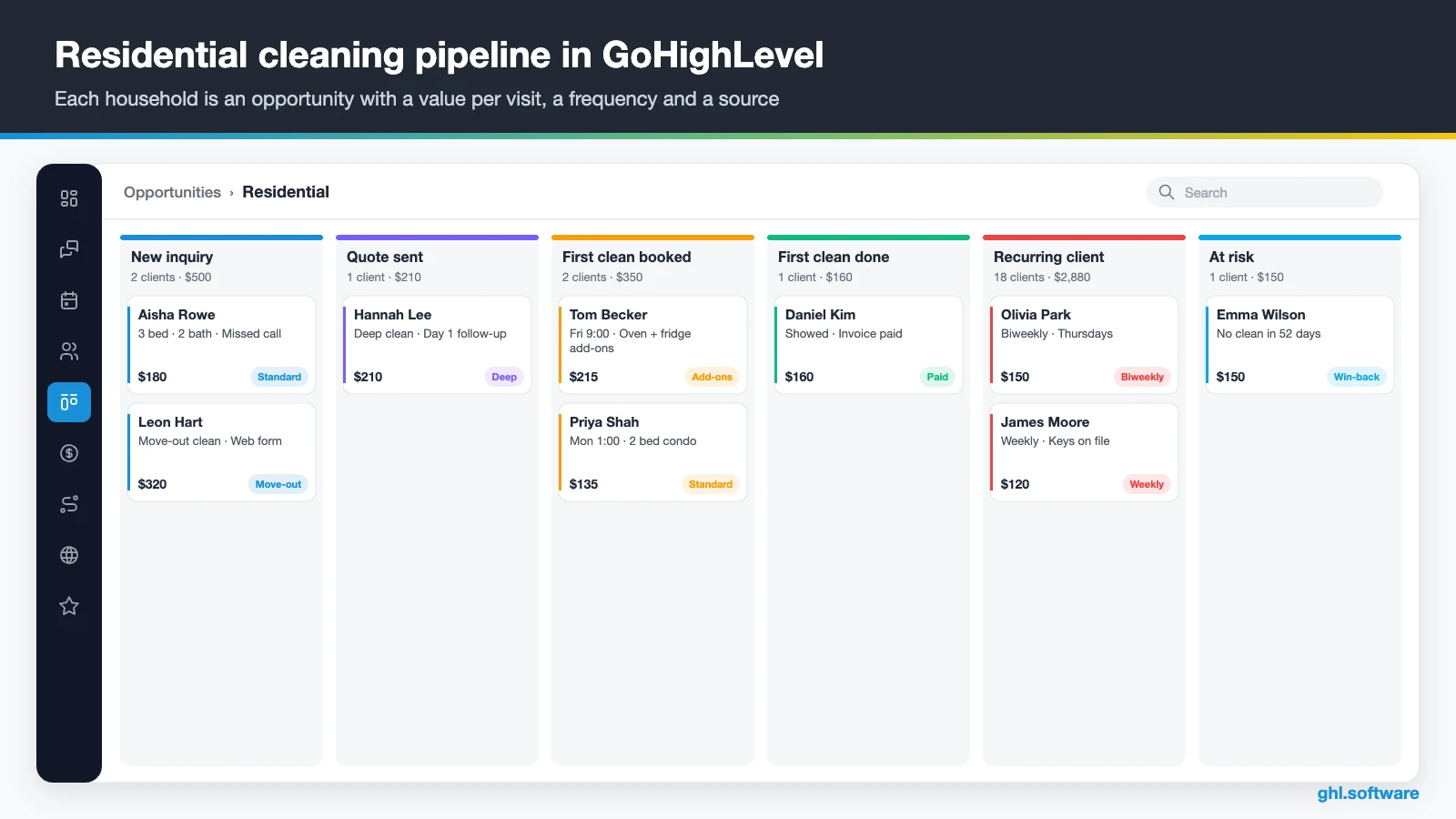
A cleaning pipeline should follow the client from inquiry to recurring service, not stop at “booked”. After all, a cleaning company earns its margin on the fourth and the fortieth clean, not the first. So in a CRM for cleaning business work, the opportunity board tracks each household with a value per visit, a service type and a source. Then each stage change can trigger the next message.
| Stage | What moves the client here |
|---|---|
| New inquiry | A quote form, call, chat or ad lead creates the opportunity |
| Quote sent | The price goes out by text or email |
| First clean booked | The client books on the service calendar |
| First clean done | The cleaner marks the visit showed and the invoice goes out |
| Recurring client | The client books weekly, biweekly or monthly service |
| At risk / paused | No clean in 45 days, or the client asks for a pause |
| Lost | Closed with a reason such as price, moved or chose another company |
Store what the crew needs in custom fields: address, home size, pets, frequency, add-ons, price and last clean date. Also, keep gate codes and key locations in a restricted field, so only the right users see them. Meanwhile, the opportunity Forecast tab shows expected revenue, while each card keeps the full message history.
A second board for commercial and janitorial accounts
Office and janitorial work sells differently, so give it its own pipeline. The stages are lead, walk-through booked, proposal sent, negotiation, contract signed and active account. The proposal goes out from Documents & Contracts with e-signature. Then, once the client signs, a workflow marks the deal won and creates the onboarding tasks for the site.
Three automations every cleaning company should run
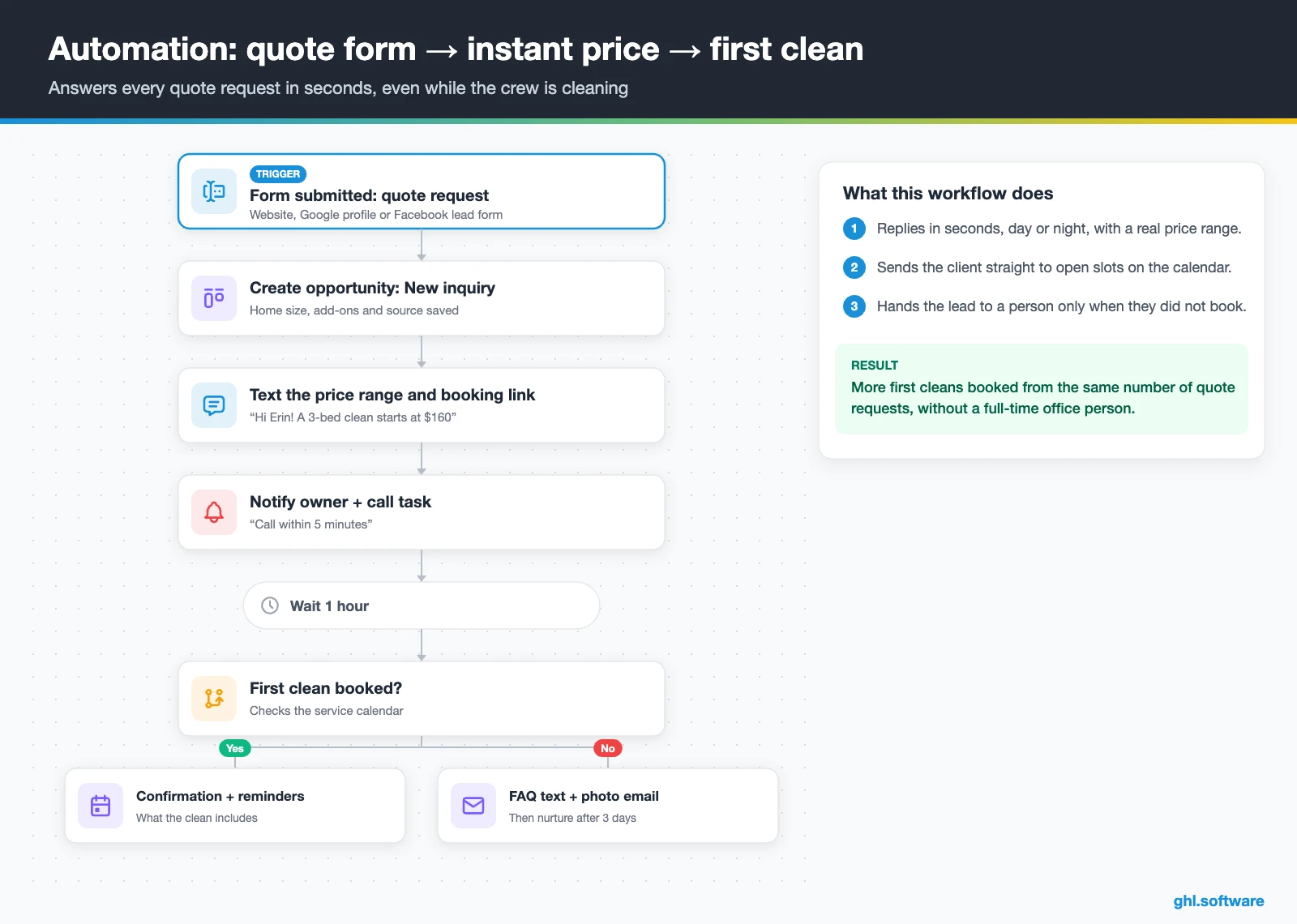
These workflows turn your CRM for cleaning business sales into a system that works while you clean. They cover the first reply, the visit itself and the moment after the first clean, when a client decides whether to come back.
Quote request → instant price → booked first clean
The trigger is a submitted quote form or a Facebook lead form. The workflow creates the opportunity in “New inquiry” and texts a price range with a booking link right away. It also notifies the owner and creates a “call within 5 minutes” task, because some families still want to hear a voice.
After an hour, an if/else checks whether a first clean is on the calendar. If not, a second text answers the usual questions about supplies, insurance and your satisfaction guarantee. Then, a day later, an email shows before-and-after photos and a first-clean offer. Finally, after three days without a booking, the lead moves to long-term nurture with a tag.
Visit prep, access notes and payment
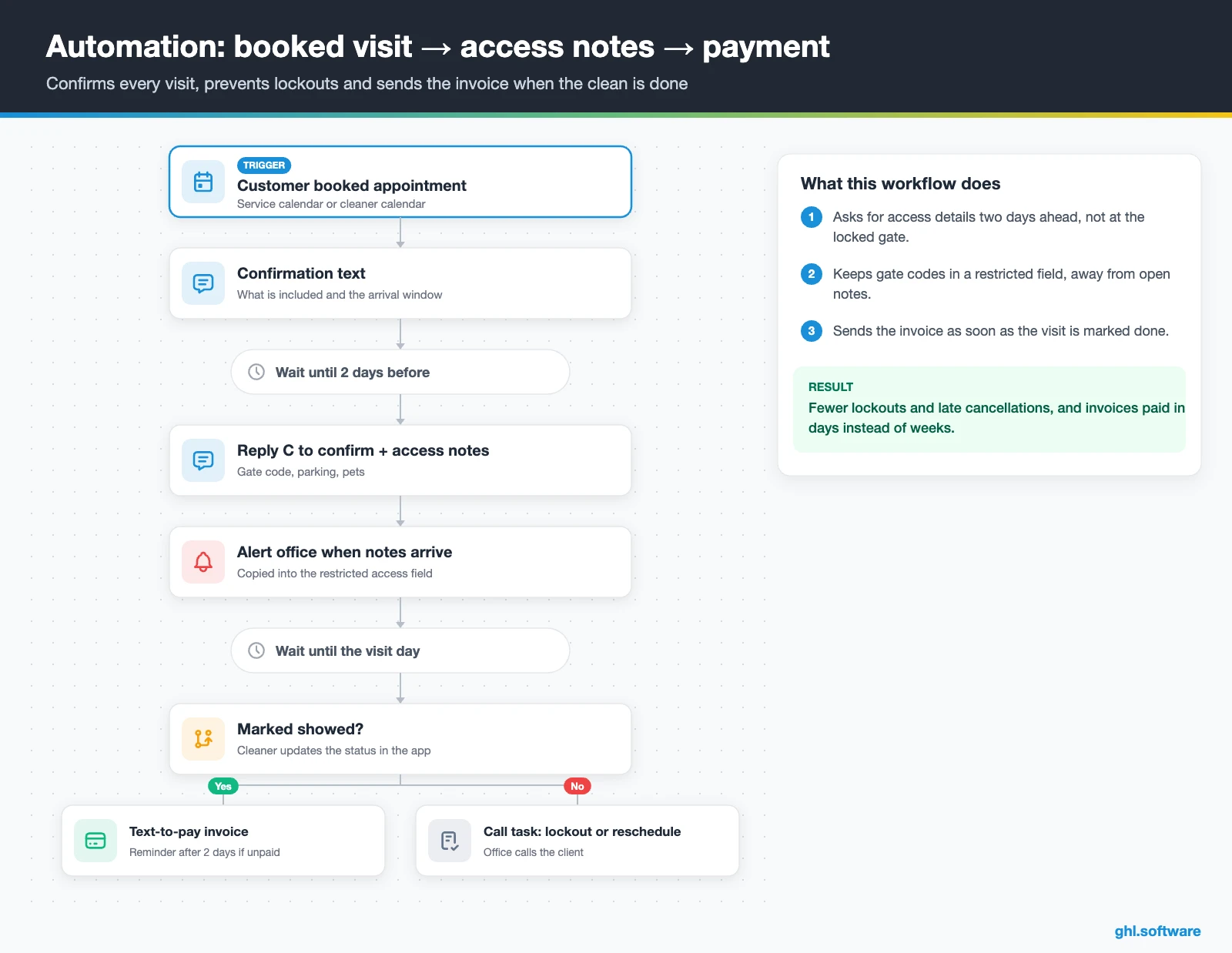
This one starts when a client books. The client first gets a confirmation with what the clean includes and the arrival window. Two days before the visit, a text asks them to reply C to confirm and to share any gate code, parking or pet notes. When notes come in, the workflow alerts the office, which then copies them into the restricted access field for the assigned cleaner.
On the visit day, the cleaner marks the appointment as showed in the mobile app, and an if/else checks that status. If it shows, the client gets the invoice or a text-to-pay link, with a polite reminder two days later if it is still unpaid. Otherwise, the office gets a call task, because a missing status usually means a lockout or a reschedule. As a result, you get fewer lockouts and faster payments.
First clean done → review → recurring offer
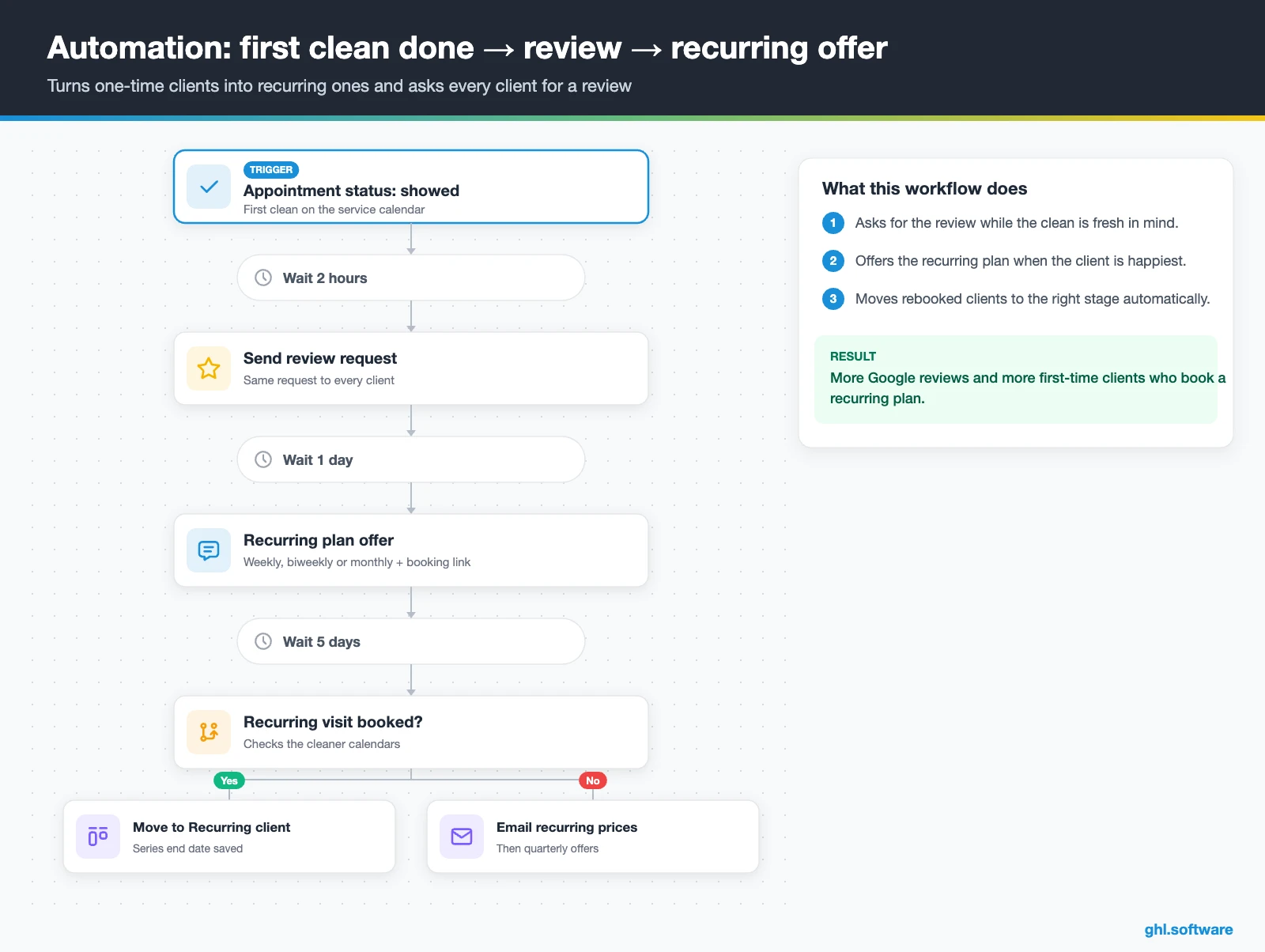
The trigger is the first appointment changing to showed. Two hours later, the client gets a review request. Every client gets the same request, because asking only happy clients is review gating, which Google’s policies don’t allow. The next day, a text offers weekly, biweekly or monthly service with a booking link. If the client books, the card moves to “Recurring client”. Otherwise, an email with recurring prices follows five days later.
A small sibling workflow protects the recurring base. For example, a smart list shows recurring clients whose last clean date is more than 45 days ago. Each one gets an “at risk” tag and a friendly win-back text. In short, you catch a pause before it turns into a lost client.
Start with the snapshot and the pipeline from this guide, then add the automations one by one. The extended trial comes with our bootcamp link.
Start the 30-day trialAffiliate link. I may earn a commission at no extra cost to you.
Texting, calls and AI receptionists for cleaning companies
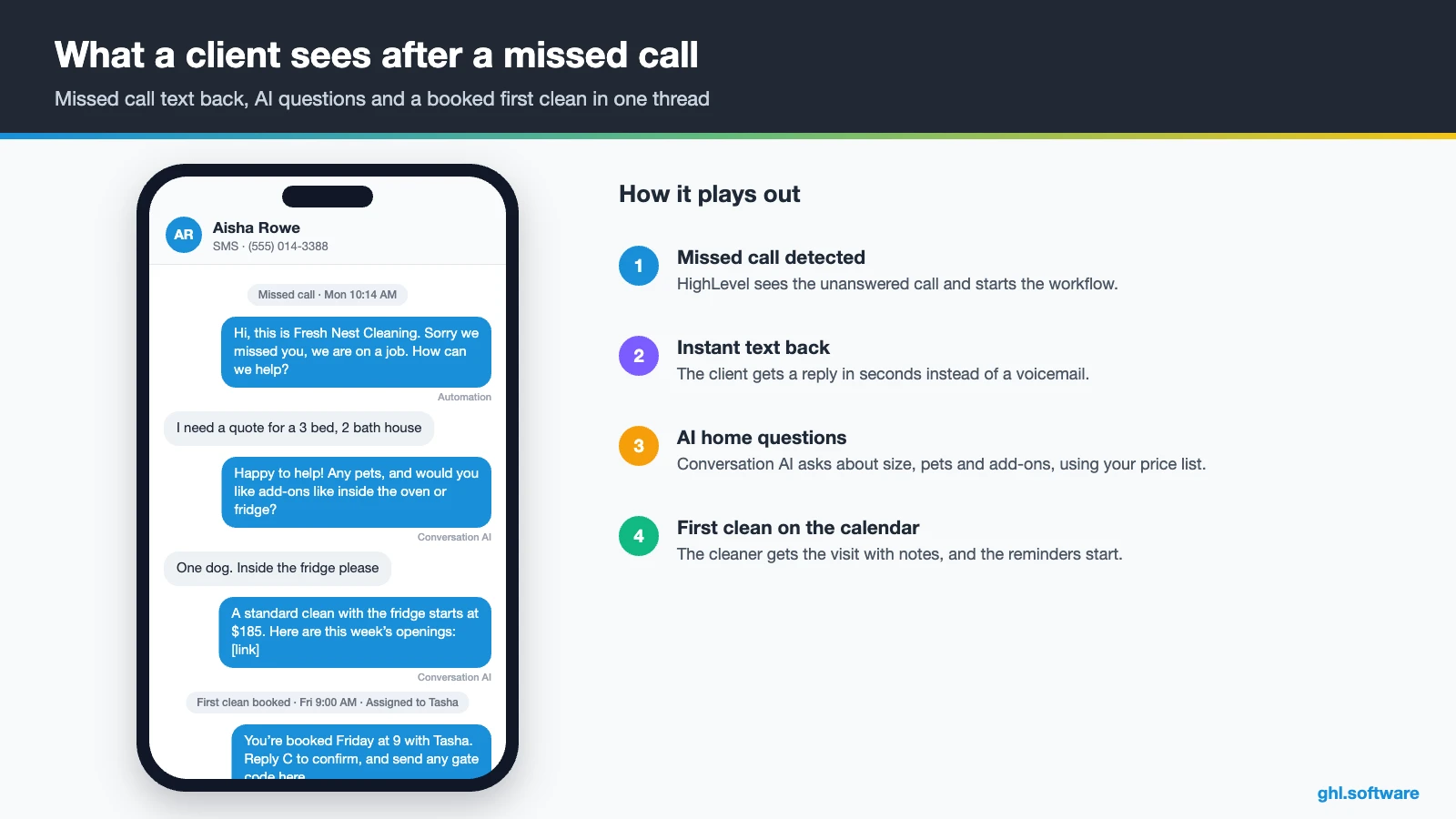
Any CRM for cleaning business leads has to handle texts, calls, Facebook messages and forms, often from one client in the same week. HighLevel keeps SMS, email, Facebook and Instagram DMs, WhatsApp and web chat in one conversation per contact. So the office manager answers while you clean, and both of you see the same history. Besides, response-time SLAs in Conversations show which messages wait too long.
AI covers the hours nobody can answer. Conversation AI can reply to chats and texts, ask about bedrooms, bathrooms and pets, and then send the quote form or open slots. Meanwhile, Voice AI does the same by phone and can book on the calendar during the call. Also, the “Aria” Industry Agent template targets HVAC, plumbing and electrical, not cleaning, so adapt it first. The AI Employee pricing guide explains the costs.
What HighLevel’s official House Cleaning snapshot includes
HighLevel publishes a free House Cleaning playbook with a matching snapshot, plus a separate one for pressure washing. However, it is a generic template with the industry name swapped in. Still, it is a useful starter kit for a CRM for cleaning business setup. Out of the box you get:
- A “House Cleaning” website with Home and Link in Bio pages, plus a chat widget.
- A “House Cleaning Offer” funnel: a lead-info step, then an appointment booking page.
- The “Marketing Form – Claim Offer” form and a “Marketing Pipeline”.
- The “New Lead Nurture (Fast 5) – Claim Offer” and “Long Term Nurture” workflows, with email, SMS and a voicemail drop.
- Service calendars tagged “House Cleaning Services”, custom values, snippets, social post templates and one ad.
- Quick-win steps for missed call text back, review requests, Stripe, invoices and the mobile app.
What you still build is the cleaning logic. The snapshot has no quote-by-room form, no recurring-client stage, no access-notes field and no crew assignment. It also has no Voice AI prompt. So add the pipeline, custom fields and three automations from this guide, and rewrite every message for your service area. Then save the finished build as your own snapshot if you run several locations or serve cleaners as an agency.
How to set up a CRM for cleaning business in HighLevel
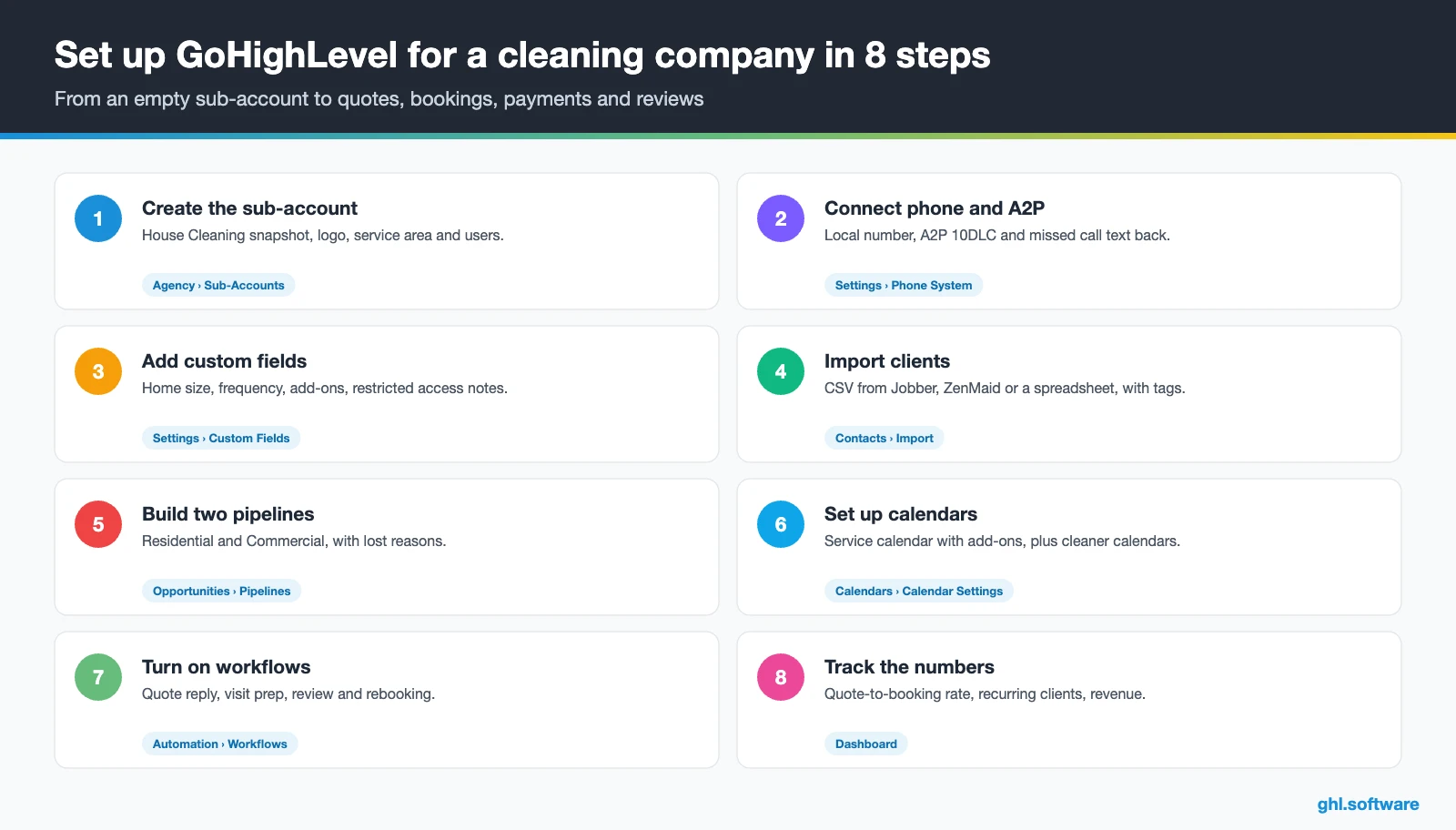
Follow this order, so the first quote request already flows from form to booked clean. In fact, a small team can finish it in a few focused days.
- Create the sub-account. Start from the House Cleaning snapshot or a blank account, then add your logo, service area, hours and users.
- Connect phone and A2P. Buy a local number, register A2P 10DLC and turn on missed call text back. Approval takes time, so start this step first.
- Add custom fields. Create fields for home size, frequency, pets, add-ons, price per visit and last clean date, plus a restricted access-notes field.
- Import your clients. Upload a CSV from Jobber, ZenMaid or a spreadsheet, with service and frequency tags, so win-backs start on day one.
- Build the pipelines. Create Residential and Commercial boards with the stages above, and require a lost reason on every closed card.
- Set up calendars. Use a service calendar with Services and add-ons for first cleans, while each cleaner gets a standard calendar for recurring visits.
- Publish the quote form. Put a quote form on a landing page and your Google Business Profile, built with forms.
- Turn on workflows, payments and reporting. Activate the three automations, connect Stripe and reviews, and build a dashboard for quote-to-booking rate, recurring clients and revenue.
What a CRM for cleaning business costs on HighLevel
HighLevel charges a flat plan price with unlimited users and contacts, so adding cleaners or office staff doesn’t raise the bill. Usage, however, is billed on top: numbers, texts, calls, emails and AI.
For example, a maid service on Starter ($97) with one local number ($1.15) sends 1,500 SMS segments (about $11.21). It also makes 600 outbound call minutes (about $9.96) and sends 4,000 emails (about $2.70). That comes to about $122 a month. Then, if you want an AI receptionist, the $50 AI plan brings it to about $172. Besides, carrier fees, the A2P campaign fee and card processing come on top. As a result, most small cleaning companies land between $110 and $250 a month. Our pricing guide has the full breakdown.
GoHighLevel plans compared
| Starter | Unlimited | Founder (formerly Agency Pro) | |
|---|---|---|---|
| Price | $97/month | $297/month | $497/month |
| Annual | $970/year | $2,970/year | $4,970/year |
| Sub-accounts | 3 | Unlimited | Unlimited |
| Contacts and users | Unlimited | Unlimited | Unlimited |
| All core features | Yes | Yes | Yes |
| White label web app | Yes | Yes | Yes |
| API access | Basic | Basic | Advanced, agency-level keys |
| Rebill phone and email | No | At cost | With markup |
| Rebill AI usage | No | No | Yes |
| SaaS Mode and automated sub-accounts | No | No | Yes |
| User and agent reporting | No | No | Yes |
| Support | 24/7 | 24/7 | 24/7 |
Usage costs on top of the plan
| Item | Official price | When you pay it |
|---|---|---|
| Local phone number (US/Canada) | $1.15/month | Each number for SMS and calls |
| SMS (US/Canada) | $0.00747 per segment + carrier fees | Every text sent or received |
| Calls (US) | $0.0166/min outbound, $0.01165/min inbound | Calls through LC Phone |
| A2P 10DLC registration | $22.50 one-time (low volume) + monthly campaign fee | Before texting US numbers |
| Email (LC Email) | $0.675 per 1,000 emails | Campaigns and workflow emails |
| $10/month per sub-account + Meta fees | If you use WhatsApp inside HighLevel | |
| AI | Pay-per-use, or $50 or $97/month per sub-account | Voice AI, Conversation AI and other AI tools |
| Premium workflow steps | $0.01 per run after 100 free | Webhooks, Google Sheets, Slack, app actions |
Honest limits: what to keep in Jobber, ZenMaid or Housecall Pro
As a CRM for cleaning business sales, HighLevel is the front office, not the field operations app. So be clear about what it does not do before you move:
- No routing or GPS. For example, there is no route optimization, map-based dispatch or crew location tracking.
- No timesheets or payroll. Clock-in, hours and pay stay in your field-service or payroll tool.
- No native cleaner checklists. HighLevel has no room-by-room checklist with photo proof, although a form or a third-party app can approximate it.
- Field-service sync varies. In fact, Jobber and Housecall Pro have official HighLevel apps in the Marketplace. However, ZenMaid has none, so plan on Zapier, webhooks or the API.
The cleanest stack is simple: HighLevel wins and keeps the client, while a field-service app runs the day’s jobs.
Here is how HighLevel compares with the tools that show up most when owners look for a CRM for cleaning business use. Features change often, so confirm details on each vendor’s site.
| GoHighLevel | Jobber | ZenMaid | Housecall Pro | |
|---|---|---|---|---|
| Built for cleaning or home services | No | Yes | Yes | Yes |
| Online booking | Yes | Yes | Yes | Yes |
| Recurring visits | Up to 24 per calendar series | Yes | Yes | Yes |
| Routing, dispatch and crew app | CRM mobile app only | Check plan | Check plan | Check plan |
| Funnels, social, ads, WhatsApp and Voice AI in one tool | Yes | Check plan | Check plan | Check plan |
| White label for agencies | Yes | No | No | No |
| Best fit | Lead response, rebooking and marketing | Home service teams that need quoting and scheduling | Residential maid services | Home service teams that need dispatch |
Compliance for cleaning companies: texting consent and client keys
The angle most guides miss: HighLevel’s recurring-appointment rules
Every guide says a CRM for cleaning business owners should “automate recurring cleans”. Few explain how HighLevel actually handles them. According to the recurring appointments help article, a series set on the calendar allows a maximum of 24 occurrences. It also needs a calendar with only one team member and no date-specific hours. So a weekly client fills a series in about six months, while a monthly one lasts two years.
Custom rules, such as every second Thursday, are instead created from the appointment window. However, service and class calendars don’t support custom recurrence. Moreover, workflows trigger only for the first appointment of a custom series, and custom rules ignore your availability. Therefore a reminder workflow built on “appointment booked” won’t fire for visit five unless you plan for it.
A setup that works around the limits
For that reason, many teams split the work in two. The service calendar with add-ons books first cleans and one-off deep cleans. Meanwhile, each cleaner gets a standard calendar for recurring clients, with the series end date saved in a custom field. Then a date-based workflow creates a “renew series” task two weeks before that date. Test your reminders on a live series before you rely on them. Otherwise, keep recurring scheduling in your field-service app and let HighLevel handle the rest. Compare this setup with other trades in our industry guides, or browse every module in the features hub.
Open a free account, load the pipeline and turn on the first automation today. The bootcamp walks you through the setup live.
Start the 30-day trialAffiliate link. I may earn a commission at no extra cost to you.
Frequently asked questions
What is the best CRM for a cleaning business?
It depends on where you lose money. If routing, timesheets and crew checklists are the problem, a field-service tool such as Jobber, ZenMaid or Housecall Pro is the core. If you lose jobs to slow quotes, missed calls and clients who never rebook, HighLevel fixes that with instant replies, booking, reminders, payments and reviews for a flat price. Many cleaning companies run both, each for its own job.
Does my cleaning business need a CRM if I already use Jobber or ZenMaid?
Not always. Field-service apps already store clients, schedules and invoices. However, they are usually lighter on marketing: funnels, ads, social posts, AI chat, WhatsApp and multi-step follow-up. If your schedule is full and clients rebook on their own, keep it simple. If quotes go cold or recurring clients drift away, a CRM such as HighLevel adds that growth layer next to your current app.
Can GoHighLevel automate recurring cleaning appointments?
Partly. A calendar-configured series repeats daily, weekly or monthly up to 24 occurrences and needs a calendar with one team member. Custom rules, such as every two weeks, are created from the appointment window, but service and class calendars don’t support them. Also, workflows fire only on the first appointment of a custom series. So test reminders carefully, or keep recurring scheduling in your field-service app.
How much does a CRM for a cleaning business cost?
On HighLevel the plan price stays flat as your team grows: Starter is $97 a month and Unlimited $297, both with unlimited users and contacts. Usage adds the rest, such as numbers at $1.15 a month, SMS segments, call minutes, email and optional AI. In total, a small cleaning company typically pays between $110 and $250 a month, plus carrier and card processing fees.
Is there a free CRM for a cleaning business?
Free CRMs exist, but they usually limit texting, automation or users, which is exactly what speeds up a cleaning company. HighLevel has no free plan. Its own trial runs 14 days and needs a card, while the extended 30-day trial comes with our bootcamp link. After that, Starter costs $97 a month with every core feature included.
Can I move my client list from another cleaning software?
Yes. Export your clients from Jobber, ZenMaid or a spreadsheet as a CSV, then import it into HighLevel and map each column to a field. Add tags for service type and frequency, and fill the last clean date, so win-back workflows can start right away. Recurring appointments don’t move with the CSV, so rebuild active series on the cleaner calendars.
How do I avoid double bookings and lockouts?
HighLevel calendars only offer open slots and can add buffers between visits, so online booking avoids most double bookings. Custom recurring rules ignore availability, though, so check those series by hand. For lockouts, a reminder 48 hours before asks the client to confirm and send gate codes or parking notes. The office then stores them in a restricted field for the assigned cleaner.
More industry guides
Sources: HighLevel House Cleaning playbook · HighLevel help: Recurring appointments · HighLevel help: Missed Call Text Back · HighLevel help: Appointment booking in Voice AI · HighLevel help: A2P 10DLC brand and campaign registration · HighLevel help: Tap to Pay · HighLevel help: Daily operations playbook for cleaning and maintenance · HighLevel blog: Cleaning business playbook