

CRM for Plumbers: Catch Every Emergency Call With HighLevel
A CRM for plumbers has to answer the call you can’t pick up, chase the water heater quote you sent last week and ask for a review after every job. GoHighLevel does this with missed call text back, Voice AI, estimate follow-up workflows, text-to-pay and review requests. However, it is not field-service software, so dispatch, routing and price books stay in Jobber, Housecall Pro or ServiceTitan, which HighLevel can connect to.
Water drips through Tamika Gallagher’s kitchen ceiling in Baltimore, and a puddle spreads toward the hallway. It is 2:10 a.m. on a Saturday. She calls your number first and gets voicemail, so she tries the next plumber on Google. He answers. As a result, he gets the emergency job and, very likely, her water heater replacement next year. A CRM for plumbers exists for the call you miss while you sleep, drive or lie under a sink.
This guide is for plumbing shops with one to twenty trucks, drain-cleaning companies and their agencies. Most already run Jobber, Housecall Pro or ServiceTitan for jobs. So what sits in front of that software? The layer that answers, follows up and asks for reviews. Here, that layer is HighLevel, set up as a CRM for plumbers.
Below are the needs, a two-lane pipeline, three automations, the official snapshot, an 8-step setup and real costs. Then we cover the honest limits, because this is an independent affiliate guide.
Leer en español: Software para plomería · Ler em português: Sistema para encanador e desentupidora · Part of GoHighLevel by industry
Includes a free live setup class with a HighLevel coach.
Start free + bootcampAffiliate link.
What plumbers need from a CRM (and what HighLevel does)
Plumbing leads come at two speeds. An emergency caller wants someone at the door within the hour, while a homeowner pricing a tankless water heater compares three quotes over two weeks. So the system has to answer instantly and also follow up patiently. In fact, most plumbing shops lose more work to slow replies and forgotten quotes than to price. Here is how HighLevel covers each job a CRM for plumbers should do.
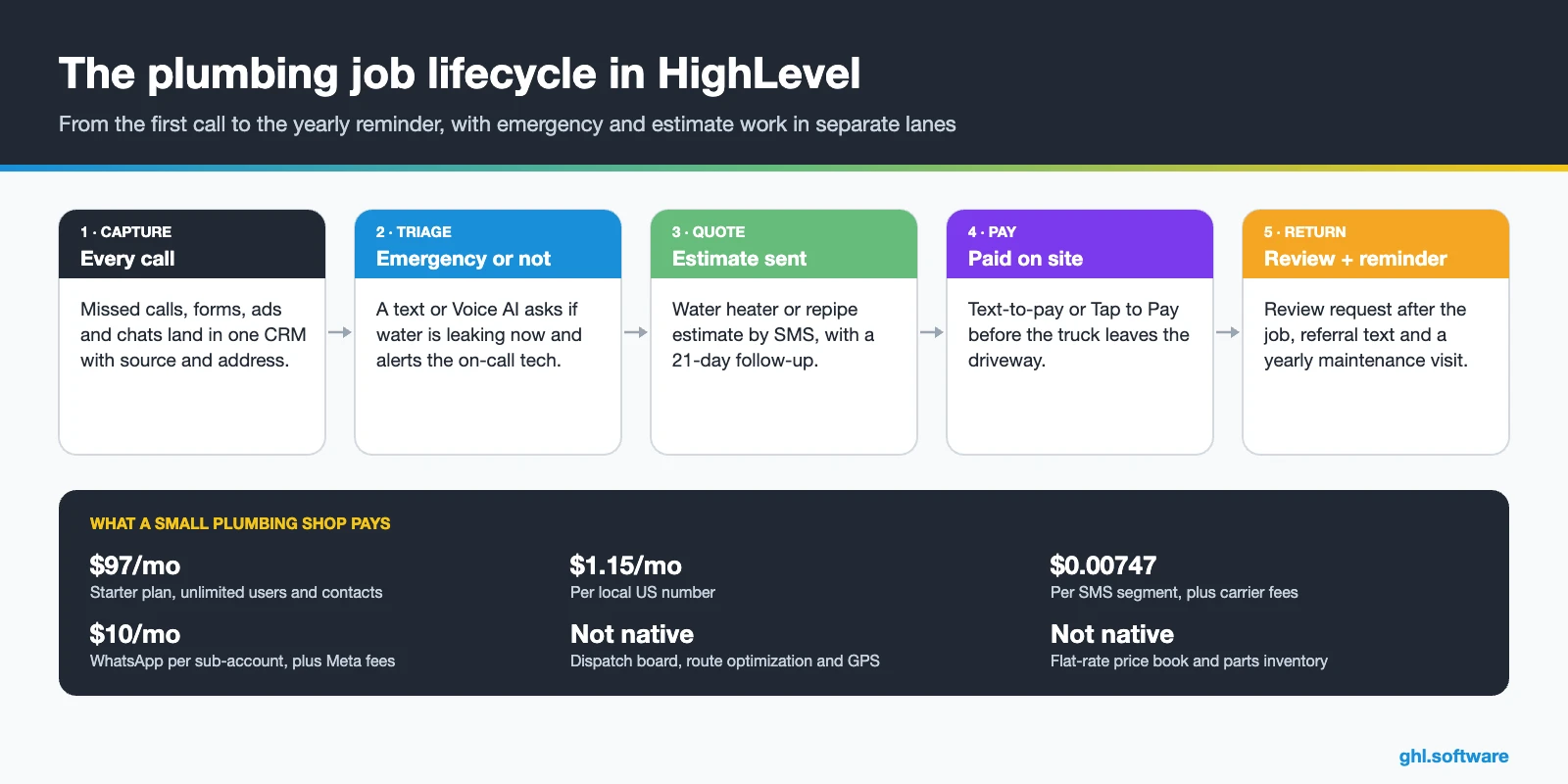
Plumbing business problems and how HighLevel solves them
The table maps the usual leaks in a plumbing shop’s sales process to the CRM for plumbers feature that plugs each one. Most of these leaks, in fact, happen before the truck ever leaves the yard.
| Problem | What HighLevel does | Feature |
|---|---|---|
| Calls missed under a sink or at night | Texts back in seconds with a triage question or a booking link | Missed call text back |
| Nobody answers after hours | Answers, qualifies the emergency and books or alerts the on-call tech | Voice AI · Aria agent |
| Water heater and repipe quotes go cold | Runs a 21-day follow-up with texts, email and a call task | Estimates + workflows |
| Diagnostic fees disputed on site | Takes the fee at booking, so you can credit it on the final invoice | Calendar Services + payments |
| Techs chasing payment for days | Sends text-to-pay or takes a card with Tap to Pay | Payments |
| Few recent Google reviews | Asks every customer for a review after the job | Reputation management |
| Past customers never call back | Sends a yearly water heater flush or drain maintenance reminder | Workflows |
The CRM for plumbers pipeline: emergency lane and estimate lane
The most common setup mistake is one board for everything. After all, a burst pipe and a whole-house repipe have little in common except the address. So a CRM for plumbers should run two pipelines. The Emergency pipeline is short and fast: new lead, dispatched, fixed and paid. The Estimates pipeline is longer, because planned work such as water heaters, repipes and sewer lines needs a visit, a quote and patient follow-up.
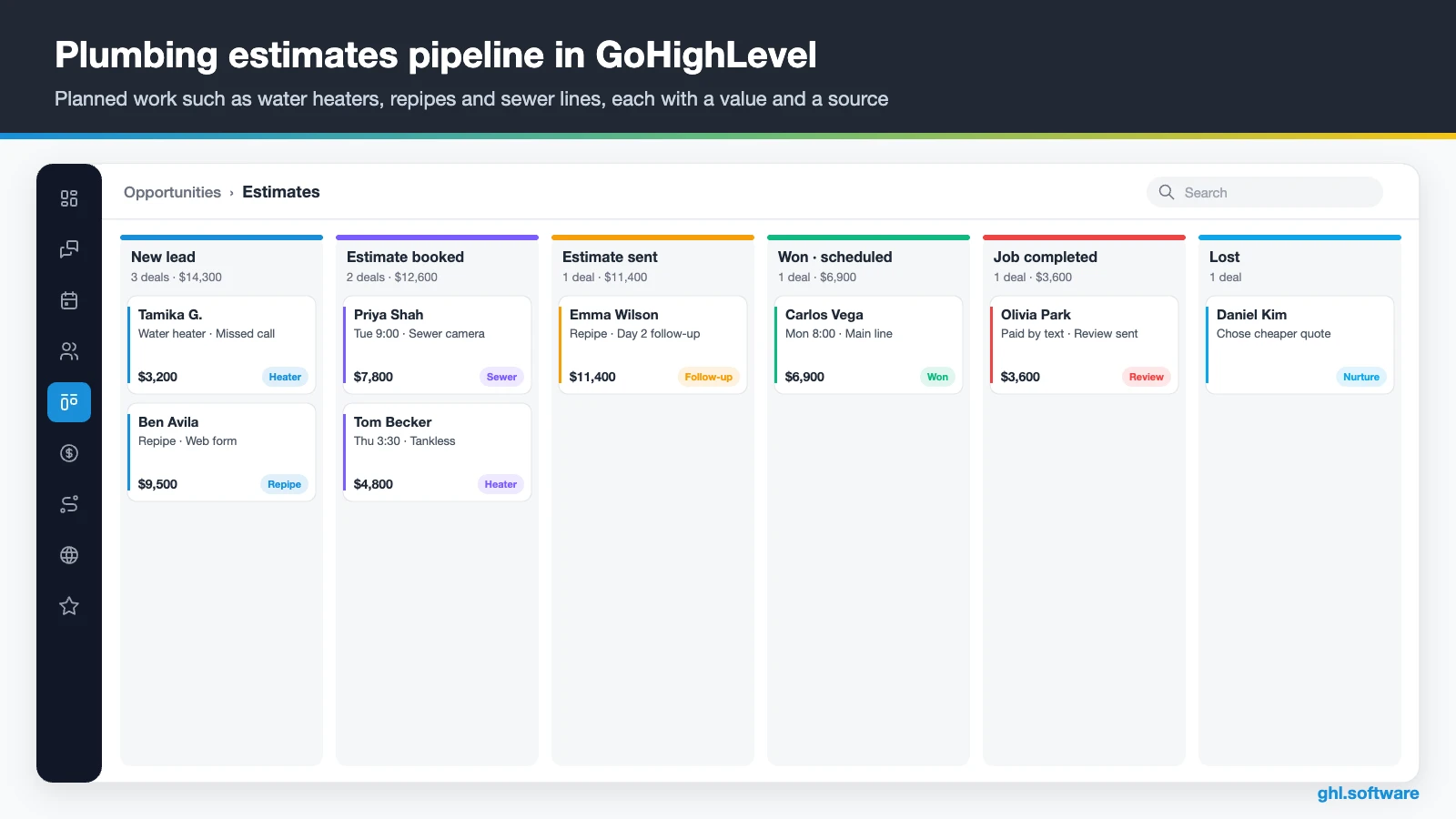
| Stage | Pipeline | What moves the job here |
|---|---|---|
| New lead | Both | A call, form, chat or ad lead creates the opportunity |
| Emergency dispatched | Emergency | The customer confirms active water and the on-call plumber accepts |
| Fixed and paid | Emergency | The tech closes the job and the text-to-pay invoice is paid |
| Estimate booked | Estimates | The customer books an estimate visit, often with a diagnostic fee |
| Estimate sent | Estimates | The estimate goes out by SMS or email from HighLevel or your job software |
| Won · scheduled | Estimates | The customer accepts and the job goes on the schedule |
| Job completed | Both | The tech marks the job done, or Housecall Pro reports “Job finished” |
| Lost | Both | Marked with a reason such as price, timing or no reply, then moved to nurture |
Also keep the details a plumber needs in custom fields: property type, water heater age and fuel, shut-off valve location, last service date and membership status. Then the Forecast tab on opportunities shows what your open estimates are worth this month.
Where Jobber, Housecall Pro or ServiceTitan fit
Most growing shops already dispatch from a field-service tool, so connect it instead of retyping customers. The native Jobber integration syncs clients both ways: name, email, phone, address, lead source and tags. However, it does not sync custom fields, notes or attachments, and each sub-account connects to one Jobber account (HighLevel help).
Housecall Pro has a native workflow app with 9 triggers, such as “Job finished” and “Estimate finished”, and 14 actions. Those triggers poll every 5 to 10 minutes, so they are not instant (HighLevel help). Meanwhile, ServiceTitan uses a paid third-party Marketplace app, Zapier or the API. In short, the job system runs the truck, while your CRM for plumbers runs the conversation before and after it.
Three automations every plumbing company should run
In a CRM for plumbers, these workflows cover the three moments where plumbers lose the most work: the call nobody answered, the quote nobody chased and the finished job nobody asked about. Build them in this order, because each one pays for the next.
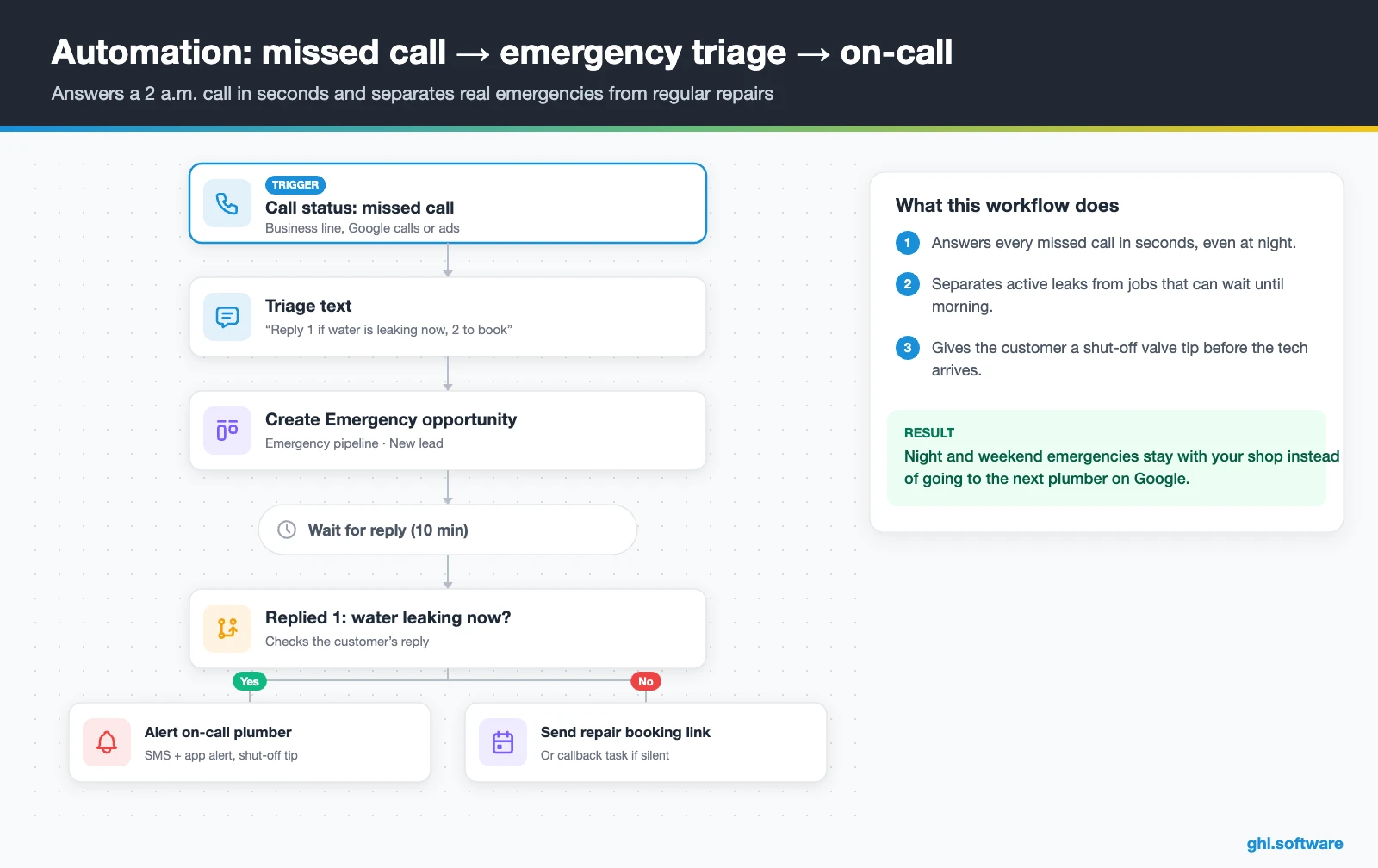
Missed call at 2 a.m. → emergency triage → on-call alert
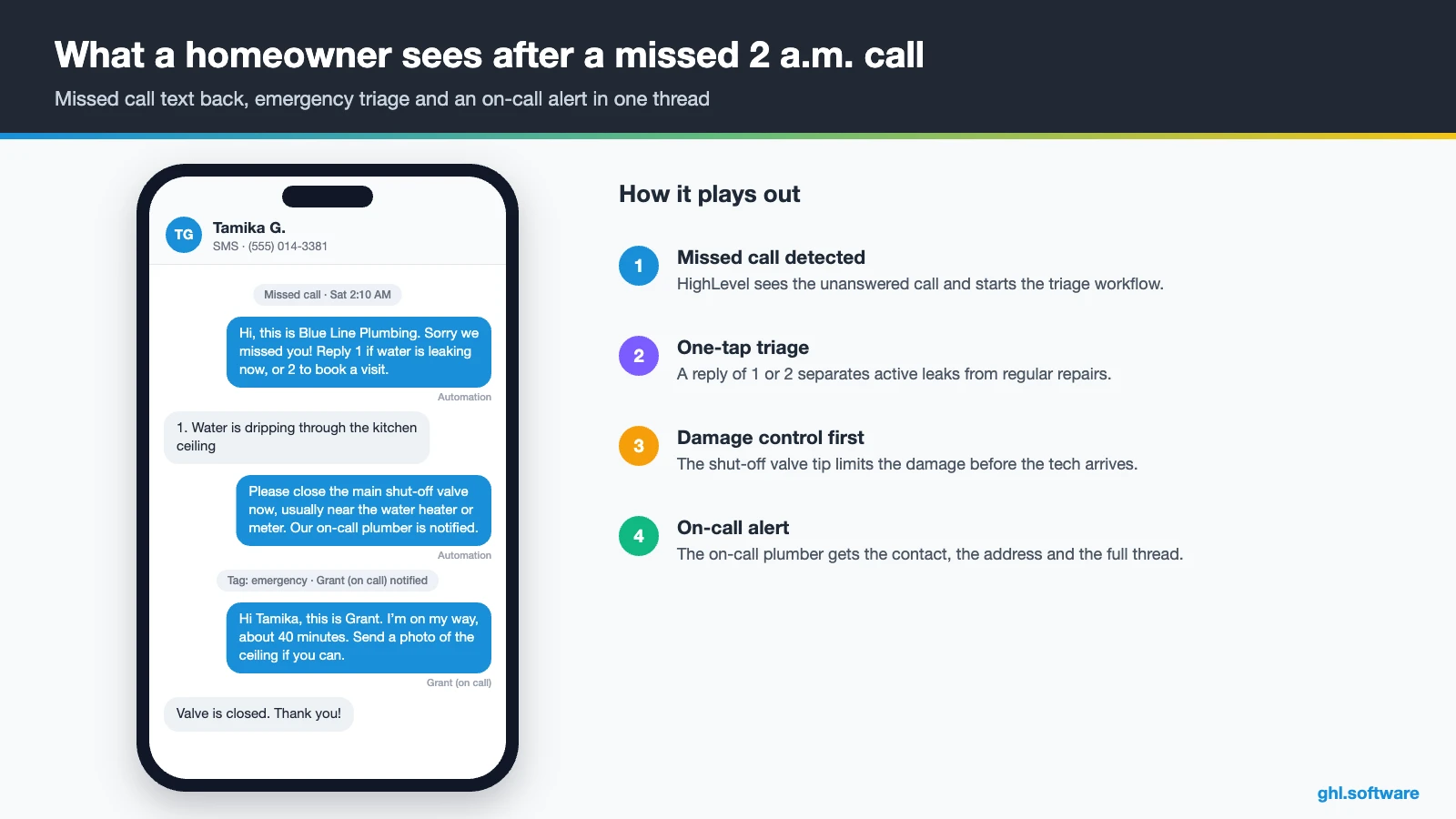
The trigger is a missed call on your business number. Within seconds, the workflow texts: “Sorry we missed you. Reply 1 if water is leaking now, or 2 to book a visit.” It also creates an opportunity in the Emergency pipeline. If the customer replies 1, the workflow tags the contact as an emergency and alerts the on-call plumber by SMS and in the mobile app. Meanwhile, the customer gets a short text on how to close the main shut-off valve.
If they reply 2, they get the repair calendar link instead. Otherwise, when nobody replies within 10 minutes, a callback task goes to the on-call phone. Therefore night and weekend emergencies stay with you instead of going to the next listing. Voice AI or the Aria agent can also answer first, instead of voicemail.
Water heater and repipe estimates that close
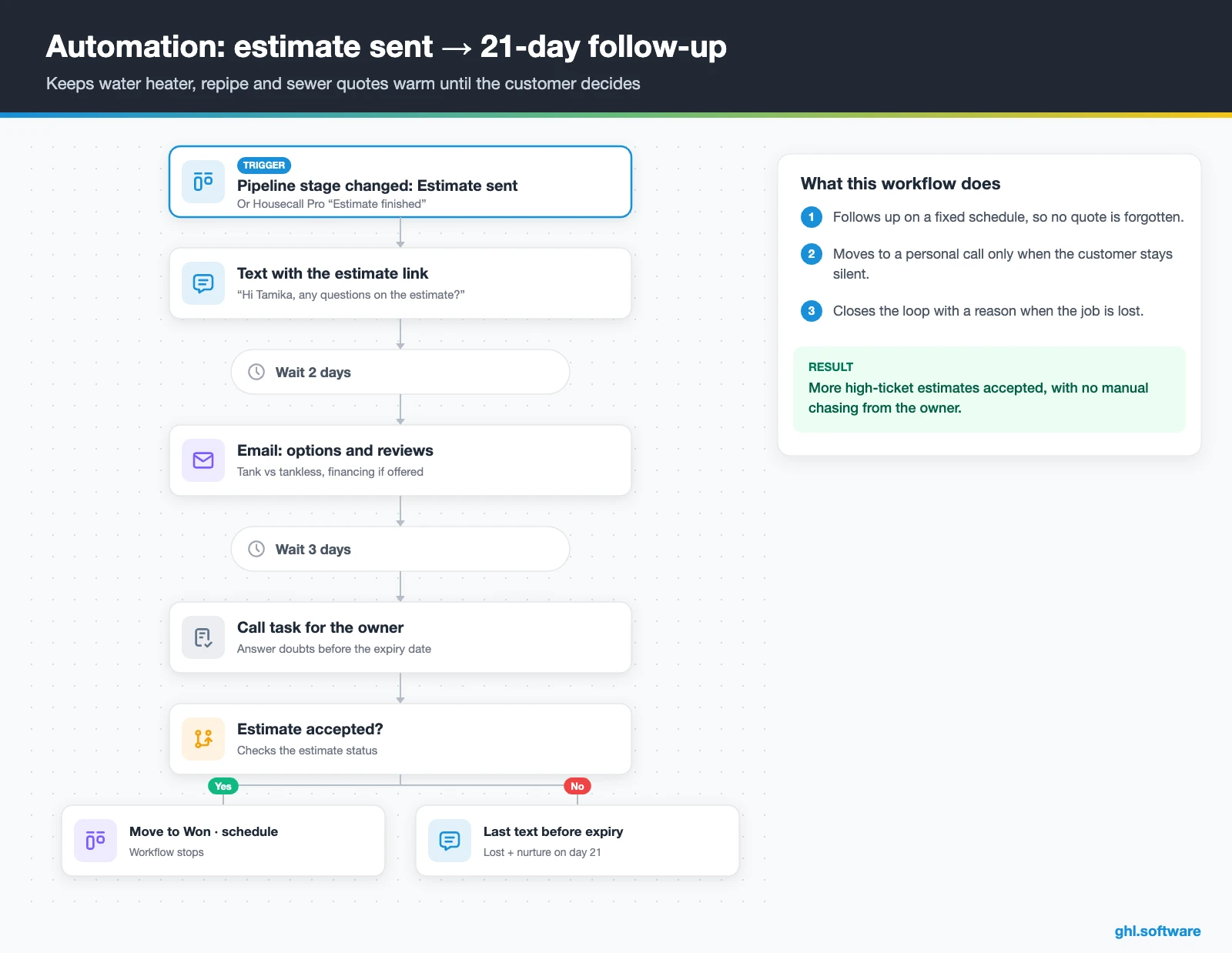
This workflow starts when an opportunity moves to “Estimate sent”, or when Housecall Pro reports “Estimate finished”. The customer first gets a text with the estimate link and a simple “Any questions?” Two days later, an email explains the options, such as tank versus tankless, plus recent reviews and financing if you offer it. Then, three days after that, the owner gets a call task.
HighLevel’s Estimates support line items, an expiry date and online accept or decline, and an accepted estimate converts to an invoice. So the last text goes out shortly before the expiry date. If the customer accepts, the card moves to Won and the workflow stops. If there is still no answer by day 21, the opportunity moves to Lost with a reason, and the contact enters long-term nurture.
Job completed → review → maintenance reminder
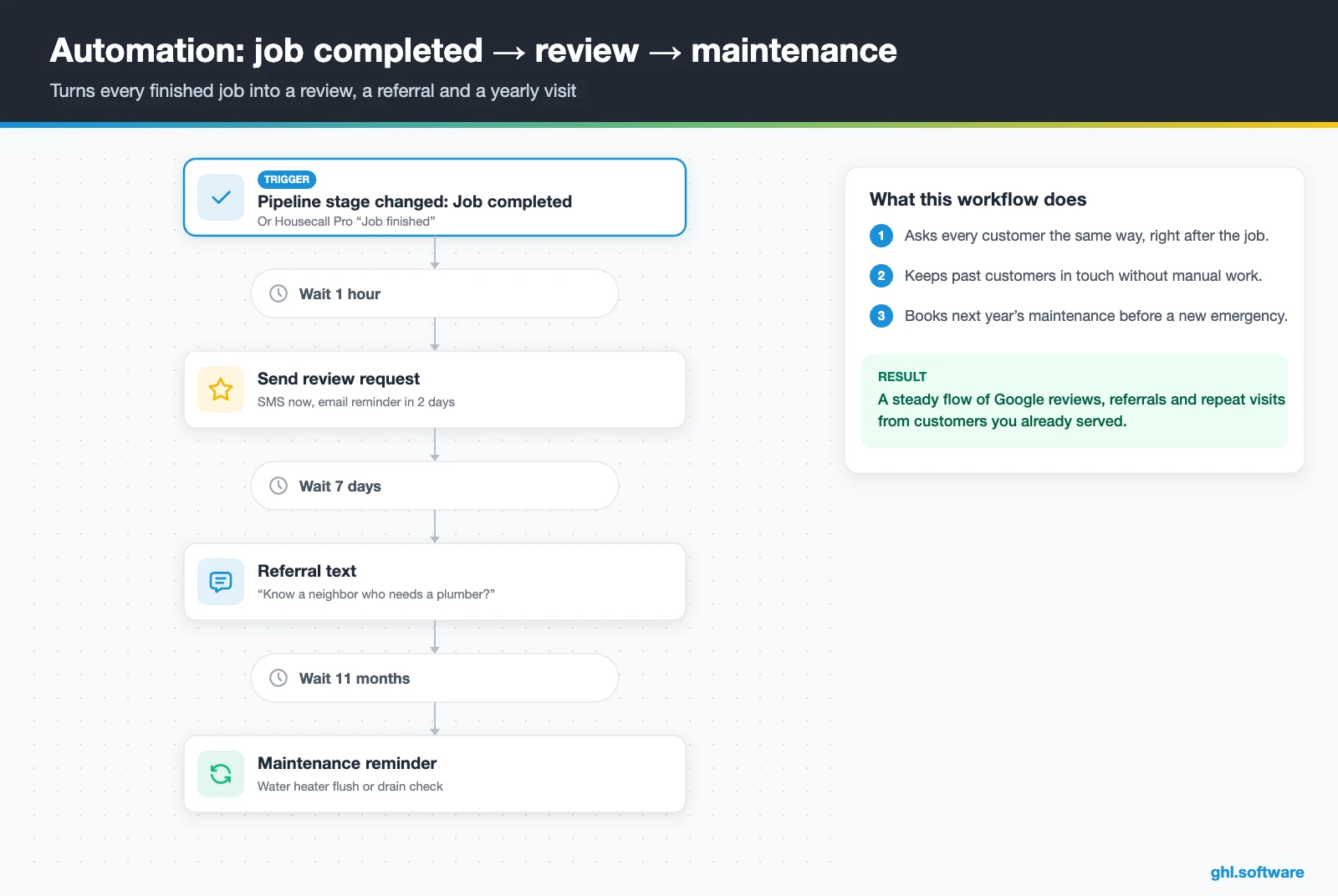
The trigger is the opportunity moving to “Job completed”, or the Housecall Pro “Job finished” trigger. One hour later, HighLevel sends a review request by SMS with your Google link. If no review arrives, an email reminder follows two days later. Ask every customer the same way, happy or not, because filtering who gets the link goes against Google’s review policies and erodes trust.
A week after the request, a referral text offers a booking link for friends and neighbors. Then, eleven months later, the customer gets a water heater flush or drain maintenance reminder. As a result, one emergency call can turn into a review, a referral and a yearly visit.
Start with the snapshot and the pipeline from this guide, then add the automations one by one. The extended trial comes with our bootcamp link.
Start the 30-day trialAffiliate link. I may earn a commission at no extra cost to you.
Texting, calls and AI receptionists for plumbers
Plumbing customers text photos of leaks, call in a panic and message your Facebook page, sometimes all in one evening. Therefore, HighLevel keeps SMS, email, WhatsApp, Facebook and Instagram DMs and web chat in one conversation per customer. So the dispatcher and the owner see the same history, while response-time SLAs flag threads that wait too long.
Meanwhile, AI covers the hours nobody answers. The Aria Industry Agent is a ready template for home services, including plumbing, that captures leads, books inbound jobs, handles emergencies and covers after-hours calls. Voice AI agents can also transfer a live call or trigger a workflow, but they work only on LC Phone or Twilio numbers (HighLevel help).
For texts and chats, Conversation AI asks what is leaking and offers real openings. Still, keep pricing on big jobs with a person. The AI Employee pricing guide explains the per-use and monthly plans.
What HighLevel’s official Plumbing snapshot includes
HighLevel publishes a free Plumbing playbook with a matching “Plumbing Snapshot”. However, it is a generic template with the trade name swapped in, so treat it as a starter kit rather than a finished CRM for plumbers. Out of the box you get:
- A “Plumbing” website with a Home page (services and FAQ sections) and a Link in Bio page, plus a chat widget.
- A “Plumbing Offer” funnel with an opt-in step and an appointment booking page, fed by the “Marketing Form – Claim Offer”.
- A “Marketing Pipeline” and the “New Lead Nurture (Fast 5) – Claim Offer” and “Long Term Nurture” workflows, with email, SMS and a voicemail drop.
- Service calendars tagged “Plumbing Services”, custom values, snippets and one ad.
- A Voice AI prompt for call handling, appointment setting and FAQs, which the playbook lists as a quick win.
What you still build is the plumbing logic. For example, it has no emergency or after-hours routing, no estimate follow-up and no maintenance reminders. Also, missed call text back is not part of its quick wins, so turn it on yourself. Rewrite every message for your services and area, then save the result as your own snapshot. For deeper ideas, HighLevel’s help center also has a getting-started playbook for plumbing businesses.
How to set up HighLevel as a CRM for plumbers
Follow this order, so the first missed call already flows into a booked job. A one-truck shop can finish it in a few focused days.
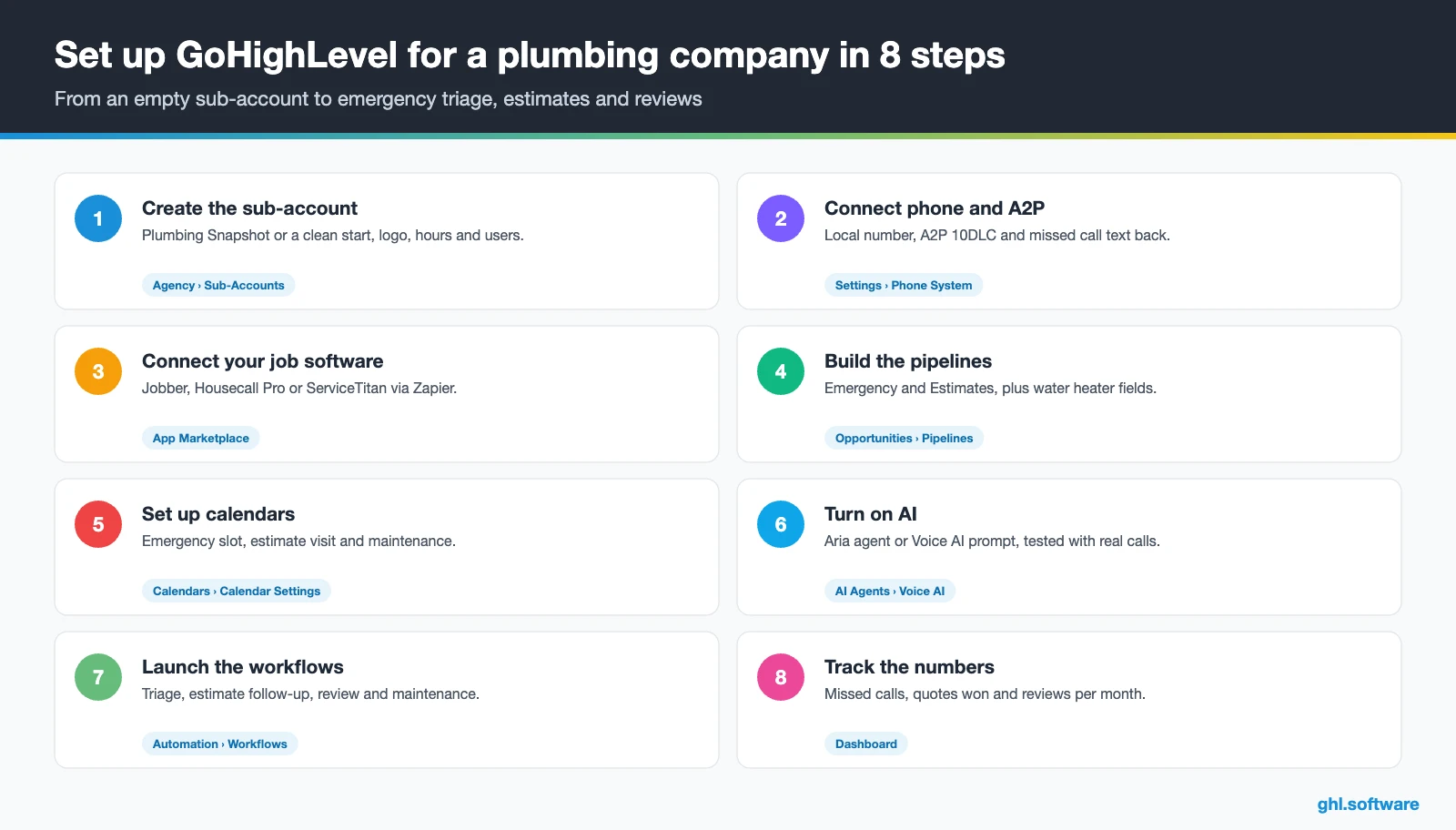
- Create the sub-account. Load the Plumbing Snapshot or start clean, then add your logo, service area, hours and users.
- Connect phone and A2P. Buy a local number, register A2P 10DLC, turn on missed call text back and record calls only where your state’s consent rules allow it.
- Connect your job software. Install the official Jobber or Housecall Pro app from the App Marketplace. If you run ServiceTitan, instead use a paid third-party app or Zapier, as our integrations page explains. Otherwise, import a CSV of past customers.
- Build the pipelines. Create the Emergency and Estimates pipelines with the stages above, plus custom fields for water heater age, last service and membership.
- Set up calendars. An emergency slot, an estimate visit with an optional diagnostic fee and a maintenance calendar, each with buffers and reminders.
- Turn on AI. Activate the Aria Industry Agent or the snapshot’s Voice AI prompt, and Conversation AI for web chat and social DMs. Then test it with real calls.
- Launch the three workflows. Emergency triage, estimate follow-up and review plus maintenance, in that order. Check each one with a test contact first.
- Add reviews, ads and reporting. Connect Google Business Profile, set review requests and build a dashboard of missed calls, quotes won and reviews. Techs collect payment in the mobile app.
What a CRM for plumbers costs on HighLevel
HighLevel charges a flat plan price with unlimited users and contacts, so adding techs or a dispatcher does not raise the bill. Usage, however, comes on top: numbers, texts, calls, email and AI.
For example, a three-truck shop on Starter ($97) with one local number ($1.15) and 2,000 SMS segments (about $15) pays about $113. Then add 1,000 outbound minutes (about $17), 1,500 inbound minutes (about $17) and the $50 AI plan. The total is about $197 a month, before carrier fees, the monthly A2P campaign fee and card processing. As a result, most small plumbing companies land between $150 and $300 a month. Our pricing guide has the full breakdown.
GoHighLevel plans compared
| Starter | Unlimited | Founder (formerly Agency Pro) | |
|---|---|---|---|
| Price | $97/month | $297/month | $497/month |
| Annual | $970/year | $2,970/year | $4,970/year |
| Sub-accounts | 3 | Unlimited | Unlimited |
| Contacts and users | Unlimited | Unlimited | Unlimited |
| All core features | Yes | Yes | Yes |
| White label web app | Yes | Yes | Yes |
| API access | Basic | Basic | Advanced, agency-level keys |
| Rebill phone and email | No | At cost | With markup |
| Rebill AI usage | No | No | Yes |
| SaaS Mode and automated sub-accounts | No | No | Yes |
| User and agent reporting | No | No | Yes |
| Support | 24/7 | 24/7 | 24/7 |
Usage costs on top of the plan
| Item | Official price | When you pay it |
|---|---|---|
| Local phone number (US/Canada) | $1.15/month | Each number for SMS and calls |
| SMS (US/Canada) | $0.00747 per segment + carrier fees | Every text sent or received |
| Calls (US) | $0.0166/min outbound, $0.01165/min inbound | Calls through LC Phone |
| A2P 10DLC registration | $22.50 one-time (low volume) + monthly campaign fee | Before texting US numbers |
| Email (LC Email) | $0.675 per 1,000 emails | Campaigns and workflow emails |
| $10/month per sub-account + Meta fees | If you use WhatsApp inside HighLevel | |
| AI | Pay-per-use, or $50 or $97/month per sub-account | Voice AI, Conversation AI and other AI tools |
| Premium workflow steps | $0.01 per run after 100 free | Webhooks, Google Sheets, Slack, app actions |
Honest limits: what a CRM for plumbers can’t do in HighLevel
HighLevel is the front office, not the truck. So be clear about the gaps before you move anything:
- No dispatch board or routing. There is no native dispatch board, route optimization, GPS or live ETA. The “Dispatching” request on HighLevel’s ideas board has been in progress since 18 August 2026, with no release date.
- No flat-rate price book or parts inventory, though you can create products and services with prices. Flat-rate price books, parts inventory, job costing and permit tracking stay in your field-service or accounting software.
- Limited equipment history. Water heater age or fixture details live in custom fields or custom objects, not in a service-history module.
The cleanest stack is simple: HighLevel wins and keeps the customer, while your field-service tool runs the job. Here is how it compares, as a CRM for plumbers, with the tools shops usually shortlist. Features change often, so confirm details on each vendor’s site.
| GoHighLevel | Jobber | Housecall Pro | ServiceTitan | |
|---|---|---|---|---|
| Built for field service | No | Yes | Yes | Yes |
| Dispatch and scheduling board | Not native | Yes | Yes | Yes |
| Quotes or estimates | Yes | Yes | Yes | Yes |
| Connection to HighLevel | Not needed | Native client sync | Native workflow app | Paid third-party app or Zapier |
| Funnels, social, ads and Voice AI in one tool | Yes | Check plan | Check plan | Check plan |
| White label for agencies | Yes | No | No | No |
| Best fit | Lead response, follow-up, reviews and marketing | Small and mid-size service shops | Small and mid-size home service shops | Larger multi-truck operations |
CRM compliance for plumbers: texting, calls and licensing
The angle most guides miss: the first text should save the floor
Most guides about a CRM for plumbers talk about booking speed. However, in a real emergency the first message matters more than the booking link. For example, a homeowner with water coming through the ceiling needs to know where the main shut-off valve is, right now. So write that tip into your triage text and into the Voice AI prompt.
That one line does three things. It limits the damage before you arrive. It also proves you know the trade, so the customer stops calling the next plumber. Finally, it gives the on-call tech a calmer customer at the door. The BLS notes that plumbers are often on call for emergencies, so evening and weekend work is common. Your CRM for plumbers should therefore treat those hours as the core of the business, not an exception. Compare this setup with other trades in our industry guides or browse every module in the features hub.
Open a free account, load the pipeline and turn on the first automation today. The bootcamp walks you through the setup live.
Start the 30-day trialAffiliate link. I may earn a commission at no extra cost to you.
Frequently asked questions
What is the best CRM for plumbers?
It depends on where you lose money. If dispatch, routes and price books are the problem, a field-service platform such as Jobber, Housecall Pro or ServiceTitan is the core. However, if you lose jobs to missed calls and forgotten quotes, HighLevel fixes that with missed call text back, Voice AI, estimate follow-up and review requests for a flat price. Many shops run both and connect them.
Does GoHighLevel integrate with Jobber or Housecall Pro?
Yes. Jobber has a native integration that syncs clients both ways, including name, phone, email, address, lead source and tags, but not custom fields, notes or attachments. Housecall Pro has a native workflow app with 9 triggers, such as “Job finished”, and 14 actions. Its triggers poll every 5 to 10 minutes. ServiceTitan connects through a paid third-party app or Zapier.
Can an AI receptionist answer plumbing calls 24/7?
Yes. HighLevel’s Aria Industry Agent is a home-services template, including plumbing, for lead capture, inbound booking, emergency handling and after-hours calls. Voice AI agents can book appointments, transfer calls and trigger workflows, but only on LC Phone or Twilio numbers. Test it with real scenarios first, and keep pricing on large jobs with a person.
How do emergency bookings work in a plumbing CRM?
In HighLevel, an emergency is a fast lane. A missed call or a message with words like “leak” triggers a triage text. If the customer confirms active water, the workflow tags the contact, creates an Emergency opportunity and alerts the on-call plumber by SMS and in the mobile app. Otherwise, the customer gets a link to book a regular repair slot.
Can customers pay a diagnostic fee when they book?
Yes. Calendar Services in HighLevel can take a payment at booking, which suits a diagnostic or trip fee for an estimate visit. Then you can credit that amount on the final invoice if you close the job. On site, techs can also send text-to-pay links or use Tap to Pay in the mobile app. However, card fees apply on top.
How do I get more Google reviews as a plumber?
Ask every customer, every time, soon after the job. In HighLevel, a workflow sends a review request by SMS about an hour after the job is completed, then an email reminder two days later. Ask everyone the same way, because sending only happy customers to Google goes against its review policies. Also, reply to every review, using Reviews AI drafts.
Is there a free CRM for plumbers?
Free CRMs exist, but they usually limit texting, automation or users, which is exactly what helps a plumber answer faster. HighLevel has no free plan. Its own trial runs 14 days and needs a card, while the extended 30-day trial comes through our bootcamp link. After that, Starter costs $97 a month with unlimited users.
More industry guides
Sources: HighLevel Plumbing playbook · HighLevel help: Getting-started playbook for plumbing businesses · HighLevel help: Jobber integration · HighLevel help: Housecall Pro workflow triggers and actions · HighLevel help: ServiceTitan via Zapier · HighLevel help: Estimates · HighLevel help: AI Voice Agents overview · HighLevel help: A2P 10DLC registration · HighLevel ideas: Dispatching and job scheduling · BLS: Plumbers, Pipefitters, and Steamfitters