

Roofing CRM: Storm Leads, Inspections and Claims in HighLevel
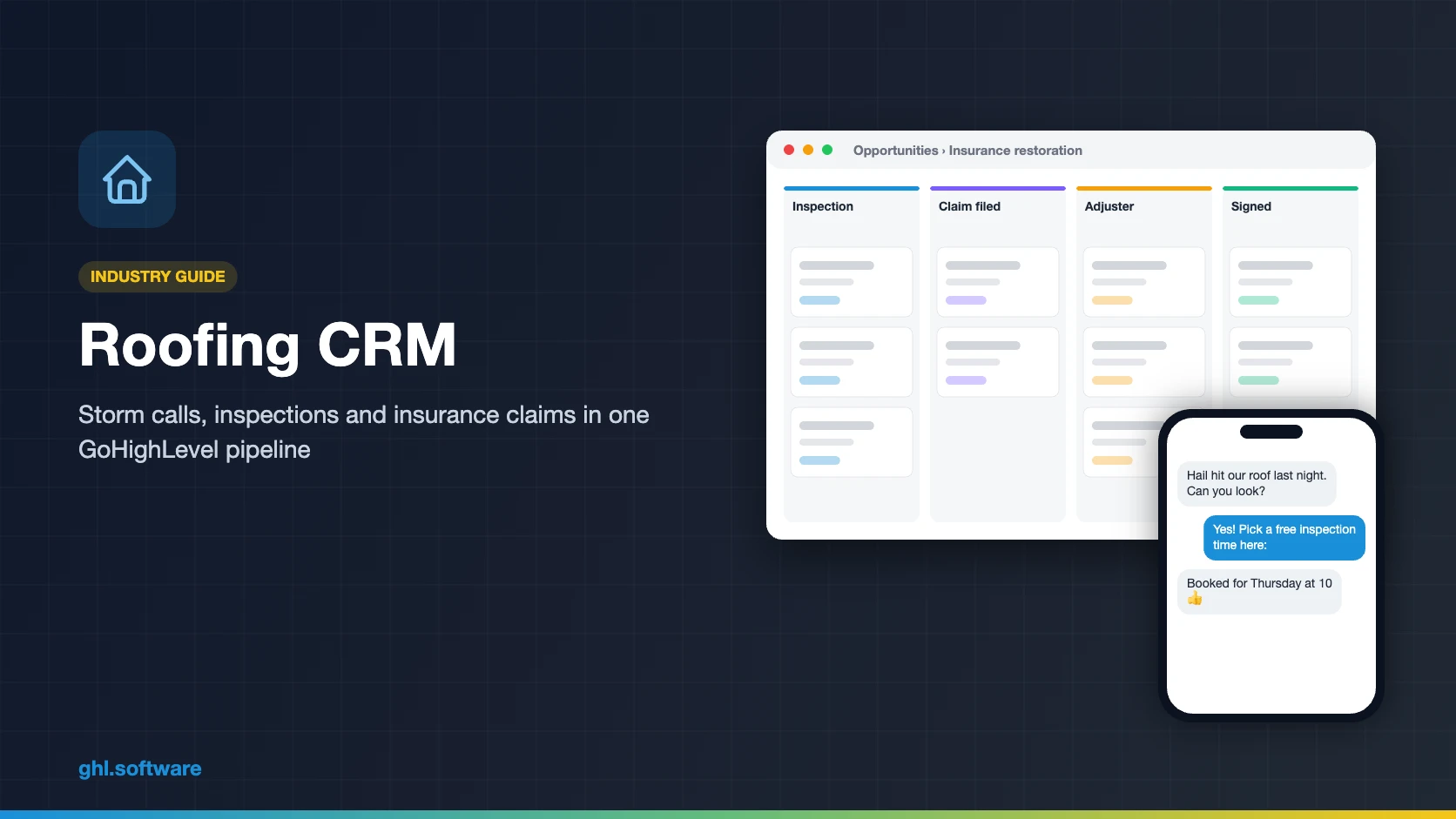
A roofing CRM should answer every storm call in seconds, book the inspection and follow each proposal or insurance claim until the homeowner signs. GoHighLevel does that with missed call text back, Voice AI, inspection calendars, Estimates, e-signed contracts, text-to-pay and review requests. However, it does not measure roofs, write supplements or schedule crews, so many roofers run it next to AccuLynx or JobNimbus.
Hail is still melting on Atlanta lawns when your office line starts ringing. By six, it shows 23 missed calls, and both of your estimators are still on ladders across town. One of those calls is from Yuki Frost, who has shingles on her lawn and a stain on her ceiling. She will book whichever roofer texts back first. A roofing CRM exists for that evening. It answers every caller, books the inspection and keeps the job moving while your crew is on a roof.
This guide is for residential roofing companies, storm restoration teams and their agencies. It shows how GoHighLevel (HighLevel) runs the sales side of roofing: two pipelines, three automations, the official snapshot, the setup and the real cost. If you also remodel, our CRM for construction guide goes deeper into estimates and change orders.
Then we draw an honest line. HighLevel is not production software, so you will see what to keep in AccuLynx, JobNimbus or Roofr, how to connect them, and the rules for storm work.
Leer en español: Software para empresas de impermeabilización y techos · Ler em português: Sistema para empresa de calhas e telhados · Part of GoHighLevel by industry
Includes a free live setup class with a HighLevel coach.
Start free + bootcampAffiliate link.
What a roofing company needs from a CRM
Roofing sales run at two speeds. On a normal week, leads trickle in from Google, referrals and your website. After a storm, however, the phone rings faster than anyone can answer, and then things go quiet for weeks while insurance companies decide. So a roofing CRM has to work in both modes: instant response during the surge and patient follow-up during the wait. Here is what HighLevel brings to each step as a CRM for roofing.
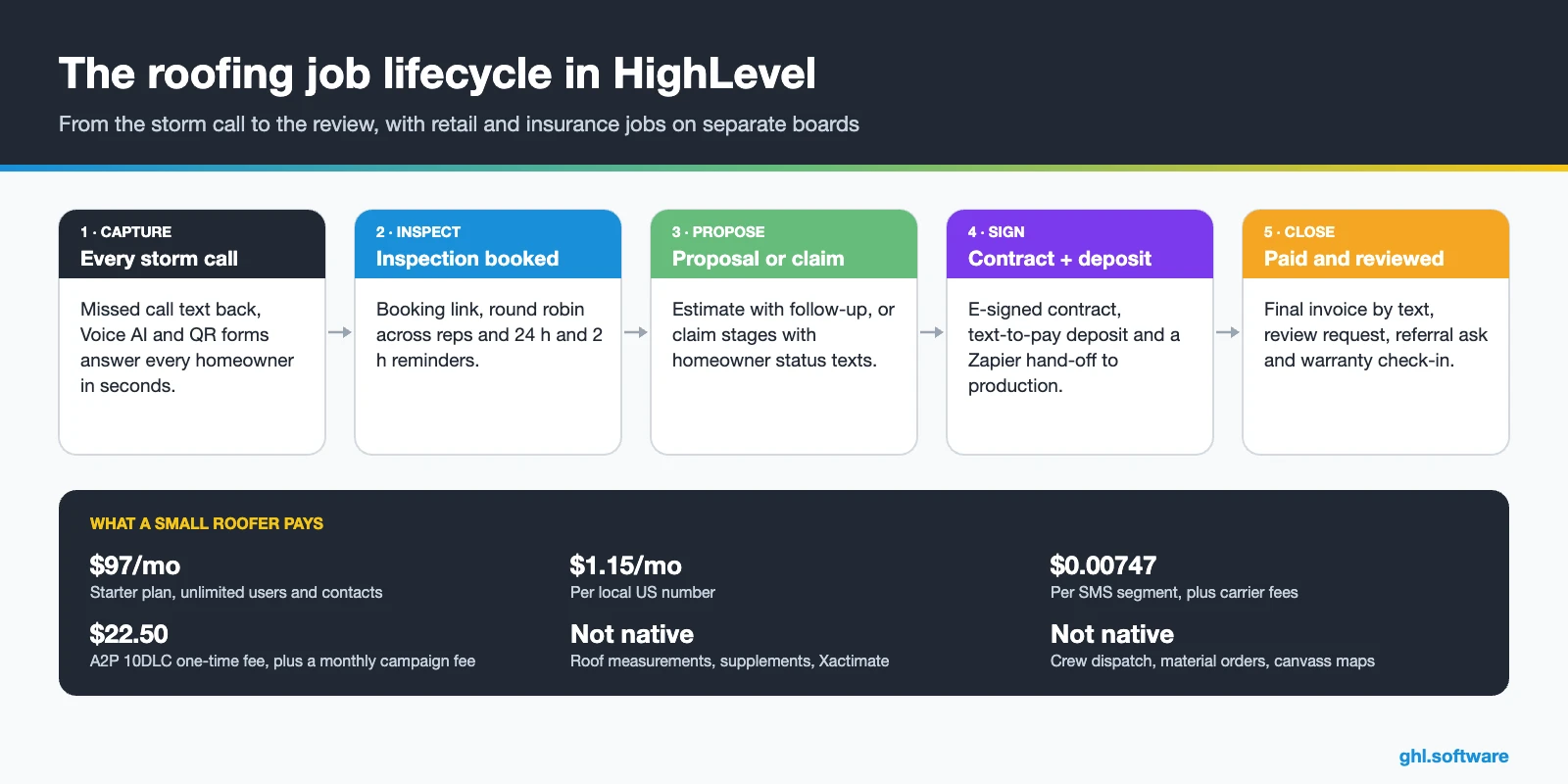
Roofing sales problems and how HighLevel fixes them
Most roofers don’t lose jobs on shingles or price. Instead, they lose them in the gaps between the call, the inspection, the proposal and the claim decision. The table maps each gap to the roofing CRM feature that closes it.
| Problem | What HighLevel does | Feature |
|---|---|---|
| Dozens of missed calls after a hailstorm | Texts every caller back with an inspection link | Missed call text back |
| Nobody answers at night or on weekends | An AI agent answers, asks about the damage and books the visit | Voice AI |
| Canvassers hand off leads on paper | A QR form creates the contact, tags the territory and alerts the closer | Forms + workflows |
| Homeowners miss inspections | Confirms and reminds 24 h and 2 h before | Calendars |
| Proposals die in “sent” | Runs a 21-day follow-up with texts, email and call tasks | Estimates + workflows |
| Homeowners go cold during the claim | Sends a status text at each insurance stage | Pipeline stage triggers |
| Chasing the deposit and the final check | Sends text-to-pay invoices and takes cards on site | Payments + Tap to Pay |
| Too few Google reviews | Asks for a review the day after the final payment | Reputation management |
Roofing CRM pipelines: retail jobs and insurance restoration
Retail and insurance jobs follow different paths, so give them two boards. A retail roof moves from inspection to proposal to signature in days or weeks. Meanwhile, an insurance job waits on an adjuster, a scope and often a supplement before anyone talks about shingle color. If both share one board, the claim jobs clog it and your forecast stops making sense. In HighLevel, you create both pipelines in the same sub-account, and each stage change in your roofing CRM can start a workflow.
Retail pipeline stages
| Retail stage | What moves the job here |
|---|---|
| New lead | A call, form, chat, ad or canvasser QR scan creates the opportunity |
| Inspection booked | The homeowner books on the inspection calendar |
| Inspected and measured | The rep adds photos and the measurement report to the contact |
| Proposal sent | The Estimate goes out by SMS or email, often as good, better and best options |
| Signed + deposit | The contract is e-signed and the deposit is paid; the job is Won |
| Installed and paid | The final invoice is paid, so the review workflow starts |
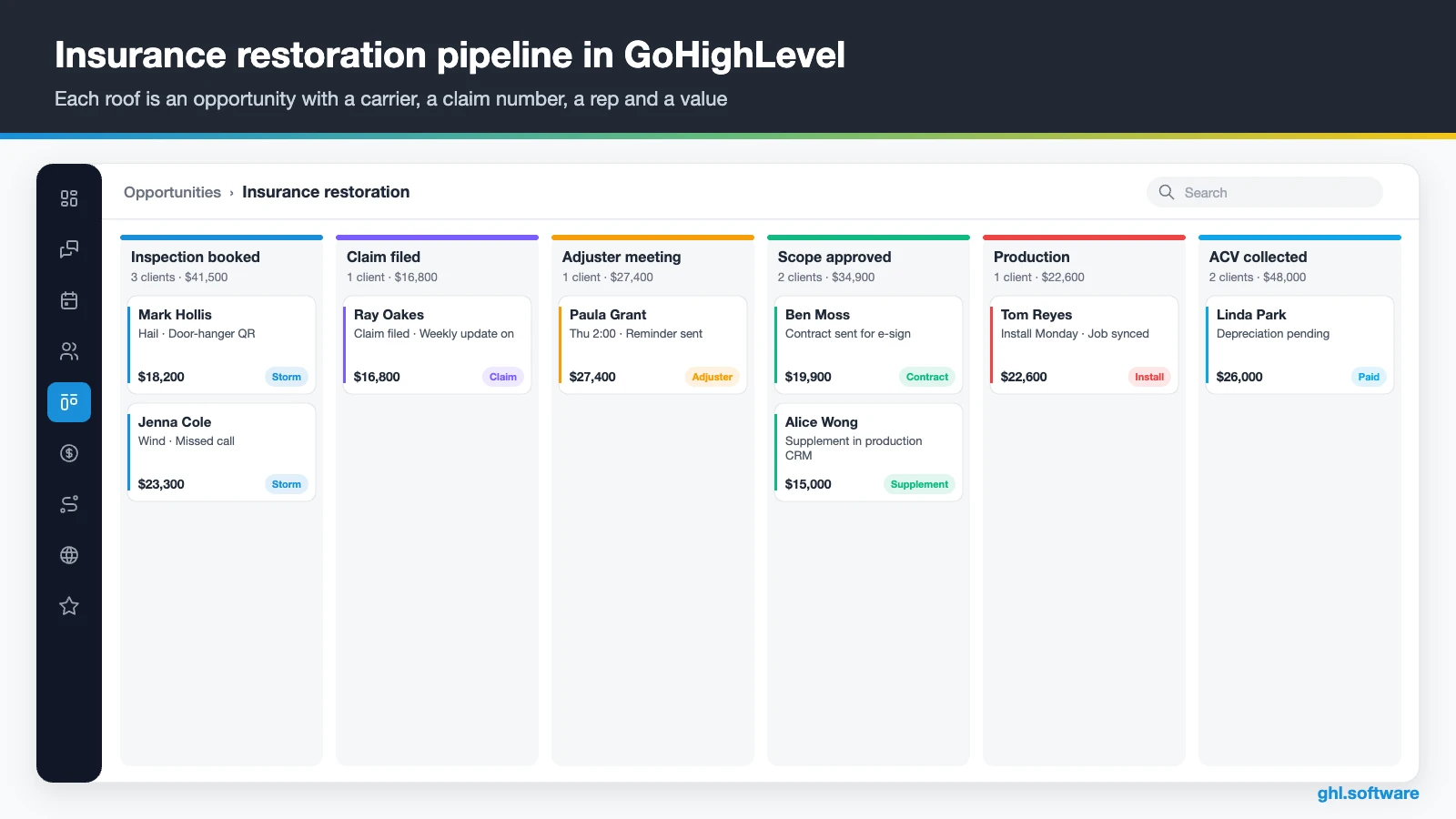
Insurance restoration pipeline stages
The insurance board tracks the claim instead of the sale. Its stages run from inspection booked and damage found to claim filed, adjuster meeting, scope approved, contract signed, production, ACV collected, depreciation released and closed. For example, the “Adjuster meeting” stage can send reminders, while “Scope approved” creates a task to send the contract.
Also, store the carrier, claim number, roof type, install date and warranty years in custom fields, so every rep sees the same facts. Besides, the Forecast tab shows which jobs slipped past their expected close date.
Three automations every roofing company should run
These roofing CRM workflows cover the moments where jobs are won or lost: the storm surge, the proposal and the long wait for the claim. Build them in this order, because the first one usually pays for the rest.
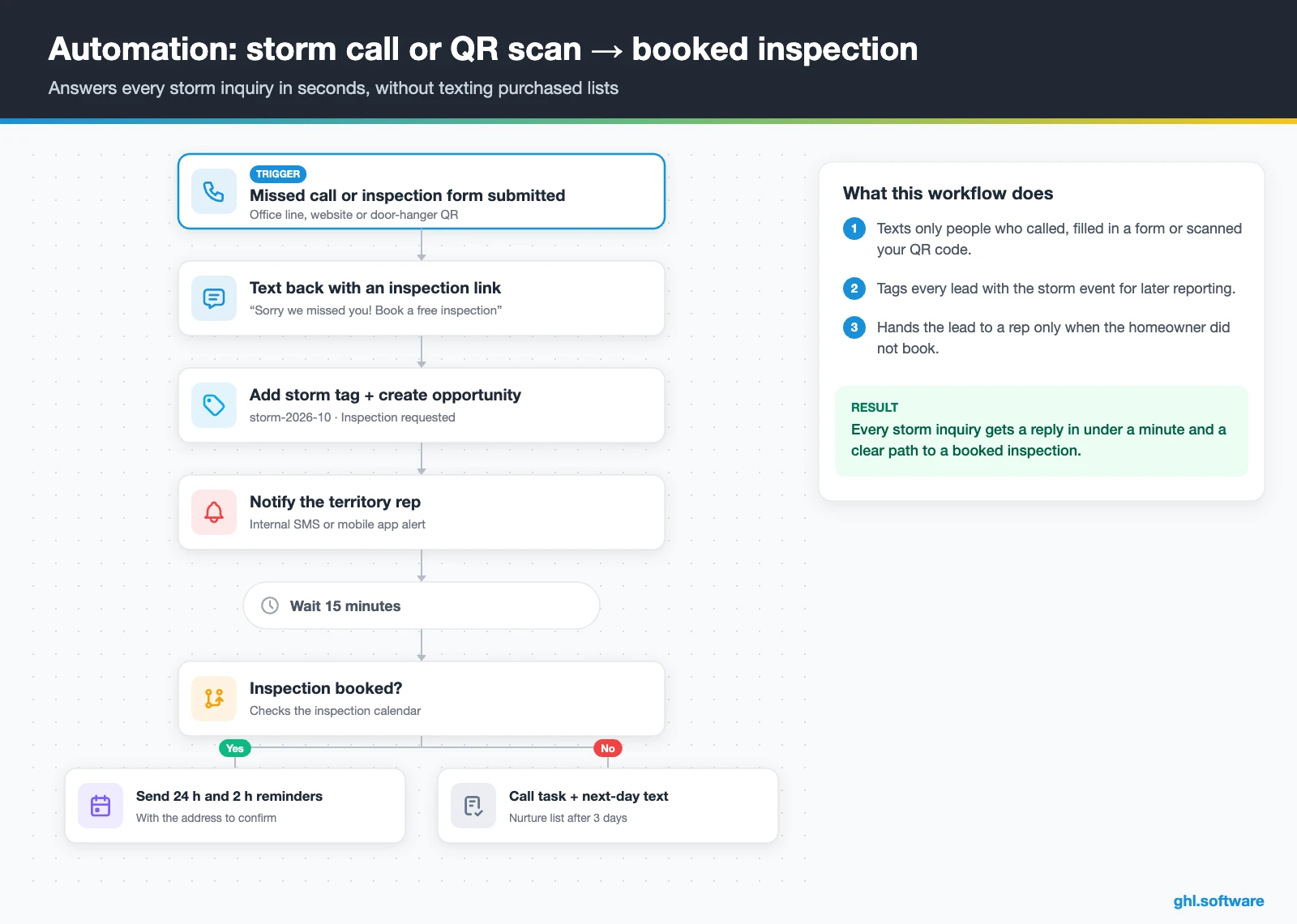
Storm surge: missed call or QR scan → booked inspection
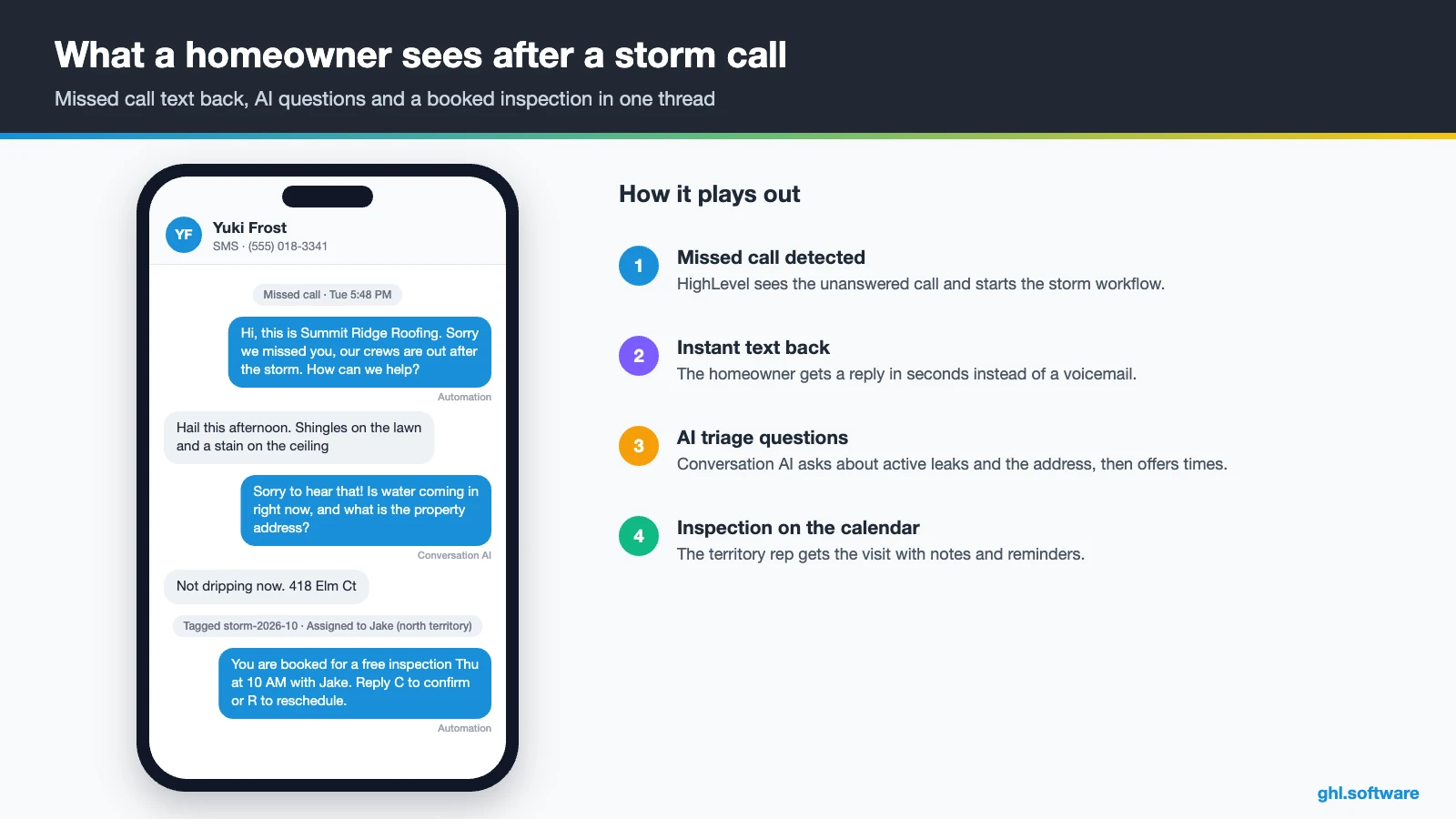
The trigger is a missed call or a submitted inspection form, including the one behind your door-hanger QR code. Right away, the workflow texts a booking link, creates an opportunity, adds a storm tag such as storm-2026-10 and notifies the territory rep. After 15 minutes, an if/else checks whether the inspection is on the calendar.
If it isn’t, the rep gets a call task, and a second text follows the next day. After three days without a booking, the contact moves to a nurture list. As a result, every storm inquiry gets an answer in under a minute. Still, the workflow only texts people who contacted you or opted in, never purchased hail-zone lists.
Proposal sent → follow-up → signature and deposit
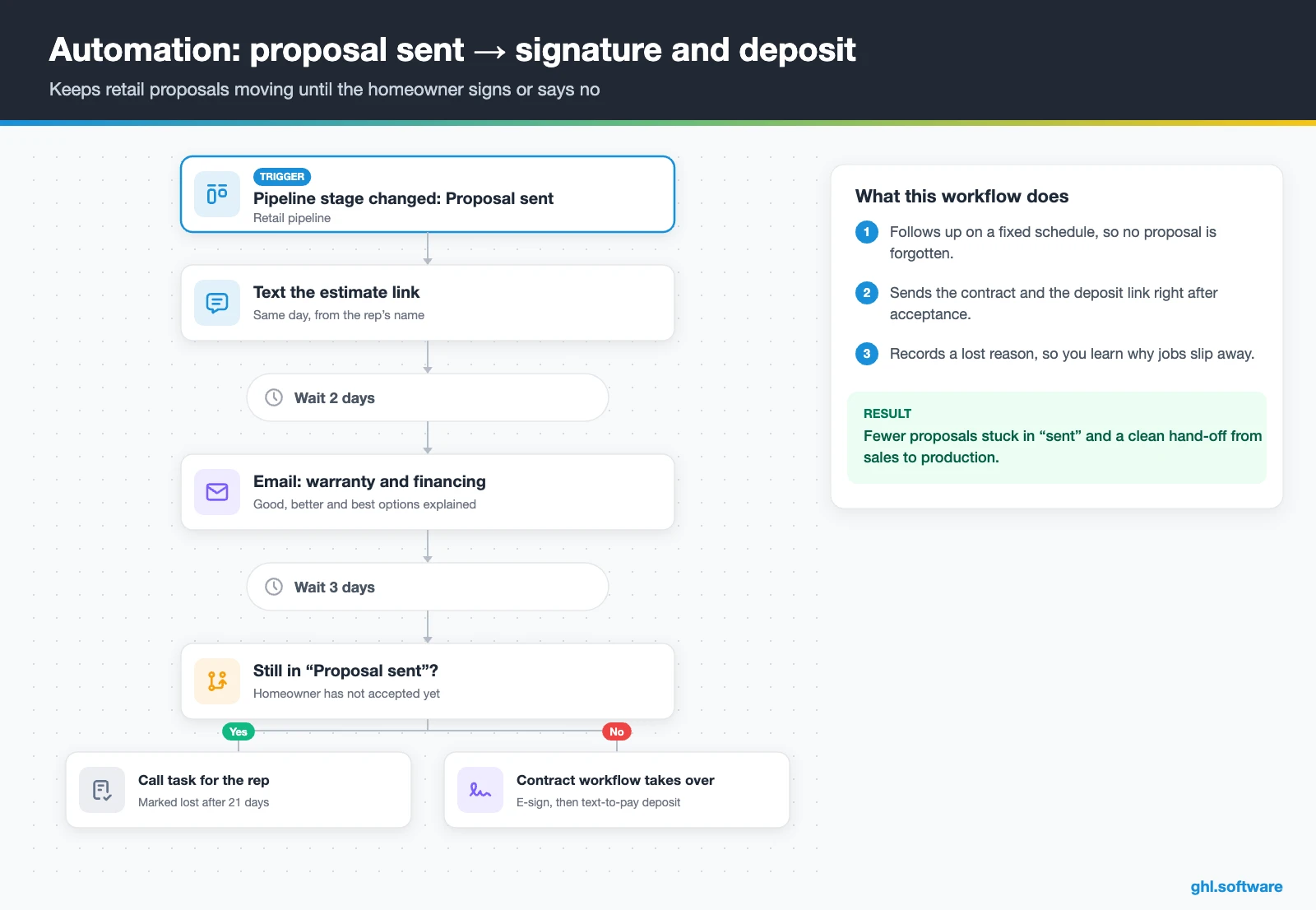
This workflow starts when the opportunity moves to “Proposal sent”, and the Send Estimate action can send the estimate itself. The same day, the homeowner gets a text with the link. Two days later, an email explains the warranty and any financing you offer. After three more days, the rep gets a call task if nothing has changed.
When the homeowner accepts, the rep moves the card, and a second workflow sends the contract for e-signature and a text-to-pay deposit link. Once it is paid, Zapier can create the job in AccuLynx or JobNimbus. Finally, after 21 days of silence, the opportunity is marked lost with a reason.
Claim updates → final payment → review
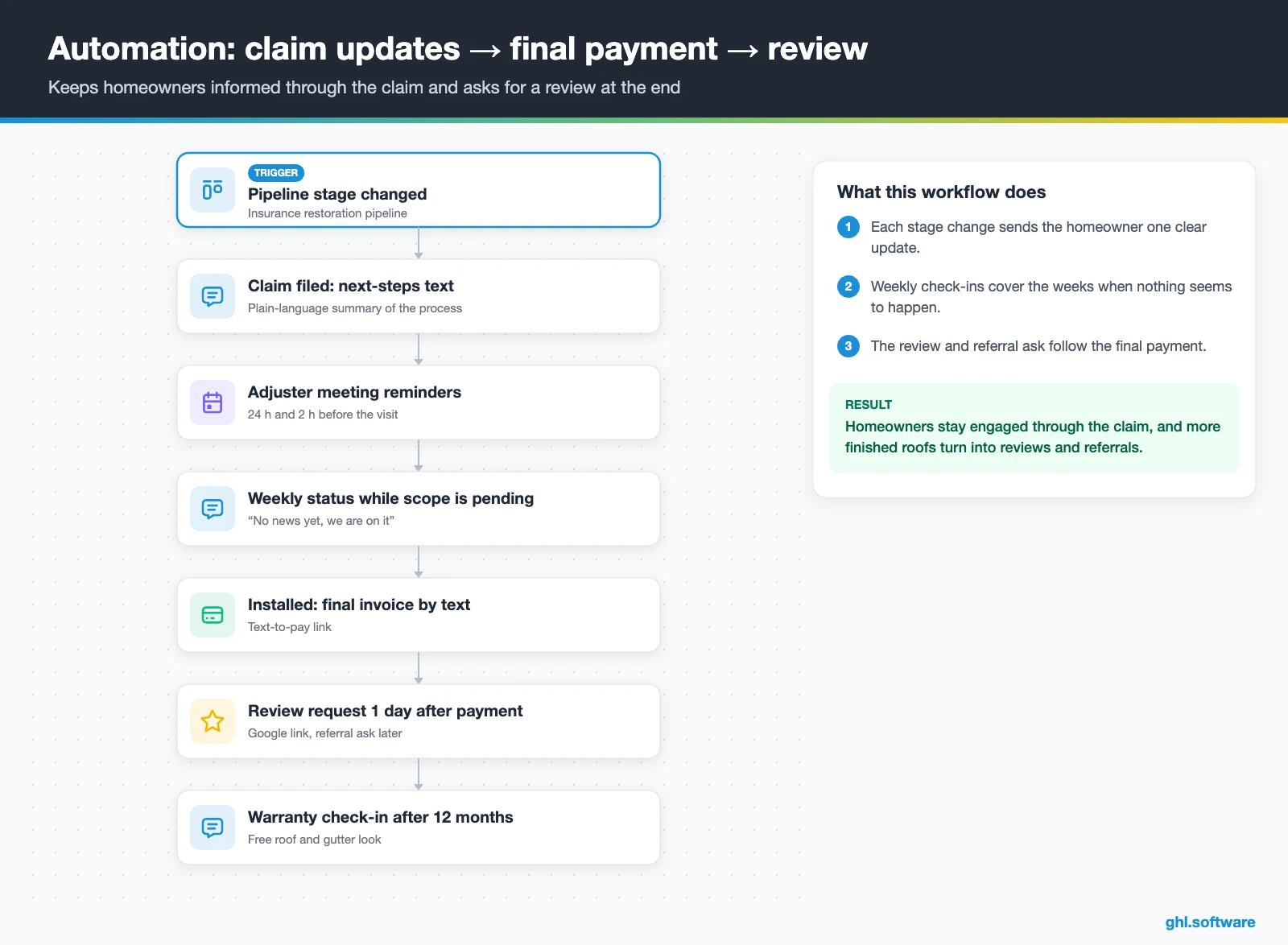
The trigger is “Pipeline stage changed” in the insurance pipeline. At “Claim filed”, the homeowner gets a plain-language text about what happens next. At “Adjuster meeting”, reminders go out 24 hours and 2 hours before. Then, while the job waits in “Scope approved”, a weekly check-in keeps them informed, so the job doesn’t go cold during the claim.
After the install, the final invoice goes out by text-to-pay. One day after payment, the workflow sends a review request to every customer, and a referral ask follows later. Twelve months on, a warranty check-in offers a free roof and gutter look. In short, the homeowner hears from you at every step.
Start with the snapshot and the pipeline from this guide, then add the automations one by one. The extended trial comes with our bootcamp link.
Start the 30-day trialAffiliate link. I may earn a commission at no extra cost to you.
Texting, calls and Voice AI for roofers
Homeowners text photos of a leak, call during dinner and message your Facebook page about the same roof, so a roofing CRM needs one inbox. HighLevel keeps SMS, email, calls, Facebook and Instagram DMs, Google Business Profile messages and web chat in one conversation per contact. So the office manager, the estimator and the owner see the same history. Conversations also support response-time SLAs, which help you spot leads that waited too long during a storm week.
For calls nobody can take, Conversation AI answers texts and chats, while Voice AI answers the phone and can book during the call. HighLevel’s Industry Agents include Aria, a home-services template built for HVAC, plumbing and electrical. It is not made for roofing, but you can adapt it to ask about leaks and the address. Still, keep prices and claim advice with a person. See the AI Employee pricing guide.
What HighLevel’s official Roofing snapshot includes
HighLevel publishes a free Roofing playbook with a “Roofing Snapshot”. However, it is the same generic template HighLevel uses for many trades, with the industry name swapped in. Still, it gives your roofing CRM a head start. Out of the box, you get:
- A “Roofing” website (Home and Link in Bio pages) with a chat widget.
- The “Roofing Offer” funnel: an opt-in step followed by an appointment booking page.
- The “Marketing Form – Claim Offer” form and a “Marketing Pipeline”.
- The “New Lead Nurture (Fast 5) – Claim Offer” workflow (email, SMS and a voicemail drop) and “Long Term Nurture”.
- Service calendars grouped under “Roofing Services”, custom values, snippets and one ad template.
- Voice AI prompts, plus quick wins such as missed call text back and Tap to Pay.
What you still build is everything that is specific to roofing. The snapshot has no storm workflows, no inspection or adjuster calendars, no insurance stages, no proposal follow-up and no warranty reminders. Also, “Claim Offer” in those names means a marketing offer, not an insurance claim. So rewrite the copy, add the two pipelines and the three automations, and save the result as your own snapshot. HighLevel’s help center has no roofing guide, although its home service playbook covers the same basics.
How to set up GoHighLevel as your roofing CRM
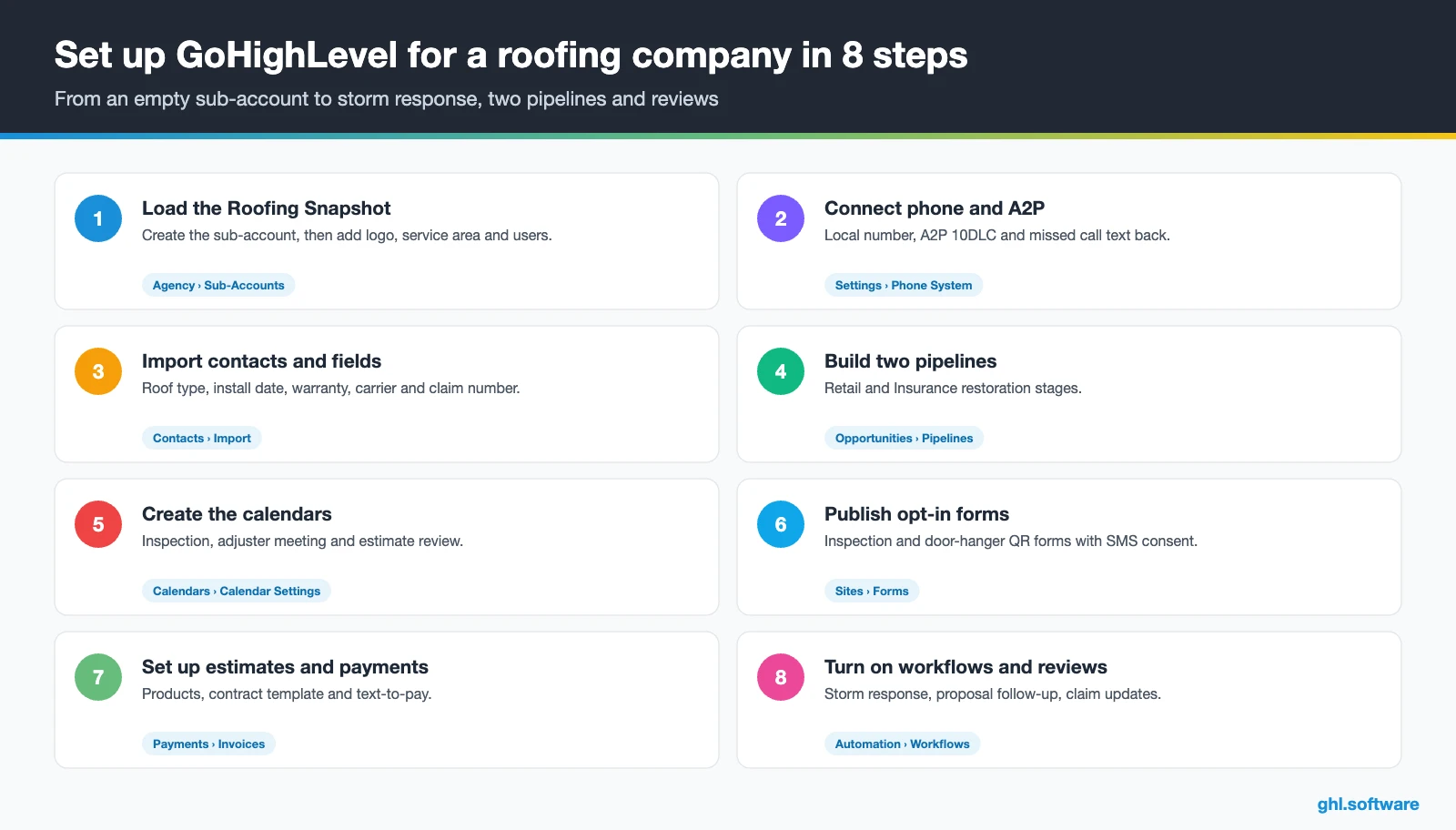
Follow this order so the first storm call already flows from ring to booked inspection. In fact, a small roofing company can finish it in a few focused days.
- Create the sub-account with the snapshot. Load the Roofing Snapshot, then add your logo, service area, hours and one user per rep.
- Connect phone, A2P and missed call text back. Buy a local number and register A2P 10DLC. Then turn on missed call text back and set call recording under your state’s consent rules.
- Import contacts with roofing fields. Upload past customers with roof type, install date, warranty years and carrier, so warranty campaigns start on day one.
- Build both pipelines. Create Retail and Insurance restoration with the stages above, and then check the Forecast tab every week.
- Create the calendars. Set up inspection, adjuster meeting and estimate review calendars with round robin and reminders.
- Publish forms with consent. Put an inspection form and a door-hanger QR form on a landing page, each with its own SMS consent checkbox.
- Load estimates, contracts and payments. Connect Stripe, add products for line items and upload your contract template, including the cancellation notice for door-to-door sales.
- Turn on workflows, reviews and reporting. Activate the three automations and connect Google Business Profile. Finally, build a dashboard for leads by storm tag, inspections, signed jobs and reviews.
Connecting AccuLynx or JobNimbus to HighLevel
We found no native HighLevel integration with AccuLynx, JobNimbus, Roofr or Leap. However, AccuLynx and JobNimbus both connect to LeadConnector, HighLevel’s app, on Zapier. For example, the LeadConnector “Pipeline Stage Changed” trigger can create a job in JobNimbus or a lead in AccuLynx when a contract is signed.
In the other direction, AccuLynx’s “Job Milestone Current Changed” trigger can add the homeowner to a HighLevel workflow that sends the right status text. For ServiceTitan, a paid third-party app exists in the Marketplace. Either way, decide whether the roofing CRM or the production tool owns each field, and test the sync before storm season. Our integrations and API page covers webhooks and custom options.
What a roofing CRM costs on HighLevel
HighLevel charges a flat plan with unlimited users and contacts, so adding canvassers or estimators doesn’t raise the bill. Usage, however, comes on top: phone numbers, texts, calls, email and AI.
For example, a roofer on Starter ($97) with three local numbers ($3.45) and 3,000 SMS segments (about $22) pays about $123. Add 2,000 outbound minutes (about $33), 10,000 emails (about $7) and the $50 AI plan, and the total reaches about $213 a month. Besides, carrier fees, the A2P campaign fee and card processing come on top, and storm months cost more. So most small roofing companies land between $150 and $350 a month. Our pricing guide has the full breakdown.
GoHighLevel plans compared
| Starter | Unlimited | Founder (formerly Agency Pro) | |
|---|---|---|---|
| Price | $97/month | $297/month | $497/month |
| Annual | $970/year | $2,970/year | $4,970/year |
| Sub-accounts | 3 | Unlimited | Unlimited |
| Contacts and users | Unlimited | Unlimited | Unlimited |
| All core features | Yes | Yes | Yes |
| White label web app | Yes | Yes | Yes |
| API access | Basic | Basic | Advanced, agency-level keys |
| Rebill phone and email | No | At cost | With markup |
| Rebill AI usage | No | No | Yes |
| SaaS Mode and automated sub-accounts | No | No | Yes |
| User and agent reporting | No | No | Yes |
| Support | 24/7 | 24/7 | 24/7 |
Usage costs on top of the plan
| Item | Official price | When you pay it |
|---|---|---|
| Local phone number (US/Canada) | $1.15/month | Each number for SMS and calls |
| SMS (US/Canada) | $0.00747 per segment + carrier fees | Every text sent or received |
| Calls (US) | $0.0166/min outbound, $0.01165/min inbound | Calls through LC Phone |
| A2P 10DLC registration | $22.50 one-time (low volume) + monthly campaign fee | Before texting US numbers |
| Email (LC Email) | $0.675 per 1,000 emails | Campaigns and workflow emails |
| $10/month per sub-account + Meta fees | If you use WhatsApp inside HighLevel | |
| AI | Pay-per-use, or $50 or $97/month per sub-account | Voice AI, Conversation AI and other AI tools |
| Premium workflow steps | $0.01 per run after 100 free | Webhooks, Google Sheets, Slack, app actions |
Honest limits: what HighLevel does not do for roofers
As a roofing CRM, HighLevel wins the job and keeps the homeowner informed. However, it is not a production system, so be clear about the gaps:
- No roof measurements. There are no aerial reports, roof diagrams or material takeoffs, so keep EagleView, Hover or GAF QuickMeasure.
- No supplements or Xactimate. Insurance scopes and supplement tracking stay in your production CRM.
- No material ordering. Orders to suppliers such as ABC Supply or SRS are not built in.
- No crew dispatch or canvassing map. A dispatching request on HighLevel’s ideas board has been “in progress” since August 2026, and there is no territory map for door knocking.
- Estimates are simple. They support line items and online acceptance, but acceptance is a button, so the contract carries the signature.
So the cleanest stack has two layers. HighLevel handles leads, follow-up, payments and reviews, while a roofing production tool handles measurements, supplements and crews. Here is how they compare. Features change often, so check each vendor’s site.
| GoHighLevel | AccuLynx | JobNimbus | Roofr | |
|---|---|---|---|---|
| Built for roofing | No | Yes | Yes | Yes |
| Main focus | Lead response, follow-up, marketing and reviews | Roofing production and insurance jobs | Job boards for roofing and exterior trades | Roof measurements, proposals and CRM |
| Supplements and measurements | Not native | Supplement tracking | Check vendor | Measurement reports |
| Voice AI, funnels, social and ads in one tool | Yes | Check vendor | Check vendor | Check vendor |
| White label for agencies | Yes | No | No | No |
| Connection to HighLevel | Native | Zapier | Zapier | No native app found |
Compliance for storm work: consent, door knocking and deductibles
The angle most roofing guides miss: an opt-in storm list you own
After a hailstorm, it is tempting to buy addresses in the hail path and text them all. Few roofing CRM guides warn you, so here it is: don’t. Those homeowners never gave consent, so a text blast puts your number, your A2P registration and your reputation at risk. Instead, build the list yourself, with permission, before and during each storm.
In practice, that means a door hanger with a QR code that opens a short inspection form, with a checkbox for texts about the inspection and future storm alerts. The same form sits on your website and your Facebook ads. Each submission gets the storm tag and the zip code, so when the next storm hits that area, you message people who asked to hear from you.
Meanwhile, canvassers stop carrying paper leads, and the three-day cancellation window lives in the contract workflow, so nobody orders materials too early. Compare this setup with other trades in our industry guides, or browse every module in the features hub.
Open a free account, load the pipeline and turn on the first automation today. The bootcamp walks you through the setup live.
Start the 30-day trialAffiliate link. I may earn a commission at no extra cost to you.
Frequently asked questions
What is the best CRM for roofing companies?
It depends on where you lose money. If measurements, supplements and crew schedules are the problem, a production CRM such as AccuLynx, JobNimbus or Roofr is the core. If you lose jobs to slow replies, missed storm calls and forgotten proposals, HighLevel fixes that with missed call text back, Voice AI, follow-up workflows and review requests for a flat price. Many roofers run HighLevel for sales and keep a production tool for the build.
What is a CRM for a roofing company?
A CRM is the system that keeps every homeowner, call, inspection, proposal and claim in one place, with a clear next step. For a roofer, it should answer calls fast, book inspections, follow up on proposals and keep insurance customers informed while the claim moves. Then it should ask for a review after the final payment. HighLevel covers those steps, while measurements and production usually live in a roofing-specific tool.
How much does a roofing CRM cost?
HighLevel’s Starter plan costs $97 a month and Unlimited $297, both with unlimited users and contacts. Usage comes on top: local numbers at $1.15 a month, SMS segments, call minutes, email and optional AI from $50 a month. So a small roofing company typically pays between $150 and $350 a month in total, with storm months at the higher end because texting and calls spike.
Does GoHighLevel integrate with AccuLynx or JobNimbus?
Not natively, as far as we found. Both connect to LeadConnector, HighLevel’s app, through Zapier. For example, a “Pipeline Stage Changed” trigger in HighLevel can create a job in JobNimbus or a lead in AccuLynx. AccuLynx triggers such as “Job Milestone Current Changed” can also add a contact to a HighLevel workflow. So test the field mapping before storm season, and decide which system owns each field.
Can I text storm leads automatically?
Yes, if they contacted you or gave consent. A missed call, a web form or a door-hanger QR form with an SMS checkbox can start an instant text with your inspection link. However, never text purchased hail-zone lists. Federal rules require prior express written consent for autodialed telemarketing to cell phones, and US texting from local numbers needs A2P 10DLC registration. In short, build an opt-in list instead of buying one.
Is there a free roofing CRM?
Some CRMs have free tiers, but they usually limit texting, automation or users, which is exactly what speeds up storm response. HighLevel has no free plan. Its own trial runs 14 days and needs a card, while the extended 30-day trial comes through our bootcamp link. After that, Starter costs $97 a month with unlimited users, so you can add canvassers without paying per seat.
What is the difference between a roofing CRM and a canvassing app?
A canvassing app such as SPOTIO focuses on the door: territory maps, routes and knock tracking. A roofing CRM, on the other hand, follows the homeowner after the first contact, through inspection, proposal, claim, payment and review. HighLevel has no territory map. Still, a QR form on your door hanger can create the contact and alert the closer, and Zapier or the API can connect a field app.
More industry guides
Sources: HighLevel Roofing playbook · HighLevel help: Estimates · HighLevel help: Send Estimate workflow action · HighLevel help: Missed Call Text Back · HighLevel help: AI Voice Agents overview · HighLevel help: A2P 10DLC registration · Zapier: AccuLynx and LeadConnector · Zapier: JobNimbus and LeadConnector · FTC: Cooling-Off Rule · Texas Department of Insurance: roofing and insurance