

Electrician CRM: How HighLevel Wins Calls, Estimates and Reviews
An electrician CRM should answer every call, follow up on every panel, EV charger or generator estimate, and keep permits and inspections visible until the final invoice. GoHighLevel does this with missed call text back, the Aria home services AI agent, estimates, pipelines and workflows. However, it is not field service software, so keep Jobber, Housecall Pro or ServiceTitan for dispatch and the pricebook.
The job is gone before you even see the missed call. Rewind to 8:15 on a Sunday evening in Indianapolis. The kitchen lights in Brandon Lowe’s house flicker, and then half the house goes dark. He notices a warm smell near the panel, so he calls you first. Your phone rings out, because you are on a ladder at another job. The second company, however, texts him back within seconds with a safety question and a time slot. An electrician CRM exists for that moment, because the first useful reply usually wins the job.
This guide is for electrical contractors, solo electricians and their agencies. It shows how GoHighLevel (HighLevel) runs the sales side of electrical work, from emergency calls to permits and reviews. Moreover, it explains how HighLevel sits next to your field service software.
After that, you get two pipelines, three automations, the official snapshot, a setup order and real costs. Finally, we cover honest limits, because this is an independent affiliate guide.
Leer en español: Software para electricistas · Ler em português: App para eletricista · Part of GoHighLevel by industry
Includes a free live setup class with a HighLevel coach.
Start free + bootcampAffiliate link.
What an electrician needs from a CRM (and what HighLevel covers)
Field service apps run the job itself: dispatch, work orders, the flat-rate pricebook and the invoice. A CRM, instead, runs the phone, the follow-up and the repeat business, which is where electrical leads quietly leak. So the useful question is which front-office jobs an electrician CRM like HighLevel handles well.
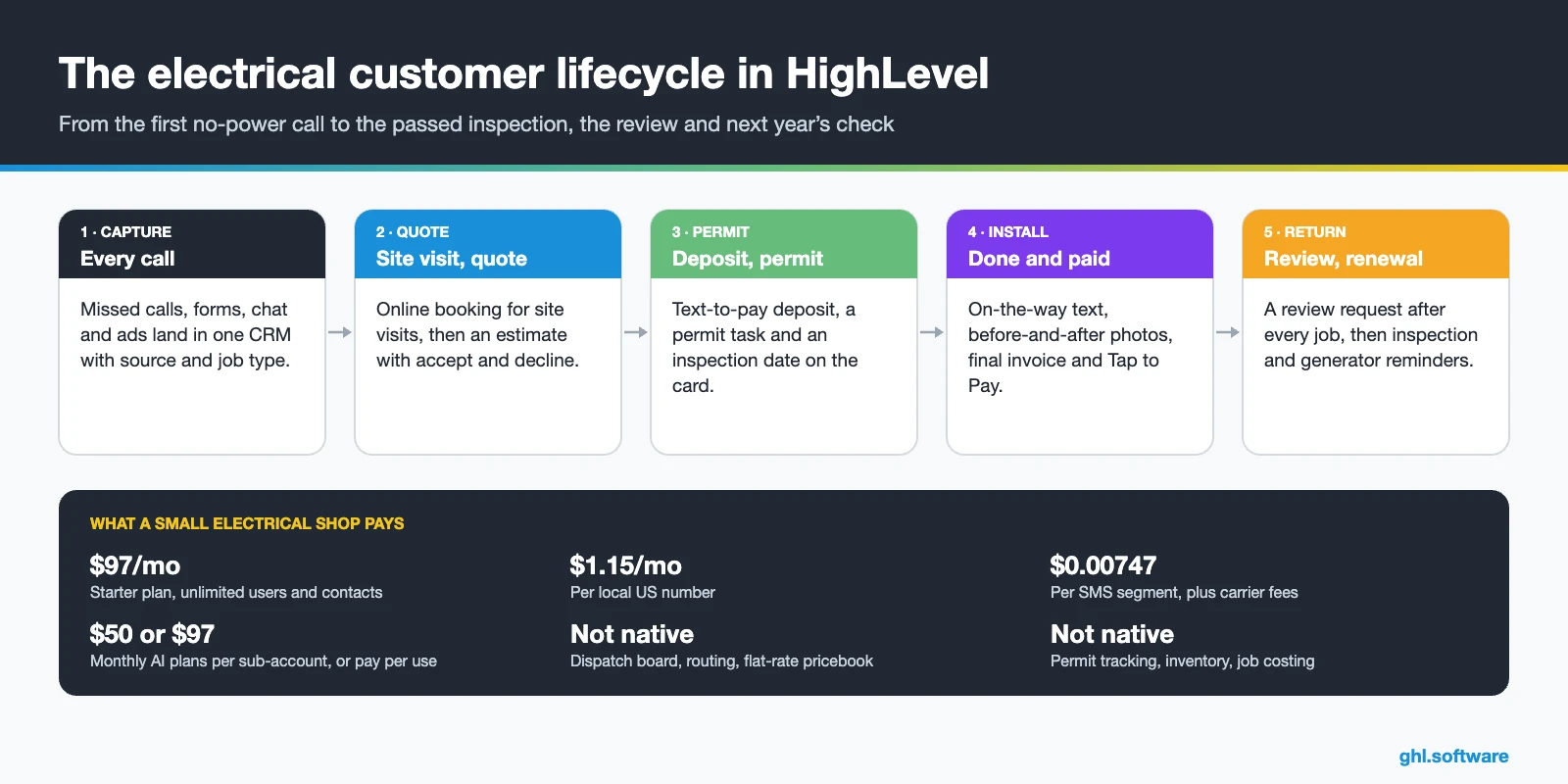
Electrician CRM vs field service software: who does what
Most results for “best CRM for electrical contractors” list ServiceTitan, Housecall Pro, Jobber, FieldEdge and FieldPulse. In fact, those are field service management (FSM) platforms. They shine once a job exists, because they dispatch electricians, hold the pricebook and invoice the work. However, they put less focus on the call nobody answered, the panel quote that sat for ten days, or the generator owner nobody called back.
HighLevel works the other way around. Because it has marketing built in, its strength is speed to lead, follow-up, campaigns and reviews. So many contractors run both: the FSM delivers the work, while the electrician CRM wins and keeps the customer. A solo electrician, on the other hand, may quote and invoice from HighLevel alone until the crew grows.
How Jobber, Housecall Pro and ServiceTitan connect
| FSM | How it connects | What to know |
|---|---|---|
| Jobber | Official Jobber Integration by LeadConnector, HighLevel’s own developer brand, free in the App Marketplace | Two-way client sync. Custom fields and notes don’t sync |
| Housecall Pro | Housecall Pro app by LeadConnector, free | Workflow triggers and actions, with an API key |
| ServiceTitan | A paid third-party Marketplace app, or Zapier | Not built by HighLevel, so test the field mapping before you rely on it |
The Jobber guide explains the sync. For Housecall Pro, the triggers and actions article lists 9 triggers and 14 actions. Meanwhile, ServiceTitan users can follow the Zapier guide.
Common electrical business problems and how HighLevel solves them
In fact, most leaks in electrical sales happen while the owner is busy on a job.
| Problem | What HighLevel does | Feature |
|---|---|---|
| No-power calls missed while you work | Texts back in seconds with a safety question | Missed call text back |
| After-hours emergencies go to the next result | Answers 24/7 and alerts the on-call electrician | Aria Industry Agent + Voice AI |
| Panel and EV charger quotes go silent | Follows up by text, email and a call task | Estimates + workflows |
| Permits and inspections tracked on paper | Turns each step into a stage with a task | Pipelines + tasks |
| Customers ask “when will you get here?” | Sends an on-the-way text when the job changes stage | Workflows + mobile app |
| Late final payments | Sends invoices with text-to-pay or Tap to Pay | Payments |
| Few recent Google reviews | Asks every customer for a review after the job | Reputation management |
| Generator and inspection customers forgotten | Sends date-based reminders to Smart Lists | Custom fields + Smart Lists |
The electrician CRM pipeline: from site visit to passed inspection
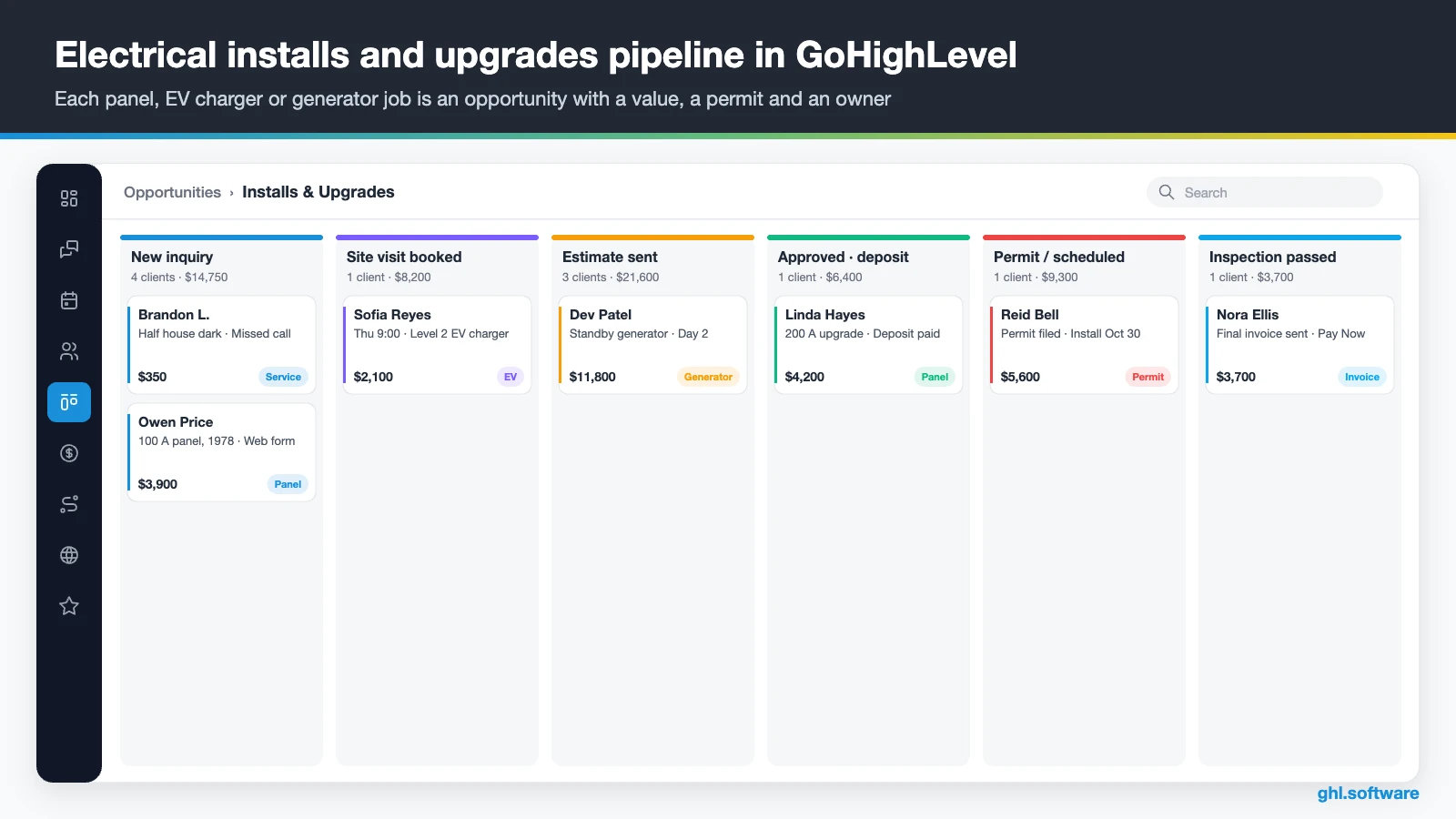
Service calls such as a dead outlet or a tripping breaker usually close on the spot. Installs and upgrades, however, take weeks, because they need a site visit, an estimate, a deposit, a permit and an inspection. So build one electrician CRM pipeline for that work and a second one for service plans. Each card carries a value, a source, a job-type tag and an owner. Meanwhile, the Forecast tab in Opportunities shows expected revenue and deals whose close dates slipped.
| Stage | What moves the job here |
|---|---|
| New inquiry | A call, form, chat or ad lead |
| Contacted | The office or the AI qualifies the job |
| Site visit booked | A visit for a panel, EV charger or generator |
| Estimate sent | The estimate goes out and follow-up starts |
| Approved · deposit | The customer accepts; the deposit link goes out |
| Permit / scheduled | The office files the permit and sets the install date |
| Installed | The crew finishes; the inspection is booked |
| Inspection passed | The inspector signs off; the final invoice goes out |
| Paid · review | Payment arrives; the review request goes out |
Permits and inspections: what stays manual
No CRM pulls permits for you, and HighLevel has no permit module. Instead, the “Approved” stage creates a task for the office, while a custom field stores the permit number and inspection date. That way, the owner sees every job stuck with the inspector in one column, instead of on sticky notes.
The second pipeline: service plans
Service plans also need a short board: Active, Renewal due, and Renewed or Lapsed. Custom fields hold the plan end date, the last inspection and the generator model. As a result, a date-based workflow can move a card to “Renewal due”, and the office knows exactly whom to call this week.
Three automations every electrical contractor should run
The missed call gets its own section below, under conversations. These three electrician CRM workflows, instead, cover what is special about electrical work: the stalled permit, the customer waiting without an arrival time, and the yearly check that fills slow months.
Approved estimate → deposit → permit → final invoice
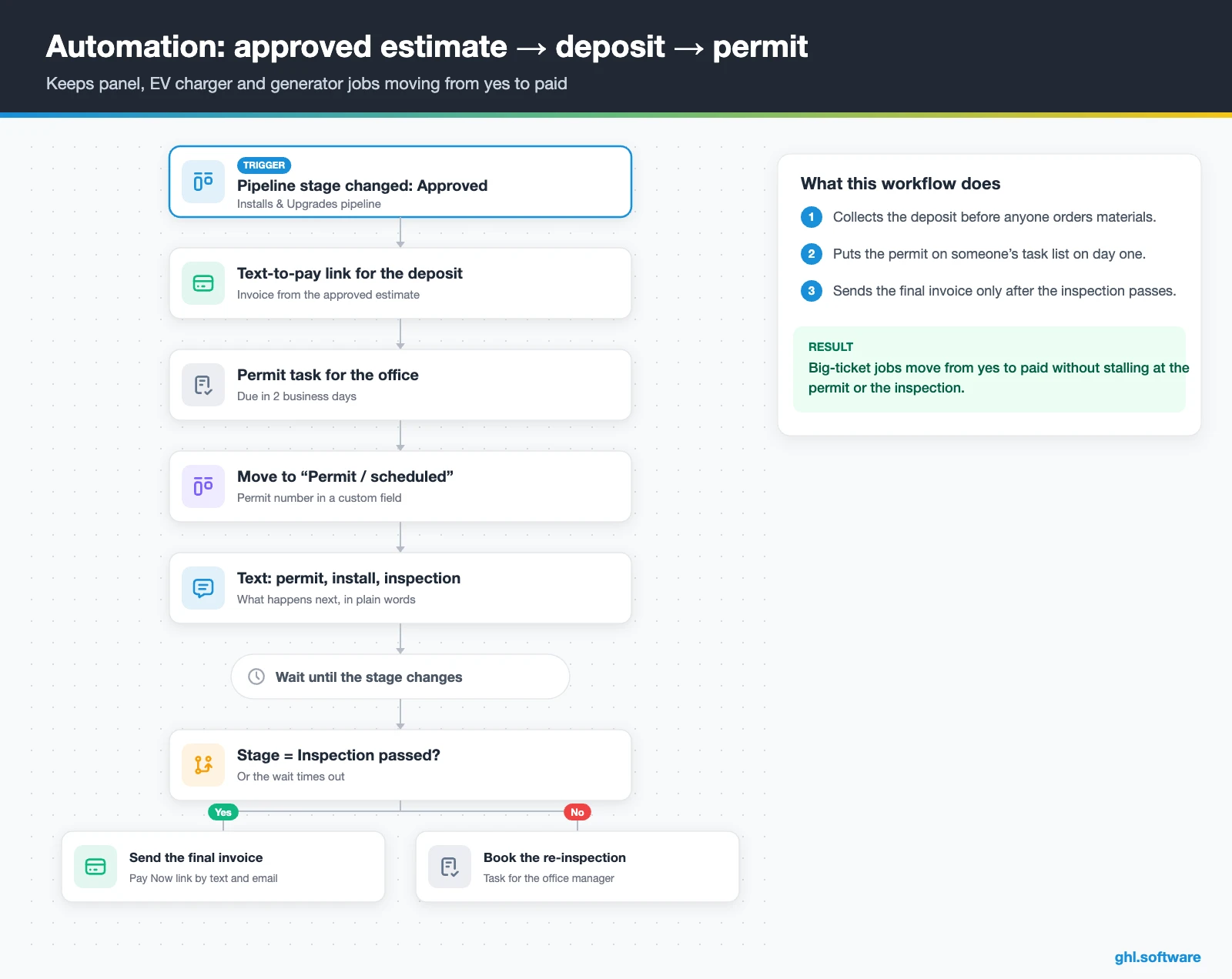
Before this flow, a short follow-up runs on “Estimate sent”: a text the same day, an email after two days and a call task after four. Then, when the card moves to “Approved · deposit”, the workflow sends a text-to-pay deposit link and creates a permit task due in two business days. After that, it moves the card to “Permit / scheduled” and texts the customer what happens next.
The workflow then waits for the next stage change. If the card reaches “Inspection passed”, the final invoice goes out with a Pay Now link. Otherwise, the office gets a task to book a re-inspection. In short, panel upgrades, EV chargers and generators never stall silently between the yes and the payment.
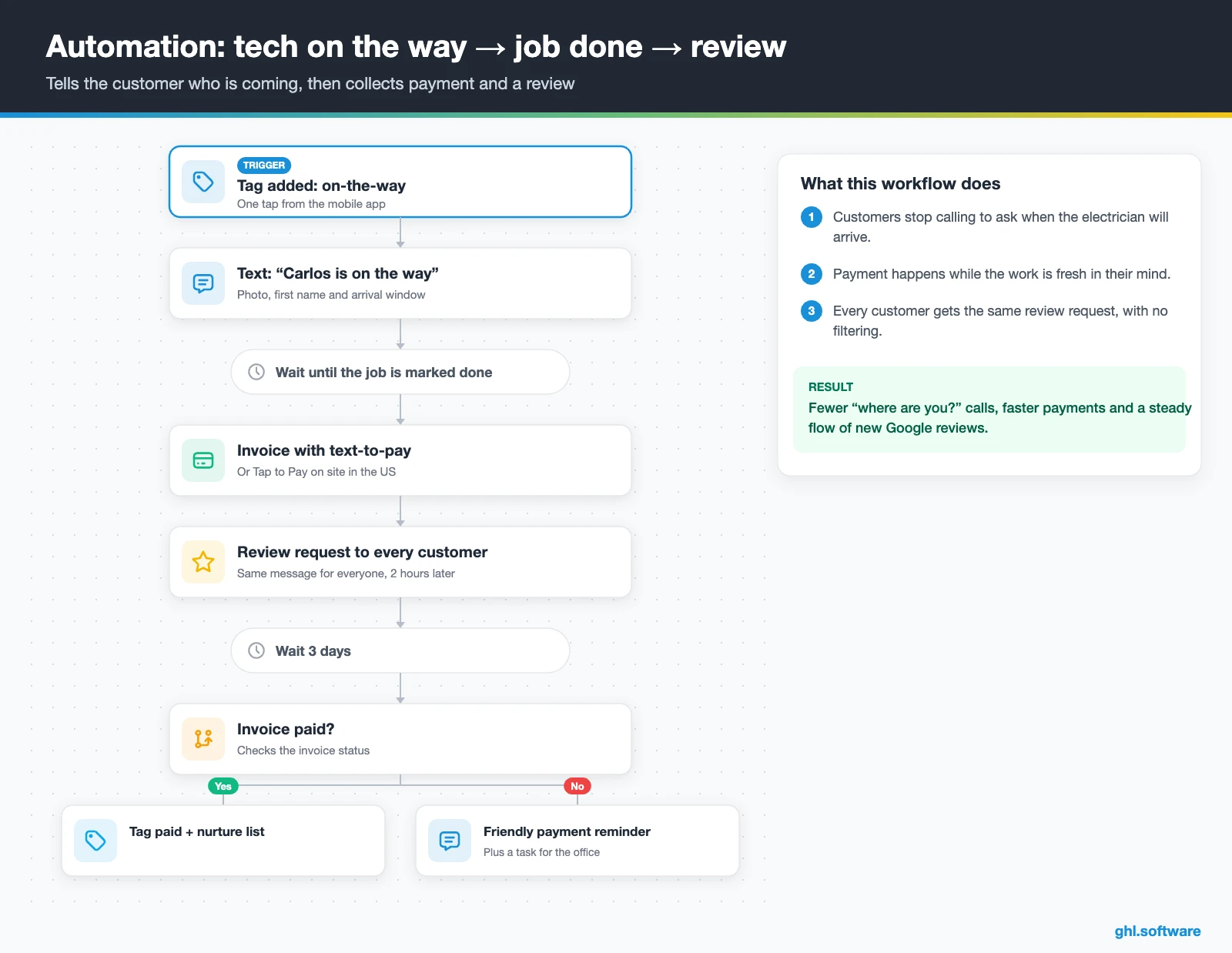
Tech on the way → job done → review
This one starts when the tech adds an “on-the-way” tag to the contact, a single tap in the mobile app. The customer then gets a text with the electrician’s name, photo and arrival window. When the tech marks the job done, the invoice goes out with text-to-pay, or the customer pays on site with Tap to Pay.
Two hours later, a review request goes to every customer in the same way. Then, three days later, an if/else checks the invoice. Paid customers get a tag and join a nurture list, while unpaid ones get a friendly reminder and the office gets a task.
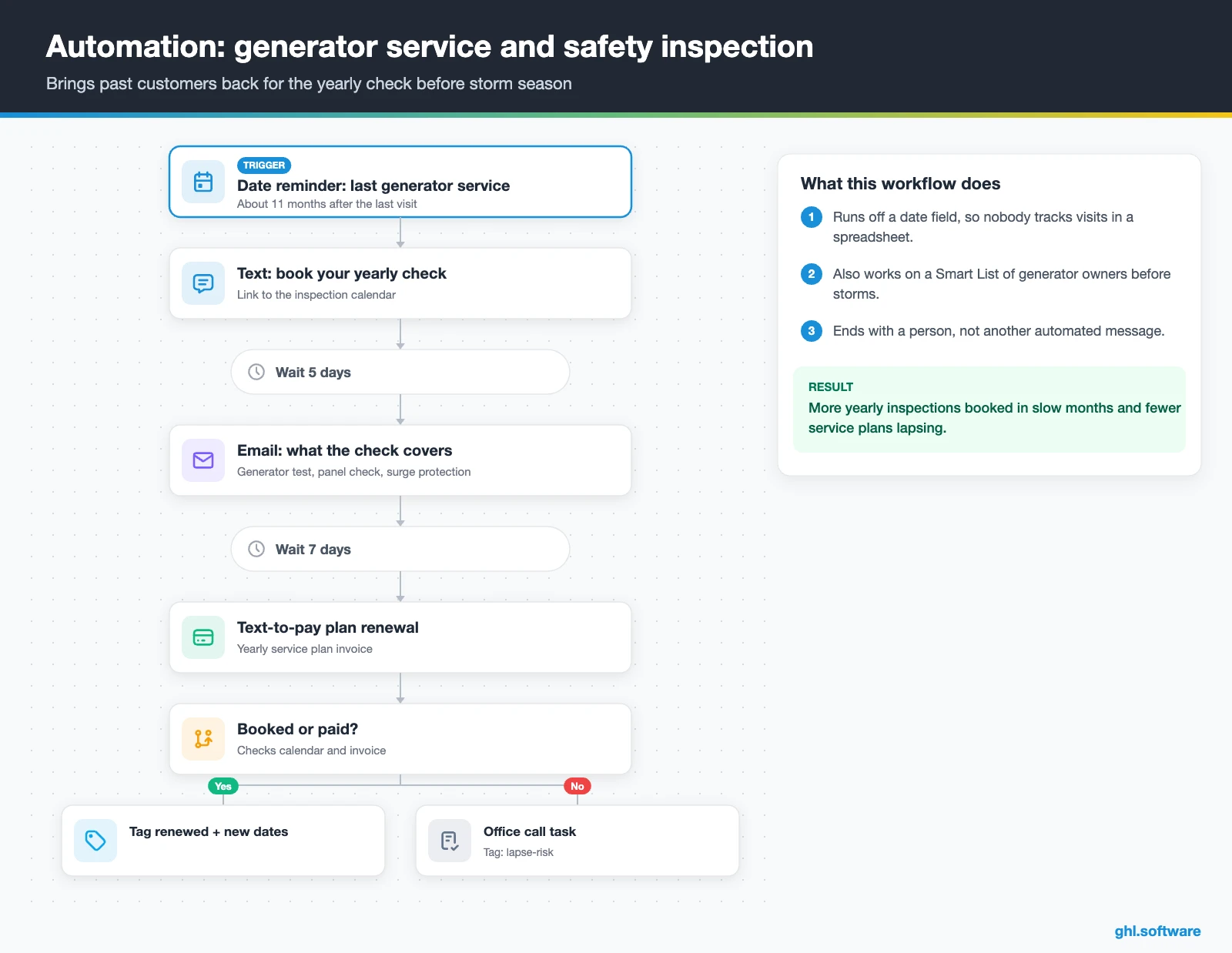
Generator service and yearly safety inspection reminders
The trigger is a date-based workflow on a field such as “Last generator service”, set to fire about 11 months later. Check the exact trigger name in your workflow builder, because names can change. The customer first gets a text with the inspection booking link, then an email five days later if nothing is booked.
After a week, a text-to-pay link also offers the yearly plan renewal. If the customer books or pays, the workflow updates the dates and adds a “renewed” tag. Otherwise, the office gets a call task. Moreover, you can run the same flow on a Smart List of generator owners before your local storm season.
Start with the snapshot and the pipeline from this guide, then add the automations one by one. The extended trial comes with our bootcamp link.
Start the 30-day trialAffiliate link. I may earn a commission at no extra cost to you.
Texts, calls and an AI receptionist for electricians
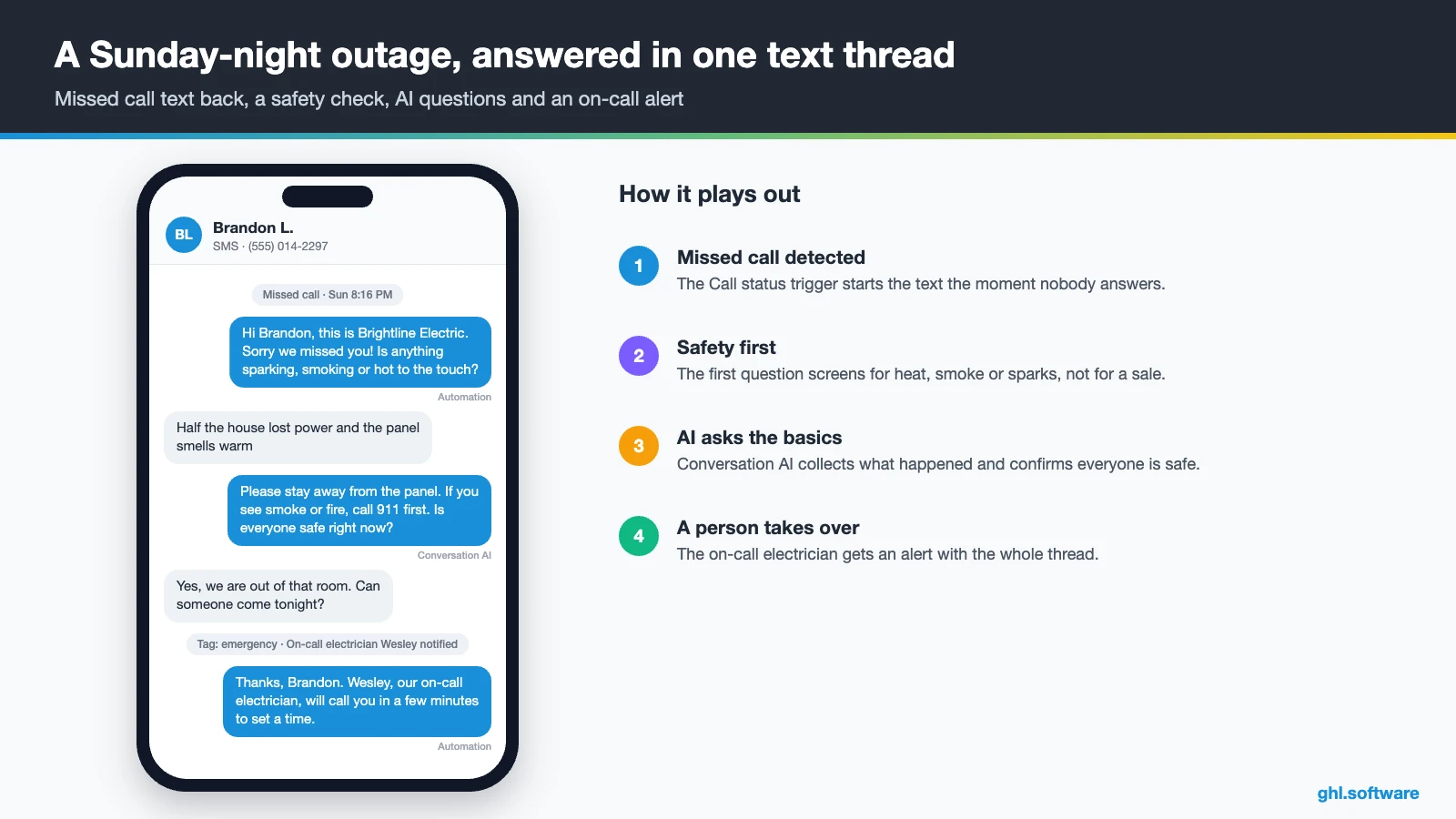
Emergency calls rarely wait until morning. For example, a burning smell or a sparking outlet needs a fast, safe answer. So start your electrician CRM with missed call text back. Then keep every reply in one thread, because HighLevel puts SMS, email, WhatsApp, Facebook and Instagram DMs and web chat in one inbox. Also, response-time SLAs show which leads waited too long.
For nights and weekends, AI Agents include an Industry Agents template called Aria. It targets home services such as HVAC, plumbing and electrical, with lead capture, emergency handling, 24/7 answering and booking. Voice AI agents can also book appointments mid-call.
However, an AI should never coach anyone through a live fault. Instead, script it to say “stay away from the panel, call 911 if you see smoke or fire”, and then alert the on-call electrician. Meanwhile, Conversation AI handles web chat and texts. Finally, the AI Employee pricing guide explains the per-use and monthly options.
What HighLevel’s official Electrician snapshot includes
HighLevel publishes a free Electrician playbook with a matching “Electrician Snapshot”. However, it is a generic template with the industry name swapped in. Still, it saves your electrician CRM a few hours on day one. You get:
- An “Electrician” website (Home with services and FAQ, plus Link in Bio) and a chat widget.
- An “Electrician Offer” funnel: an opt-in step, then an appointment booking page.
- The “Marketing Form – Claim Offer” form and a “Marketing Pipeline”.
- The “New Lead Nurture (Fast 5) – Claim Offer” and “Long Term Nurture” workflows, with email, SMS and a voicemail drop.
- Calendars tagged “Electrician Services”, three custom values, snippets, an “Electrician” proposal template and ad, and Voice AI prompts.
What you still build is the electrical logic: emergency routing, estimate follow-up, permit stages and plan reminders. Some copy also comes from other templates, so rewrite every message. Then save your finished build as your own snapshot for the next client or location.
How to set up GoHighLevel as an electrician CRM
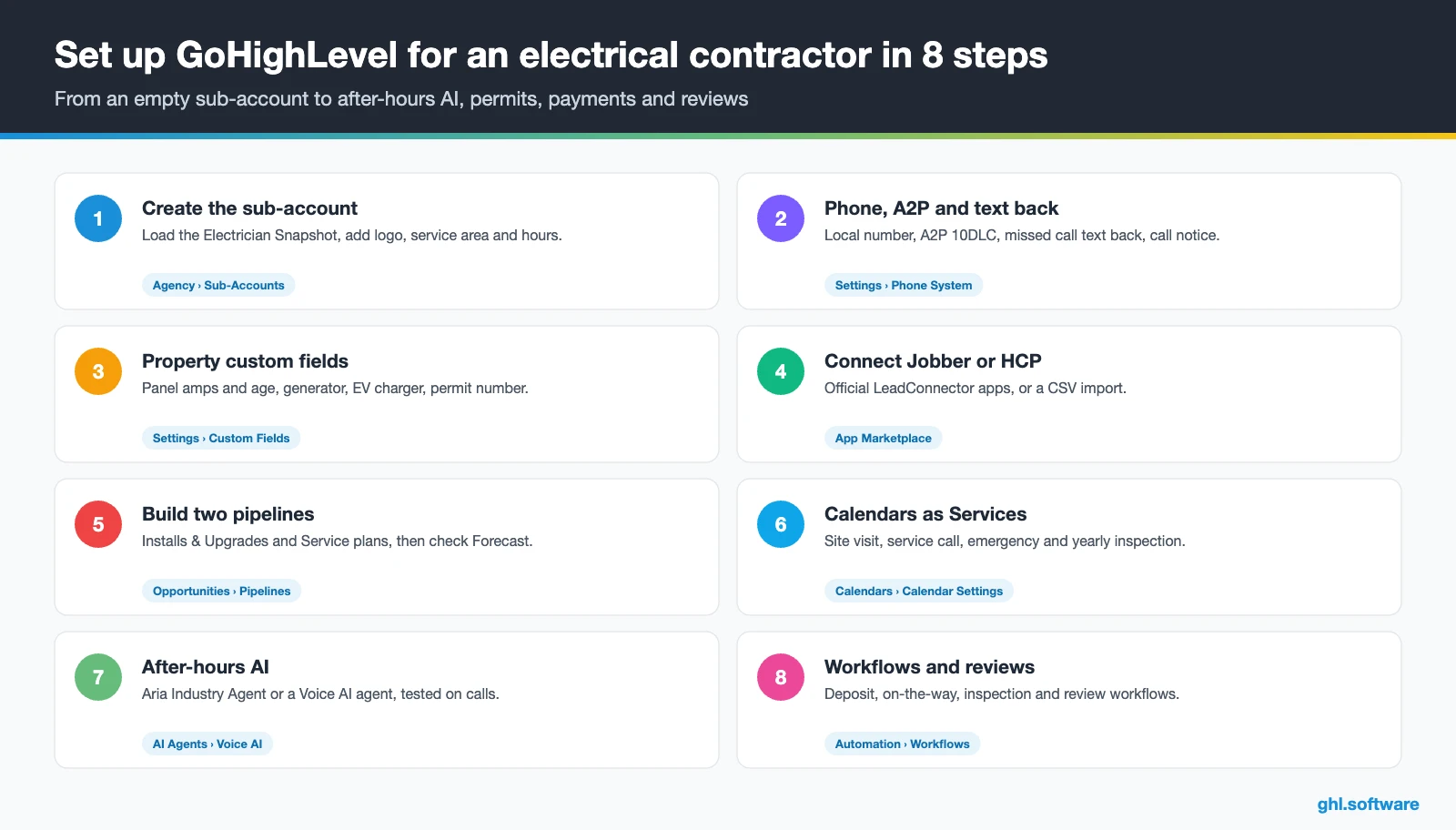
Follow this order, so the first missed call already flows into a booked visit. Still, plan a few days for A2P approval.
- Create the sub-account. Load the Electrician Snapshot, then add your logo, license number, service area, hours and users.
- Connect phone and A2P. Buy a local number, register A2P 10DLC, then turn on missed call text back and a call recording notice.
- Add property fields. Add panel amps and age, generator, EV charger, permit number, inspection date and plan end date.
- Connect your FSM or import. Install the Jobber or Housecall Pro app. Otherwise, import past customers by CSV.
- Build two pipelines. Create Installs & Upgrades and Service plans, then review the Forecast tab weekly.
- Set up calendars as Services. Add site visit, service call, emergency and inspection calendars with reminders.
- Turn on after-hours AI. Start from the Aria Industry Agent, add Conversation AI to chat and SMS, and test with real calls.
- Activate workflows, reviews and reports. Run the three automations, connect Google Business Profile and build a dashboard of leads, estimates won and renewals.
What an electrician CRM costs on HighLevel
An electrician CRM on HighLevel has a flat plan price with unlimited users and contacts. Usage, however, comes on top: numbers, texts, calls, emails and AI.
For example, a three-van shop on Starter ($97) with one local number ($1.15) and 2,500 SMS segments (about $19) pays about $117. Then add 1,500 inbound minutes (about $17), 800 outbound minutes (about $13), 5,000 emails (about $3) and the $50 AI plan. The total lands near $201 a month, plus carrier fees, the A2P campaign fee and card processing. As a result, most small electrical contractors pay between $130 and $300 a month. Our pricing guide also has the full breakdown.
GoHighLevel plans compared
| Starter | Unlimited | Founder (formerly Agency Pro) | |
|---|---|---|---|
| Price | $97/month | $297/month | $497/month |
| Annual | $970/year | $2,970/year | $4,970/year |
| Sub-accounts | 3 | Unlimited | Unlimited |
| Contacts and users | Unlimited | Unlimited | Unlimited |
| All core features | Yes | Yes | Yes |
| White label web app | Yes | Yes | Yes |
| API access | Basic | Basic | Advanced, agency-level keys |
| Rebill phone and email | No | At cost | With markup |
| Rebill AI usage | No | No | Yes |
| SaaS Mode and automated sub-accounts | No | No | Yes |
| User and agent reporting | No | No | Yes |
| Support | 24/7 | 24/7 | 24/7 |
Usage costs on top of the plan
| Item | Official price | When you pay it |
|---|---|---|
| Local phone number (US/Canada) | $1.15/month | Each number for SMS and calls |
| SMS (US/Canada) | $0.00747 per segment + carrier fees | Every text sent or received |
| Calls (US) | $0.0166/min outbound, $0.01165/min inbound | Calls through LC Phone |
| A2P 10DLC registration | $22.50 one-time (low volume) + monthly campaign fee | Before texting US numbers |
| Email (LC Email) | $0.675 per 1,000 emails | Campaigns and workflow emails |
| $10/month per sub-account + Meta fees | If you use WhatsApp inside HighLevel | |
| AI | Pay-per-use, or $50 or $97/month per sub-account | Voice AI, Conversation AI and other AI tools |
| Premium workflow steps | $0.01 per run after 100 free | Webhooks, Google Sheets, Slack, app actions |
Honest limits: what HighLevel doesn’t do for electricians
An electrician CRM is the front office, not the dispatch desk or the estimating tool. So check these gaps first:
- No dispatch board, route optimization or GPS. The dispatching request is in progress, but not a feature yet.
- No flat-rate pricebook, materials inventory or job costing. Keep those in your FSM.
- No permit tracking or load calculations. Use stages, tasks and custom fields instead.
- No panel or equipment history object out of the box. So build it with custom fields or objects.
- AI needs testing. Aria is a template, so test it on real calls first.
Here is how HighLevel compares with the field service tools on most electrician CRM shortlists. Features change, so confirm details with each vendor.
| GoHighLevel | ServiceTitan | Housecall Pro | Jobber | |
|---|---|---|---|---|
| Built for field service work | No | Yes | Yes | Yes |
| Dispatch board and work orders | No | Yes | Yes | Yes |
| Funnels, social, ads, WhatsApp and Voice AI in one tool | Yes | Check plan | Check plan | Check plan |
| Connection to HighLevel | n/a | Paid third-party app or Zapier | Official LeadConnector app | Official LeadConnector app |
| White label for agencies | Yes | No | No | No |
| Best fit | Lead response, follow-up, reviews and repeat work | Larger shops that need full operations | Small and mid-size residential shops | Small shops with many quick service jobs |
Compliance notes for electrical contractors
The angle most electrician guides miss: 25C and 30C are gone, so change the pitch
Many panel-upgrade and EV charger ads still promise federal tax credits. However, the IRS says the 25C home improvement credit, which covered some panel upgrades, applies only to property placed in service through 31 December 2025. Meanwhile, the 30C refueling property credit covers EV chargers placed in service only through 30 June 2026. So a campaign that promises either one now sets up an angry customer.
Instead, use your electrician CRM to audit the offers. Search templates, snippets and funnels for “tax credit”, then rewrite each offer around safety, capacity and convenience. After that, build a Smart List of older panels and send a plain email about new appliances and EV charging. Utility rebates vary, so link to the utility’s page instead of quoting numbers.
In short, you educate first and quote second. Also, compare this setup with other trades in our industry guides, or browse every module in the features hub.
Open a free account, load the pipeline and turn on the first automation today. The bootcamp walks you through the setup live.
Start the 30-day trialAffiliate link. I may earn a commission at no extra cost to you.
Frequently asked questions
What is an electrician CRM?
An electrician CRM is the system that tracks every lead and customer: calls, texts, site visits, estimates, permits and service dates. It also makes sure nobody waits for a reply and every quote gets a follow-up. Field service software, by contrast, dispatches electricians and runs work orders. HighLevel is a CRM with marketing built in, so it also sends review requests and seasonal campaigns.
What is the best CRM for electrical contractors?
It depends on what leaks in your business. If dispatch, the pricebook and work orders are the problem, an FSM such as ServiceTitan, Housecall Pro, Jobber or FieldPulse fits better. If missed calls, silent estimates and few reviews are the problem, a marketing CRM such as HighLevel fits better. Many growing contractors therefore run both and connect them, so each tool does the job it does best.
Does an electrician CRM like GoHighLevel integrate with Jobber or ServiceTitan?
Yes, at different depths. Jobber and Housecall Pro both have official apps by LeadConnector, HighLevel’s own developer brand, in the App Marketplace. Jobber syncs clients both ways, although custom fields and notes don’t sync. Housecall Pro works through workflow triggers and actions with an API key. ServiceTitan, however, uses a paid third-party Marketplace app or Zapier, so test the field mapping first.
Can an electrician CRM answer after-hours emergency calls?
Yes. Missed call text back replies in seconds, and HighLevel’s Industry Agents include Aria, a home services template that covers electrical work with emergency handling, booking and 24/7 answering. Still, script it for safety: no repair advice on a live fault, a clear “call 911 if you see smoke or fire”, and an instant alert to your on-call electrician. Also test it on real calls before you trust it at night.
How does permit tracking work in an electrician CRM?
HighLevel has no permit module, so you build the tracking from pipeline stages, tasks and custom fields. For example, an “Approved” stage creates a permit task for the office, a field stores the permit number, and the card waits in “Permit / scheduled” until the inspection. The filing itself still happens with your local authority. In short, the CRM shows what is stuck, while the office does the paperwork.
Can customers book EV charger installs or yearly inspections online?
Yes. Service calendars let you publish separate booking links for an EV charger site visit, a service call or a yearly safety inspection, each with its own staff, duration and reminders. You can then share them on your website, Google Business Profile and texts. However, don’t promise federal tax credits in those offers, because the 30C EV charger credit ended for property placed in service after 30 June 2026.
Is there a free electrician CRM, and what does HighLevel cost?
Some field service apps and CRMs offer free tiers, but they usually limit users, automations or texting. HighLevel has no free plan. Starter costs $97 a month and Unlimited $297, both with unlimited users and contacts, while usage such as SMS, calls and AI comes on top. As a result, a small electrical contractor typically pays $130 to $300 a month. The trial through our link also runs 30 days.
More industry guides
Sources: HighLevel Electrician playbook · HighLevel help: Electrician’s guide to maximizing your business · HighLevel help: Jobber integration · HighLevel help: Housecall Pro triggers and actions · HighLevel help: Missed Call Text Back · HighLevel help: A2P 10DLC registration · IRS: Energy Efficient Home Improvement Credit (25C) · IRS: Alternative Fuel Vehicle Refueling Property Credit (30C) · eCFR: 47 CFR 64.1200 · BLS: Electricians