

CRM for Personal Trainers: From DM to Renewal in HighLevel
A CRM for personal trainers runs the business side of training: it answers DMs and missed calls, books consults, sells packages and monthly plans, and starts the renewal talk before a package runs out. HighLevel does this with one inbox, calendars, payments and workflows. However, it has no workout builder, so most trainers keep Trainerize, TrueCoach or a similar app for programs.
Monday, 6:10 a.m. In a rented corner of a Fresno gym, Colin Okafor counts reps for his first client. Meanwhile, Marco Nolan sends an Instagram DM asking what two sessions a week cost. Colin sees it at 1 p.m., between his fourth and fifth client. By then, Marco has booked a consult with a trainer who replied in two minutes. A CRM for personal trainers closes that gap. It replies to the DM with a consult link, even mid-set.
The second leak is quieter. A client buys a 10-session pack, loves it and uses the last session in week five. Nobody mentions what comes next, so she simply stops booking. In short, most solo trainers don’t lose clients to bad coaching; they lose them to silence between the sale and the renewal.
This guide is for independent, mobile and online trainers. In fact, about 15% of US fitness trainers and instructors are self-employed, according to the BLS. Below: the pipeline, three automations, setup, costs and honest limits. For other professions, see our GoHighLevel industry guides.
Leer en español: Software para entrenadores personales · Ler em português: Sistema para personal trainer · Part of GoHighLevel by industry
Includes a free live setup class with a HighLevel coach.
Start free + bootcampAffiliate link.
What personal trainers need from a CRM (and what it is not)
Most trainer software is built for the workout: programs, exercise videos and progress photos. A CRM for personal trainers, instead, covers everything around it, from the first DM to the renewal. So think of HighLevel as the sales, billing and follow-up layer next to Trainerize or TrueCoach. Running a gym or studio with memberships and class schedules? Then our CRM for gyms guide fits better.
Common problems a CRM for personal trainers solves
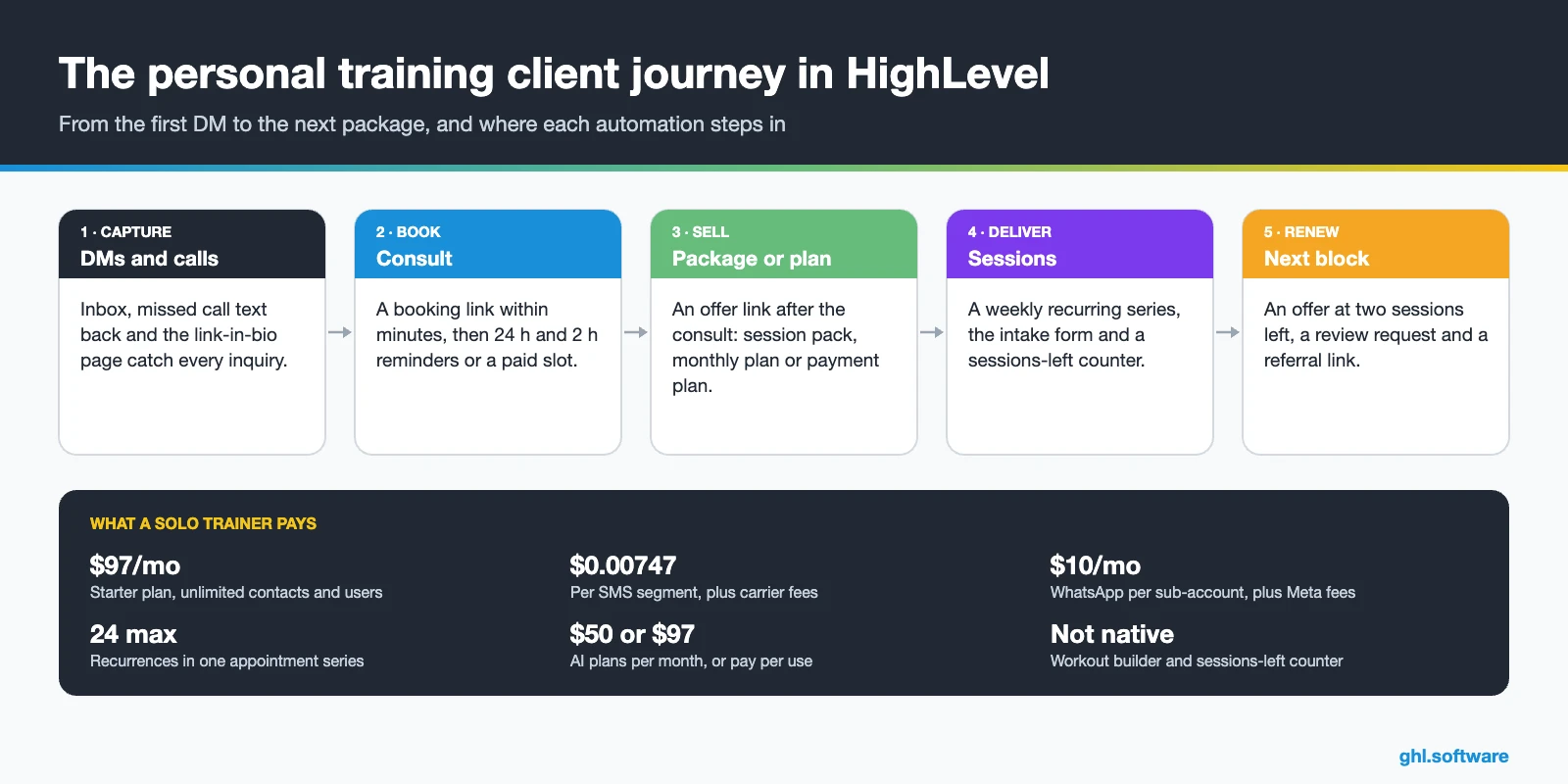
Solo trainers lose money in the same few places. Therefore, a CRM for personal trainers should map each leak to one feature, so you can fix them one at a time.
| Trainer problem | What HighLevel does | Feature |
|---|---|---|
| Missed DMs and calls | Texts back a booking link and alerts you | Missed call text back |
| Consult no-shows | Reminds 24 h and 2 h before; can charge up front | Calendars |
| Same slot every week | Books a weekly series, up to 24 recurrences | Recurring appointments |
| Chasing payments | Charges plans and sends text-to-pay links | Payments |
| Losing track of sessions left | Counts down a custom field after each session | Custom fields + workflows |
| Online clients going quiet | Sends a weekly check-in and flags low scores | Surveys + workflows |
| Churn after 8 to 12 weeks | Starts the renewal offer before the package ends | Opportunities + Forecast |
| Few reviews and referrals | Asks every client after session six | Reputation management |
Personal trainer CRM vs coaching app: do you need both?
Usually yes, and the split is clean. A coaching app such as Trainerize, TrueCoach, PT Distinction or My PT Hub delivers the training: workouts, exercise demos and progress tracking. HighLevel, in turn, brings the client in and keeps the money coming: leads, consults, payments, reminders and renewals. As a result, the client lives in both tools, but each tool has one job.
For a trainer with five steady clients, Calendly plus Stripe may honestly be enough. However, once you run ads or pass 20 clients, a personal trainer CRM saves hours each week, because the follow-up runs without you. Also, the two apps can share data through webhooks and the API or Zapier.
The client pipeline in a CRM for personal trainers
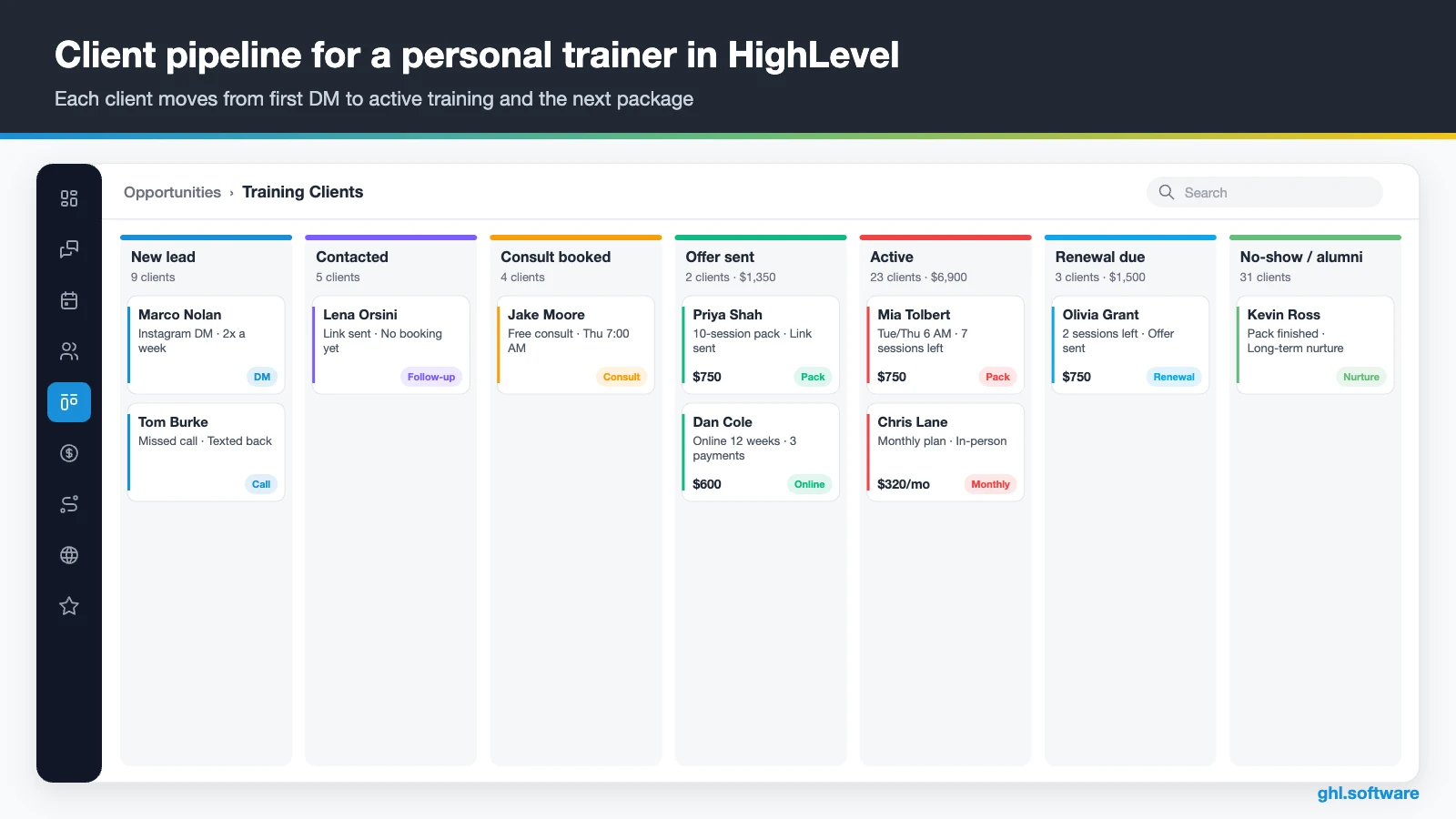
A trainer doesn’t sell one deal. You sell a consult, then a package, then the next package. So the pipeline follows the person from the first message to active client, and it keeps watching after the sale. Workflows move the card when a lead books, shows up, pays or nears the end of a package. That way, you see your close rate and upcoming renewals every week.
| Stage | What moves the client here |
|---|---|
| New lead | DM, missed call, ad form or link-in-bio page |
| Contacted | You or the automation replied, but no consult yet |
| Consult booked | Booked on the consult calendar from the link |
| Offer sent | Consult marked Showed, then a package or plan link sent |
| Active | Payment received or agreement signed; then each session lowers the sessions-left counter |
| Renewal due | Two sessions left, or 14 days before a plan ends |
| No-show / alumni | Missed consult, “not now” or finished; long-term nurture |
Consults, recurring sessions and session packs
Start with the consult. A free 20-minute video call works well for online clients, while an in-person assessment often deserves a fee. HighLevel calendars can take payment at booking, which helps cut no-shows (HighLevel on upfront payments). Then reminders go out by text and email, and online consults get a Zoom or Google Meet link.
Weekly clients are where a booking tool earns its keep. HighLevel supports recurring appointments (daily, weekly, monthly or custom), so Tuesday and Thursday at 7 a.m. becomes one series. Still, check the limits in the recurring appointments guide before you move your whole schedule:
- 24 recurrences at most. So a twice-weekly series covers about three months, and then you book the next one.
- One team member per calendar. Recurring booking needs a calendar with a single host.
- Custom series have limits. They are not available on class or service calendars.
- Workflows fire once. For a custom series, automations trigger only on the first appointment.
Session packs need a small build, because HighLevel has no native “sessions left” counter. Instead, a workflow subtracts one from a number field each time a session is marked Showed.
Three automations for your CRM for personal trainers
1. DM or missed call → consult booked
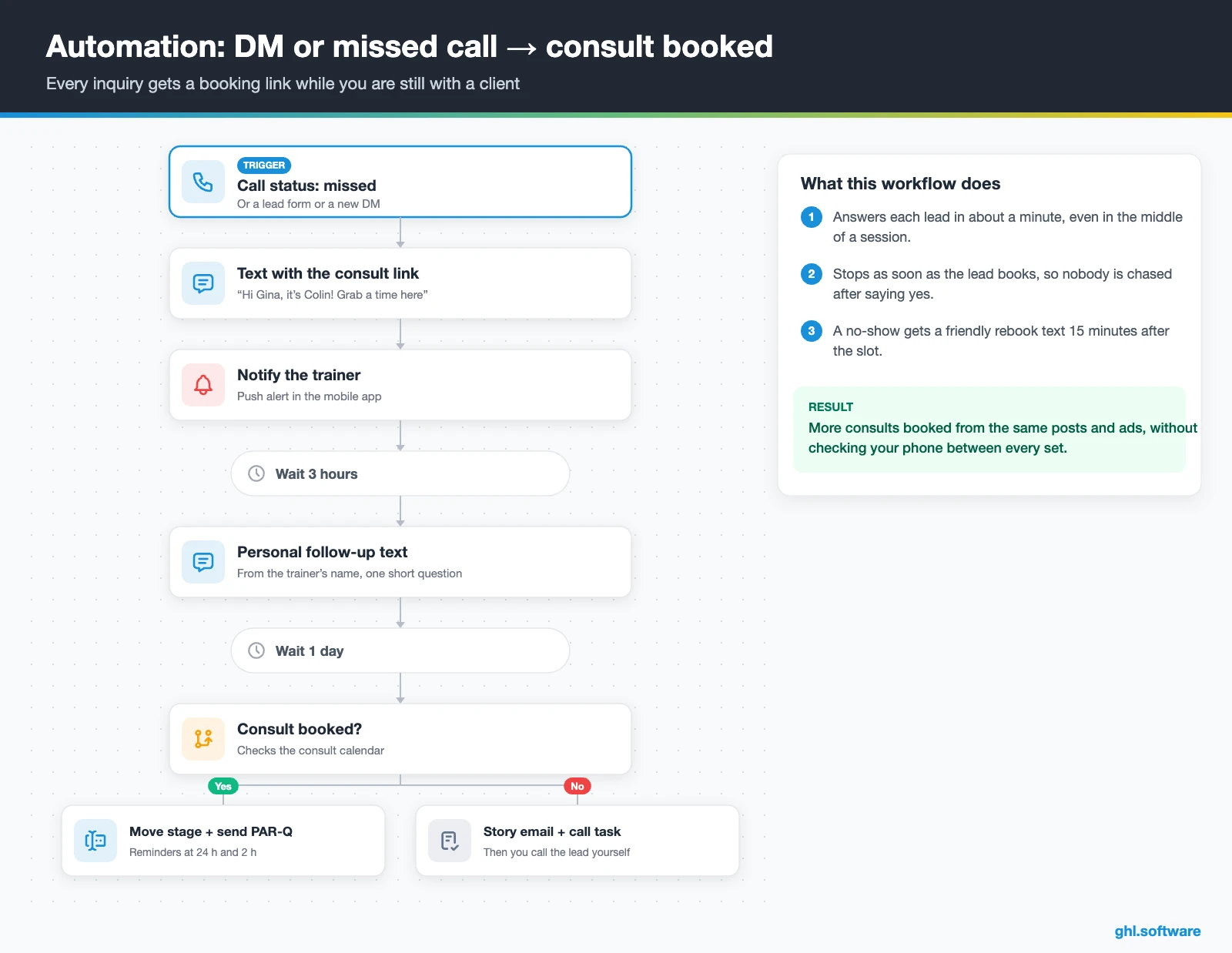
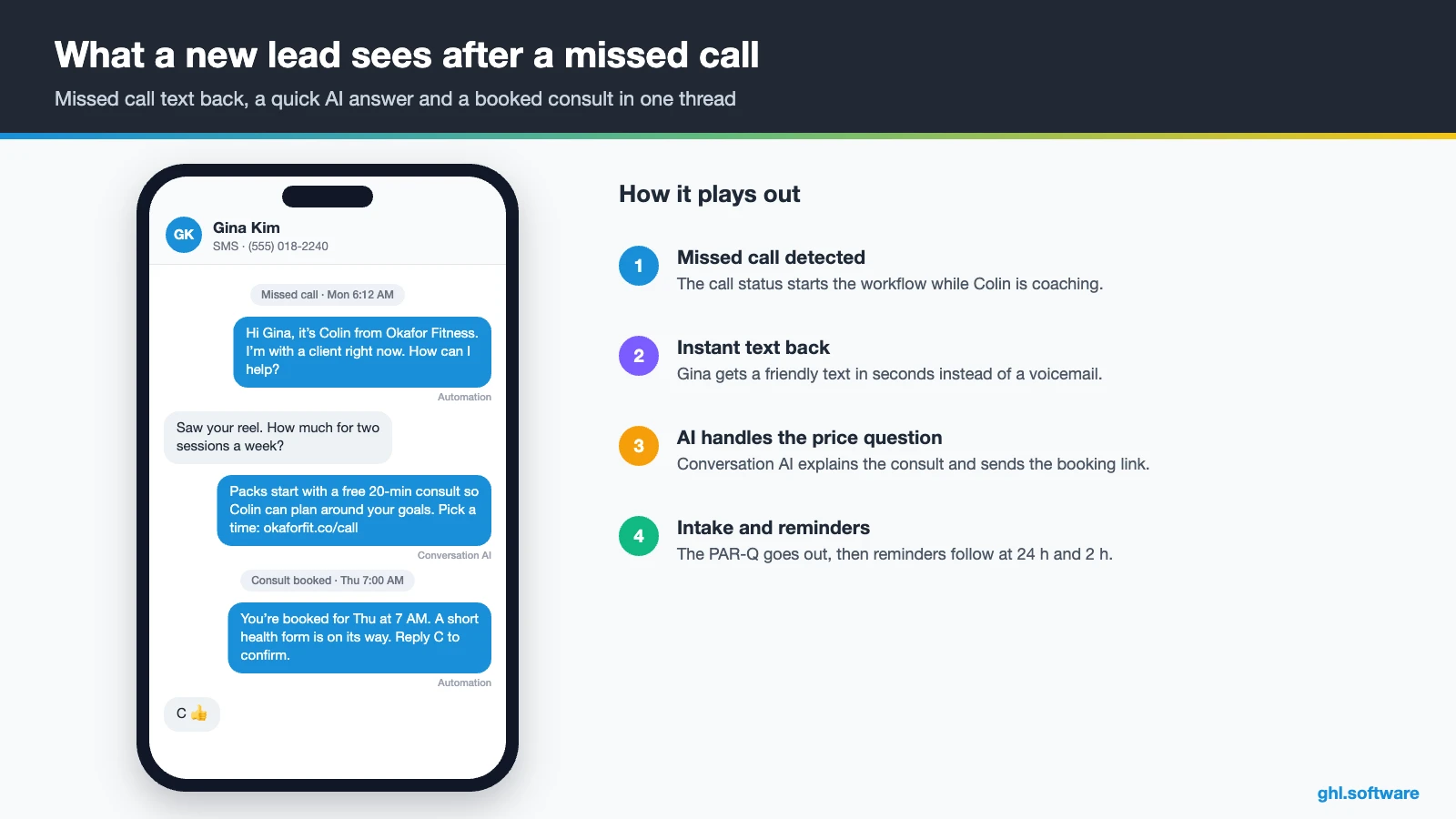
This workflow pays for your CRM for personal trainers. The trigger is a form, a Facebook or Instagram lead form, or a missed call. Right away, HighLevel creates the opportunity in New lead, tags the source and sends a text with your consult link. Meanwhile, you get a notification on your phone.
If the lead hasn’t booked after three hours, a short text follows from your name. After a day, an email shares a client story (a real one, with permission) and creates a call task. Once the lead books, the card moves to Consult booked and the PAR-Q form goes out. Finally, if the lead misses the consult, a friendly rebook text follows 15 minutes later.
2. Package paid → onboarding and sessions-left tracking
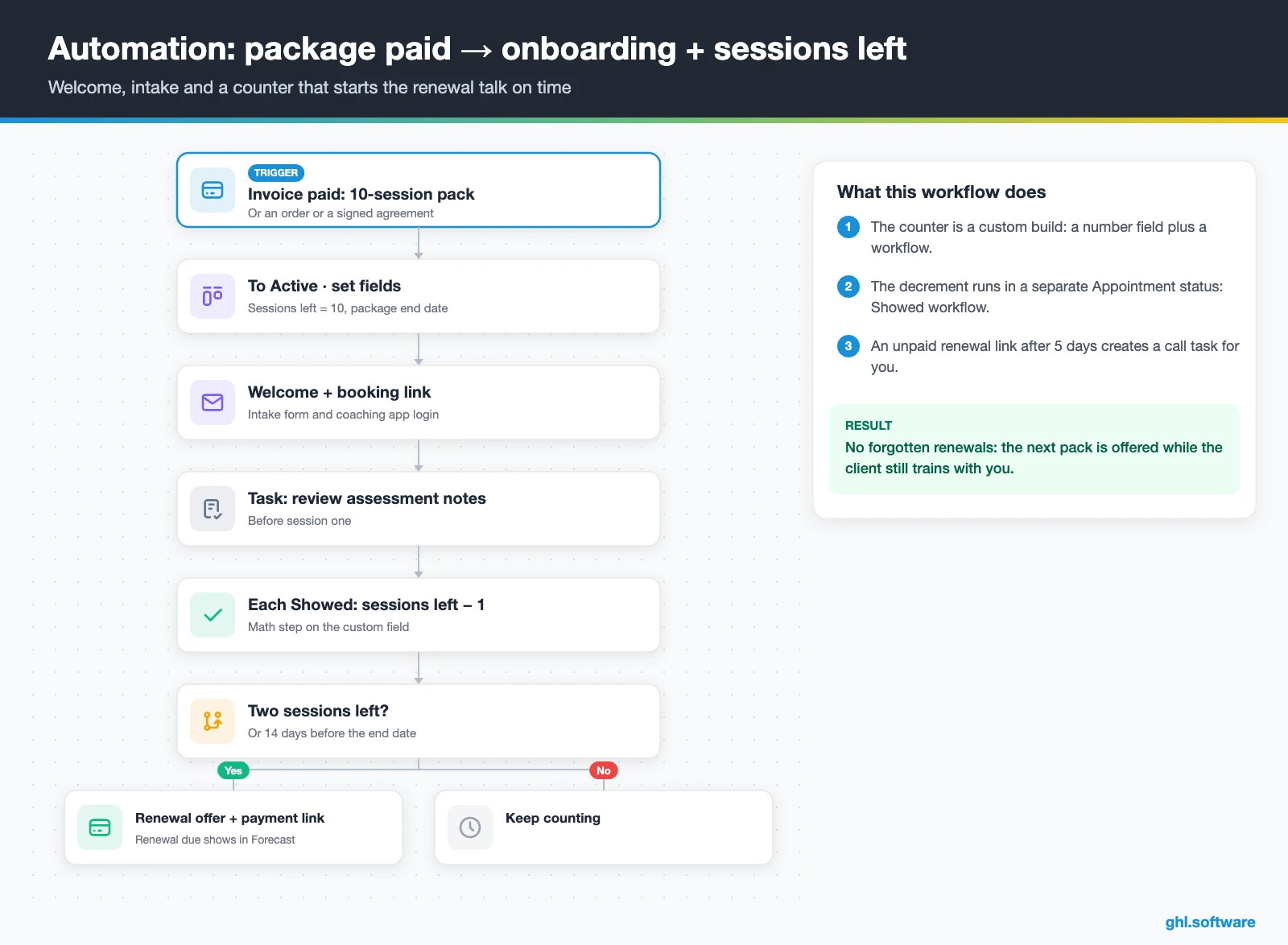
The trigger is a paid invoice or order for a package or plan, or a signed agreement. Then the card moves to Active, and the workflow sets two fields: sessions left (for example, 10) and package end date. The client gets a welcome message with the booking link, the intake form and the login to your coaching app.
After each session marked Showed, a second workflow subtracts one from sessions left. When the field reaches two, or 14 days before the end date, the client receives a renewal offer with a payment link. At the same time, a Renewal due opportunity appears in the Forecast tab. If the link stays unpaid for five days, you get a reminder to call.
3. Weekly check-in → at-risk alert
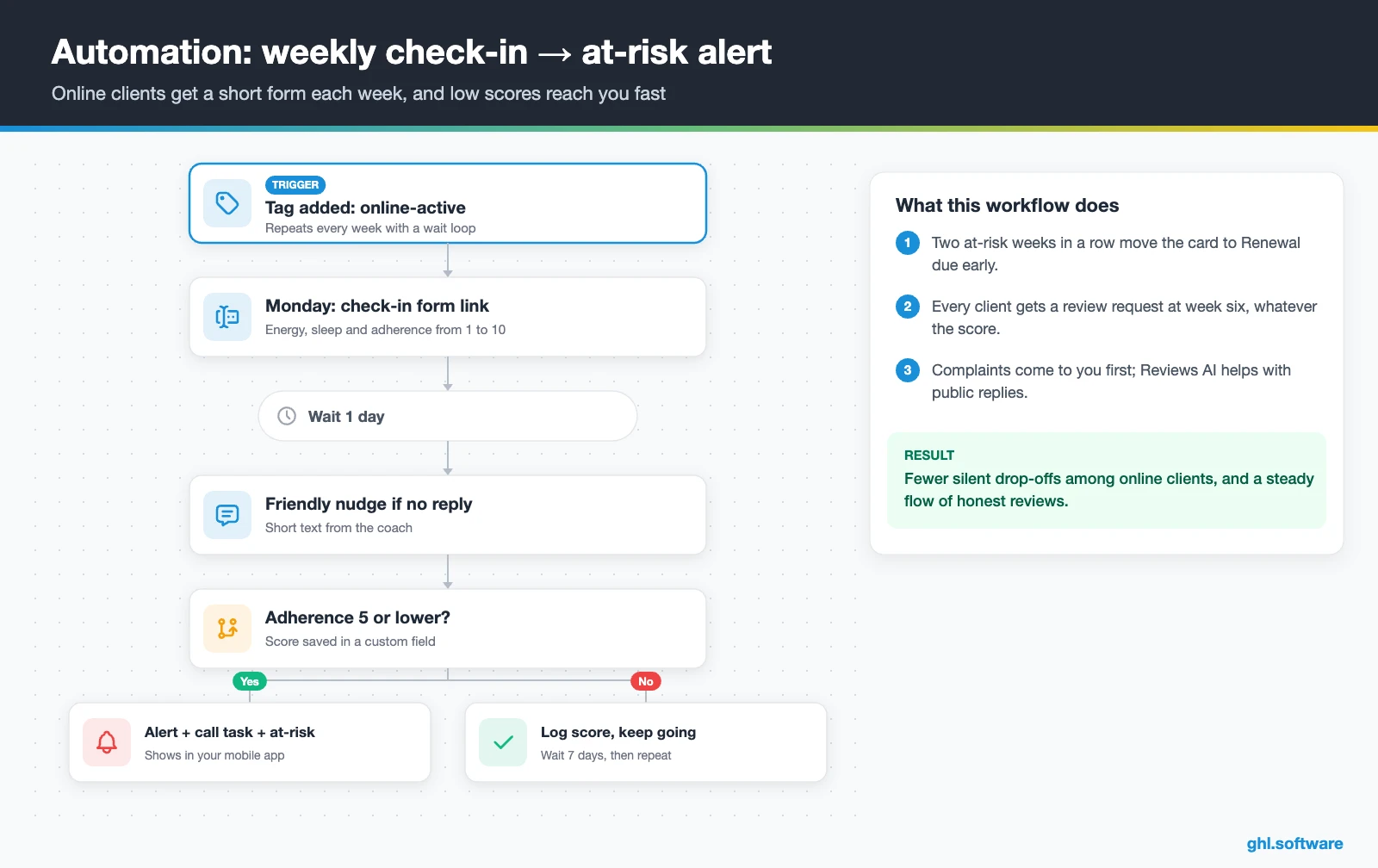
Online clients rarely quit loudly; they just stop replying. So every Monday, clients tagged online-active get a short check-in form: energy, sleep and adherence from 1 to 10. If nobody answers in 24 hours, a friendly text nudges them. If adherence is five or lower, however, you get a notification and a call task, and the contact gets an at-risk tag. Trigger names vary, so check your account.
Reviews follow a separate, simpler rule. Every client gets a Google review request after session six or week six, whatever their check-in scores, because selective asking breaks Google’s review policy. Complaints come to you first, and a referral link in the same message brings friends into the pipeline.
Start with the snapshot and the pipeline from this guide, then add the automations one by one. The extended trial comes with our bootcamp link.
Start the 30-day trialAffiliate link. I may earn a commission at no extra cost to you.
DMs, texts, WhatsApp and AI between sessions
Most leads message you; few fill out a long form. So, in a CRM for personal trainers, the inbox matters as much as the funnel. HighLevel puts Instagram and Facebook DMs, SMS, email, web chat and WhatsApp in one thread per contact. You reply from the mobile app between clients, while response-time SLAs show when a lead has waited too long.
In the US, register A2P 10DLC before you text, because HighLevel requires it for local numbers (A2P guide). Missed call text back also needs a registered number (setup guide). Then add Conversation AI for the questions that repeat: price, location and “do you train beginners?”. Newer AI models sit in Labs as a beta, so test first, and answer injury questions yourself.
Online coaching: application funnel, check-ins and a client portal
Online trainers sell differently. Often, a reel leads to an application form, then a call, then a 12-week program on a payment plan. HighLevel covers that path with funnels, a call calendar and payment plans. After the sale, a course area and a community hold your welcome videos and group Q&A.
Clients log in through the Client Portal, and HighLevel’s changelog lists a branded client app at an introductory $49 a month per location (changelog). Even so, workouts stay in your coaching app.
What the official Personal Trainer snapshot includes
HighLevel publishes a free Personal Trainer snapshot playbook. It is a fast starting kit, but it is a generic marketing template with the industry name swapped in. In fact, the guide never mentions sessions, packages or check-ins. It includes:
- A “Personal Trainer” website with a Home page and a Link in Bio page.
- A “Personal Trainer Offer” funnel: an opt-in step, then a booking page.
- The “Marketing Form – Claim Offer” and a “Marketing Pipeline” whose stages you define.
- Six workflows, two of them named: “New Lead Nurture (Fast 5) – Claim Offer” and “Long Term Nurture”.
- Calendars tagged “Personal Trainer Services”, a simple calendar and an event calendar for consultations.
- A proposal template, an Ad Manager ad, a chat widget, missed call text back and a Voice AI prompt.
So you still turn the kit into a CRM for personal trainers: pipeline stages, recurring sessions, packages, the sessions-left field and check-ins. All message copy is yours too, because the guide ships none. Also, HighLevel’s Health & Wellness playbook adds a useful journey: capture, book, confirm, deliver, pay, review and rebook. Load the kit through snapshots when you create the sub-account.
How to set up a CRM for personal trainers in 8 steps
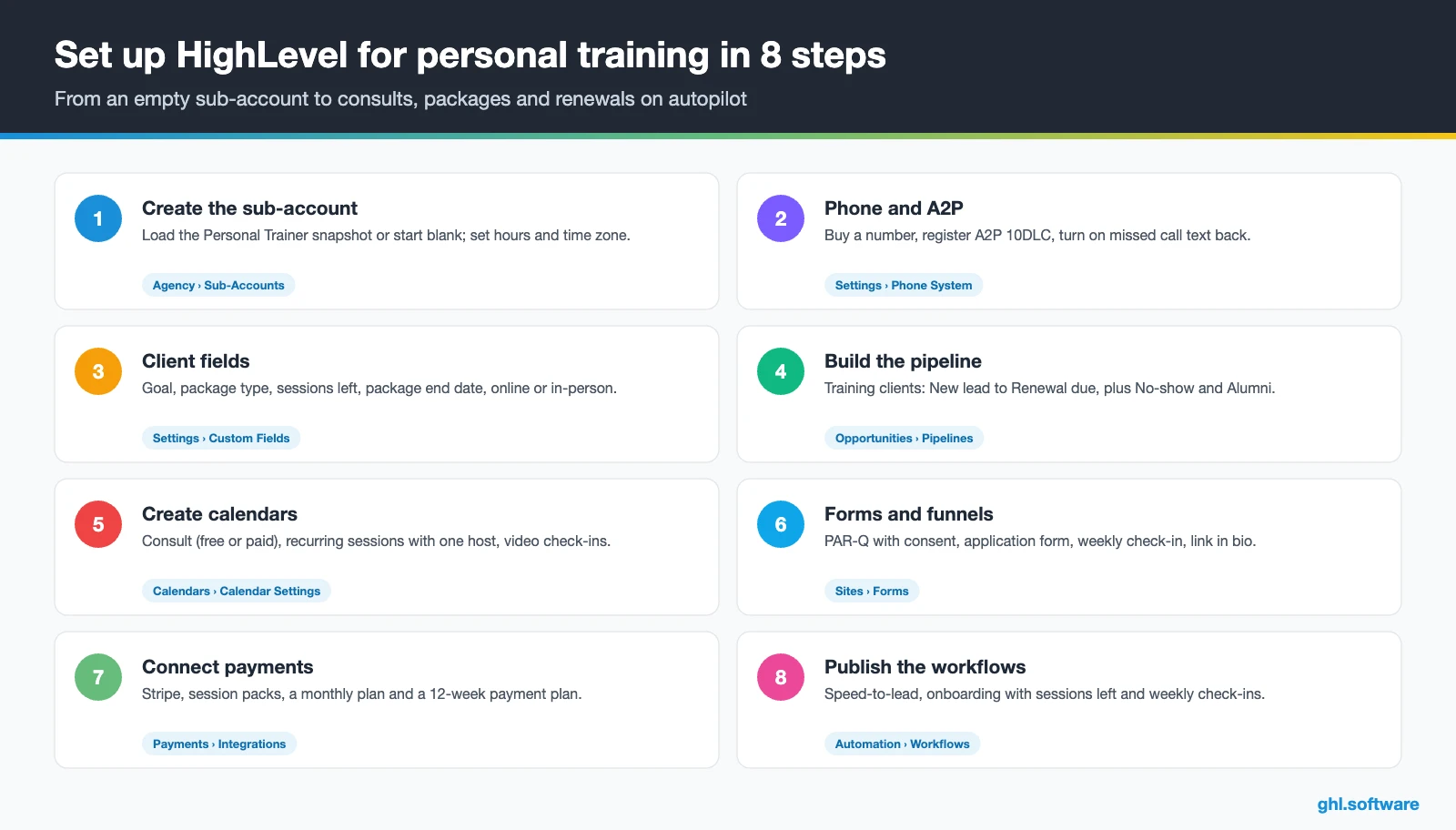
- Create the sub-account. Load the Personal Trainer snapshot or start blank, then set hours and time zone.
- Connect your channels. Register A2P 10DLC, turn on missed call text back, then connect Instagram, Facebook, WhatsApp and Google.
- Import clients and add fields. Import a CSV, then add fields for goal, package, sessions left and package end date.
- Build the pipeline. Create “Training clients” with the stages above, including Renewal due, No-show and Alumni.
- Create calendars. Add a consult calendar (free or paid) and a one-host calendar for recurring sessions.
- Set up forms and funnels. Edit the offer funnel, then build the PAR-Q with a consent checkbox and the check-in form.
- Connect payments and documents. Connect Stripe, create packs and plans, and add an agreement with payment at signing.
- Publish workflows and track numbers. Test the three automations with your own number, then watch show rate, close rate and renewals in Reporting.
What a CRM for personal trainers costs with HighLevel
HighLevel charges a flat plan plus usage. A solo trainer usually starts on Starter at $97 a month, with unlimited contacts, unlimited users and all core features. Usage comes on top: $1.15 a month for a local US number and $0.00747 per SMS segment plus carrier fees. Also, A2P registration costs $22.50 one-time plus a monthly campaign fee, and email runs $0.675 per 1,000.
So a trainer with 20 to 40 clients typically pays about $105–$140 a month before AI. If you add WhatsApp, budget $10 a month plus Meta fees. An AI plan at $50 or $97 a month, in turn, moves the total to roughly $155–$240. These numbers are illustrative, because your volume decides the rest, and your coaching app comes on top. For details, see our GoHighLevel pricing guide and the AI Employee pricing breakdown.
GoHighLevel plans compared
| Starter | Unlimited | Founder (formerly Agency Pro) | |
|---|---|---|---|
| Price | $97/month | $297/month | $497/month |
| Annual | $970/year | $2,970/year | $4,970/year |
| Sub-accounts | 3 | Unlimited | Unlimited |
| Contacts and users | Unlimited | Unlimited | Unlimited |
| All core features | Yes | Yes | Yes |
| White label web app | Yes | Yes | Yes |
| API access | Basic | Basic | Advanced, agency-level keys |
| Rebill phone and email | No | At cost | With markup |
| Rebill AI usage | No | No | Yes |
| SaaS Mode and automated sub-accounts | No | No | Yes |
| User and agent reporting | No | No | Yes |
| Support | 24/7 | 24/7 | 24/7 |
Usage costs on top of the plan
| Item | Official price | When you pay it |
|---|---|---|
| Local phone number (US/Canada) | $1.15/month | Each number for SMS and calls |
| SMS (US/Canada) | $0.00747 per segment + carrier fees | Every text sent or received |
| Calls (US) | $0.0166/min outbound, $0.01165/min inbound | Calls through LC Phone |
| A2P 10DLC registration | $22.50 one-time (low volume) + monthly campaign fee | Before texting US numbers |
| Email (LC Email) | $0.675 per 1,000 emails | Campaigns and workflow emails |
| $10/month per sub-account + Meta fees | If you use WhatsApp inside HighLevel | |
| AI | Pay-per-use, or $50 or $97/month per sub-account | Voice AI, Conversation AI and other AI tools |
| Premium workflow steps | $0.01 per run after 100 free | Webhooks, Google Sheets, Slack, app actions |
Honest limits and alternatives
HighLevel is a strong CRM for personal trainers, but it is not a training app. So check these gaps before you cancel anything.
- No workout builder. No exercise library, progress charts or wearable sync, so keep Trainerize or TrueCoach.
- No native sessions-left counter. You build it with a number field and a workflow, then test it.
- Recurring series limits. A series has 24 recurrences at most and needs a one-host calendar.
- Late-cancel fees. You can charge a saved card from the contact record, but we found no native rule that charges a late-cancel fee automatically, so use paid booking or an invoice.
- Learning curve. It takes longer to learn than Calendly plus Stripe.
HighLevel next to trainer software
Here is a neutral view of HighLevel next to tools trainers use. The coaching-app cells reflect how each vendor describes its core product. “Check vendor” means we couldn’t confirm it, so ask before you buy.
| HighLevel | Trainerize | TrueCoach | Calendly + Stripe | |
|---|---|---|---|---|
| Built for | Sales, follow-up and billing | Training delivery and client app | Program delivery and client app | Booking and payments |
| Workout builder | No | Yes | Yes | No |
| Lead pipeline and funnels | Yes | Check vendor | Check vendor | No |
| SMS and WhatsApp inbox | ✓ (usage-based) | Check vendor | Check vendor | No |
| Payments and plans | ✓ (Stripe and others) | Check vendor | Check vendor | ✓ (Stripe) |
Sessions left, not the calendar, should start the renewal talk
Here is the angle most guides miss. A pack of 10 sessions doesn’t end on a date; it ends when the client uses session 10. A client who trains twice a week finishes in five weeks, while a once-a-week client takes ten. So a date-based reminder fires too early for one client and too late for the other.
Instead, let the sessions-left field in your CRM for personal trainers drive the renewal. When it hits two, you still have two face-to-face sessions to talk about the next block, and that is the best moment to offer it. Meanwhile, the Renewal due opportunity shows the revenue at stake in the Forecast tab. Keep the date-based rule only for monthly plans, because they renew on a calendar. Finally, test the counter with one client for a full pack before you roll it out.
Open a free account, load the pipeline and turn on the first automation today. The bootcamp walks you through the setup live.
Start the 30-day trialAffiliate link. I may earn a commission at no extra cost to you.
Frequently asked questions
What is the best CRM for personal trainers?
It depends on the job. If you mainly need workouts, exercise videos and progress tracking, a coaching app such as Trainerize or TrueCoach is the base. If your gap is lead follow-up, consult booking, package payments, texting and renewals, HighLevel is a strong CRM for personal trainers. Many trainers run both: the coaching app for delivery and HighLevel for sales, billing and retention.
Does HighLevel replace Trainerize or TrueCoach?
No. HighLevel has no workout builder, exercise library, progress charts or wearable sync. However, it can replace the tools around your coaching app: Calendly for consults, Stripe links for packages, Google Forms for intake and the spreadsheet for renewals. So most trainers keep their workout app and send new clients its login from a HighLevel onboarding workflow. The two can share data through webhooks or Zapier.
Can clients book recurring weekly sessions?
Yes. HighLevel calendars support recurring appointments that repeat daily, weekly, monthly or on a custom pattern. A series can have up to 24 recurrences, and the calendar needs a single team member. Custom series aren’t available on class or service calendars, and workflows fire only on the first appointment of a custom series. So plan to rebook long series every few months.
Can I sell session packs and track sessions left?
You can sell packs as one-time products, payment plans or subscriptions, with payment links, invoices and text-to-pay. Tracking sessions left, however, is not a native feature. Instead, create a number field such as sessions left, set it when the pack is paid, and let a workflow subtract one each time a session is marked Showed. Then trigger the renewal offer when it reaches two.
Can I charge for consults to cut no-shows?
Yes. HighLevel calendars can collect payment at booking through a connected payment provider, so a paid assessment or a deposit is possible. Many online trainers still offer a free 20-minute call, while in-person assessments often carry a fee. Either way, reminders by text and email at 24 hours and 2 hours before, plus a rebook text after a no-show, do most of the work.
How much does a personal trainer CRM cost?
With HighLevel, the Starter plan costs $97 a month with unlimited contacts and users. Usage comes on top: about $1.15 a month for a US number, $0.00747 per SMS segment plus carrier fees, and a one-time $22.50 A2P registration plus a monthly campaign fee. A solo trainer usually pays about $105 to $140 a month before AI, plus the coaching app.
Can I deliver online coaching programs in HighLevel?
Partly. Courses, communities and the Client Portal can hold welcome videos, nutrition guides, group Q&A and check-in forms. HighLevel’s changelog also lists a branded client app at an introductory $49 a month per location. However, it can’t design workouts or log sets and reps, so programming stays in your coaching app. HighLevel then handles the application, the sale, payments and renewals.
More industry guides
Sources: HighLevel Personal Trainer snapshot playbook · HighLevel: Industry playbook, Health & Wellness business · HighLevel: Recurring appointments · HighLevel: Upfront payments for calendars · HighLevel changelog: Client Portal branded mobile app · HighLevel: A2P 10DLC brand and campaign registration · HighLevel: Missed call text back setup · HighLevel: HIPAA compliance with HighLevel · BLS: Fitness trainers and instructors · FTC: Endorsement Guides