

CRM for Coaches: From Discovery Call to Renewal in HighLevel
A CRM for coaches has to do more than store contacts: it should book discovery calls, collect a signed agreement and payment, onboard new clients and flag packages that are about to end. GoHighLevel does all of that in one account, with funnels, calendars with Zoom links, payment plans, courses and a community. One-to-one calendar sessions run on Zoom or Google Meet, and there is no coaching journal; for group sessions, communities include live rooms (Go Live).
“How does your coaching program work, and what does it cost?” Wendy Tanaka sends that Instagram DM from her couch in Raleigh on a Sunday night. Your podcast episode on changing careers at 40 has just ended in her earbuds. You see it on Tuesday, between two client sessions, and record a long voice note. By then, however, she has booked a call with another coach, whose link reached her in two minutes. A CRM for coaches exists for that gap, not only for the spreadsheet afterwards.
Most coaches juggle five or six tools: Calendly, Stripe, a PDF agreement, a course host, a community app and spreadsheets. Still, nothing connects them, so follow-up depends on memory. Meanwhile, the ICF 2025 Global Coaching Study counts 122,974 coach practitioners, up 15% since 2023, so prospects can shop around.
This guide covers GoHighLevel as a CRM for coaches: pipeline, three automations, conversations, snapshots, setup, costs and honest limits. For other professions, browse the industry guides.
Leer en español: Software para coaches · Ler em português: CRM para coaches e mentores · Part of GoHighLevel by industry
Includes a free live setup class with a HighLevel coach.
Start free + bootcampAffiliate link.
What a coaching business needs from a CRM
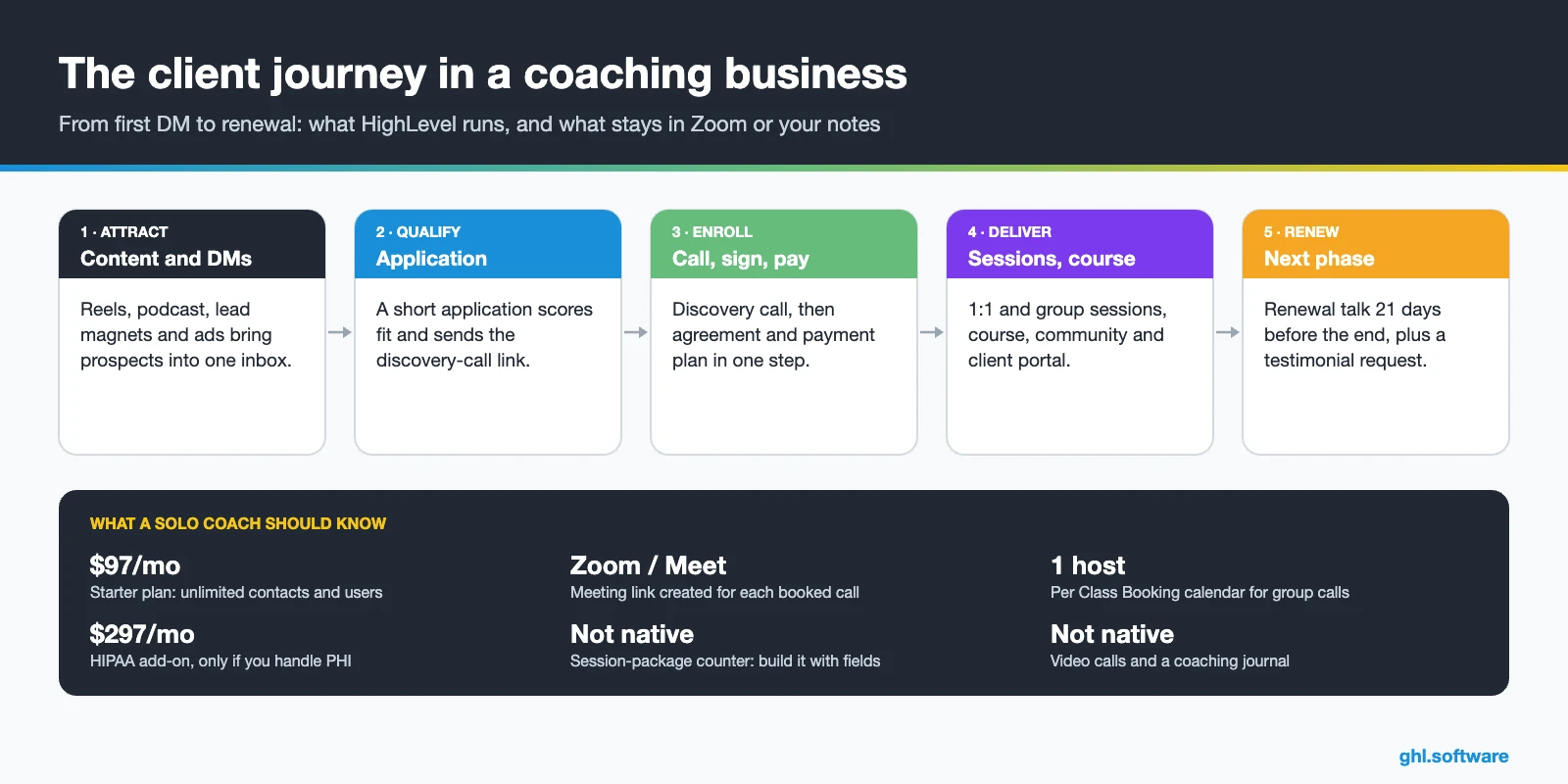
Coaching is a high-trust sale followed by a delivery phase that lasts weeks or months. For example, a prospect may download a guide in January, apply in February and start a 12-week program in March. Then the real work begins: sessions, homework, group calls and, finally, the renewal talk. So a CRM for coaches has to cover selling and serving, not only a list of names.
Coaching pain points and how HighLevel solves them
Most coaching businesses lose clients in the same few places, and a CRM for coaches should close each gap. Therefore, the table maps each one to what HighLevel does and the feature behind it.
| Pain | What HighLevel does | Feature |
|---|---|---|
| Too many disconnected tools | Puts funnels, calendars, payments, agreements, courses and the community in one sub-account | Whole platform |
| DMs answered days later | Replies in minutes with a booking link, from the inbox or the mobile app | Conversations, Conversation AI |
| Discovery-call no-shows | Sends reminders with the Zoom link, then a rebook text if the call is missed | Calendars, workflows |
| Chasing installments | Charges payment plans and subscriptions automatically and sends text-to-pay links | Payments |
| Onboarding admin | Grants course access, sends the intake form and books session one | Workflows, courses |
| Lost context between sessions | Keeps notes, forms, messages and payments on one contact record | CRM |
| Renewals noticed too late | Opens a renewal deal 21 days before the package ends | Custom date reminder, Forecast tab |
| Few testimonials | Asks every client for a testimonial and a review three weeks before the package ends | Surveys, reviews |
The client pipeline in a CRM for coaches
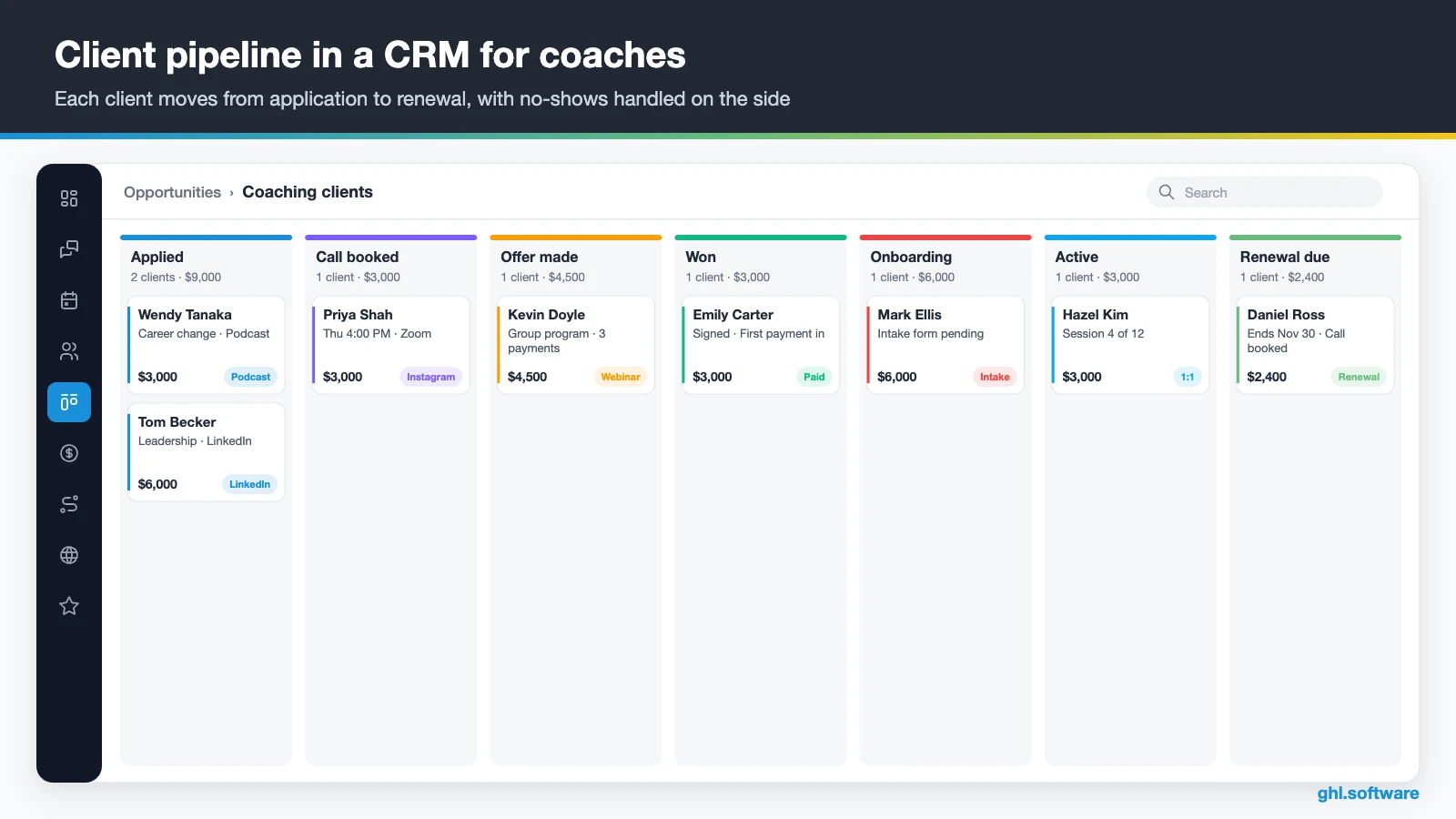
A coaching pipeline should mirror the client journey, from first touch to renewal. Each stage needs a clear trigger. For example, a submitted application creates the card in “Applied”, while “Offer made” stays a manual move after the call. Meanwhile, “No-show” and “Not now” work as side stages, so missed calls and soft no’s get their own follow-up instead of disappearing.
Keep the value on each card realistic. For instance, a 12-week program at $3,000 shows its full value, even when the client pays in three installments. That way, the board shows what is really in play this month, and the Forecast tab gives you a forward view of open deals and renewals.
| Stage | What moves the client here |
|---|---|
| New lead | Lead magnet opt-in, DM, podcast or webinar form |
| Applied | The application form is submitted and scored |
| Call booked | The prospect books a discovery call on your calendar |
| No-show | You mark the appointment as a no-show; a rebook text goes out |
| Offer made | You present the program at the end of the call (manual move) |
| Won | The agreement is signed and the first payment arrives |
| Onboarding | Course access is granted and the intake form goes out |
| Active | Session one is booked and the package end date is set |
| Renewal due | 21 days before the package end date |
| Alumni / Not now | No renewal yet: quarterly check-ins and long-term nurture |
Three automations for coaches who sell programs
A CRM for coaches doesn’t need dozens of workflows. Instead, these three cover the moments where most revenue leaks: the application, the start of a program and its end. Build them once, test them with your own email and phone, and then publish them.
Application → discovery call booked
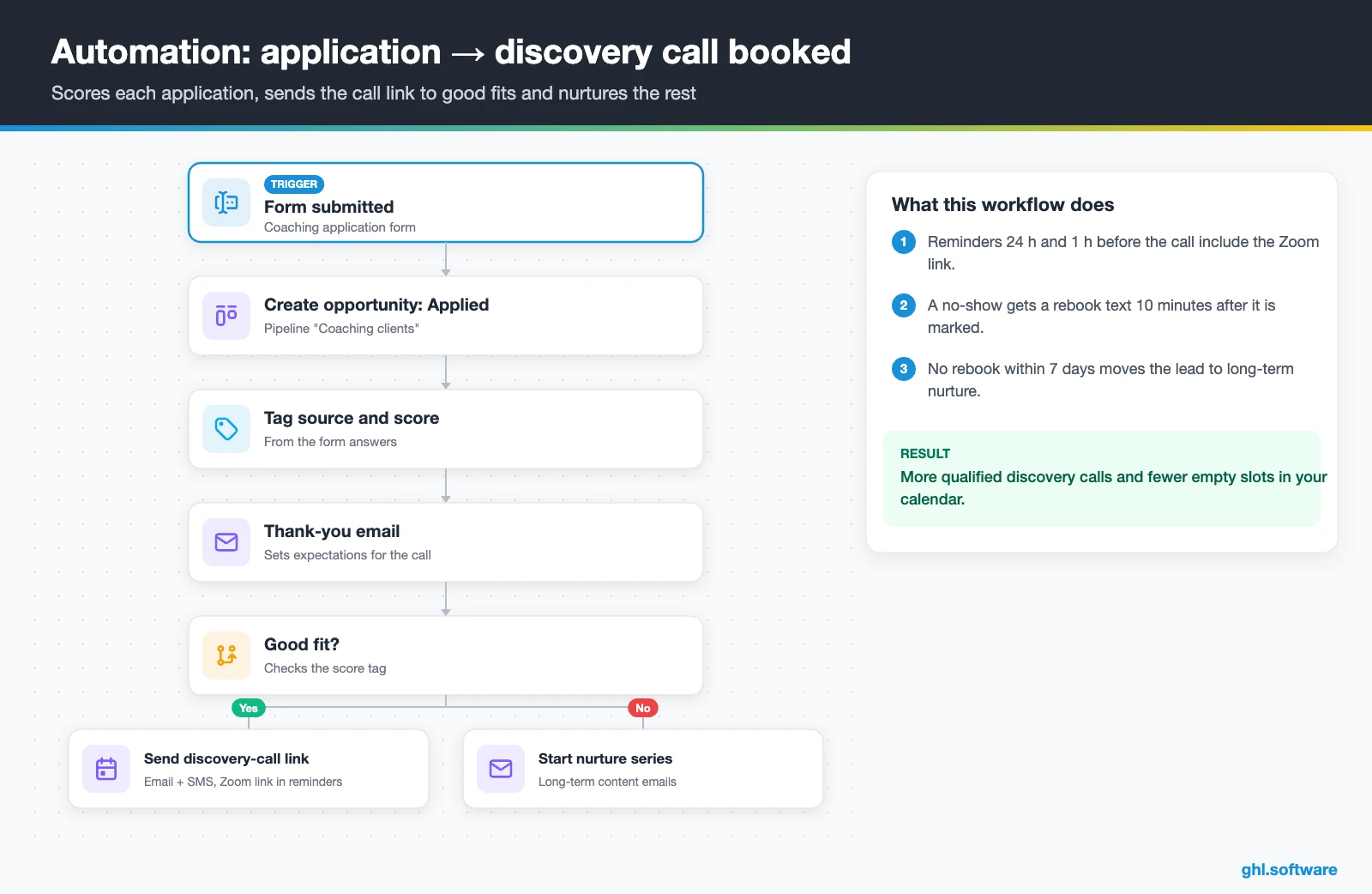
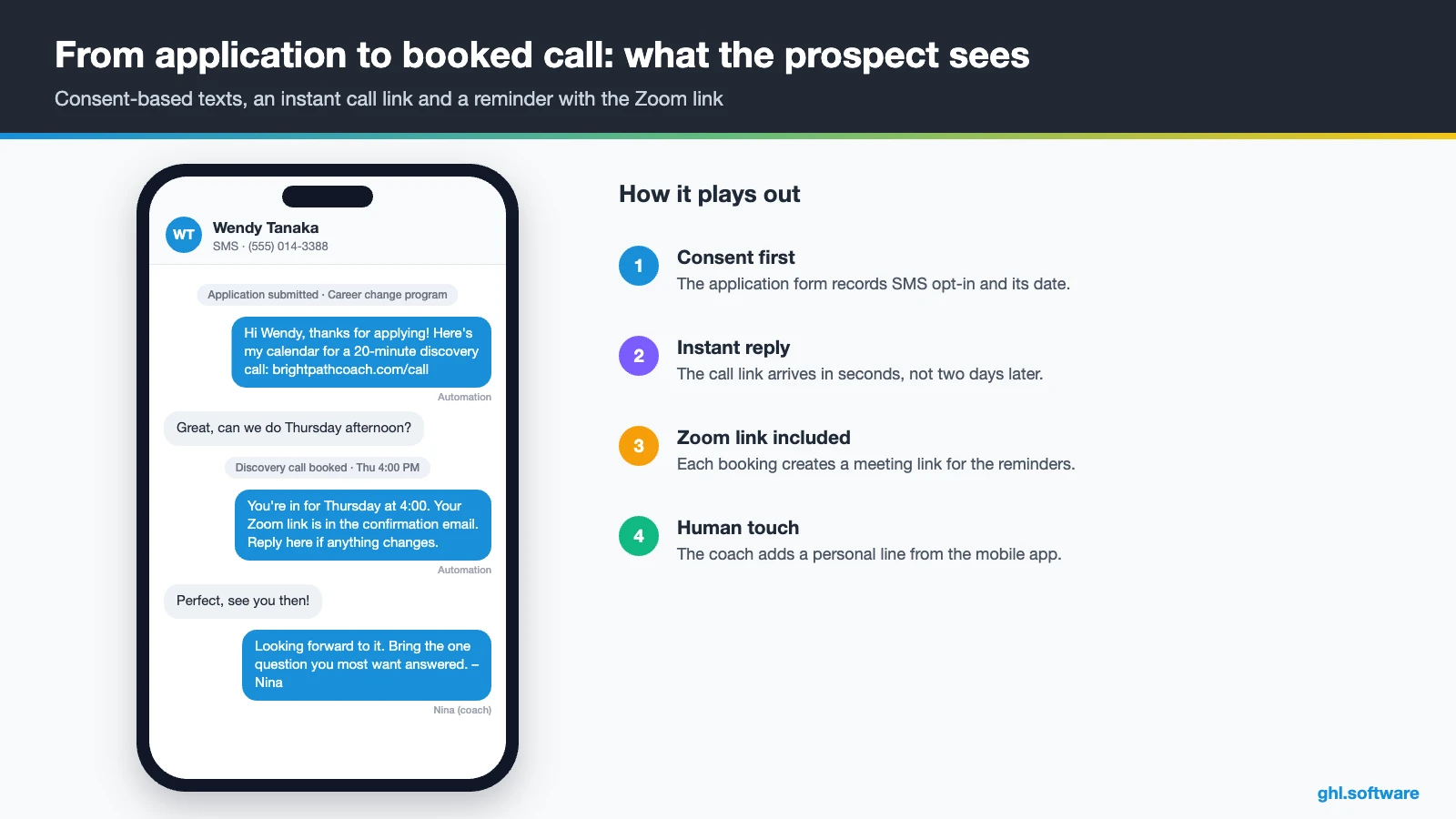
The trigger is your application form. HighLevel creates an opportunity in “Applied”, tags the lead source and reads a score from the form answers. If the applicant fits, they get an email and a text with your discovery-call link. Otherwise, they join a nurture series with useful content, so nobody receives a cold rejection.
Once they book, reminders go out 24 hours and one hour before the call. Because HighLevel generates Zoom links for personal, round robin, service and collective calendars, each reminder can carry the link through the [appointment.location] value. Then, if you mark the call as a no-show, a rebook text goes out ten minutes later. As a result, more calendar slots turn into real conversations.
Paid and signed → onboarding without admin
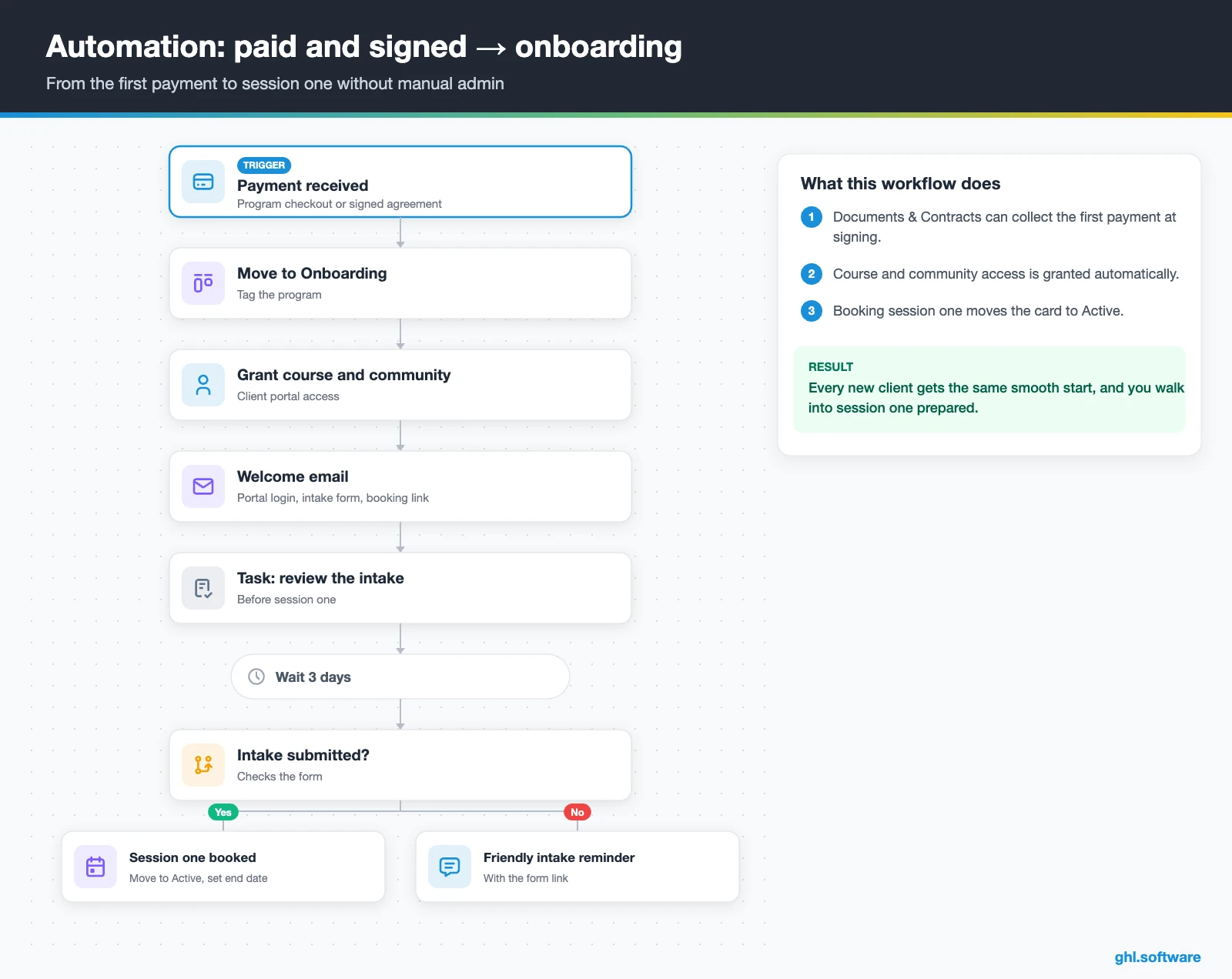
The trigger is a received payment, from a program checkout or from an agreement that collects the first payment at signing. In fact, Documents & Contracts can take one-time or recurring payments when the client signs, so both steps happen at once. The workflow then moves the card to “Onboarding”, tags the program and grants access to the course and the community.
After that, the client receives a welcome email with the portal login, the intake form and the link to book session one. Meanwhile, you get a task to review the intake before the first session. If the form is still missing after three days, a friendly text reminds the client. In short, the time between payment and session one stops depending on your inbox.
Package end → renewal and testimonial
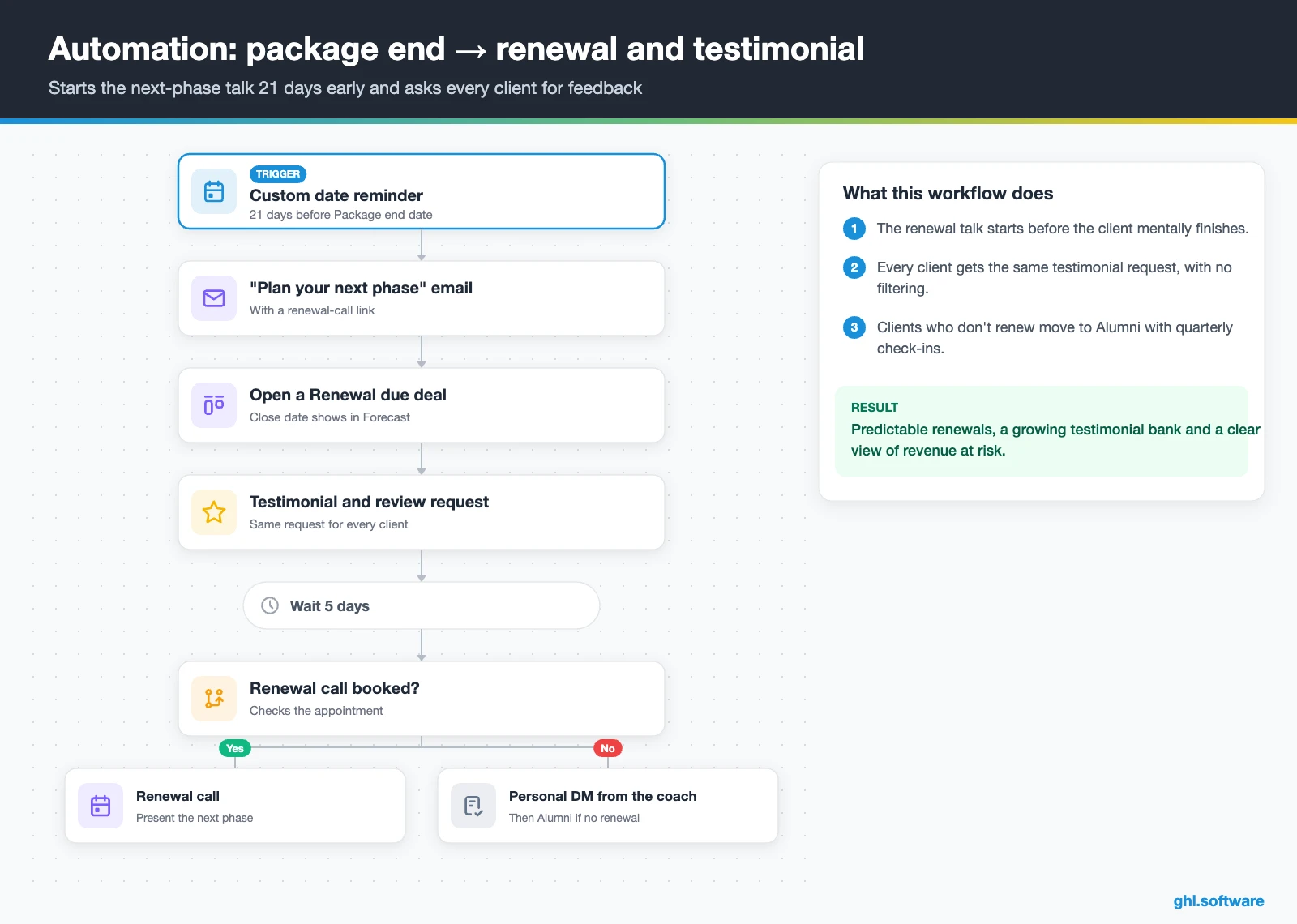
This workflow starts from a custom date field, “Package end date”, 21 days before it arrives. The client gets a personal email inviting them to plan the next phase, with a link to a renewal call. At the same time, the workflow opens a “Renewal due” opportunity with a close date, so it shows up in the Forecast tab.
In the same run, every client receives the same testimonial survey and review request, whatever their mood. So ask everyone the same way, and get written permission before you publish a quote. If the client hasn’t booked the renewal call within five days, you get a task to send a personal DM. Finally, clients who don’t renew move to “Alumni” with a quarterly check-in.
Start with the snapshot and the pipeline from this guide, then add the automations one by one. The extended trial comes with our bootcamp link.
Start the 30-day trialAffiliate link. I may earn a commission at no extra cost to you.
DMs, texts, email and AI: conversations for coaches
Coaching leads rarely start with a form. Instead, they start with a comment, a DM or a reply to your newsletter. HighLevel’s inbox puts Instagram and Facebook DMs, SMS, email, web chat and, as an add-on, WhatsApp into one thread per contact. Besides, response-time SLAs show your team which messages have waited too long.
For a solo coach, the mobile app is the part of a CRM for coaches that matters most, because you can answer between sessions with a saved snippet and a booking link. If you text US contacts, register A2P 10DLC first and collect SMS consent on every form in the phone system. Meanwhile, Conversation AI can answer common questions about programs, dates and booking, then hand off to you. Still, keep it away from anything that sounds like therapy or medical advice.
What HighLevel’s official coaching snapshots include
HighLevel publishes three playbooks for coaches: Life Coach, Business Coaching and Career Coaching. Each comes with a snapshot built on the generic template HighLevel uses for many industries, with the names changed. Out of the box, you get:
- A website (“Life Coach”, “Business Coaching” or “Career Coach”) with a Home page, services and FAQ sections, plus a Link in Bio page.
- An offer funnel, such as “Life Coach Offer”, that goes from an opt-in to a booking page.
- The “Marketing Form – Claim Offer”, a “Marketing Pipeline” and service calendars tagged with your coaching niche.
- The “New Lead Nurture (Fast 5)” workflow (email, SMS and a voicemail drop) and a “Long Term Nurture” workflow.
- Custom values, a chat widget, snippets, missed call text back and a Voice AI prompt for call handling and booking.
- One ad template. The Life Coach version adds a proposal template, and the Business Coaching version lists social post templates.
Still, these snapshots are a marketing starter, not a finished CRM for coaches. For example, none of them includes an application form, a no-show flow, payment plans, course onboarding or renewal workflows. The pipeline also comes without stages. So load a snapshot for its website and funnel, then build the pipeline and the three automations above yourself. Third-party coaching snapshots exist too, but check what each one really contains.
How to set up HighLevel as a CRM for coaches
Do the core setup first and add program content over the following weeks.
The eight setup steps
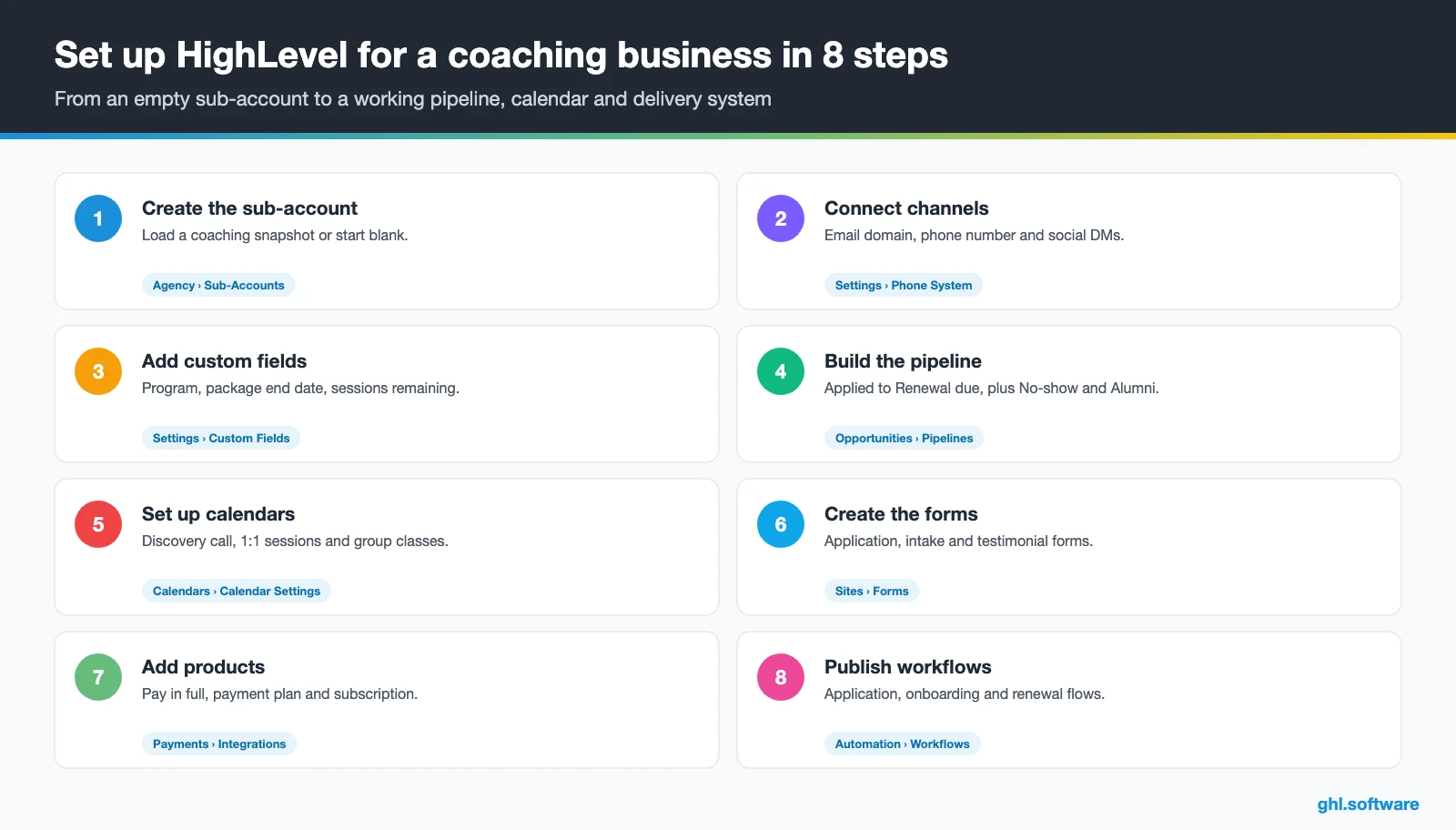
- Create the sub-account. Load the Life Coach, Business Coaching or Career Coach snapshot, or start blank. Then fill in the business profile, time zone and branding.
- Connect your channels. Link Instagram and Facebook, add a dedicated email domain and connect Zoom or Google Meet, so bookings get a meeting link. Add WhatsApp if your clients use it.
- Import contacts and add fields. Import leads, clients and alumni with tags. Then add fields such as program, start date, package end date, sessions remaining and main goal.
- Build the pipeline. Create a “Coaching clients” pipeline with the stages above, including No-show, Renewal due and Alumni.
- Set up calendars. Add a discovery call, 1:1 sessions and a Class Booking calendar for group calls, with reminders and payment where needed.
- Create forms and funnels. Build the lead magnet, application, intake and testimonial forms with forms and surveys, then connect them to your funnel.
- Add products and the agreement. Connect Stripe or PayPal and create pay-in-full, payment-plan and subscription products. After that, build an agreement template that collects payment.
- Publish delivery and workflows. Upload the course, open the community and enable the client portal. Finally, publish the three automations after a test run.
After launch, check the dashboard of your CRM for coaches once a week: leads by source, show rate, close rate and renewals due. Also, send email newsletters to alumni, because past clients are often the warmest audience for your next program.
What a coaching business pays for HighLevel
Most solo coaches and small teams who use HighLevel as a CRM for coaches start on Starter at $97 a month, which includes unlimited contacts and users. On the other hand, Unlimited at $297 suits agencies or coaching companies that run many sub-accounts. On top of the plan, you pay for usage: about $1.15 a month for a local US number, $0.00747 per SMS segment plus carrier fees and $0.675 per 1,000 emails. Texting in the US also needs the one-time A2P fee and a monthly campaign fee.
For example, picture a solo coach with 300 SMS segments, 200 call minutes and 5,000 emails a month. Usage would add roughly $10–20, so HighLevel lands around $110 a month. With WhatsApp ($10 a month plus Meta fees) and the $97 AI plan, it reaches about $220. Payment processing fees go to Stripe or PayPal separately. In return, it can replace a booking tool, an e-signature tool, an email platform and a course host. For details, see the GoHighLevel pricing guide and the AI Employee pricing page.
GoHighLevel plans compared
| Starter | Unlimited | Founder (formerly Agency Pro) | |
|---|---|---|---|
| Price | $97/month | $297/month | $497/month |
| Annual | $970/year | $2,970/year | $4,970/year |
| Sub-accounts | 3 | Unlimited | Unlimited |
| Contacts and users | Unlimited | Unlimited | Unlimited |
| All core features | Yes | Yes | Yes |
| White label web app | Yes | Yes | Yes |
| API access | Basic | Basic | Advanced, agency-level keys |
| Rebill phone and email | No | At cost | With markup |
| Rebill AI usage | No | No | Yes |
| SaaS Mode and automated sub-accounts | No | No | Yes |
| User and agent reporting | No | No | Yes |
| Support | 24/7 | 24/7 | 24/7 |
Usage costs on top of the plan
| Item | Official price | When you pay it |
|---|---|---|
| Local phone number (US/Canada) | $1.15/month | Each number for SMS and calls |
| SMS (US/Canada) | $0.00747 per segment + carrier fees | Every text sent or received |
| Calls (US) | $0.0166/min outbound, $0.01165/min inbound | Calls through LC Phone |
| A2P 10DLC registration | $22.50 one-time (low volume) + monthly campaign fee | Before texting US numbers |
| Email (LC Email) | $0.675 per 1,000 emails | Campaigns and workflow emails |
| $10/month per sub-account + Meta fees | If you use WhatsApp inside HighLevel | |
| AI | Pay-per-use, or $50 or $97/month per sub-account | Voice AI, Conversation AI and other AI tools |
| Premium workflow steps | $0.01 per run after 100 free | Webhooks, Google Sheets, Slack, app actions |
Honest limits and the alternatives coaches use
HighLevel is a sales, booking, delivery and follow-up platform, not a coaching-specific practice tool. It has no coaching journal, goal or habit tracker and no homework module, only notes and forms. It also lacks a native session-package counter, so you build one with custom fields and workflows. Video calls run on Zoom or Google Meet, and each Class Booking calendar allows one host.
HighLevel is also not HIPAA compliant by default. So a health coach who works with a clinic and handles protected health information needs the HIPAA add-on, which costs $297 a month. Besides, HighLevel takes longer to learn than a simple booking tool. For a coach with five private clients, Paperbell or Calendly plus Stripe may be enough. HighLevel pays off when it replaces four to six tools, or when you run ads and funnels.
HighLevel compared with popular coaching tools
| Tool | What it is | Where it fits |
|---|---|---|
| GoHighLevel | All-in-one marketing, CRM, booking, payments and course platform | Coaches who sell programs with funnels, ads, DMs and renewals |
| Paperbell | Client management software built for coaches | Solo coaches who want packages, scheduling, contracts and payments in a simple tool |
| Practice Better | Practice management for health and wellness practitioners | Health and nutrition coaches who need client records and programs |
| Kajabi | Platform for courses, communities and digital products | Course-led coaches who sell content more than 1:1 sessions |
| HoneyBook | Client flow tool for independent businesses | Proposals, contracts and invoices for service providers |
| Calendly + Stripe | Scheduling tool plus a payment processor | Very small practices that only need booking and payment |
So which CRM for coaches should you pick? If you mainly need clean admin for a handful of clients, a coaching-native tool is simpler. On the other hand, if you want the funnel, the inbox, the program and the renewal in one place, HighLevel covers more ground.
The angle most guides miss: the package end date drives revenue
Most guides about a CRM for coaches stop at the sale. However, a coaching business lives on what happens in week ten of a twelve-week program. If the renewal talk starts after the last session, the client has already finished in their head. Therefore, treat the package end date as the most important field in your account.
Set it automatically when session one is booked, and pair it with a “sessions remaining” field you update after each call. Then the renewal workflow, the Forecast tab and your weekly review all run from the same date. For group programs, the same logic applies to the cohort end date. That way, renewals and alumni offers become a calendar habit, not a lucky surprise.
Open a free account, load the pipeline and turn on the first automation today. The bootcamp walks you through the setup live.
Start the 30-day trialAffiliate link. I may earn a commission at no extra cost to you.
Frequently asked questions
What is the best CRM for coaches?
It depends on how you sell. Coaching-native tools such as Paperbell or Practice Better keep admin simple for a small client list, and Kajabi suits coaches who mainly sell courses. GoHighLevel fits coaches who sell programs through funnels, DMs, ads and discovery calls, and who want payments, agreements, courses, a community and renewals in one account. It makes the most sense when it replaces four or more tools.
Is there a free CRM for coaches?
Some CRMs have free tiers, usually with limits on contacts, automations or branding. GoHighLevel has no free plan, and Starter costs $97 a month. However, HighLevel offers a 14-day trial with a card, and our partner link extends it to 30 days with a bootcamp. So you can build the pipeline and your first workflow before you pay anything.
Can GoHighLevel host my courses and community too?
Yes. Courses and communities come with every plan, and clients reach them through the client portal. A workflow can grant course and community access as soon as a payment arrives, so onboarding runs without manual steps. You can also sell memberships and subscriptions. A branded client app is a separate paid option, so check its current price before you plan around it.
Can HighLevel manage coaching sessions and packages?
Partly. Calendars handle discovery calls, 1:1 sessions and group calls with reminders, and Class Booking calendars set seats per session. However, HighLevel has no native session-package counter. Instead, add custom fields such as “sessions remaining” and “package end date”, update them after each session and let a workflow start the renewal conversation 21 days before the end.
Does HighLevel connect with Zoom for discovery calls?
Yes. Once you connect Zoom or Google Meet, HighLevel can create a meeting link automatically for bookings on personal, round robin, service and collective calendars. To show that link in confirmations and reminders, add the [appointment.location] value to those messages. Test one booking yourself before you go live, because the link only appears where you insert that value.
Is it safe to store confidential client notes in a CRM?
Treat client notes with care in any CRM. In HighLevel, limit what each team member can see, keep sensitive details out of texts and store only what you need. HighLevel is not HIPAA compliant by default, so health coaches who handle protected health information need the HIPAA add-on at $297 a month. Coaches with EU or Brazilian clients should also follow GDPR or LGPD.
How much does a CRM for coaches cost with HighLevel?
A solo coach usually pays $97 a month for Starter plus usage. With a few hundred texts and several thousand emails, usage adds roughly $10 to $20, so the total lands near $110. WhatsApp ($10 a month plus Meta fees) and an AI plan ($50 or $97) raise it to about $170 to $220. Payment processing fees are separate. See our pricing guide.
More industry guides
Sources: HighLevel playbook: Life Coach · HighLevel playbook: Business Coaching · HighLevel playbook: Career Coaching · HighLevel help: Zoom integration with calendars · HighLevel help: Creating Class Booking calendars · HighLevel help: How to use Documents & Contracts · HighLevel help: Client Portal · HighLevel help: HIPAA compliance · ICF: 2025 Global Coaching Study · FTC: proposed changes on earnings claims (Jan 2025)