

CRM for Consultants: Discovery Calls, Proposals and Retainers
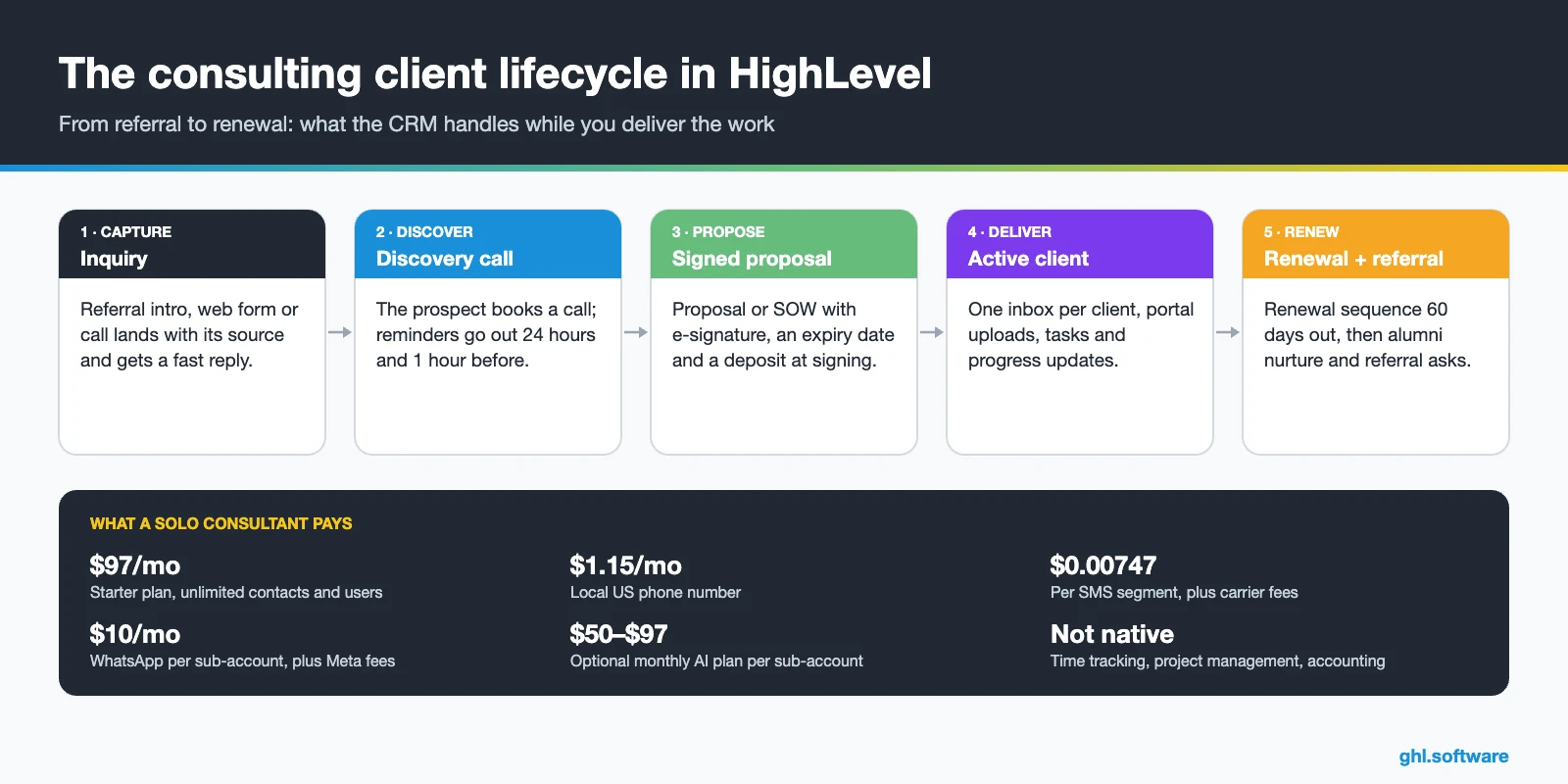
A CRM for consultants tracks every referral and inquiry from the first message to a signed proposal. Then it keeps the relationship alive through delivery and renewal. HighLevel does this in one account, with discovery call booking, proposals with e-signature and deposits, one inbox and automated renewal reminders. However, it is not a time-tracking or project management tool, so pair it with one if you bill by the hour.
How long does a referral wait for your reply in a heavy delivery week? Last Monday, Sierra Parks, a CFO in Dallas, emailed you. A former client, Sarah Halden, had told her you fix messy month-end closes. You were on site all week, so her email waited until Thursday afternoon. By then, she had booked a call with a consultant who answered within the hour. Still, you weren’t careless, just busy delivering. A CRM for consultants exists for exactly that week: it answers, books and follows up while you work.
Most consulting businesses run on referrals, a calendar link and proposal templates. That works until two big projects end in the same month and nothing new is waiting.
So this guide walks through the pipeline, three automations, the closest snapshot, an 8-step setup and real costs. After that come honest limits, a comparison with HubSpot, Pipedrive and HoneyBook, and the referral system most guides skip. It is part of our GoHighLevel by industry series.
Leer en español: CRM para consultores · Ler em português: Sistema para consultoria · Part of GoHighLevel by industry
Includes a free live setup class with a HighLevel coach.
Start free + bootcampAffiliate link.
What a consultant needs from a CRM
A generic sales CRM tracks deals. Consulting is different, because the same person sells, delivers and renews, and most new work comes from people you already know. Therefore, a good CRM for consultants has to cover the network, the discovery call, the proposal and the retainer. In a typical practice, that comes down to nine jobs.
Is HighLevel only for agencies?
Some people assume HighLevel is only for marketing agencies.
Common consulting problems and how HighLevel solves them
Before you build anything, list the leaks. For example, most people shopping for a CRM for consultants recognize at least four of the problems below. Each one maps to a specific feature, so you can fix them one at a time.
| Problem | What HighLevel does | Feature |
|---|---|---|
| Inquiries answered days later | Sends an instant email or text with your booking link and alerts you | Forms + workflows |
| Discovery-call no-shows | Sends confirmations and reminders 24 hours and 1 hour before | Calendars |
| Proposals that go silent | Follows up after the document is viewed and creates a call task | Documents & Contracts |
| Chasing deposits | Collects the deposit inside the signed proposal | Payments in documents |
| Missed retainer renewals | Starts a renewal sequence 60 days before the contract end date | Custom date field + workflow |
| Notes scattered across email and WhatsApp | Keeps every channel in one thread per client | Conversations inbox |
| Feast-or-famine pipeline | Shows expected revenue and at-risk deals by close date | Forecast tab |
The consulting pipeline in your CRM for consultants
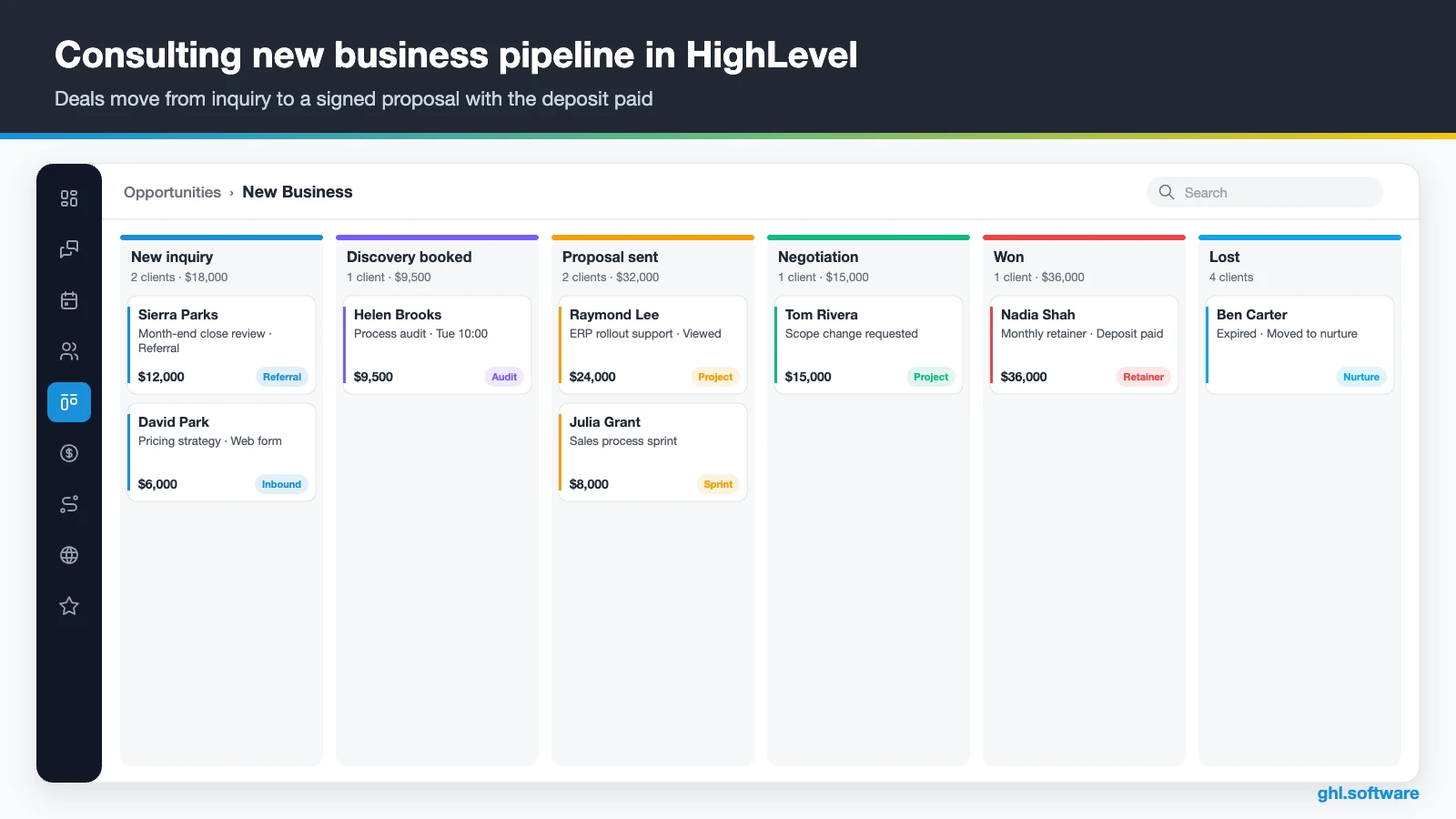
A pipeline is a board of stages, and each card is an opportunity with a value and a close date. Moreover, every move between stages can trigger the next message or task. For a consultant, the board answers one question every Monday: how much work is signed, and how much is still only talk?
So keep two pipelines. New Business runs from inquiry to signed contract, while Client Lifecycle holds active engagements until they renew or end. That way, selling and retaining never compete for the same view. Also, the Forecast tab flags deals whose close date has slipped, which is often the first sign of a quiet quarter.
| Stage | What moves a deal here |
|---|---|
| New inquiry | Web form, referral intro, call or chat |
| Qualified | Budget, timeline and problem fit your minimum |
| Discovery booked | The prospect books the call on your calendar |
| Discovery held | Appointment marked as showed; notes logged |
| Proposal sent | Proposal or SOW sent from a template |
| Negotiation | The prospect asks questions or changes the scope |
| Won | Contract signed and deposit paid |
| Lost | Declined or expired; the contact moves to nurture |
Three automations every consultant should run
You could build dozens of workflows. Still, three of them do most of the work in a CRM for consultants, whether you work solo or in a small firm. Also, each one below uses triggers and actions that exist in the HighLevel workflow builder.
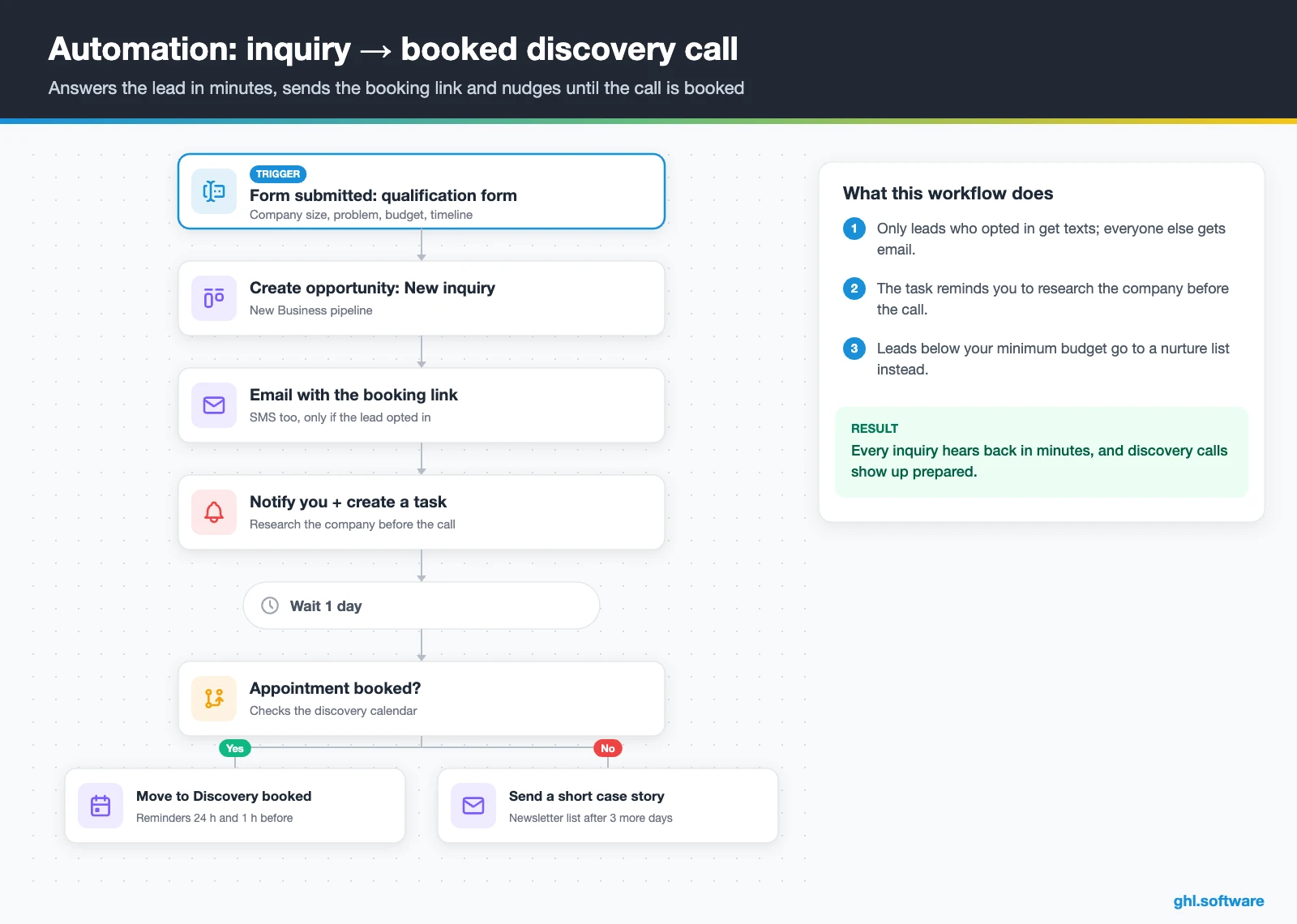
1. Inquiry → booked discovery call
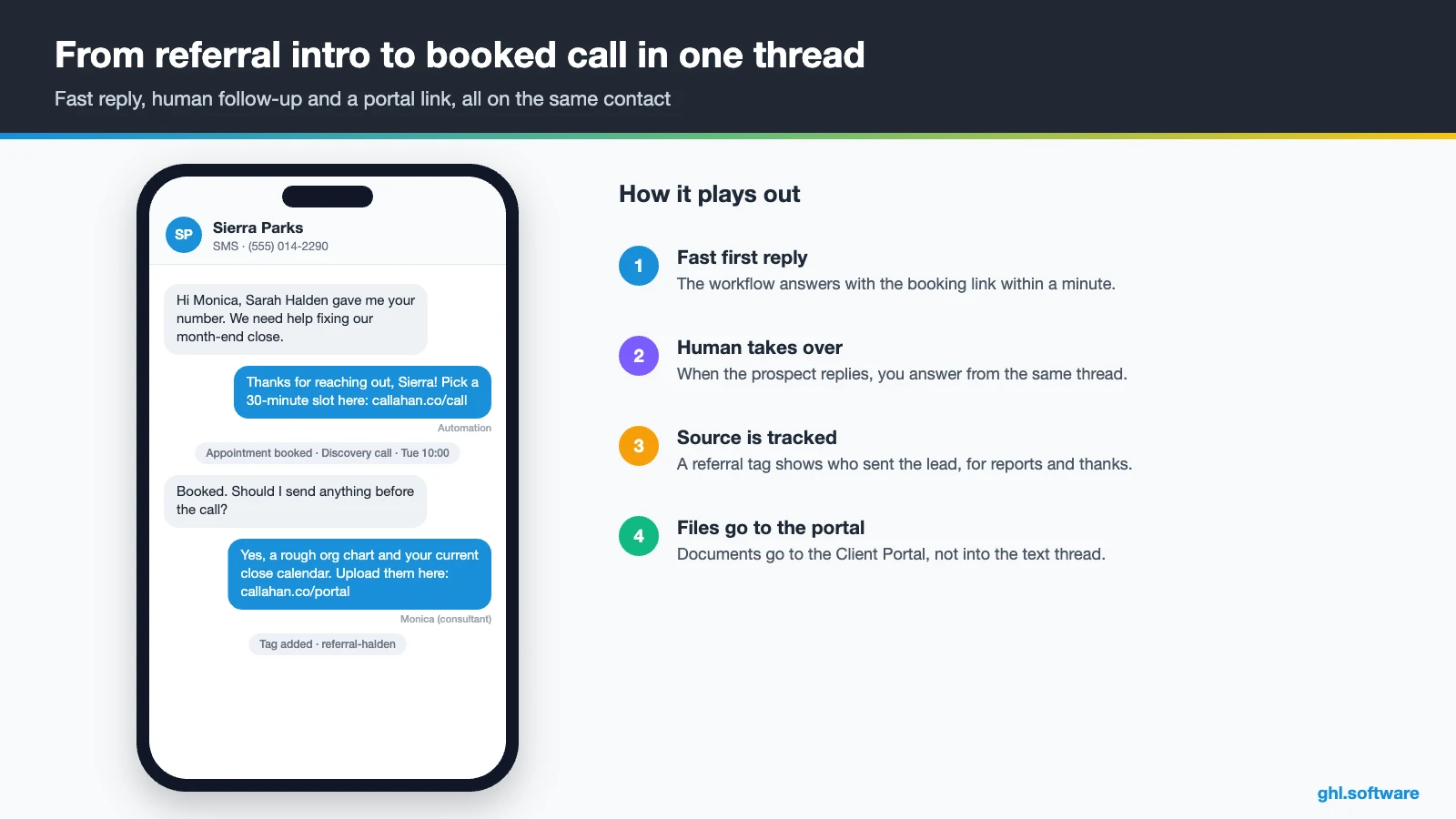
The trigger is Form submitted on a short qualification form that asks for company size, problem, budget range and timeline. The workflow creates an opportunity in New inquiry. Then the prospect gets an email with the booking link, and a text follows only if they opted in. Leads below your minimum budget get a tag and a nurture list instead.
Meanwhile, you get an internal notification and a task to research the company before the call. If no appointment appears after a day, a second message shares a short case story. After three more days, the contact moves to a monthly newsletter. As a result, every lead hears back in minutes, even when you are on site with a client.
2. Proposal viewed → signed with a deposit
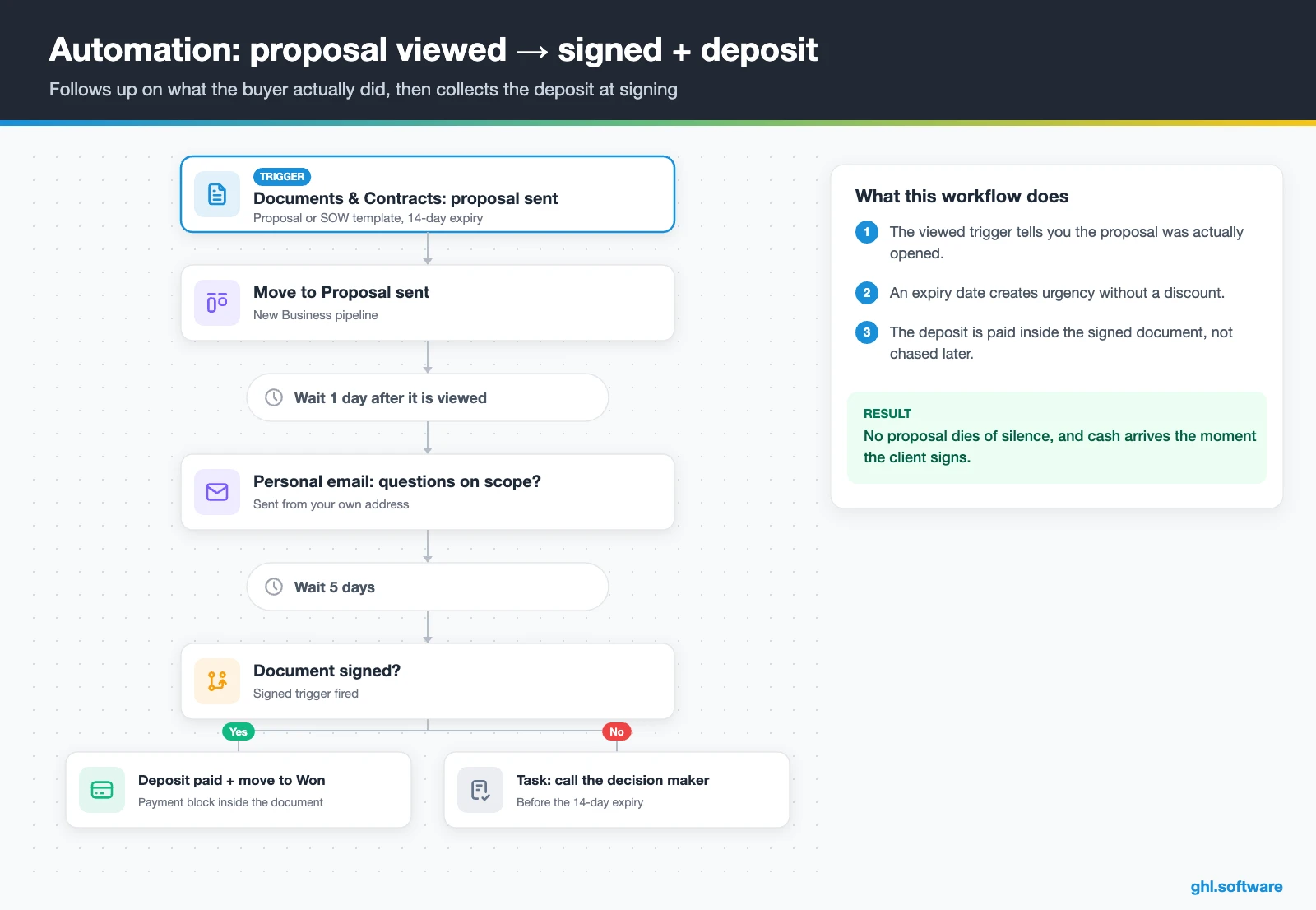
Proposals rarely die of a clear no. Instead, they die of silence. So this workflow starts when you send the proposal or SOW from Documents & Contracts, and the card moves to Proposal sent. Because HighLevel can trigger workflows when a document is sent, viewed or signed, your follow-up can match what the buyer actually did.
When the viewed trigger fires, the workflow waits a day and sends a personal email that asks about scope. If the document is still unsigned five days later, you get a task to call the decision maker. Also, set an expiry date of 14 days, which creates urgency without a discount. Finally, the signed trigger moves the card to Won, while the payment block inside the document collects the deposit.
3. Retainer renewal and alumni nurture
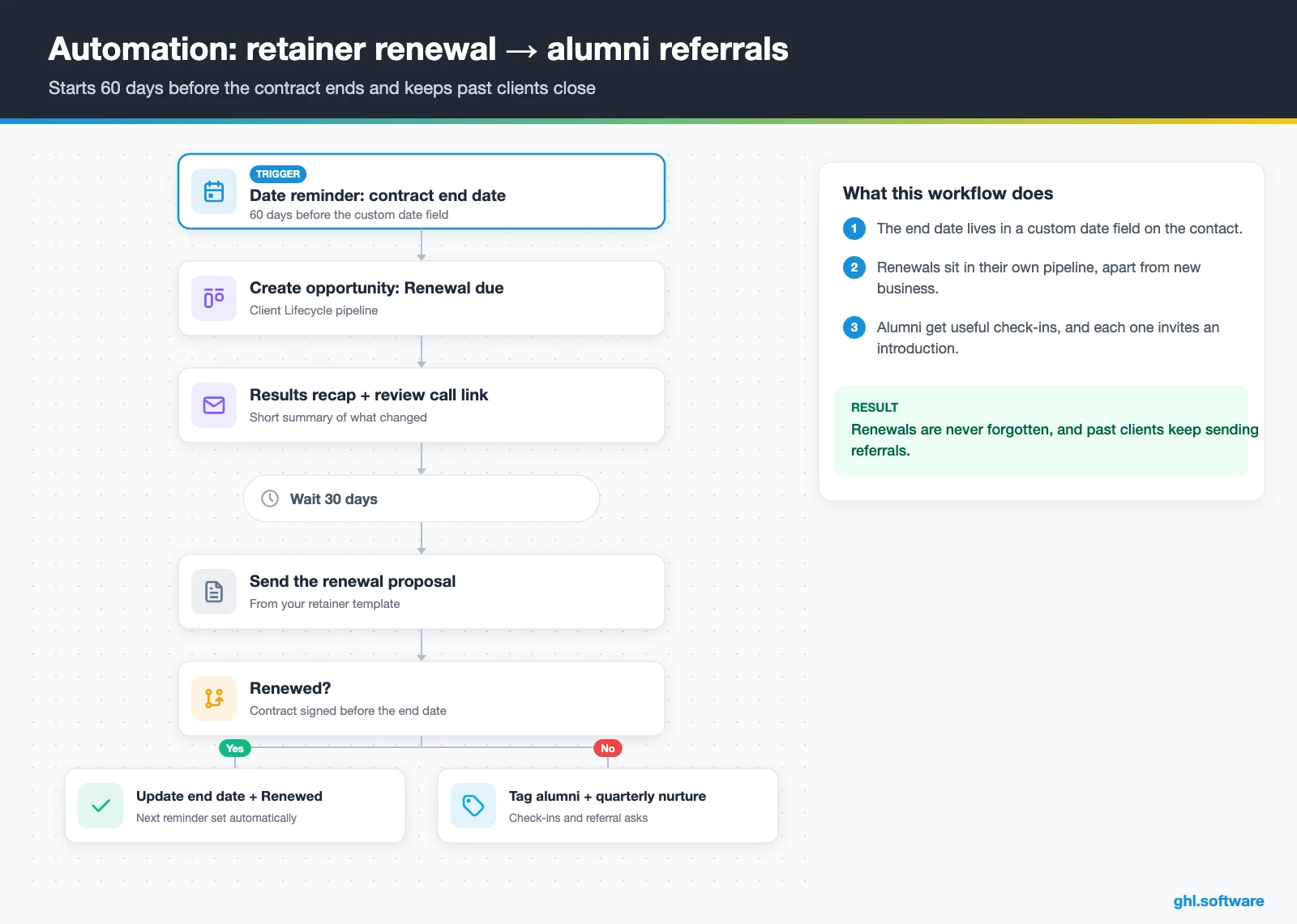
First, store each contract end date in a custom date field. Then a date-based reminder trigger starts this workflow 60 days before that date. After that, it creates an opportunity in the Renewal due stage of Client Lifecycle, sends a short results recap and offers a review call.
Thirty days later, the renewal proposal goes out from a template, and the account owner gets a task if no call is booked. If the client renews, the workflow updates the end date. Otherwise, the contact gets an alumni tag and enters a quarterly check-in sequence that also asks for introductions. Since most consulting work comes from referrals, this is the workflow that fills next year’s pipeline.
Start with the snapshot and the pipeline from this guide, then add the automations one by one. The extended trial comes with our bootcamp link.
Start the 30-day trialAffiliate link. I may earn a commission at no extra cost to you.
Email, WhatsApp and AI answering for consultants
Consulting clients write on every channel: email for scope, text or WhatsApp for quick questions, and LinkedIn for introductions. So a CRM for consultants has to bring them together. HighLevel puts email, SMS, WhatsApp, web chat, Facebook and Instagram messages into one thread per contact. LinkedIn messages are not part of that list, so log the important ones as notes.
Moreover, Conversations now have response-time SLAs, so a firm can see when an inquiry waits too long. For after-hours calls, a Voice AI agent can answer, book a discovery call during the call and transfer to a human. Likewise, Conversation AI can handle routine chat questions about availability or process. Keep scope, pricing and anything confidential for a human, though.
US texting needs A2P 10DLC registration and documented consent. Meanwhile, WhatsApp costs $10 a month per sub-account plus Meta fees, which makes sense when you have clients abroad. In addition, the phone system adds call tracking and missed call text back.
Is there an official HighLevel snapshot for consultants?
No. HighLevel publishes free industry playbooks with matching snapshots, but none of them is a CRM for consultants template. The closest one is the Business Coaching playbook. A snapshot loads a website, a funnel, forms, workflows and calendars into a sub-account in one step. However, this one is a generic template with the industry name swapped in. Out of the box you get:
- A website called Business Coaching, with a home page (services and FAQ sections) and a link-in-bio page
- A Business Coaching Offer funnel: an opt-in step, then an appointment booking page
- The Marketing Form – Claim Offer and a Marketing Pipeline whose stages the guide does not define
- Two named workflows, New Lead Nurture (Fast 5) – Claim Offer and Long Term Nurture, plus four unnamed ones
- A general calendar, an event calendar and service calendars tagged Business Coaching Services
- Custom values, a chat widget, snippets, a Voice AI prompt and setup steps for missed call text back
What you still build yourself: both pipelines with real stages, the proposal, SOW and NDA templates, the qualification form, deposits, renewals and the referral system. Besides, all the message copy is generic, so rewrite it in your own voice. Third-party consulting snapshots exist too, but they are not official, so check what you import. If you sell group programs rather than projects, our CRM for coaches guide fits better.
How to set up HighLevel for a consulting business
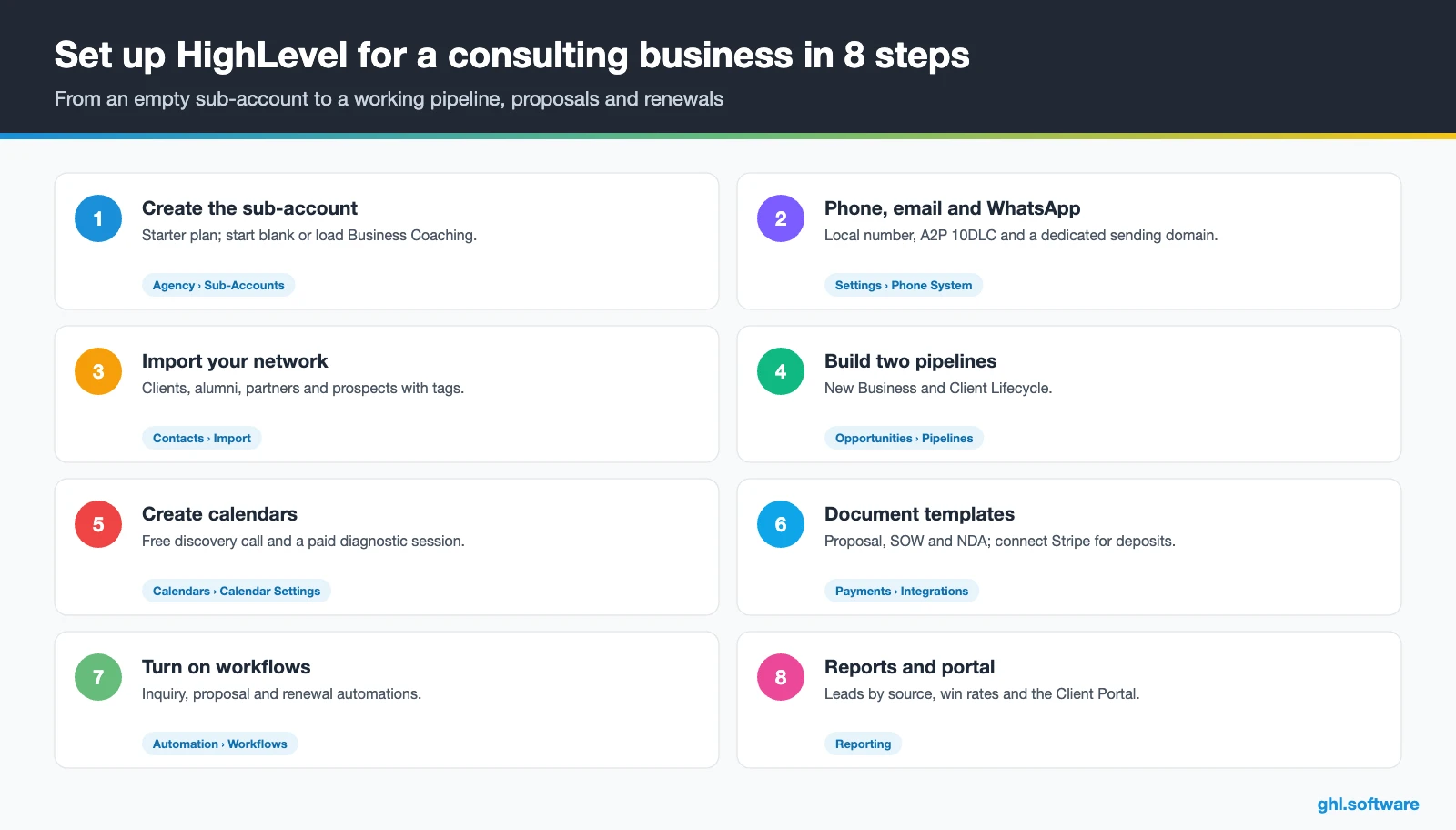
- Create the sub-account. Add the business under Agency › Sub-Accounts on the Starter plan. One sub-account is enough for a CRM for consultants. Start blank or load the Business Coaching snapshot, and then fill in the Business Profile.
- Connect phone, email and WhatsApp. Buy a local number, register A2P 10DLC in the Trust Center and set a dedicated sending domain. Then add WhatsApp if your clients use it.
- Import your network. Bring in past clients, referral partners and prospects with tags (client, alumni, partner, prospect). Also add custom fields for industry, engagement type, contract end date and referral source.
- Build both pipelines. Create New Business and Client Lifecycle with the stages from the table above, so every deal has a clear next step.
- Create calendars. Set up a free 30-minute discovery call with buffers and questions, plus a paid diagnostic session. Use round robin if several partners sell.
- Build document templates. Create proposal, SOW and NDA templates with product lists, a deposit or recurring payment and an expiry date. Then connect Stripe.
- Turn on the workflows. Publish the three automations. After each project, also send a testimonial request that goes to every client the same way.
- Add reporting and the portal. Track leads by source and proposal win rates in reporting, open the Client Portal and install the mobile app.
What a CRM for consultants costs with HighLevel
HighLevel charges a flat plan plus usage. A solo consultant or a small firm starts on Starter at $97 a month, which includes every core feature, unlimited contacts and unlimited users. On top of that, you pay for what you send. A local number is $1.15 a month, SMS is $0.00747 per segment plus carrier fees, and email is $0.675 per 1,000.
For example, a consultant who sends 1,500 text segments and 5,000 emails a month pays about $115 to $135 in total. Add the one-time $22.50 A2P fee and a monthly campaign fee. WhatsApp ($10 plus Meta fees) or an AI plan ($50 or $97 per sub-account) pushes it toward $180 to $250. Also, Stripe’s processing fees apply to every payment you collect. Our pricing guide and the AI Employee pricing page break it down.
GoHighLevel plans compared
| Starter | Unlimited | Founder (formerly Agency Pro) | |
|---|---|---|---|
| Price | $97/month | $297/month | $497/month |
| Annual | $970/year | $2,970/year | $4,970/year |
| Sub-accounts | 3 | Unlimited | Unlimited |
| Contacts and users | Unlimited | Unlimited | Unlimited |
| All core features | Yes | Yes | Yes |
| White label web app | Yes | Yes | Yes |
| API access | Basic | Basic | Advanced, agency-level keys |
| Rebill phone and email | No | At cost | With markup |
| Rebill AI usage | No | No | Yes |
| SaaS Mode and automated sub-accounts | No | No | Yes |
| User and agent reporting | No | No | Yes |
| Support | 24/7 | 24/7 | 24/7 |
Usage costs on top of the plan
| Item | Official price | When you pay it |
|---|---|---|
| Local phone number (US/Canada) | $1.15/month | Each number for SMS and calls |
| SMS (US/Canada) | $0.00747 per segment + carrier fees | Every text sent or received |
| Calls (US) | $0.0166/min outbound, $0.01165/min inbound | Calls through LC Phone |
| A2P 10DLC registration | $22.50 one-time (low volume) + monthly campaign fee | Before texting US numbers |
| Email (LC Email) | $0.675 per 1,000 emails | Campaigns and workflow emails |
| $10/month per sub-account + Meta fees | If you use WhatsApp inside HighLevel | |
| AI | Pay-per-use, or $50 or $97/month per sub-account | Voice AI, Conversation AI and other AI tools |
| Premium workflow steps | $0.01 per run after 100 free | Webhooks, Google Sheets, Slack, app actions |
Limits and alternatives: HubSpot, Pipedrive and HoneyBook
Like most tools sold as a CRM for consultants, HighLevel is a sales, communication and marketing system, not a professional services automation (PSA) tool. In short, it has no time tracking, billable hours, utilization or resource planning. Its tasks help with follow-up, but they are not project management with Gantt charts or dependencies. In fact, a request for a built-in project management module is still open on the HighLevel ideas board.
What to keep next to HighLevel
Invoices are not accounting either, so keep your books in your accounting software. HighLevel does offer a QuickBooks Online integration for payments and invoices, and other tools connect through integrations and the API. Also, expect a learning curve, because the interface is denser than HoneyBook or Dubsado. Plan on a weekend or so for a solo setup.
| HighLevel | HubSpot | Pipedrive | HoneyBook | |
|---|---|---|---|---|
| What it is | All-in-one CRM with inbox, booking, proposals, payments and marketing | CRM platform with free tools and paid hubs | Sales pipeline CRM | Client flow tool for independent service businesses |
| Deal pipeline | Yes | Yes | Yes | Yes |
| Booking page | Yes | ✓ (meetings tool) | ✓ (scheduler) | Yes |
| Proposals with e-signature | Yes | Varies by plan | Varies by plan or add-on | Yes |
| Missed call text back and Voice AI | Yes | Not its focus | Not its focus | Not its focus |
| Courses and community | Yes | Not its focus | Not its focus | Not its focus |
| Time tracking and projects | No | Check with vendor | Check with vendor | Check with vendor |
In short, if you mostly need a clean deal pipeline and email, HubSpot’s free tools or Pipedrive are simpler. If you want light client admin with proposals and invoices, HoneyBook or Dubsado feel lighter. However, if you want booking, proposals, deposits, texting, follow-up, courses and a website in one account, a CRM for consultants like HighLevel covers more of the journey. Either way, check each vendor’s current plans before you decide.
Compliance: consent, confidentiality and regulated niches
Confidentiality is a practice issue rather than a law, yet any CRM for consultants holds sensitive data. Consultants hold client financials and strategy, so use role-based user permissions and send NDAs through Documents & Contracts before the deep-dive. Meanwhile, some niches carry their own rules. For example, financial and investment consultants answer to SEC or FINRA rules, which our CRM for financial advisors guide covers. Immigration and HR consultants should also check the licensing rules in their country before they automate anything.
The referral engine most consulting CRM guides skip
Most guides about a CRM for consultants focus on lead generation. Yet the data points elsewhere. In the Consulting Success marketing study, 31% of consultants said they get 60–80% of their business from referrals, and 19% get 80–95%. Meanwhile, 70% said their consulting website brings in zero leads or calls per month.
So treat referrals as a system, not luck. Add a Referral source field to every inquiry form, tag each referral partner and build a smart list of past clients you have not contacted in 90 days. Then send that list a quarterly email with something useful, such as a short insight, a case story or an event invite. You can also share the same insights on LinkedIn with the Social Planner.
For formal partners, the Client Portal can track affiliate commissions too. As a result, your best lead source finally shows up in your reports, and you know exactly whom to thank.
Open a free account, load the pipeline and turn on the first automation today. The bootcamp walks you through the setup live.
Start the 30-day trialAffiliate link. I may earn a commission at no extra cost to you.
Frequently asked questions
Do I need a CRM as a consultant?
If you rely on referrals and run more than a few proposals a quarter, yes. A CRM remembers who introduced whom, answers inquiries while you deliver, reminds prospects about discovery calls and follows up on silent proposals. Without one, those steps depend on your memory during your busiest weeks. That is exactly when the pipeline dries up and the next quarter turns quiet.
What is the best CRM for independent consultants?
It depends on what you need beyond a deal list. HubSpot’s free tools and Pipedrive are solid sales pipelines. HoneyBook and Dubsado suit light client admin with proposals and invoices. HighLevel fits consultants who want booking, proposals with e-signature, deposits, texting, follow-up workflows, a website and courses in one account, with unlimited contacts and users from $97 a month.
How much does a CRM for consultants cost?
With HighLevel, the Starter plan costs $97 a month with unlimited contacts and users, and every core feature included. Usage comes on top: a local number is $1.15 a month, SMS is $0.00747 per segment plus carrier fees, and email is $0.675 per 1,000. Most solo consultants land around $115 to $135 a month, or $180 to $250 with WhatsApp or an AI plan.
Can a CRM handle proposals and invoicing for consultants?
HighLevel can. Documents & Contracts sends proposals, SOWs and NDAs with e-signature, product lists, an expiry date and one-time or recurring payments inside the document. Workflows can also react when a document is sent, viewed or signed. For billing, you get invoices and text-to-pay links. However, it is not accounting software, so keep your books in your accounting tool.
Is GoHighLevel only for marketing agencies?
No. Agencies made HighLevel popular because of white label and sub-accounts, but a single sub-account works fine for one consulting business. The Starter plan includes three sub-accounts, so a consultant can run one for the practice and keep the others for testing or a second brand.
Is there a free CRM for consultants?
Yes, some vendors offer free tiers, such as HubSpot’s free CRM tools, and they work well for a basic contact and deal list. HighLevel has no free plan, but it offers a trial, and our link extends it to 30 days. The real question is what the free tier leaves out, for example texting, booking with payment, e-signed proposals or automated follow-up.
How long does it take to set up a CRM for a consulting business?
A basic setup with one pipeline, a discovery calendar and a proposal template takes a day or two. A complete build with two pipelines, three workflows, a qualification form, reporting and the Client Portal usually takes a weekend or so for a solo consultant. Moreover, A2P 10DLC approval for US texting can take extra days, so start that step first.
More industry guides
Sources: HighLevel Business Coaching playbook · How to use Documents & Contracts · How customers use the Client Portal · AI Voice Agents overview · A2P 10DLC brand and campaign registration · Setting up the QuickBooks integration · Custom reports, scheduling and PDF export · HighLevel ideas board: project management module · Consulting Success consultant marketing study