

CRM for Marketing Agencies: Sales, Onboarding and Reports
A CRM for marketing agencies has two jobs: winning new clients and delivering to the ones you already have. HighLevel covers both in one account, with prospecting audits, a new-business pipeline, proposals with recurring payments, onboarding workflows and scheduled client reports, from $97 a month with unlimited users. However, it does not replace a project management or time-tracking tool.
Across a converted warehouse office in Tampa, Heather Underwood is clicking between three windows. One holds a proposal she promised a dental group back on Tuesday. Another holds a spreadsheet of prospects from a networking breakfast, and the third lists eleven client reports due Monday. Meanwhile, one client still hasn’t sent the Google Ads access her team requested at onboarding, three weeks ago. Nobody at her six-person agency is lazy. The work just lives in too many places, which is exactly the leak a CRM for marketing agencies should close.
Most pages that rank for this topic compare sales CRMs such as HubSpot, Pipedrive, Zoho or Insightly. Still, almost none treats GoHighLevel as the agency’s own CRM, although many agencies already pay for it. As a result, the agency’s own new business often lives in a spreadsheet while clients get the polished automations.
This guide treats HighLevel as a CRM for marketing agencies: your own prospecting, discovery calls, proposals, onboarding, reporting and renewals. For reselling HighLevel under your brand, see the white label and SaaS guide.
Leer en español: CRM para agencias de marketing · Ler em português: Sistema para agência de marketing · Part of GoHighLevel by industry
Includes a free live setup class with a HighLevel coach.
Start free + bootcampAffiliate link.
What a CRM for marketing agencies needs to do
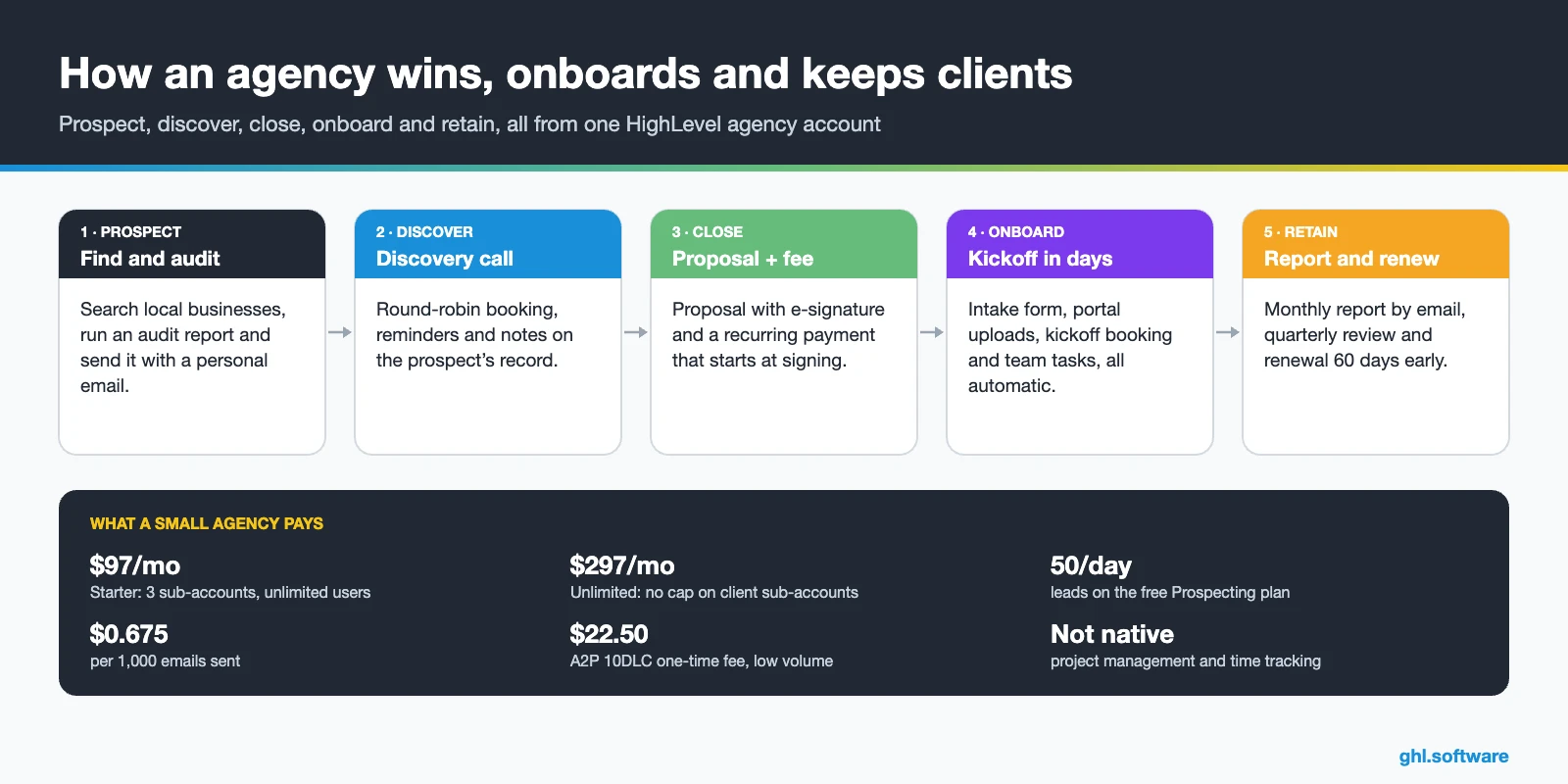
An agency does not sell like a store. Instead, it sells a relationship that has to be won, set up and renewed. In AgencyAnalytics’ 2023 benchmark of 121 agencies (all its own users, so not a neutral sample), client acquisition was the top growth barrier at 37%. Meanwhile, referrals (24%) and word of mouth (21%) were the biggest sources of new clients. So a CRM for marketing agencies has to feed new business and keep current clients talking about you.
Two jobs, one platform: your agency account and client accounts
Most agencies already use HighLevel sub-accounts for clients, one per client. However, the agency’s own pipeline deserves its own home too. So a common setup is an internal “Agency” sub-account that holds your prospects, proposals, onboarding board and renewals. HighLevel’s docs do not prescribe this, so treat it as a practice to test, not a rule.
There is also a practical reason for it. The Prospecting dashboard lives at agency level, so it is separate from sub-account CRM records. In fact, HighLevel’s own help article flags that it still needs confirmation whether Won or Lost status on prospect cards updates opportunities. So keeping the real pipeline inside one sub-account avoids two half-true views of the same deal.
Common agency problems and how HighLevel solves them
| Problem | What HighLevel does | Feature |
|---|---|---|
| Feast-or-famine new business | Builds a steady outbound list of local prospects, each with an audit report | Prospecting tool + workflows |
| Proposals that go quiet | Shows when a proposal is viewed and sends a reminder if it stays unsigned | Documents & Contracts |
| Retainer billing chased by hand | Starts a recurring payment inside the signed proposal | Payments |
| Slow onboarding and missing logins | Sends intake, portal invite and kickoff link, then reminds after 48 hours | Workflows + Client Portal |
| Hours spent on monthly reports | Schedules a Custom Report to each client’s inbox | Reporting |
| Renewals noticed too late | Opens a renewal opportunity 60 days before the contract ends | Custom date trigger + pipeline |
| Team spread across many apps | Puts every client message and file on one contact record | Conversations + CRM |
Prospecting: local audits and outreach that stays compliant
HighLevel’s Prospecting tool searches businesses by keyword and location, for example “dentist Tampa”. Then you add a prospect and run a Marketing Audit Report. According to HighLevel’s help center, the report covers listings across more than 70 directories, Google Business Profile and Facebook reviews, and the website platform. The free basic plan gives you 50 leads a day, while Prospecting Premium removes that cap.
Since spring 2026, a workflow action called “Generate marketing audit report” also adds the report link to your emails through custom values. That way, each message names the business and links to its own audit. Still, keep the channel honest: use email, calls and LinkedIn for cold outreach, and send SMS only after a prospect opts in.
A new-business pipeline in your CRM for marketing agencies
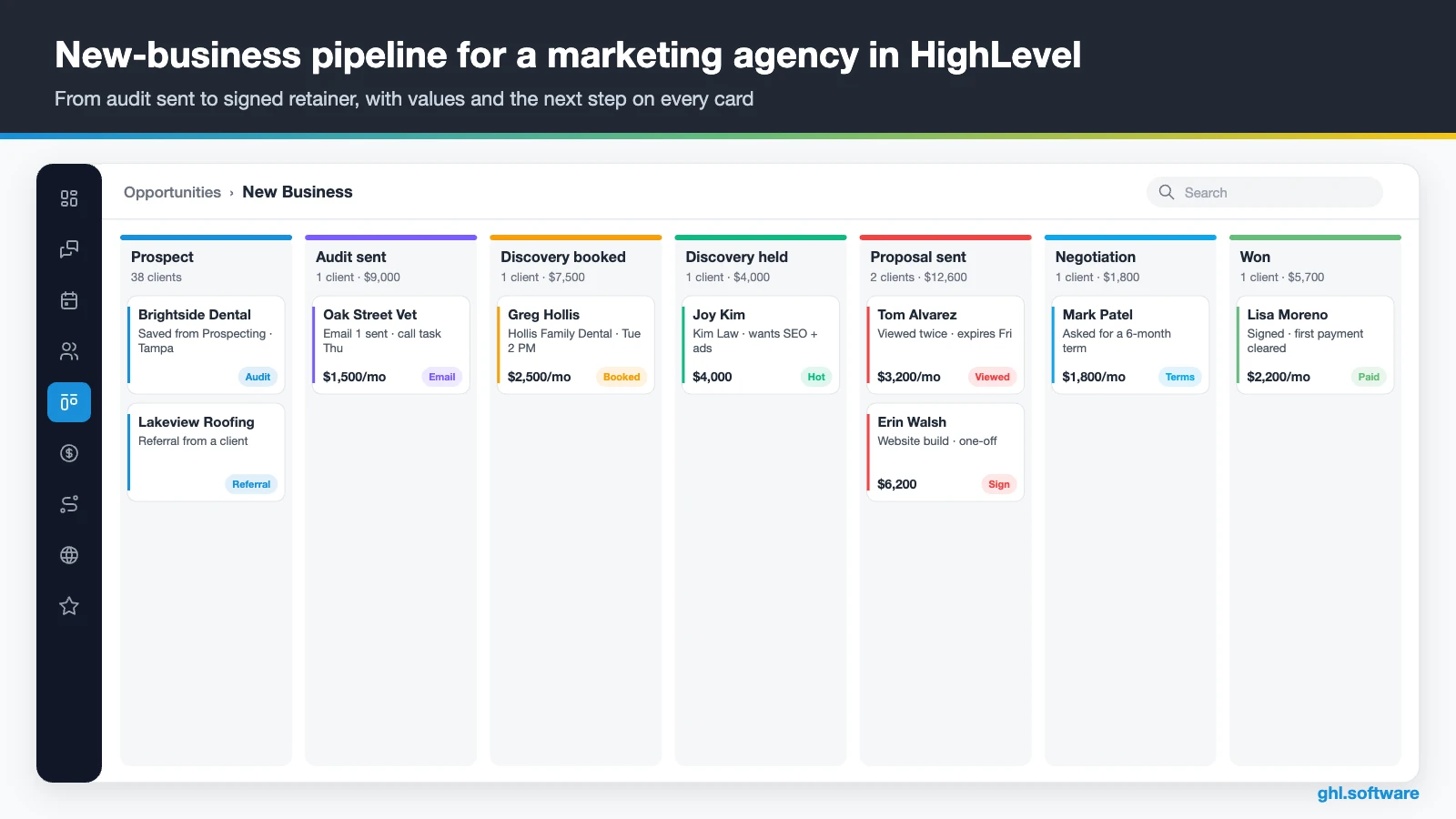
Agencies tend to sell in the same rhythm: audit, reply, discovery call, proposal, then contract and first payment. In a CRM for marketing agencies, the pipeline should mirror that rhythm, and every move should follow a real event. For example, a booked call moves the card, and so does a signed document. That way, the board stays accurate even when nobody drags anything.
| Stage | What moves a prospect here |
|---|---|
| Prospect | Saved from the Prospecting tool, a referral form or an inbound lead |
| Audit sent | The audit workflow sends email 1 with the report link |
| Replied | The prospect answers an email or calls back |
| Discovery booked | A booking on the discovery calendar |
| Discovery held | The appointment is marked as showed |
| Proposal sent | The proposal goes out from Documents & Contracts |
| Negotiation | The proposal is viewed, or the prospect asks for changes |
| Won / Lost | The document is signed and the first payment clears, or a lost reason is chosen |
Beyond the board, the Forecast tab shows expected and won revenue and flags deals whose close dates slipped. Moreover, if you sell very different services, such as SEO retainers and one-off website builds, one pipeline per service keeps values and stages clean. Then add Onboarding and Account management pipelines for delivery.
Three automations for agency sales and delivery
Any CRM for marketing agencies should automate these three moments first: the first touch, the week after signing and the months before a renewal.
Prospect → audit report → follow-up
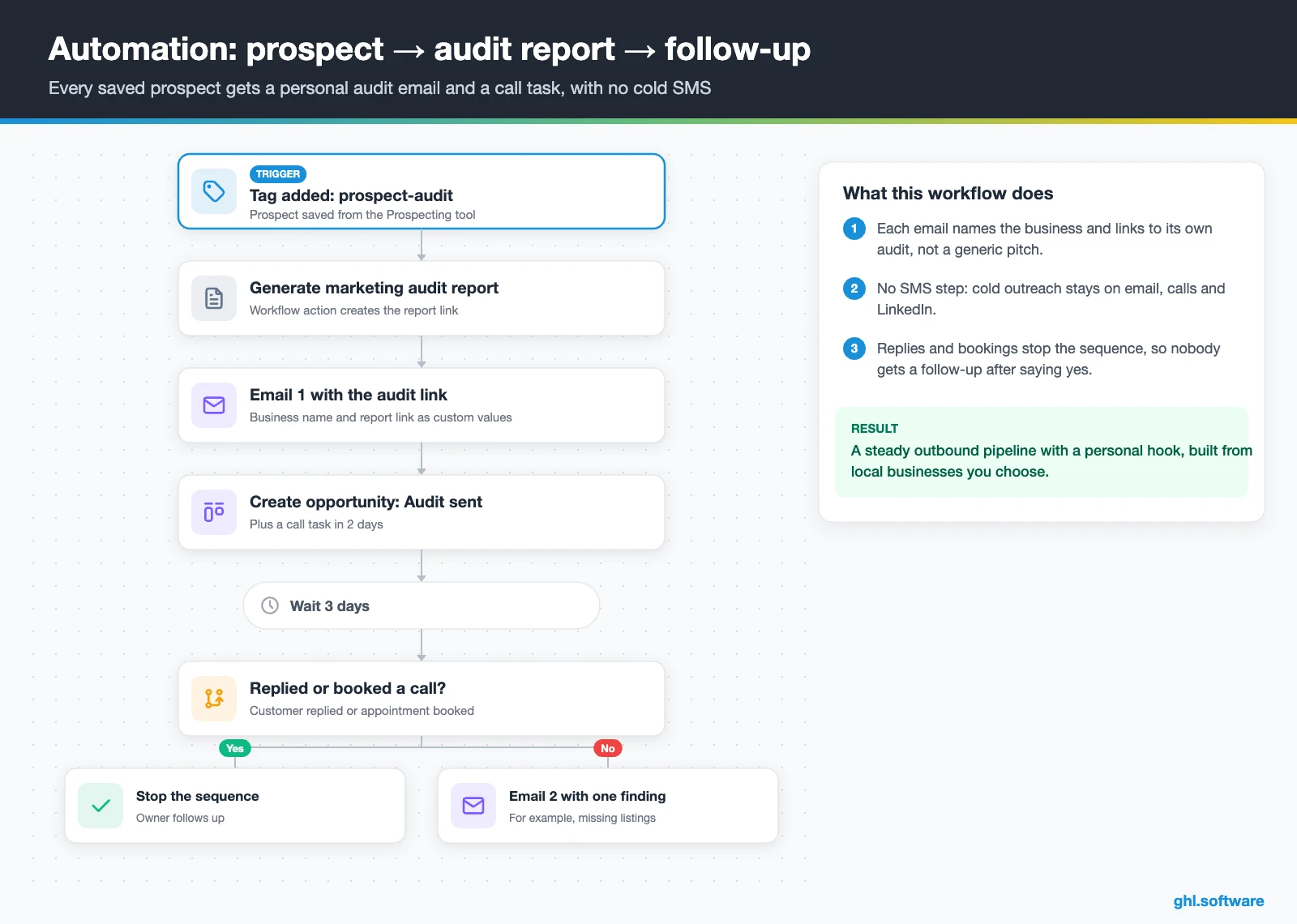
The trigger is a tag such as prospect-audit, added when you save a prospect. The workflow then generates the audit, sends email 1 with the business name and report link, and creates an opportunity in Audit sent with a call task two days later.
After three days, an if/else step checks for a reply or a booking. If either happened, the sequence stops, and a booking moves the card to Discovery booked. Otherwise, email 2 goes out with one specific finding, such as missing listings. Because there is no SMS step, the sequence stays clear of cold-texting rules.
Signed proposal → onboarding checklist
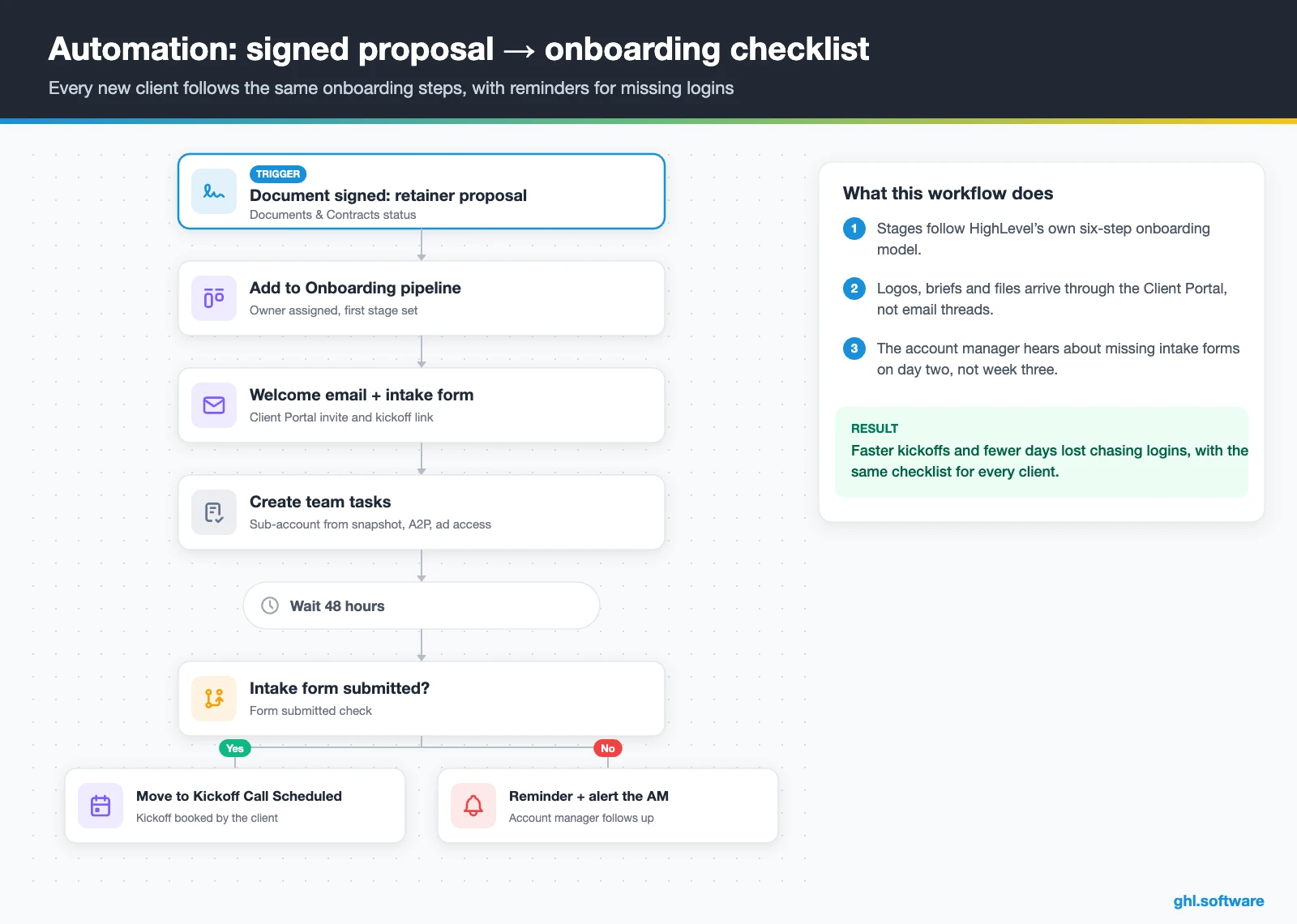
This one fires when the retainer proposal is signed. It adds the client to an Onboarding pipeline whose stages follow HighLevel’s own onboarding guide: Intake Form Completed, Initial Welcome Sent, Kickoff Call Scheduled, Strategy Session Completed, Resource Delivery & Access Confirmed and Onboarding Completed.
Meanwhile, the client receives a welcome email with the intake form, a Client Portal invite for uploads and the kickoff booking link. The team also gets tasks for the client sub-account, A2P registration and ad-account access. If the intake form is still missing after 48 hours, the client gets a reminder and the account manager gets an alert.
Monthly reports and a renewal guardrail
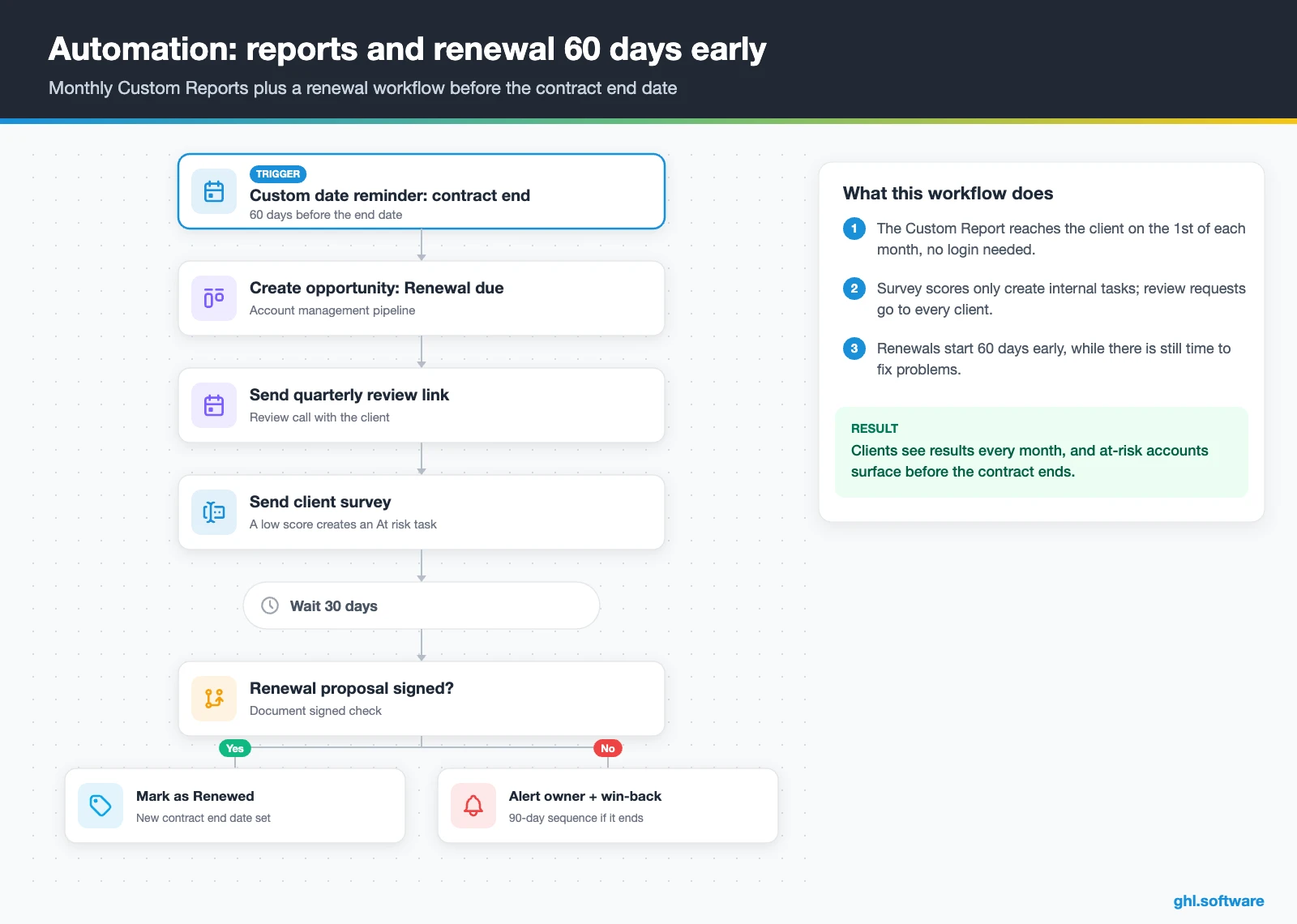
First, schedule a Custom Report per client so results arrive on the first of each month. Then a Custom date reminder trigger on a “Contract end date” field fires 60 days before the term ends. It opens a Renewal due opportunity, sends a booking link for a quarterly review and sends a short client survey.
A low survey score creates an At risk task for the account manager, not a different message. Thirty days later, the workflow checks whether the renewal proposal is signed. If it is not, the owner gets an alert and the contact enters a 90-day win-back sequence. In short, renewals get worked while there is still time.
Start with the snapshot and the pipeline from this guide, then add the automations one by one. The extended trial comes with our bootcamp link.
Start the 30-day trialAffiliate link. I may earn a commission at no extra cost to you.
Proposals with retainers and reports that send themselves
Documents & Contracts for agency deals
HighLevel’s Documents & Contracts builds proposals, estimates and contracts with e-signature and a signing certificate. You can add a product list, set an expiry date and attach a one-time or recurring payment inside the document. Therefore, the client signs the scope and starts the monthly retainer in the same step. Workflows can also react when a document is sent, viewed or signed.
Custom Reports for clients
Custom Reports come with every plan. You can schedule them by email with a frequency, date range and subject, and recipients do not need a HighLevel login. Also, Google Ads and Facebook Ads data are available, and reports export to PDF. However, PDFs leave out images and iframes, tables show only the first 100 records, and there is no drill-down. For heavy multi-channel reporting, many agencies still keep a dedicated reporting tool.
Client conversations: inbox, SMS, WhatsApp and AI
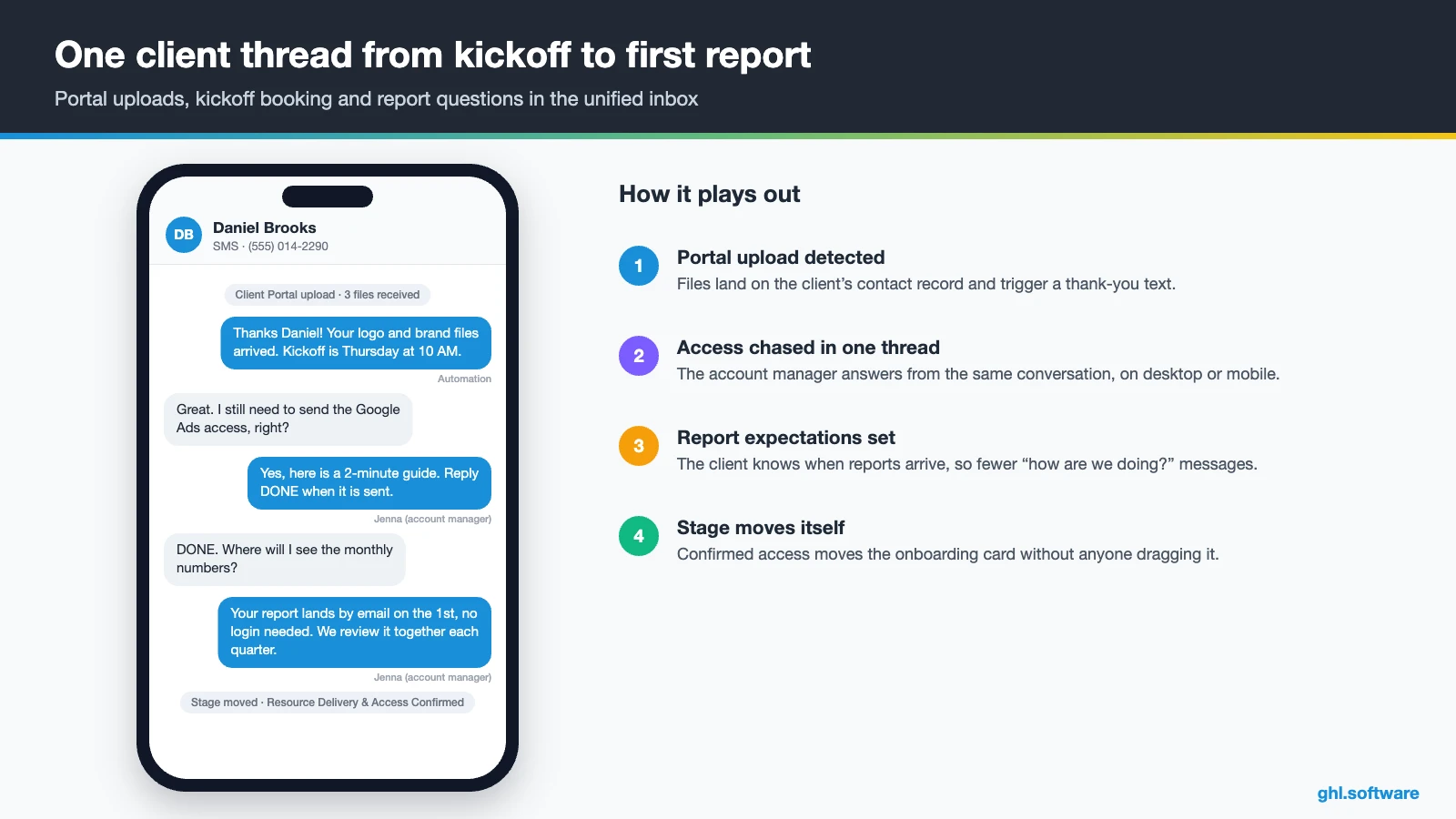
Clients rarely churn over one bad month. Instead, they leave when they feel unheard. In the same AgencyAnalytics benchmark, “effective communication and transparency” was the top retention driver (36%). A CRM for marketing agencies should make that visible. In HighLevel, email, SMS, calls, WhatsApp, Facebook and Instagram DMs and web chat land in one thread per client. In addition, response-time SLAs show when a client has waited too long.
For US clients, SMS and email do most of the work. Meanwhile, WhatsApp for international clients costs $10 a month per sub-account plus Meta’s fees. On your site, Conversation AI can answer questions and book discovery calls, while Voice AI can pick up the line after hours. The AI Employee pricing guide explains those costs, and the mobile app keeps the inbox in your pocket.
What HighLevel’s official Marketing Agency snapshot includes
HighLevel publishes a Marketing Agency playbook for its official snapshot. It follows the same generic template as the other industry snapshots and treats the agency like a local business running a claim-offer funnel. Even so, it is a quick start for your own lead capture:
- A “Marketing Agency” website with Home (services and FAQ sections) and Link in Bio pages
- A “Marketing Offer” funnel: an opt-in step, then an appointment booking page
- The “Marketing Form – Claim Offer” form and a “Marketing Pipeline”
- “New Lead Nurture (Fast 5) – Claim Offer” with email, SMS and a voicemail drop, plus “Long Term Nurture”
- A general calendar, an event calendar for consultations and service calendars tagged “Marketing Services”
- Custom values, a chat widget, email templates, one ad template and a Voice AI prompt, plus missed call text back in the quick wins
However, the snapshot has no prospecting, discovery, proposal, onboarding, client-reporting or renewal assets. The guide also lists no pipeline stages, form fields, workflow triggers or message copy. So you still build the three pipelines and three workflows above, write your own service calendars and rename the offer. In other words, use it as scaffolding for the agency’s own website and inbound leads.
How to set up HighLevel for your agency
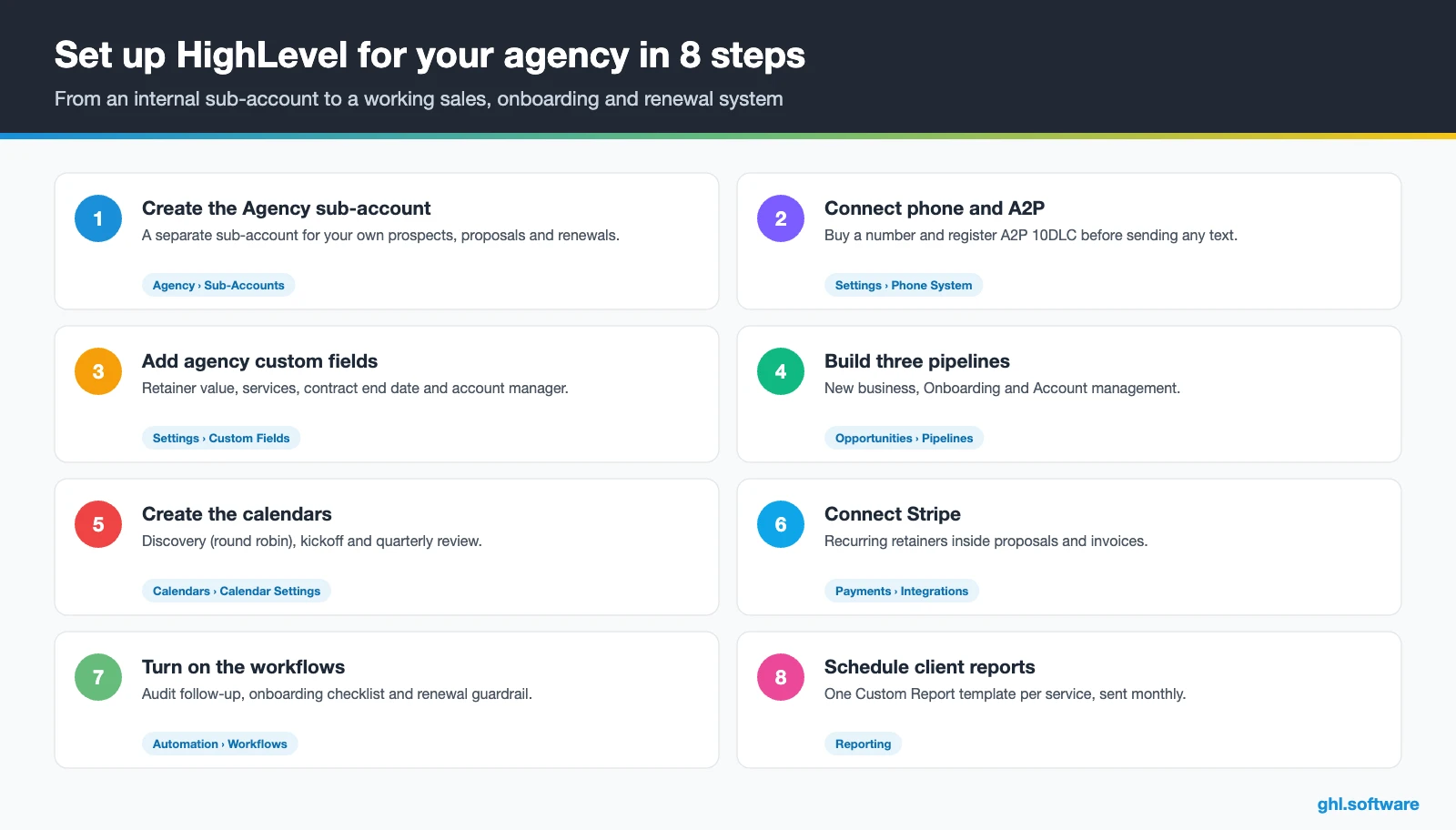
- Pick the plan and create the internal sub-account. Starter covers three sub-accounts; Unlimited suits agencies that deliver inside client accounts. Then create an “Agency” sub-account for your own sales.
- Connect phone, email and A2P. Fill in the business profile, set a sending domain for email, buy a number and register A2P 10DLC before any texting.
- Enable Prospecting and test one audit. Turn on the Prospecting tool, save one prospect and check the report before you automate anything.
- Build three pipelines. New business, Onboarding (HighLevel’s six stages) and Account management with Renewal due, At risk, Renewed and Churned.
- Create the calendars. Discovery call (round robin), kickoff and quarterly review, each with reminders and buffers.
- Set up proposals and Stripe. One proposal template per service with retainer products, recurring payments and an expiry date, plus your MSA.
- Turn on the workflows. Audit follow-up, signed-to-onboarding and renewal guardrail, plus missed call text back for your own line.
- Prepare the client delivery kit. A client snapshot (one sub-account per client), the Client Portal with uploads, an intake form and a Custom Report template per service.
What a CRM for marketing agencies costs in HighLevel
The plan choice depends on where you deliver. If you run your own sales plus one or two client accounts, Starter at $97 a month includes three sub-accounts. Once each client gets a sub-account, Unlimited at $297 removes that cap. Finally, Founder (formerly Agency Pro) at $497 makes sense if you resell HighLevel through SaaS Mode, rebill AI to clients or want a markup on usage.
GoHighLevel plans compared
| Starter | Unlimited | Founder | |
|---|---|---|---|
| Price | $97/month | $297/month | $497/month |
| Annual | $970/year | $2,970/year | $4,970/year |
| Sub-accounts | 3 | Unlimited | Unlimited |
| Contacts and users | Unlimited | Unlimited | Unlimited |
| All core features | Yes | Yes | Yes |
| White label web app | Yes | Yes | Yes |
| API access | Basic | Basic | Advanced, agency-level keys |
| Rebill phone and email | No | At cost | With markup |
| Rebill AI usage | No | No | Yes |
| SaaS Mode and automated sub-accounts | No | No | Yes |
| User and agent reporting | No | No | Yes |
| Support | 24/7 | 24/7 | 24/7 |
Usage comes on top. A2P 10DLC also costs $22.50 once for a low-volume brand, plus a monthly campaign fee.
Usage costs on top of the plan
| Item | Official price | When you pay it |
|---|---|---|
| Local phone number (US/Canada) | $1.15/month | Each number for SMS and calls |
| SMS (US/Canada) | $0.00747 per segment + carrier fees | Every text sent or received |
| Calls (US) | $0.0166/min outbound, $0.01165/min inbound | Calls through LC Phone |
| A2P 10DLC registration | $22.50 one-time (low volume) + monthly campaign fee | Before texting US numbers |
| Email (LC Email) | $0.675 per 1,000 emails | Campaigns and workflow emails |
| $10/month per sub-account + Meta fees | If you use WhatsApp inside HighLevel | |
| AI | Pay-per-use, or $50 or $97/month per sub-account | Voice AI, Conversation AI and other AI tools |
| Premium workflow steps | $0.01 per run after 100 free | Webhooks, Google Sheets, Slack, app actions |
Here is some illustrative math. Take a six-person agency on Unlimited whose internal sub-account sends 8,000 emails, about 400 texts and 300 call minutes a month. Its CRM for marketing agencies setup lands around $315 to $330 a month, before AI. Each client sub-account then adds its own numbers, A2P fees and messages. The GoHighLevel pricing guide breaks down annual billing and every plan.
Honest limits: what HighLevel does not replace
As a CRM for marketing agencies, HighLevel is strong on sales, messaging and automation, but it is not an agency operating system. It has no native project management: no Gantt charts, task dependencies or capacity planning. In fact, an Ideas request for a built-in project management module had 53 votes and no status when we checked. Likewise, it has no time tracking, utilization or profitability per client. So most agencies pair it with ClickUp, Asana, Productive or Teamwork through integrations, the API or webhooks.
HighLevel vs HubSpot, Pipedrive and ClickUp
| GoHighLevel | HubSpot | Pipedrive | ClickUp | |
|---|---|---|---|---|
| Main role | CRM, messaging, funnels and automations | CRM that grows into marketing, sales and service hubs | Visual sales pipeline | Project and task management |
| Pricing model | Flat per account, unlimited users | Free CRM; paid tiers per seat | Per user | Per user |
| Prospecting audits | Built in (Prospecting tool) | No | No | No |
| Client sub-accounts | Yes | No | No | No |
| Project management | No | No | No | Yes |
| Best when | You sell and deliver marketing for local clients | You want a broad CRM and start free | Your team lives in the deal board | You need projects, tasks and workload views |
The retention calendar most agency CRMs never set up
Here is the angle most comparisons skip. AgencyAnalytics found that 70% of its surveyed agencies keep clients for more than two years. After all, those relationships are where the profit sits. Yet a CRM for marketing agencies usually stops at Won. In HighLevel, the account management pipeline and date-based triggers can run a fixed rhythm for every client:
- Monthly: the Custom Report lands on the 1st, followed by a short note from the account manager.
- Every 90 days: a quarterly review booking link, plus the same review request for every client.
- 60 days before the end date: Renewal due opens, along with the client survey.
- 30 days before: the workflow checks for a signed renewal or upsell proposal and alerts the owner if it is missing.
- After churn: a light 90-day win-back sequence.
As a result, renewals stop depending on someone’s memory. Browse the other industry guides to plan client snapshots, or see all HighLevel features.
Open a free account, load the pipeline and turn on the first automation today. The bootcamp walks you through the setup live.
Start the 30-day trialAffiliate link. I may earn a commission at no extra cost to you.
Frequently asked questions
What is the best CRM for marketing agencies?
It depends on what the agency needs most. If you sell and deliver marketing for local businesses, GoHighLevel combines prospecting audits, pipelines, proposals, messaging, onboarding workflows and client sub-accounts at a flat price. HubSpot suits agencies that want a broad CRM and a free start. Meanwhile, Pipedrive suits deal-focused sales teams. For projects and workloads, pair any of them with a tool such as ClickUp or Asana.
Does a digital marketing agency need a CRM?
Yes, once more than one person handles prospects or clients. Without a CRM, proposals, follow-ups and renewal dates live in inboxes and memory, so deals slip and renewals arrive as surprises. A CRM keeps every prospect, conversation, document and payment on one record. It also shows where new clients really come from, which helps you decide between outbound, referrals and ads.
What is the difference between a CRM, project management and an agency OS?
A CRM tracks people and deals: prospects, proposals, clients and renewals. Project management, however, tracks the work: tasks, deadlines, dependencies and workloads. An agency operating system tries to combine both, often with time tracking and profitability per client. HighLevel is a strong CRM and automation layer with tasks, but it has no native project management, so many agencies run it next to ClickUp, Asana or Productive.
Can HighLevel track retainer renewals?
Yes. Add a custom date field such as “Contract end date” to each client, then use a Custom date reminder trigger to start a workflow 60 days before it. The workflow can open a Renewal due opportunity, book a review call and send the renewal proposal. Because recurring payments live inside Documents & Contracts, the new term can start billing as soon as the client signs.
Should my agency use the same HighLevel account it uses for clients?
Use the same agency account, but give your own sales a separate internal sub-account. That keeps your prospects and proposals away from client data, and it gives you clean reports on your own pipeline. HighLevel does not prescribe this setup, so test it first. Client work then happens in one sub-account per client, usually cloned from a snapshot.
Is GoHighLevel better than HubSpot for agencies?
They solve different problems. For example, HubSpot is easier to start with, has a generous free CRM and grows through paid hubs priced per seat. GoHighLevel costs more on day one but includes texting, funnels, reviews, payments and client sub-accounts for a flat price with unlimited users. Agencies that deliver local marketing often prefer HighLevel, while B2B agencies with long sales cycles often prefer HubSpot.
Can I send clients automated monthly reports from HighLevel?
Yes. Custom Reports, available on every plan, can be scheduled by email with a frequency, date range and custom subject, and recipients do not need a login. Reports can include Google Ads and Facebook Ads data and export to PDF. However, PDFs exclude images and iframes, tables show the first 100 records, and there is no drill-down, so complex reporting may need a dedicated tool.
More industry guides
Sources: HighLevel Marketing Agency playbook · Prospecting tool guide (HighLevel Help) · Marketing audit report in workflows (HighLevel changelog) · Documents & Contracts (HighLevel Help) · Custom Reports schedule and PDF export (HighLevel Help) · Client Portal document upload (HighLevel Help) · Client onboarding system (HighLevel blog) · A2P 10DLC registration (HighLevel Help) · AgencyAnalytics: marketing agency benchmarks · FTC final rule on reviews (Covington Inside Privacy)