

CRM for Photographers: From Inquiry to Retainer in HighLevel
A CRM for photographers keeps every inquiry, session, contract and payment on one client record, and it follows up for you. HighLevel does this with inquiry forms, booking calendars, a pipeline, e-signed contracts that collect the retainer, texting and review requests. However, it does not deliver or proof client galleries, so you keep a gallery tool next to it.
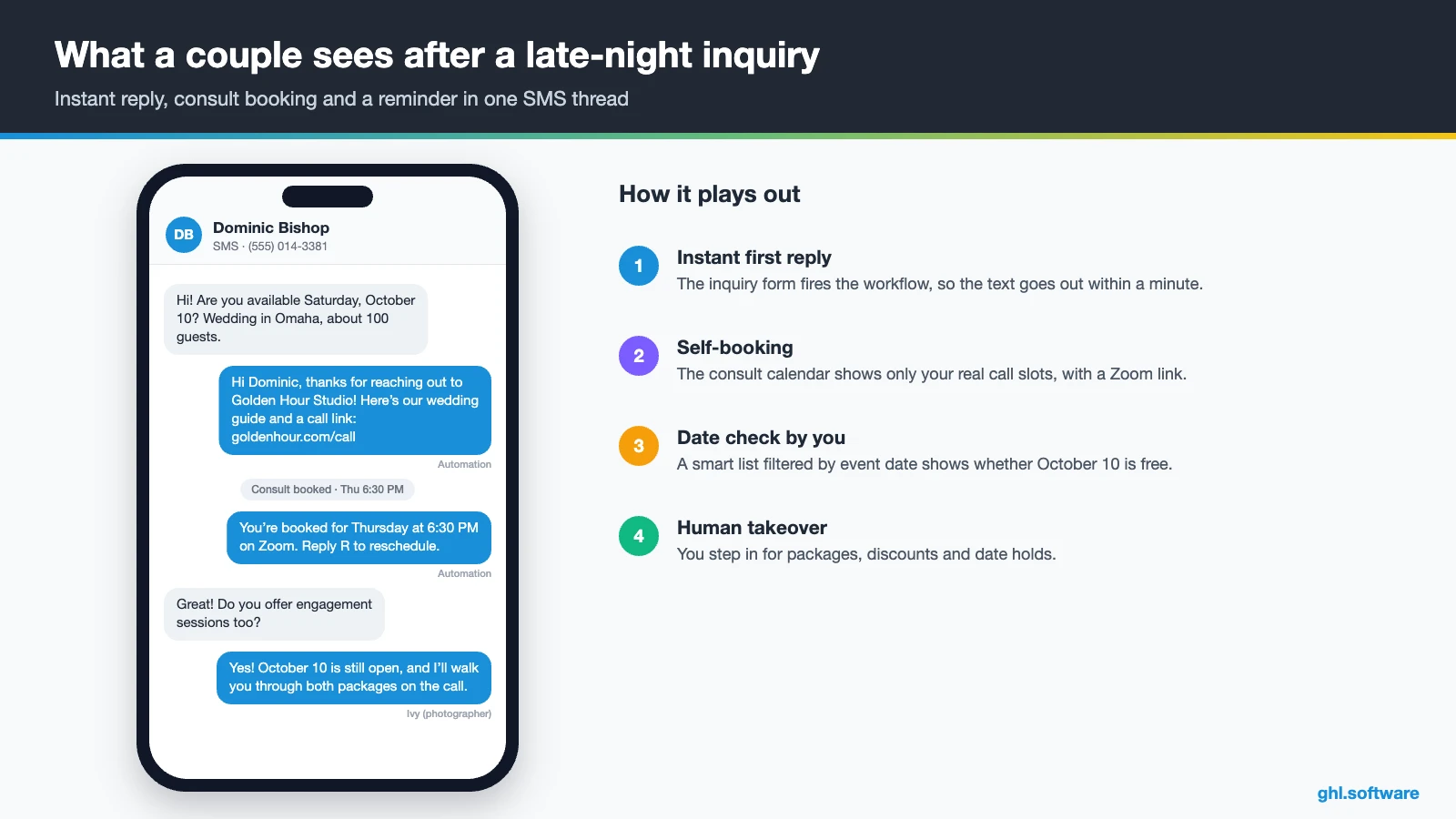
“Are you free October 10?” Dominic Bishop types that into your contact form from his couch in Omaha. It is 9:40 p.m., and you are still culling last Saturday’s wedding, so the message waits. Meanwhile, he sends the same question to four other photographers. By morning, one of them has replied with a price guide and a call link, so Dominic books that call. A CRM for photographers exists for that moment, because it answers in seconds while you edit, shoot or sleep.
The inquiry is only the start. After the call come the proposal, the contract, the retainer, the questionnaire, the timeline and the reminder before the shoot. Then you deliver the gallery, collect the balance and, ideally, ask for a review. Most photographers run all of this from email, Instagram DMs, a notes app and a spreadsheet. As a result, something slips every season.
This guide shows how to run that cycle in HighLevel. You will see the pipeline, three automations, the snapshot, setup, real costs and honest limits. For other businesses, see the industries hub.
Leer en español: CRM para fotógrafos · Ler em português: Sistema para fotógrafos · Part of GoHighLevel by industry
Includes a free live setup class with a HighLevel coach.
Start free + bootcampAffiliate link.
What photographers need from a CRM (and where HighLevel fits)
Studio tools like HoneyBook or Dubsado focus on admin: proposals, contracts and invoices. HighLevel covers that admin too, and then it adds the marketing side: texting, ads, funnels and reviews. In short, it is the place where leads arrive and clients get booked. Here is what a photography business needs from it.
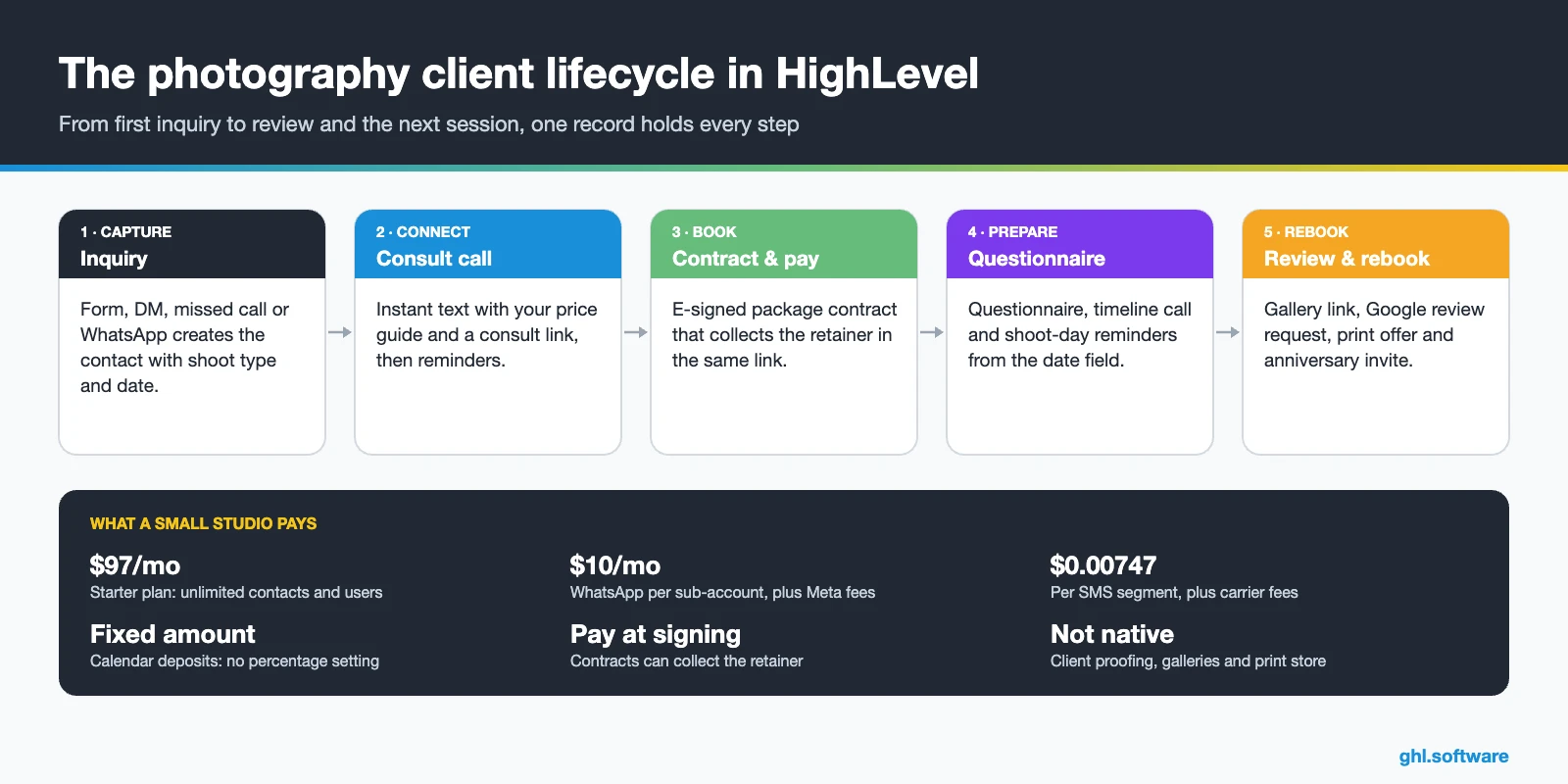
Photography business problems a CRM solves
Each of these problems costs bookings or hours. So this is where a CRM for photographers should earn its price first.
| Problem | What HighLevel does | Feature |
|---|---|---|
| Inquiries go cold while you shoot or edit | Instant text and email with your price guide and a consult link | Workflows + Calendars |
| Missed calls during sessions | Missed call text back replies by SMS within seconds | Phone system |
| Typing the same package answers | Saved snippets and an automatic price-guide email | Conversations + Workflows |
| Late signatures, later retainers | One link to sign the contract and pay the retainer | Documents & Contracts |
| Chasing questionnaires and timelines | Forms sent before the shoot date, with reminders | Forms + Workflows |
| Mini-session no-shows | Payment at booking plus SMS and email reminders | Calendars |
| Few reviews after great galleries | The same review request to every client after delivery | Reputation |
| Past clients never rebook | Anniversary and milestone offers from date fields | Workflows + Smart lists |
The booking pipeline in a CRM for photographers
A pipeline turns your process into columns. Each card is one shoot, while its value is the package total. So the board also shows booked revenue for the season. In addition, the Opportunities Forecast tab shows expected and won revenue. Keep it to seven stages plus Lost, because extra stages turn into cards nobody moves.
Most moves happen on their own. For example, a booked consult moves the card forward, and a signed contract with a paid retainer moves it to Booked. You still drag cards by hand when a couple says yes on the phone, and that is fine.
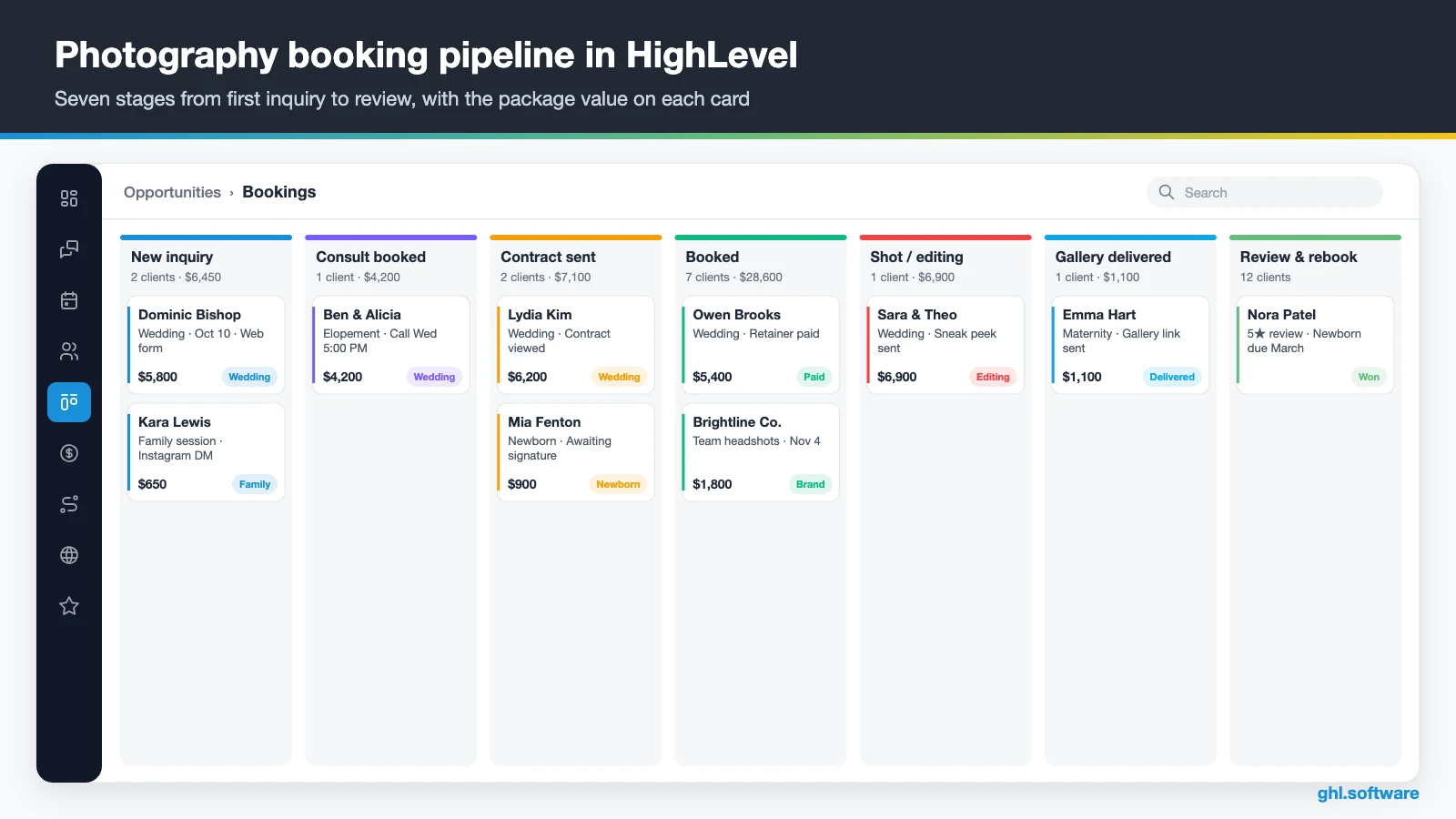
| Stage | What moves the card here |
|---|---|
| New inquiry | Inquiry form, DM, missed call or Facebook lead form |
| Consult booked | The client books a call on your consult calendar |
| Contract sent | You send the package contract with the retainer product |
| Booked | Contract signed and retainer paid; shoot date saved |
| Shot / editing | The shoot date passes and the sneak-peek message goes out |
| Gallery delivered | You paste the gallery link and move the card |
| Review & rebook | The review request goes out and the card closes as won |
| Lost / date taken | No reply, budget or date already booked, with a reason |
The Lost reasons matter more than they seem. After one season, they tell you whether to change your prices, your reply speed or your marketing.
Three automations every photographer should run
These workflows cover the moments where photographers lose the most money: the first reply, the retainer and the review. In any CRM for photographers, these three come first. Build them in Automation › Workflows, and then test each one with your own phone number before you publish it.
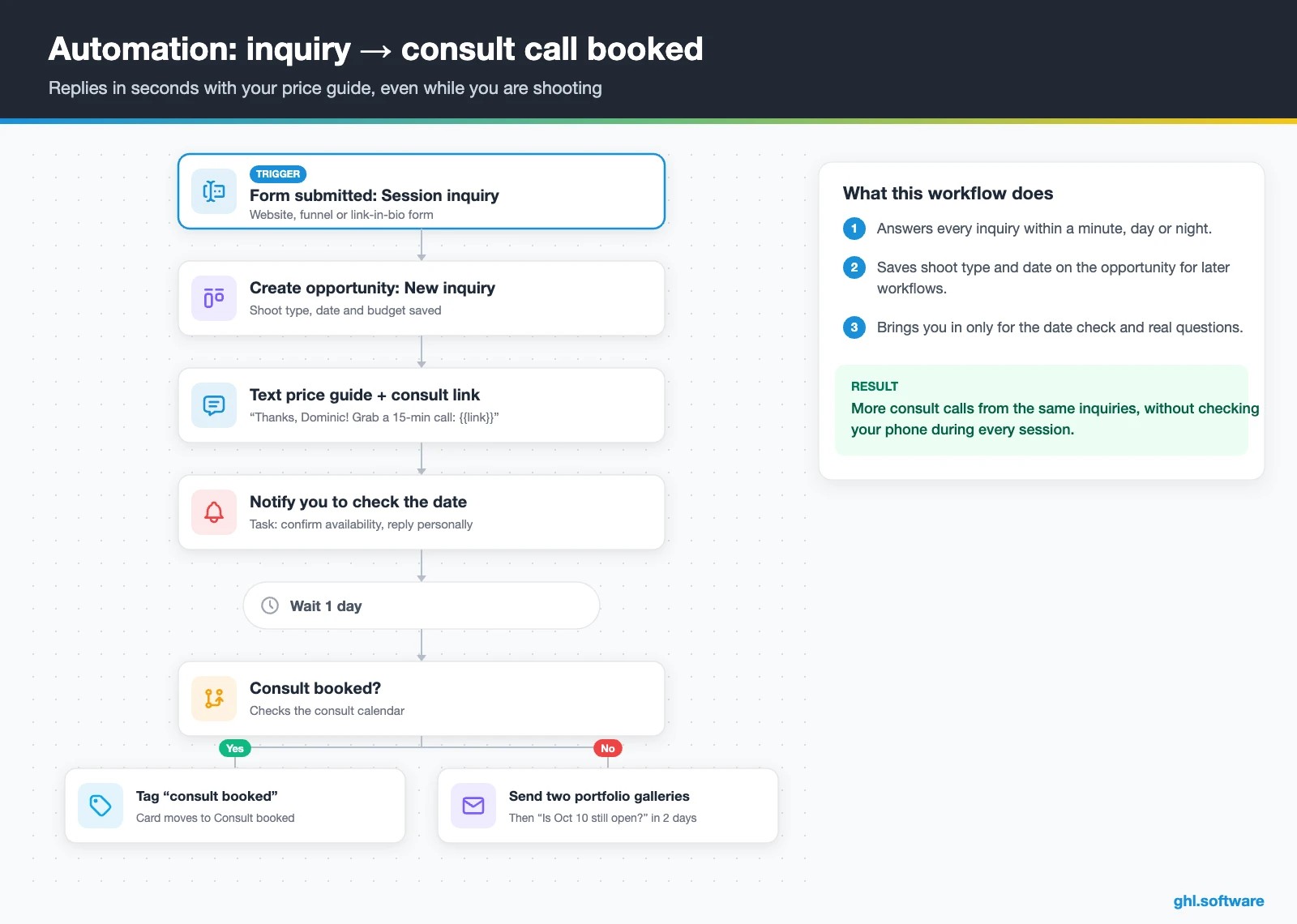
Inquiry → consult call in minutes
The trigger is the inquiry form being submitted, or a Facebook or Instagram lead form. Then the workflow creates an opportunity in New inquiry and tags the shoot type. It texts and emails your price guide with a link to book a 15-minute consult. At the same time, it notifies you to check the date and reply personally.
If the client stays quiet for a day, the workflow sends two portfolio galleries. Two days later, a short text asks whether the date is still open. After that, the contact moves to a monthly nurture email. Speed matters here because couples often message several photographers on the same night.
Contract signed → onboarding until shoot day
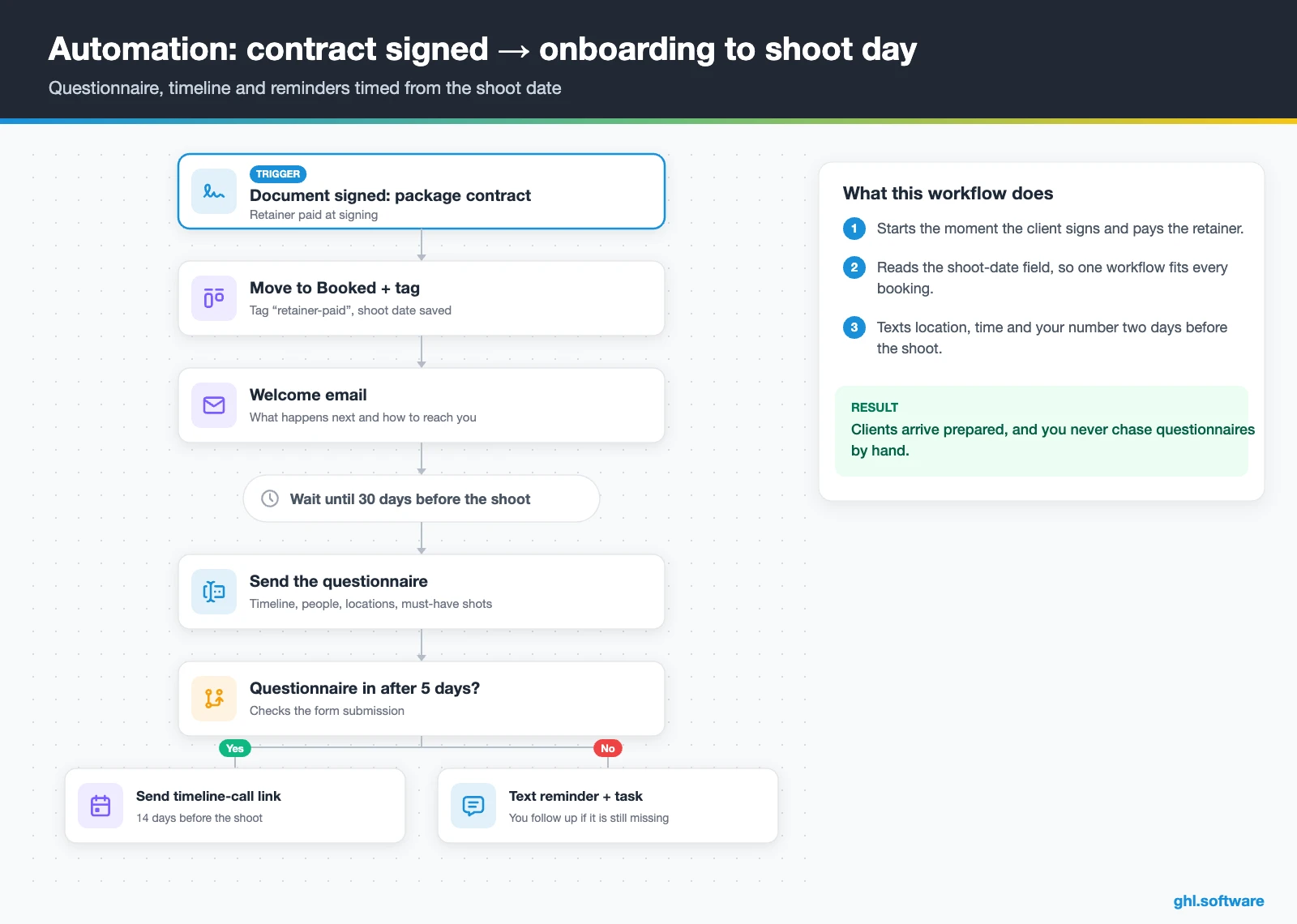
When the client signs the package contract and pays the retainer at signing, the second workflow starts. It moves the card to Booked, adds a retainer-paid tag and sends a welcome email. Then it waits until 30 days before the shoot date and sends the questionnaire. If the client hasn’t filled it in after five days, a text reminder goes out.
Closer to the date, the workflow sends a timeline-call link at 14 days and a text with location and time two days before. The day after the shoot, it sends a thank-you with the sneak-peek timing. That way the client feels looked after, and you never dig through email for a venue address.
Gallery delivered → review and rebooking
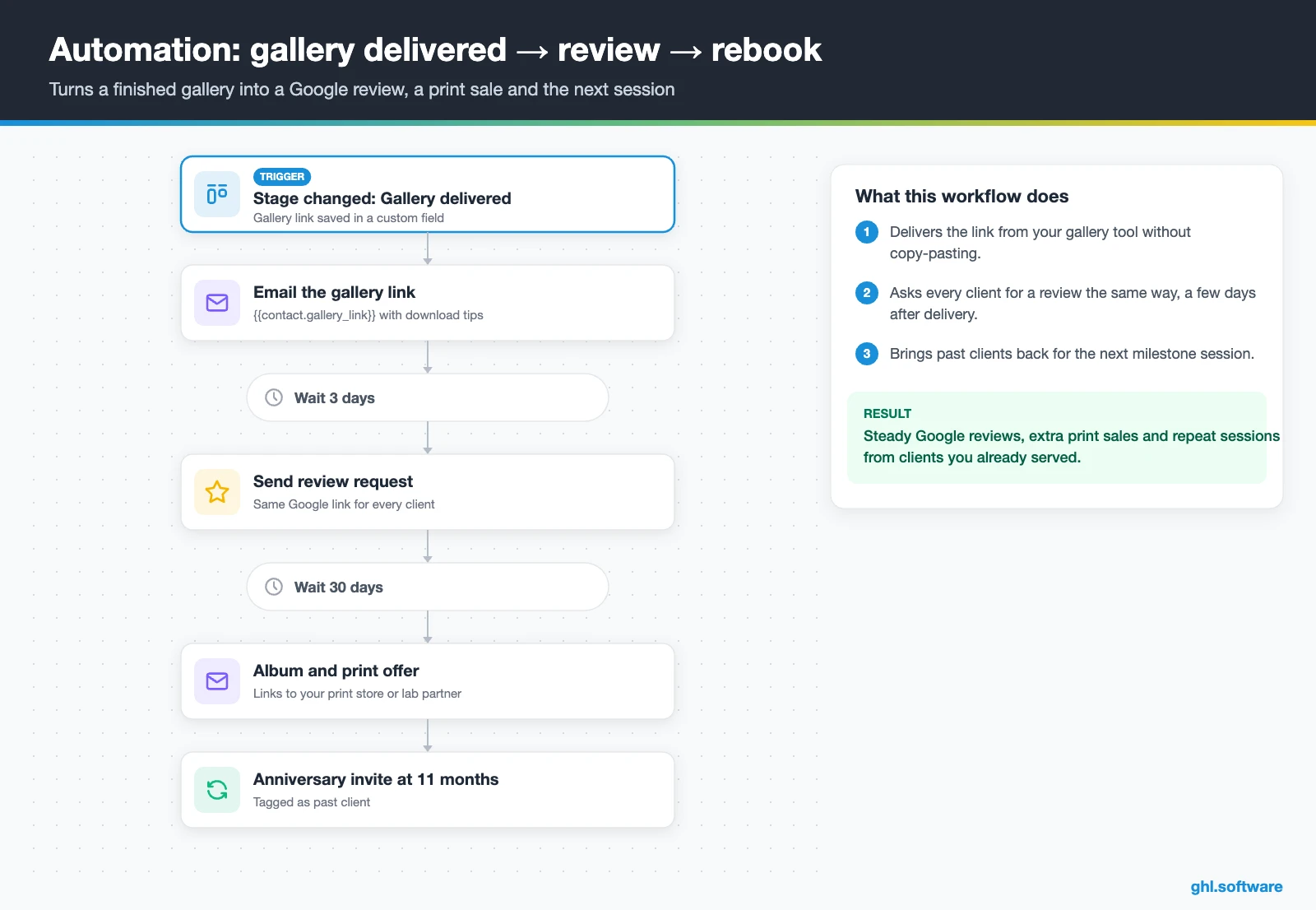
This workflow starts when you move the card to Gallery delivered, with the gallery link saved in a custom field. First, it emails the link with download instructions. Three days later, it sends a review request with your Google link. Also, if a balance is still open, it texts a payment link and creates a task for you.
Thirty days later comes an album or print offer. Finally, about eleven months after the shoot, the client gets an anniversary or family-session invitation, and the contact gets a past-client tag. Ask every client for a review the same way, because Google’s rules don’t allow asking only happy clients.
Start with the snapshot and the pipeline from this guide, then add the automations one by one. The extended trial comes with our bootcamp link.
Start the 30-day trialAffiliate link. I may earn a commission at no extra cost to you.
Instagram DMs, texts and WhatsApp in one inbox
Photography inquiries rarely arrive by email alone. They come as Instagram DMs after a Reel, Facebook messages, website chat, texts and, for many Latino and international clients, WhatsApp. So a CRM for photographers that ignores DMs misses many of them. HighLevel’s Conversations puts them in one inbox, and each thread sits on the client record. So you see the package, the shoot date and the payment status while you reply.
In the US, connect a local number for calls and texting, register A2P 10DLC and turn on missed call text back. Then save your package answers as snippets. On wedding weekends, Conversation AI can answer common questions and share the consult link, while Voice AI can pick up calls. However, prices, discounts and date holds should still come from you.
On location, the mobile app lets you reply between portraits. You can also send a payment link without opening a laptop.
What HighLevel’s official Photographer snapshot includes
HighLevel publishes a Photographer playbook for its “Photographer Snapshot”. It is a useful start, although it follows the same generic template HighLevel uses for many local businesses. Out of the box you get:
- A website called “Photographer” with a Home page (services and FAQ sections) and a Link in Bio page.
- A “Photographer Offer” funnel: an opt-in step, then an appointment booking page.
- The “Marketing Form – Claim Offer” form and a “Marketing Pipeline” (the guide lists no stages).
- Six workflows, two of them named: “New Lead Nurture (Fast 5) – Claim Offer” and “Long Term Nurture”.
- Service calendars tagged “Photographer Services”, a simple calendar and an event calendar for consultations.
- A “Photographer” proposal template, one “Photographer” ad, custom values, a chat widget, snippets and missed call text back.
What it lacks is the photography part. For example, there are no calendars per shoot type, no questionnaire, no contract-plus-retainer flow and no review request after delivery. This version also has no Voice AI prompt. So treat it as the marketing shell of your CRM for photographers. Then build the pipeline and the three automations yourself, or import an agency snapshot that already has them.
How to set up HighLevel for a photography business
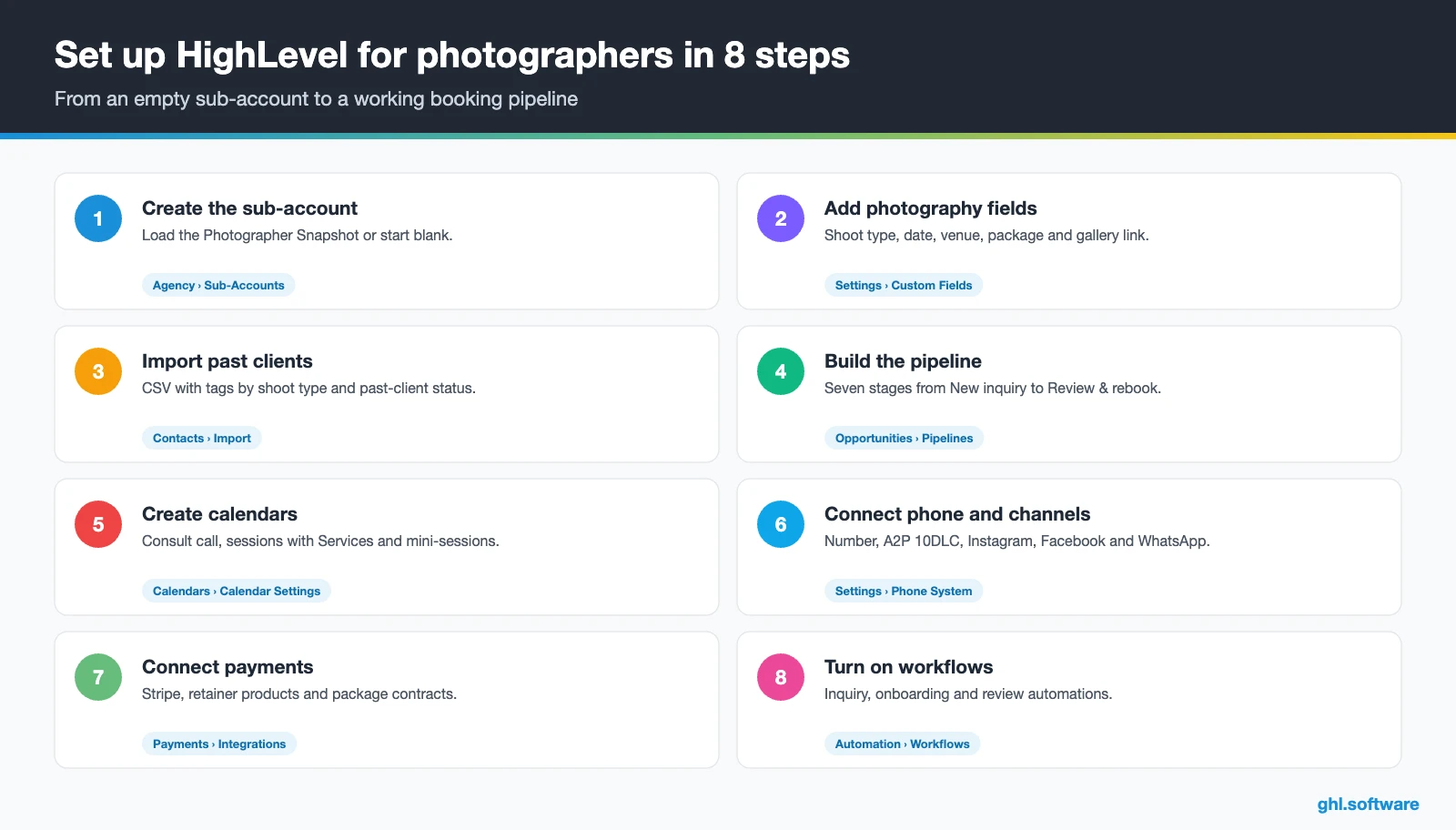
These eight steps turn an empty account into a working CRM for photographers.
- Create the sub-account. Load the Photographer Snapshot or start blank. Then complete Settings › Business Profile and add any second shooter or assistant under My Staff.
- Add photography custom fields. Shoot type, shoot date, venue, package, gallery link and anniversary date, so forms, cards and workflows share the same data.
- Import past clients. Upload a CSV with tags by shoot type (wedding, family, newborn, brand) and a past-client tag for rebooking campaigns.
- Build the pipeline. Seven stages from New inquiry to Review & rebook, plus Lost. If commercial work sells differently, add a second pipeline for it.
- Create calendars. Set up a consult calendar with Zoom or Meet, session calendars built with Services, and mini-session calendars that take payment.
- Connect your channels. Phone number with A2P 10DLC, missed call text back, Instagram, Facebook, Google Business Profile and, if your clients use it, WhatsApp.
- Set up payments and contracts. Connect Stripe or another supported processor. Then create retainer and balance products and one contract template per package.
- Publish workflows and reporting. Turn on the three automations and review requests. Then add a reporting dashboard with inquiries by source and consult-to-booked rate.
What a CRM for photographers costs in HighLevel
HighLevel charges a flat subscription rather than a per-user or per-contact fee. For a CRM for photographers, a solo shooter or small studio usually starts on Starter at $97 a month. It includes unlimited contacts, unlimited users and every core feature. Agencies that build systems for many studios look at Unlimited ($297) or Founder (formerly Agency Pro) ($497) instead. Annual billing costs $970, $2,970 or $4,970.
On top of the plan, you pay for usage. For example, a local number costs $1.15 a month, and each SMS segment costs $0.00747 plus carrier fees. A2P registration adds a one-time fee and a monthly campaign fee. Meanwhile, WhatsApp adds $10 a month plus Meta’s fees, and an AI plan costs $50 or $97 a month, or you pay per use.
In short, a small photography business typically lands between $105 and $200 a month, depending on texting and AI. These ranges are illustrative, so check the full pricing guide and the AI Employee pricing before you budget. Card fees go to your processor, not to HighLevel.
GoHighLevel plans compared
| Starter | Unlimited | Founder | |
|---|---|---|---|
| Price | $97/month | $297/month | $497/month |
| Annual | $970/year | $2,970/year | $4,970/year |
| Sub-accounts | 3 | Unlimited | Unlimited |
| Contacts and users | Unlimited | Unlimited | Unlimited |
| All core features | Yes | Yes | Yes |
| White label web app | Yes | Yes | Yes |
| API access | Basic | Basic | Advanced, agency-level keys |
| Rebill phone and email | No | At cost | With markup |
| Rebill AI usage | No | No | Yes |
| SaaS Mode and automated sub-accounts | No | No | Yes |
| User and agent reporting | No | No | Yes |
| Support | 24/7 | 24/7 | 24/7 |
Usage costs on top of the plan
| Item | Official price | When you pay it |
|---|---|---|
| Local phone number (US/Canada) | $1.15/month | Each number for SMS and calls |
| SMS (US/Canada) | $0.00747 per segment + carrier fees | Every text sent or received |
| Calls (US) | $0.0166/min outbound, $0.01165/min inbound | Calls through LC Phone |
| A2P 10DLC registration | $22.50 one-time (low volume) + monthly campaign fee | Before texting US numbers |
| Email (LC Email) | $0.675 per 1,000 emails | Campaigns and workflow emails |
| $10/month per sub-account + Meta fees | If you use WhatsApp inside HighLevel | |
| AI | Pay-per-use, or $50 or $97/month per sub-account | Voice AI, Conversation AI and other AI tools |
| Premium workflow steps | $0.01 per run after 100 free | Webhooks, Google Sheets, Slack, app actions |
Honest limits: galleries, proofing and other gaps
No CRM for photographers does everything, and HighLevel has one big gap for this industry: galleries. The gallery element on websites and funnels is for your portfolio. It is not a client proofing tool, so it has no favorites, no private download galleries, no print store and no lab fulfillment.
The fix is simple. Keep your gallery platform, such as Pixieset or ShootProof, and paste each gallery link into a custom field. Then the delivery workflow sends it for you.
Other limits to plan around
- Calendar payments charge a fixed amount or save the card. There is no percentage deposit setting.
- Contract templates have no conditional logic, so you keep one template per package.
- There is no built-in “date already booked” check. Instead, filter a smart list by event date before you confirm.
- There are no album design, culling or editing tools, so your editing apps stay as they are.
- Setup takes longer than HoneyBook for a solo shooter. Therefore HighLevel pays off when marketing and follow-up are your bottleneck.
HighLevel vs HoneyBook, Dubsado and Pixieset
The table uses each vendor’s own site in October 2026 (HoneyBook, Dubsado, Pixieset). “Not listed” means the page didn’t mention it, so confirm the details on a demo.
| HighLevel | HoneyBook | Dubsado | Pixieset | |
|---|---|---|---|---|
| Main focus | CRM, marketing and payments | Client flow, payments and galleries | Client workflows, forms and contracts | Galleries, website and studio manager |
| Proposals and e-sign contracts | Yes | Yes | Yes | Not listed |
| Payments and reminders | Yes | Yes | ✓ (split payments) | Booking and deposits |
| Client portal | Custom work | Yes | Yes | Not listed |
| Client galleries and proofing | No | Branded galleries | Not listed | Yes |
| Print and download store | No | Not listed | Not listed | Yes |
| SMS and WhatsApp inbox | Yes | Phone & SMS listed | Not listed | Not listed |
| Funnels, ads and review requests | Yes | Not listed | Not listed | Not listed |
The angle most guides miss: book the next milestone
Most CRMs stop caring once the deal is won. In photography, however, a delivered gallery is often the start of the next booking. For example, a maternity client may come back for newborn photos, then a first birthday and then yearly family sessions. A wedding couple has an anniversary every year, while a brand client needs new headshots when the team grows.
So save the dates that matter: due date, shoot date, wedding date and birthday. Then let date-based workflows send the right invitation at the right time, for example 11 months after a wedding. The BLS counts most photographers as self-employed, so nobody else will remember those dates for you. In short, your CRM for photographers becomes a rebooking calendar, not just a lead list.
Open a free account, load the pipeline and turn on the first automation today. The bootcamp walks you through the setup live.
Start the 30-day trialAffiliate link. I may earn a commission at no extra cost to you.
Frequently asked questions
What is a CRM for photographers?
It is the system that holds every lead and client, the details of each shoot (type, date, venue, package) and every message, contract and payment. It also shows where each booking stands in a pipeline and automates the follow-up. As a result, fewer inquiries go cold, contracts and retainers come in faster, and past clients get invited back at the right time.
Which CRM is best for photographers?
It depends on your bottleneck. If you mainly need proposals, contracts and invoices, HoneyBook or Dubsado are popular choices. If galleries and print sales matter most, Pixieset combines galleries with a studio manager. HighLevel fits photographers who also want to generate demand, because it adds texting, WhatsApp, funnels, ads and review requests to the booking pipeline at a flat monthly price.
Is there a free CRM for photographers?
Some tools offer free plans or free starts with limits, and several studio tools let you begin without a card. HighLevel has no free plan: it starts at $97 a month with unlimited contacts and users, and you can try it before paying. For a photographer who books a few sessions a month, one recovered inquiry often covers the monthly cost.
Can GoHighLevel replace HoneyBook or Dubsado?
For many photographers, yes, with trade-offs. HighLevel covers proposals, e-signed contracts, invoices, payment links, scheduling, questionnaires and workflows. It also adds texting, WhatsApp, websites, ads and reviews. On the other hand, it has no ready client portal and no client galleries, and it takes longer to set up. Choose it when marketing and lead follow-up are what hold you back.
Can HighLevel deliver client galleries?
Not as a proofing tool. The gallery element on websites and funnels works for a portfolio, but it has no favorites, private downloads, print store or lab fulfillment. So keep your gallery platform, such as Pixieset or ShootProof, and save each gallery link in a custom field. Then a workflow emails the link, asks for a review and sends a print offer.
Can I take a retainer and send the contract in one step?
Yes. In Documents & Contracts, add a product list to the package contract, so the client signs and pays the retainer in the same link. Then a workflow on the signed document moves the card to Booked. For mini-sessions, calendars can also charge a fixed amount at booking, but there is no percentage deposit option, so set the exact amount.
Can a CRM help me book mini-sessions?
Yes. Create a calendar with Services for each mini-session day, with short slots, add-ons such as extra images, and the studio or backdrop as a resource. Then turn on payment at booking with a fixed amount and send reminders by text or email. Finally, invite only past clients who agreed to receive promotions, and save each session date for next year’s invitation.
More industry guides
Sources: HighLevel Photographer playbook · HighLevel Help: Documents & Contracts · HighLevel Help: payments and triggers in documents · HighLevel Help: payments on calendars · HighLevel Help: Zoom with calendars · HighLevel Help: A2P 10DLC registration · BLS Occupational Outlook: Photographers · FCC: Telemarketing and robocalls (TCPA) · FTC: CAN-SPAM Act compliance guide · HoneyBook for photographers