

Church CRM: Guest Follow-Up, Giving and Events in HighLevel
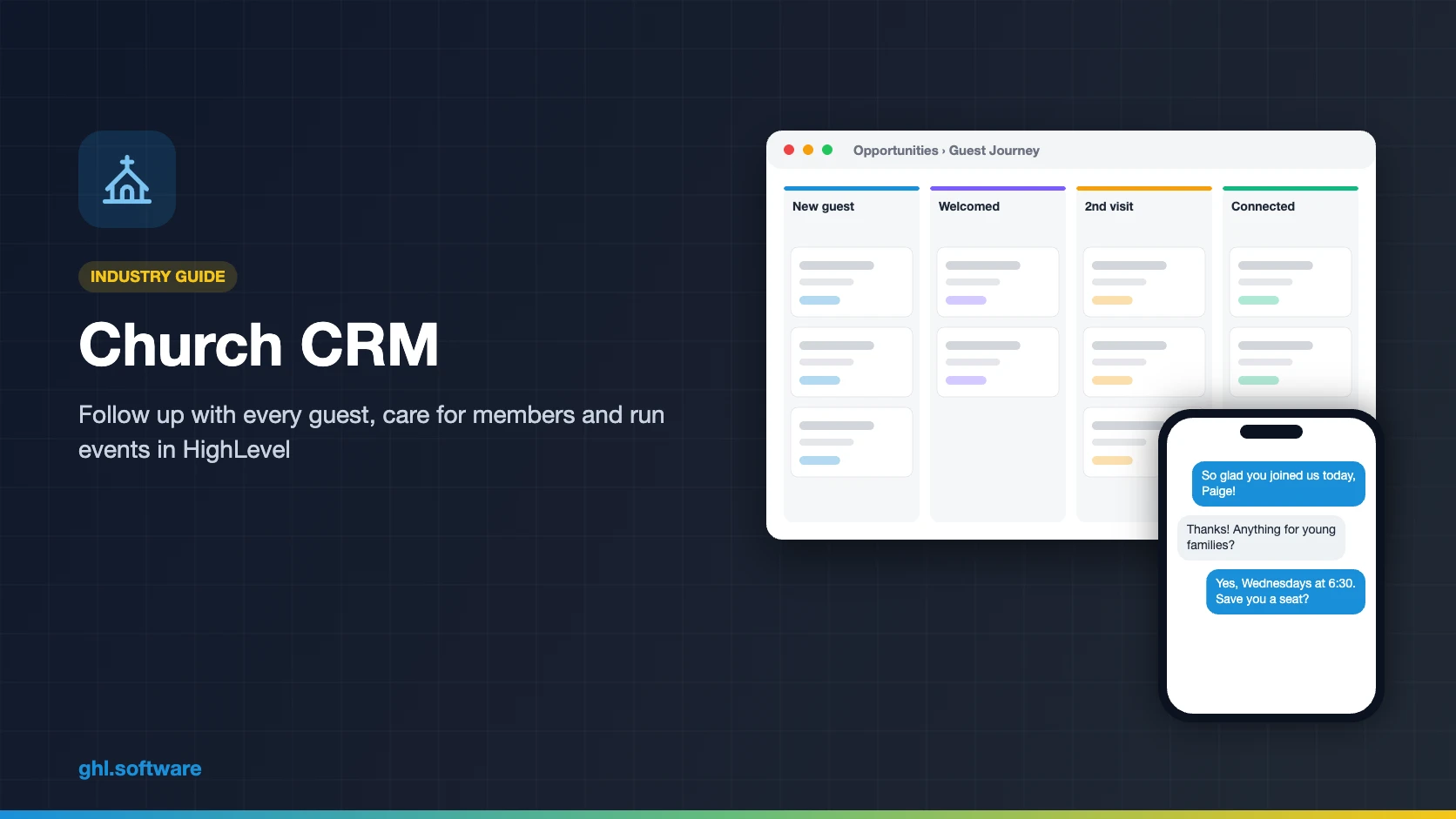
A church CRM helps you follow up with every first-time guest, care for members who drift away and keep events and giving in one place. HighLevel works well as that outreach and follow-up layer, with connect cards, texting, WhatsApp and automations. However, it is not a full church management system: it has no children’s check-in, volunteer rotas or fund accounting.
Paige Quinn will not come back to your church, and nobody on staff knows why. Rewind to Sunday, 12:15 p.m. Paige, new to Chattanooga, walks her two kids to the car after her first visit. Her connection card sits in a basket with forty others. On Thursday, a volunteer finally types the cards into a spreadsheet. By then, Paige has decided that nobody noticed she came. A good church CRM would have welcomed her by name before she left the parking lot.
That gap between the first visit and the first personal contact is where many guests quietly disappear. In fact, the follow-up is simple and repeats every week: a welcome, a volunteer’s call and a next step. So automation can carry it, while people do the caring.
This guide builds that guest journey in HighLevel, from a QR connect card to a “we miss you” text. It also explains honestly where a church CRM ends and a church management system (ChMS) begins. It is part of our GoHighLevel industry guides.
Leer en español: Software para iglesias · Ler em português: Sistema para igrejas · Part of GoHighLevel by industry
Includes a free live setup class with a HighLevel coach.
Start free + bootcampAffiliate link.
What a church needs from a CRM
Most churches run on a few staff members and many volunteers. The office manager also answers the phone, edits the bulletin and builds the event page. So a church CRM has to carry the routine follow-up, while pastors and volunteers focus on people. In HighLevel, that work maps to the building blocks below.
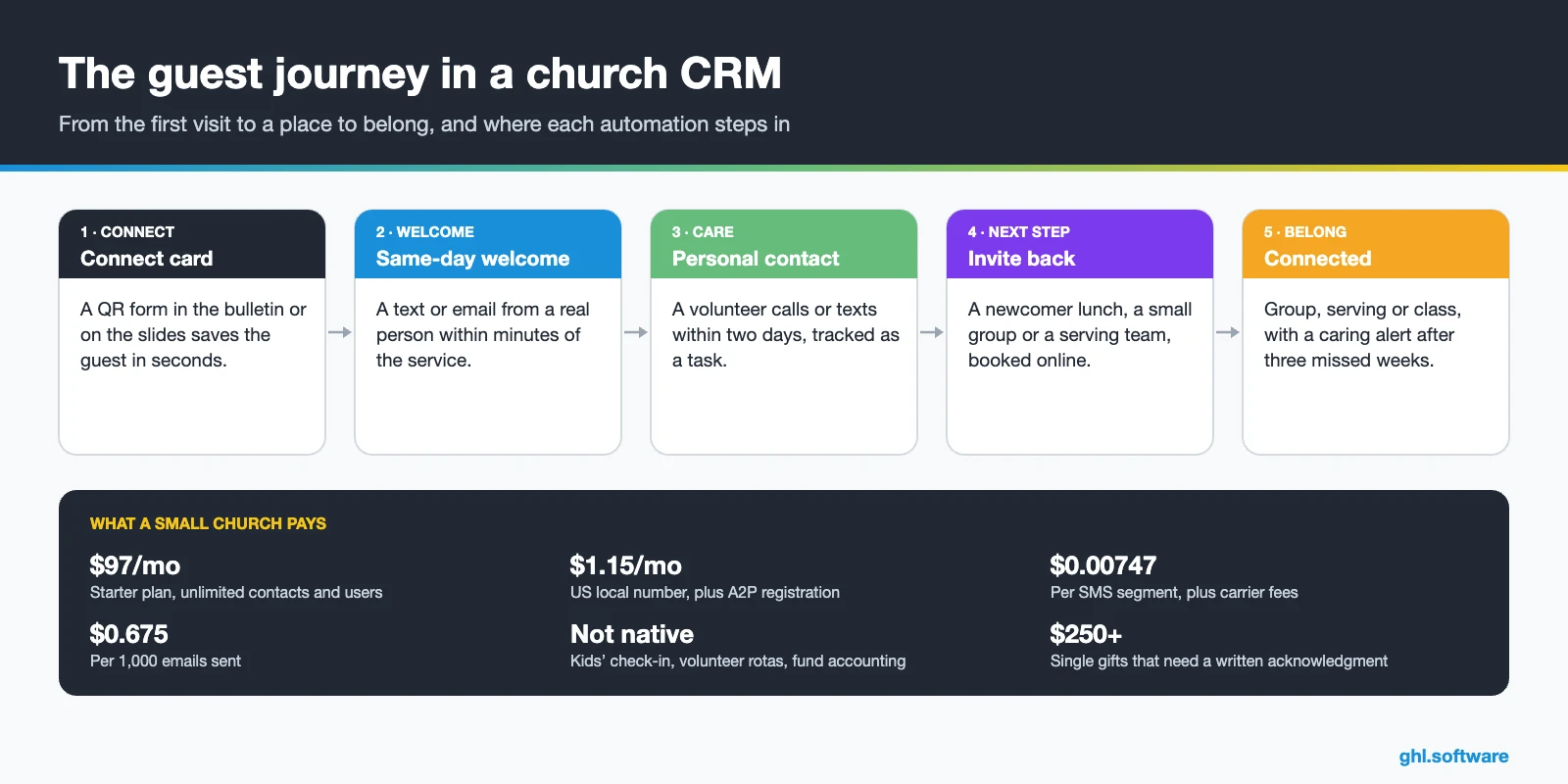
Common church follow-up problems and how HighLevel solves them
Start with the leaks a church CRM should close first. Each one maps to one feature, so you can fix them one at a time.
| Church problem | What HighLevel does | Feature |
|---|---|---|
| Connection cards typed in days later | Saves guests instantly from a QR form | Forms + CRM |
| Guests never get a personal call | Assigns a volunteer task with a due date for each new guest | Workflows + tasks |
| Member data in spreadsheets and group chats | Keeps people, households and groups on one record | Contacts + associations + tags |
| Calls to the office go unanswered | Texts back missed calls and answers common questions | Missed call text back + Voice AI |
| People drift away and nobody notices | Flags anyone not seen for three weeks and alerts their leader | Custom fields + workflows |
| Event sign-ups live in another tool | Registers people, takes payments and sends reminders | Forms + calendars + payments |
| Leaders can’t see follow-up results | Shows guests per week, follow-up speed and next steps taken | Pipelines + reporting |
Church CRM, ChMS or ChurchCRM: which one do you need?
Search for a church CRM and several top results point to ChurchCRM, which is a specific product. It is a free, open-source church management system that you typically install on your own server or web host (ChurchCRM). That is a valid choice for a church with a technical volunteer. However, it answers a different question from the one this guide covers. In practice, churches use three kinds of tools, and a CRM is the one that focuses on the relationship.
| Type of tool | Main job | Examples |
|---|---|---|
| Church database | Store member records and attendance | Spreadsheets, ChurchCRM (open source) |
| Church management system (ChMS) | Check-in, giving records, groups and volunteer rotas | Planning Center, Breeze, Realm, ChurchTrac |
| Outreach and follow-up CRM | Capture guests, message them and automate next steps | HighLevel; texting tools such as Text In Church |
HighLevel belongs in the third row. So the honest setup for most established churches is a ChMS for records and check-in, with HighLevel as the church CRM for outreach, follow-up, texting and events. Meanwhile, a young church plant can run on HighLevel alone for a while, as long as it does not need secure children’s check-in.
The guest-to-member pipeline in your church CRM
Pipelines in HighLevel were designed for sales, but they map well to a guest journey. Each card is a person or a family, while each stage says what they need from you next. Most moves happen automatically, because workflows update the card after a form, a booking or a reply. As a result, the Monday staff meeting can see who is stuck and who needs a call.
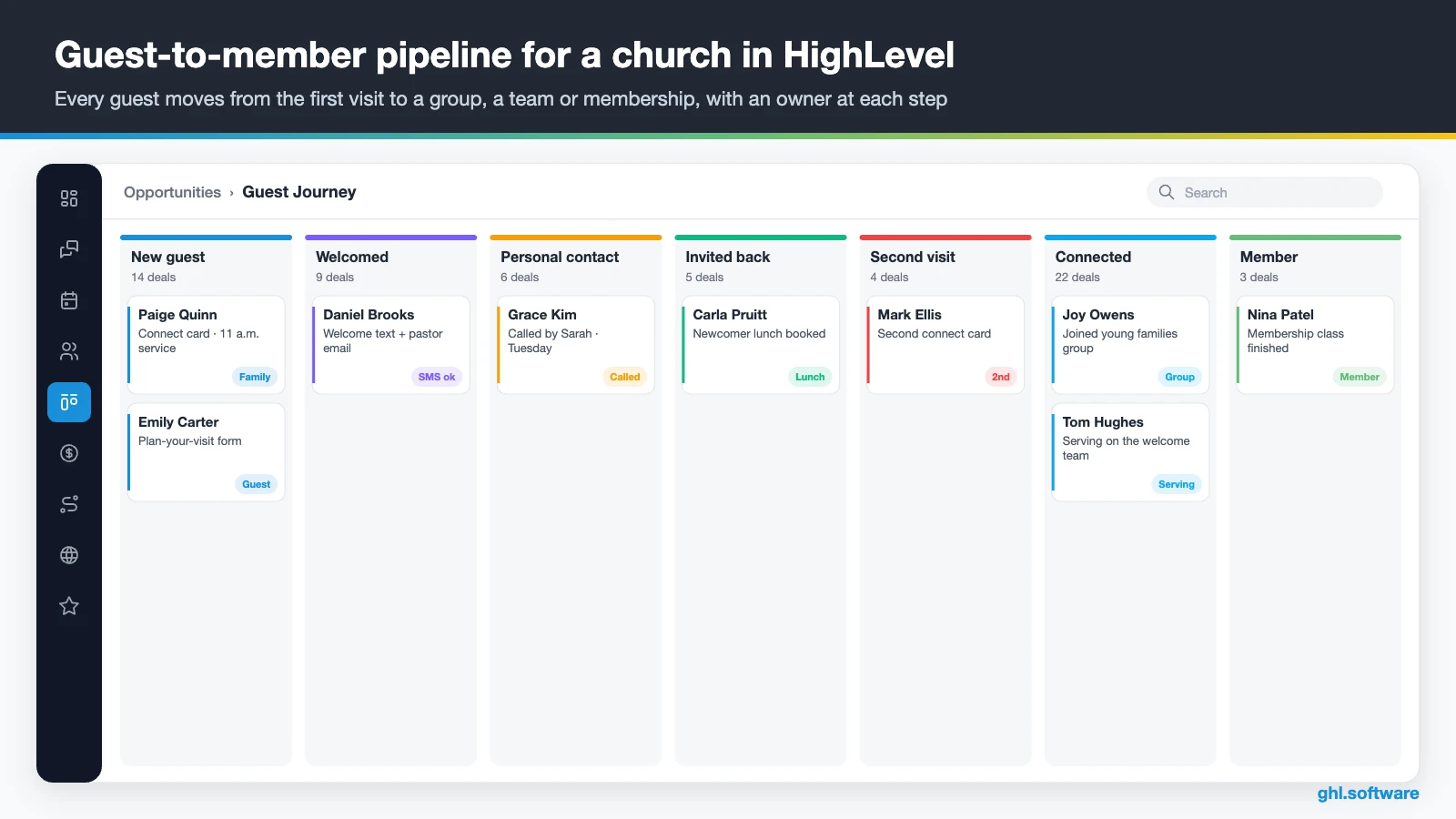
| Stage | What moves a person here |
|---|---|
| New guest | Digital connect card, plan-your-visit form or a paper card entered by hand |
| Welcomed | The welcome text and the pastor’s email have gone out |
| Personal contact | A volunteer logged a call or a conversation |
| Invited back | They booked a newcomer lunch, a coffee or a group visit |
| Second visit | A second connect card, a check-in import or a volunteer’s note |
| Connected | They joined a group, a serving team or a class |
| Member | Membership class finished, by your church’s own definition |
Name the stages the way your church already talks, for example “assimilation” or “next steps”. Also, a second pipeline for baptism, membership and serving keeps the first-visit board short.
Three church CRM automations for the first visit and beyond
These three workflows cover the moments where people most often slip through: the first week, a request for prayer and the weeks when someone stops coming. Build them in this order, because each one reuses the fields and tags of the one before.
1. First-time guest welcome (the first 7 days)
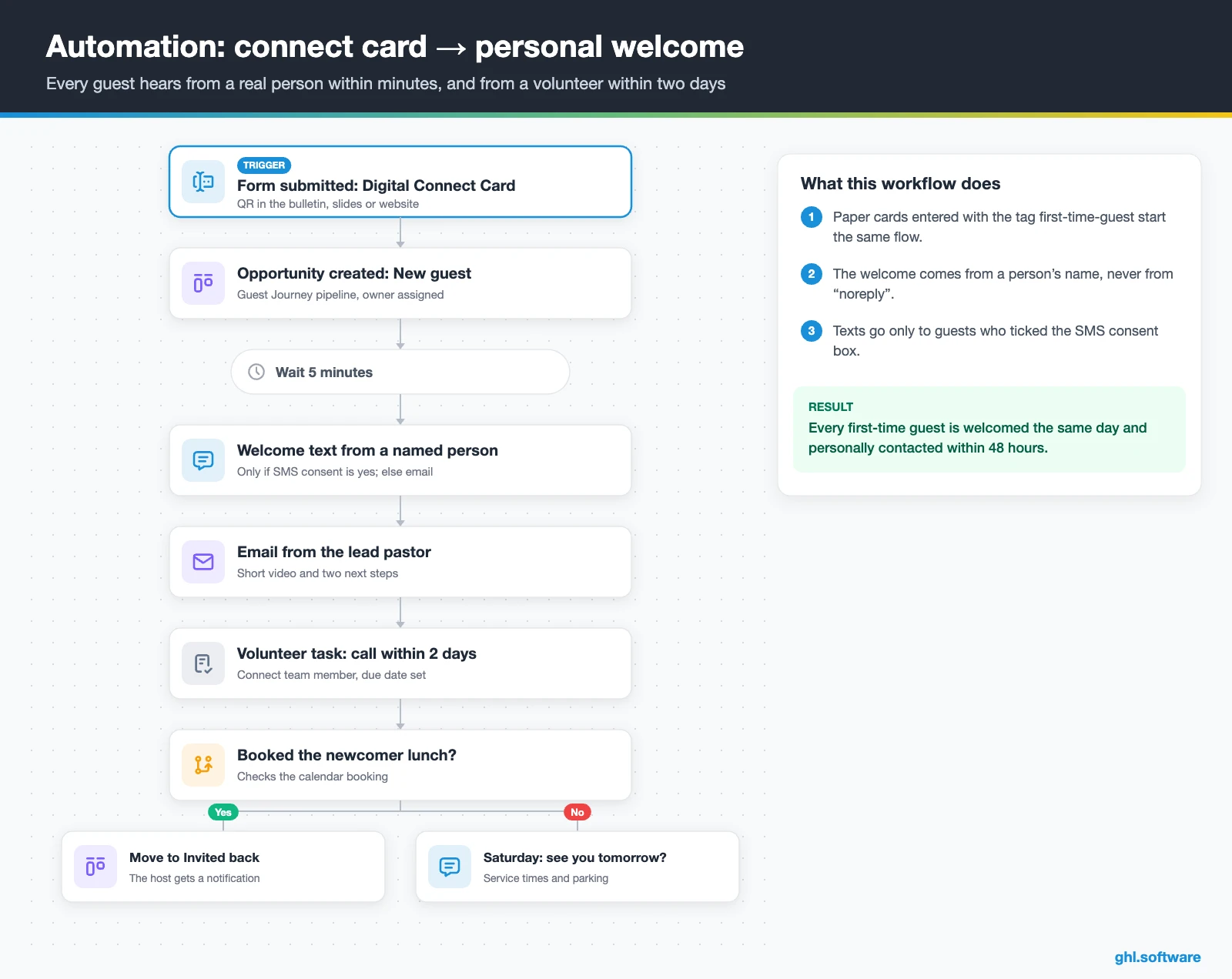
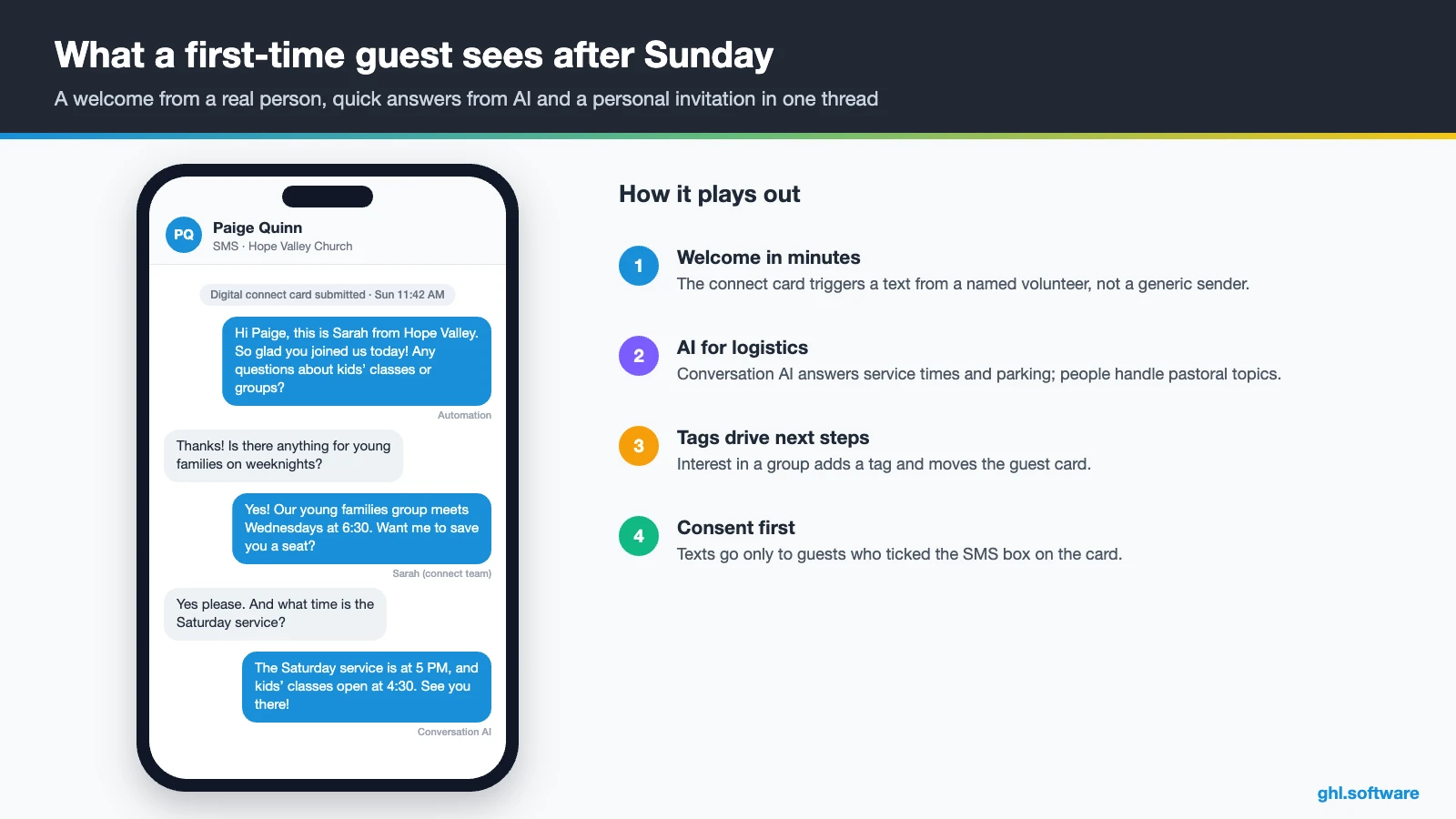
The trigger is the digital connect card being submitted. For paper cards, instead, a volunteer enters them and adds the tag first-time-guest, which starts the same flow. Right away, the workflow creates a card at New guest and assigns an owner. After five minutes, a welcome text goes out from a named person, but only if the guest ticked the SMS consent box. Otherwise, the welcome goes by email only.
Then the lead pastor’s email arrives with a short video and two next steps. Meanwhile, a connect-team volunteer gets a task to call or text within two days. Three days later, the guest is invited to the newcomer lunch with a calendar link. If they book, the card moves to Invited back; if not, a Saturday text shares service times. In short, every guest hears from a person within 48 hours.
2. Prayer requests routed to the care team
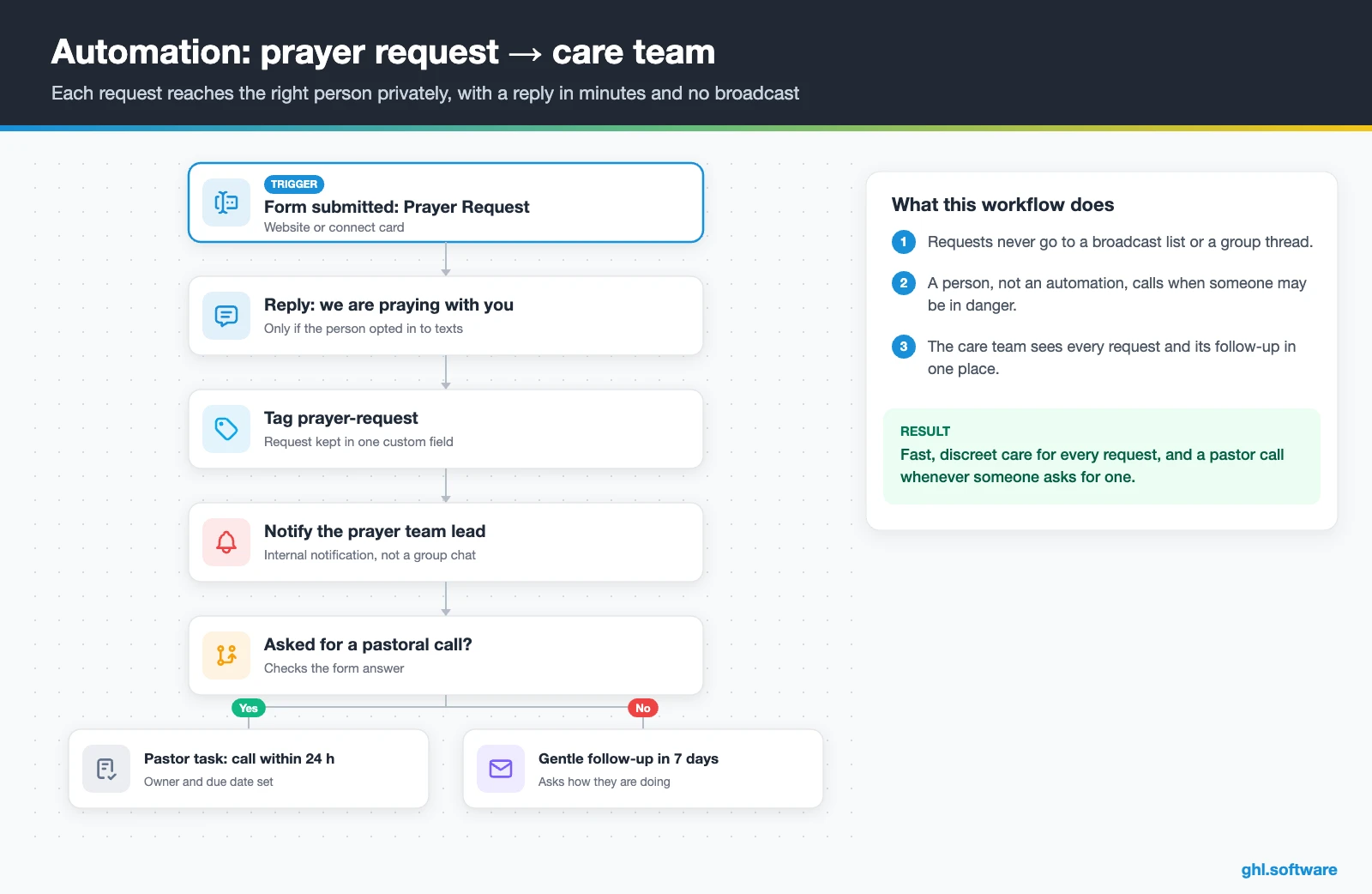
Prayer requests are some of the most personal messages a church receives, so they need both speed and discretion. The trigger is a prayer request form, on the website or on the connect card. The person first gets a short reply that the team is praying, if they agreed to texts. After that, an internal notification goes to the prayer team lead, not to a group chat or a broadcast list.
If the person asked for a call, the workflow creates a task for a pastor, due within 24 hours. Otherwise, a gentle follow-up email goes out a week later. And when a request suggests that someone may be in danger, a person should call right away, not an automation.
3. “We miss you” re-engagement
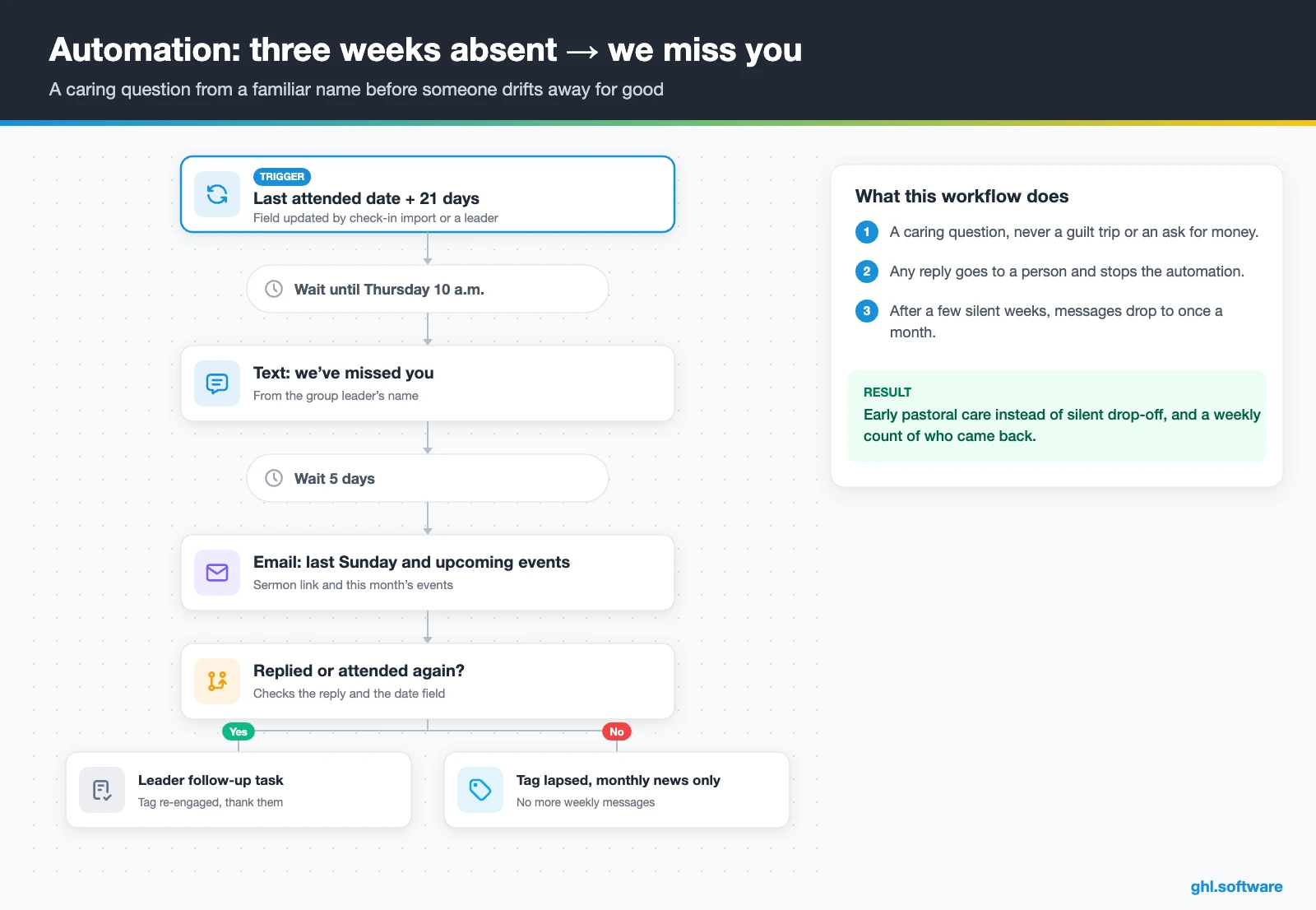
People rarely announce that they are leaving; they just stop coming. So this workflow watches a “last attended” date field, which a check-in import, a form or a leader updates. Trigger names vary, so check the list in your account: a custom date trigger or a weekly Smart List of people not seen for 21 days both work. The first message waits until Thursday morning and comes from the group leader’s name, because a familiar name feels personal.
The text is a caring question, not a guilt trip: “We’ve missed you. Is there anything we can pray about?” If the person replies, the leader gets a task and the automation stops. Otherwise, an email five days later shares last Sunday’s message and upcoming events. Finally, after a few more weeks of silence, the tag lapsed goes on and messages drop to a monthly newsletter.
Start with the snapshot and the pipeline from this guide, then add the automations one by one. The extended trial comes with our bootcamp link.
Start the 30-day trialAffiliate link. I may earn a commission at no extra cost to you.
Texting, WhatsApp and AI for the church office
Guests answer texts faster than email, and many Spanish- and Portuguese-speaking congregations live on WhatsApp. So a church CRM needs every channel in one place. HighLevel puts SMS, WhatsApp, email, Facebook and Instagram messages and web chat in one thread per person, so the connect team and the pastor see the same history. Also, the mobile app lets volunteers reply from the lobby on Sunday.
For calls, missed call text back answers anyone who reaches the office after hours. Meanwhile, Voice AI or Conversation AI can answer repeat questions about service times or parking. Keep pastoral conversations human, though, and set response-time goals in Conversations so no message waits all weekend.
Online giving: tithes, offerings and recurring gifts
HighLevel collects gifts through a payment element inside forms, connected to Stripe or another supported gateway. Givers pick a suggested amount or type their own, and recurring donations are supported in forms and surveys. Text-to-pay links also work for camp fees.
Then add a thank-you workflow for every gift, with the IRS wording for single gifts of $250 or more (see the note below). However, we could not verify a consolidated year-end giving statement in HighLevel. So churches with a ChMS usually keep the giving record there.
Is there an official HighLevel church snapshot?
No. HighLevel’s playbook library has industry snapshots, but none for churches or ministries as of October 2026. Those playbooks share one template, which the Hair Salon playbook shows well. It includes a website, an offer funnel, the “Marketing Form – Claim Offer”, a “Marketing Pipeline”, and the “New Lead Nurture (Fast 5)” and “Long Term Nurture” workflows. It also ships calendars, custom values, a chat widget and missed call text back. Here is how each piece maps to church work:
- Website → service times, beliefs, ministries and a plan-your-visit page.
- Offer funnel → a seasonal invitation, for example for Easter or Christmas.
- Claim Offer form → your digital connect card.
- Fast 5 nurture → the first-week guest welcome.
- Long Term Nurture → the weekly or monthly church newsletter.
- Marketing Pipeline → renamed Guest Journey, with your own stages.
You still build the stages, the three workflows, the consent wording and every message yourself. Third-party church snapshots also exist, for example from SermoSuite, but they are not official, so test one in a blank sub-account first.
How to set up HighLevel for a church in 8 steps
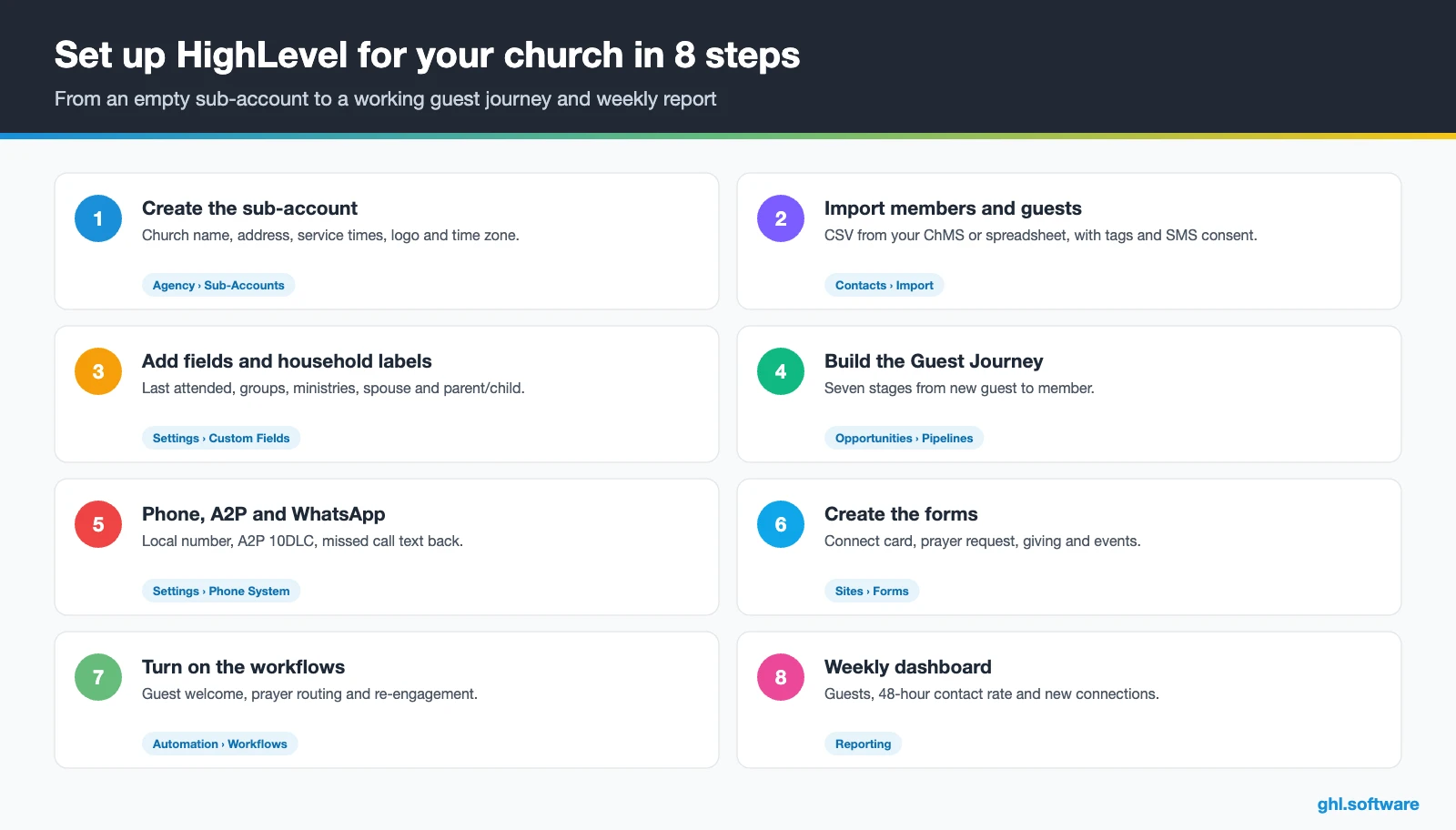
These steps turn HighLevel into a working church CRM, from your data to the weekly report.
- Create the sub-account. Add the church name, address, service times, logo and time zone, plus a privacy policy and consent text.
- Import members and guests. Export a CSV from your ChMS or spreadsheet, map tags for groups and ministries, and import SMS consent.
- Link households. Create association labels such as spouse and parent/child, so families stay connected (HighLevel help).
- Build the Guest Journey. Create the seven stages above in Opportunities › Pipelines, plus a Next Steps pipeline if you need one.
- Set up phone, A2P and WhatsApp. Buy a local number, register A2P 10DLC, turn on missed call text back, then connect WhatsApp.
- Create the forms. Build the connect card, prayer request, giving form and event registration, each with a clear consent checkbox.
- Turn on the workflows. Publish the guest welcome, prayer routing and re-engagement flows, then event reminders.
- Build the weekly dashboard. Track guests per week, contact within 48 hours and moves to Connected in Reporting.
What a church CRM costs with HighLevel
HighLevel charges a flat plan plus usage instead of a fee per member. Most churches start on Starter at $97 a month, with unlimited contacts, users and core features. Usage then comes on top: texts cost $0.00747 per segment plus carrier fees, and email costs $0.675 per 1,000. A US local number is $1.15 a month, while A2P registration is $22.50 one-time plus a monthly campaign fee.
So a church CRM for 300 people that sends four emails a month and a few hundred texts usually costs about $105–$120 a month before AI. AI comes as pay-per-use or $50 or $97 a month per sub-account. Card fees on gifts go to your payment provider, not to HighLevel. See our pricing guide and AI Employee pricing for the details.
GoHighLevel plans compared
| Starter | Unlimited | Founder (formerly Agency Pro) | |
|---|---|---|---|
| Price | $97/month | $297/month | $497/month |
| Annual | $970/year | $2,970/year | $4,970/year |
| Sub-accounts | 3 | Unlimited | Unlimited |
| Contacts and users | Unlimited | Unlimited | Unlimited |
| All core features | Yes | Yes | Yes |
| White label web app | Yes | Yes | Yes |
| API access | Basic | Basic | Advanced, agency-level keys |
| Rebill phone and email | No | At cost | With markup |
| Rebill AI usage | No | No | Yes |
| SaaS Mode and automated sub-accounts | No | No | Yes |
| User and agent reporting | No | No | Yes |
| Support | 24/7 | 24/7 | 24/7 |
Usage costs on top of the plan
| Item | Official price | When you pay it |
|---|---|---|
| Local phone number (US/Canada) | $1.15/month | Each number for SMS and calls |
| SMS (US/Canada) | $0.00747 per segment + carrier fees | Every text sent or received |
| Calls (US) | $0.0166/min outbound, $0.01165/min inbound | Calls through LC Phone |
| A2P 10DLC registration | $22.50 one-time (low volume) + monthly campaign fee | Before texting US numbers |
| Email (LC Email) | $0.675 per 1,000 emails | Campaigns and workflow emails |
| $10/month per sub-account + Meta fees | If you use WhatsApp inside HighLevel | |
| AI | Pay-per-use, or $50 or $97/month per sub-account | Voice AI, Conversation AI and other AI tools |
| Premium workflow steps | $0.01 per run after 100 free | Webhooks, Google Sheets, Slack, app actions |
Honest limits of HighLevel as a church CRM
HighLevel handles outreach, messaging, events and follow-up. Still, it is a church CRM, not a church management system, so check these gaps before you move anything.
- No secure children’s check-in. There are no security labels or kiosk check-in for kids’ ministry, so keep your ChMS for that.
- No volunteer rotation scheduling. You can text teams, but rotas belong in a tool like Planning Center Services.
- No fund accounting. So designated funds, budgets and bookkeeping stay in your accounting software.
- No year-end giving statements that we could verify. You can email each acknowledgment, but not an annual summary per giver.
- No built-in ChMS sync. Planning Center, Breeze and Tithely connect through Zapier, webhooks or the API, so decide which system owns each field.
- Ticketed events with QR check-in are a Labs beta. Test them before your next retreat (HighLevel Events guide).
How HighLevel compares with other church CRM and ChMS tools
Here is a neutral comparison. The Planning Center cells come from its pricing page, while “Check vendor” means we could not confirm the point.
| HighLevel | Planning Center | Breeze | Text In Church | |
|---|---|---|---|---|
| Built around | Outreach, messaging, automation and pages | Modular ChMS: People, Check-Ins, Giving, Groups, Services | ChMS, now part of Tithely | Texting and follow-up for churches |
| Children’s check-in | No | ✓ (Check-Ins) | Check vendor | Check vendor |
| Online giving | Payment element in forms, recurring gifts | ✓ (2.15% + $0.30 per card gift, $0.30 per ACH) | Check vendor | Check vendor |
| SMS, WhatsApp, email and workflows in one tool | Yes | Check vendor | Check vendor | Check vendor |
| Pricing model | $97/mo + usage, unlimited contacts | Per module | Check vendor | Check vendor |
For church networks and agencies: one build, many churches
Here is the angle most church CRM guides miss: the setup is very repeatable. After all, every church needs a connect card, a guest journey, a prayer flow and a lapsed-attender check. So a denominational office, a church-planting network or an agency can build it once and copy it as a snapshot. Meanwhile, each church or campus gets its own sub-account and data.
HighLevel’s own ChurchCandy case study describes this model. An agency started by a former youth pastor runs guest ads and automated follow-up for more than 1,000 churches on white-labeled HighLevel. It also reports reactivating 1,800 old leads with one SMS campaign (self-reported). With the white label option, churches see the agency’s brand, while each congregation’s records stay in its own account.
Open a free account, load the pipeline and turn on the first automation today. The bootcamp walks you through the setup live.
Start the 30-day trialAffiliate link. I may earn a commission at no extra cost to you.
Frequently asked questions
What is the best CRM for churches?
It depends on what you need most. If your main gap is follow-up with guests, texting, WhatsApp, events and pages, an all-in-one like HighLevel covers it at a flat price. If you need children’s check-in, volunteer rotas and giving records, a church management system such as Planning Center or Breeze fits better. Many churches use a ChMS for records and HighLevel for outreach and follow-up.
Is ChurchCRM free, and how is it different from HighLevel?
ChurchCRM is a free, open-source church management system. You usually install and maintain it on your own server or web host, so it suits churches with a technical volunteer. It focuses on member records rather than automated messaging. HighLevel, in contrast, is a paid, hosted platform built around follow-up: forms, texting, WhatsApp, email, workflows and pages, with no install to maintain.
Can a church CRM like HighLevel replace Planning Center or Breeze?
For a small church plant, sometimes yes, if you don’t need secure children’s check-in, volunteer rotation scheduling or fund accounting. For most established churches, no. In that case, the better setup is to keep Planning Center or Breeze as the record of people, giving and check-in, and use HighLevel for guest follow-up, messaging and events. They connect through Zapier, webhooks or the API.
Can churches take recurring tithes and offerings in HighLevel?
Yes. HighLevel forms have a payment element that supports suggested amounts, a custom amount and recurring donations, and HighLevel’s changelog confirms recurring donations in forms and surveys. You connect Stripe or another supported gateway, and card fees go to that provider. However, we could not verify consolidated year-end giving statements, so plan to produce those from your ChMS or giving records.
Do churches need A2P 10DLC registration to text members?
Yes, if you text from a regular 10-digit US number through a platform like HighLevel. You register a brand and a campaign before sending, and HighLevel guides you through it. Nonprofits may register as nonprofits and can qualify for special use cases, but eligibility depends on your legal registration. Also, collect clear consent on connect cards and forms before sending any marketing text.
How fast should we follow up with first-time guests?
The same day, ideally within minutes. Pro Church Tools recommends following up right away rather than later in the week, with an email from a real person’s name. A good rhythm is an automated welcome within minutes, a personal call or text from a volunteer within two days, and an invitation to a next step by the end of the week. Then a church CRM tracks who was contacted.
How much does a church CRM cost with HighLevel?
The Starter plan costs $97 a month with unlimited contacts and users. Usage comes on top: $0.00747 per text segment plus carrier fees, $0.675 per 1,000 emails, and $1.15 a month for a US number, plus A2P registration. A church of about 300 people usually pays around $105 to $120 a month before AI. Card fees on gifts go to your payment provider.
More industry guides
Sources: HighLevel case study: ChurchCandy (self-reported figures) · HighLevel changelog: recurring donations in forms and surveys · HighLevel help: associating contacts with custom labels · HighLevel help: A2P 10DLC brand and campaign registration · HighLevel help: Events · HighLevel playbook library (no church snapshot) · IRS: Charitable contributions, written acknowledgments · Twilio: A2P 10DLC for government and nonprofit agencies · Planning Center pricing · ChurchCRM (open-source church management)