

Car Dealership CRM: HighLevel for Speed-to-Lead and Test Drives
A car dealership CRM tracks every shopper from the first inquiry to delivery and beyond: it answers leads in seconds, books test drives, reminds people to show up, follows up with unsold prospects and brings sold customers back. HighLevel (GoHighLevel) does that well for independent lots and as the BDC layer for franchise stores. However, it is not a DMS, so desking, F&I, titles and inventory stay in your dealer software.
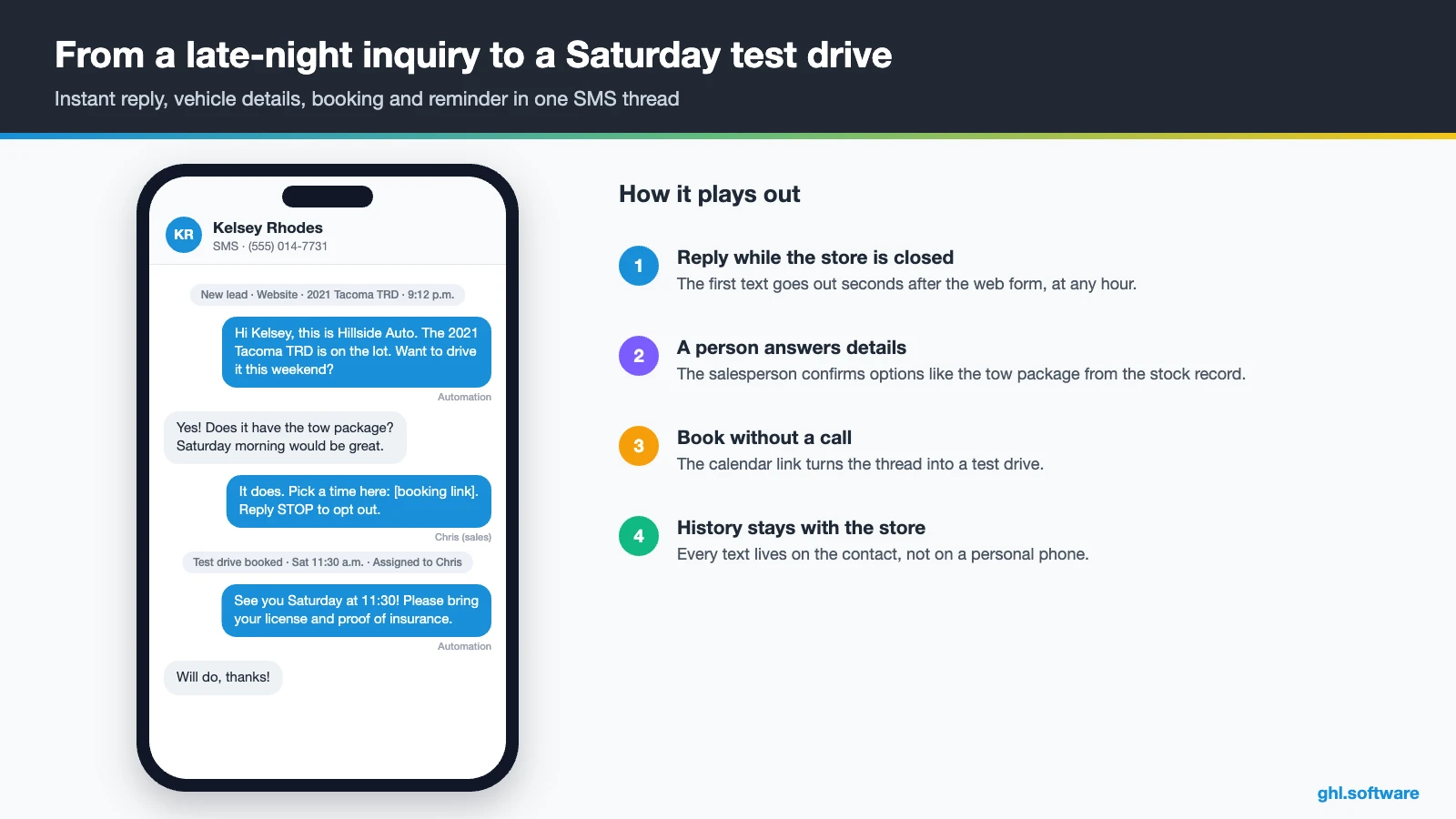
Three Nashville dealers got the same question on a Thursday night: “Is the 2021 Tacoma still available?” Kelsey Rhodes sent it to your website at 9:12 p.m., then to two other stores. Your floor had closed at 8, so her lead sat in a shared mailbox until morning. Meanwhile, the second store never replied. The third texted her a walkaround video by 9:30, and she booked a Saturday test drive. A car dealership CRM exists so the first reply comes from you, in seconds.
Speed is not a guess. In the Pied Piper 2025 PSI Internet Lead Effectiveness study, 19% of dealers never personally responded to a web inquiry (Auto Remarketing). Meanwhile, the top-ranked dealer group answered 90% of customers by email or text within one hour (Business Wire).
So this guide shows how HighLevel handles that job for new, used and independent dealers. Finally, it covers the FTC Safeguards Rule, because a CRM full of credit details is a liability.
Leer en español: CRM automotriz · Ler em português: CRM automotivo · Part of GoHighLevel by industry
Includes a free live setup class with a HighLevel coach.
Start free + bootcampAffiliate link.
What a car dealership CRM does, and what stays in your DMS
A dealership runs on two kinds of software. The DMS (CDK Global, Reynolds & Reynolds, Dealertrack and others) owns the deal: desking, F&I, titles, accounting, parts and repair orders. Instead, a car dealership CRM owns the people: every inquiry, call, text, test drive and follow-up, before and after the sale. HighLevel covers that second job, so it sits next to the DMS. For a small used-car lot, however, it can be the only CRM you need.
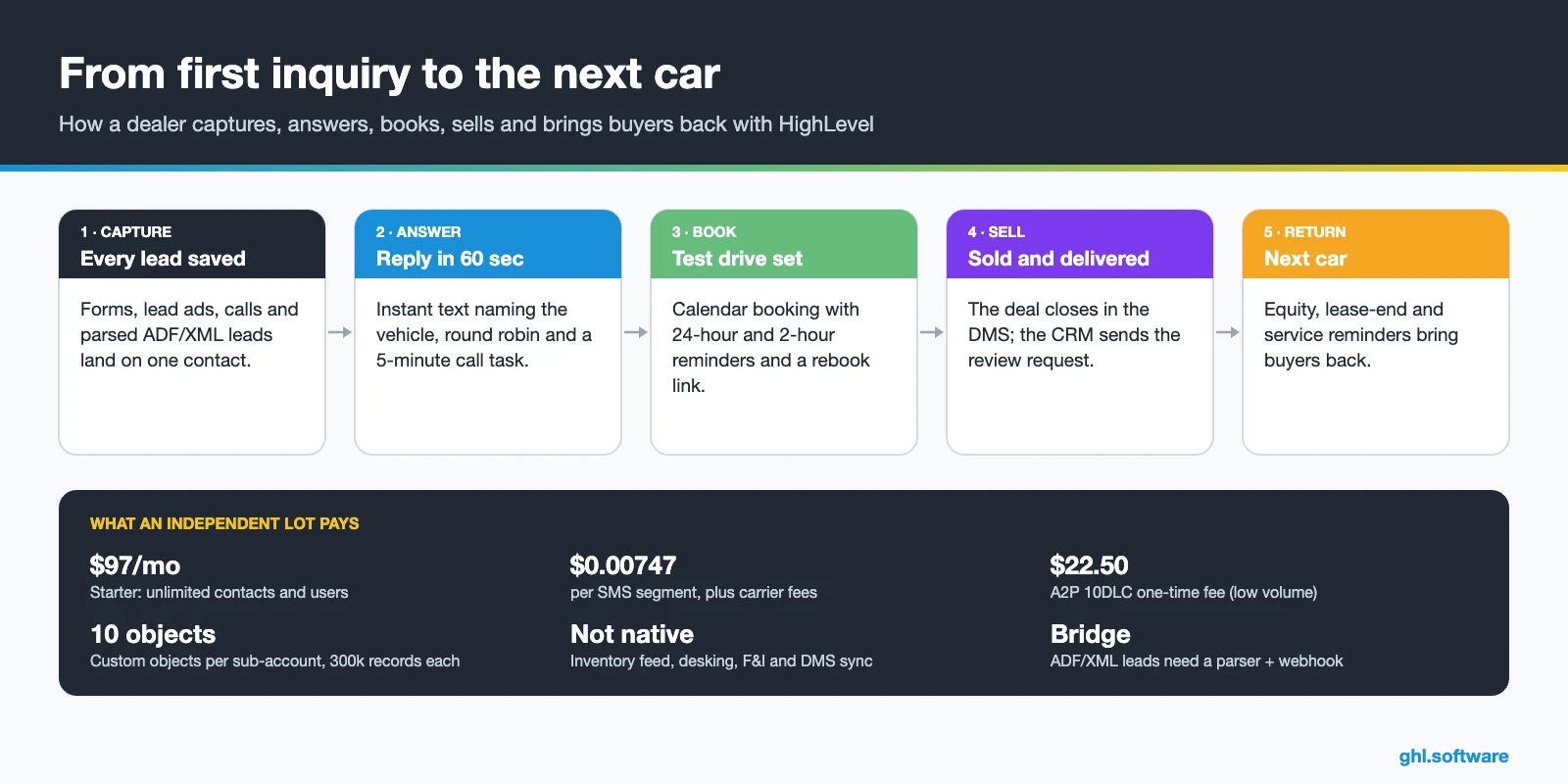
Dealership CRM problems and how HighLevel solves them
| Problem | What HighLevel does | Feature |
|---|---|---|
| Internet leads wait hours for a reply | Instant text naming the vehicle, plus a call task for the rep | Workflows + round robin |
| Marketplace leads arrive as ADF/XML emails | A parser posts them to an inbound webhook | Inbound Webhook trigger |
| Calls missed after closing time | Text back in seconds, or a Voice AI agent that books the visit | Missed call text back + Voice AI |
| Test-drive no-shows | Confirmation, 24-hour and 2-hour reminders, then a rebook link | Calendars + reminders |
| Unsold prospects dropped after three days | A 90-day nurture with new arrivals and price changes | Smart lists + workflows |
| Reps texting from personal phones | Shared inbox on a store number | Conversations + mobile app |
| Few Google reviews per delivery | The same review request for every buyer | Reputation management |
| Sold customers never hear from you | Reminders for trade cycle, lease end and service | Custom fields + workflows |
Car dealership CRM pipeline: from first inquiry to equity watch
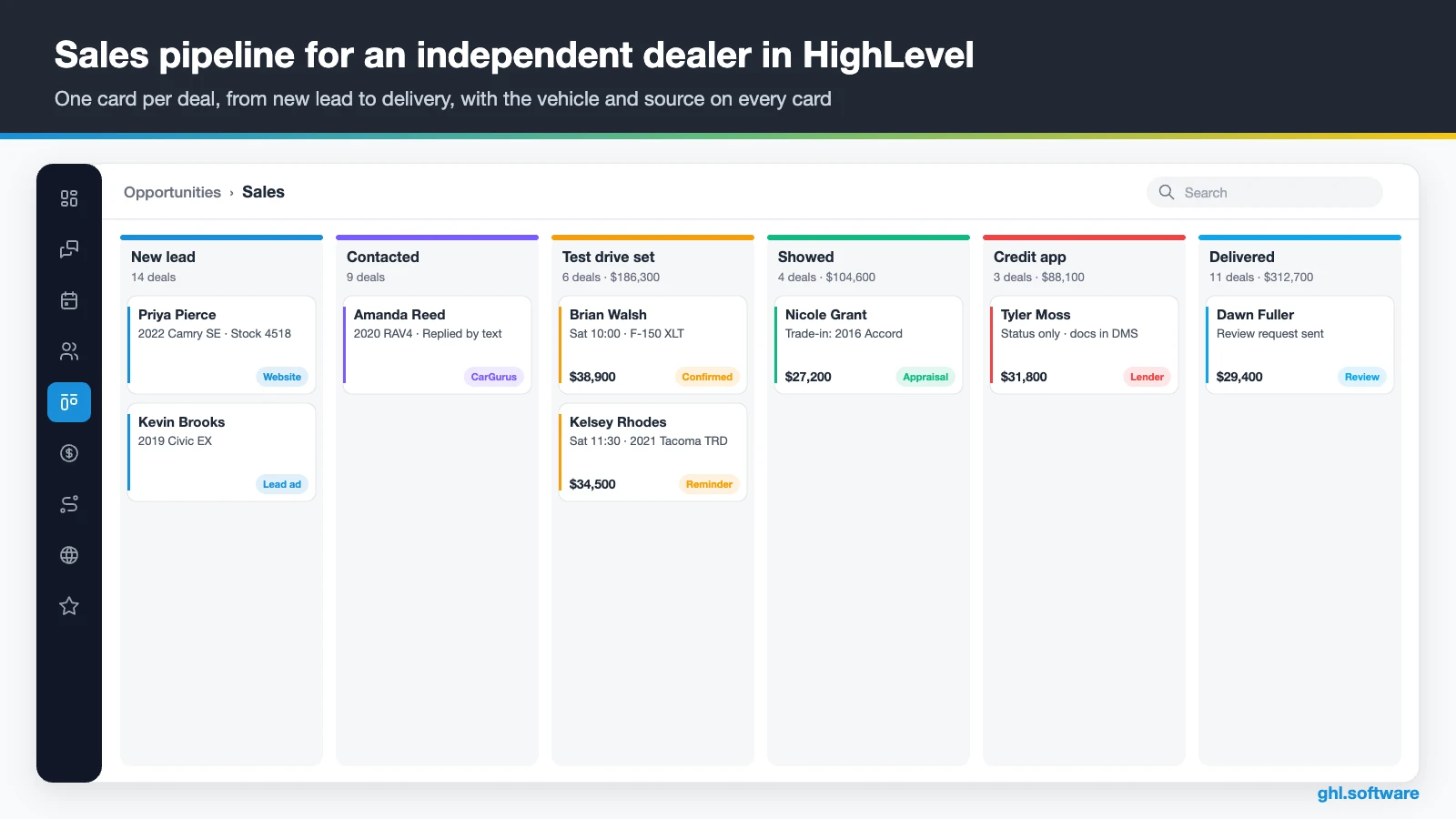
In HighLevel, a pipeline is a board of cards called opportunities. For a dealer, one card equals one deal, not one person, because the same family may buy twice in five years. The card also carries the vehicle, the lead source, the assigned rep and the expected value. As a result, a sales manager sees in one screen which leads nobody touched, which test drives are set and which deals wait on credit.
| Stage | What moves the deal here |
|---|---|
| New lead | Form, lead ad, ADF/XML webhook, call or chat |
| Contacted | The rep replies, or the shopper answers the first text |
| Test drive set | The shopper books on the test-drive calendar |
| Showed | The appointment status changes to showed |
| Credit app / negotiation | Numbers sent; the application stays in the DMS |
| Sold | Deal signed in the DMS; the rep moves the card |
| Delivered | Keys handed over; review request and follow-up start |
| Unsold nurture | No reply or no deal after three days |
Then add a second pipeline for what comes after delivery: equity watch, lease end and service due. Meanwhile, the Forecast tab on Opportunities shows expected and won revenue and flags deals whose close dates slipped. That way, the Sales board stays clean, while every sold customer still has an owner.
Vehicles as custom objects
Custom fields work well when each deal has one vehicle. However, a store that wants real vehicle records can use Custom Objects, which come with all plans: up to 10 objects per sub-account and 300,000 records per object, linked to contacts and opportunities and usable in workflows (HighLevel Help). Still, a Vehicles object is a copy you maintain, not a live inventory feed.
Three automations every dealership should run
A store loses money quietly in three places: the lead nobody answered, the test drive nobody showed up for and the buyer nobody called again. Each workflow below uses triggers and actions that exist in HighLevel, so you can build your car dealership CRM without code. Then test it with your own phone before it reaches a real shopper.
60-second speed-to-lead with round robin
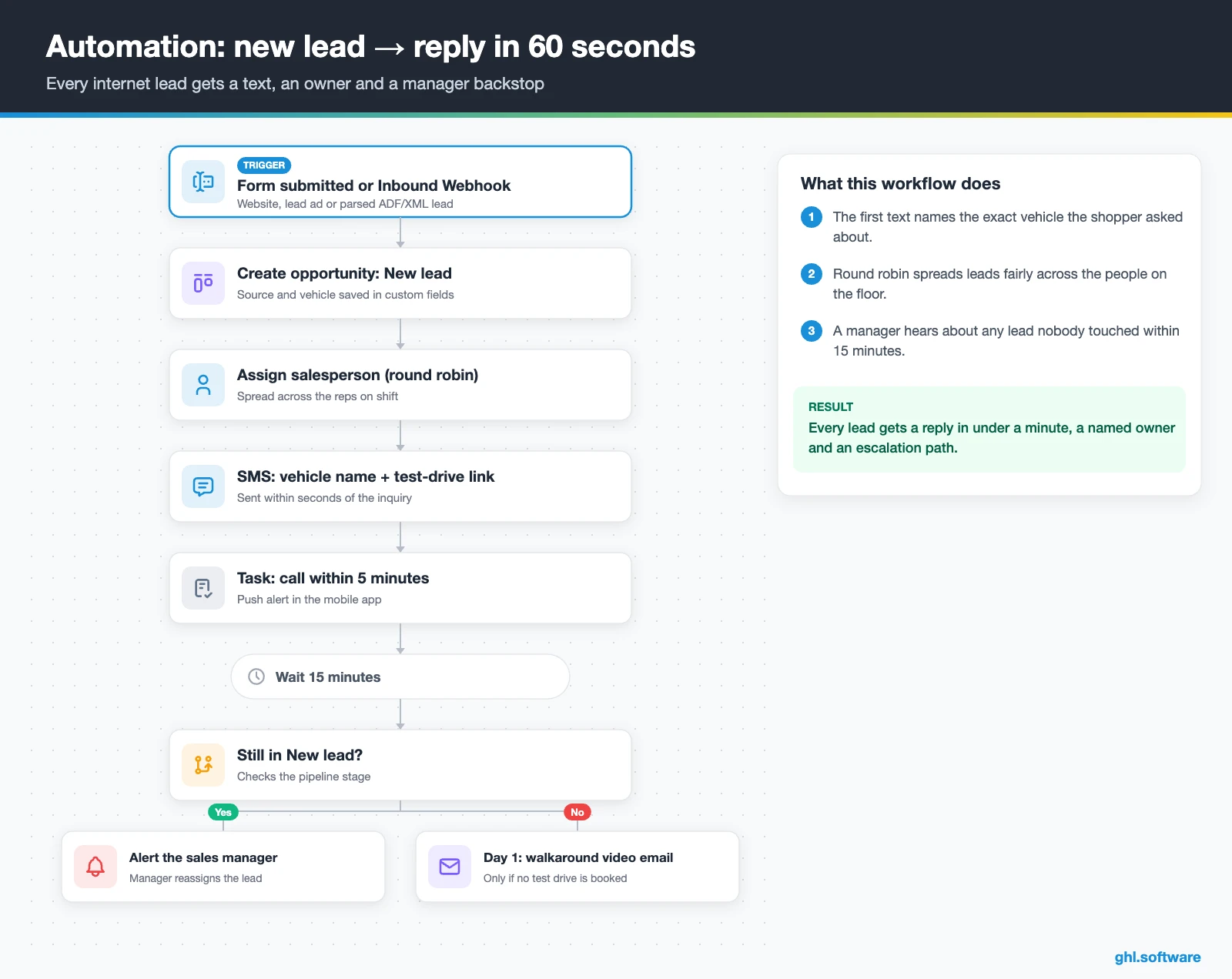
The trigger is a form submission, a Facebook lead form, an inbound webhook from your ADF parser or a customer reply. At once, the workflow creates an opportunity in New lead with the source and vehicle fields. Then it assigns a rep by round robin and texts the shopper the vehicle name, a short question and the test-drive link. The rep also gets a push notification and a task to call within five minutes.
After 15 minutes, an if/else step checks the stage. If the card still sits in New lead, the sales manager gets an alert and can reassign it. When the shopper has not booked after a day, an email with a walkaround video goes out. Finally, after three quiet days, the deal moves to Unsold nurture. In short, every lead gets an answer, an owner and a backstop.
Test drive booked → showed → sold
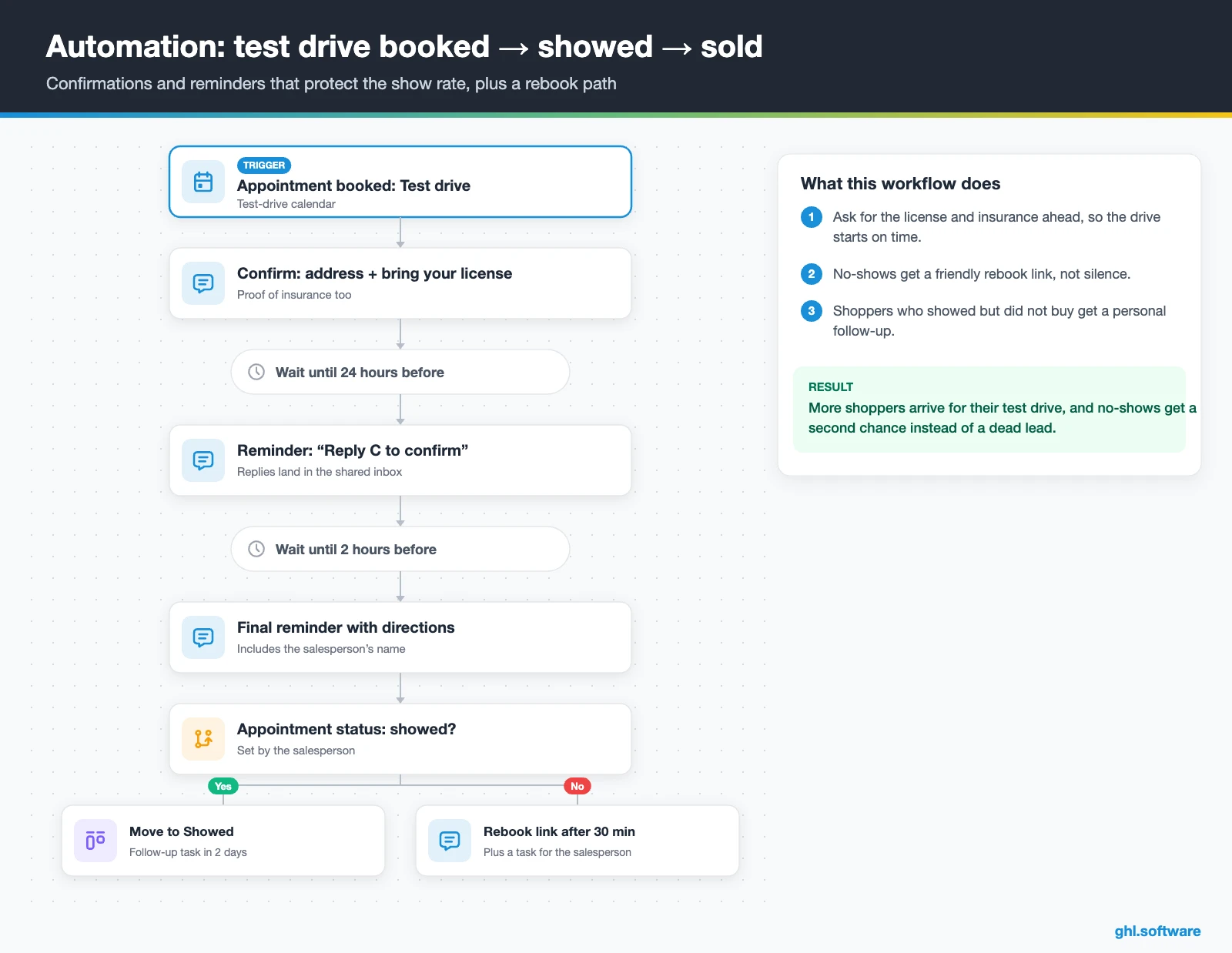
This one starts when a shopper books on the test-drive calendar. The confirmation text includes the address and a reminder to bring a driver’s license and proof of insurance, since the store needs both before the drive. After that, a reminder goes out 24 hours before with “Reply C to confirm,” and another two hours before.
If the appointment status changes to no-show, the workflow waits 30 minutes and sends a friendly rebook link, plus a task for the rep. If the shopper showed but did not buy, a thank-you text and a follow-up with the numbers come two days later. Once the card reaches Sold, the delivery workflow takes over and asks for the review.
Sold-customer and unsold-lead reactivation
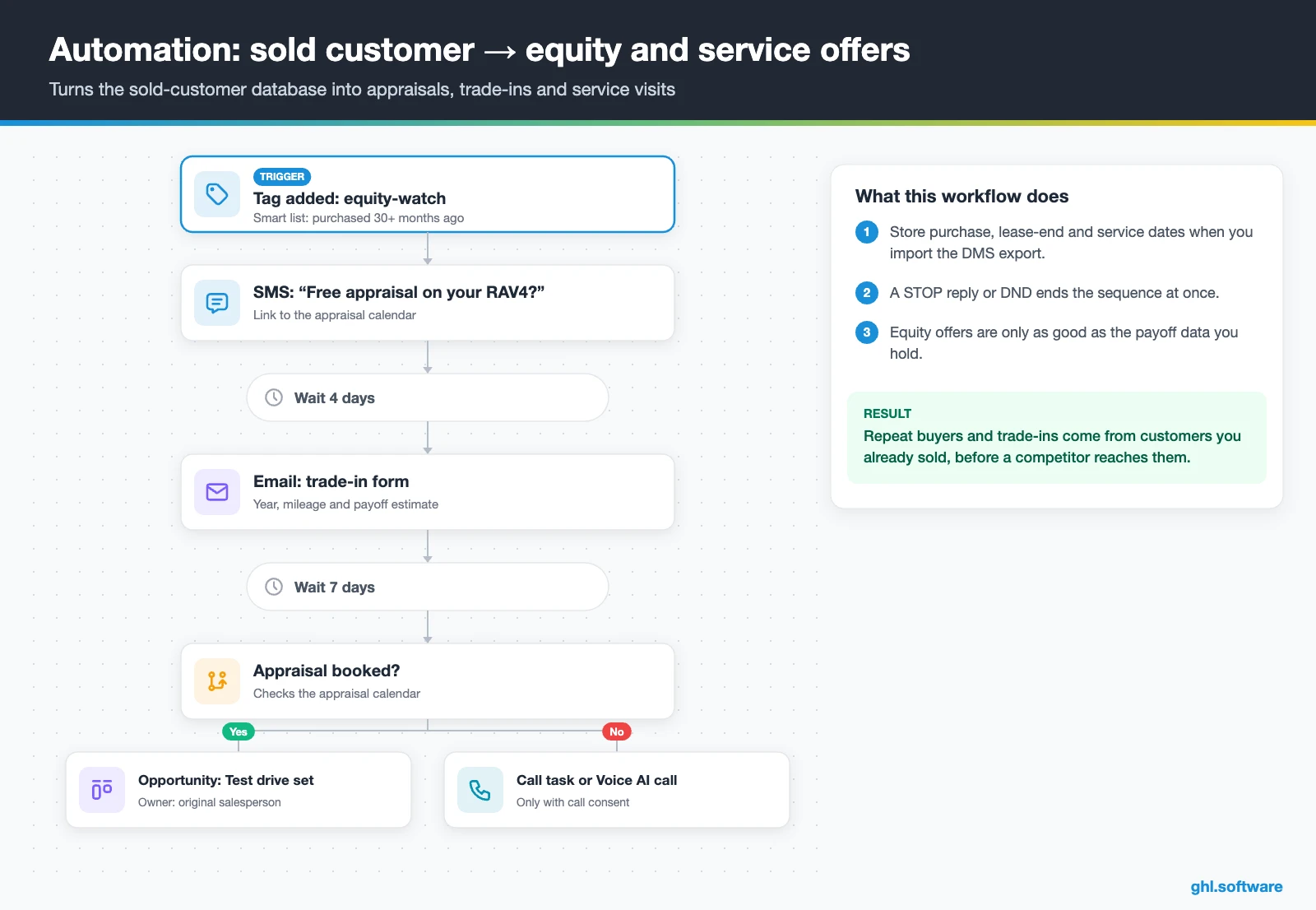
Your database is the cheapest lead source you have. Therefore, store a purchase date, a lease-end date and a next-service date on every sold customer. A smart list such as “purchased more than 30 months ago” also adds the equity-watch tag. Then the workflow sends a short text: “Your RAV4 may be worth more than you think. Want a free appraisal?”
If nobody books within four days, an email with a trade-in form follows. After a week, the original rep gets a call task, or a Voice AI agent calls when the contact agreed to calls. Throughout, a STOP reply or DND ends the sequence at once. The same idea also works for unsold leads, with new arrivals instead of equity.
Start with the snapshot and the pipeline from this guide, then add the automations one by one. The extended trial comes with our bootcamp link.
Start the 30-day trialAffiliate link. I may earn a commission at no extra cost to you.
Getting Autotrader, Cars.com and CarGurus leads into HighLevel
Most third-party and OEM leads reach dealers in ADF/XML, a standard for moving customer, vehicle, trade and appointment data between lead providers and dealership CRMs (TecoBi). Dealer CRMs read it natively, but HighLevel does not, because we found no built-in ADF/XML parser in its documentation. So you need a small bridge:
- Point the lead provider at an email address handled by an email parser that reads ADF/XML.
- Map name, phone, email, vehicle, stock number, trade-in and lead source.
- Then have the parser post the data to a workflow that starts with the Inbound Webhook trigger.
- Send a test lead from each provider, and check duplicates and the source field.
Alternatively, some lead vendors post JSON straight to a webhook, which removes the parser. Either way, keep the original lead emails for a few weeks to compare both systems. For webhooks and the API, see integrations.
Texting, Voice AI and the shared inbox on the sales floor
Shoppers switch channels all the time. In Cox Automotive’s 2025 Car Buyer Journey Study, 44% of new-car buyers mixed online and in-person steps (Digital Dealer). But in the Pied Piper study, only 49% of dealers used multiple channels. In a car dealership CRM like HighLevel, every SMS, email, Facebook and Instagram message and web chat lands in one Conversations inbox. Besides, response-time SLAs flag threads that wait too long.
Voice AI covers nights and weekends. For example, an agent can answer, ask which vehicle the caller saw, book a test drive and transfer hot calls. HighLevel’s Industry Agents include Aria for home services, while Riley and Maya are still coming soon, so none targets dealers. Therefore, you build a custom agent and test it with real questions, such as “Is the black Tacoma still there?” Prices and credit answers should stay with people.
Conversation AI can also reply to chats with hours, directions and the booking link, while reps answer from the mobile app. Then check the AI Employee pricing guide before you pick a plan.
What HighLevel’s official Auto Dealer snapshot includes
HighLevel publishes an Auto Dealer playbook with an “Auto Dealer Snapshot.” Like other industry snapshots, it follows a generic template with the industry name swapped in:
- An “Auto Dealer” website with Home and Link in Bio pages
- An “Auto Dealer/Sales Offer” funnel: an opt-in step, then a booking page
- The “Marketing Form – Claim Offer” form and a “Marketing Pipeline”
- “New Lead Nurture (Fast 5) – Claim Offer” (email, SMS, voicemail drop) and “Long Term Nurture”
- Calendars tagged “Auto Dealer Services,” custom values, a chat widget, snippets and one ad
- Missed call text back and a Voice AI prompt
Still, the guide never mentions cars, test drives, trade-ins, financing or inventory, and it has no unsold-lead, lease-end or review-after-delivery workflows. So use it for the website, the offer funnel and the nurture basics. Then add the Sales pipeline, the vehicle fields and the three workflows above to turn it into a working car dealership CRM.
How to set up a car dealership CRM in HighLevel
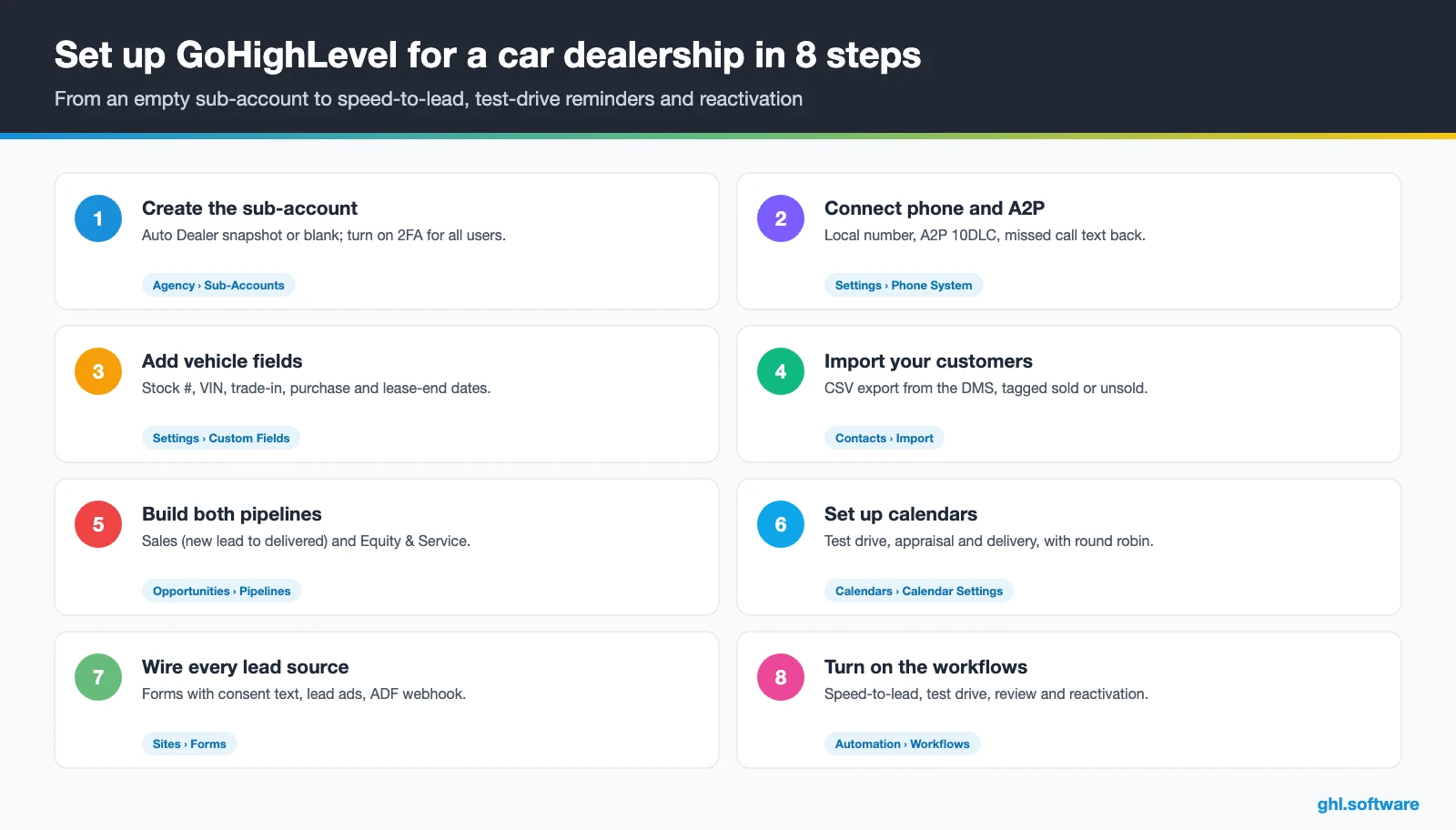
- Create the sub-account. Load the Auto Dealer snapshot or start blank, then turn on two-factor authentication for every user.
- Connect phone and A2P. Buy a local number, register A2P 10DLC, enable missed call text back and connect Facebook and Google.
- Add vehicle fields. Stock number, VIN, trade-in, purchase date, lease end and next service, or a Vehicles object.
- Import your customers. Export sold and unsold customers from the DMS as CSV, then import them with status tags.
- Build both pipelines. Sales (new lead to delivered) and Equity & Service, with the stages above.
- Set up calendars. Create test drive, appraisal and delivery calendars, then add round robin, buffers and reminders.
- Wire every lead source. Forms with TCPA consent text, lead ads and an inbound webhook for ADF/XML leads.
- Turn on workflows and reports. The three automations, review requests and a dashboard from source to sold.
What a car dealership CRM costs with HighLevel
The plan is the predictable part. Starter costs $97 a month, or $970 a year, with unlimited contacts and users, so every rep, BDC agent and manager can log in. Because all core features come with every plan, workflows, calendars, reviews and payments cost nothing extra. Meanwhile, Unlimited ($297) and Founder (formerly Agency Pro) ($497) fit agencies or dealer groups with several rooftops.
GoHighLevel plans compared
| Starter | Unlimited | Founder | |
|---|---|---|---|
| Price | $97/month | $297/month | $497/month |
| Annual | $970/year | $2,970/year | $4,970/year |
| Sub-accounts | 3 | Unlimited | Unlimited |
| Contacts and users | Unlimited | Unlimited | Unlimited |
| All core features | Yes | Yes | Yes |
| White label web app | Yes | Yes | Yes |
| API access | Basic | Basic | Advanced, agency-level keys |
| Rebill phone and email | No | At cost | With markup |
| Rebill AI usage | No | No | Yes |
| SaaS Mode and automated sub-accounts | No | No | Yes |
| User and agent reporting | No | No | Yes |
| Support | 24/7 | 24/7 | 24/7 |
Usage is the variable part. For example, picture an independent lot with 300 leads a month and about eight texts per lead. That is roughly 2,400 segments, or about $18 plus carrier fees. Then add around 2,000 call minutes, two local numbers at $1.15 each, 10,000 emails and the A2P campaign fee.
Usage costs on top of the plan
| Item | Official price | When you pay it |
|---|---|---|
| Local phone number (US/Canada) | $1.15/month | Each number for SMS and calls |
| SMS (US/Canada) | $0.00747 per segment + carrier fees | Every text sent or received |
| Calls (US) | $0.0166/min outbound, $0.01165/min inbound | Calls through LC Phone |
| A2P 10DLC registration | $22.50 one-time (low volume) + monthly campaign fee | Before texting US numbers |
| Email (LC Email) | $0.675 per 1,000 emails | Campaigns and workflow emails |
| $10/month per sub-account + Meta fees | If you use WhatsApp inside HighLevel | |
| AI | Pay-per-use, or $50 or $97/month per sub-account | Voice AI, Conversation AI and other AI tools |
| Premium workflow steps | $0.01 per run after 100 free | Webhooks, Google Sheets, Slack, app actions |
In short, a car dealership CRM for a lot like that usually costs around $160 to $210 a month on Starter, before AI. Voice AI and Conversation AI add pay-per-use charges or a $50 or $97 monthly plan, and card deposits carry processor fees. The GoHighLevel pricing guide explains every line.
Honest limits: HighLevel is not a DMS
HighLevel does not do desking, F&I, titles and registration, dealer accounting, or parts and repair orders. It also has no native inventory feed, no vehicle detail pages and no ADF/XML intake. In fact, a public request for a car dealer inventory feature has 43 votes and no status shown (HighLevel Ideas). So keep the inventory with your website provider and the deal in the DMS.
Two more checks matter. Franchise dealers may need an OEM-approved CRM for brand programs, so ask your manufacturer before you switch. Besides, there is no DMS sync, so data moves by CSV or a third-party bridge, and equity offers are only as good as the payoff data you import.
HighLevel next to dealer CRMs and the DMS
| HighLevel | Dealer CRMs (VinSolutions, DealerSocket, Elead, DriveCentric) | DMS (CDK Global, Reynolds & Reynolds, Dealertrack) | |
|---|---|---|---|
| Main job | Lead response, texting, booking, reactivation and reviews | The dealership sales process | The deal, F&I, accounting and service |
| ADF/XML lead intake | Parser + webhook | Yes | No |
| Inventory and VDPs | No | Through integrations | Varies |
| Desking and F&I | No | Varies | Yes |
| SMS, Voice AI, reviews and funnels in one account | Yes | Varies | No |
| Best when | You run an independent lot or want a BDC layer | You are a franchise store on OEM programs | Always: it runs the deal |
So who should use it? An independent or used-car lot can run HighLevel as its full car dealership CRM. A franchise store, on the other hand, usually keeps its dealer CRM and adds HighLevel for speed-to-lead and reactivation. For the service drive, our auto repair CRM guide covers status texts and service reminders.
FTC Safeguards Rule: what not to keep in your dealership CRM
Here is the angle most CRM pages skip. The FTC says its Safeguards Rule covers “most automobile dealers who finance or lease automobiles” (FTC). It requires a qualified individual, a written risk assessment, encryption at rest and in transit, multi-factor authentication and oversight of service providers. Moreover, a dealer must notify the FTC within 30 days of an event involving at least 500 consumers’ unencrypted information.
Your car dealership CRM does not need that data to do its job. Therefore, keep Social Security numbers, credit applications, pay stubs and license scans out of HighLevel notes, fields and uploads. Instead, store a status such as “credit app submitted” and leave the documents in the DMS or lender portal. Then turn on two-factor authentication, remove access the day a rep leaves and include HighLevel in your service-provider review.
Texting consent and pricing claims
For more ideas, browse the other industry guides or all HighLevel features.
Open a free account, load the pipeline and turn on the first automation today. The bootcamp walks you through the setup live.
Start the 30-day trialAffiliate link. I may earn a commission at no extra cost to you.
Frequently asked questions
What is a car dealership CRM?
A car dealership CRM is software that manages shoppers and customers rather than vehicles or deals. It captures every lead, assigns it to a salesperson, answers by text or email, books test drives, tracks each deal in a pipeline and follows up after delivery. Moreover, it brings buyers back with equity, lease-end and service reminders. The DMS, meanwhile, keeps desking, F&I, titles and accounting.
What is the difference between a CRM and a DMS?
A DMS runs the dealership’s operations: deals, F&I, accounting, inventory, parts and service orders. A CRM runs the relationship: leads, calls, texts, appointments, follow-ups and marketing. Dealer CRMs connect to the DMS so sold data flows back. HighLevel is a CRM without a native DMS sync, so data moves by CSV or a third-party bridge. Most stores keep both systems.
What CRM do most car dealerships use?
Franchise dealers in the US often use dealer-specific CRMs such as VinSolutions (Cox Automotive), DealerSocket, Elead (CDK) or DriveCentric, usually next to a DMS like CDK Global, Reynolds & Reynolds or Dealertrack. Independent and used-car lots use a wider mix, including general CRMs. HighLevel fits that second group as a full CRM, while franchise stores tend to use it as a speed-to-lead and reactivation layer.
Can a small independent dealership use HighLevel as its only CRM?
Yes, if you accept a few gaps. HighLevel handles leads, texting, test-drive booking, follow-up, reviews and marketing with unlimited users on the $97 Starter plan. However, it has no inventory feed, no desking and no ADF/XML intake, so you keep inventory on your website provider and paperwork in your dealer software. Many small lots find that split simpler than one heavy dealer platform.
Can GoHighLevel receive leads from Autotrader, Cars.com or CarGurus?
Not natively. Those marketplaces usually deliver leads in ADF/XML, and we found no built-in ADF/XML parser in HighLevel’s documentation. Instead, route the lead emails through an email parser that reads ADF/XML, then post the data to a workflow with the Inbound Webhook trigger. Some vendors post JSON to a webhook directly. Either way, test each source before you rely on it.
How fast should a dealership respond to an internet lead?
As fast as you can, ideally within minutes. In the Pied Piper 2025 study, the top dealer group answered 90% of customers by email or text within one hour, while 19% of dealers never personally responded at all. So an automatic text within seconds, plus a call task within five minutes and a manager alert at 15, is a sensible standard.
How much does a car dealership CRM cost?
With HighLevel, the Starter plan costs $97 a month with unlimited users, and usage adds the rest. For example, an independent lot with 300 leads a month usually lands around $160 to $210 a month before AI, including texts, calls, numbers and email. Voice AI and Conversation AI add pay-per-use charges or a $50 or $97 monthly plan. Dealer-specific CRMs quote their own prices.
More industry guides
Sources: Auto Dealer playbook (HighLevel) · Getting started with Custom Objects (HighLevel Help) · AI Voice Agents overview (HighLevel Help) · A2P 10DLC registration (HighLevel Help) · HighLevel Ideas: Car Dealer Inventory · FTC: Automobile dealers and the Safeguards Rule · FCC: Telemarketing and robocalls · Auto Remarketing: Pied Piper 2025 internet lead study · Digital Dealer: Cox Automotive Car Buyer Journey Study · Holland & Knight: Fifth Circuit vacates the CARS Rule