

Auto Repair CRM: Text Approvals, Status Updates and Reminders
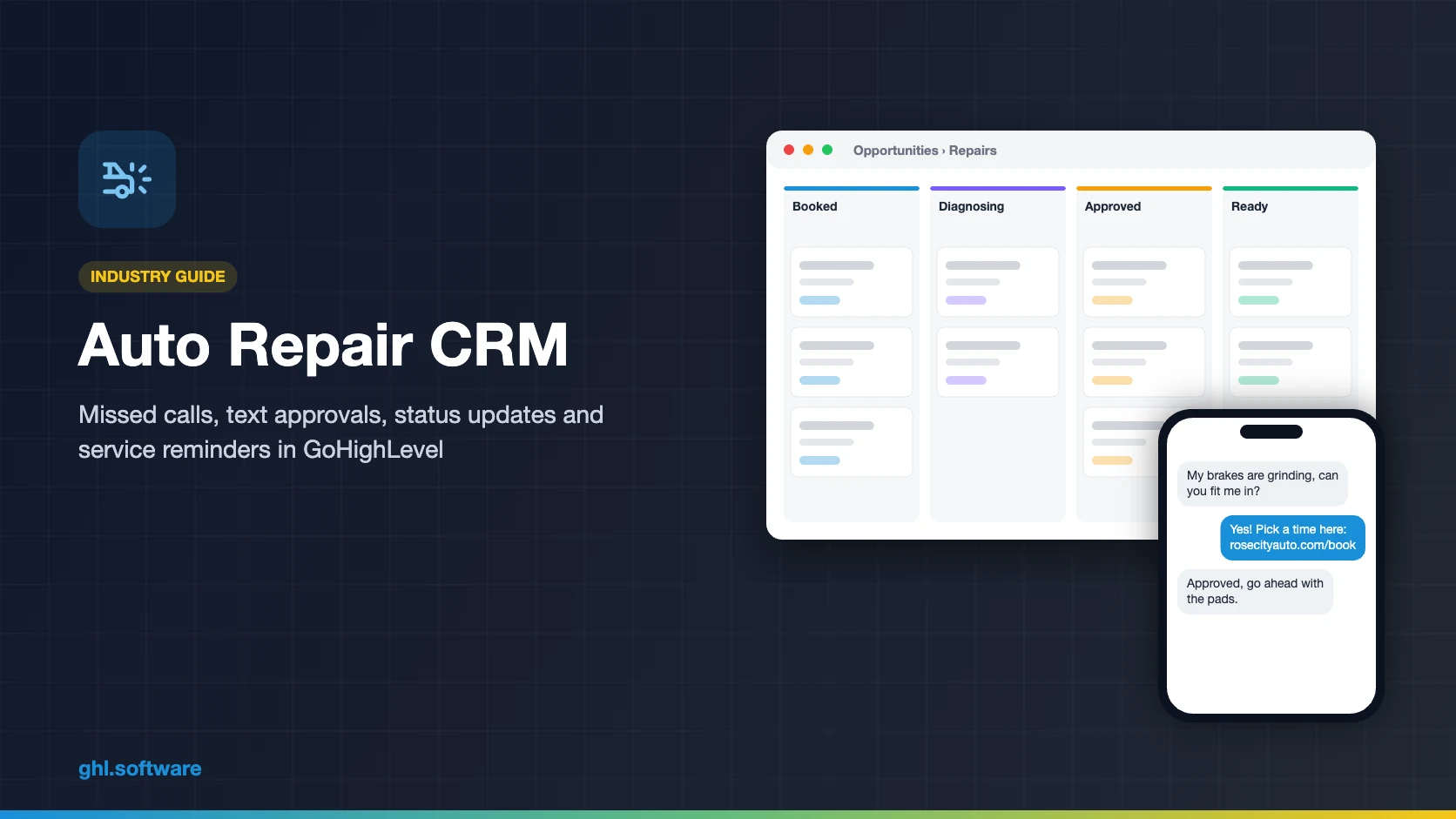
An auto repair CRM handles the customer side of a shop: it answers missed calls, books bays online, sends status texts and estimate links, asks for reviews and reminds drivers when service is due. HighLevel (GoHighLevel) does all of that in one account. However, it is not shop management software, so it sits next to Tekmetric, Shopmonkey or Mitchell 1, which keep the repair orders, parts and inspections.
Under a pickup in your Portland shop, you have both hands on a caliper when the phone rings. Your only advisor, Austin Patel, is busy at the counter. So it rings four times and goes to voicemail. The caller, Jasmine Emerson, has grinding brakes, so she skips the message and taps the next shop on Google Maps. Meanwhile, yesterday’s estimate for a timing belt still waits for an answer. An auto repair CRM exists for exactly these two moments.
Most pages on this topic either sell shop management software or list CRMs built for sales teams. Instead, this guide treats your shop system as the home of the repair order. The CRM, in contrast, is the layer that talks to customers before, during and after the job.
Below, you will see the pipeline, three automations, texting and AI, setup, real costs and honest limits. Finally, a section covers how to document estimate approvals, because in some states that record is not optional.
Leer en español: Software para talleres mecánicos · Ler em português: Sistema para oficina mecânica · Part of GoHighLevel by industry
Includes a free live setup class with a HighLevel coach.
Start free + bootcampAffiliate link.
What an auto repair CRM does, and what your shop system keeps
Shop management software runs the bay: repair orders, digital vehicle inspections (DVI), labor guides, parts ordering, inventory and invoices. An auto repair CRM runs the conversation around it. In other words, it makes sure every call gets an answer, every estimate gets a reply and every customer comes back for the next oil change. Moreover, HighLevel covers eight of those jobs in one sub-account.
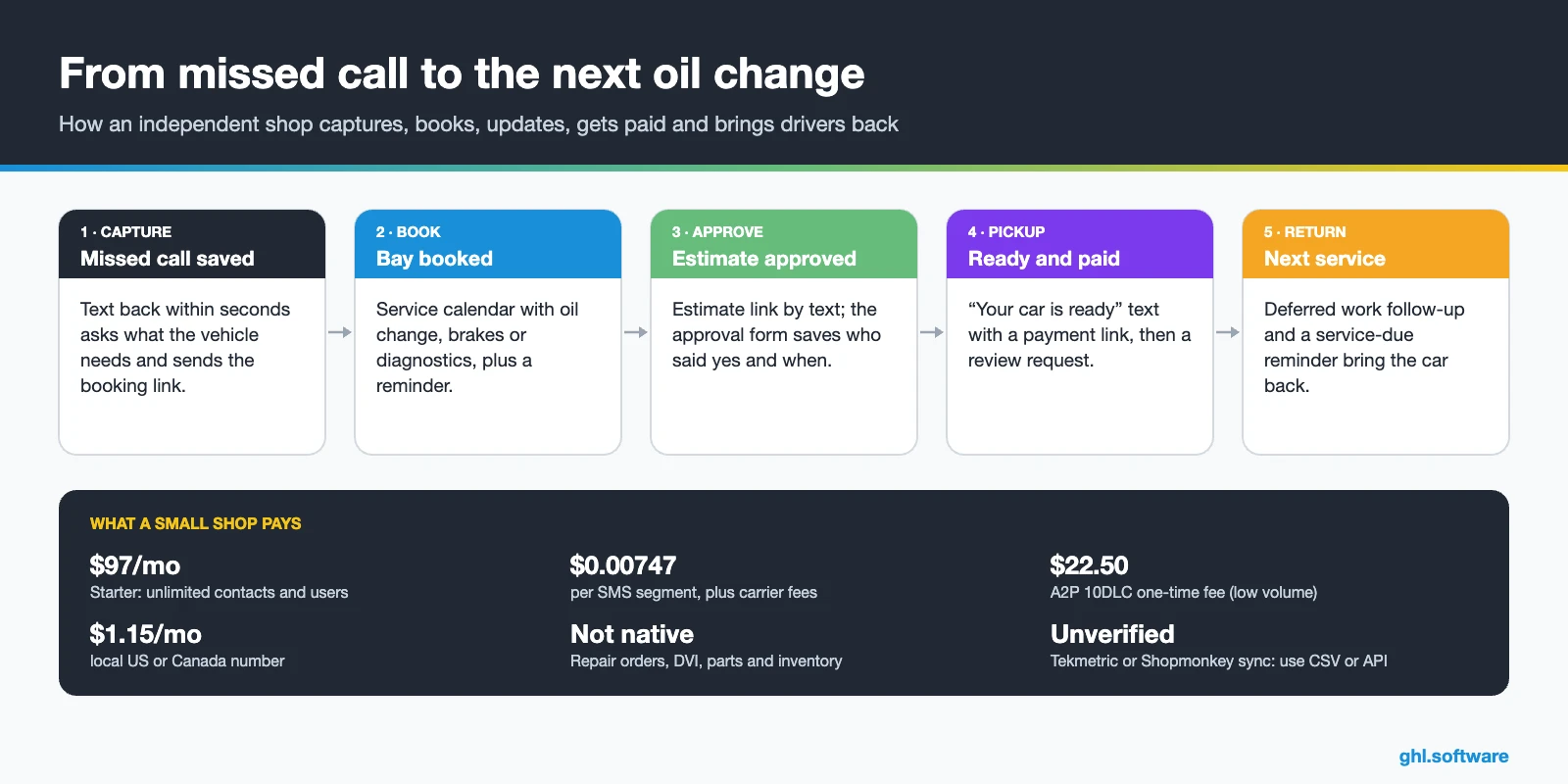
Common shop problems and how HighLevel solves them
| Problem | What HighLevel does | Feature |
|---|---|---|
| Missed calls while techs are working | Instant text to the caller with a booking link | Missed call text back |
| Slow estimate approvals | Estimate link by text, a reminder after 2 hours, a call task after 4 | Workflows + forms |
| “Is my car ready?” calls | Automatic texts at each repair stage | Pipeline + SMS |
| Declined work nobody follows up | Deferred-items field and 30/60-day reminders | Custom fields + workflows |
| Customers who visit once a year | Service-due reminder based on the last service date | Date-based workflow |
| Few Google reviews | The same review request for everyone, a few hours after pickup | Reputation management |
| Waiting at the counter to pay | Text-to-pay link when the car is ready | Payments |
The repair pipeline inside your auto repair CRM
In an auto repair CRM like HighLevel, a pipeline is a board of cards, and each card is an opportunity. For a shop, one card equals one visit, not one customer, because the same driver may come back three times a year. The board then shows at a glance which cars wait for a diagnosis, which estimates wait for a yes and which keys are ready at the counter.
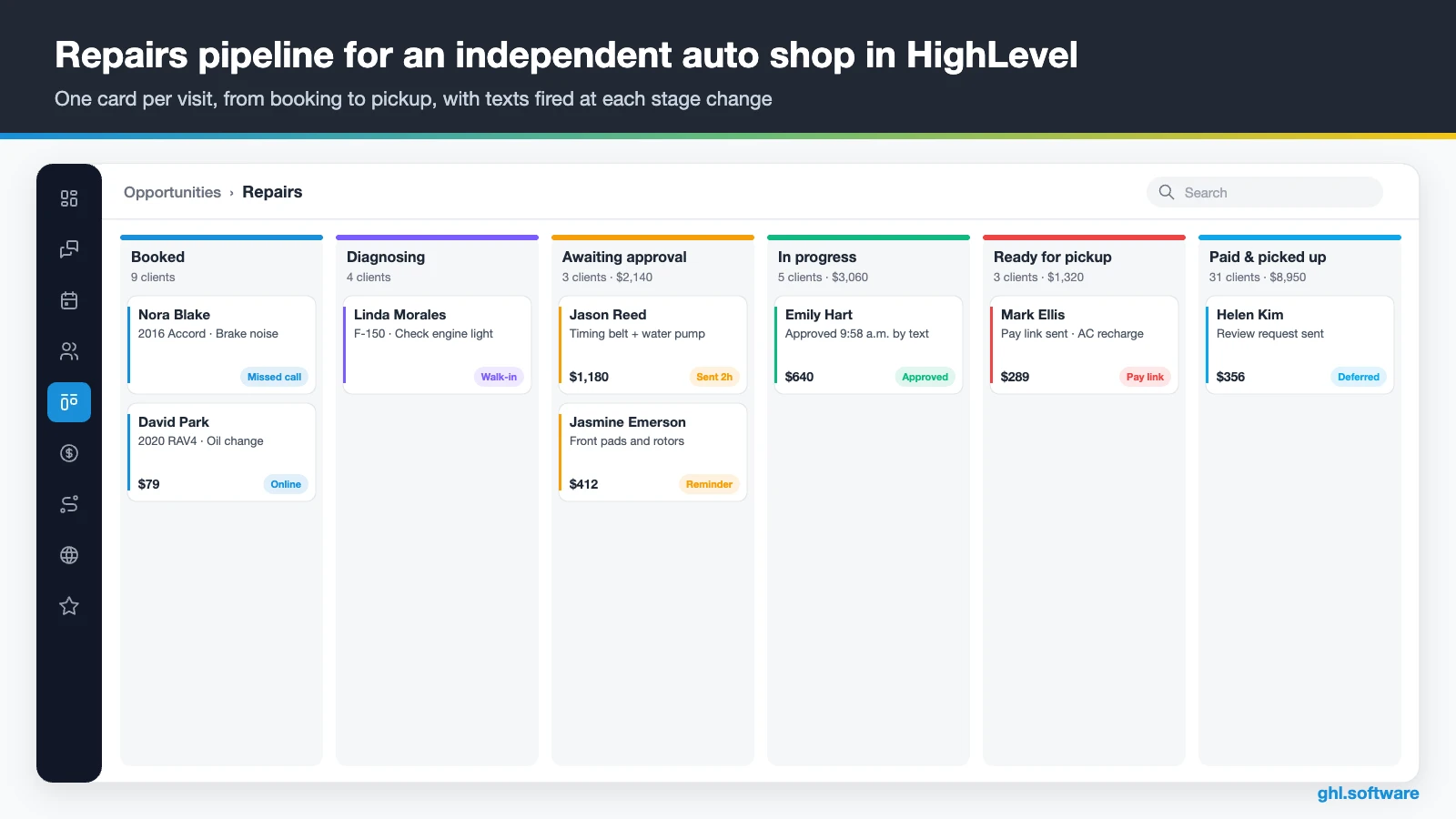
| Stage | What moves the card here |
|---|---|
| Appointment request | Missed call text back, web form or chat |
| Booked | The customer books on the service calendar, or the advisor books for them |
| Checked in | The advisor marks the arrival, or the appointment status changes to showed |
| Diagnosing | The tech starts the inspection in your shop system and the advisor moves the card |
| Awaiting approval | The estimate link goes out by text |
| Approved | The customer submits the approval form or signs the document |
| In progress | Parts arrived and the repair started |
| Ready for pickup | Quality check done; the text-to-pay link goes out |
| Paid & picked up | Invoice paid in HighLevel, or marked paid from the shop system |
Add a second pipeline called Retention for the work that happens after the car leaves. It holds two lanes: service due (reminder sent, booked) and deferred work (follow-up, booked or lost). That way, the Repairs board stays clean, while declined brake pads and upcoming oil changes still have an owner.
Three automations every repair shop should run
Start with the moments where shops lose money quietly: the call nobody answered, the estimate nobody approved and the customer nobody invited back. Each workflow below uses triggers and actions that exist in HighLevel today, so you can build this auto repair CRM without custom code.
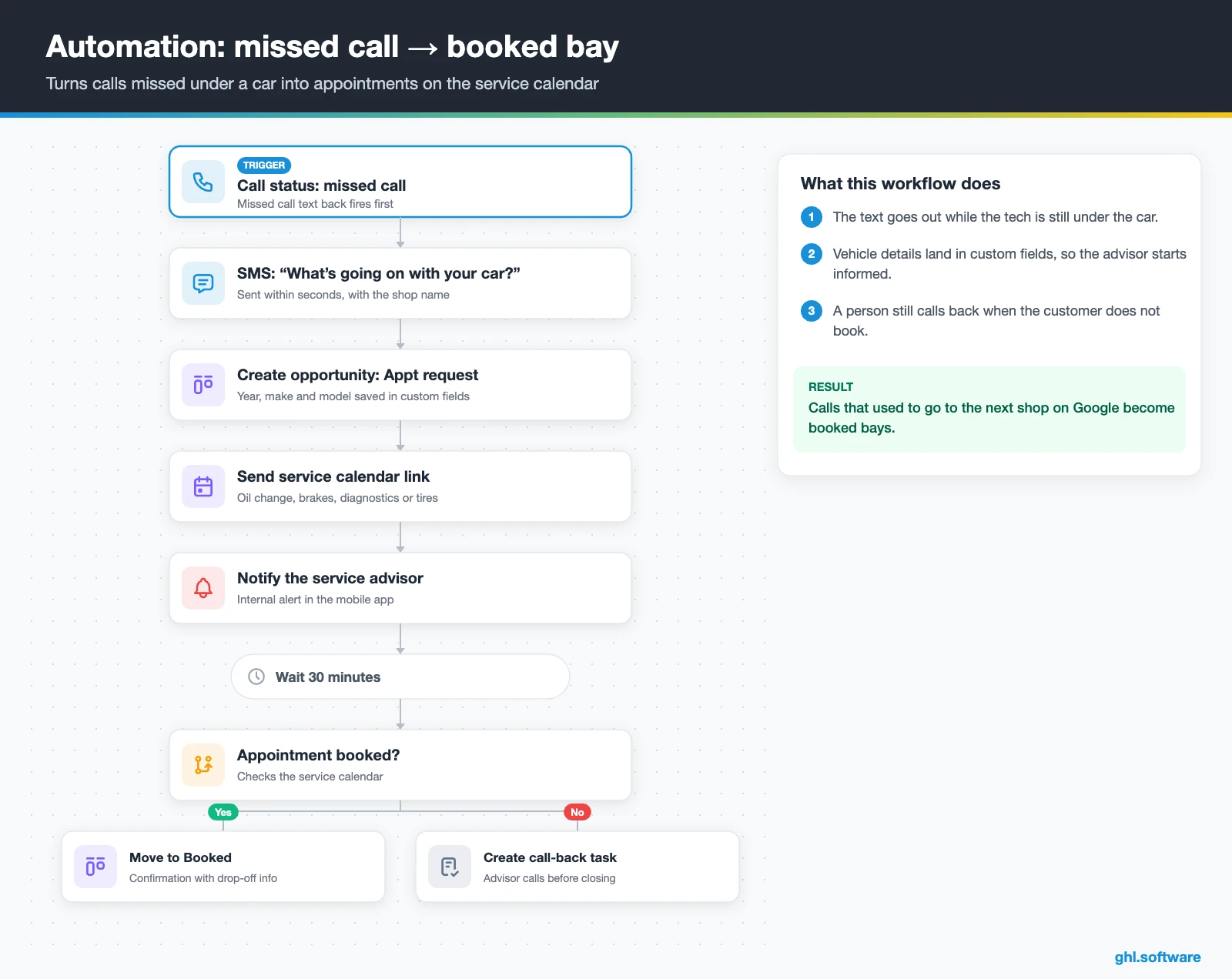
Missed call → booked bay
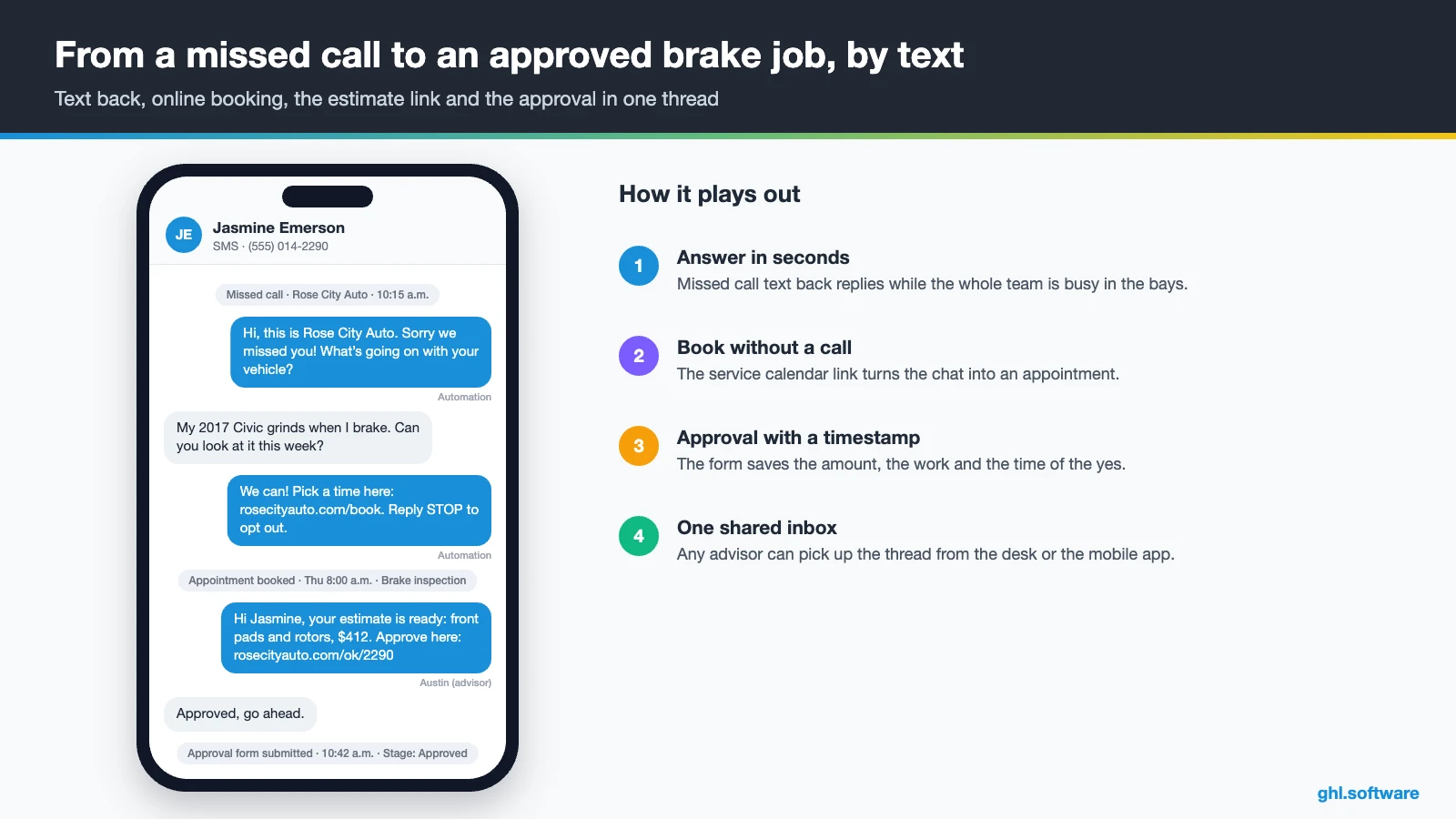
The trigger is a missed call, a web form or a chat. After the trigger fires, HighLevel texts the caller right away: “Sorry we missed you, what’s going on with your vehicle?” Then the workflow creates an opportunity in Appointment request, saves year, make and model in custom fields and sends a link to the service calendar. The advisor also gets an internal notification, so a person can step in.
After 30 minutes without a booking or a reply, the workflow creates a call-back task. If the customer books, the card moves to Booked and the confirmation includes drop-off instructions. As a result, calls missed while everyone is under a car turn into scheduled work instead of a win for the shop down the street.
Estimate sent → approval on record
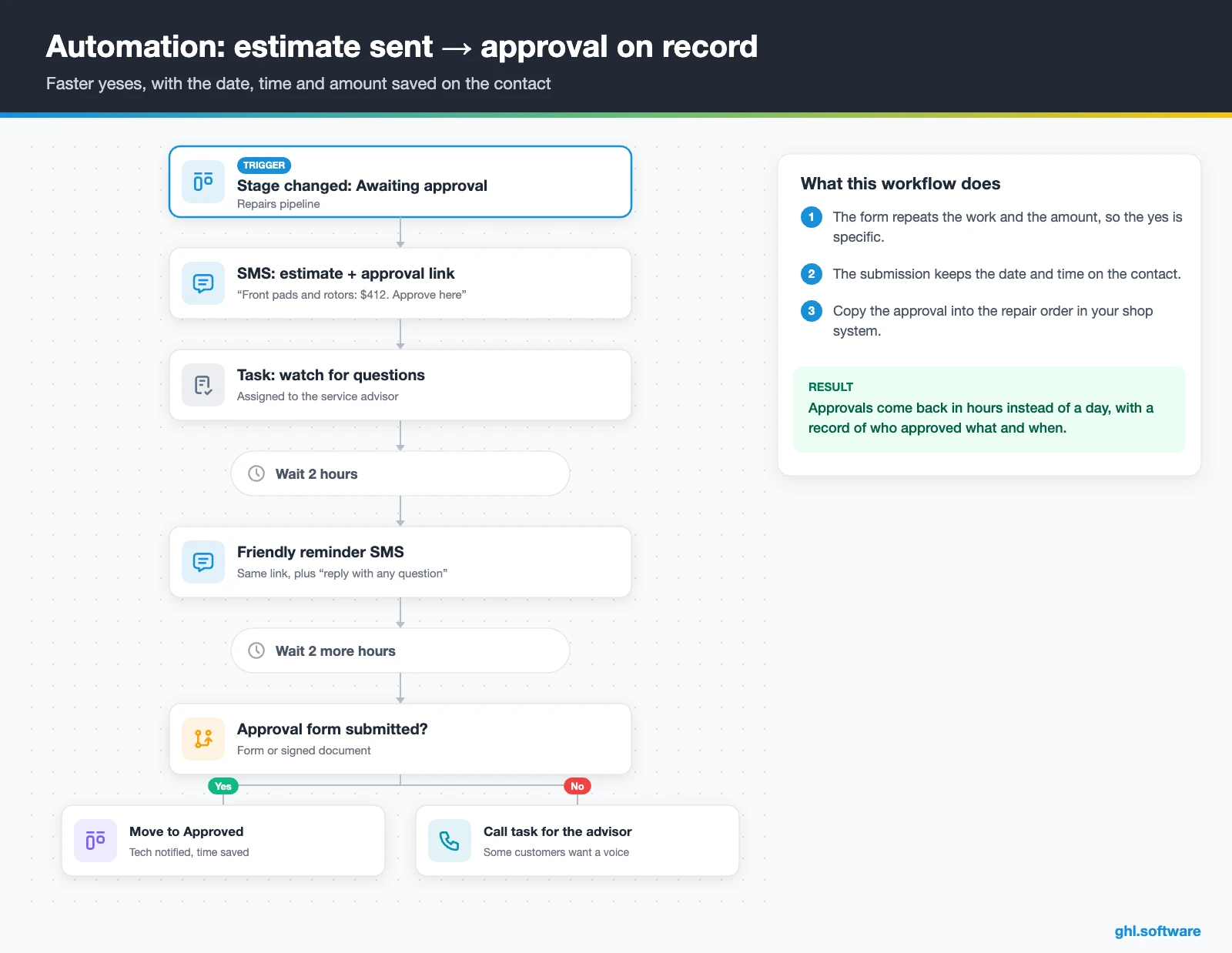
This one runs on Pipeline stage changed. When the advisor moves a card to Awaiting approval, the customer receives a text with the estimate and an approval link. Then the link opens a short form, or a document with e-signature, that repeats the amount and the work. Meanwhile, the advisor gets a task to watch for questions.
If nobody answers within two hours, a friendly reminder goes out. After four hours, the workflow creates a call task, because some customers want to hear it from a person. Once the form comes back, HighLevel stores the submission with its date and time, moves the card to Approved and notifies the tech. Later, the same workflow can send “your car is ready” with a payment link.
Pickup → review, deferred work and the next service
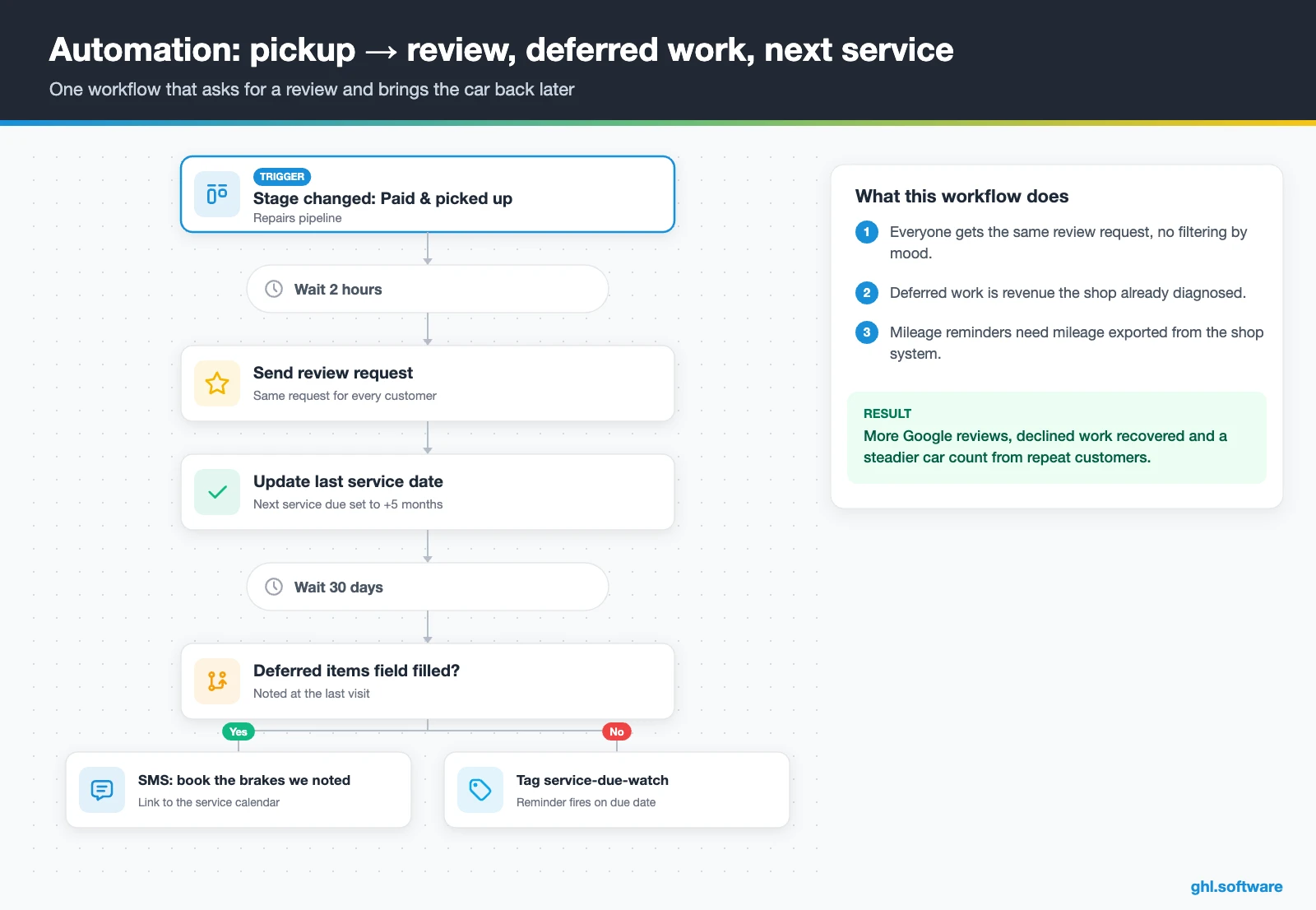
The trigger is the move to Paid & picked up. After two hours, every customer gets the same review request, whether the visit felt perfect or not. Then the workflow updates the last service date. If the deferred items field is not empty, the contact gets a deferred tag and, 30 days later, a text such as “Last time we noted your rear brakes at 3 mm. Want to book them?”
Service reminders also work the same way. A date-based workflow fires about five months after the last service, or earlier if your shop system exports mileage. In short, the shop keeps a steady car count from customers it already earned, instead of paying for ads to replace them.
Start with the snapshot and the pipeline from this guide, then add the automations one by one. The extended trial comes with our bootcamp link.
Start the 30-day trialAffiliate link. I may earn a commission at no extra cost to you.
Texting, Voice AI and the shared inbox for auto shops
In the US, SMS is the channel drivers actually read, so most workflows in an auto repair CRM end in a text. Every reply lands in HighLevel’s Conversations inbox, next to email, Facebook and Instagram messages and website chat. Advisors can answer from the counter or from the mobile app. Besides, response-time SLAs flag threads that wait too long.
Voice AI covers the hours when the shop is closed or every line is busy. For example, an agent can answer, collect the vehicle and the problem, book on the service calendar and transfer urgent calls. HighLevel’s Industry Agents include Aria for home services (HVAC, plumbing, electrical), but there is no auto repair template yet. So you build a custom agent and test it with real questions, such as “Do you do alignments?” or “How much is a diagnostic?”
Conversation AI can also answer web chat and texts with your hours, services and booking link. However, prices and diagnoses should stay with a person. Therefore, check the AI Employee pricing guide before you choose between pay-per-use and a monthly plan.
Is there an official HighLevel snapshot for auto repair?
Not exactly. HighLevel has no auto repair playbook. The closest official template is the Tire Shop playbook, and there is also one for automotive detailing. Like other industry snapshots, the Tire Shop one follows HighLevel’s generic structure:
- A “Tire Shop” website with Home (services and FAQ) and Link in Bio pages
- A “Tire Shop Offer” funnel: an opt-in step, then an appointment booking page
- The “Marketing Form – Claim Offer” form and a “Marketing Pipeline”
- “New Lead Nurture (Fast 5)” with email, SMS and a voicemail drop, plus “Long Term Nurture”
- Service calendars, custom values, a chat widget, snippets, a proposal template and one ad template
- Missed call text back and a Voice AI prompt for calls, appointments and FAQs
Still, the snapshot talks about tires and offers, not repairs. In fact, it has no repair stages, no estimate approval, no status updates, no deferred work and no service-due reminders. So use it for the website, the booking funnel and the nurture basics. Then add the Repairs and Retention pipelines and the three workflows from this guide to turn it into a real auto repair CRM. Third-party “car mechanic” snapshots also exist, but they are not official, so review one carefully before you import it.
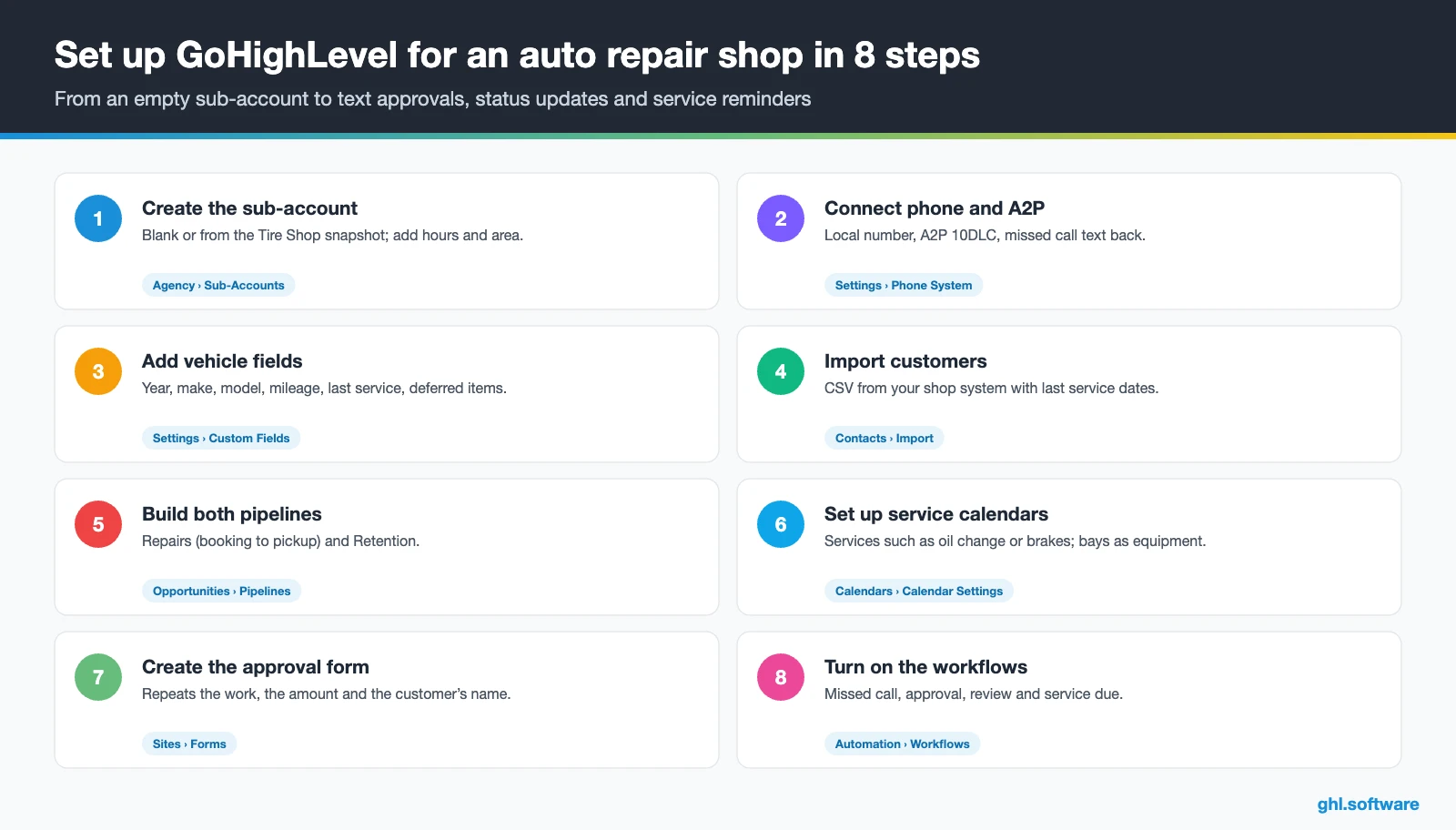
How to set up HighLevel for an auto repair shop
- Create the sub-account. Start blank or from the Tire Shop snapshot, then fill in the business profile, hours and service area.
- Connect phone and A2P. Buy a local number, register A2P 10DLC and turn on missed call text back and the call recording notice.
- Add vehicle fields. Year, make, model, plate or VIN, mileage, last service date, next service due and deferred items.
- Import customers. Export a CSV from your shop system and import it. Then plan a sync through Zapier, webhooks or the API.
- Build both pipelines. Repairs (booking to pickup) and Retention (service due and deferred work), with the stages from this guide.
- Set up service calendars. Oil change, brakes, diagnostics and tires as Services, with bays or lifts as equipment and buffers between jobs.
- Create the approval form. A short estimate-approval form or e-sign template that repeats the amount, the work and the customer’s name.
- Turn on workflows and reviews. The three automations, the review request, the Google connection and a dashboard for calls, approvals and repeat visits.
What an auto repair CRM costs with HighLevel
The plan is the simple part. Starter costs $97 a month, or $970 a year, with unlimited contacts and users, so every advisor and tech can log in. Because all core features come with every plan, workflows, calendars, reviews and payments cost nothing extra. Unlimited ($297) and Founder (formerly Agency Pro) ($497) suit agencies or groups with several locations.
GoHighLevel plans compared
| Starter | Unlimited | Founder | |
|---|---|---|---|
| Price | $97/month | $297/month | $497/month |
| Annual | $970/year | $2,970/year | $4,970/year |
| Sub-accounts | 3 | Unlimited | Unlimited |
| Contacts and users | Unlimited | Unlimited | Unlimited |
| All core features | Yes | Yes | Yes |
| White label web app | Yes | Yes | Yes |
| API access | Basic | Basic | Advanced, agency-level keys |
| Rebill phone and email | No | At cost | With markup |
| Rebill AI usage | No | No | Yes |
| SaaS Mode and automated sub-accounts | No | No | Yes |
| User and agent reporting | No | No | Yes |
| Support | 24/7 | 24/7 | 24/7 |
Usage adds the variable part. For example, picture a shop with 250 jobs a month and five texts per job: confirmation, status, estimate, ready and review. That is about 1,250 segments, or roughly $9 plus carrier fees. Then add service reminders, around 1,500 call minutes, a $1.15 local number, 5,000 emails and the A2P campaign fee.
Usage costs on top of the plan
| Item | Official price | When you pay it |
|---|---|---|
| Local phone number (US/Canada) | $1.15/month | Each number for SMS and calls |
| SMS (US/Canada) | $0.00747 per segment + carrier fees | Every text sent or received |
| Calls (US) | $0.0166/min outbound, $0.01165/min inbound | Calls through LC Phone |
| A2P 10DLC registration | $22.50 one-time (low volume) + monthly campaign fee | Before texting US numbers |
| Email (LC Email) | $0.675 per 1,000 emails | Campaigns and workflow emails |
| $10/month per sub-account + Meta fees | If you use WhatsApp inside HighLevel | |
| AI | Pay-per-use, or $50 or $97/month per sub-account | Voice AI, Conversation AI and other AI tools |
| Premium workflow steps | $0.01 per run after 100 free | Webhooks, Google Sheets, Slack, app actions |
In short, an auto repair CRM for a small independent shop like that usually costs around $140 to $170 a month on Starter, before AI. Voice AI and Conversation AI add pay-per-use charges or a $50 or $97 monthly plan. Card payments also carry Stripe’s processing fees. The GoHighLevel pricing guide explains every line.
Honest limits: what HighLevel does not do for a repair shop
As an auto repair CRM, HighLevel is not shop management software, and it does not try to be. It has no repair orders, no digital vehicle inspections, no labor guides, no parts catalog or ordering, no inventory, no VIN or plate decoding and no technician time clock. So keep Tekmetric, Shopmonkey, Mitchell 1, AutoLeap or whatever runs your bays. Then use HighLevel for calls, texts, approvals, reminders and reviews.
Connecting your shop management system
We could not verify a native, two-way sync between HighLevel and Tekmetric, Shopmonkey or Mitchell 1. Therefore, plan on CSV imports at first, then Zapier, inbound webhooks or the API once the workflows prove their value. Mileage-based reminders also depend on that data, because HighLevel only knows the mileage you send it. Recurring appointments have limits too, so run reminders as workflows rather than standing bookings.
| HighLevel | Shop management (Tekmetric, Shopmonkey, Mitchell 1) | Kukui | AutoLeap | |
|---|---|---|---|---|
| Main job | Calls, texts, booking, approvals, reviews and marketing | Repair orders, inspections, parts and invoices | Marketing and CRM for auto shops | Shop management with built-in marketing |
| Repair orders and inventory | No | Yes | No | Yes |
| Missed calls and AI answering | Text back + Voice AI | Varies | Call tracking | AI receptionist |
| Deferred work follow-up | Workflows | Varies | Varies | Yes |
| Google reviews | Yes | Varies | Yes | Yes |
| Best when | You want one flat-priced layer for all customer contact | Always: it runs the bay | You want an auto-only marketing vendor | You want shop management and marketing in one tool |
Estimate approvals that leave a record: the California example
Many states regulate how a shop gets permission to work on a car, and California spells it out. Under the Bureau of Automotive Repair’s Write It Right guide, a shop gives a written estimate for parts and labor. Then the customer authorizes the repair in written, oral or electronic form before work begins. When the approval is oral, the shop records the date, the time and the name of the person who approved.
Extra work found halfway through needs a revised estimate and a new approval, which can come by phone, email, text or other electronic means. It also has to appear on the work order and the invoice. Finally, the shop keeps those records for three years. Other states have different rules, so check yours.
This is where an auto repair CRM helps without pretending to be your lawyer. The approval form saves who approved, which amount and when, right on the contact. Meanwhile, the text thread keeps the conversation, and call recordings can back up phone approvals. Copy the approval into the repair order too, because the shop system remains the official record. For more ideas, browse the other industry guides or all features.
Open a free account, load the pipeline and turn on the first automation today. The bootcamp walks you through the setup live.
Start the 30-day trialAffiliate link. I may earn a commission at no extra cost to you.
Frequently asked questions
What is auto repair CRM software?
Auto repair CRM software manages the relationship with drivers rather than the repair itself. Moreover, it stores each customer and vehicle, answers missed calls, books appointments, sends status updates and estimate links, and asks for reviews. Then it brings customers back with service reminders and deferred-work follow-ups. In HighLevel, all of that runs in one account, next to the shop management system that holds repair orders, inspections and parts.
What is the difference between a CRM and shop management software?
Shop management software, such as Tekmetric, Shopmonkey or Mitchell 1, runs the work: repair orders, inspections, labor, parts, inventory and invoices. Meanwhile, a CRM runs the communication: calls, texts, bookings, approvals, reviews and reminders. Some shop systems include basic texting and reminders, while a CRM like HighLevel goes deeper on automation and marketing. Most independent shops keep both and connect them through CSV imports or an integration.
What is the best CRM for an auto repair shop?
It depends on what you already use. If your shop system already sends reminders and you only need reviews, its built-in tools may be enough. However, if you want missed call text back, an AI receptionist, online booking, estimate approvals by text, reviews and a website in one flat-priced account, HighLevel is a strong fit. Auto-specific vendors such as Kukui or AutoLeap suit shops that prefer an industry-only tool.
How much does an auto repair CRM cost?
HighLevel’s Starter plan costs $97 a month with unlimited users, and usage adds the rest. For example, a shop with 250 jobs a month and five texts per job, plus calls, email and a local number, usually lands around $140 to $170 a month before AI. Voice AI and Conversation AI add pay-per-use charges or a $50 or $97 monthly plan, and card payments carry Stripe fees.
Can customers approve repair estimates by text?
Yes. The workflow texts a link to a short approval form or an e-signature document that repeats the amount and the work. When the customer submits it, HighLevel saves the submission with the date and time and moves the job to Approved. Some states, such as California, set rules for written, oral and electronic authorization, so copy the approval into your repair order and check your state’s requirements.
Does HighLevel integrate with Tekmetric or Shopmonkey?
We could not verify a native, two-way integration with Tekmetric, Shopmonkey or Mitchell 1. Instead, most shops start with a CSV export of customers, vehicles and last service dates. Later, they connect the systems through Zapier, inbound webhooks or HighLevel’s API, so a closed repair order can update the last service date and trigger the review request. Ask your shop system’s support which export or API options your plan includes.
Is there a free auto repair CRM?
Some shop systems and general CRMs have free tiers, but they rarely include texting, AI calls or review automation, because every text and call has a carrier cost. HighLevel itself has no free plan. It offers a free trial, and after that the Starter plan costs $97 a month with unlimited users. For most shops, the real question is whether one recovered brake job a month covers the bill.
More industry guides
Sources: Tire Shop playbook (HighLevel) · Automotive Detailing playbook (HighLevel) · Missed call text back (HighLevel Help) · AI Voice Agents overview (HighLevel Help) · Appointment booking in Voice AI (HighLevel Help) · Recurring appointments (HighLevel Help) · Tap to Pay (HighLevel Help) · A2P 10DLC registration (HighLevel Help) · California BAR: Write It Right · FCC: Telemarketing and robocalls