A WhatsApp CRM ties every WhatsApp chat to a contact, a pipeline and automations, so a team can sell from one number. In GoHighLevel, it runs on the official WhatsApp Business Platform for $10 a month per sub-account, plus Meta’s per-message rates and a 5% processing fee.
Checked on HighLevel’s help center and Meta’s developer documentation on October 24, 2026.
Carlos runs a roofing company in Houston, and most of his leads now arrive on WhatsApp. For a while, three salespeople shared one phone. Then a homeowner asked for a quote twice, got two different prices and hired someone else. That week Carlos started looking for a WhatsApp CRM, a way to keep every chat, quote and follow-up in one place.
His problem is common. WhatsApp is easy to start on, but it gets messy once a second person answers the same number. So this guide covers what a WhatsApp CRM does, how GoHighLevel handles it, what it costs in 2026, the setup and the honest alternatives.
What is a WhatsApp CRM?
A WhatsApp CRM is a customer relationship manager that treats WhatsApp as a sales channel. So instead of living on one phone, each chat sits on a contact with history, tags and a deal stage. Then the team can assign chats, send templates and automate follow-ups.
The connection matters most. A serious WhatsApp CRM uses Meta’s official WhatsApp Business Platform, often called the WhatsApp Business API. However, some cheap tools automate WhatsApp Web through browser extensions instead. They can break WhatsApp’s terms, so your number is at risk.
How the GoHighLevel WhatsApp integration works
GoHighLevel connects WhatsApp through the official WhatsApp Business Platform. Setup happens in each sub-account under Settings > WhatsApp > Connect your WhatsApp, where you choose one of three paths. After that, WhatsApp chats appear in Conversations, next to SMS, email, Facebook and Instagram.
| Coexistence (existing app) | New business account | Migration | |
|---|---|---|---|
| Option in HighLevel | Connect a WhatsApp Business App | Create a new WhatsApp business account | Migrating from an existing BSP |
| Number | Your current WhatsApp Business app number | A new number, or a display name with a virtual number | A number you use with another official provider |
| Verification | Facebook login and the app on your phone | A one-time code by SMS or call, after Facebook login | An active number, plus Facebook login |
| History | Contacts and up to 6 months of chats | Starts empty | Not detailed by HighLevel |
| Main limits | One Coexistence number per account; 20 messages per second | Standard platform rules | Standard platform rules |
Coexistence is what most small businesses want, because the owner keeps the app while the team uses the CRM. Still, group chats, broadcast lists, calls and the catalog are not supported on that number. It is also unavailable for numbers from Nigeria or South Africa.
WhatsApp CRM pricing in GoHighLevel (2026)
WhatsApp in HighLevel has two layers of cost: HighLevel’s fee and Meta’s fee for each delivered message. Since July 1, 2025, Meta charges per delivered message instead of per 24-hour conversation. The rate depends on the message category and the country code of the recipient.
| Charge | Amount | Notes |
|---|---|---|
| HighLevel WhatsApp fee | $10/month per sub-account | Billed to the agency for each WhatsApp-enabled sub-account |
| Marketing, utility and authentication templates | Meta’s rate per delivered message | Varies by country and category |
| Service messages (free-form replies) | First 1,000 per number each month free | Billed from the 1,001st since October 1, 2026 |
| Utility templates inside an open window | Meta’s rate | Free until September 30, 2026; billed since October 1, 2026 |
| Processing fee | 5% on Meta rates | Covers Stripe payment processing |
| Agency rebilling | 1x to 10x markup | Default 1.05x to cover processing |
Meta only charges for delivered messages, and messages from customers are free. Also, chats that start from a Click to WhatsApp ad open a free entry point window once you reply. Meta’s docs say it can last up to 7 days, while HighLevel’s guides still say 72 hours, so confirm before you budget ads.
Meta publishes rates by market, so the United States and Canada, for example, share one North America rate. Also, business-initiated calls are billed per minute, while customer-initiated calls are free. Finally, the platform costs $97, $297 or $497 a month on Starter, Unlimited or Agency Pro. See GoHighLevel pricing.
WhatsApp templates and the 24-hour window
This is the rule that confuses most new users. When a customer messages or calls you, a 24-hour customer service window opens. While it is open, you can send normal free-form messages. However, once it closes, you can only reach that person with a template Meta has approved.
Templates live in Settings > WhatsApp > Templates. There you pick one of three categories: marketing for promotions, utility for transactional updates and authentication for verification codes. Choose honestly, because Meta reviews every template and can reject it for the wrong category or content.
The MM Lite deadline
Meta will stop delivering marketing messages through the Cloud API on October 13, 2027. So marketing templates must move to its Marketing Messages API, which HighLevel supports as MM Lite. You enable it from a banner in Settings > WhatsApp, while numbers and templates keep working.
Workflows and AI chatbots on WhatsApp
The CRM part pays off in automation. In Automation > Workflows, the Customer Replied trigger can filter by reply channel, so a WhatsApp reply starts its own flow. Then the WhatsApp action sends a free-form message or an approved template with variables such as the contact’s name.
There is also a Customer Service Window Check action with Open and Closed branches. So you send free-form text while the window is open and a template once it closes.
AI replies with Conversation AI
For chatbots, HighLevel’s Conversation AI lists WhatsApp among its supported channels. You create a bot in AI Agents > Conversation AI. Then you choose Suggestive mode, where it drafts replies for your team, or Auto-Pilot, where it answers on its own. The Appointment Booking bot type can also book, reschedule or cancel appointments on your calendars.
AI is billed separately, either per use at token cost or with an AI Employee plan. For example, Growth costs $50 a month per location with 1,000 Conversation AI responses, while Unlimited costs $97. See AI Employee pricing and the WhatsApp bot tutorial.
How to set up a WhatsApp CRM in GoHighLevel step by step
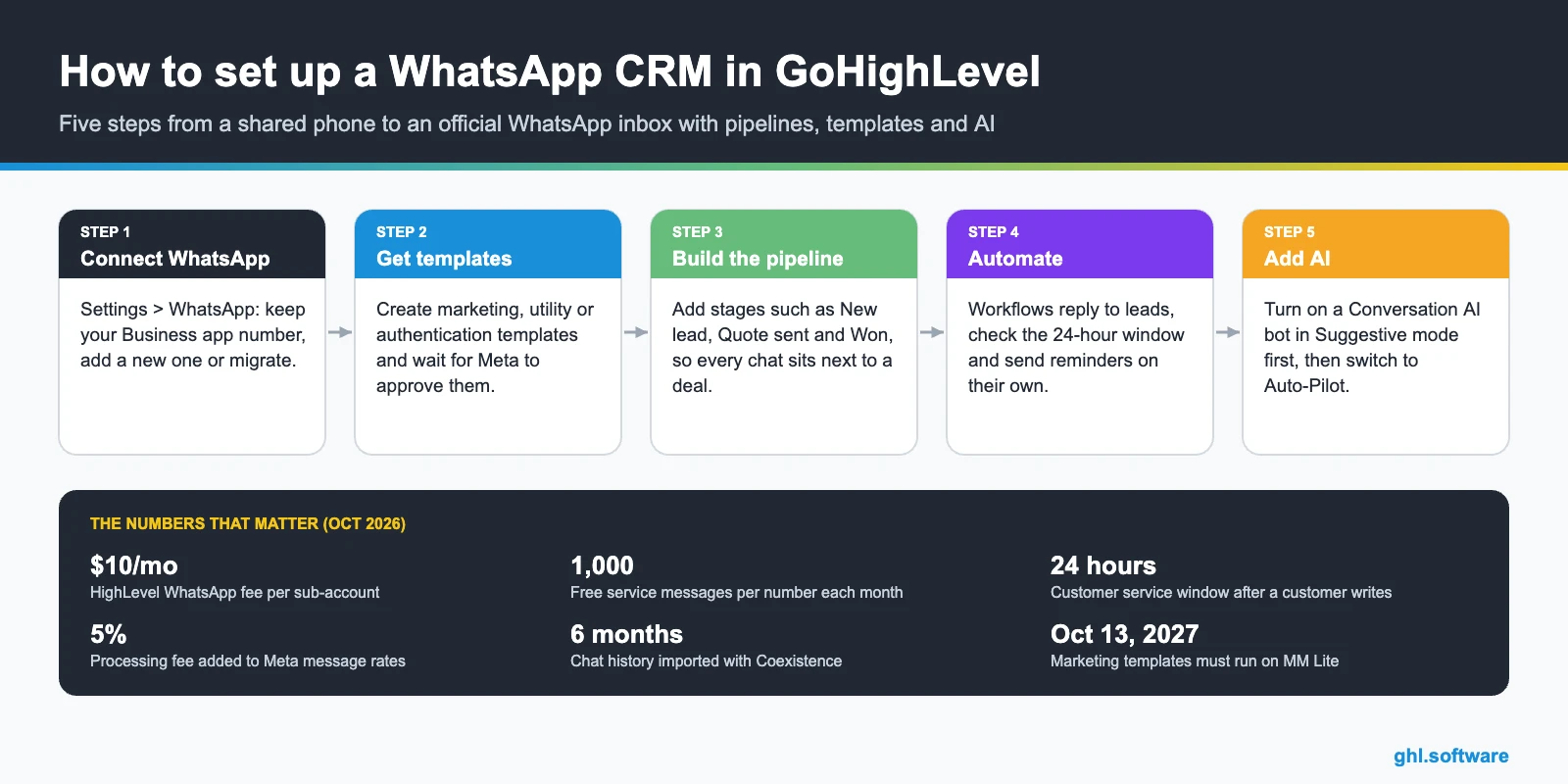
- Choose your number. Decide whether to keep your WhatsApp Business app number with Coexistence or use a new one. If you keep it, update the app to the latest version first.
- Connect WhatsApp. In the sub-account, go to Settings > WhatsApp > Connect your WhatsApp and pick Coexistence, a new account or a migration.
- Log in with Facebook. Click Continue with Facebook, select your Meta business portfolio and WhatsApp Business Account, then verify the number.
- Create templates. In Settings > WhatsApp > Templates, build a welcome, a reminder and a follow-up template, then wait for Meta’s review.
- Build the pipeline. Create stages such as New lead, Quote sent and Won, so every WhatsApp chat sits next to a deal.
- Automate replies. Add workflows with the Customer Replied trigger, the WhatsApp action and the window check.
- Add AI and test. Turn on a Conversation AI bot in Suggestive mode, then message the number yourself before you go live.
With Coexistence, finish the history sync within 24 hours of onboarding, or you have to repeat the flow. Also, templates go out from the CRM, because the app cannot send them.
Five WhatsApp automations to build first
- Instant lead reply. A form or ad lead gets a welcome template in seconds, so nobody waits.
- Appointment reminders. HighLevel lists interactive calendar reminders as part of its WhatsApp add-on. See calendars.
- Quote follow-up. If a deal sits in Quote sent for three days, a template checks in politely.
- Review requests. Reputation settings include WhatsApp review requests after a visit. See reviews.
- After-hours AI. A Conversation AI bot answers common questions and books calls while the team is offline.
Carlos started with the first two. Then he added the quote follow-up, because that is where his deals used to go cold.
WhatsApp CRM alternatives
GoHighLevel is not the only option, and for some teams it is more than they need. Here is how the main alternatives compare, based on each vendor’s pricing page:
| Tool | Entry price | WhatsApp messages | Free trial |
|---|---|---|---|
| WhatsApp Business app | Free | Free to use, but no pipeline or workflows | No |
| Kommo | From $15 per user/month, 6-month minimum | Messengers included from the Base plan | 14 days |
| WATI | Growth $59/month billed annually, 3 users | Per-message charges on WATI’s rate card | 7 days |
| Respond.io | Starter $79/month | You pay for the contacts you talk to | 7 days |
| GoHighLevel | From $97/month plus $10/month per sub-account | Meta rates plus 5% processing | 14 days, or 30 with the bootcamp |
So which one fits? Kommo and WATI are messaging-first tools that are quick to learn, while Respond.io bills by the contacts you talk to. GoHighLevel, instead, makes sense when WhatsApp is one piece of a bigger system with funnels, calendars, payments and reviews. Whatever you choose, avoid unofficial WhatsApp Web automations.
Is GoHighLevel the right WhatsApp CRM for you?
Choose it if WhatsApp drives your sales
You get the official platform, unlimited users, pipelines, calendars and workflows in one account, so leads stop falling through the cracks.
Choose it if you run an agency
Each client gets a sub-account, and rebilling lets you charge WhatsApp usage with a markup from 1x to 10x.
Skip it if you answer a few chats alone
The free WhatsApp Business app is enough until a second person needs to answer the same number.
Carlos chose GoHighLevel because his ads, quotes and appointments lived in three tools. So now every lead lands in one pipeline. See the full WhatsApp feature guide, the CRM and automations.
The bootcamp link gives you 30 days instead of 14, plus live onboarding classes to connect WhatsApp and launch your first automations. However, WhatsApp and Meta usage fees can still apply during the trial.
Start the 30-day trialAffiliate link. I may earn a commission at no extra cost to you.
Frequently asked questions
What is a WhatsApp CRM?
It is a CRM that treats WhatsApp as a sales channel. Each chat sits on a contact record with tags and a deal stage, so a team can share one number and automate follow-ups.
Does GoHighLevel integrate with WhatsApp?
Yes, through the official WhatsApp Business Platform. In Settings > WhatsApp you can keep your WhatsApp Business app with Coexistence, create a new account or migrate from another provider.
How much does WhatsApp cost in GoHighLevel?
HighLevel charges $10 a month per WhatsApp-enabled sub-account. Then Meta charges per delivered message by country and category, plus a 5% processing fee. Since October 1, 2026, each number gets 1,000 free service messages a month, and utility templates inside the 24-hour window are billed.
Can I keep my WhatsApp Business app number?
Yes, with Coexistence. It imports your contacts and up to six months of chats, while the app keeps working on your phone. However, templates go out only from the CRM, and groups, broadcasts and calls are not supported.
What is the WhatsApp 24-hour window?
When a customer messages or calls you, a 24-hour customer service window opens. During it you can send free-form messages. Once it closes, you can only start the conversation again with a template that Meta has approved.
Is there a free WhatsApp CRM?
The WhatsApp Business app is free, but it has no pipelines or workflows. Instead, most CRMs offer a trial, and the official platform always adds Meta’s rates beyond the free tiers. GoHighLevel has a 14-day trial, or 30 days with the bootcamp link.
Related: WhatsApp in GoHighLevel · How to build a WhatsApp bot · CRM · Automations · AI · Phone and SMS · GoHighLevel pricing · AI Employee pricing
HighLevel sources (checked October 24, 2026): WhatsApp Pricing, Billing and Rebilling Guide (updated September 22, 2026) · WhatsApp Platform Pricing & Feature Comparison (October 15, 2026) · WhatsApp Overview, Sub-Account Set Up and Best Practices (September 16, 2026) · WhatsApp Coexistence (September 2, 2026) · How to create a WhatsApp Template (September 11, 2026) · WhatsApp – Workflow Integration (June 30, 2026) · Workflow Action – WhatsApp Customer Service Window Check (April 8, 2025) · How to Set Up a Conversation AI Bot (September 10, 2026) · AI Product Pricing (October 20, 2026) · Move your WhatsApp marketing to MM Lite before October 2027 · A rebuilt WhatsApp template builder, plus per-contact media · HighLevel pricing.
Meta and alternatives (checked October 24, 2026): Meta: Pricing on the WhatsApp Business Platform · Kommo pricing · WATI pricing · Respond.io pricing. Message rates change by market; check Meta’s rate cards before you launch a campaign.
También en español: CRM para WhatsApp · Também em português: CRM para WhatsApp
Related Posts