A missed call is often a high-intent moment. Someone has a question, needs a quote, wants to book, or is ready to buy—but your team cannot always answer immediately. If the caller reaches voicemail and hears nothing back, the conversation may end before it begins.
Missed call text back solves that gap by automatically sending an SMS when an inbound call goes unanswered. The caller receives an immediate acknowledgment, can continue the conversation by text, and can be guided toward the next step—such as answering a qualifying question or booking an appointment.
Quick answer: GoHighLevel can automatically text missed callers, personalize the message, continue the conversation in the CRM, and connect the response to workflows, pipelines, notifications, and appointment calendars.
Table of contents
What is missed call text back?
Missed call text back is an automated response that sends a text message after your business misses an inbound call. Instead of asking the caller to leave a voicemail and wait, the system acknowledges the call while the person is still thinking about the problem they wanted to solve.
A basic message might say:
“Hi, this is {{business.name}}. Sorry we missed your call. How can we help?”
The message is simple, but the process behind it can be much more powerful. In GoHighLevel, the caller can become a contact, the conversation can appear in a shared inbox, and a workflow automation can assign the lead, add tags, notify a team member, update a pipeline, or send an appointment link.
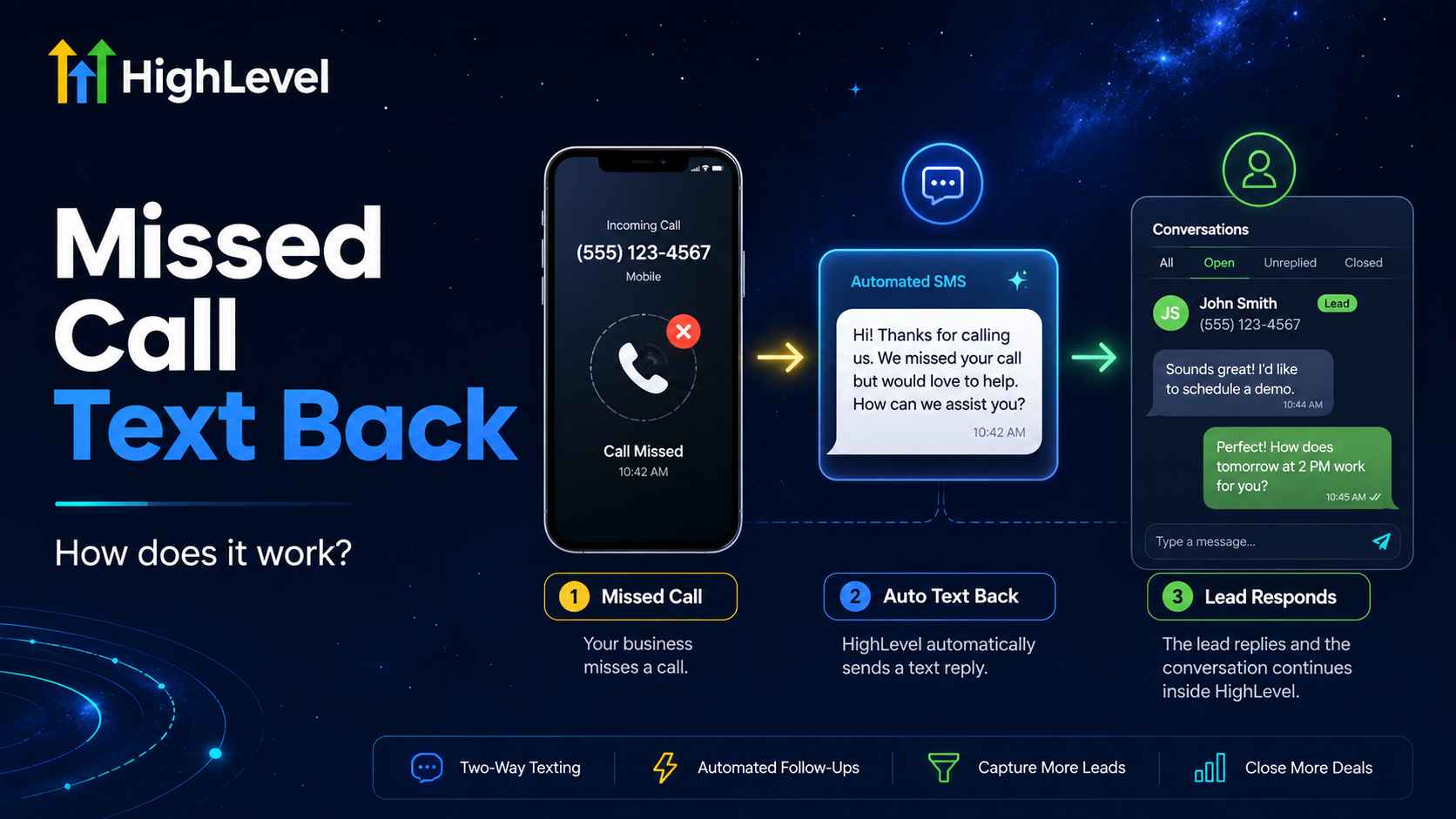
How missed call text back automation works
- A prospect calls your business number.
- The call is not answered within the configured ring time.
- GoHighLevel sends an automatic SMS from your default business number.
- The caller replies by text. The response is recorded in Conversations and associated with the contact.
- Your workflow takes the next action. It can notify a salesperson, ask a qualifying question, create an opportunity, or send a booking link.
The native feature is designed for speed. For more control—such as preventing repeated messages when someone calls several times—you can use a custom workflow with wait steps, filters, tags, and business-hour conditions.
Why missed call text back matters for small businesses
It responds while intent is still fresh
A caller may be contacting several businesses. An immediate text confirms that the call was noticed and gives the person a low-friction way to continue without waiting for a callback.
It creates a written conversation
Some customers prefer text to voicemail. SMS lets them describe what they need, share details, and respond when convenient. Your team also gains a written record inside the GoHighLevel CRM.
It can move callers toward an appointment
The first message does not need to close the sale. Its job is to reopen the conversation. Once the caller replies, the automation can ask a qualifying question or provide a calendar link.
It helps after hours and during busy periods
Local businesses, contractors, clinics, real estate teams, and service companies cannot answer every call. An automated acknowledgment keeps communication moving when staff members are unavailable.
It centralizes follow-up
Calls, texts, contact records, pipeline stages, and appointments can live in one platform instead of being scattered across a phone system, spreadsheet, inbox, and scheduling tool.
Turn missed calls into active conversations
Try GoHighLevel with the CRM, phone system, workflows, and appointment tools in one platform.
No contracts • Cancel anytime. Disclosure: we may earn a commission if you start a trial through this link, at no additional cost to you.
How to set up missed call text back in GoHighLevel
HighLevel’s current setup is available at the sub-account level. Menu labels can change as the interface evolves, but the official configuration path is:
- Open the appropriate sub-account.
- Go to Settings → Phone System → Voice.
- Open Voicemail & Missed Call Text Back.
- Select Missed Call Text Back and enable the feature.
- Choose Customize and write your message.
- Use custom values when appropriate to insert the contact or business name.
- Send a test message, review it on a real phone, and save the configuration.
You can also adjust the incoming-call timeout and voicemail greeting. HighLevel notes that the native feature can send a message for every missed attempt, including repeated calls made close together. If that would create duplicate texts, use a workflow recipe with a wait step or tags to control re-entry.
For the latest interface details, consult HighLevel’s official missed call text back guide.
Missed call text back templates
The best message is short, specific, and easy to answer. Avoid sending a long sales pitch before the caller has replied.
General small business
Hi {{contact.first_name}}, this is {{location.name}}. Sorry we missed your call. What can we help you with today?
Appointment-based business
Hi {{contact.first_name}}, sorry we missed your call. Are you looking to book, reschedule, or ask a question? Reply here and we’ll help.
Home services or contractors
Thanks for calling {{location.name}}. We’re helping another customer right now. What service do you need, and what ZIP code is the property in?
After-hours response
Thanks for calling {{location.name}}. Our office is currently closed, but we received your call. Reply with a short description of what you need and we’ll follow up as soon as possible.
Booking-focused message
Sorry we missed you. If you’d like to choose a time now, you can book here: {{custom_values.booking_link}}. Or reply with your question.
Advanced GoHighLevel workflow ideas
Prevent duplicate messages
Add a tag such as “Missed Call Follow-Up Sent,” wait for a defined period, and check whether the contact has already entered the workflow before sending another SMS.
Separate business-hours and after-hours messages
Use time-window conditions so callers receive the most accurate expectation. During business hours, promise a quick response only if your team can deliver it. After hours, explain when the office will reopen.
Create or update an opportunity
When a new caller replies, create an opportunity in a “Missed Call Leads” pipeline or move the contact to the appropriate stage. This keeps the follow-up visible and measurable.
Notify the right person
Assign the contact and send an internal notification based on the phone number called, service requested, territory, or calendar selected.
Offer appointment booking
Send a relevant calendar link after the caller indicates what they need. Avoid forcing every caller into the same booking page if your business has different services or teams.
Use AI for the next response
Businesses that receive many repetitive questions can extend the workflow with GoHighLevel AI tools. Define clear escalation rules so pricing disputes, emergencies, sensitive questions, and unusual requests reach a person.
Missed call text back vs. voicemail vs. manual callbacks
| Method | Response speed | Customer effort | Automation potential | Best use |
|---|---|---|---|---|
| Voicemail only | Depends on staff | Caller records a message | Low | Detailed messages when callers are willing to wait |
| Manual callback | Variable | Caller waits for a return call | Low to medium | High-value or complex conversations |
| Missed call text back | Immediate | Caller replies by SMS | High | Fast acknowledgment, qualification, and booking |
| Text back plus workflow | Immediate | Caller follows guided next steps | Very high | Teams that need routing, CRM tracking, and consistent follow-up |
Metrics to track
- Missed calls: How many inbound calls were not answered?
- SMS delivery rate: Were the automated messages delivered successfully?
- Reply rate: How many missed callers replied?
- Time to human response: How quickly did a team member join the conversation when needed?
- Appointment rate: How many missed-call conversations produced a booking?
- Opportunity and revenue outcomes: How many became qualified leads, won deals, or paying customers?
- Opt-outs and complaints: Are the message, timing, and frequency appropriate?
Track the complete path rather than celebrating the number of texts sent. The real goal is productive conversations and measurable business outcomes.
Common mistakes to avoid
Sending several texts after repeated calls
A frustrated caller may redial. Without re-entry controls, every missed attempt can create another SMS. Use tags, wait steps, or workflow filters to prevent message fatigue.
Writing a long automated pitch
The first message should restart the conversation. Ask one simple question or offer one clear next step.
Promising an unrealistic response time
Do not say “we’ll call you in five minutes” unless the team is staffed to meet that promise. Set expectations by business hours and routing rules.
Sending the wrong calendar
A generic link can send a caller to the wrong service or representative. Qualify first or use routing logic.
Ignoring consent and messaging rules
Business messaging requirements vary by country, carrier, and use case. Maintain appropriate consent and opt-out processes, register numbers and campaigns when required, and follow the rules that apply to your audience.
Failing to monitor the inbox
Automation creates the opening; your team still needs ownership and escalation rules for conversations that require a human.
Frequently asked questions
What is a missed call text back?
It is an automatic SMS sent when a business misses an inbound call. The message acknowledges the call and invites the caller to continue by text or take another action.
Does GoHighLevel have missed call text back?
Yes. GoHighLevel includes a native missed call text back setting and also supports workflow-based versions with additional filters, wait steps, tags, notifications, CRM actions, and booking links.
Can missed call text back work after hours?
Yes. The native feature can acknowledge after-hours missed calls. A workflow can also send a different message based on the time and explain when the business will respond.
Can it send multiple messages to the same caller?
The native HighLevel feature can trigger for each missed call. If someone calls several times, use a custom workflow with wait steps, tags, or re-entry filters to reduce duplicate messages.
Can the text include a booking link?
Yes. You can include a HighLevel calendar link directly or send it later after asking what service the caller needs.
Does missed call text back replace a receptionist?
No. It handles immediate acknowledgment and simple routing. Complex questions, emergencies, complaints, and high-value conversations should have a clear path to a person.
Do missed call text messages have usage costs?
Yes. HighLevel states that these messages count toward phone messaging usage. Rates, registration requirements, and availability can vary by country and provider, so review the current pricing and compliance guidance for your account.
Turn the next missed call into an opportunity
Missed call text back is effective because it solves a small but costly communication gap: the moment between an unanswered call and a lost conversation. The strongest setup combines an immediate acknowledgment with thoughtful workflow logic, CRM visibility, clear team ownership, and an easy path to book.
GoHighLevel brings those pieces together in one platform. You can start with the native feature, then expand it into a complete lead-response system as your call volume and team grow.
Ready to recover more missed calls?
Build your missed-call workflow, manage replies in the CRM, and connect qualified callers to your calendar.
Try GoHighLevel Free for 30 Days
No contracts • Cancel anytime. Disclosure: we may earn a commission if you start a trial through this link, at no additional cost to you.
Related Posts