Every missed appointment creates two problems: a patient may experience a delay in care, and the organization loses a time slot that could have served someone else. A successful no-show program does not begin with harsher penalties. It begins by identifying why people miss appointments and removing the friction between booking, confirming, rescheduling, and attending.
This playbook explains how to reduce patient no shows using a practical combination of shorter scheduling lead times, automated SMS and email reminders, two-way confirmation, Voice AI calls, simple rescheduling, internal escalation, and no-show recovery workflows. It also shows how the same operating model can help outpatient clinics, home care agencies, property managers, dental practices, med spas, and other appointment-based organizations.
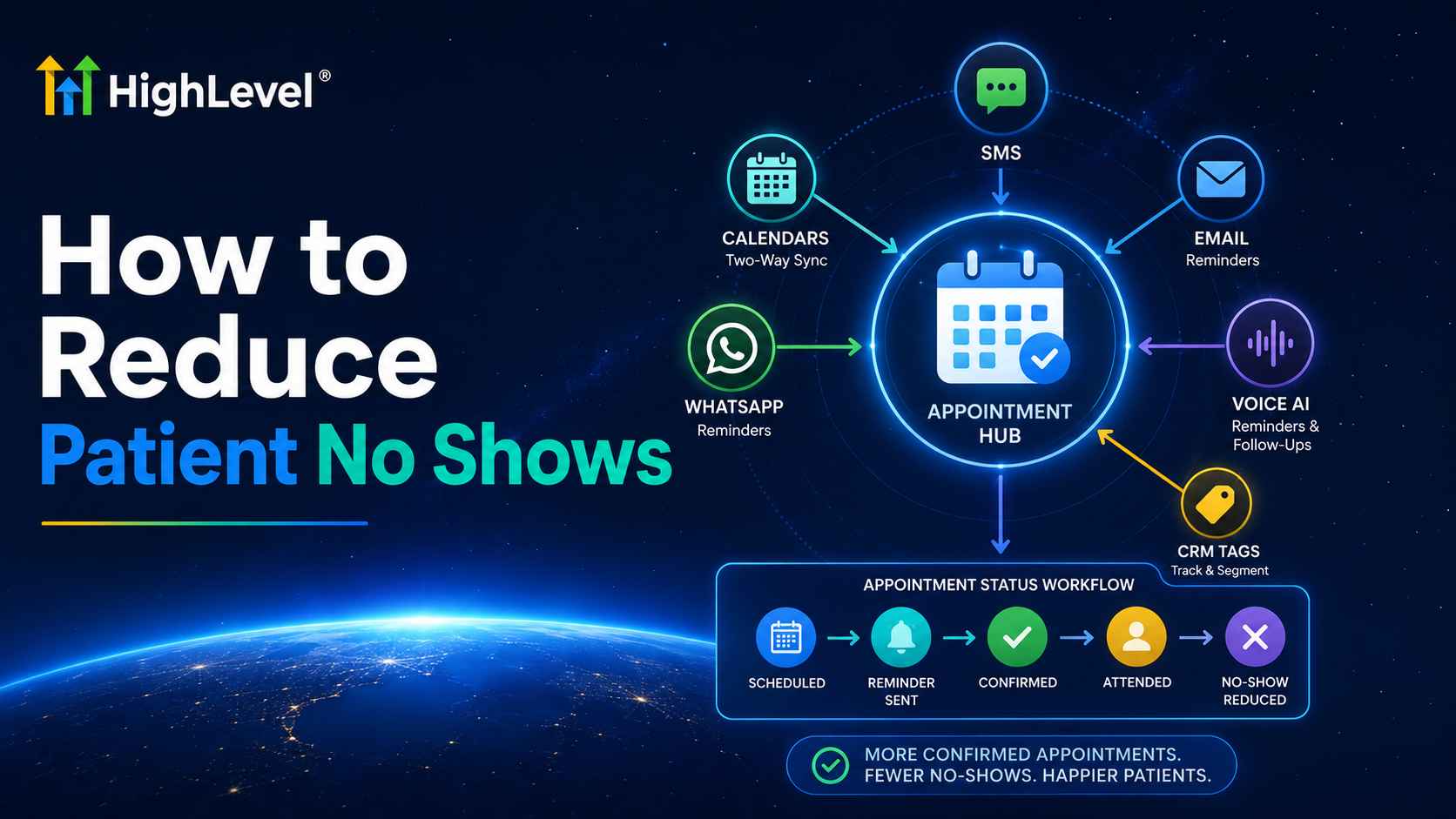
Quick answer: Reduce patient no shows by measuring a baseline, sending an immediate booking confirmation, requesting a reply 24–48 hours before the visit, offering a one-click reschedule path, escalating unconfirmed appointments to a voice call or staff task, and automatically rebooking patients who miss. In HighLevel, calendars, SMS, email, WhatsApp, Voice AI, CRM tags, and appointment-status workflows can coordinate that sequence.
Table of contents
- Why patients miss appointments
- Metrics to establish before changing the process
- The nine-part no-show prevention playbook
- Businesses this system can help
- Visual HighLevel implementation guide
- Reminder and recovery templates
- Healthcare privacy and consent checklist
- 30-day rollout plan
- Frequently asked questions
Why patients miss appointments
Forgetfulness matters, but it is only one cause. A patient may lack transportation, misunderstand the location, have a work or family conflict, feel anxious about the visit, face an unexpected cost, wait too long between booking and the appointment, or decide not to attend because canceling feels inconvenient. Treating every missed visit as irresponsibility produces the wrong solution.
Memory problem
The patient intended to attend but forgot the date or time. Timely reminders and calendar invitations are the primary response.
Access problem
Transportation, childcare, language, mobility, work schedules, or location confusion blocks attendance. Messages should surface these barriers early.
Friction problem
The patient knows they cannot attend but rescheduling requires a phone call, hold time, or an uncomfortable conversation. A direct reschedule option converts a no-show into a recovered slot.
Commitment problem
The visit was booked too far in advance or without clear expectations. Two-way confirmation, shorter lead time, and appropriate deposits can strengthen commitment.
A Cochrane review of eight randomized trials involving 6,615 participants found that mobile messaging reminders improved attendance compared with no reminders and produced attendance similar to phone-call reminders, while the reported cost per attendance was lower for texting. The evidence was rated low to moderate quality, so reminders should be treated as one component of a broader access and scheduling strategy rather than a guaranteed cure. See the Cochrane evidence summary.
Measure the no-show problem before changing it
Without a baseline, a team can send more messages and still have no idea whether the process improved. Measure by calendar, service, provider, location, day of week, lead time, and patient type. Avoid using the overall rate alone; a clinic may have a manageable average while one service line loses a large share of its capacity.
| Metric | Why it matters | What to segment |
|---|---|---|
| No-show rate | Shows the percentage of scheduled capacity lost without advance notice | Calendar, provider, service, new vs. returning patient |
| Confirmation rate | Shows whether patients actively acknowledge the appointment | SMS, email, WhatsApp, voice call |
| Reschedule and cancellation rate | Reveals whether the system is converting silent absences into usable notice | Hours of notice and reason |
| Recovered-slot rate | Measures how often a canceled slot is filled from a waitlist or reactivation list | Service, notice window, staff member |
| Delivery and reply rate | Exposes invalid contact data or a channel patients ignore | Phone, email, patient preference |
| Rebooked-after-no-show rate | Measures continuity of care and revenue recovery | Time to rebook and successful attendance |
How to reduce patient no shows: the nine-part prevention playbook
1. Reduce unnecessary scheduling lead time
The longer the gap between booking and the visit, the more opportunity there is for circumstances and intent to change. Offer the earliest appropriate slots, enable self-scheduling where suitable, maintain a waitlist, and consider open-access capacity for services that can safely support it. A 2024 systematic review found that open-access scheduling significantly reduced no-show rates in 10 of 16 included outpatient studies, although results depended on implementation and local conditions. Read the open-access scheduling review.
2. Confirm immediately after booking
Send the patient the date, time, timezone, location or telehealth link, provider or department name, preparation requirements, and a reschedule path. The confirmation should establish trust and catch booking errors while the interaction is still fresh. Do not wait until the day before to reveal essential instructions.
3. Use a layered reminder cadence
A useful starting point is an email 48–72 hours before the visit, a two-way text 24 hours before, and a brief same-day reminder. High-value, complex, or historically high-risk appointments can add a consented voice call. Adjust the timing based on booking lead time so that someone who books tomorrow does not receive three messages within minutes.
| Timing | Channel | Objective |
|---|---|---|
| Immediately after booking | Email + optional SMS | Confirm details, add to calendar, supply preparation information |
| 48–72 hours before | Email or SMS | Surface transportation, paperwork, cost, or schedule barriers |
| 24 hours before | Two-way SMS or WhatsApp | Ask the patient to confirm or reschedule |
| 2–3 hours before | Short SMS | Provide the essential time and location without overloading the patient |
| After no-show | SMS followed by task or call | Rebook without blame and identify the cause |
4. Require a simple confirmation action
Passive reminders are easy to ignore. Ask for a small action such as “Reply C to confirm or R to reschedule.” Store the response in a custom field or apply a tag such as Appointment Confirmed. Patients who do not respond become an exception queue instead of forcing staff to call every person.
5. Make rescheduling easier than disappearing
Include a secure rescheduling link or invite the patient to reply. Preserve appropriate minimum-notice rules, but avoid making cancellation unnecessarily difficult. An earlier cancellation is operationally better than an empty room discovered after the scheduled time.
6. Escalate unconfirmed appointments
Use workflow logic to wait for a reply, then branch. Confirmed patients can leave the reminder sequence. Unconfirmed patients can receive a second message, an internal task, or a consented Voice AI call. Reserve manual staff effort for valuable exceptions, accessibility needs, or complex clinical situations.
7. Solve the barrier, not just the calendar status
Add structured reasons such as transportation, forgot, work conflict, cost concern, symptoms improved, could not reach the office, or wrong appointment details. Over time, this turns anecdotal explanations into operational data. If transportation drives absences, another reminder alone will not solve the problem.
8. Trigger a respectful no-show recovery workflow
When staff marks an appointment as No-show, send a neutral message that checks on the patient and offers rebooking. Notify the appropriate team when clinical follow-up is required. Avoid shame-based language. The goal is to protect continuity, recover the relationship, and free staff from manually reconstructing what happened.
9. Optimize monthly
Compare no-show rates before and after implementation, but also examine delivery, confirmation, rescheduling, and recovered-slot rates. Test one variable at a time: message timing, channel, wording, rescheduling path, or escalation threshold. A lower no-show rate accompanied by an unmanageable cancellation surge may require better waitlist automation rather than more reminders.
Build your no-show prevention system in HighLevel
Connect calendars, reminders, two-way conversations, appointment-status workflows, Voice AI, CRM records, and reporting in one platform.
Start Your 30-Day HighLevel Trial
Affiliate disclosure: we may earn a commission if you start a trial through this link, at no additional cost to you. Healthcare organizations should review the HIPAA requirements described below before storing or transmitting PHI.
What types of businesses can this system help?
Outpatient clinics and ambulatory practices
If you are researching how to reduce no-show rates in outpatient clinics, start by separating new-patient visits, follow-ups, procedures, diagnostic appointments, telehealth, and recurring care. Each type has a different preparation burden and risk. Primary care, behavioral health, physical therapy, optometry, chiropractic, dental, imaging, specialty clinics, wellness practices, med spas, and veterinary clinics can adapt the same sequence.
HighLevel can maintain separate calendars, route reminders by calendar or calendar group, notify staff when a patient does not confirm, and launch a no-show recovery workflow when the appointment status changes. Clinical urgency should never be left solely to marketing automation; use staff alerts and approved escalation protocols for situations that require professional judgment.
Home care agencies and caregiver scheduling
The question how home care scheduling software reduces caregiver no-shows involves two connected attendance risks: the caregiver may miss a shift, or the client may be unavailable for a scheduled visit. Home care agencies can use separate contact roles, appointment guests, internal notifications, recurring-event filters, and escalation tasks to remind the caregiver, inform coordinators, and contact the client or authorized representative.
A practical sequence confirms the assigned shift, requests caregiver acknowledgment, alerts a scheduler when no confirmation is received, and starts a replacement protocol before the visit is missed. Because home care can involve sensitive health and family information, minimize the content of reminders and confirm the correct recipient and authority before sending details.
Healthcare teams using automated voice calls
Teams comparing tools for voice calls to reduce patient no show rates should look beyond prerecorded blasts. The useful question is whether the call can identify the patient appropriately, confirm attendance, capture a reschedule request, update the CRM, transfer a complex case to staff, and record an auditable outcome.
HighLevel’s outbound Voice AI can be added as a workflow action for appointment outreach. Current platform documentation states that businesses must manage consent, KYC, opt-outs, calling hours, and applicable law. For healthcare, the call prompt should reveal only the minimum necessary information and route clinical questions to a qualified person.
Property management companies
The workflow also answers how to use texting to reduce no-shows in property management. Replace “patient” with prospect, tenant, owner, contractor, or vendor and apply the sequence to property showings, lease consultations, inspections, maintenance access windows, move-in appointments, and contractor visits.
Property managers can send the address or meeting point, parking and access instructions, the name of the assigned agent, a confirmation request, and an easy reschedule option. If a prospect does not confirm a showing, the system can notify the leasing agent and offer the slot to another lead. If a tenant must be present for maintenance, the message can request confirmation and trigger an internal exception task.
| Business | Appointment at risk | Best automation | Human escalation |
|---|---|---|---|
| Outpatient clinic | New patient, follow-up, procedure, diagnostic visit | Two-way SMS + email instructions + no-show recovery | Clinical or high-risk follow-up |
| Home care agency | Caregiver shift or client visit | Recurring reminder + guest/user notification + coordinator alert | Replacement caregiver protocol |
| Dental, therapy, med spa | Chair, room, or provider time | Confirmation + deposit policy + waitlist recovery | Unconfirmed high-value appointment |
| Property management | Showing, inspection, maintenance window | Text confirmation + directions + reschedule link | Access issue or contractor replacement |
| Auto dealership or service center | Test drive, sales visit, service appointment | SMS + Voice AI + assigned-rep notification | High-intent or high-value customer |
Visual tutorial: build the prevention workflow in HighLevel
The screenshots below are provided by HighLevel’s official documentation. Interface details may evolve, so test every workflow with internal contacts before enrolling real patients or customers.
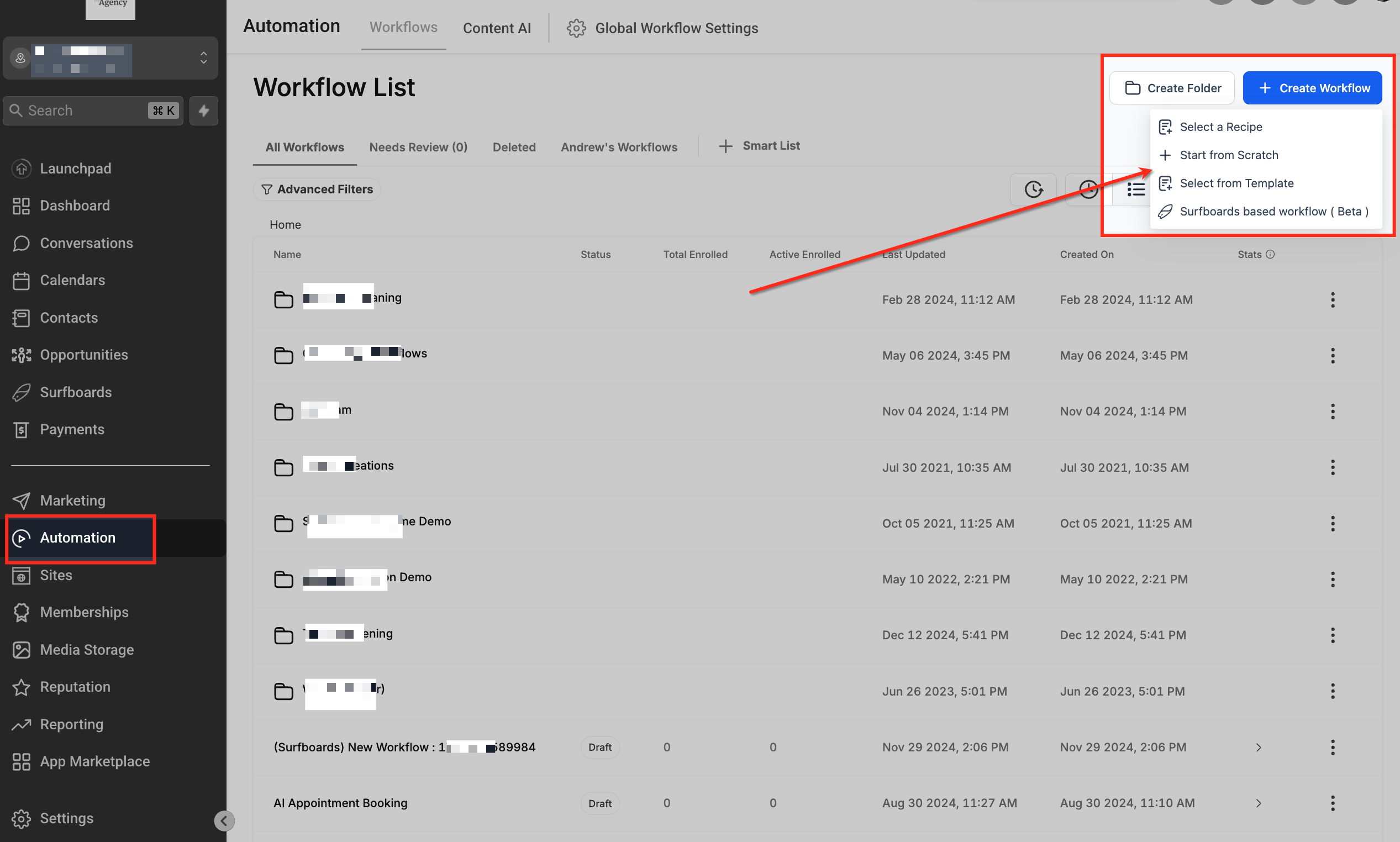
Step 1: Create the prevention workflow
Open Automation → Workflows and create a workflow. Use a descriptive name such as “Patient Appointment Confirmation and No-Show Prevention.” Build separate workflows when locations, calendars, consent rules, or message content differ.
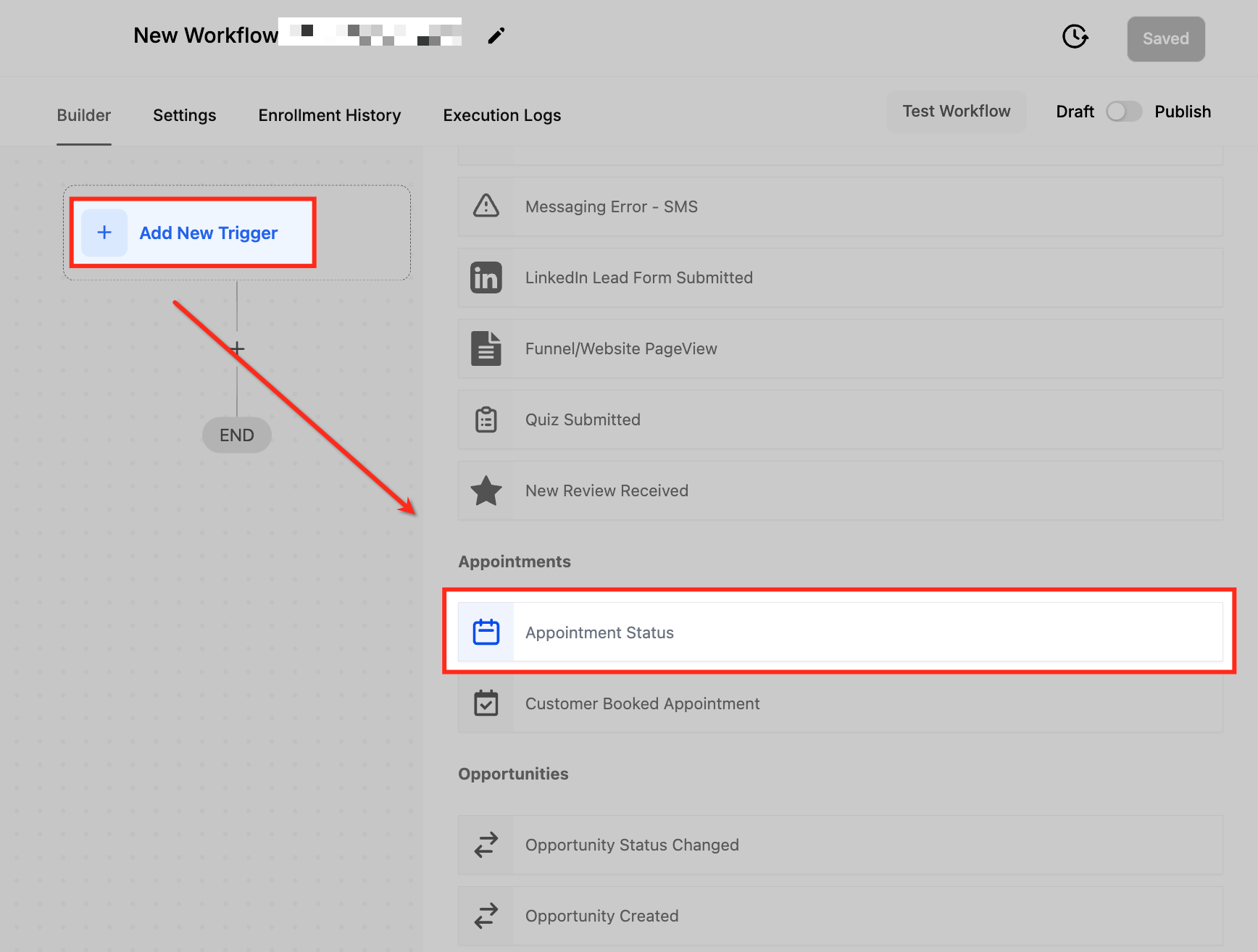
Step 2: Add the Appointment Status trigger
Click Add New Trigger, search for Appointment Status, and select it. This trigger can respond to New, Confirmed, Cancelled, Showed, No-show, or Invalid statuses.
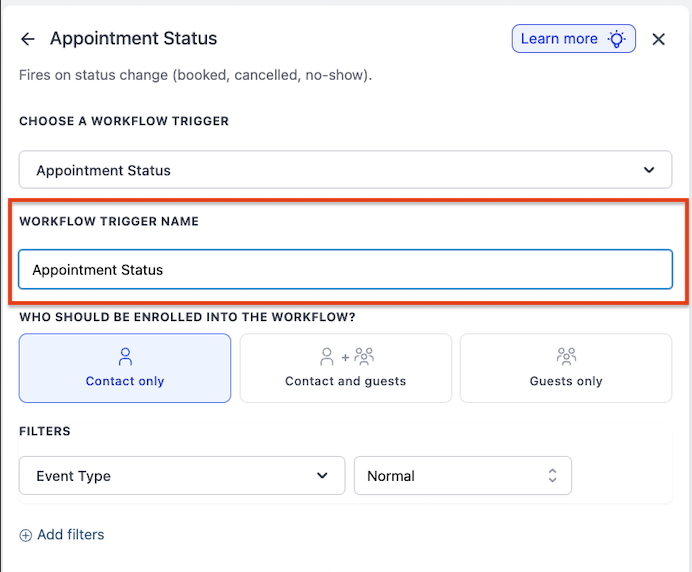
Step 3: Name and filter the trigger
Give the trigger a purpose-based name. Select the relevant calendar or calendar group and the appointment status. For a recovery workflow, choose No-show. For a confirmation workflow, use the booking trigger and schedule reminders relative to the appointment time.
Step 4: Configure calendar reminders
Go to Calendar → Calendar Settings, select the calendar, and open Notifications. Configure booked, confirmed, rescheduled, reminder, and follow-up notifications for the contact, guests, users, or approved additional recipients.

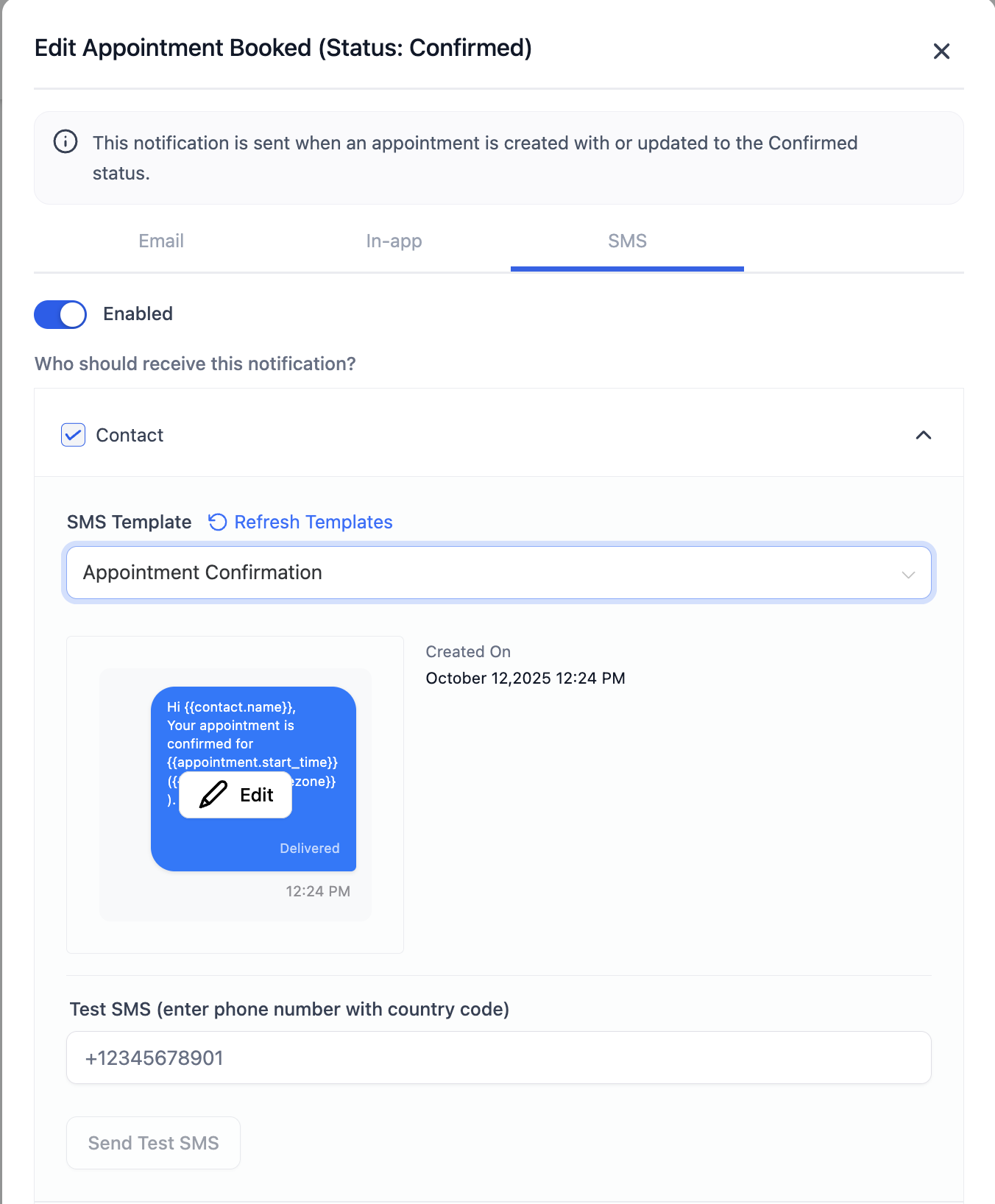
Step 5: Enable and test two-way SMS reminders
Open the SMS tab, select the recipient, write a concise message, add appointment merge fields, and set the timing. Ask for confirmation or rescheduling. Send a test to an internal number and verify the reply path before saving.
Step 6: Add confirmation branches
After the reminder, wait for the patient’s response. If confirmed, apply a confirmation tag and end the escalation. If the patient asks to reschedule, send the approved booking link or assign a task. If there is no reply, continue to the voice or staff-call step.
Step 7: Add a consented Voice AI call for exceptions
Enable outbound calling under AI Agents → Voice AI, complete the required setup, and add the Voice AI Outbound Call action to the workflow. Select the agent and sending number. Keep the prompt limited to confirmation and routing; transfer medical, legal, billing, or urgent questions to qualified staff.

Step 8: Build the No-show recovery branch
Create a second Appointment Status trigger filtered to No-show. Send a neutral rebooking message, create an internal task when staff review is needed, apply a reason or outcome tag, and remove the contact from conflicting reminder workflows.
Step 9: Publish and run controlled tests
Test New, Confirmed, Cancelled, Rescheduled, Showed, and No-show scenarios. Confirm timezone behavior, merge fields, links, opt-outs, reply routing, duplicate prevention, and user notifications. Only then publish the workflow and monitor the first live appointments closely.
Patient reminder and recovery templates
Use the minimum information necessary for the purpose. Replace placeholders with approved merge fields and adapt language to the recipient’s communication preference.
Hi {{contact.first_name}}, your appointment with {{location.name}} is scheduled for {{appointment.start_time}}. Location/details: {{appointment.location}}. To make a change, use {{custom_values.reschedule_link}} or reply to this message.
Hi {{contact.first_name}}, this is a reminder of your appointment with {{location.name}} on {{appointment.start_time}}. Reply C to confirm or R if you need help rescheduling.
We have not received your confirmation yet. Please reply C to confirm or R to reschedule. If you need assistance with access or directions, reply HELP and our team will contact you.
Hi {{contact.first_name}}, we missed you today and hope everything is okay. If you would like to reschedule, use {{custom_values.booking_link}} or reply here for assistance.
Hi {{contact.first_name}}, your property showing is scheduled for {{appointment.start_time}} at {{appointment.location}}. Reply C to confirm or R to choose another time. Please arrive at the meeting point listed here: {{custom_values.meeting_instructions}}.
Healthcare privacy, HIPAA, and consent checklist
The U.S. Department of Health and Human Services states that appointment reminders are considered part of treatment and may be made without a separate HIPAA authorization. HHS also recommends limiting the information disclosed and accommodating reasonable confidential-communication requests. That does not remove the need for security controls, consent under other communication laws, appropriate vendors and agreements, staff training, and documented policies.
- Activate the appropriate HighLevel HIPAA package and BAA before storing or transmitting PHI when required.
- Enable HIPAA for each relevant sub-account according to current HighLevel instructions.
- Collect and document communication consent and channel preference.
- Honor opt-outs, Do Not Disturb settings, and reasonable confidential-contact requests.
- Use neutral language and the minimum necessary appointment information.
- Do not place diagnoses, treatment details, sensitive test names, or unnecessary PHI in ordinary reminders.
- Restrict permissions, require MFA, review audit logs, and remove access promptly when staff roles change.
- Never let an AI agent provide medical advice; route clinical and urgent matters to qualified staff and emergency resources.
- Confirm that outbound voice calls comply with consent, recording, telemarketing, and automated-call rules in every relevant jurisdiction.
Review HHS guidance on appointment reminders, HHS guidance on limiting reminder information, and HighLevel’s current HIPAA package documentation.
A practical 30-day rollout plan
| Week | Actions | Success signal |
|---|---|---|
| Week 1: Baseline | Clean contact data, define status rules, measure prior 30–90 days, document consent and escalation requirements | Reliable no-show baseline by calendar and service |
| Week 2: Core reminders | Launch immediate confirmation, 24-hour two-way SMS, email instructions, and same-day reminder for one calendar | High delivery rate and visible confirmation responses |
| Week 3: Exceptions | Add unconfirmed branch, internal tasks, Voice AI or manual call, and no-show recovery | Fewer silent appointments and faster rebooking |
| Week 4: Optimize | Compare results, interview staff, review patient feedback, change one timing or message variable | Lower no-show rate without excessive messages or workload |
Frequently asked questions
How to reduce patient no shows quickly?
Start with an immediate booking confirmation, a two-way reminder 24 hours before the visit, and a simple reschedule option. Measure the baseline and escalate only unconfirmed appointments to a call or staff task.
Are SMS reminders better than phone calls?
Evidence reviewed by Cochrane found similar attendance impact for mobile messages and calls, with lower reported messaging costs in two studies. The better channel depends on patient preference, consent, accessibility, urgency, and the appointment type. A layered strategy can use SMS for most patients and calls for exceptions.
How many appointment reminders should a clinic send?
A practical starting point is confirmation at booking, a two-way reminder 24–48 hours before, and a short same-day reminder. Adjust the sequence based on lead time and patient preference; avoid sending several messages at once for appointments booked on short notice.
Can HighLevel trigger a workflow after a no-show?
Yes. The Appointment Status workflow trigger supports a No-show status and can be filtered by calendar, calendar group, tag, event type, or who modified the appointment. Use it to send rebooking messages and internal alerts.
Can HighLevel make automated voice reminder calls?
HighLevel’s outbound Voice AI can place calls through workflow actions when the location meets the platform requirements. The business is responsible for consent, opt-outs, legal compliance, approved calling hours, and appropriate handling of sensitive information.
Is HighLevel HIPAA compliant on the basic plan?
No. HighLevel states that accounts are not HIPAA compliant by default. It offers a separate HIPAA add-on with a BAA and additional controls. Check the current price, permanence, activation process, and your organization’s obligations directly with HighLevel and qualified counsel.
Does this playbook work outside healthcare?
Yes. Home care agencies, property managers, auto dealerships, consultants, salons, legal offices, and service businesses can use the same confirmation, reminder, rescheduling, escalation, and recovery pattern with industry-appropriate language and compliance.
Turn missed appointments into a measurable workflow
Learning how to reduce patient no shows is not about finding one perfect reminder. It is about designing a reliable system: accurate scheduling data, clear expectations, patient-friendly confirmation, easy rescheduling, appropriate escalation, respectful recovery, and continuous measurement.
HighLevel can connect the operational pieces, but the business must define the policy, privacy controls, human handoffs, and success metrics. Begin with one calendar, test every branch, review the first 30 days, and then adapt the model for outpatient clinics, home care, Voice AI calling, property management, or other appointment-based services.
Launch your appointment automation system
Build reminders, confirmations, rescheduling, Voice AI escalation, no-show recovery, CRM tracking, and staff notifications from one HighLevel account.
Start Your 30-Day HighLevel Trial
Affiliate disclosure: we may earn a commission if you start a trial through this link, at no additional cost to you. The HIPAA add-on, BAA, messaging, Voice AI, phone usage, and other services may involve separate requirements or charges.
Related Posts